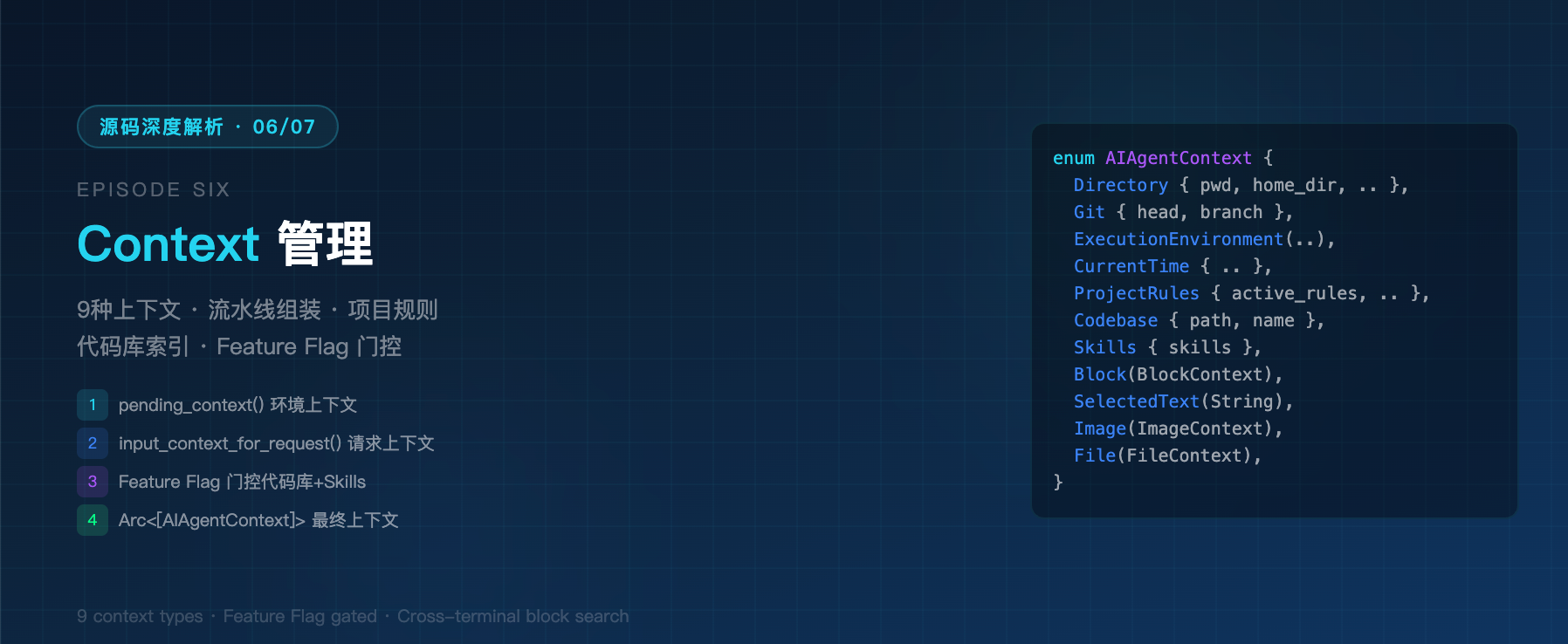
这是 Warp 源码深度解析系列的第六篇。Context 管理是 AI Agent 的"感知系统"------决定了 Agent 能看到什么、知道什么。本文深入 Warp 的 9 种 AIAgentContext、BlocklistAIContextModel 状态机、input_context_for_request 流水线组装、项目规则扫描和代码库索引上下文,完整还原从用户输入到 LLM 请求的上下文构建全链路。
一、为什么 Context 管理是 Agent 的命脉?
LLM 的上下文窗口是有限的。一个 Agent 的"智商",很大程度上取决于你能往这个窗口里塞什么、怎么塞、塞多少。
用户提问:"这个 bug 怎么修?"

┌──────────────────────────────────────────────────────────┐
│  低级 Agent:只看到用户的问题                              │
│  → 回答:"请提供更多上下文"                                │
├──────────────────────────────────────────────────────────┤
│  中级 Agent:看到问题 + 当前目录 + 最近几条命令            │
│  → 回答:猜测性建议,经常猜错                              │
├──────────────────────────────────────────────────────────┤
│  高级 Agent:看到问题 + 目录 + Git分支 + 项目规则 +        │
│  代码索引 + 执行环境 + 终端输出 + 选中文本 + 附件图片       │
│  → 回答:精准定位,直接给 patch                            │
└──────────────────────────────────────────────────────────┘
Warp 选择了第三条路------9 种上下文源 + 流水线组装 + Feature Flag 动态门控。
二、9 种 AIAgentContext------Agent 的感知维度
2.1 完整枚举
rust
// app/src/ai/agent/mod.rs:1966
pub enum AIAgentContext {
    // ── 环境类(始终包含)──
    Directory {
        pwd: Option<String>,
        home_dir: Option<String>,
        are_file_symbols_indexed: bool,
    },
    Git {
        head: String,
        branch: Option<String>,
    },
    ExecutionEnvironment(WarpAiExecutionContext),  // OS、Shell类型和版本
    CurrentTime { current_time: DateTime<Local> },
    ProjectRules {
        root_path: String,
        active_rules: Vec<FileContext>,
        additional_rule_paths: Vec<String>,
    },

    // ── 代码库类(Feature Flag 门控)──
    Codebase {
        path: String,
        name: String,
    },
    Skills {
        skills: Vec<SkillDescriptor>,
    },

    // ── 用户选择类(仅用户查询时包含)──
    SelectedText(String),
    Image(ImageContext),
    File(FileContext),
    Block(Box<BlockContext>),
}
2.2 分类解读
| 分类 | 上下文 | 何时注入 | 控制方式 |
|---|---|---|---|
| 环境类 | Directory, Git, ProjectRules | 每次请求 | 无条件包含 |
| 执行类 | ExecutionEnvironment, CurrentTime | 每次请求 | 无条件包含 |
| 代码类 | Codebase | 每次请求 | FullSourceCodeEmbedding + CrossRepoContext 双 Flag 门控 |
| 技能类 | Skills | 每次请求 | ListSkills Flag 门控 |
| 用户类 | Block, SelectedText, Image, File | 仅用户查询 | is_user_query 参数控制 |
这种分层设计的关键洞察:环境上下文是"免费的" (Token 开销小),代码上下文是"昂贵的" (需要索引和嵌入),用户上下文是"有歧义的"(需要互斥处理)。
三、BlocklistAIContextModel------上下文状态机
3.1 核心结构
rust
// app/src/ai/blocklist/context_model.rs:110
pub struct BlocklistAIContextModel {
    terminal_model: Arc<FairMutex<TerminalModel>>,
    directory_context: DirectoryContext,

    // 用户手动选择的 Block 上下文
    pending_context_block_ids: HashSet<BlockId>,

    // 用户选中的文本上下文
    pending_context_selected_text: Option<String>,

    // 附件(图片 + 文件)
    pending_attachments: Vec<PendingAttachment>,

    // Diff hunk 附件
    pending_inline_diff_hunk_attachments: HashMap<String, AIAgentAttachment>,

    // 查询状态:新对话 vs 继续现有对话
    pending_query_state: PendingQueryState,

    // Agent View 中自动附加的用户命令 Block
    auto_attached_agent_view_user_block_ids: Vec<BlockId>,

    // 队列模式:Agent 响应中排队下一条 prompt
    queue_next_prompt_enabled: bool,
}
3.2 关键不变量:Block 与 SelectedText 互斥
在 Warp 的设计中,用户不能同时选择 Block 上下文和选中文本。这不是实现限制,而是产品决策:
- 选 Block = "看这段命令和输出"
- 选文本 = "看这几行代码"
两种上下文语义不同,同时存在会让 LLM 困惑。代码中通过 set_pending_context_block_ids 和 set_pending_context_selected_text 的调用时序保证互斥。
3.3 自动附加的 Block 上下文
当 AgentViewBlockContext Flag 启用时,用户在 Agent View 中执行的命令会自动附加为上下文:
rust
// 监听 Block 完成事件
ModelEvent::BlockCompleted(BlockCompletedEvent {
    block_type: BlockType::User(user_block_completed),
    block_id,
    ..
}) => {
    if FeatureFlag::AgentViewBlockContext.is_enabled()
        && me.agent_view_controller.as_ref(ctx).is_fullscreen()
        && !user_block_completed.was_part_of_agent_interaction
    {
        // 用户执行的命令(非 Agent 交互产生的)自动附加
        me.auto_attached_agent_view_user_block_ids.push(block_id.clone());
    }
}
这意味着在 Agent 全屏模式下,你执行的每一条命令,Agent 都能"看到"。这是一种隐式上下文注入------用户不需要手动 @-引用。
四、pending_context()------上下文组装的第一层
BlocklistAIContextModel::pending_context() 是上下文组装的第一层,负责将状态转化为 Vec<AIAgentContext>:
pending_context(app, is_user_query)
│
├── 始终包含:
│   ├── Directory { pwd, home_dir, are_file_symbols_indexed }
│   ├── Git { head, branch }  (如果有 git 信息)
│   └── ProjectRules { root_path, active_rules }  (如果有规则文件)
│
└── if is_user_query:
    ├── pending_context_block_ids → Block 上下文
    ├── auto_attached_agent_view_user_block_ids → 自动附加 Block
    ├── pending_context_selected_text → SelectedText
    └── pending_attachments 中的 Image → Image 上下文
4.1 ProjectRules 的注入
项目规则扫描是 pending_context 的重要环节。Warp 通过 ProjectContextModel 扫描当前目录树上的规则文件:
rust
let project_rules = if let Some(pwd) = pwd.clone().and_then(|path| {
    PathBuf::from_str(&path).ok().and_then(|s| s.canonicalize().ok())
}) {
    ProjectContextModel::as_ref(app).find_applicable_rules(&pwd)
} else {
    None
};
4.2 目录是否被索引的标记
are_file_symbols_indexed 告诉 Agent 当前目录是否有代码索引可用:
rust
let is_pwd_indexed = UserWorkspaces::as_ref(app).is_codebase_context_enabled(app)
    && pwd.as_ref().is_some_and(|pwd| {
        RepoOutlines::as_ref(app).is_directory_indexed(Path::new(&pwd))
    });
这个标记让服务端知道是否应该尝试代码搜索。
五、input_context_for_request()------流水线的最终组装
input_context_for_request() 是上下文流水线的最后一公里 ,在 pending_context() 基础上追加请求级上下文:
rust
// app/src/ai/blocklist/controller/input_context.rs:51
pub(super) fn input_context_for_request(
    is_user_query: bool,
    context_model: &BlocklistAIContextModel,
    active_session: &ActiveSession,
    conversation_id: Option<AIConversationId>,
    additional_context: Vec<AIAgentContext>,
    app: &AppContext,
) -> Arc<[AIAgentContext]> {
    // 第一层:pending_context()
    let mut context = context_model.pending_context(app, is_user_query);

    // 第二层:请求级上下文
    context.push(AIAgentContext::CurrentTime { current_time: Local::now() });

    if let Some(env) = active_session.ai_execution_environment(app) {
        context.push(AIAgentContext::ExecutionEnvironment(env));
    }

    // 第三层:Feature Flag 门控的上下文
    if FeatureFlag::FullSourceCodeEmbedding.is_enabled()
        && FeatureFlag::CrossRepoContext.is_enabled()
    {
        for (codebase_path, status) in
            CodebaseIndexManager::as_ref(app).get_codebase_index_statuses(app)
        {
            if status.has_synced_version() {
                context.push(AIAgentContext::Codebase { name, path });
            }
        }
    }

    if FeatureFlag::ListSkills.is_enabled() {
        let skills = list_skills_if_changed(
            active_session.current_working_directory().map(Path::new),
            conversation_id,
            app,
        );
        if let Some(skills) = skills {
            context.push(AIAgentContext::Skills { skills });
        }
    }

    // 第四层:额外上下文(如 Agent 间通信)
    context.extend(additional_context);

    context.into()
}
5.1 完整流水线可视化
用户按 Enter 提交查询
    │
    ▼
BlocklistAIContextModel.pending_context()
    │
    ├── Directory { pwd, home_dir, are_file_symbols_indexed }
    ├── Git { head, branch }
    ├── ProjectRules { root_path, active_rules }
    ├── Block × N(用户选择 + 自动附加)
    ├── SelectedText
    └── Image × N
    │
    ▼
input_context_for_request()
    │
    ├── + CurrentTime
    ├── + ExecutionEnvironment(OS, Shell版本)
    ├── + Codebase × N(需 FullSourceCodeEmbedding + CrossRepoContext)
    ├── + Skills(需 ListSkills)
    └── + additional_context(Agent间通信等)
    │
    ▼
Arc<[AIAgentContext]>  ← 最终上下文集合
    │
    ▼
AIAgentInput::UserQuery { context, ... }
    │
    ▼
发送到 LLM Server
六、上下文引用解析------parse_context_attachments
用户可以在查询文本中用特殊语法引用上下文:
6.1 三种引用模式
rust
lazy_static! {
    // <block:block_id> → 引用终端 Block
    pub static ref BLOCK_CONTEXT_ATTACHMENT_REGEX: Regex =
        Regex::new(r"<block:([^>]+)>").unwrap();

    // <workflow:id> / <notebook:id> / <plan:id> / <rule:id> → Warp Drive 对象
    pub static ref DRIVE_OBJECT_ATTACHMENT_REGEX: Regex =
        Regex::new(r"<(workflow|notebook|plan|rule):([^>]+)>").unwrap();

    // <change:filename:line_start-line_end> → Diff Hunk
    pub static ref DIFF_HUNK_ATTACHMENT_REGEX: Regex =
        Regex::new(r"<change:([^>]+)>").unwrap();
}
6.2 跨终端 Block 搜索
当用户用 <block:ID> 引用 Block 时,Warp 会搜索所有 TerminalModel,不只当前终端:
rust
fn find_block_attachment_in_all_terminals(
    block_id: &BlockId,
    ctx: &AppContext,
) -> Option<AIAgentAttachment> {
    for window_id in ctx.window_ids() {
        if let Some(terminal_views) = ctx.views_of_type::<TerminalView>(window_id) {
            for terminal_view_handle in terminal_views {
                let terminal_view = terminal_view_handle.as_ref(ctx);
                let terminal_model = terminal_view.model.lock();
                let block_list = terminal_model.block_list();
                if let Some(block) = block_list.block_with_id(block_id) {
                    return Some(AIAgentAttachment::Block(BlockContext { ... }));
                }
            }
        }
    }
    None
}
这意味着你可以在终端 A 的 Agent 对话中引用终端 B 的命令输出。对于多终端工作流,这是杀手级特性。
6.3 Warp Drive 对象附件
<plan:ID> 引用特别有趣------它优先从 AIDocumentModel(本地编辑器)获取内容,再 fallback 到 CloudModel(云端同步版本):
rust
let content = AIDocumentModel::as_ref(ctx)
    .get_document_content(&ai_doc_id, ctx)
    .or_else(|| {
        CloudModel::as_ref(ctx)
            .get_all_active_notebooks()
            .find(|nb| nb.model().ai_document_id.as_ref() == Some(&ai_doc_id))
            .map(|nb| nb.model().data.clone())
});这保证了未保存的编辑也能作为上下文注入------Agent 看到的永远是最新版本。
七、ProjectContextModel------项目规则扫描
7.1 规则文件扫描
rust
// crates/ai/src/project_context/model.rs
const RULES_FILE_PATTERN: &[&str] = &["WARP.md", "AGENTS.md"];
const MAX_SCAN_DEPTH: usize = 3;
const MAX_FILES_TO_SCAN: usize = 5000;
Warp 扫描当前目录向上遍历的 WARP.md 和 AGENTS.md 文件,最多深入 3 层、最多扫描 5000 个文件。
7.2 优先级规则
这和 Claude Code 的 CLAUDE.md、Cursor 的 .cursorrules 是同一思路,但 Warp 支持两个文件名,且做了目录树遍历。
八、代码库索引上下文------双路系统
Warp 的代码库上下文有两条路径,由 Feature Flag 控制:
                    ┌─────────────────────────────┐
                    │ 用户查询到达服务端            │
                    └──────────┬──────────────────┘
                               │
              ┌────────────────┴────────────────┐
              │                                 │
    FullSourceCodeEmbedding              Outline-Based
    + CrossRepoContext                   (传统路径)
              │                                 │
    ┌─────────▼──────────┐            ┌────────▼────────┐
    │ CodebaseIndexManager│            │   RepoOutlines  │
    │ (本地 Merkle Tree   │            │ (服务端 API)     │
    │  + 向量嵌入)         │            │                  │
    └─────────┬──────────┘            └────────┬────────┘
              │                                 │
    retrieve_relevant_files()           server API search
              │                                 │
    get_relevant_fragments()                    │
              │                                 │
    build_and_rerank_fragments()               │
              │                                 │
    process_fragments()                        │
              │                                 │
              └────────────┬────────────────────┘
                           │
                    相关代码片段注入上下文
8.1 全文嵌入路径
rust
const RETRIEVE_FRAGMENT_CONTEXT_LENGTH: usize = 0;  // 不附加上下文行
const REINDEX_INTERVAL: Duration = Duration::from_secs(20 * 60); // 20分钟重索引关键设计决策:RETRIEVE_FRAGMENT_CONTEXT_LENGTH = 0------片段不附带上下文行。这意味着每个代码片段是独立的,不会因为包含周围的"噪音"代码而浪费 Token。
8.2 Merkle Tree 增量同步
文件变更检测 → Merkle Tree Hash 比较
    │
    ├── Hash 一致 → 跳过
    └── Hash 不同 → 重新嵌入该文件
增量同步间隔 60 分钟,全量重索引间隔 20 分钟。这种"全量 + 增量"双节奏设计兼顾了完整性和性能。
九、Feature Flag 门控的上下文路径
上下文相关的 Feature Flag 构成了一个精细的控制系统:
| Flag | 控制的上下文 | 默认渠道 |
|---|---|---|
FullSourceCodeEmbedding |
本地代码库向量索引 | DOGFOOD |
CrossRepoContext |
跨仓库代码上下文 | DOGFOOD |
ListSkills |
Skills 列表注入 | DOGFOOD |
ImageAsContext |
图片作为上下文 | - |
FileRetrievalTools |
文件检索工具 | - |
AgentViewBlockContext |
Agent View 自动附加 Block | DOGFOOD |
ReloadStaleConversationFiles |
重新加载过时文件 | - |
SummarizationViaMessageReplacement |
摘要替换方式 | DOGFOOD |
ContextWindowUsageV2 |
上下文窗口使用量 v2 | - |
双 Flag 门控是最值得学习的模式:
rust
// 必须两个 Flag 同时开启才注入 Codebase 上下文
if FeatureFlag::FullSourceCodeEmbedding.is_enabled()
    && FeatureFlag::CrossRepoContext.is_enabled()
{
    // 注入 Codebase 上下文
}
为什么不是单个 Flag?因为 FullSourceCodeEmbedding 控制索引的构建 ,CrossRepoContext 控制索引的使用。你可以构建索引但不跨仓库使用,也可以允许跨仓库但索引还没建好。这种"能力 Flag × 行为 Flag"的组合是很好的实践。
十、上下文重置策略
10.1 什么时候重置?
rust
ModelEvent::BlockCompleted(BlockCompletedEvent {
    block_type: BlockType::User(user_block_completed),
    block_id,
    ..
}) => {
    // 如果不是 AgentViewBlockContext 模式,
    // 且用户执行的命令不是 Agent 交互的一部分,
    // 则重置上下文
    if !FeatureFlag::AgentViewBlockContext.is_enabled()
        && !user_block_completed.was_part_of_agent_interaction
    {
        me.reset_context_to_default(ctx);
    }
}
10.2 两种模式对比
| 模式 | 重置时机 | 行为 |
|---|---|---|
| 传统模式 | 用户命令完成后 | 立即清空 pending context |
| AgentViewBlockContext | 不自动重置 | 用户命令自动附加,持续累积 |
传统模式下,每次用户执行命令后上下文都会被清空------这避免了过时上下文污染,但也丢失了连续对话的上下文连贯性。AgentViewBlockContext 模式通过自动附加解决了这个矛盾。
十一、设计模式总结
| 模式 | 实现 | 价值 |
|---|---|---|
| 分层组装 | pending_context() → input_context_for_request() | 环境上下文和用户上下文解耦,各自演进 |
| 互斥不变量 | Block vs SelectedText | 避免语义冲突的上下文注入 |
| Feature Flag 门控 | 双 Flag 组合(能力 × 行为) | 渐进式发布,索引构建和使用解耦 |
| 隐式上下文注入 | AgentViewBlockContext 自动附加 | 用户无需手动 @,体验更自然 |
| 跨终端引用 | <block:ID> 搜索所有 TerminalModel |
多终端工作流的上下文共享 |
| 最新内容优先 | AIDocumentModel → CloudModel fallback | 未保存的编辑也能注入上下文 |
| 零上下文片段 | RETRIEVE_FRAGMENT_CONTEXT_LENGTH = 0 |
代码片段不带噪音,精确匹配 |
十二、与其他 Agent 框架对比
| 特性 | Warp | Claude Code | Cursor | GitHub Copilot |
|---|---|---|---|---|
| 上下文种类 | 9 种枚举 | 隐式(文件+终端) | 文件+选择 | 文件+选择 |
| 终端输出作为上下文 | Block 自动附加 | 终端日志读取 | 无 | 无 |
| 图片上下文 | ImageAsContext Flag |
支持 | 截图 | 无 |
| 项目规则 | WARP.md/AGENTS.md 双文件 | CLAUDE.md | .cursorrules | 无 |
| 代码索引 | Merkle Tree + 向量嵌入 | 本地索引 | 本地索引 | 服务端索引 |
| 跨仓库上下文 | CrossRepoContext Flag |
多项目 | Workspace | 无 |
| 引用语法 | <block:ID> <plan:ID> |
@file |
@file |
无 |
| Feature Flag 门控 | 9 个上下文相关 Flag | 无 | 无 | 无 |
Warp 的独特价值在于上下文是显式建模的------9 种枚举类型、Feature Flag 门控、互斥不变量,而不是简单地"把所有东西塞进 prompt"。这种工程化的上下文管理,使得 Warp 的 Agent 可以在 Token 预算有限的情况下,精准选择最有价值的上下文。
系列索引: