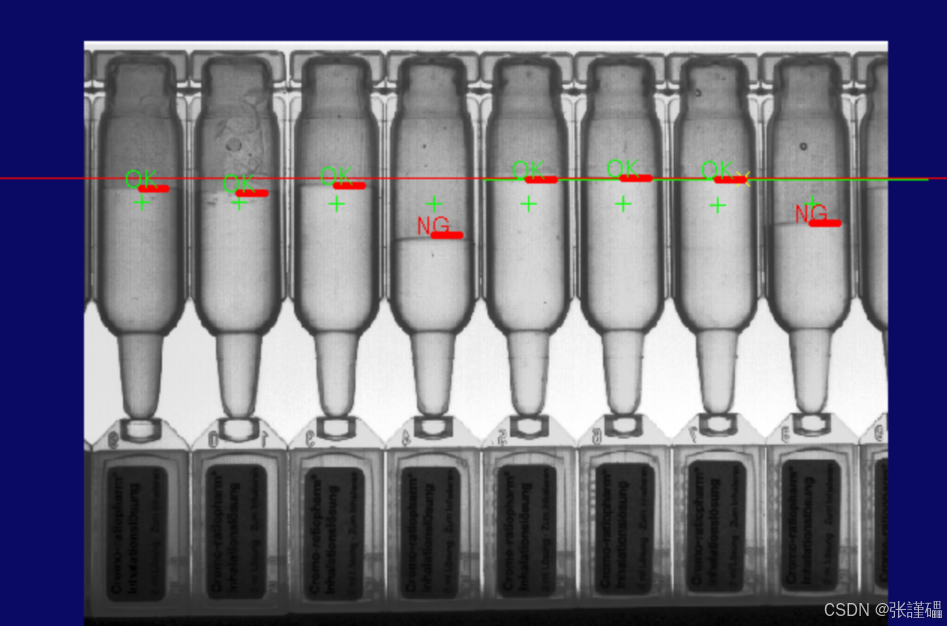
VisionPro 液位检测项目完整笔记
这是工业液位 / 液面高度检测 的标准方案:模板匹配定位 + 动态卡尺找液面 + 距离判定 OK/NG,适用于瓶装、杯装、试管类液位检测。
我把代码、工具、逻辑全部整理成可直接学习、复用的笔记,结构清晰、重点标注。
一、整体功能(一句话总结)
- 模板匹配(CogPMAlignTool) 定位瓶子 / 容器位置
- 动态移动卡尺(CogCaliperTool2) 到目标位置,精准找液面边缘点
- 画红色水平线标记液面位置
- 距离工具(CogDistanceSegmentLineTool) 计算液面高度
- 判定 OK/NG并在图像上显示绿色 / 红色标签
- 图形叠加显示,直观判断液位是否合格
二、使用工具清单(核心 4 个工具)
表格
| 工具名称 | 作用 |
|---|---|
| CogPMAlignTool1 | 模板匹配:定位容器位置,解决产品偏移问题 |
| CogCaliperTool1 | 辅助卡尺(脚本未使用,一般用于定位基准线) |
| CogCaliperTool2 | 主检测卡尺:动态找液面边缘 |
| CogDistanceSegmentLineTool1 | 距离测量:计算液面到基准线的高度 |
| CogIPOneImageTool1 | 图像预处理(灰度 / 滤波,提升检测稳定性) |
三、代码逐段笔记(最核心)
1. 命名空间(固定引用)
c#
#region namespace imports
using System;
using System.Collections;
using System.Drawing;
using Cognex.VisionPro;
using Cognex.VisionPro.ToolBlock;
using Cognex.VisionPro.PMAlign;    // 模板匹配
using Cognex.VisionPro.Caliper;    // 卡尺
using Cognex.VisionPro.Dimensioning;// 距离/尺寸工具
using Cognex.VisionPro.ImageProcessing; // 图像处理
#endregion
作用:导入 VisionPro 工具库,让脚本可以调用匹配、卡尺、距离工具。
2. 私有变量(脚本全局对象)
c#
#region Private Member Variables
  private CogToolBlock mToolBlock;  // 工具块主体(固定)
  CogGraphicCollection gc = new CogGraphicCollection(); // 图形集合
#endregiongc:用来统一存放所有要画的线、文字,最后一次性显示- 比 List 更适合 VisionPro 图形管理
3. 主运行逻辑(最重要!逐行解析)
c#
// 1. 运行工具块里所有工具(预处理、匹配、卡尺等)
foreach(ICogTool tool in mToolBlock.Tools)
    mToolBlock.RunTool(tool, ref message, ref result);

// 2. 获取4个核心工具对象
CogPMAlignTool pma = mToolBlock.Tools["CogPMAlignTool1"] as CogPMAlignTool;
CogCaliperTool c = mToolBlock.Tools["CogCaliperTool2"] as CogCaliperTool;
CogDistanceSegmentLineTool dis = mToolBlock.Tools["CogDistanceSegmentLineTool1"] as CogDistanceSegmentLineTool;

// 清空上一帧图形,避免重叠
gc.Clear();

// 3. 遍历匹配到的目标(支持多目标)
foreach (CogPMAlignResult item in pma.Results)
{
    // ======================
    // 动态移动卡尺到匹配位置
    // ======================
    c.Region.CenterX = item.GetPose().TranslationX;
    c.Region.CenterY = item.GetPose().TranslationY;
    c.Run(); // 卡尺重新运行找边缘

    // ======================
    // 画红色水平线标记液面
    // ======================
    CogLineSegment s = new CogLineSegment();
    s.StartX = c.Results.Edges[0].PositionX;  // 液面X
    s.StartY = c.Results.Edges[0].PositionY;  // 液面Y
    s.EndX   = c.Results.Edges[0].PositionX + 20; // 向右画20像素
    s.EndY   = c.Results.Edges[0].PositionY;
    s.Color  = CogColorConstants.Red;
    s.LineWidthInScreenPixels = 5; // 粗线,醒目

    gc.Add(s); // 加入图形集合

    // ======================
    // 距离测量 + OK/NG判定
    // ======================
    CogGraphicLabel label = new CogGraphicLabel();

    dis.Segment = s;   // 把液面线段给距离工具
    dis.Run();         // 计算距离(液面到基准线)

    // 阈值:>15 → NG  ≤15 → OK
    if(dis.Distance > 15)
    {
        label.SetXYText(s.StartX, s.StartY, "NG");
        label.Color = CogColorConstants.Red;
    }
    else
    {
        label.SetXYText(s.StartX, s.StartY, "OK");
        label.Color = CogColorConstants.Green;
    }

    gc.Add(label); // 把OK/NG标签加入集合
}

return false;
核心逻辑总结
- 模板定位 → 动态移动卡尺(解决产品偏移)
- 卡尺找液面边缘点
- 画红线标记液面
- 距离工具算高度
- 阈值判定 OK/NG
- 图形存入集合等待显示
4. 图形叠加显示(最后一步)
c#
// 把所有线、标签画到输出图上
foreach(ICogGraphic g in gc)
{
    mToolBlock.AddGraphicToRunRecord(
        g,
        lastRecord,
        "CogIPOneImageTool1.OutputImage", // 画在预处理后的图
        ""
    );
}
四、工具配置关键要点(必记)
1. CogPMAlignTool1(模板匹配)
- 学习模板:瓶身 / 瓶口固定特征
- 作用:得到产品 XY 坐标,让卡尺跟着产品动
2. CogCaliperTool2(液面检测卡尺)
- 边缘极性:明→暗 或 暗→明(根据液面是亮还是暗)
- 搜索方向:垂直向下 / 向上扫过液面
- 对比阈值:调高,避免干扰
3. CogDistanceSegmentLineTool1(距离工具)
- 一条线是基准线(标准液位)
- 另一条是卡尺找到的液面线
- 输出:两条线之间的垂直距离
五、关键知识点(面试 / 项目必背)
- 液位检测 = 模板定位 + 垂直卡尺找边缘
- 动态卡尺:匹配结果 XY → 卡尺中心 XY → 重新 Run
- 用
CogLineSegment画线标记液面 - 用
DistanceSegmentLine测高度差 - 图形统一存入
CogGraphicCollection - OK/NG 根据距离阈值判断
六、常见调整参数
- 液面 OK 高度:
if(dis.Distance > 15)里的 15 - 红线长度:
+20可改长改短 - 红线粗细:
LineWidthInScreenPixels = 5 - 卡尺位置:根据匹配结果偏移微调 XY
七、完整流程图示
plaintext
图像采集 → 预处理(IPOne) → 模板匹配(PMAlign)
→ 动态移动卡尺(Caliper2) → 找液面边缘
→ 画红线 → 距离计算 → OK/NG判定 → 图形叠加显示
总结
这是最标准、最稳定、工业最常用的 VisionPro 液位检测方案:
- 鲁棒性强(模板匹配抗偏移)
- 精度高(卡尺亚像素边缘)
- 直观(红线 + OK/NG 标签)
- 可扩展多目标、多容器
工具:
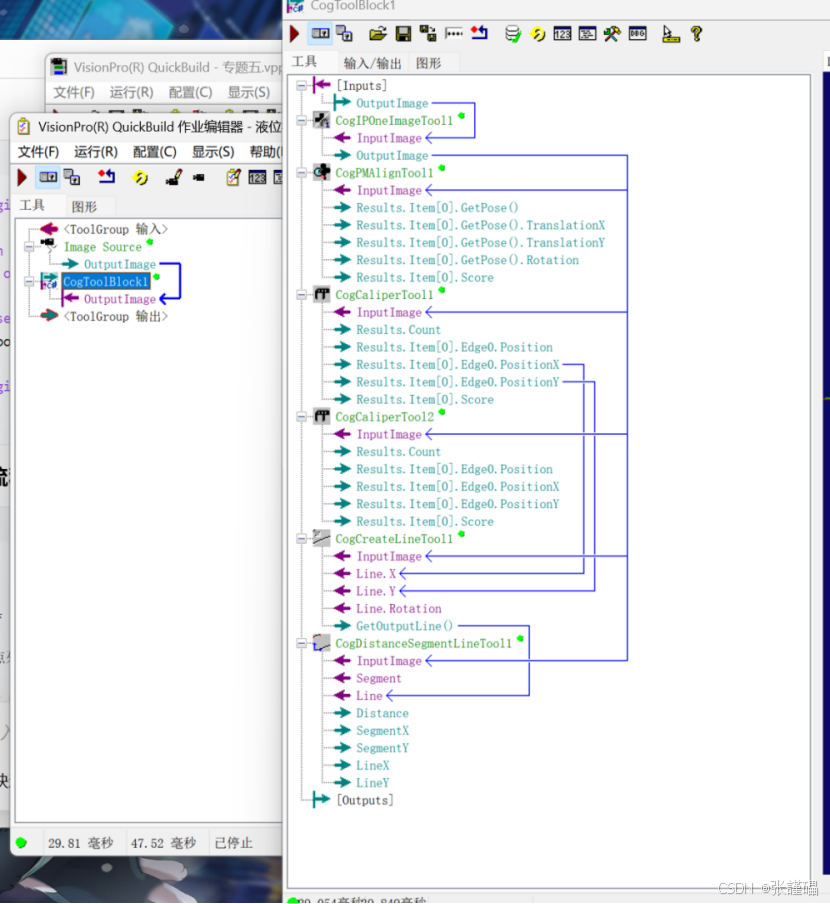
参数:
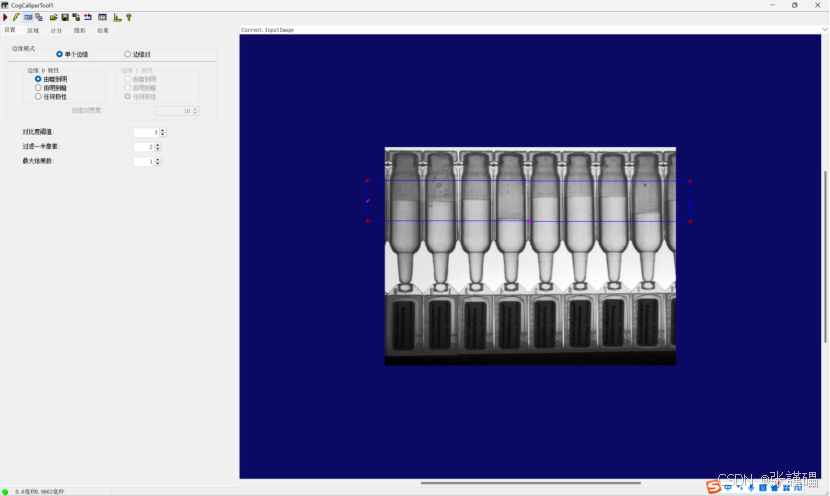
CogCaliperTool1
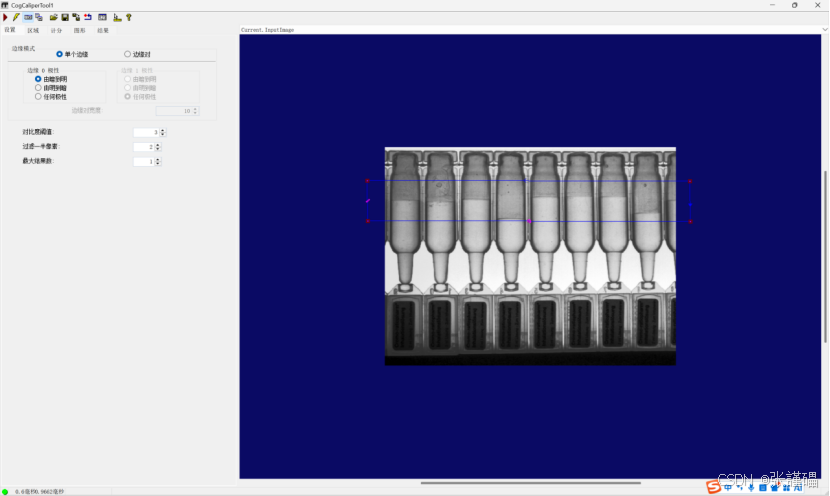
CogCaliperTool2
脚本:
命名空间:
#region namespace imports
using System;
using System.Collections;
using System.Drawing;
using System.IO;
using System.Windows.Forms;
using Cognex.VisionPro;
using Cognex.VisionPro.ToolBlock;
using Cognex.VisionPro3D;
using Cognex.VisionPro.ImageProcessing;
using Cognex.VisionPro.PMAlign;
using Cognex.VisionPro.Caliper;
using Cognex.VisionPro.Dimensioning;
#endregion
第一部分:
#region Private Member Variables
private Cognex.VisionPro.ToolBlock.CogToolBlock mToolBlock;
CogGraphicCollection gc = new CogGraphicCollection();
#endregion
第二部分:
// Run each tool using the RunTool function
foreach(ICogTool tool in mToolBlock.Tools)
mToolBlock.RunTool(tool, ref message, ref result);
CogPMAlignTool pma = mToolBlock.Tools"CogPMAlignTool1" as CogPMAlignTool;
CogCaliperTool c = mToolBlock.Tools"CogCaliperTool2" as CogCaliperTool;
CogDistanceSegmentLineTool dis = mToolBlock.Tools"CogDistanceSegmentLineTool1" as CogDistanceSegmentLineTool;
gc.Clear();
foreach ( CogPMAlignResult item in pma.Results)
{
c.Region.CenterX = item.GetPose().TranslationX;
c.Region.CenterY = item.GetPose().TranslationY;
c.Run();
CogLineSegment s = new CogLineSegment();
s.StartX = c.Results.Edges0.PositionX;
s.StartY = c.Results.Edges0.PositionY;
s.EndX = c.Results.Edges0.PositionX + 20;
s.EndY = c.Results.Edges0.PositionY;
s.Color = CogColorConstants.Red;
s.LineWidthInScreenPixels = 5;
gc.Add(s);
CogGraphicLabel label = new CogGraphicLabel();
dis.Segment = s;
dis.Run();
if( dis.Distance > 15 )
{
//NG
label.SetXYText( s.StartX, s.StartY, "NG");
label.Color = CogColorConstants.Red;
}
else
{
//OK
label.SetXYText(s.StartX, s.StartY, "OK");
label.Color = CogColorConstants.Green;
}
gc.Add(label);
}
return false;
第三部分:
foreach( ICogGraphic g in gc)
{
mToolBlock.AddGraphicToRunRecord(g,lastRecord,"CogIPOneImageTool1.OutputImage","");
}
完整代码:
cs
#region namespace imports
using System;
using System.Collections;
using System.Drawing;
using System.IO;
using System.Windows.Forms;
using Cognex.VisionPro;
using Cognex.VisionPro.ToolBlock;
using Cognex.VisionPro3D;
using Cognex.VisionPro.ImageProcessing;
using Cognex.VisionPro.PMAlign;
using Cognex.VisionPro.Caliper;
using Cognex.VisionPro.Dimensioning;


#endregion

public class CogToolBlockAdvancedScript : CogToolBlockAdvancedScriptBase
{
  #region Private Member Variables
  private Cognex.VisionPro.ToolBlock.CogToolBlock mToolBlock;

  CogGraphicCollection gc = new CogGraphicCollection();


  #endregion

  /// <summary>
  /// Called when the parent tool is run.
  /// Add code here to customize or replace the normal run behavior.
  /// </summary>
  /// <param name="message">Sets the Message in the tool's RunStatus.</param>
  /// <param name="result">Sets the Result in the tool's RunStatus</param>
  /// <returns>True if the tool should run normally,
  ///          False if GroupRun customizes run behavior</returns>
  public override bool GroupRun(ref string message, ref CogToolResultConstants result)
  {
    // To let the execution stop in this script when a debugger is attached, uncomment the following lines.
    // #if DEBUG
    // if (System.Diagnostics.Debugger.IsAttached) System.Diagnostics.Debugger.Break();
    // #endif


    // Run each tool using the RunTool function
    foreach(ICogTool tool in mToolBlock.Tools)
      mToolBlock.RunTool(tool, ref message, ref result);

    CogPMAlignTool pma = mToolBlock.Tools["CogPMAlignTool1"] as CogPMAlignTool;
    CogCaliperTool c = mToolBlock.Tools["CogCaliperTool2"] as CogCaliperTool;
    CogDistanceSegmentLineTool dis = mToolBlock.Tools["CogDistanceSegmentLineTool1"] as CogDistanceSegmentLineTool;


    gc.Clear();
    foreach ( CogPMAlignResult item in pma.Results)
    {
      c.Region.CenterX = item.GetPose().TranslationX;
      c.Region.CenterY = item.GetPose().TranslationY;
      c.Run();

      CogLineSegment s = new CogLineSegment();
      s.StartX = c.Results.Edges[0].PositionX;
      s.StartY = c.Results.Edges[0].PositionY;
      s.EndX = c.Results.Edges[0].PositionX + 20;
      s.EndY = c.Results.Edges[0].PositionY;
      s.Color = CogColorConstants.Red;
      s.LineWidthInScreenPixels = 5;

      gc.Add(s);


      CogGraphicLabel label = new CogGraphicLabel();

      dis.Segment = s;
      dis.Run();
      if( dis.Distance > 15 )
      {
         //NG
        label.SetXYText( s.StartX, s.StartY, "NG");
        label.Color = CogColorConstants.Red;
      }
      else
      {
         //OK
        label.SetXYText(s.StartX, s.StartY, "OK");
        label.Color = CogColorConstants.Green;
      }
      gc.Add(label);

    }


    return false;
  }

  #region When the Current Run Record is Created
  /// <summary>
  /// Called when the current record may have changed and is being reconstructed
  /// </summary>
  /// <param name="currentRecord">
  /// The new currentRecord is available to be initialized or customized.</param>
  public override void ModifyCurrentRunRecord(Cognex.VisionPro.ICogRecord currentRecord)
  {
  }
  #endregion

  #region When the Last Run Record is Created
  /// <summary>
  /// Called when the last run record may have changed and is being reconstructed
  /// </summary>
  /// <param name="lastRecord">
  /// The new last run record is available to be initialized or customized.</param>
  public override void ModifyLastRunRecord(Cognex.VisionPro.ICogRecord lastRecord)
  {

    foreach( ICogGraphic g in gc)
    {
      mToolBlock.AddGraphicToRunRecord( g, lastRecord, "CogIPOneImageTool1.OutputImage","");
    }


  }
  #endregion

  #region When the Script is Initialized
  /// <summary>
  /// Perform any initialization required by your script here
  /// </summary>
  /// <param name="host">The host tool</param>
  public override void Initialize(Cognex.VisionPro.ToolGroup.CogToolGroup host)
  {
    // DO NOT REMOVE - Call the base class implementation first - DO NOT REMOVE
    base.Initialize(host);


    // Store a local copy of the script host
    this.mToolBlock = ((Cognex.VisionPro.ToolBlock.CogToolBlock)(host));
  }
  #endregion

}