landppt部署本地ai画图模型方案(sdwebui)
部署环境说明
1. 系统环境
- 操作系统:Ubuntu 24.04.4 LTS
- 内核版本:6.17.0-23-generic
- 系统架构:x86_64
2. 硬件配置
- CPU:Intel Core i7-10700 @ 2.90GHz(8核16线程)
- 内存:31Gi
- 交换分区:8.0Gi
- 显卡:双路 NVIDIA RTX 3090 24G
- NVIDIA 驱动版本:580.126.09
- 支持 CUDA 版本:13.0
一、ComfyUI 测试情况
测试用comfyui总是传入传出接口格式不对,写脚本也不管用,放弃用comfyui本地绘图
二、选择用 sd_webui
- 选择模型:SDXL 1.0 官方基础模型
- 模型名:sd_xl_base_1.0_0.9vae.safetensors
- 下载地址(直接浏览器复制链接):https://huggingface.co/stabilityai/stable-diffusion-xl-base-1.0/resolve/main/sd_xl_base_1.0_0.9vae.safetensors
- 大小:6.46GB
- 适配:PPT 通用配图、科技 / 商务 / 科普 / 儿童插画、16:9 高清
- 优点:官方出品、兼容性 100%、断网稳定、LandPPT 无报错
- 缺点:风格偏基础,需配合提示词
三、本地源码部署 sd_webui
源码版必须编译、必须装依赖、必须匹配 Python 版本,需要的环境太复杂,卡死了,所以放弃
四、Docker 部署 sd_webui
网址:docker.io/siutin/stable-diffusion-webui-docker 项目中国可用镜像列表 | 高速可靠的 Docker 镜像资源
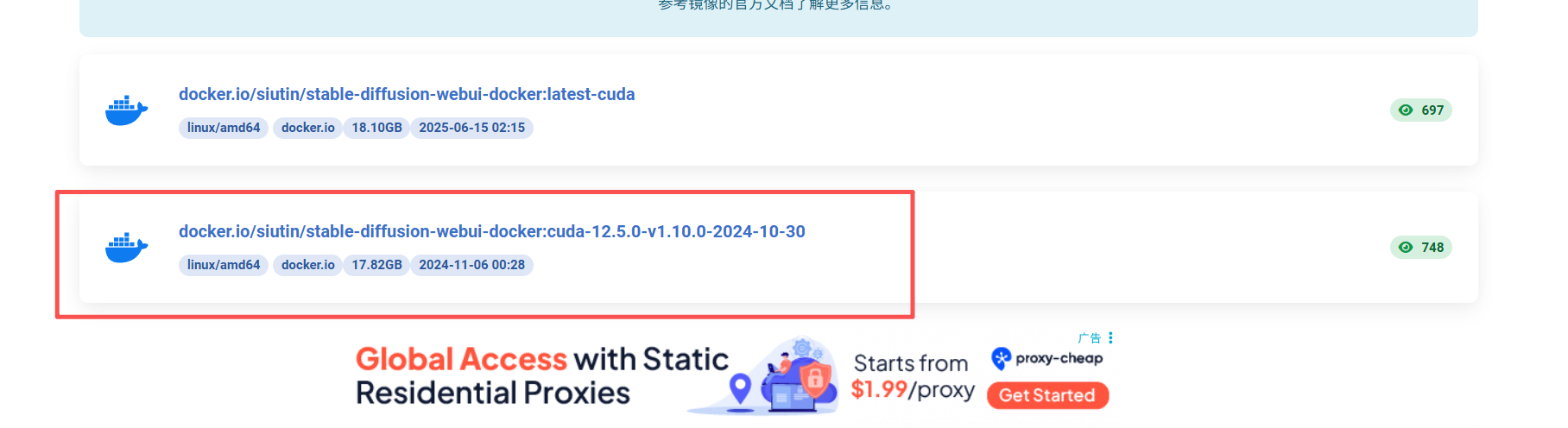
下载命令:
bash
docker pull swr.cn-north-4.myhuaweicloud.com/ddn-k8s/docker.io/siutin/stable-diffusion-webui-docker:cuda-12.5.0-v1.10.0-2024-10-30

docker tag swr.cn-north-4.myhuaweicloud.com/ddn-k8s/docker.io/siutin/stable-diffusion-webui-docker:cuda-12.5.0-v1.10.0-2024-10-30 docker.io/siutin/stable-diffusion-webui-docker:cuda-12.5.0-v1.10.0-2024-10-30
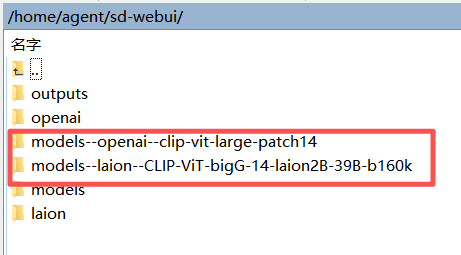
五、创建如下文件夹结构
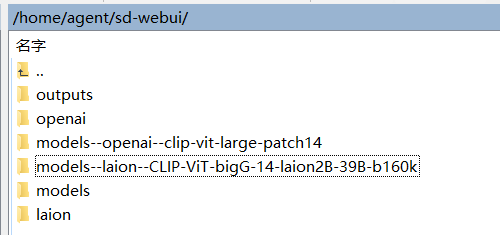
agent@agent-Super-Server:~/sd-webui$ ls
laion
Models
models--laion--CLIP-ViT-bigG-14-laion2B-39B-b160k
models--openai--clip-vit-large-patch14
openai
outputs
六、启动容器命令
bash
sudo docker rm -f sd-webui
bash
#进入你的sd-webui目录
cd /home/agent/sd-webui
#给容器用户10000授权(文档强制要求)
sudo chown 10000:SUID -R models outputs
sudo chmod 775 -R models outputs
启动命令:
bash
sudo docker run -d \
  --name sd-webui \
  --gpus '"device=1"' \
  --network host \
  -e CUDA_VISIBLE_DEVICES=1 \
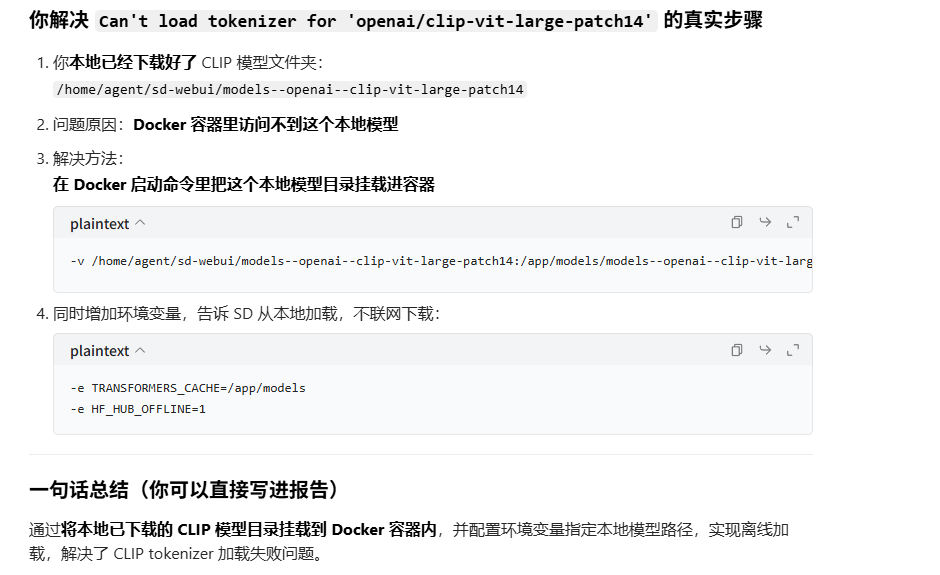
  -e HF_HUB_OFFLINE=1 \
  -e TRANSFORMERS_CACHE=/app/models \
  -v /home/agent/sd-webui/models:/app/stable-diffusion-webui/models \
  -v /home/agent/sd-webui/outputs:/app/stable-diffusion-webui/outputs \
  -v /home/agent/sd-webui/openai:/app/stable-diffusion-webui/openai \
  -v /home/agent/sd-webui/laion:/app/stable-diffusion-webui/laion \
  --restart unless-stopped \
  siutin/stable-diffusion-webui-docker:cuda-12.5.0-v1.10.0-2024-10-30 \
  bash webui.sh --skip-install --api --listen --port 7860 --no-half --skip-torch-cuda-test
查看日志检查运行结果:
bash
sudo docker logs -f sd-webui七、sdwebui 拉起后先在网页端测试生图是否正常
访问地址:http://192.168.x.xx:7860/
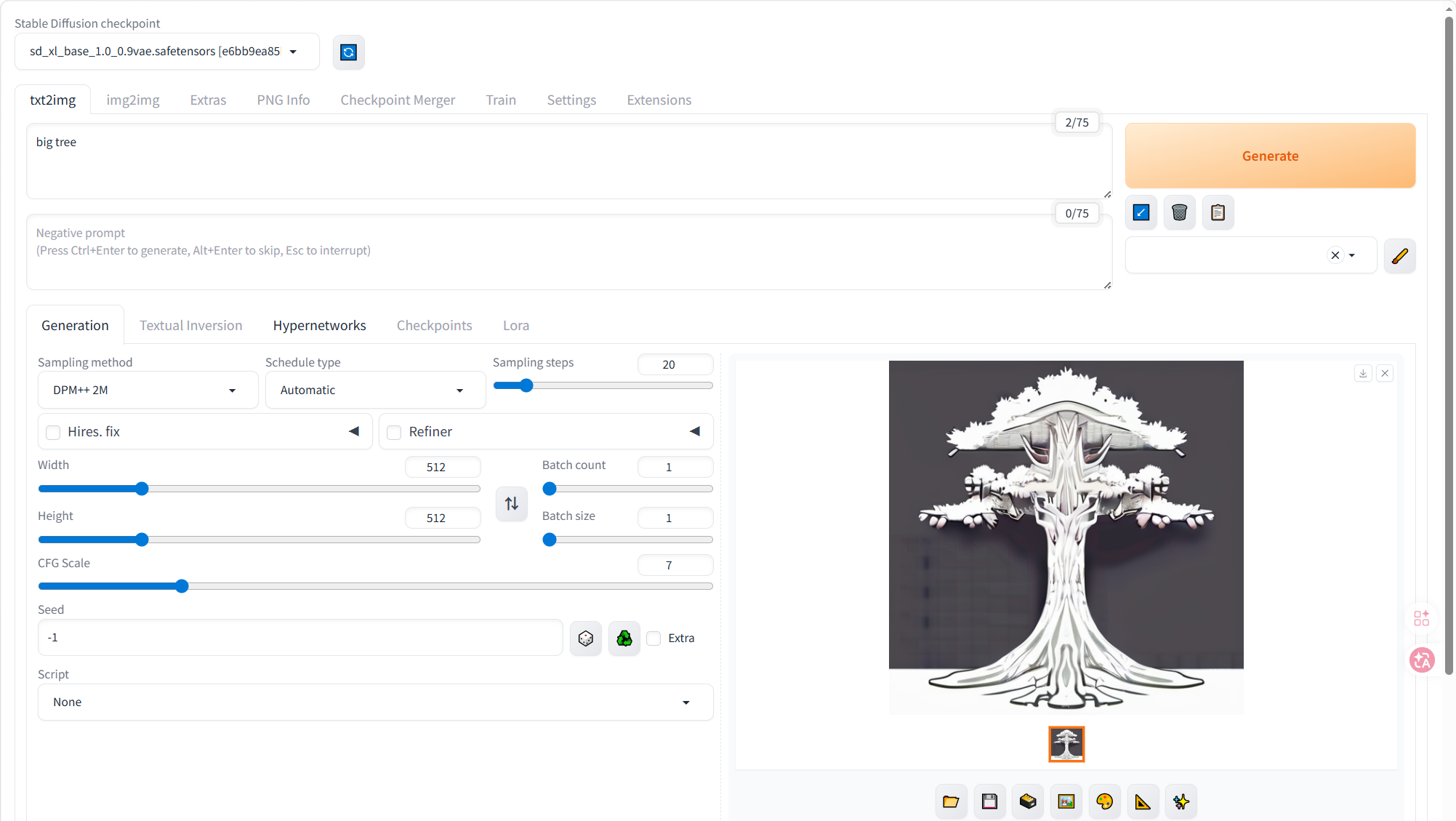
网页端生成正常再测试与 landppt 的联合
八、修改 landppt 的 .env 文件
env
# ====================== 安全密钥 ======================
SECRET_KEY=a1b2c3d4e5f67890abcdef1234567890abcdef1234567890abcdef1234567890

# ====================== 管理员 ======================
LANDPPT_BOOTSTRAP_ADMIN_ENABLED=true
LANDPPT_BOOTSTRAP_ADMIN_USERNAME=admin
LANDPPT_BOOTSTRAP_ADMIN_PASSWORD=admin123

# ====================== 服务器 ======================
HOST=0.0.0.0
PORT=8000
DEBUG=false
DATABASE_URL=sqlite:///./landppt.db

# ====================== 本地大模型(Ollama) ======================
OPENAI_API_KEY=sk-ollama-local-123456
OPENAI_API_BASE=http://localhost:11434/v1
OPENAI_MODEL=qwen3-coder:30b

DEFAULT_MODEL_PROVIDER=openai
OUTLINE_MODEL_PROVIDER=openai
CREATIVE_MODEL_PROVIDER=openai
SLIDE_GENERATION_MODEL_PROVIDER=openai
EDITOR_ASSISTANT_MODEL_PROVIDER=openai
IMAGE_PROMPT_MODEL_PROVIDER=openai

# ====================== 【唯一正确】SD WebUI OpenAI兼容接口 ======================
DEFAULT_AI_IMAGE_PROVIDER=openai
OPENAI_IMAGE_API_BASE_URL=http://127.0.0.1:7860/openai
OPENAI_API_KEY=
OPENAI_IMAGE_MODEL=dall-e-3
OPENAI_IMAGE_SIZE=1024x576
OPENAI_IMAGE_N=1
OPENAI_TIMEOUT=180

ENABLE_IMAGE_SERVICE=true
ENABLE_AI_GENERATION=true
ENABLE_LOCAL_GALLERY=false
ENABLE_WEB_IMAGE_SEARCH=false

# ====================== 关闭所有云端服务 ======================
ANTHROPIC_API_KEY=
GOOGLE_API_KEY=
SILICONFLOW_API_KEY=
POLLINATIONS_API_TOKEN=
TAVILY_API_KEY=
PIXABAY_API_KEY=
UNSPLASH_ACCESS_KEY=
OLLAMA_API_KEY=
OLLAMA_BASE_URL=
OLLAMA_MODEL=
OPENAI_ONLINE_API_KEY=
OPENAI_ONLINE_API_BASE=

# ====================== 生成参数 ======================
TEMPERATURE=0.4
MAX_TOKENS=8192
LLM_TIMEOUT_SECONDS=600
九、打开 landppt 服务器
打开landppt虚拟环境
bash
source .venv/bin/activate拉起landppt服务器
bash
UV_HTTP_TIMEOUT=300 uv run python run.py --index-url https://pypi.tuna.tsinghua.edu.cn/simple十、修改 landppt 网页端配置
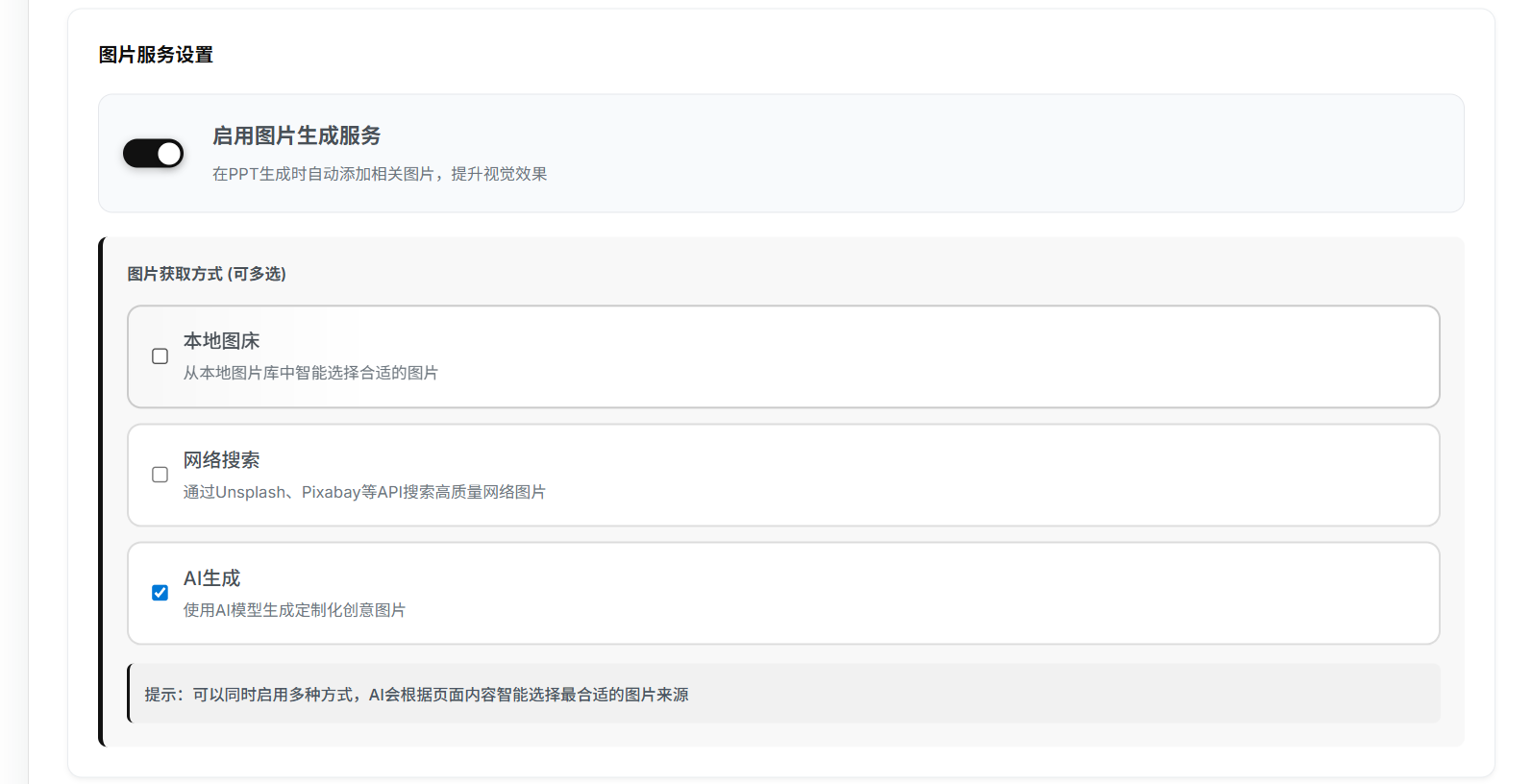
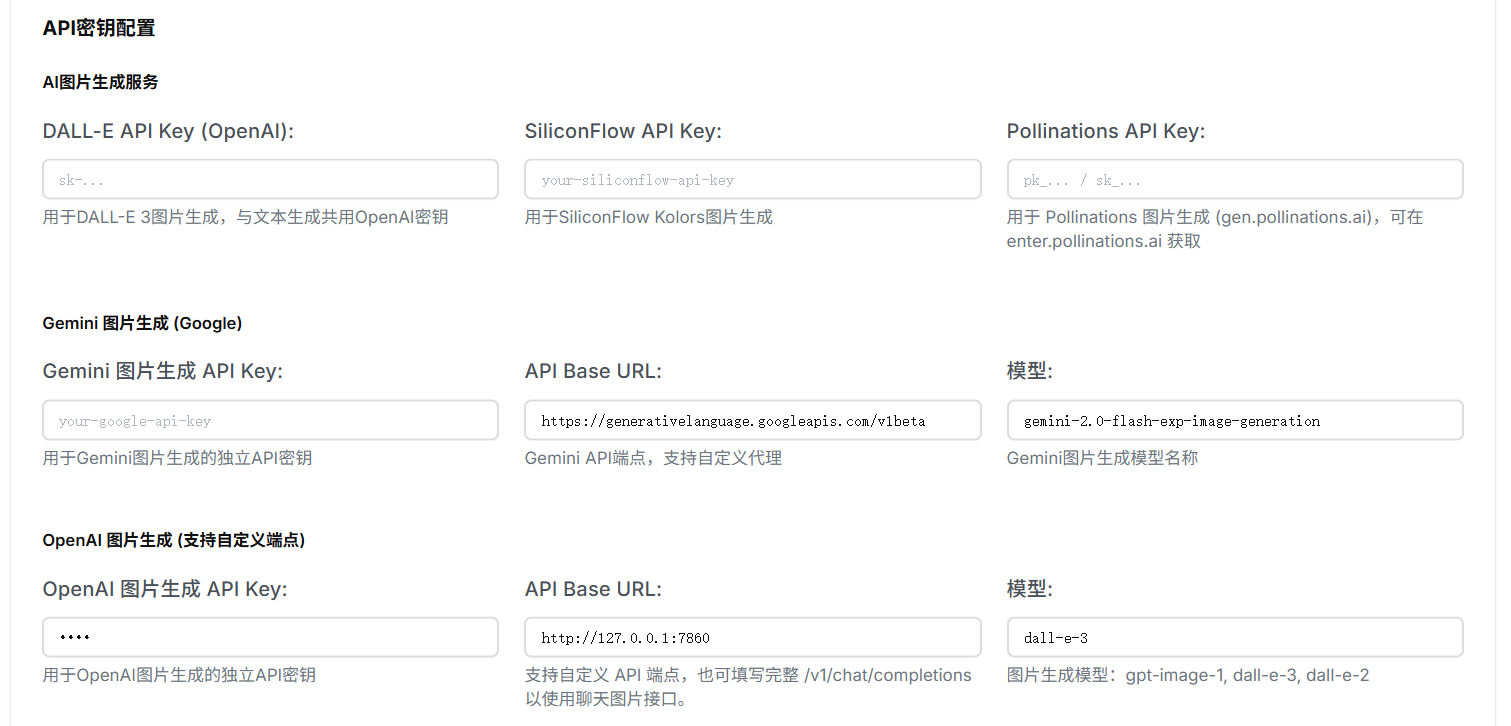
OpenAI 图片生成 API Key 不填写,直接点保存(none)
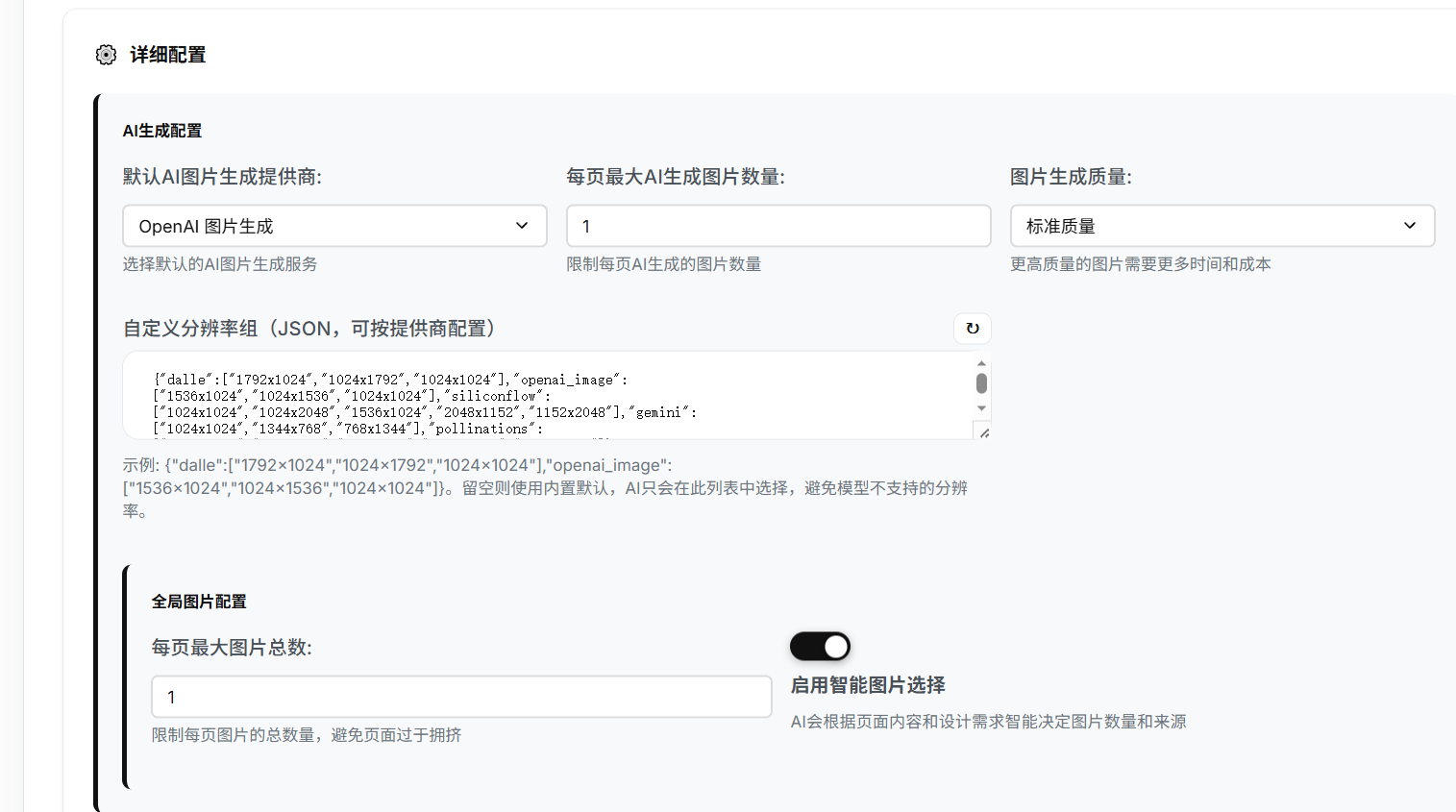
每页最大AI生成图片数量最好设为1,不然sdwebui会非常慢
十一、修改 openai_image_provider.py
让landppt传出的prompt适应sdwebui接口
文件路径:/LandPPT-master/src/landppt/services/image/providers/openai_image_provider.py
python
"""
OpenAI 图片生成提供者 (GPT-Image / gpt-image-1)
支持通过OpenAI兼容API进行图片生成
"""
import asyncio
import logging
import time
from typing import Dict, Any, Optional, List
from pathlib import Path
import aiohttp
import json
import base64
from .base import ImageGenerationProvider
from ..models import (
    ImageInfo, ImageGenerationRequest, ImageOperationResult,
    ImageProvider, ImageSourceType, ImageFormat, ImageMetadata, ImageTag
)

logger = logging.getLogger(__name__)


class OpenAIImageProvider(ImageGenerationProvider):
    """OpenAI 图片生成提供者 (支持自定义API端点)"""

    def __init__(self, config: Dict[str, Any]):
        super().__init__(ImageProvider.OPENAI_IMAGE, config)
        self.api_key = config.get('api_key')
        self.api_base = config.get('api_base', 'https://api.openai.com/v1')
        self.model = config.get('model', 'gpt-image-1')
        self.default_size = config.get('default_size', '1024x1024')
        self.default_quality = config.get('default_quality', 'auto')
        self.rate_limit_requests = config.get('rate_limit_requests', 50)
        self.rate_limit_window = config.get('rate_limit_window', 60)
        self._request_history = []
        if not self.api_key:
            logger.warning("OpenAI Image API key not configured")

    def _is_chat_completions_endpoint(self) -> bool:
        api_base = (self.api_base or "").lower().rstrip("/")
        return "/chat/completions" in api_base

    async def generate(self, request: ImageGenerationRequest) -> ImageOperationResult:
        try:
            if not await self._check_rate_limit():
                return ImageOperationResult(
                    success=False,
                    message="Rate limit exceeded",
                    error_code="rate_limit_exceeded"
                )
            return await self._generate_via_images_api(request)
        except asyncio.TimeoutError:
            logger.error("OpenAI Image API request timeout")
            return ImageOperationResult(
                success=False,
                message="Request timeout",
                error_code="timeout"
            )
        except Exception as e:
            logger.error(f"OpenAI Image generation failed: {e}")
            return ImageOperationResult(
                success=False,
                message=f"Generation failed: {str(e)}",
                error_code="generation_error"
            )

    async def _generate_via_images_api(self, request: ImageGenerationRequest) -> ImageOperationResult:
        api_request = self._prepare_api_request(request)
        url = "http://127.0.0.1:7860/sdapi/v1/txt2img"

        async with aiohttp.ClientSession() as session:
            # ✅ 超大超时:5 分钟!绝对不会再断!
            async with session.post(
                url,
                headers={
                    "Content-Type": "application/json"
                },
                json=api_request,
                timeout=aiohttp.ClientTimeout(total=300)
            ) as response:

                if response.status != 200:
                    error_text = await response.text()
                    logger.error(f"OpenAI Image API error {response.status}: {error_text}")
                    return ImageOperationResult(
                        success=False,
                        message=f"OpenAI Image API error: {response.status}",
                        error_code="api_error"
                    )

                result_data = await response.json()

        try:
            if "images" in result_data and len(result_data["images"]) > 0:
                result_data = {
                    "data": [
                        {"b64_json": result_data["images"][0]}
                    ]
                }
        except Exception as e:
            logger.error(f"[SD兼容] 格式转换失败: {e}")

        return await self._process_api_response(result_data, request)

    def _prepare_api_request(self, request: ImageGenerationRequest) -> Dict[str, Any]:
        # ✅ 强制 512x512 + 10步,超快生成!不爆显存!
        api_request = {
            "prompt": request.prompt,
            "steps": 10,
            "width": 512,
            "height": 512,
            "cfg_scale": 7.0,
            "sampler_name": "Euler"
        }
        return api_request

    async def _process_api_response(self,
                                    response_data: Dict[str, Any],
                                    request: ImageGenerationRequest) -> ImageOperationResult:
        try:
            if 'data' not in response_data or not response_data['data']:
                return ImageOperationResult(
                    success=False,
                    message="No image data in response",
                    error_code="no_data"
                )
            image_data = response_data['data'][0]
            image_base64 = image_data['b64_json']
            image_path, image_size = await self._save_image_from_base64(image_base64, request)
            image_info = self._create_image_info(image_path, image_size, request)
            return ImageOperationResult(
                success=True,
                message="Image generated successfully",
                image_info=image_info
            )
        except Exception as e:
            logger.error(f"Failed to process Image response: {e}")
            return ImageOperationResult(
                success=False,
                message=f"Failed to process response: {str(e)}",
                error_code="response_processing_error"
            )

    async def _save_image_from_base64(self,
                                       image_base64: str,
                                       request: ImageGenerationRequest) -> tuple[Path, int]:
        image_bytes = base64.b64decode(image_base64)
        timestamp = int(time.time())
        filename = f"sd_image_{timestamp}.png"
        save_dir = Path("temp/images_cache/ai_generated/openai_image")
        save_dir.mkdir(parents=True, exist_ok=True)
        image_path = save_dir / filename
        with open(image_path, 'wb') as f:
            f.write(image_bytes)
        return image_path, len(image_bytes)

    def _create_image_info(self,
                           image_path: Path,
                           image_size: int,
                           request: ImageGenerationRequest) -> ImageInfo:
        image_id = f"sd_image_{int(time.time())}"
        metadata = ImageMetadata(
            width=512,
            height=512,
            format=ImageFormat.PNG,
            file_size=image_size,
            color_mode="RGB",
            has_transparency=False
        )
        return ImageInfo(
            image_id=image_id,
            filename=image_path.name,
            title="AI Generated Image",
            description=request.prompt,
            alt_text=request.prompt,
            source_type=ImageSourceType.AI_GENERATED,
            provider=ImageProvider.OPENAI_IMAGE,
            original_url="",
            local_path=str(image_path),
            metadata=metadata,
            tags=[],
            keywords=[],
            usage_count=0,
            created_at=time.time(),
            updated_at=time.time()
        )

    async def _check_rate_limit(self) -> bool:
        return True

    async def health_check(self) -> Dict[str, Any]:
        return {
            'status': 'healthy',
            'message': 'Local SD API is ready',
            'provider': self.provider.value
        }

    async def get_available_models(self) -> List[Dict[str, Any]]:
        return [{'id': 'sd', 'name': 'Stable Diffusion', 'description': 'Local SD'}]

    async def _generate_via_chat_completions(self, request):
        return await self._generate_via_images_api(request)
    async def _extract_image_from_stream(self, response): return None
    def _extract_image_data_from_chat_response(self, data): return None
    def _extract_image_from_container(self, data): return None
    def _extract_image_from_list(self, data): return None
    def _extract_image_payload(self, data): return None
    def _extract_base64_from_data_url(self, data): return None
    async def _save_image_from_payload(self, payload, request): return None, 0
    async def _download_image(self, url, request): return None, 0
    def _generate_tags_from_prompt(self, prompt): return []
    def _extract_keywords_from_prompt(self, prompt): return []
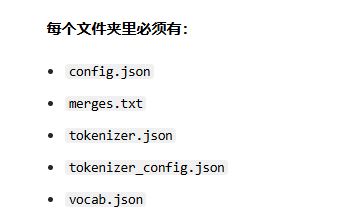
十二、报错解决:Can't load tokenizer for 'openai/clip-vit-large-patch14'
网页下载地址:
- https://huggingface.co/openai/clip-vit-large-patch14/tree/main
- https://huggingface.co/laion/CLIP-ViT-bigG-14-laion2B-39B-b160k/tree/main