UITableView
UITableView 本质就是一个可复用的列表容器
数据 → 显示规则 → 渲染成一行一行的 cell
一.cell简介
核心组成
- UITableView(表)
- UITableViewCell(每一行)
- dataSource(数据来源)
- delegate(行为控制)
我们首先要实现自定义cell需要两个协议
UITableViewDelegate和UITableViewDataSource。
前者的主要用于实现显示单元格,设置单元格的行高和对于制定的单元格的操作设置头视图和尾视图
后者主要设置TableView的section与row的数量
创建一个 UITableView
objc
- (void)viewDidLoad {
    [super viewDidLoad];
    self.dataArr = @[@"A",@"B",@"C",@"D"];
    self.tableView = [[UITableView alloc] initWithFrame:self.view.bounds style:UITableViewStylePlain];
    self.tableView.dataSource = self;
    self.tableView.delegate = self;
    [self.view addSubview:self.tableView];
}
dataSource协议实现
objc
// 行数
- (NSInteger)tableView:(UITableView *)tableView numberOfRowsInSection:(NSInteger)section {
    return self.dataArr.count;
}

// 每一行内容
- (UITableViewCell *)tableView:(UITableView *)tableView cellForRowAtIndexPath:(NSIndexPath *)indexPath {

    static NSString *cellID = @"cell";

    UITableViewCell *cell = [tableView dequeueReusableCellWithIdentifier:cellID];

    if (!cell) {
        cell = [[UITableViewCell alloc] initWithStyle:UITableViewCellStyleDefault reuseIdentifier:cellID];
    }

    cell.textLabel.text = self.dataArr[indexPath.row];

    return cell;
}
Delegate(行为控制)
objc
// 点击某一行
- (void)tableView:(UITableView *)tableView didSelectRowAtIndexPath:(NSIndexPath *)indexPath {
    NSLog(@"点击了第 %ld 行", indexPath.row);
}

// 行高
- (CGFloat)tableView:(UITableView *)tableView heightForRowAtIndexPath:(NSIndexPath *)indexPath {
    return 60;
}
// 组数
- (NSInteger)numberOfSectionsInTableView:(UITableView *)tableView {
    return 2;
}
// 每组行数
- (NSInteger)tableView:(UITableView *)tableView numberOfRowsInSection:(NSInteger)section {
    return 3;
}
二.cell的复用机制
如果你创建了 1000 行数据,滚动时不会创建 1000 个 cell,而是 只创建屏幕显示范围内的 cell + 少量缓存,来回复用
初始化的时候他会先创建cell的缓存字典 和 section的缓存array,以及一个用于存放复用cell的mutableSet(可变的集合)。并且它会去创建显示的(n+1)个cell,其他都是从中取出来重用。
当有cell滑出屏幕时,会将其放入到一个set中(相当于一个重用池),当UITableView要求返回cell的时候,datasource会先在集合中查找是否有闲置的cell,若有则会将数据配置到这个cell中,并将cell返回给UITabelView。 这大大减少了内存的开销。
因为我在滚动的过程中会出现一个将cell滚出屏幕外的时候,这时候如果我们一直创建cell的话,如果cell太多了就会出现一个内存开销过多的一个问题。所以我们要采用这个复用的方式来提高内存利用率
cell复用的两种不同方式
手动进行cell复用(非注册)
设置复用标识符:在创建Cell时,我们要给每一个Cell设置一个复用标识符,这个标识符通常是一个字符串,用来表示cell类型 在创建cell时,我们会把这个标识符作为参数传入
请求重用的cell:在需要显示新的cell时,我们会使用复用标识符去请求一个不再显示但还没被销毁的的cell。这个过程是通过调用UITableView的dequeueReusableCellwithIdentifier:来实现的,这个方法会返回一个可选类型的Cell,如果有可用的重用Cell,就会返回一个Cell,否则返回nil
配置Cell:无论是新创建Cell还是重用的Cell,都需要进行配置,以显示数据,配置Cell在tableView(:cellForRowAt:)方法中完成
dequeueReusableCellWithIdentifier·:意思是出列的可用的cell,即使用这个方法可以获取通过滚动创建过并放回对象池中的可以复用的cell对象
例如我们在dataSource协议实现中的代码
objc
- (void)viewDidLoad {
    [super viewDidLoad];
    self.dataArr = @[@"A",@"B",@"C",@"D"];
    self.tableView = [[UITableView alloc] initWithFrame:self.view.bounds style:UITableViewStylePlain];
    self.tableView.dataSource = self;
    self.tableView.delegate = self;
    [self.view addSubview:self.tableView];
}
- (UITableViewCell *)tableView:(UITableView *)tableView cellForRowAtIndexPath:(NSIndexPath *)indexPath {

    static NSString *cellID = @"cell";

    UITableViewCell *cell = [tableView dequeueReusableCellWithIdentifier:cellID];

    if (!cell) {
        cell = [[UITableViewCell alloc] initWithStyle:UITableViewCellStyleDefault reuseIdentifier:cellID];
    }

    cell.textLabel.text = self.dataArr[indexPath.row];

    return cell;
}
自动注册
使用cell的注册机制,在cell的复用时无需判空,在viewDidLoad先对需要复用的cell使用registerClass进行注册,然后在创建cell的函数中使用dequeueReusableCellWithIdentifier获取可复用的cell,如果没有可复用的cell,就自动利用注册cell时提供的类创建一个新的cell并返回
objc
- (void)viewDidLoad {
    [super viewDidLoad];
    self.tableView = [[UITableView alloc] initWithFrame:self.view.frame style:UITableViewStyleGrouped];
    self.tableView.delegate = self;
    self.tableView.dataSource = self;
    self.dataArr = @[@"头像", @"名字", @"微信号"];
    [self.view addSubview:_tableView];
    [self.tableView registerClass:[UITableViewCell class] forCellReuseIdentifier:@"cell"];
}
- (UITableViewCell *)tableView:(UITableView *)tableView cellForRowAtIndexPath:(NSIndexPath *)indexPath {
    UITableViewCell *cell = [tableView dequeueReusableCellWithIdentifier:@"cell" forIndexPath:indexPath];

    cell.textLabel.text = self.dataArr[indexPath.row];
  	return cell;
}
二者对比
go
取 cell → 没有 → 返回 nil → 手动创建取 cell → 没有 → 系统自动创建 → 返回真正区别是:
"是否自动创建 cell"
上述代码的区别在于注册方法需要提前对我们要使用的cell类进行注册,如此一来就不需要在后续过程中对我们的单元格进行判空。这是因为我们的注册方法:
(void)registerClass:(nullable Class)cellClass forCellReuseIdentifier:(NSString *)identifier API_AVAILABLE(ios(6.0));
在调用过程中会自动返回一个单元格实例,如此一来我们就避免了判空操作
引用的方法不同(nullable __kindof UITableViewCell *)dequeueReusableCellWithIdentifier:(NSString *)identifier;
(__kindof UITableViewCell *)dequeueReusableCellWithIdentifier:(NSString *)identifier forIndexPath:(NSIndexPath *)indexPath NS_AVAILABLE_IOS(6_0);
第一个 method 用在了非注册的方式里,第二个 method 用在了需要注册的方式里。经过验证,第一个 method 也可以用在注册的方式里,但是第二个 method 如果用于非注册的方式,则会报错崩溃:
自定义cell
系统自带的UITableViewCellStyleDefault
👉 只能放:
- 一个标题
- 一个副标题(有限)
而实际需求需要比较复杂的逻辑,这时自定义的cell才能满足我们的需求
自定义cell的本质就是:UITableView+子视图
所有UI必须加在cell.contentView上
例如:
首先新创建一个UITableViewCell的子类,用属性定义自己需要的控件
objc
@interface MyCell : UITableViewCell
@property(nonatomic,strong) UIImageView* iconView;
@property(nonatomic,strong) UILabel* tieleLabel;
@property(nonatomic,strong) UILabel* subLabel;
@property(nonatomic,strong) UIButton* btn;
@end其次用-(instancetype)initWithStyle:(UITableViewCellStyle)style reuseIdentifier:(NSString *)reuseIdentifier创建cell
objc
-(instancetype)initWithStyle:(UITableViewCellStyle)style reuseIdentifier:(NSString *)reuseIdentifier{
    self = [super initWithStyle:style reuseIdentifier:reuseIdentifier];
    if (self) {
        //头像
        self.iconView = [[UIImageView alloc] initWithFrame:CGRectMake(10, 10, 50, 50)];
        self.iconView.backgroundColor = [UIColor grayColor];
        [self.contentView addSubview:self.iconView];

        //标题
        self.tieleLabel = [[UILabel alloc] initWithFrame:CGRectMake(70, 10, 200, 20)];
        self.tieleLabel.font = [UIFont boldSystemFontOfSize:16];
        [self.contentView addSubview:self.tieleLabel];

        //副标题
        self.subLabel = [[UILabel alloc] initWithFrame:CGRectMake(70, 35, 200, 20)];
        self.subLabel.font = [UIFont systemFontOfSize:14];
        self.subLabel.textColor = [UIColor grayColor];
        [self.contentView addSubview:self.subLabel];

        //按钮
        self.btn = [UIButton buttonWithType:UIButtonTypeSystem];
        self.btn.frame = CGRectMake(300, 20, 60, 30);
        [self.btn setTitle:@"点击" forState:UIControlStateNormal];
        [self.btn addTarget:self action:@selector(pressBtn) forControlEvents:UIControlEventTouchDown];
        [self.contentView addSubview:self.btn];
    }
    return self;
}
-(void)pressBtn {
    NSLog(@"按钮被点击了");
}
随后回到ViewController和一开始的那段代码差不多的流程
objc
#import "ViewController.h"
#import "MyCell.h"
@interface ViewController () <UITableViewDelegate, UITableViewDataSource>
@property(nonatomic,strong) UITableView* tableView;
@property(nonatomic,strong) NSArray* dataArr;
@property(nonatomic,strong) NSArray* imageArr;
@end

@implementation ViewController

- (void)viewDidLoad {
    [super viewDidLoad];

    self.view.backgroundColor = [UIColor whiteColor];

    self.dataArr = @[@"左思源", @"源蛋", @"小蛋", @"小源", @"源思左"];
    self.imageArr = @[@"zsy1", @"zsy2", @"zsy3", @"zsy4", @"zsy5"];
    self.tableView = [[UITableView alloc] initWithFrame:self.view.bounds style:UITableViewStylePlain];
    self.tableView.dataSource = self;
    self.tableView.delegate = self;//设置代理

    [self.tableView registerClass:[MyCell class] forCellReuseIdentifier:@"cell"];//注册cell
    [self.view addSubview:self.tableView];
}
-(NSInteger)tableView:(UITableView *)tableView numberOfRowsInSection:(NSInteger)section{
    return  self.dataArr.count;
}
-(UITableViewCell*)tableView:(UITableView *)tableView cellForRowAtIndexPath:(NSIndexPath *)indexPath{
    MyCell* cell = [tableView dequeueReusableCellWithIdentifier:@"cell" forIndexPath:indexPath];//cell的复用

    cell.tieleLabel.text = self.dataArr[indexPath.row];
    cell.subLabel.text = self.dataArr[indexPath.row];
    cell.iconView.image = [UIImage imageNamed:self.imageArr[indexPath.row]];
    return cell;
}
-(void)tableView:(UITableView *)tableView didSelectRowAtIndexPath:(NSIndexPath *)indexPath{
    NSLog(@"点击了 %@",self.dataArr[indexPath.row]);
    [tableView deselectRowAtIndexPath:indexPath animated:YES];
}
-(CGFloat)tableView:(UITableView *)tableView heightForRowAtIndexPath:(NSIndexPath *)indexPath{
    return 70;
}
需要注意的几个点是:
- 不要忘记设置两个协议的代理
- 注册cell,cell的复用
- 用数组存数据(也可以用model封装成一个类,不用创建多个数组)
在此附上两个协议的一些方法源码:
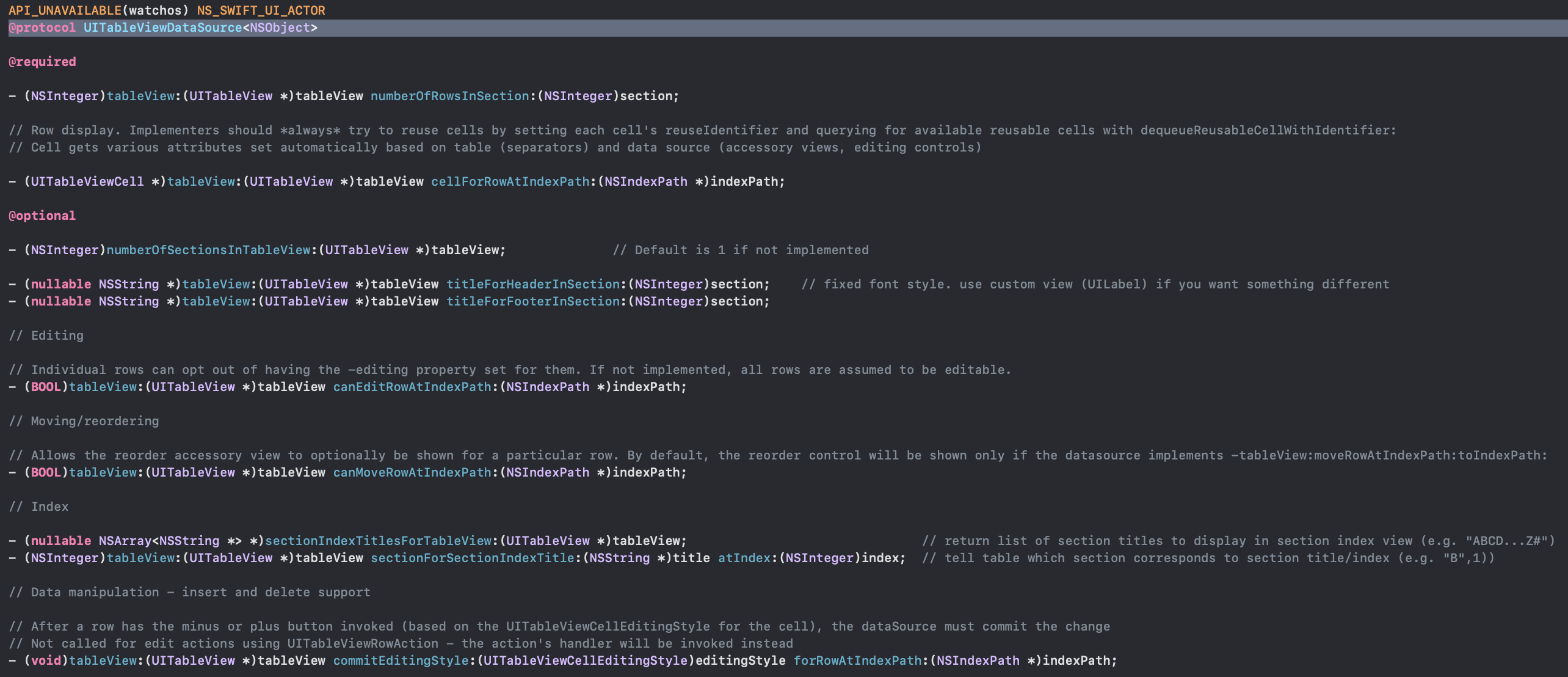
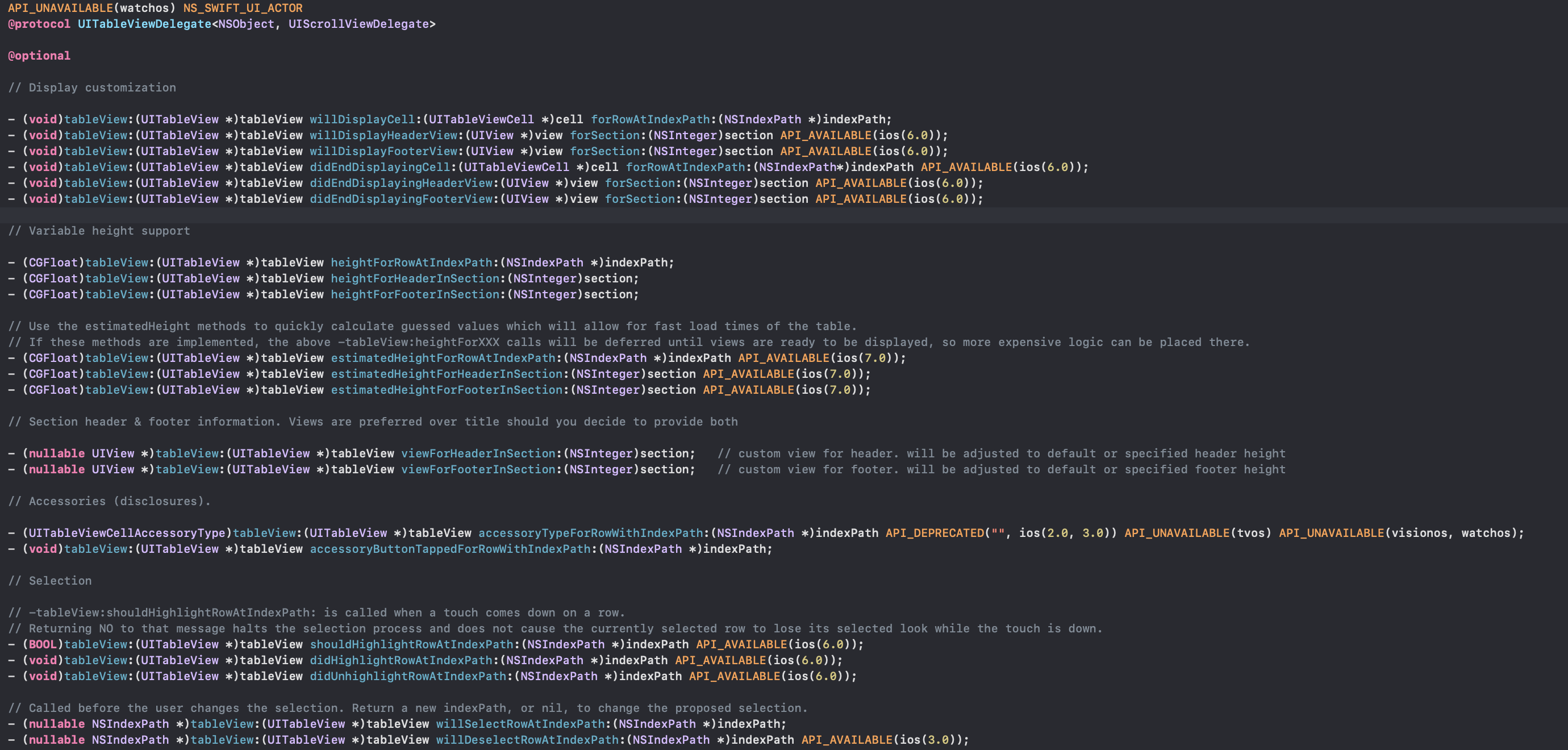
可以看到的是UITableViewDataSource的这两个方法是必须实现的:
objc
-(NSInteger)tableView:(UITableView *)tableView numberOfRowsInSection:(NSInteger)section
-(UITableViewCell*)tableView:(UITableView *)tableView cellForRowAtIndexPath:(NSIndexPath *)indexPath
其余的选择自己需要的实现就好