1.什么是序列化和反序列化
定义结构体来表⽰我们需要交互的信息; 发送数据时将这个结构体按照⼀个规则转换成字符串, 接收到数据的时候再按照相同的规则把字符串转化回结构体; 这个过程叫做 "序列化" 和 "反序列化;这样的约定就是应用层协议;
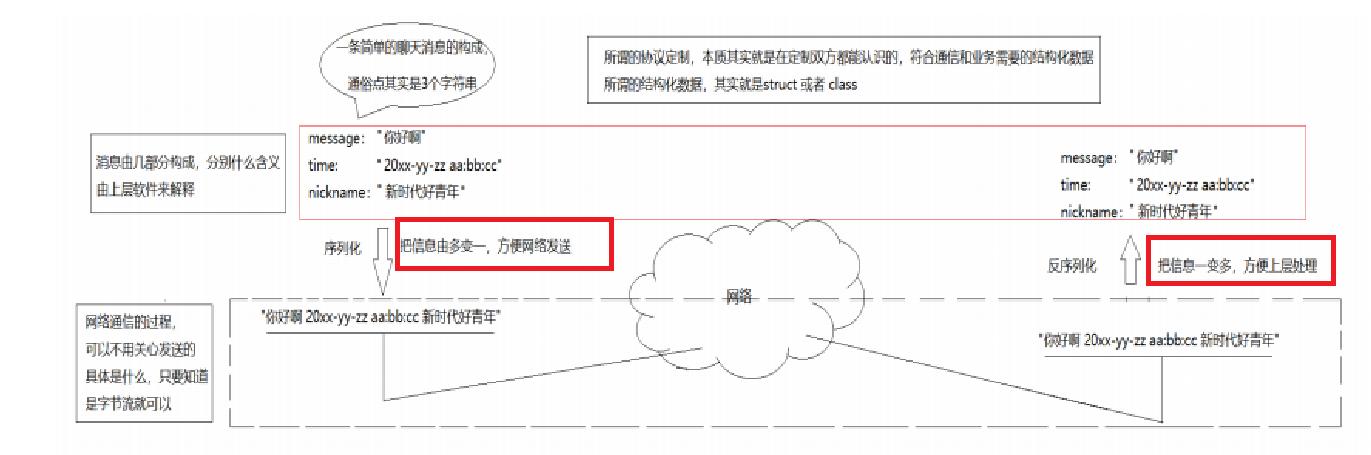
而之所以要序列化其实是为了方便网络发送,因为之前我们发送的都是一个字符串;
2.成熟的序列化和反序列化常用格式
xml /json/protobuf
常用的是json,以下是jsoncpp的安装方法;

这三个都是数据序列化格式,是用来把程序中的结构化数据(比如对象、字典)转换成可传输 / 可存储的格式的标准 / 协议。
①XML(Extensible Markup Language,可扩展标记语言)
定义:一种基于文本的标记语言,用标签来描述数据结构,格式像 HTML 但更通用。
核心特点:可读性强、结构严谨,但冗余度高、解析慢。
用途:早期用于配置文件、跨平台数据交换,现在多用于遗留系统。
② JSON(JavaScript Object Notation,JavaScript 对象表示法)我们今天使用的就是这个库
定义:一种轻量级的文本数据交换格式,源自 JavaScript,现已成为跨语言通用标准。
核心特点:语法简洁、可读性好、解析快,比 XML 更轻量。
用途:Web 前后端交互、API 接口、配置文件,是目前最主流的文本序列化格式。
③ Protobuf(Protocol Buffers,协议缓冲区)
定义:谷歌推出的二进制序列化协议,是一种平台无关、语言无关的数据交换格式。
核心特点:体积小、解析速度快、性能高,支持自动生成代码。
用途:高性能服务端通信、微服务数据交换、大数据传输,是后端服务常用的二进制格式。
一句话总结:它们都是数据序列化的 "通用语言",让不同程序 / 不同语言之间能看懂、传输和解析数据,只是 XML 和 JSON 是文本格式,Protobuf 是二进制格式,适用场景不同。
3.深刻认识tcp全双工和面向字节流
首先我们要理解的是我们之前通过创建套接字使用tcp向网络中发送数据并不是直接发送而是先加载(本质是拷贝)到OS为tcp创建的发送缓冲区中,而至于什么时候刷新、怎么刷新取决于OS;
反过来对端其实也有对应的接收缓冲区,当接收缓冲区为空的时候,read被阻塞,当接收缓冲区中有数据,OS就会把接收缓冲区的数据拷贝到read创建好的buffer中;所以读本质也是拷贝;
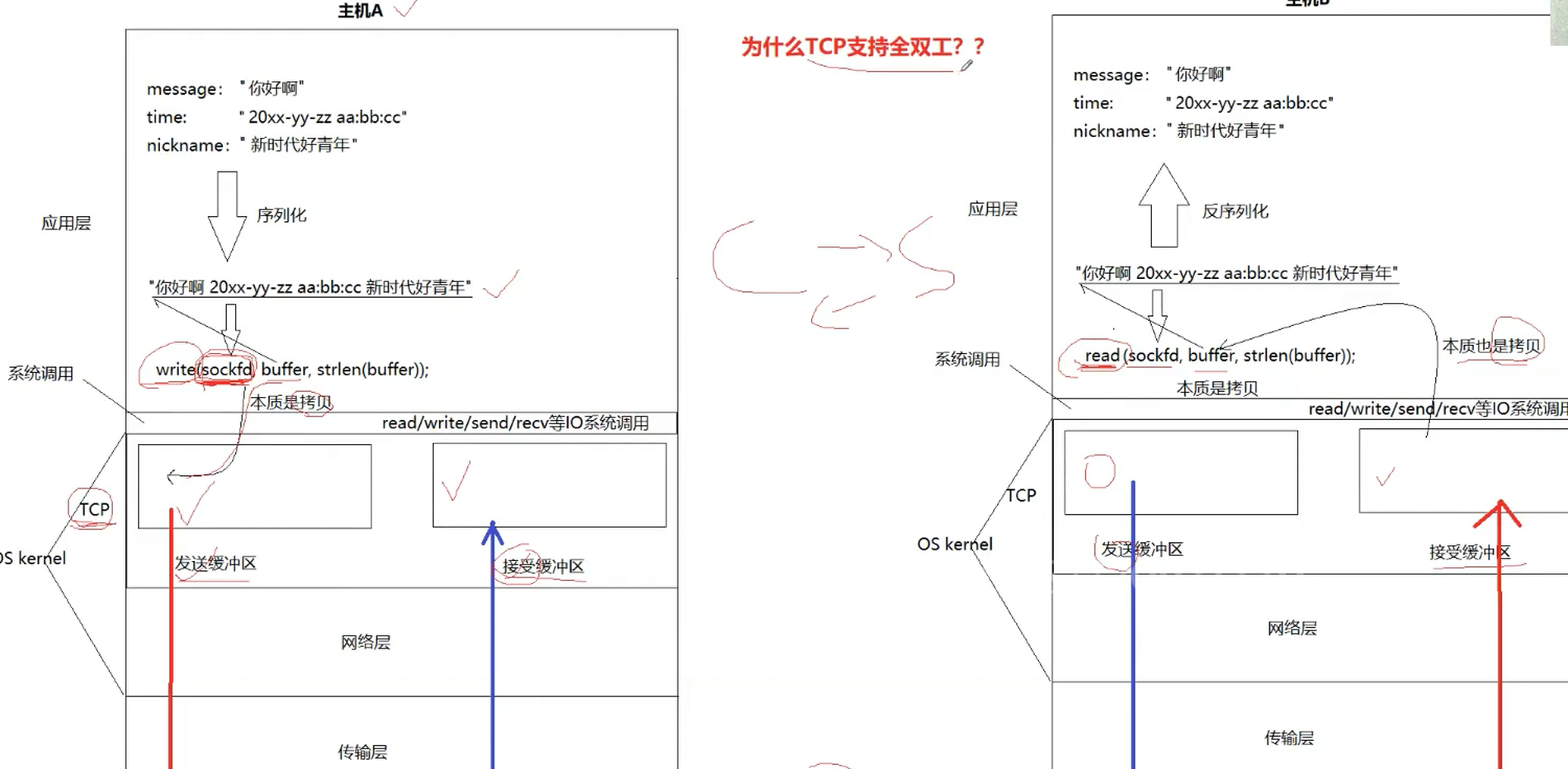
因为有两对发送和接收缓冲区,所以这也就是为什么TCP支持全双工;而这个缓冲区要接收大量的报文,OS要对其进行管理,所以缓冲区本质上被设计成了链表,每个结点时一个描述对应报文的结构体;这也就是为什么TCP叫做传输控制协议,因为当数据被拷贝到TCP的缓冲区中,TCP天然就已经有了自己的控制权,即在对方缓冲区接收能力强的时候发快一点,在对方接受能力弱的时候发慢一点,而TCP是面向字节流发送数据的,这也就是说一个数据TCP也会发送,10个数据TCP也会发送,就很像我们家里的自来水,接收多少也取决于我们自己,而这里的我们自己就是应用层了,也就是说应用层来保证报文的完整性,当读来数据之后如果数据不完整不能立刻进行数据的处理,而是将数据读全之后再进行数据的处理,值得注意的是文件的读取也是面向字节流的,而UDP是面向数据报发送数据的,UCP规定必须发送完整的一个数据报的数据;
4.序列化和反序列化的使用
cpp
#pragma once
#include <string>
#include <jsoncpp/json/json.h>
#include <iostream>
#include <memory>
//这个类的作用是实现序列化和反序列化的协议

const std::string  sep = "\n\r";
//将{json}转为headlen\n\r{json}\r\n  ->也就是给报文加上报头,方便在网络层解析
bool Encode(std::string &message)
{
    std::string package = std::to_string(message.length())+ sep+message+sep;
    message=package;
    return true;

}

bool Decode(std::string &package,std::string *content)
{

    auto pos = package.find(sep);
    if(pos == std::string:: npos)
    {
        return false;
    }
    std::string head = package.substr(0,pos);
    int content_len=std::stoi(head);
    int full_size(head.size()+content_len + 2*sizeof(sep));
    if(package.size() < full_size)
    {
        return false;
    }
    *content = package.substr(pos+sep.size(),content_len);
    package=package.erase(0,full_size); //更新package
    return true;
}


class request
{
    public:
    request()
     :_x(0)
    ,_y(0)
    ,_oper(0)
    {}
    request(int x, int y, char oper)
    :_x(x)
    ,_y(y)
    ,_oper(oper)
    {}
    bool serialize(std::string &out_string)  //序列化
    {
        Json::Value root;
        root["x"] = _x;
        root["y"] = _y;
        root["oper"] = _oper;
       Json::StreamWriterBuilder wb;
       std::unique_ptr<Json::StreamWriter> w(wb.newStreamWriter());
       std::stringstream ss;
       w->write(root, &ss);
       out_string = ss.str();
       return true;
    }
    bool Deserialize(std::string & in_string ) //反序列化
    {
        Json::Value root;
        Json::Reader reader;
        bool parsingSuccessful = reader.parse(in_string,root);
        if(!parsingSuccessful)
        {
            std::cout<<"Error parsing JSON:"<<reader.getFormattedErrorMessages()<<std::endl;
        }
        _x=root["x"].asInt();
        _y=root["y"].asInt();
        _oper=root["oper"].asInt();  //char会转为asscall码
        return true;
    }
    int get_x() const {return _x;}
    int get_y() const {return _y;}
    char get_oper() const {return _oper;}
    private:
    int _x;
    int _y;
    char _oper;
};

class response
{
   public:
   response()
    :_result(0)
   ,_code(0)
   {}
   response(int result,int code)
   :_result(result)
   ,_code(code)
   {}

    bool serialize(std::string &out_string)  //序列化
    {
        Json::Value root;
        root["result"] = _result;
        root["code"] = _code;
       Json::StreamWriterBuilder wb;
       std::unique_ptr<Json::StreamWriter> w(wb.newStreamWriter());
       std::stringstream ss;
       w->write(root, &ss);
       out_string = ss.str();
       return true;
    }
    bool Deserialize(std::string & in_string ) //反序列化
    {
        Json::Value root;
        Json::Reader reader;
        bool parsingSuccessful = reader.parse(in_string,root);
        if(!parsingSuccessful)
        {
            std::cout<<"Error parsing JSON:"<<reader.getFormattedErrorMessages()<<std::endl;
        }
        _result=root["result"].asInt();
        _code=root["code"].asInt();
        return true;
    }
    int get_result() const {return _result;}
    int get_code() const {return _code;}

    void set_result(int result) {_result=result;}
    void set_code(int code) {_code=code;}
   private:
   int _result;
   int _code;
};