一、vector是什么
vector 是动态数组,属于线性表中的顺序存储结构,底层本质是连续内存的数组。
所以vector也可以随机访问、尾部增删。
(vector = 有自动扩容功能的数组)
二、vector的优点
在 C 语言中我们用普通数组处理动态数组集合,痛点非常多:
- 需要固定长度,无法动态扩容,极易出现空间不足或浪费;
- 插入、删除、扩容、拷贝都要手动管理内存和元素移动,代码繁琐易出错;
- 没有封装好的成员方法,获取长度、判空、尾部增删等操作都要自己实现;
- 内存需要手动申请释放,极易造成内存泄漏、越界访问、野指针等问题。
C++ STL 提供的std::vector,它本质是封装了动态数组的顺序容器,完美替代 C 语言原生数组:
- 自动管理内存与动态扩容,无需手动 malloc/free,不够用时自动申请更大空间;
- 封装大量实用成员方法,尾部增删、任意位置插入删除、获取大小、判空、清空等操作一键完成;
- 兼容 STL 标准规范,支持迭代器遍历,可配合算法库(sort、find 等)直接使用;
- 可存储任意数据类型,int、double、string、结构体、对象都能存放,通用性极强;
- 自动处理元素拷贝与析构,使用安全简单,大幅降低内存泄漏和越界风险
三、vector的使用
3.1 vector的初始化

| 名称 | 使用示例 | 功能说明 |
|---|---|---|
| default(默认构造) | vector<int> v1; | 无参构造 |
| fill(填充构造) | vector<int> v2(5, 10); | 5 个元素,每个都是 10 |
| range(迭代器初始化) | vector<int> v4(src.begin() + 1, src.end() - 1) | 用 [first, last) 区间元素构造 |
| copy(拷贝构造) | vector<int> v6(v2); | 复制v2 |
演示代码
cpp
#include <iostream>
#include <vector>
using namespace std;

int main()
{
    // 1. 默认构造
    vector<int> v1;
    // v1 为空,size = 0

    // 2. 填充构造
    vector<int> v2(5, 10);
    // v2: 10 10 10 10 10

    // 3. 迭代器区间构造
    vector<int> v3(v2.begin(), v2.end());
    // v3: 10 10 10 10 10

    // 4. 拷贝构造
    vector<int> v4(v2);
    // v4: 10 10 10 10 10

    return 0;
}
3.2 vector类对象的容量操作
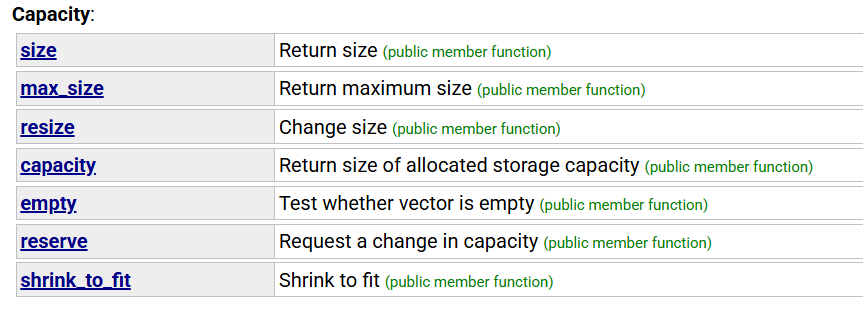
| 名称 | 使用示例 | 功能说明 |
|---|---|---|
| size | v1.size() | 获取 vector 中实际存储的元素个数 |
| capacity | v1.capacity() | 获取 vector 当前已分配的总容量大小 |
| empty | v1.empty() | 判断 vector 是否为空(size 是否为 0) |
| ⭐resize | v1.reserve(10); | 改变 vector 的 size(同时会初始化 / 销毁元素) |
| ⭐reserve | v1.reserve(10); | 改变 vector 的 capacity(仅开辟空间,不初始化元素) |
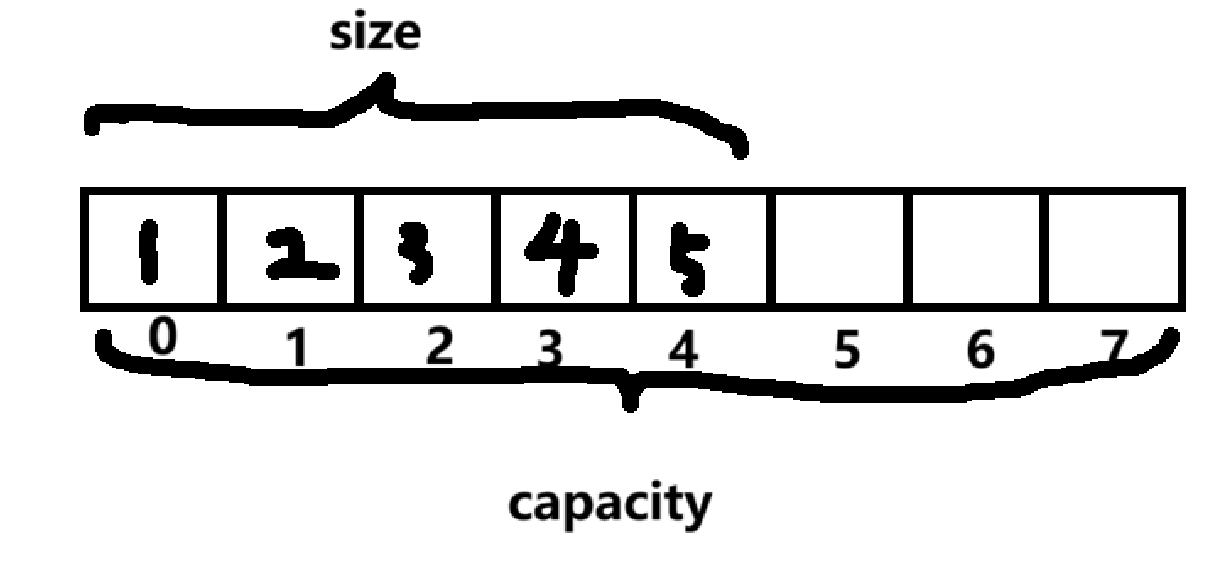
注意:
++resize = 改元素个数(size),会创建 / 删除元素++
++reserve = 改容量大小(capacity),只开空间,不创建元素++
演示代码
cpp
#include <iostream>
#include <vector>
using namespace std;

int main() {
    // 1. 无参构造
    vector<int> v;
    cout << "元素个数:" << v.size() << endl;  // 元素个数:0

    // 2. 检查是否为空
    cout << "元素个数:" << v.empty() << endl; // 元素个数:1

    // 3. 预分配容量
    v.reserve(10);
    cout << "元素个数:" << v.size() << endl;  // 元素个数:0

    // 4. 改变元素数量
    v.resize(5);
    cout << "元素个数:" << v.size() << endl;  // 元素个数:5

    // 5. 查看容量
    cout << "元素个数:" << v.capacity() << endl; // 元素个数:10

    // 6. 再次改变数量
    v.resize(2);
    cout << "元素个数:" << v.size() << endl;  // 元素个数:2

    return 0;
}
3.3 vector类对象的访问及遍历操作
| 名称 | 使用示例 | 功能说明 |
|---|---|---|
| operator\[\] | s0 | 返回 pos 位置的元素,const string 对象调用时返回 const char& |
| begin() end() | s.begin() s.end () | begin() 获取指向第一个元素的迭代器;end() 获取指向最后一个元素下一个位置的迭代器 |
| rbegin() rend() | s.rbegin () s.rend () | rbegin() 获取指向最后一个元素的反向迭代器;rend() 获取指向第一个元素前一个位置的反向迭代器 |
| 范围 for(C++11) | for (char ch : s) {cout << ch;} | 更简洁的遍历方式,底层等价于迭代器遍历 |
这里和string基本一样
代码演示
cpp
#include <iostream>
#include <vector>
using namespace std;

int main() {
    vector<int> v = {10, 20, 30, 40, 50};

    // 1. operator[] 下标访问
    cout << v[0];       // 输出:10
    cout << v[2];       // 输出:30

    // 2. begin() end() 正向迭代器遍历
    for (vector<int>::iterator it = v.begin(); it != v.end(); ++it) {
        cout << *it << " ";  // 输出:10 20 30 40 50
    }

    // 3. rbegin() rend() 反向迭代器遍历
    for (auto rit = v.rbegin(); rit != v.rend(); ++rit) {
        cout << *rit << " ";  // 输出:50 40 30 20 10
    }

    // 4. 范围for C++11遍历
    for (auto x : v) {
        cout << x << " ";     // 输出:10 20 30 40 50
    }

    return 0;
}
3.4 vector类对象的修改操作
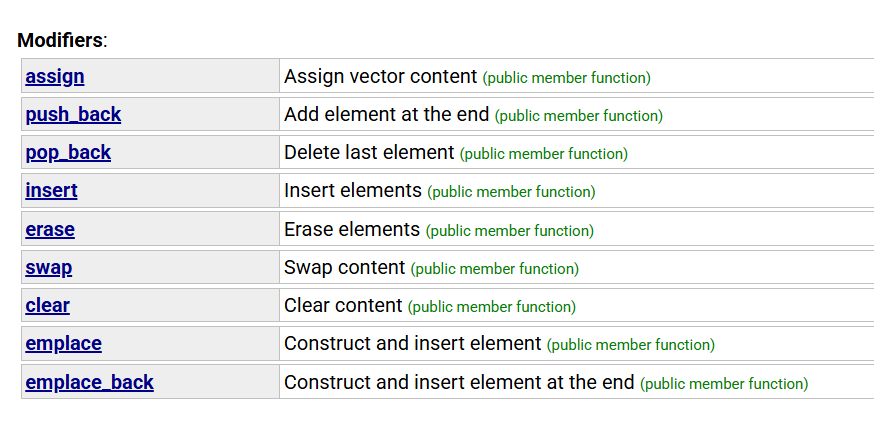
| 名称 | 使用示例 | 功能说明 |
|---|---|---|
| push_back(val)(尾插元素) | 最常用的添加元素方式,时间复杂度 O (1)(扩容时除外) | |
| pop_back() (尾删元素) | 直接删除最后一个元素,无返回值,时间复杂度 O (1) | |
| find() (查找元素) | 不是 vector 成员函数,而是 <algorithm> 库提供的通用算法 | |
| insert(pos, val)(中间插入) | 在 pos 迭代器位置前插入元素 插入后,后续元素会向后移动,时间复杂度 O (n) | |
| erase(pos)(中间删除) | 删除 pos 迭代器位置的元素 删除后,后续元素会向前移动,时间复杂度 O (n) | |
| swap(v2)(交换两个vector的数据) | 底层只是交换内部指针,效率极高 |
演示代码
cpp
#include <iostream>
#include <vector>
#include <algorithm> // std::find
using namespace std;

int main() {
    // ---------------- 1. push_back 尾插 ----------------
    vector<int> v;
    v.push_back(1);
    v.push_back(2);
    v.push_back(3);
    cout << "push_back后: ";
    for (int x : v) cout << x << " ";
    // 输出:push_back后: 1 2 3
    cout << endl;

    // ---------------- 2. pop_back 尾删 ----------------
    v.pop_back(); // 删除最后一个元素3
    cout << "pop_back后: ";
    for (int x : v) cout << x << " ";
    // 输出:pop_back后: 1 2
    cout << endl;

    // ---------------- 3. find 查找(非成员函数) ----------------
    // 查找元素2
    auto it = find(v.begin(), v.end(), 2);
    if (it != v.end()) {
        cout << "find找到元素: " << *it << endl;
        // 输出:find找到元素: 2
    } else {
        cout << "find未找到元素" << endl;
    }

    // 查找不存在的元素99
    it = find(v.begin(), v.end(), 99);
    if (it != v.end()) {
        cout << "find找到元素: " << *it << endl;
    } else {
        cout << "find未找到元素99" << endl;
        // 输出:find未找到元素99
    }

    // ---------------- 4. insert 在position之前插入val ----------------
    // 在开头插入0
    v.insert(v.begin(), 0);
    // 在第二个元素(下标1)前插入10
    v.insert(v.begin() + 1, 10);
    cout << "insert后: ";
    for (int x : v) cout << x << " ";
    // 输出:insert后: 0 10 1 2
    cout << endl;

    // ---------------- 5. erase 删除position位置的数据 ----------------
    // 删除下标1位置的元素10
    v.erase(v.begin() + 1);
    cout << "erase后: ";
    for (int x : v) cout << x << " ";
    // 输出:erase后: 0 1 2
    cout << endl;

    // ---------------- 6. swap 交换两个vector的数据空间 ----------------
    vector<int> v1 = {100, 200, 300};
    vector<int> v2 = {400, 500, 600};
    cout << "交换前v1: ";
    for (int x : v1) cout << x << " ";
    cout << "\n交换前v2: ";
    for (int x : v2) cout << x << " ";
    // 交换前v1: 100 200 300
    // 交换前v2: 400 500 600
    cout << endl;

    v1.swap(v2);
    cout << "交换后v1: ";
    for (int x : v1) cout << x << " ";
    cout << "\n交换后v2: ";
    for (int x : v2) cout << x << " ";
    // 交换后v1: 400 500 600
    // 交换后v2: 100 200 300
    cout << endl;

    return 0;
}