仓库提供了官方的开源 skill 包,帮助 AI 编码 agent 使用 Elastic stack 工作。它们基于 Agent Skills开放标准构建,为 Claude Code 、Cursor 、GitHub Copilot 等 agent 提供执行 Elastic 特定任务所需的专业知识,从而更准确、更高效地完成工作。
这些 skills 覆盖了与 Elasticsearch API 交互、构建 Kibana dashboard、配置 Fleet policy,以及使用 Observability 和 Elastic Security 工作流等领域。
什么是 AI agent skills?
AI agent skills 是一种轻量级开放格式,用于通过专业知识扩展 AI agent 的能力。每个 skill 都是一个独立文件夹,其中包含一个带有元数据和说明的 SKILL.md 文件。
agent 会在启动时通过读取 skill 的名称和描述字段来发现可用 skills,然后在检测到匹配任务时按需加载完整说明。
这种方式让 agent 默认保持快速,同时在需要时能够访问深入的流程化知识。
有关该标准的更多背景信息,请参阅 agentskills.io 。
可用 skills
elastic/agent-skills 仓库中的 skills 专注于 Elastic 产品和 Elastic stack:
-
与 Elasticsearch API 交互(搜索、索引、集群管理)。
-
构建和管理 Kibana dashboard、saved object 和 visualization。
-
配置 Fleet policy、Elastic Agent integration 和 Beats pipeline。
-
用于 Observability、Elastic Security 和 APM 工作流的模式。
安装
你可以使用带有 npx 的 skills CLI 安装 Elastic skills,或者通过克隆 elastic/agent-skills 仓库并运行附带的安装脚本来安装。 npx 方法需要你的环境中提供带有 npx 的 Node.js 。
npx(推荐)
安装 skills 的最快方式是使用 skills CLI。运行以下命令以启动交互式提示,你可以在其中选择 skills 和目标 agents:
npx skills add elastic/agent-skills按名称安装特定 skill:
npx skills add elastic/agent-skills --skill elasticsearch-esql或者使用 @ 简写直接将 skill 指定为 repo@skill(等同于 --skill):
npx skills add elastic/agent-skills@elasticsearch-esql安装到指定的 agents:
npx skills add elastic/agent-skills -a cursor -a claude-code在不安装的情况下列出可用 skills:
npx skills add elastic/agent-skills --list在不提示的情况下将所有 skills 安装到所有 agents:
npx skills add elastic/agent-skills --all| 标志 | 说明 |
|---|---|
-a, --agent |
目标指定的 agents |
-s, --skill |
按名称安装特定 skills |
-g, --global |
安装到用户主目录,而不是项目目录 |
-y, --yes |
跳过确认提示 |
--all |
在不提示的情况下将所有 skills 安装到所有 agents |
--list |
在不安装的情况下列出可用 skills |
本地克隆
如果你更倾向于使用本地 checkout,或者你的环境没有 Node.js 或 npx,可以克隆该仓库并使用内置的 bash 安装脚本:
git clone https://github.com/elastic/agent-skills.git
cd agent-skills
./scripts/install-skills.sh add -a <agent>
该脚本需要 bash 3.2+ 以及标准 Unix 工具(awk、find、cp、rm、mkdir)。
| 标志 | 说明 |
|---|---|
-a, --agent |
目标 agent(可重复使用) |
-s, --skill |
按名称安装特定 skills |
-f, --force |
覆盖已安装的 skills |
-y, --yes |
跳过确认提示 |
支持的 agents
以下 AI coding agents 兼容 Agent Skills 格式:
| Agent | Install directory |
|---|---|
| Claude Code | .claude/skills |
| Cursor | .agents/skills |
| Codex | .agents/skills |
| OpenCode | .agents/skills |
| Pi | .pi/agent/skills |
| Windsurf | .windsurf/skills |
| Roo | .roo/skills |
| Cline | .agents/skills |
| GitHub Copilot | .agents/skills |
| Gemini CLI | .agents/skills |
更新 skills
skills 在安装时会被复制到你的项目目录或 home 目录。当仓库更新了新的指令、bug 修复或额外资源时,这些变更不会自动同步到你的本地副本。
更新流程取决于你是如何安装 skills 的(npx 或本地 clone)。
使用 npx
检查已安装的 skills 是否有上游更新:
npx skills check拉取所有已安装 skills 的最新版本:
npx skills update提示
默认的
npx安装方式使用 symlink(符号链接),因此每个 agent 都指向同一个规范副本。只需要更新一次,就可以让所有 agents 同时刷新到最新版本。
使用本地 clone
重新运行 installer,并使用 --force 来覆盖已有的 skills:
git pull ./scripts/install-skills.sh add -a <agent> --force问题与反馈
如果你发现问题或有建议,可以在 elastic/agent-skills 仓库中提交 issue。
实践
接下来,我们以 Claude Code 为例来进行展示。
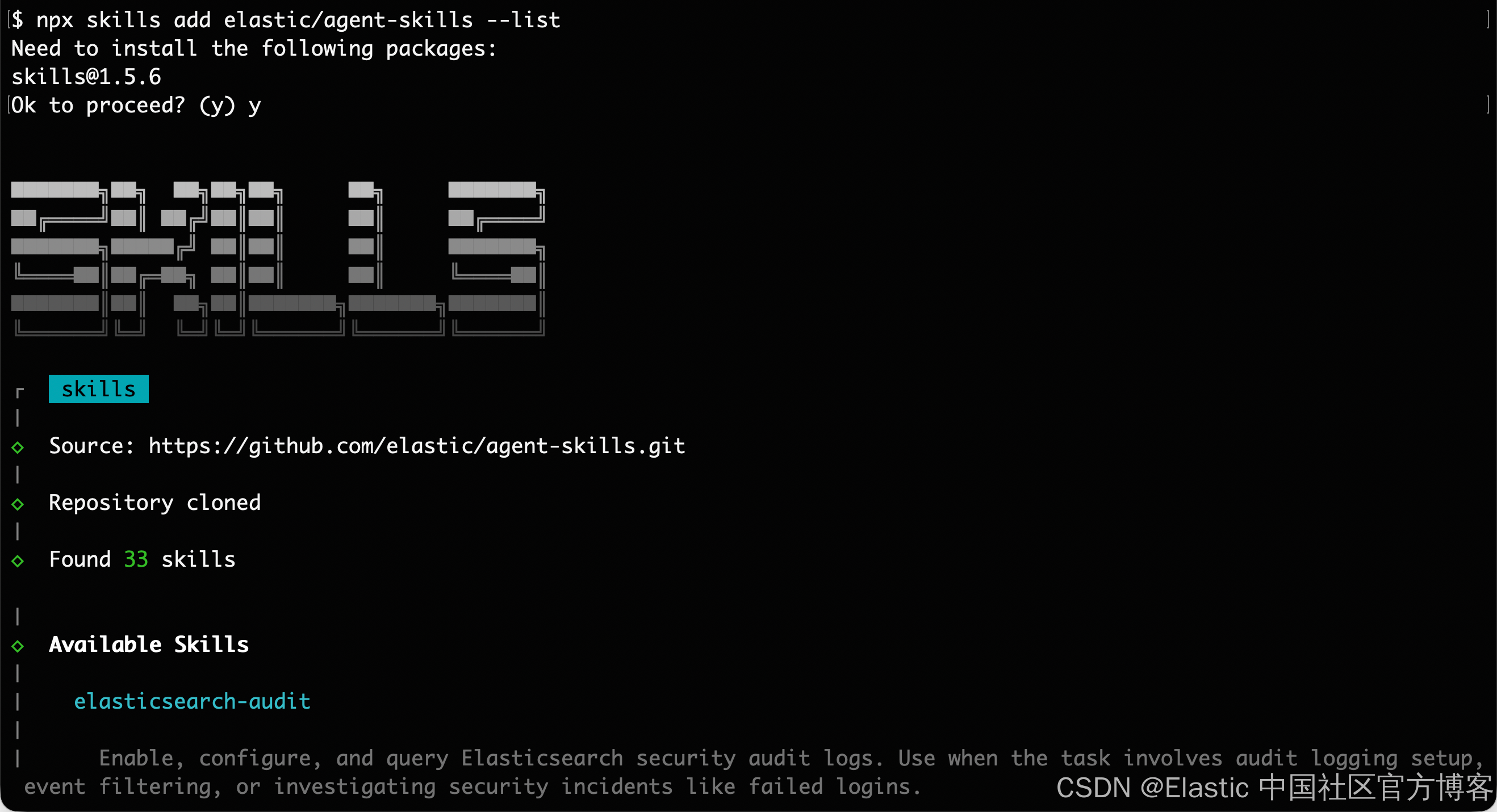
列出所有的 skills:
npx skills add elastic/agent-skills --list

$ npx skills add elastic/agent-skills --list
Need to install the following packages:
skills@1.5.6
Ok to proceed? (y) y


███████╗██╗  ██╗██╗██╗     ██╗     ███████╗
██╔════╝██║ ██╔╝██║██║     ██║     ██╔════╝
███████╗█████╔╝ ██║██║     ██║     ███████╗
╚════██║██╔═██╗ ██║██║     ██║     ╚════██║
███████║██║  ██╗██║███████╗███████╗███████║
╚══════╝╚═╝  ╚═╝╚═╝╚══════╝╚══════╝╚══════╝

┌   skills
│
◇  Source: https://github.com/elastic/agent-skills.git
│
◇  Repository cloned
│
◇  Found 33 skills

│
◇  Available Skills
│
│    elasticsearch-audit
│
│      Enable, configure, and query Elasticsearch security audit logs. Use when the task involves audit logging setup, event filtering, or investigating security incidents like failed logins.
│
│    elasticsearch-authn
│
│      Authenticate to Elasticsearch using native, file-based, LDAP/AD, SAML, OIDC, Kerberos, JWT, or certificate realms. Use when connecting with credentials, choosing a realm, or managing API keys. Assumes the target realms are already configured.
│
│    elasticsearch-authz
│
│      Manage Elasticsearch RBAC: native users, roles, role mappings, document- and field-level security. Use when creating users or roles, assigning privileges, or mapping external realms like LDAP/SAML.
│
│    elasticsearch-esql
│
│      Execute ES|QL (Elasticsearch Query Language) queries, use when the user wants to query Elasticsearch data, analyze logs, aggregate metrics, explore data, or create charts and dashboards from ES|QL results.
│
│    elasticsearch-file-ingest
│
│      Ingest and transform data files (CSV/JSON/Parquet/Arrow IPC) into Elasticsearch with stream processing and custom transforms. Use when loading files or batch importing data --- not for reindexing, general ingest pipeline design, or bulk API patterns.
│
│    elasticsearch-onboarding
│
│      Help developers new to Elasticsearch get from zero to a working search experience. Guide them through understanding their intent, mapping their data, and building a search experience with best practices baked in. Use this when developers are new to Elasticsearch and need help getting started with their search use case.
│
│    elasticsearch-security-troubleshooting
│
│      Diagnose and resolve Elasticsearch security errors: 401/403 failures, TLS problems, expired API keys, role mapping mismatches, and Kibana login issues. Use when the user reports a security error.
│
│    kibana-agent-builder
│
│      Create and manage Agent Builder agents and custom tools in Kibana. Use when asked to create, update, delete, test, or inspect agents or tools in Agent Builder.
│
│    kibana-alerting-rules
│
│      Create and manage Kibana alerting rules via REST API or Terraform. Use when creating, updating, or managing rule lifecycle (enable, disable, mute, snooze) or rules-as-code workflows.
│
│    kibana-audit
│
│      Enable and configure Kibana audit logging for saved object access, logins, and space operations. Use when setting up Kibana audit, filtering events, or correlating Kibana and ES audit logs.
│
│    kibana-connectors
│
│      Create and manage Kibana connectors for Slack, PagerDuty, Jira, webhooks, and more via REST API or Terraform. Use when configuring third-party integrations or managing connectors as code.
│
│    kibana-dashboards
│
│      Create and manage Kibana Dashboards and visualizations. Use when you need to define dashboards and visualizations declaratively, version control them, or automate their deployment.
│
│    kibana-vega
│
│      Create Vega and Vega-Lite visualizations with ES|QL data sources in Kibana. Use when building custom charts, dashboards, or programmatic panel layouts beyond standard Lens charts.
│
│    kibana-streams
│
│      List, inspect, enable, disable, and resync Kibana Streams via the REST API. Use when the user needs stream details, ingest/query settings, queries, significant events, or attachments.
│
│    observability-edot-dotnet-instrument
│
│      Instrument a .NET application with the Elastic Distribution of OpenTelemetry (EDOT) .NET SDK for automatic tracing, metrics, and logs. Use when adding observability to a .NET service that has no existing APM agent.
│
│    observability-edot-dotnet-migrate
│
│      Migrate a .NET application from the classic Elastic APM .NET agent to the EDOT .NET SDK. Use when switching from Elastic.Apm.* packages to Elastic.OpenTelemetry.
│
│    observability-edot-java-instrument
│
│      Instrument a Java application with the Elastic Distribution of OpenTelemetry (EDOT) Java agent for automatic tracing, metrics, and logs. Use when adding observability to a Java service that has no existing APM agent.
│
│    observability-edot-java-migrate
│
│      Migrate a Java application from the classic Elastic APM Java agent to the EDOT Java agent. Use when switching from elastic-apm-agent.jar to elastic-otel-javaagent.jar.
│
│    observability-edot-python-instrument
│
│      Instrument a Python application with the Elastic Distribution of OpenTelemetry (EDOT) Python agent for automatic tracing, metrics, and logs. Use when adding observability to a Python service that has no existing APM agent.
│
│    observability-edot-python-migrate
│
│      Migrate a Python application from the classic Elastic APM Python agent to the EDOT Python agent. Use when switching from elastic-apm to elastic-opentelemetry.
│
│    observability-llm-obs
│
│      Monitor LLMs and agentic apps: performance, token/cost, response quality, and workflow orchestration. Use when the user asks about LLM monitoring, GenAI observability, or AI cost/quality.
│
│    observability-logs-search
│
│      Search and filter Observability logs using ES|QL. Use when investigating log spikes, errors, or anomalies; getting volume and trends; or drilling into services or containers during incidents.
│
│    observability-manage-slos
│
│      Create and manage SLOs in Elastic Observability using the Kibana API. Use when defining SLIs, setting error budgets, or managing SLO lifecycle.
│
│    observability-service-health
│
│      Assess APM service health using SLOs, alerts, ML, throughput, latency, error rate, and dependencies. Use when checking service status, performance, or when the user asks about service health.
│
│    security-alert-triage
│
│      Triage Elastic Security alerts --- gather context, classify threats, create cases, and acknowledge. Use when triaging alerts, performing SOC analysis, or investigating detections.
│
│    security-case-management
│
│      Create, search, update, and manage SOC cases via the Kibana Cases API. Use when tracking incidents, linking alerts to cases, adding investigation notes, or managing triage output.
│
│    security-detection-rule-management
│
│      Create, tune, and manage Elastic Security detection rules (SIEM and Endpoint). Use for false positives, exceptions, new coverage, noisy rules, or rule management via Kibana API.
│
│    security-generate-security-sample-data
│
│      Generate sample security events, attack scenarios, and synthetic alerts for Elastic Security. Use when demoing, populating dashboards, testing detection rules, or setting up a POC.
│
│    cloud-access-management
│
│      Manage Elastic Cloud organization access: invite users, assign roles to Serverless projects, and create or revoke Cloud API keys. Use when granting, modifying, or auditing user access.
│
│    cloud-create-project
│
│      Creates Elastic Cloud Serverless projects (Elasticsearch, Observability, or Security) via the REST API, saves credentials to file, and bootstraps a scoped Elasticsearch API key. Use when creating a new serverless project, provisioning a search or observability environment, or spinning up a new Elastic Cloud project.
│
│    cloud-manage-project
│
│      Manages existing Elastic Cloud Serverless projects: list, get, update, delete, reset credentials, resume, and load saved credentials. Connects to existing projects by resolving endpoints and acquiring scoped Elasticsearch API keys. Use when performing day-2 operations on serverless projects, connecting to an existing project, loading or resetting project credentials, or looking up project details.
│
│    cloud-network-security
│
│      Manage Serverless network security (traffic filters): create, update, and delete IP filters and AWS PrivateLink VPC filters. Use when restricting network access or configuring private connectivity.
│
│    cloud-setup
│
│      Configures Elastic Cloud authentication and environment defaults. Use when setting up EC_API_KEY, configuring Cloud API access, or when another cloud skill requires credentials.

│
└  Use --skill <name> to install specific skills

npm notice
npm notice New major version of npm available! 10.9.2 -> 11.14.1
npm notice Changelog: https://github.com/npm/cli/releases/tag/v11.14.1
npm notice To update run: npm install -g npm@11.14.1
npm notice
对 Calude Code 进行安装
npx skills add elastic/agent-skills -a claude-code
$ npx skills add elastic/agent-skills -a claude-code
███████╗██╗ ██╗██╗██╗ ██╗ ███████╗
██╔════╝██║ ██╔╝██║██║ ██║ ██╔════╝
███████╗█████╔╝ ██║██║ ██║ ███████╗
╚════██║██╔═██╗ ██║██║ ██║ ╚════██║
███████║██║ ██╗██║███████╗███████╗███████║
╚══════╝╚═╝ ╚═╝╚═╝╚══════╝╚══════╝╚══════╝
┌ skills
│
◇ Source: https://github.com/elastic/agent-skills.git
│
◇ Repository cloned
│
◇ Found 33 skills
│
◇ Select skills to install (space to toggle)
│ cloud-access-management, cloud-create-project, cloud-manage-project, cloud-network-security, cloud-setup,
elasticsearch-audit, elasticsearch-authn, elasticsearch-authz, elasticsearch-esql, elasticsearch-file-ingest,
elasticsearch-onboarding, elasticsearch-security-troubleshooting, kibana-agent-builder, kibana-alerting-rules,
kibana-audit, kibana-connectors, kibana-dashboards, kibana-streams, kibana-vega, observability-edot-dotnet-instrument,
observability-edot-dotnet-migrate, observability-edot-java-instrument, observability-edot-java-migrate,
observability-edot-python-instrument, observability-edot-python-migrate, observability-llm-obs,
observability-logs-search, observability-manage-slos, observability-service-health, security-alert-triage,
security-case-management, security-detection-rule-management, security-generate-security-sample-data
│
◇ Installation scope
│ Global
│
◇ Installation Summary ────────────────────────────────────╮
│ │
│ ~/.agents/skills/cloud-access-management │
│ copy → Claude Code │
│ │
│ ~/.agents/skills/cloud-create-project │
│ copy → Claude Code │
│ │
│ ~/.agents/skills/cloud-manage-project │
│ copy → Claude Code │
│ │
│ ~/.agents/skills/cloud-network-security │
│ copy → Claude Code │
│ │
│ ~/.agents/skills/cloud-setup │
│ copy → Claude Code │
│ │
│ ~/.agents/skills/elasticsearch-audit │
│ copy → Claude Code │
│ │
│ ~/.agents/skills/elasticsearch-authn │
│ copy → Claude Code │
│ │
│ ~/.agents/skills/elasticsearch-authz │
│ copy → Claude Code │
│ │
│ ~/.agents/skills/elasticsearch-esql │
│ copy → Claude Code │
│ │
│ ~/.agents/skills/elasticsearch-file-ingest │
│ copy → Claude Code │
│ │
│ ~/.agents/skills/elasticsearch-onboarding │
│ copy → Claude Code │
│ │
│ ~/.agents/skills/elasticsearch-security-troubleshooting │
│ copy → Claude Code │
│ │
│ ~/.agents/skills/kibana-agent-builder │
│ copy → Claude Code │
│ │
│ ~/.agents/skills/kibana-alerting-rules │
│ copy → Claude Code │
│ │
│ ~/.agents/skills/kibana-audit │
│ copy → Claude Code │
│ │
│ ~/.agents/skills/kibana-connectors │
│ copy → Claude Code │
│ │
│ ~/.agents/skills/kibana-dashboards │
│ copy → Claude Code │
│ │
│ ~/.agents/skills/kibana-streams │
│ copy → Claude Code │
│ │
│ ~/.agents/skills/kibana-vega │
│ copy → Claude Code │
│ │
│ ~/.agents/skills/observability-edot-dotnet-instrument │
│ copy → Claude Code │
│ │
│ ~/.agents/skills/observability-edot-dotnet-migrate │
│ copy → Claude Code │
│ │
│ ~/.agents/skills/observability-edot-java-instrument │
│ copy → Claude Code │
│ │
│ ~/.agents/skills/observability-edot-java-migrate │
│ copy → Claude Code │
│ │
│ ~/.agents/skills/observability-edot-python-instrument │
│ copy → Claude Code │
│ │
│ ~/.agents/skills/observability-edot-python-migrate │
│ copy → Claude Code │
│ │
│ ~/.agents/skills/observability-logs-search │
│ copy → Claude Code │
│ │
│ ~/.agents/skills/observability-llm-obs │
│ copy → Claude Code │
│ │
│ ~/.agents/skills/observability-service-health │
│ copy → Claude Code │
│ │
│ ~/.agents/skills/observability-manage-slos │
│ copy → Claude Code │
│ │
│ ~/.agents/skills/security-alert-triage │
│ copy → Claude Code │
│ │
│ ~/.agents/skills/security-case-management │
│ copy → Claude Code │
│ │
│ ~/.agents/skills/security-detection-rule-management │
│ copy → Claude Code │
│ │
│ ~/.agents/skills/security-generate-security-sample-data │
│ copy → Claude Code │
│ │
├───────────────────────────────────────────────────────────╯
│
◇ Proceed with installation?
│ Yes
│
◇ Installation complete
│
◇ Installed 33 skills ─────────────────────────────────────────╮
│ │
│ ✓ cloud-access-management (copied) │
│ → ~/.claude/skills/cloud-access-management │
│ ✓ cloud-create-project (copied) │
│ → ~/.claude/skills/cloud-create-project │
│ ✓ cloud-manage-project (copied) │
│ → ~/.claude/skills/cloud-manage-project │
│ ✓ cloud-network-security (copied) │
│ → ~/.claude/skills/cloud-network-security │
│ ✓ cloud-setup (copied) │
│ → ~/.claude/skills/cloud-setup │
│ ✓ elasticsearch-audit (copied) │
│ → ~/.claude/skills/elasticsearch-audit │
│ ✓ elasticsearch-authn (copied) │
│ → ~/.claude/skills/elasticsearch-authn │
│ ✓ elasticsearch-authz (copied) │
│ → ~/.claude/skills/elasticsearch-authz │
│ ✓ elasticsearch-esql (copied) │
│ → ~/.claude/skills/elasticsearch-esql │
│ ✓ elasticsearch-file-ingest (copied) │
│ → ~/.claude/skills/elasticsearch-file-ingest │
│ ✓ elasticsearch-onboarding (copied) │
│ → ~/.claude/skills/elasticsearch-onboarding │
│ ✓ elasticsearch-security-troubleshooting (copied) │
│ → ~/.claude/skills/elasticsearch-security-troubleshooting │
│ ✓ kibana-agent-builder (copied) │
│ → ~/.claude/skills/kibana-agent-builder │
│ ✓ kibana-alerting-rules (copied) │
│ → ~/.claude/skills/kibana-alerting-rules │
│ ✓ kibana-audit (copied) │
│ → ~/.claude/skills/kibana-audit │
│ ✓ kibana-connectors (copied) │
│ → ~/.claude/skills/kibana-connectors │
│ ✓ kibana-dashboards (copied) │
│ → ~/.claude/skills/kibana-dashboards │
│ ✓ kibana-streams (copied) │
│ → ~/.claude/skills/kibana-streams │
│ ✓ kibana-vega (copied) │
│ → ~/.claude/skills/kibana-vega │
│ ✓ observability-edot-dotnet-instrument (copied) │
│ → ~/.claude/skills/observability-edot-dotnet-instrument │
│ ✓ observability-edot-dotnet-migrate (copied) │
│ → ~/.claude/skills/observability-edot-dotnet-migrate │
│ ✓ observability-edot-java-instrument (copied) │
│ → ~/.claude/skills/observability-edot-java-instrument │
│ ✓ observability-edot-java-migrate (copied) │
│ → ~/.claude/skills/observability-edot-java-migrate │
│ ✓ observability-edot-python-instrument (copied) │
│ → ~/.claude/skills/observability-edot-python-instrument │
│ ✓ observability-edot-python-migrate (copied) │
│ → ~/.claude/skills/observability-edot-python-migrate │
│ ✓ observability-logs-search (copied) │
│ → ~/.claude/skills/observability-logs-search │
│ ✓ observability-llm-obs (copied) │
│ → ~/.claude/skills/observability-llm-obs │
│ ✓ observability-service-health (copied) │
│ → ~/.claude/skills/observability-service-health │
│ ✓ observability-manage-slos (copied) │
│ → ~/.claude/skills/observability-manage-slos │
│ ✓ security-alert-triage (copied) │
│ → ~/.claude/skills/security-alert-triage │
│ ✓ security-case-management (copied) │
│ → ~/.claude/skills/security-case-management │
│ ✓ security-detection-rule-management (copied) │
│ → ~/.claude/skills/security-detection-rule-management │
│ ✓ security-generate-security-sample-data (copied) │
│ → ~/.claude/skills/security-generate-security-sample-data │
│ │
├───────────────────────────────────────────────────────────────╯
│
└ Done! Review skills before use; they run with full agent permissions.在 VS Code 里进行查看
我们可以简单地在 Claude 聊天窗口打入:
/elasticsearch-esql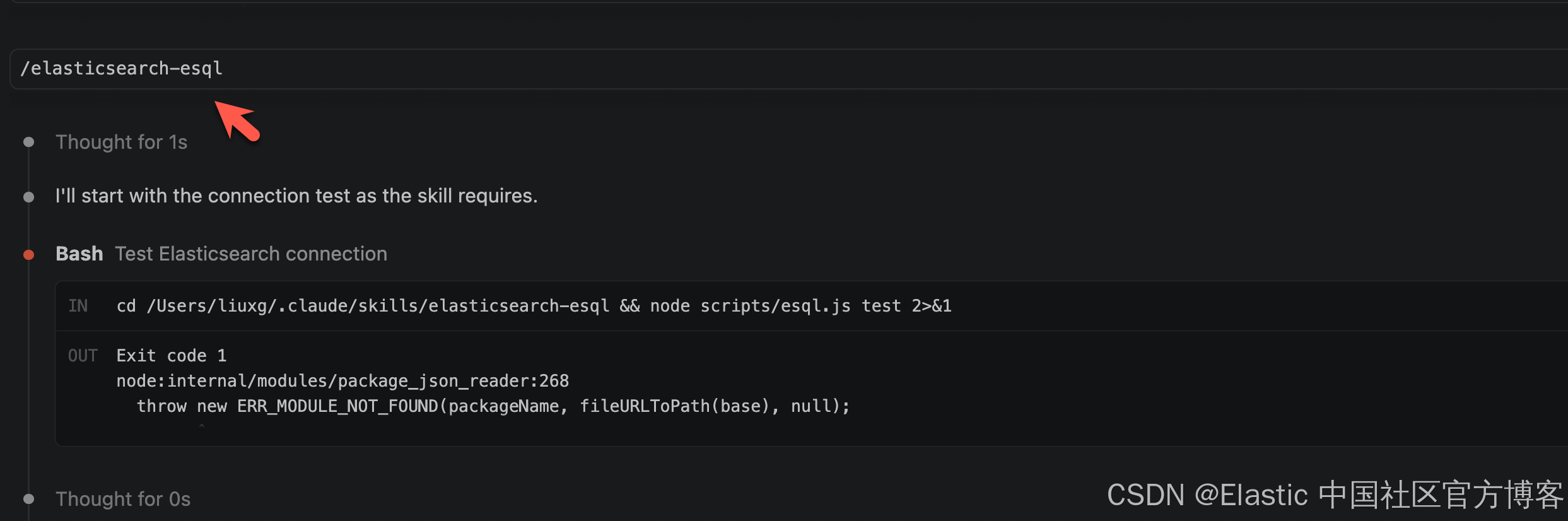
注:elasticsearch-esql 是我们其中的一个 skill。
紧接着,它会向我们要求提交连接到 Elasticsearch 的变量:
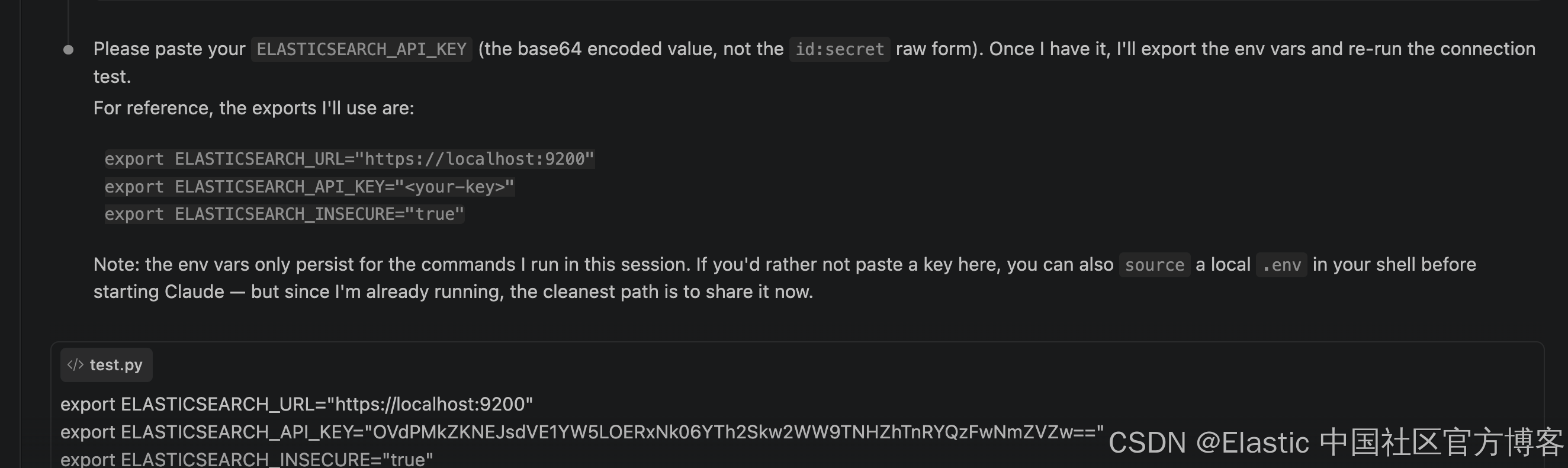
这样,我们可以建立和 Elasticsearch 的连接。
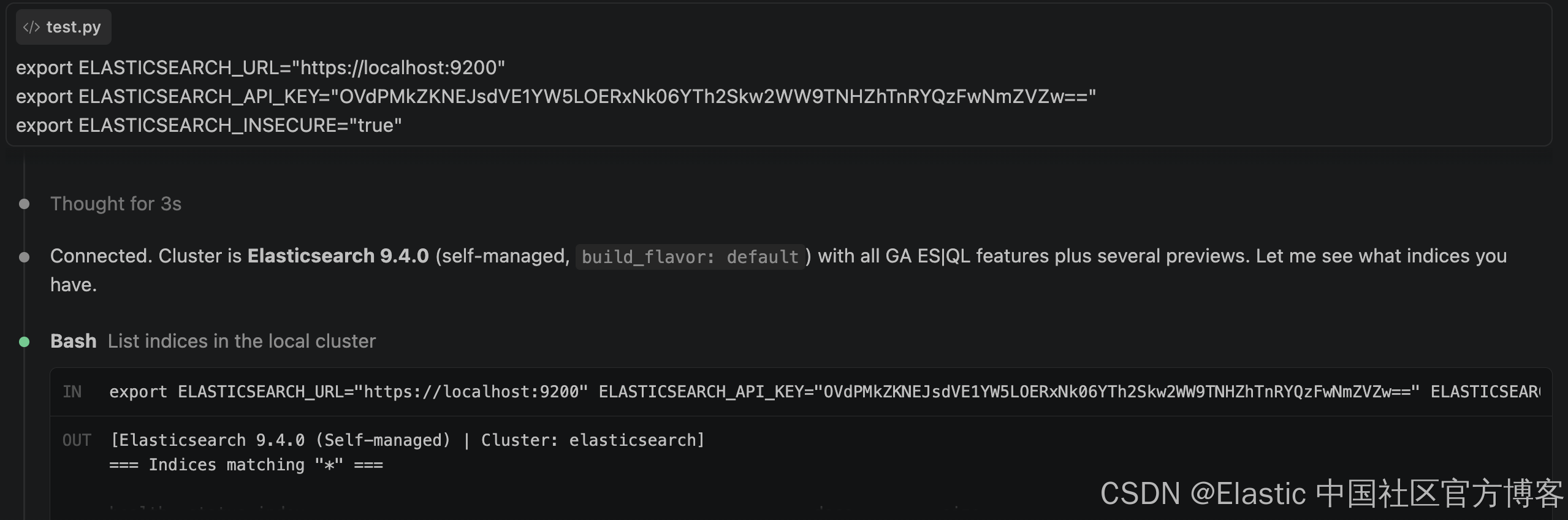
接下来,我们可以来进行提问:
what are the indices in the clusters?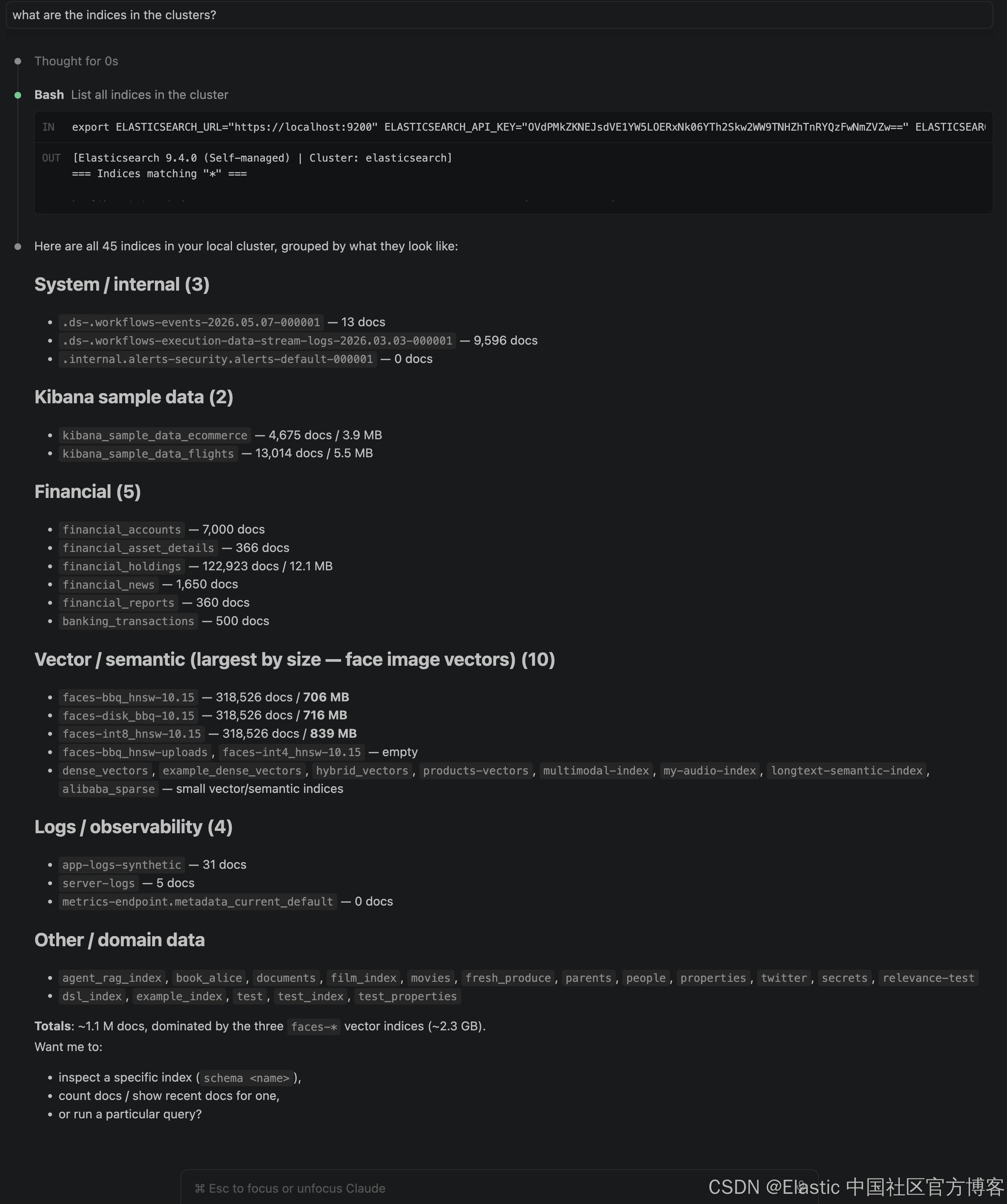
What are the AI agents in AI builder?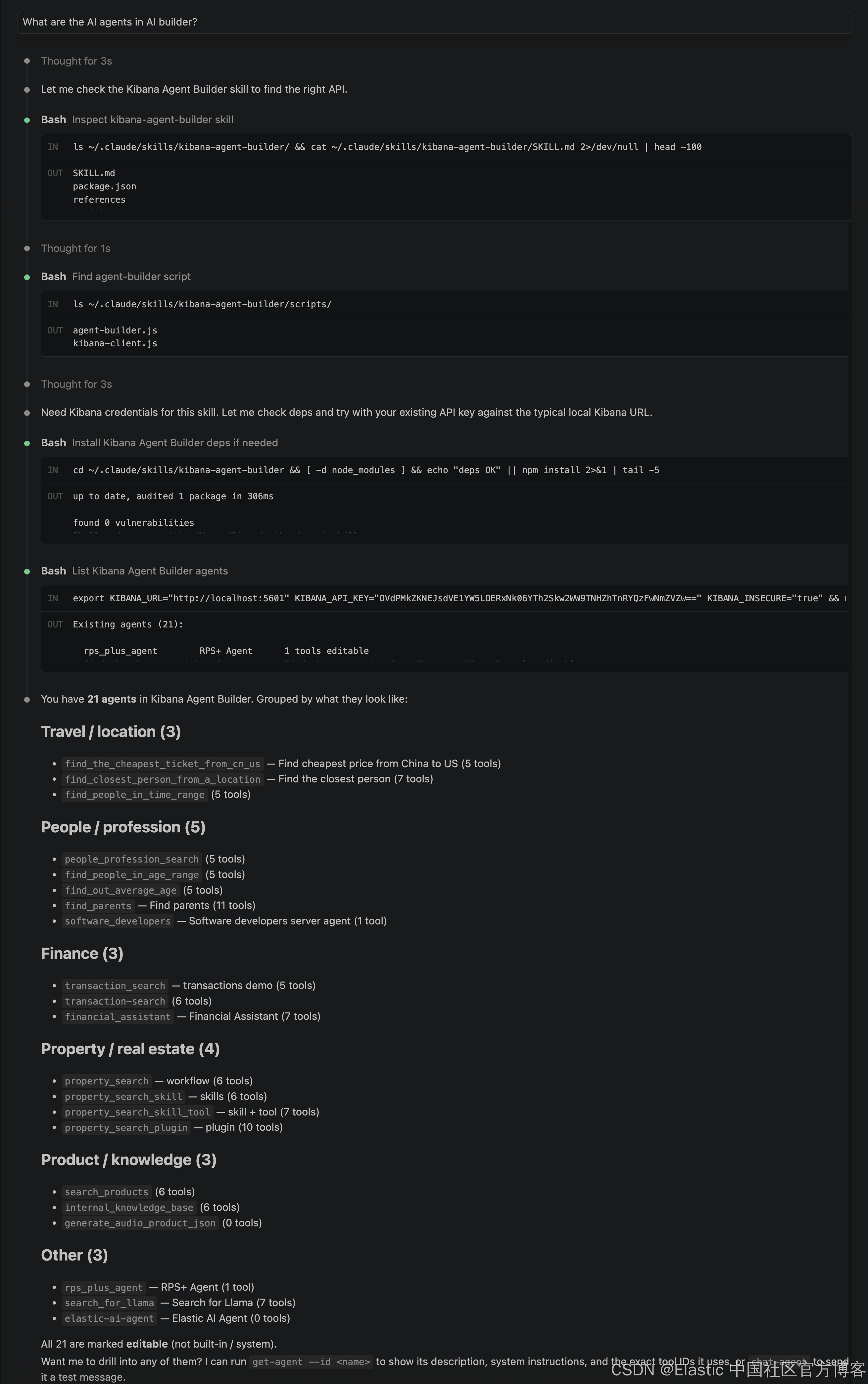
What is the cheapest air-ticket price from China to US? What are the cities?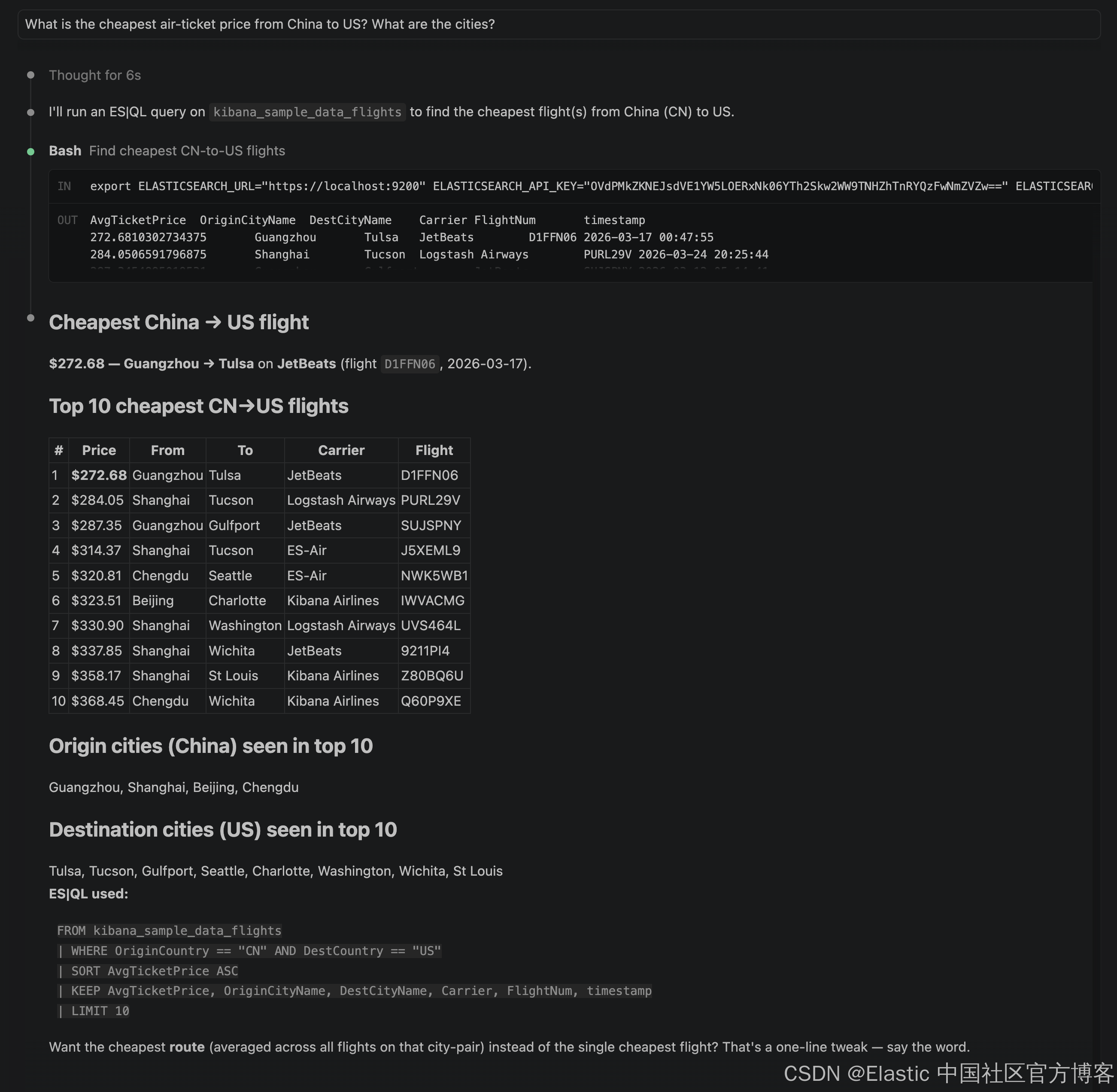
Hooray! 祝大家使用 agent-skills 愉快!