《Jetpack Compose vs XML:fillMaxSize、fillMaxHeight、fillMaxWidth 全面对比》
- 需求与最终效果
- [XML 实现(传统方式)](#XML 实现(传统方式))
- [Jetpack Compose 实现(现代方式)](#Jetpack Compose 实现(现代方式))
- 实际开发建议
- 总结
需求与最终效果
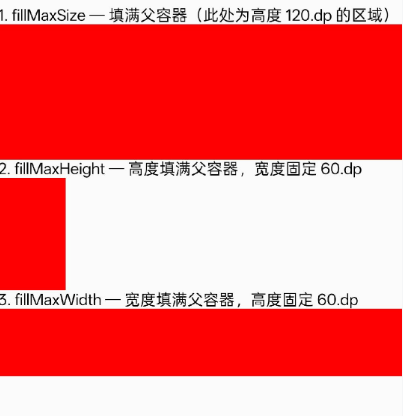
我们构建三个简单示例:
fillMaxSize:子视图填满父容器的全部空间。
fillMaxHeight:子视图高度填满父容器,宽度固定。
fillMaxWidth:子视图宽度填满父容器,高度固定。
分别用 XML(传统视图系统) 和 Jetpack Compose 实现,并观察其行为。
XML 实现(传统方式)
xml
<?xml version="1.0" encoding="utf-8"?>
<LinearLayout xmlns:android="http://schemas.android.com/apk/res/android"
    android:layout_width="match_parent"
    android:layout_height="match_parent"
    android:orientation="vertical"
    android:paddingTop="48dp">

    <!-- 示例1:fillMaxSize -->
    <TextView
        android:layout_width="wrap_content"
        android:layout_height="wrap_content"
        android:text="1. fillMaxSize --- 填满父容器(此处为高度 120.dp 的区域)"
        android:layout_marginBottom="8dp" />

    <FrameLayout
        android:layout_width="match_parent"
        android:layout_height="120dp"
        android:layout_marginBottom="16dp">
        <View
            android:layout_width="match_parent"
            android:layout_height="match_parent"
            android:background="@android:color/holo_red_dark" />
    </FrameLayout>

    <!-- 示例2:fillMaxHeight -->
    <TextView
        android:layout_width="wrap_content"
        android:layout_height="wrap_content"
        android:text="2. fillMaxHeight --- 高度填满父容器,宽度固定 60.dp"
        android:layout_marginBottom="8dp" />

    <FrameLayout
        android:layout_width="match_parent"
        android:layout_height="100dp"
        android:layout_marginBottom="16dp">
        <View
            android:layout_width="60dp"
            android:layout_height="match_parent"
            android:background="@android:color/holo_red_dark" />
    </FrameLayout>

    <!-- 示例3:fillMaxWidth -->
    <TextView
        android:layout_width="wrap_content"
        android:layout_height="wrap_content"
        android:text="3. fillMaxWidth --- 宽度填满父容器,高度固定 60.dp"
        android:layout_marginBottom="8dp" />

    <FrameLayout
        android:layout_width="match_parent"
        android:layout_height="80dp">
        <View
            android:layout_width="match_parent"
            android:layout_height="60dp"
            android:background="@android:color/holo_red_dark" />
    </FrameLayout>

</LinearLayout>
Jetpack Compose 实现(现代方式)
kotlin
package com.example.myapplication

import android.os.Bundle
import androidx.activity.ComponentActivity
import androidx.activity.compose.setContent
import androidx.compose.foundation.background
import androidx.compose.foundation.layout.Box
import androidx.compose.foundation.layout.Column
import androidx.compose.foundation.layout.fillMaxHeight
import androidx.compose.foundation.layout.fillMaxSize
import androidx.compose.foundation.layout.fillMaxWidth
import androidx.compose.foundation.layout.height
import androidx.compose.foundation.layout.padding
import androidx.compose.foundation.layout.width
import androidx.compose.material3.Text
import androidx.compose.ui.Modifier
import androidx.compose.ui.graphics.Color
import androidx.compose.ui.unit.dp

class MainActivity : ComponentActivity() {
    override fun onCreate(savedInstanceState: Bundle?) {
        super.onCreate(savedInstanceState)
        setContent {
            Column(
                modifier = Modifier
                    .fillMaxSize()
                    .padding(top = 48.dp)
            ) {
                // 示例1:fillMaxSize
                Text("1. fillMaxSize --- 填满父容器(此处为高度 120.dp 的区域)")
                Box(
                    modifier = Modifier
                        .height(120.dp)
                        .fillMaxWidth()
                ) {
                    Box(
                        modifier = Modifier
                            .fillMaxSize()
                            .background(Color.Red)
                    )
                }

                // 示例2:fillMaxHeight
                Text("2. fillMaxHeight --- 高度填满父容器,宽度固定 60.dp")
                Box(
                    modifier = Modifier
                        .height(100.dp)
                        .fillMaxWidth()
                ) {
                    Box(
                        modifier = Modifier
                            .fillMaxHeight()
                            .width(60.dp)
                            .background(Color.Red)
                    )
                }

                // 示例3:fillMaxWidth
                Text("3. fillMaxWidth --- 宽度填满父容器,高度固定 60.dp")
                Box(
                    modifier = Modifier
                        .height(80.dp)
                        .fillMaxWidth()
                ) {
                    Box(
                        modifier = Modifier
                            .fillMaxWidth()
                            .height(60.dp)
                            .background(Color.Red)
                    )
                }
            }
        }
    }
}
Modifier.fillMaxSize():等同于 XML 的 match_parent(宽高均填满父容器约束)。
Modifier.fillMaxHeight():高度填满父容器,宽度由其他 Modifier(如 width(60.dp))决定。
Modifier.fillMaxWidth():宽度填满父容器,高度由其他 Modifier 决定。
所有填充 Modifier 都是相对于父容器的。注意:Compose 中不存在"match_parent"关键字,而是通过 fillMaxSize 系列函数表达相同意图。
代码更简洁、声明式,无需单独定义布局文件,所有 UI 逻辑集中在 Kotlin 中。
实际开发建议
新项目:推荐使用 Jetpack Compose。声明式 UI 与状态管理更符合现代趋势,且代码更加紧凑。
维护传统项目:XML 依然稳定可靠,与旧代码兼容性好。但新功能可以考虑逐步引入 Compose(通过 ComposeView 集成)。
理解填充行为:无论哪种方式,核心都是子视图尺寸参考父容器的约束。Compose 中的 fillMax 系列 Modifier 与 XML 的 match_parent 逻辑等价,但命名更强调"填满最大值"而非"匹配父类"。
总结
两种实现运行结果完全一致:
一个红色矩形,宽高均填满 120dp 高的父容器。
一个红色矩形,高度填满 100dp 高的父容器,宽度仅为 60dp。
一个红色矩形,宽度填满父容器(屏幕宽度),高度为 60dp。
这证明了 Compose 的 fillMaxSize/Height/Width 是 XML match_parent 的直接替代品。