k8s的pod管理及优化

kubernetes中的资源

1 资源管理介绍

  • 在kubernetes中,所有的内容都抽象为资源,用户需要通过操作资源来管理kubernetes。

  • kubernetes的本质上就是一个集群系统,用户可以在集群中部署各种服务

  • 所谓的部署服务,其实就是在kubernetes集群中运行一个个的容器,并将指定的程序跑在容器中。

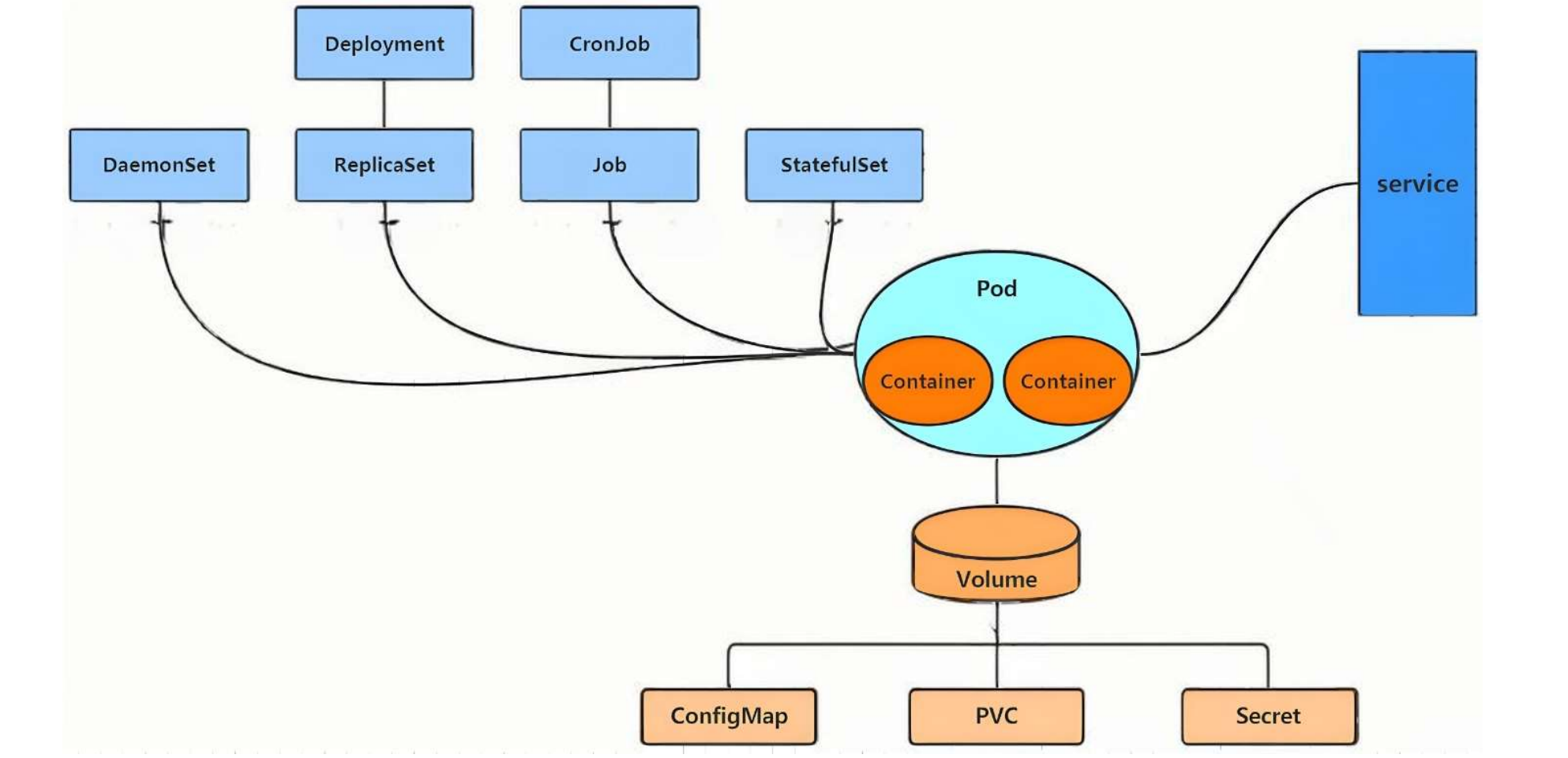
  • kubernetes的最小管理单元是pod而不是容器,只能将容器放在pod中,

  • kubernetes一般也不会直接管理Pod,而是通过Pod控制器来管理Pod的。

  • Pod中服务的访问是由kubernetes提供的Service资源来实现。

  • Pod中程序的数据需要持久化是由kubernetes提供的各种存储系统来实现

2 资源管理方式

命令式对象管理:直接使用命令去操作kubernetes资源

kubectl run nginx-pod --image=nginx:latest --port=80

命令式对象配置:通过命令配置和配置文件去操作kubernetes资源

kubectl create/patch -f nginx-pod.yaml

声明式对象配置:通过apply命令和配置文件去操作kubernetes资源

kubectl apply -f nginx-pod.yaml

类型 适用环境 优点 缺点
命令式对象管理 测试 简单 只能操作活动对象,无法审计、跟踪
命令式对象配置 开发 可以审计、跟踪 项目大时,配置文件多,操作麻烦
声明式对象配置 开发 支持目录操作 意外情况下难以调试

命令式的语法:

kubectl [command] [type] [name] [flags]

comand:指定要对资源执行的操作,例如create、get、delete

type:指定资源类型,比如deployment、pod、service

name:指定资源的名称,名称大小写敏感

flags:指定额外的可选参数

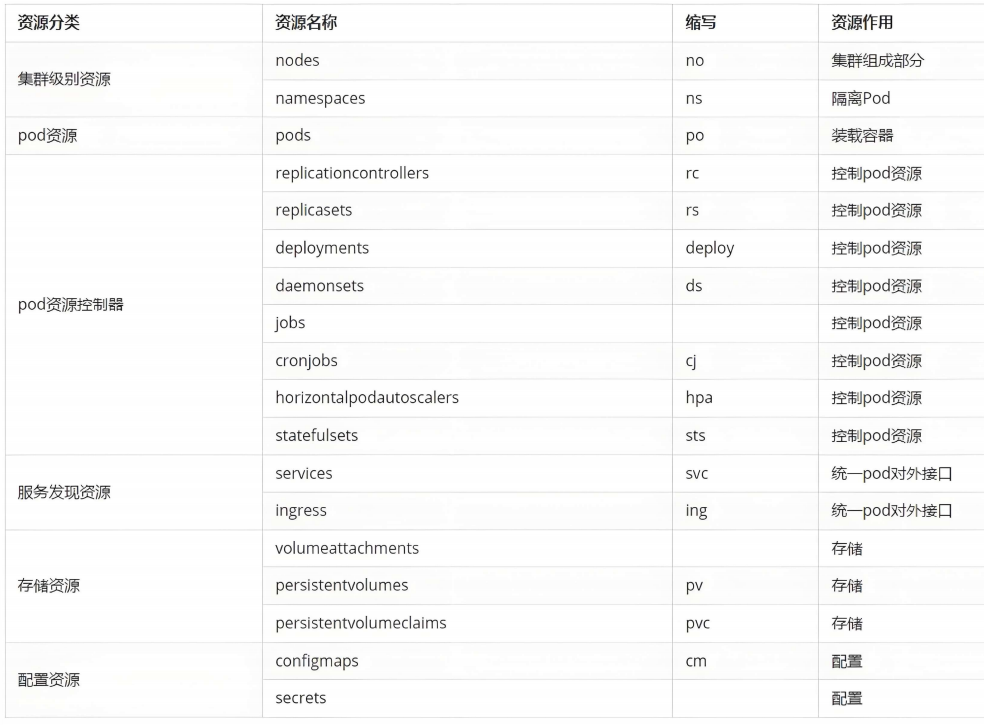
常用资源类型

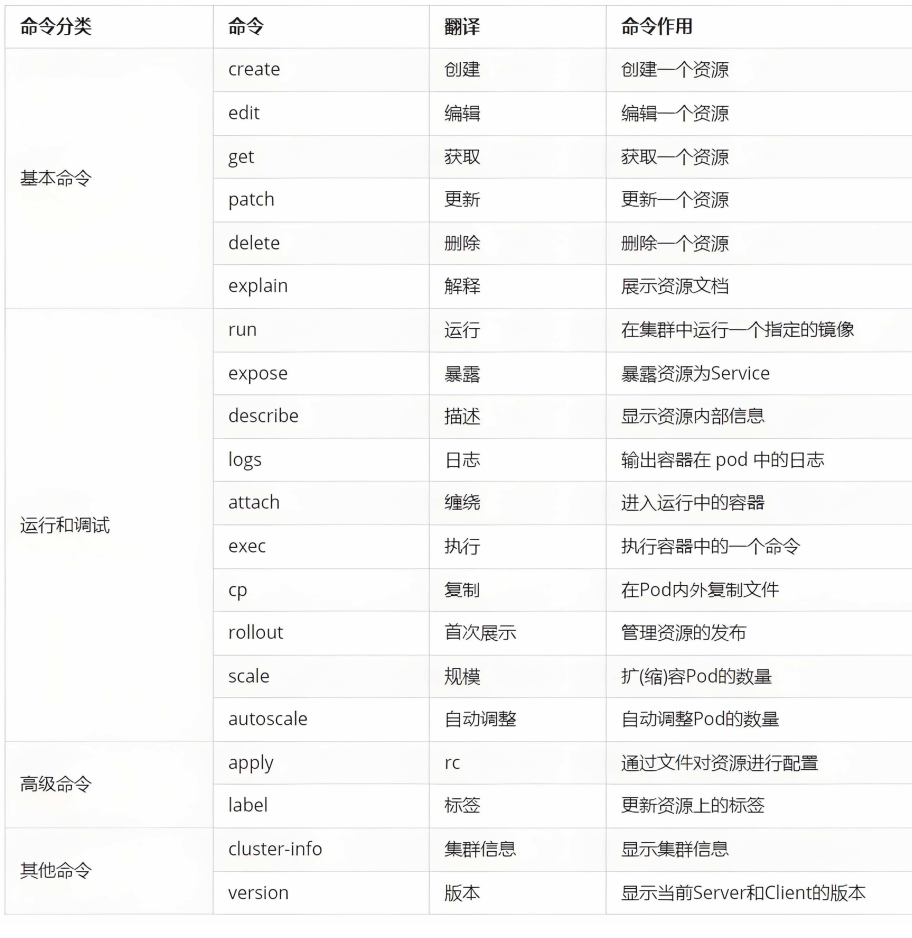
kubectl 常用命令操作

kubectl的详细说明地址:https://kubernetes.io/docs/reference/generated/kubectl/kubectl-commands
资源使用的方法

1.命令式

复制代码
[root@master ~]# kubectl run webpod --image nginx:latest --port 80
pod/webpod created
[root@master ~]# kubectl get pods
NAME     READY   STATUS              RESTARTS   AGE
webpod   0/1     ContainerCreating   0          8s
[root@master ~]# kubectl describe pods webpod
Name:             webpod
Namespace:        default
Priority:         0
Service Account:  default
Node:             node2/192.168.131.20
Start Time:       Wed, 15 Apr 2026 12:33:18 +0800
Labels:           run=webpod
Annotations:      <none>
Status:           Running
IP:               10.244.2.2
IPs:
  IP:  10.244.2.2
Containers:
  webpod:
    Container ID:   docker://130758e1e8393a185bdf787ba73b0c86f980ef53f93db51ba4db0600cb905208
    Image:          nginx:latest
    Image ID:       docker-pullable://nginx@sha256:ee228419e4bec2a78632d216e137e49dfd8f6f65b2f20e666ee4cab14eda781a
    Port:           80/TCP
    Host Port:      0/TCP
    State:          Running
      Started:      Wed, 15 Apr 2026 12:33:27 +0800
    Ready:          True
    Restart Count:  0
    Environment:    <none>
    Mounts:
      /var/run/secrets/kubernetes.io/serviceaccount from kube-api-access-m4bwc (ro)
Conditions:
  Type                        Status
  PodReadyToStartContainers   True
  Initialized                 True
  Ready                       True
  ContainersReady             True
  PodScheduled                True
Volumes:
  kube-api-access-m4bwc:
    Type:                    Projected (a volume that contains injected data from multiple sources)
    TokenExpirationSeconds:  3607
    ConfigMapName:           kube-root-ca.crt
    Optional:                false
    DownwardAPI:             true
QoS Class:                   BestEffort
Node-Selectors:              <none>
Tolerations:                 node.kubernetes.io/not-ready:NoExecute op=Exists for 300s
                             node.kubernetes.io/unreachable:NoExecute op=Exists for 300s
Events:
  Type    Reason     Age   From               Message
  ----    ------     ----  ----               -------
  Normal  Scheduled  22s   default-scheduler  Successfully assigned default/webpod to node2
  Normal  Pulling    21s   kubelet            spec.containers{webpod}: Pulling image "nginx:latest"
  Normal  Pulled     13s   kubelet            spec.containers{webpod}: Successfully pulled image "nginx:latest" in 7.73s (7.73s including waiting). Image size: 191974935 bytes.
  Normal  Created    13s   kubelet            spec.containers{webpod}: Container created
  Normal  Started    13s   kubelet            spec.containers{webpod}: Container started
[root@master ~]# kubectl get pods
NAME     READY   STATUS    RESTARTS   AGE
webpod   1/1     Running   0          25s
[root@master ~]# kubectl get pods -o wide
NAME     READY   STATUS    RESTARTS   AGE   IP           NODE    NOMINATED NODE   READINESS GATES
webpod   1/1     Running   0          69s   10.244.2.2   node2   <none>           <none>
[root@master ~]# kubectl delete pods webpod
pod "webpod" deleted from default namespace

2.yaml文件方式

复制代码
#生成控制器,控制器是pod启动时的管理工具
[root@master ~]# kubectl create deployment test --image nginx --replicas 1 --dry-run=client -o yaml > test.yml
[root@master ~]# vim test.yml
apiVersion: apps/v1
kind: Deployment
metadata:
  labels:
    app: test
  name: test
spec:
  replicas: 1
  selector:
    matchLabels:
      app: test
  template:
    metadata:
      labels:
        app: test
    spec:
      containers:
      - image: nginx
        name: nginx

#建立式
[root@master ~]# kubectl create -f test.yml
deployment.apps/test created
[root@master ~]# kubectl get pods
NAME                    READY   STATUS    RESTARTS   AGE
test-56848fd9dc-q9bkc   1/1     Running   0          12s
[root@master ~]# kubectl delete -f test.yml
deployment.apps "test" deleted from default namespace
[root@master ~]# kubectl get pods
No resources found in default namespace.

#声明式
[root@master ~]# kubectl apply -f test.yml
deployment.apps/test created
[root@master ~]# kubectl get pods
NAME                    READY   STATUS    RESTARTS   AGE
test-56848fd9dc-dwxfs   1/1     Running   0          8s

#注意:建立只能建立不能更新,声明可以
[root@master ~]#  vim test.yml
apiVersion: apps/v1
kind: Deployment
metadata:
  labels:
    app: test
  name: test
spec:
  replicas: 2			#只修改pod数量
。。。。。。。。。。。。。。。。。。


[root@master ~]# kubectl create -f test.yml
Error from server (AlreadyExists): error when creating "test.yml": deployments.apps "test" already exists

[root@master ~]# kubectl apply -f test.yml
deployment.apps/test configured
[root@master ~]# kubectl get pods
NAME                    READY   STATUS    RESTARTS   AGE
test-56848fd9dc-dwxfs   1/1     Running   0          71s
test-56848fd9dc-nvjl4   1/1     Running   0          11s

查看报错

复制代码
kubectl describe pods testpod | less 
或
kubectl logs pods/testpod -c web2

资源类型

1.node

复制代码
[root@master ~]# kubectl get nodes
NAME     STATUS   ROLES           AGE   VERSION
master   Ready    control-plane   16d   v1.35.3
node1    Ready    <none>          16d   v1.35.3
node2    Ready    <none>          16d   v1.35.3

#集群中加入新worker节点
[root@master ~]#  kubeadm token create --print-join-command

2.namespace

复制代码
[root@master ~]# kubectl get namespaces
NAME              STATUS   AGE
default           Active   16d
kube-flannel      Active   16d
kube-node-lease   Active   16d
kube-public       Active   16d
kube-system       Active   16d
[root@master ~]# kubectl get pods
NAME                    READY   STATUS    RESTARTS   AGE
test-56848fd9dc-9sw95   1/1     Running   0          25m
test-56848fd9dc-cxtnp   1/1     Running   0          27m
[root@master ~]# kubectl -n kube-flannel get pods
NAME                    READY   STATUS    RESTARTS       AGE
kube-flannel-ds-h8sg7   1/1     Running   6 (142m ago)   16d
kube-flannel-ds-p7kv5   1/1     Running   5 (142m ago)   16d
kube-flannel-ds-p8c2b   1/1     Running   6 (142m ago)   16d
[root@master ~]# kubectl create namespace timinglee
namespace/timinglee created
[root@master ~]# kubectl get namespaces
NAME              STATUS   AGE
default           Active   16d
kube-flannel      Active   16d
kube-node-lease   Active   16d
kube-public       Active   16d
kube-system       Active   16d
timinglee         Active   7s
[root@master ~]# kubectl -n timinglee run testpod --image nginx:latest
pod/testpod created
[root@master ~]# kubectl get pods
NAME                    READY   STATUS    RESTARTS   AGE
test-56848fd9dc-dwxfs   1/1     Running   0          29m
test-56848fd9dc-nvjl4   1/1     Running   0          28m
[root@master ~]# kubectl -n timinglee get pods
NAME      READY   STATUS    RESTARTS   AGE
testpod   1/1     Running   0          18s
[root@master ~]# kubectl -n timinglee run testpod --image nginx:latest
Error from server (AlreadyExists): pods "testpod" already exists
[root@master ~]# kubectl run testpod --image
error: flag needs an argument: --image
See 'kubectl run --help' for usage.
[root@master ~]# kubectl run testpod --image nginx:latest
 pod/testpod created
 #资源的隔离性

3 kubectl命令

#获取资源

复制代码
[root@master ~]# kubectl get deployments.apps
NAME   READY   UP-TO-DATE   AVAILABLE   AGE
test   1/1     1            1           25h
[root@master ~]# kubectl get pods
NAME                    READY   STATUS    RESTARTS   AGE
test-56848fd9dc-ltmgg   1/1     Running   0          28m

#编辑资源
[root@master ~]# kubectl edit deployments.apps test
.....
replicas: 4
.....

[root@master ~]# kubectl get pods
NAME                    READY   STATUS    RESTARTS   AGE
test-56848fd9dc-6fngg   1/1     Running   0          4m23s
test-56848fd9dc-ht4bt   1/1     Running   0          4m23s
test-56848fd9dc-l77mz   1/1     Running   0          4m23s
test-56848fd9dc-ltmgg   1/1     Running   0          4m23s

#更新资源

复制代码
[root@master ~]# kubectl patch deployments.apps test -p '{"spec":{"replicas":1}}'
deployment.apps/test patched
[root@master ~]# kubectl get pods
NAME                    READY   STATUS    RESTARTS   AGE
test-56848fd9dc-ltmgg   1/1     Running   0          26m

#端口暴漏

复制代码
[root@master ~]# kubectl expose  deployment test --port  80 --target-port 80
service/test exposed
[root@master ~]# kubectl describe service test
Name:                     test
Namespace:                default
Labels:                   app=test
Annotations:              <none>
Selector:                 app=test
Type:                     ClusterIP
IP Family Policy:         SingleStack
IP Families:              IPv4
IP:                       10.96.37.60
IPs:                      10.96.37.60
Port:                     <unset>  80/TCP
TargetPort:               80/TCP
Endpoints:                10.244.1.9:80,10.244.2.4:80
Session Affinity:         None
Internal Traffic Policy:  Cluster
Events:                   <none>

#查看日志

复制代码
[root@master ~]# kubectl logs pods/test-68d8574cb-dcf7t
10.244.0.0 - - [16/Apr/2026:06:26:31 +0000] "GET / HTTP/1.1" 200 65 "-" "curl/7.76.1" "-"
10.244.0.0 - - [16/Apr/2026:06:27:29 +0000] "GET /hostname.html HTTP/1.1" 200 21 "-" "curl/7.76.1" "-"

#attach

复制代码
[root@master ~]# kubectl run testpod  -it --image busybox
All commands and output from this session will be recorded in container logs, including credentials and sensitive information passed through the command prompt.
If you don't see a command prompt, try pressing enter.
/ #
/ #  (快捷键ctrl+pq可保持运行状态退出)
/ # Session ended, resume using 'kubectl attach testpod -c testpod -i -t' command when the pod is running

#重新进入交互状态
[root@master ~]# kubectl attach pods/testpod -it
All commands and output from this session will be recorded in container logs, including credentials and sensitive information passed through the command prompt.
If you don't see a command prompt, try pressing enter.
/ #
/ #
/ #

#exec

复制代码
[root@master ~]# kubectl exec -it pods/testpod -c testpod -- /bin/sh
/ #
/ #


[root@master ~]# kubectl cp testpod.yml testpod:/ -c testpod
[root@master ~]# kubectl ^C
[root@master ~]# kubectl exec -it pods/testpod -c testpod -- /bin/sh
/ #
/ # ls
bin          etc          lib          proc         sys          tmp          var
dev          home         lib64        root         testpod.yml  usr

#扩容

复制代码
[root@master ~]# kubectl get pods  --show-labels
NAME                   READY   STATUS    RESTARTS        AGE     LABELS
test-68d8574cb-lb9gq   1/1     Running   0               16m     app=test,pod-template-hash=68d8574cb
testpod                1/1     Running   1 (7m54s ago)   9m12s   run=testpod

[root@master ~]# kubectl label pods testpod  name=lee
pod/testpod labeled
[root@master ~]# kubectl get pods  --show-labels
NAME                   READY   STATUS    RESTARTS        AGE     LABELS
test-68d8574cb-lb9gq   1/1     Running   0               17m     app=test,pod-template-hash=68d8574cb
testpod                1/1     Running   1 (8m23s ago)   9m41s   name=lee,run=testpod


[root@master ~]# kubectl label pods testpod  name-
   pod/testpod unlabeled
[root@master ~]# kubectl get pods  --show-labels
NAME                   READY   STATUS    RESTARTS        AGE   LABELS
test-68d8574cb-lb9gq   1/1     Running   0               18m   app=test,pod-template-hash=68d8574cb
testpod                1/1     Running   1 (9m10s ago)   10m   run=testpod

#label

复制代码
[root@master ~]# kubectl get pods  --show-labels
NAME                   READY   STATUS    RESTARTS        AGE     LABELS
test-68d8574cb-lb9gq   1/1     Running   0               16m     app=test,pod-template-hash=68d8574cb
testpod                1/1     Running   1 (7m54s ago)   9m12s   run=testpod

[root@master ~]# kubectl label pods testpod  name=lee
pod/testpod labeled
[root@master ~]# kubectl get pods  --show-labels
NAME                   READY   STATUS    RESTARTS        AGE     LABELS
test-68d8574cb-lb9gq   1/1     Running   0               17m     app=test,pod-template-hash=68d8574cb
testpod                1/1     Running   1 (8m23s ago)   9m41s   name=lee,run=testpod


[root@master ~]# kubectl label pods testpod  name-
   pod/testpod unlabeled
[root@master ~]# kubectl get pods  --show-labels
NAME                   READY   STATUS    RESTARTS        AGE   LABELS
test-68d8574cb-lb9gq   1/1     Running   0               18m   app=test,pod-template-hash=68d8574cb
testpod                1/1     Running   1 (9m10s ago)   10m   run=testpod

Pod应用

1 自主式管理pod

bash 复制代码
[root@master ~]# mkdir pod	#创建一个存放资源的文件夹
[root@master ~]# cd pod/
[root@master pod]# kubectl run  myappv2 --image  myapp:v2  --port 80
pod/myappv2 created
[root@master pod]# kubectl get pods
NAME      READY   STATUS              RESTARTS   AGE
myappv2   0/1     ContainerCreating   0          8s				#创建中
[root@master pod]# kubectl get pods
NAME      READY   STATUS         RESTARTS   AGE
myappv2   0/1     ErrImagePull   0          20s					#镜像拉取失败

[root@master pod]# kubectl get pods
NAME      READY   STATUS             RESTARTS   AGE
myappv2   0/1     ImagePullBackOff   0          3m48s			#尝试重新拉去镜像

[root@master pod]# kubectl get pods
NAME      READY   STATUS    RESTARTS   AGE
myappv2   1/1     Running   0          4m20s

[root@master pod]# kubectl delete pods myappv2
pod "myappv2" deleted from default namespace
[root@master pod]# kubectl get pods
No resources found in default namespace.	
2 利用控制器管理pod

bash 复制代码
[root@master pod]# kubectl create deployment webcluster --image myapp:v2 --replicas 1
deployment.apps/webcluster created
[root@master pod]# kubectl get deployments.apps -o wide
NAME         READY   UP-TO-DATE   AVAILABLE   AGE   CONTAINERS   IMAGES     SELECTOR
webcluster   1/1     1            1           21m   myapp        myapp:v2   app=webcluster


[root@master pod]# kubectl scale deployment webcluster --replicas 2
deployment.apps/webcluster scaled
[root@master pod]# kubectl scale deployment webcluster --replicas 1
deployment.apps/webcluster scaled

#标签控制状态
[root@master pod]# kubectl label pods webcluster-6c8b4bb9d7-r88sl app-
pod/webcluster-6c8b4bb9d7-r88sl unlabeled
[root@master pod]# kubectl label pods webcluster-6c8b4bb9d7-r88sl app=webcluster
pod/webcluster-6c8b4bb9d7-r88sl labeled


#暴漏控制器(设定访问pod的vip)
[root@master pod]# kubectl expose deployment webcluster --port 80 --target-port 80
[root@master pod]# kubectl describe svc webcluster | tail -n 10
IP Family Policy:         SingleStack
IP Families:              IPv4
IP:                       10.109.37.194
IPs:                      10.109.37.194
Port:                     <unset>  80/TCP
TargetPort:               80/TCP
Endpoints:                10.244.1.16:80
Session Affinity:         None
Internal Traffic Policy:  Cluster
Events:                   <none>
[root@master pod]# curl 10.109.37.194
Hello MyApp | Version: v2 | <a href="hostname.html">Pod Name</a>


#更新版本
[root@master pod]# kubectl set image deployments webcluster myapp=myapp:v1
deployment.apps/webcluster image updated

[root@master pod]# curl 10.109.37.194
Hello MyApp | Version: v1 | <a href="hostname.html">Pod Name</a>

[root@master pod]# kubectl rollout history deployment webcluster
deployment.apps/webcluster
REVISION  CHANGE-CAUSE
1         <none>
2         <none>

#回退
[root@master pod]# kubectl rollout undo deployment webcluster --to-revision 1
deployment.apps/webcluster rolled back
[root@master pod]# curl 10.109.37.194
Hello MyApp | Version: v2 | <a href="hostname.html">Pod Name</a>

3 利用yaml文件部署应用

运行单个容器

复制代码
#运行单个容器
[root@master pod]# kubectl run  lee1 --image myapp:v1  --dry-run=client -o yaml  > 1test.yml
[root@master pod]# vim 1test.yml
apiVersion: v1
kind: Pod
metadata:
  labels:
    name: lee1
  name: lee1
spec:
  containers:
  - image: myapp:v1
    name: myappv1
    
[root@master pod]# kubectl apply -f 1test.yml
pod/lee1 created
[root@master pod]# kubectl get pods 
NAME   READY   STATUS    RESTARTS   AGE
lee1   1/1     Running   0          2s
[root@master pod]# kubectl describe  pods #查看详细信息
Name:             lee1
Namespace:        default
Priority:         0
Service Account:  default
Node:             node2/192.168.131.20
Start Time:       Fri, 17 Apr 2026 14:58:03 +0800
Labels:           run=lee1
Annotations:      <none>
Status:           Running
IP:               10.244.2.2
IPs:
  IP:  10.244.2.2
Containers:
  myappv1:
    Container ID:   docker://dc2ce42ca02c3b8c8ff6aac9052f100a8930a105324aac670c0e8da7c970b5e4
    Image:          myapp:v1
    Image ID:       docker-pullable://myapp@sha256:9eeca44ba2d410e54fccc54cbe9c021802aa8b9836a0bcf3d3229354e4c8870e
    Port:           <none>
    Host Port:      <none>
    State:          Running
      Started:      Fri, 17 Apr 2026 14:58:04 +0800
    Ready:          True
    Restart Count:  0
    Environment:    <none>
    Mounts:
      /var/run/secrets/kubernetes.io/serviceaccount from kube-api-access-d7rqm (ro)
Conditions:
  Type                        Status
  PodReadyToStartContainers   True
  Initialized                 True
  Ready                       True
  ContainersReady             True
  PodScheduled                True
Volumes:
  kube-api-access-d7rqm:
    Type:                    Projected (a volume that contains injected data from multiple sources)
    TokenExpirationSeconds:  3607
    ConfigMapName:           kube-root-ca.crt
    Optional:                false
    DownwardAPI:             true
QoS Class:                   BestEffort
Node-Selectors:              <none>
Tolerations:                 node.kubernetes.io/not-ready:NoExecute op=Exists for 300s
                             node.kubernetes.io/unreachable:NoExecute op=Exists for 300s
Events:
  Type    Reason     Age   From               Message
  ----    ------     ----  ----               -------
  Normal  Scheduled  46s   default-scheduler  Successfully assigned default/lee1 to node2
  Normal  Pulled     45s   kubelet            spec.containers{myappv1}: Container image "myapp:v1" already present on machine and can be accessed by the pod
  Normal  Created    45s   kubelet            spec.containers{myappv1}: Container created
  Normal  Started    45s   kubelet            spec.containers{myappv1}: Container started


Name:             webcluster-6c8b4bb9d7-4p8sd
Namespace:        default
Priority:         0
Service Account:  default
Node:             node2/192.168.131.20
Start Time:       Fri, 17 Apr 2026 14:58:38 +0800
Labels:           app=webcluster
                  pod-template-hash=6c8b4bb9d7
Annotations:      <none>
Status:           Running
IP:               10.244.2.3
IPs:
  IP:           10.244.2.3
Controlled By:  ReplicaSet/webcluster-6c8b4bb9d7
Containers:
  myapp:
    Container ID:   docker://91cbb7062719ddfa0b401f03e34ced8426bfe4efddf6dd8ca32fefb3dfc8b979
    Image:          myapp:v2
    Image ID:       docker-pullable://myapp@sha256:5f4afc8302ade316fc47c99ee1d41f8ba94dbe7e3e7747dd87215a15429b9102
    Port:           <none>
    Host Port:      <none>
    State:          Running
      Started:      Fri, 17 Apr 2026 14:58:39 +0800
    Ready:          True
    Restart Count:  0
    Environment:    <none>
    Mounts:
      /var/run/secrets/kubernetes.io/serviceaccount from kube-api-access-8lvxd (ro)
Conditions:
  Type                        Status
  PodReadyToStartContainers   True
  Initialized                 True
  Ready                       True
  ContainersReady             True
  PodScheduled                True
Volumes:
  kube-api-access-8lvxd:
    Type:                    Projected (a volume that contains injected data from multiple sources)
    TokenExpirationSeconds:  3607
    ConfigMapName:           kube-root-ca.crt
    Optional:                false
    DownwardAPI:             true
QoS Class:                   BestEffort
Node-Selectors:              <none>
Tolerations:                 node.kubernetes.io/not-ready:NoExecute op=Exists for 300s
                             node.kubernetes.io/unreachable:NoExecute op=Exists for 300s
Events:
  Type    Reason     Age   From               Message
  ----    ------     ----  ----               -------
  Normal  Scheduled  11s   default-scheduler  Successfully assigned default/webcluster-6c8b4bb9d7-4p8sd to node2
  Normal  Pulled     10s   kubelet            spec.containers{myapp}: Container image "myapp:v2" already present on machine and can be accessed by the pod
  Normal  Created    10s   kubelet            spec.containers{myapp}: Container created
  Normal  Started    10s   kubelet            spec.containers{myapp}: Container started


[root@master pod]# kubectl get pods
NAME   READY   STATUS    RESTARTS   AGE
lee1   1/1     Running   0          78s
[root@master pod]# kubectl get pods -o wide
NAME   READY   STATUS    RESTARTS   AGE     IP           NODE    NOMINATED NODE   READINESS GATES
lee1   1/1     Running   0          6m28s   10.244.2.2   node2   <none>           <none>


[root@master pod]# kubectl delete -f 1test.yml
pod "lee1" deleted from default namespace

运行多个容器

复制代码
[root@master pod]# cp 1test.yml  2test.yml
[root@master pod]# vim 2test.yml
apiVersion: v1
kind: Pod
metadata:
  labels:
    run: lee1
  name: lee1
spec:
  containers:
  - image: myapp:v1
    name: myappv1
  - image: busybox:latest
    name: busybox
    command:
      - /bin/sh
      - -c
      - sleep 20000
      
[root@master pod]# kubectl apply -f 2test.yml
pod/lee1 created
[root@master pod]# kubectl get pods
NAME   READY   STATUS    RESTARTS   AGE
lee1   2/2     Running   0          19s
[root@master pod]# kubectl delete -f 2test.yml  --force

理解pod间的网络整合

复制代码
[root@master pod]# cp 2test.yml 3test.yml
[root@master pod]# vim 3test.yml
apiVersion: v1
kind: Pod
metadata:
  labels:
    run: lee1
  name: lee1
spec:
  containers:
  - image: myapp:v1
    name: myappv1
  - image: busyboxplus:latest
    name: busybox
    command:
      - /bin/sh
      - -c
      - sleep 20000
[root@master pod]# kubectl apply -f 3test.yml
pod/lee1 created
[root@master pod]# kubectl get pods
NAME   READY   STATUS    RESTARTS   AGE
lee1   2/2     Running   0          11s
[root@master pod]# kubectl exec -it pods/lee1 -c busybox -- /bin/sh
/bin/sh: shopt: not found
[ root@lee1:/ ]$ curl localhost
Hello MyApp | Version: v1 | <a href="hostname.html">Pod Name</a>

端口映射

复制代码
[root@master pod]# cp 1test.yml  4test.yml
[root@master pod]# vim 4test.yml
apiVersion: v1
kind: Pod
metadata:
  labels:
    run: lee1
  name: lee1
spec:
  containers:
  - image: myapp:v1
    name: myappv1
    ports:
    - name: webport
      containerPort: 80
      hostPort: 80
      protocol: TCP
      

[root@master pod]# kubectl apply -f 4test.yml
The Pod "lee1" is invalid: spec.containers: Forbidden: pod updates may not add or remove containers
[root@master pod]# kubectl delete pods lee1 #先删除旧容器
pod "lee1" deleted from default namespace

[root@master pod]# kubectl apply -f 4test.yml
pod/lee1 created

[root@master pod]# kubectl get pods -o wide
NAME   READY   STATUS    RESTARTS   AGE   IP           NODE    NOMINATED NODE   READINESS GATES
lee1   1/1     Running   0          30s   10.244.1.5   node1   <none>           <none>

[root@master pod]# curl 192.168.131.10
Hello MyApp | Version: v1 | <a href="hostname.html">Pod Name</a>

选择运行节点

复制代码
[root@master pod]# cp 4test.yml 5test.yml
[root@master pod]# vim 5test.yml
apiVersion: v1
kind: Pod
metadata:
  labels:
    run: lee1
  name: lee1
spec:
  nodeSelector:
    kubernetes.io/hostname: node2
  containers:
  - image: myapp:v1
    name: myappv1
    ports:
    - name: webport
      containerPort: 80
      hostPort: 80
      protocol: TCP
[root@master pod]# kubectl apply -f 5test.yml
pod/lee1 created
[root@master pod]# kubectl get pods -o wide
NAME   READY   STATUS    RESTARTS   AGE   IP           NODE    NOMINATED NODE   READINESS GATES
lee1   1/1     Running   0          17s   10.244.2.5   node2   <none>           <none>

root@master pod]# cp  5test.yml  6test.yml
[root@master pod]# vim 6test.yml
apiVersion: v1
kind: Pod
metadata:
  labels:
    run: lee1
  name: lee1
spec:
  hostNetwork: true
  nodeSelector:
    kubernetes.io/hostname: node1
  containers:
  - image: busybox:latest
    name:  busybox
    command:
      - /bin/sh
      - -c
      - sleep 1000

[root@master pod]# kubectl apply -f 6test.yml
pod/lee1 created
[root@master pod]# kubectl exec -it pods/lee1 -c  busybox -- /bin/sh
/ #
/ # ip a	#与node2相同
1: lo: <LOOPBACK,UP,LOWER_UP> mtu 65536 qdisc noqueue qlen 1000
    link/loopback 00:00:00:00:00:00 brd 00:00:00:00:00:00
    inet 127.0.0.1/8 scope host lo
       valid_lft forever preferred_lft forever
    inet6 ::1/128 scope host
       valid_lft forever preferred_lft forever
2: eth0: <BROADCAST,MULTICAST,UP,LOWER_UP> mtu 1500 qdisc mq qlen 1000
    link/ether 00:0c:29:86:5d:cf brd ff:ff:ff:ff:ff:ff
    inet 192.168.131.20/24 brd 192.168.131.255 scope global noprefixroute eth0
       valid_lft forever preferred_lft forever
    inet6 fe80::20c:29ff:fe86:5dcf/64 scope link noprefixroute
       valid_lft forever preferred_lft forever
3: docker0: <NO-CARRIER,BROADCAST,MULTICAST,UP> mtu 1500 qdisc noqueue
    link/ether 86:a9:5f:51:a3:18 brd ff:ff:ff:ff:ff:ff
    inet 172.17.0.1/16 brd 172.17.255.255 scope global docker0
       valid_lft forever preferred_lft forever
4: flannel.1: <BROADCAST,MULTICAST,UP,LOWER_UP> mtu 1450 qdisc noqueue
    link/ether ce:22:bc:7f:d5:b3 brd ff:ff:ff:ff:ff:ff
    inet 10.244.2.0/32 scope global flannel.1
       valid_lft forever preferred_lft forever
    inet6 fe80::cc22:bcff:fe7f:d5b3/64 scope link
       valid_lft forever preferred_lft forever
5: cni0: <NO-CARRIER,BROADCAST,MULTICAST,UP> mtu 1500 qdisc noqueue qlen 1000
    link/ether 52:e0:95:5b:26:d7 brd ff:ff:ff:ff:ff:ff
    inet 10.244.2.1/24 brd 10.244.2.255 scope global cni0
       valid_lft forever preferred_lft forever
    inet6 fe80::50e0:95ff:fe5b:26d7/64 scope link
       valid_lft forever preferred_lft forever
相关推荐
笑洋仟2 小时前
docker的overlay2目录占用磁盘空间很大,清理办法
运维·docker·容器
倔强的胖蚂蚁2 小时前
主流大模型使用指南:Gemma/Llama 全流程
云原生·llama
木雷坞2 小时前
2026 年 5 月国内可用 Docker 镜像源列表与配置方法
运维·docker·容器
埃菲尔铁桶5 小时前
踩坑一周|OpenSandbox + AI Agent 冷启动从 2 分钟降到 1 秒,我们做了这些事
kubernetes
阿里云云原生6 小时前
从 Token 级观测到标准化治理:LoongSuite 如何补齐 OpenTelemetry 的 AI 可观测短板?
云原生
小小的木头人7 小时前
Docker Compose 镜像检测脚本(支持自动扫描 + 手动输入 YAML)
运维·docker·容器
沧州刺史8 小时前
k8s 拉取镜像时,请求提前断开(EOF)导致拉取失败
云原生·容器·kubernetes
2501_912784088 小时前
告别“汗水出海”:基于微服务架构的跨境电商系统设计与实现——以Taocarts为例
微服务·云原生·架构·taocarts
牛奶咖啡138 小时前
k8s容器编排技术实践——k8s的介绍及其整体运行架构
云原生·kubernetes·k8s是什么?有啥用?·k8s的应用场景·k8s的优缺点边界·k8s的重要概念·k8s的整体运行架构