修改C++标准基于使用Code Running拓展
可以看我上一章文章
 https://blog.csdn.net/2301_76542477/article/details/161060041?sharetype=blogdetail&sharerId=161060041&sharerefer=PC&sharesource=2301_76542477&spm=1011.2480.3001.8118
打开用户设置文件,只需要为编译命令添加上执行的C++版本即可
-std=C++23
"cpp": " Clear-Host; Set-Location $dir; $exe = \"$fileNameWithoutExt.exe\"; g++ \"$fileName\" -std=c++23 -o $exe; if ($?) { & .\\$exe }",
当你修改完以后你的程序就能正常编译,但是VS Code的红线依然存在
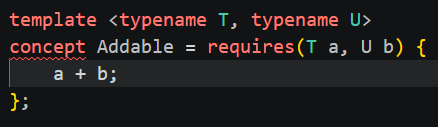
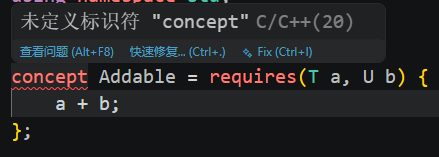
我们还需要修改IntelliSense
按Ctrl + Shift + P 输入命令:C/C++: Log Diagnostics
往上找到Standard Version查看当前使用的标准
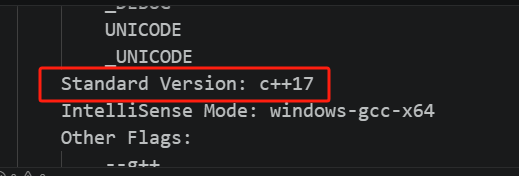
当前使用的是C++17这和设置的不一样
打开用户设置添加如下
"C_Cpp.default.cppStandard": "c++23",保存后即可完成修改
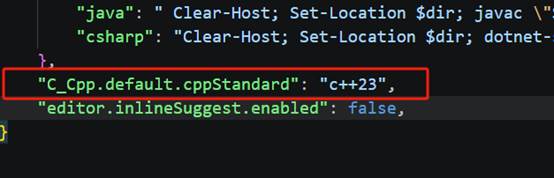
完成修改后再次检查一下
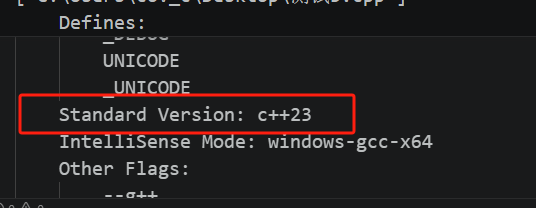
没问题即可
错误检查就正常了
最后给个代码试试看,下面的代码是需要C++20,默认的VS Code是运行不了的
如果你配置完后能正常运行并且没有小红线就表示你成功了!
#include <iostream>
#include <initializer_list>
#include <stdexcept>
using namespace std;

template <typename T, typename U>
concept Addable = requires(T a, U b) {
    a + b;
};

template <typename T>
concept type = !std::is_same_v<T, float>;  // 排除 float 类型

template <typename T>
requires type<T>
class MyArray {
private:
    T* data;
    size_t size;

public:
    MyArray(size_t n) {
        size = n;
        data = new T[n]{};
    }

    MyArray(initializer_list<T> list) {
        size = list.size();
        data = new T[size];

        size_t i = 0;
        for (auto& val : list) {
            data[i++] = val;
        }
    }

    ~MyArray() {
        delete[] data;
    }

    MyArray(const MyArray& other) {
        size = other.size;
        data = new T[size]{};
        for (size_t i = 0; i < size; i++) {
            data[i] = other.data[i];
        }
    }

    MyArray& operator=(MyArray other) {
        swap(data, other.data);
        swap(size, other.size);
        return *this;
    }

    T& operator[](size_t index) {
        return data[index];
    }

    const T& operator[](size_t index) const {
        return data[index];
    }

    size_t getSize() const {
        return size;
    }
};

template<typename T, typename U>
requires Addable<T, U>
auto operator+(const MyArray<T>& left, const MyArray<U>& right) {
    using ResultType = decltype(left[0] + right[0]);

    size_t n = (left.getSize() < right.getSize()) ? left.getSize() : right.getSize();

    MyArray<ResultType> temp(n);

    for (size_t i = 0; i < n; i++) {
        temp[i] = left[i] + right[i];
    }

    return temp;
}

template<typename T>
ostream& operator<<(ostream& os, const MyArray<T>& arr) {
    os << "[";
    for (size_t i = 0; i < arr.getSize(); i++) {
        os << arr[i];
        if (i + 1 < arr.getSize()) {
            os << ", ";
        }
    }
    os << "]";
    return os;
}

int main() {
    MyArray<int> a = {1, 2, 3};

    cout << "a = " << a << endl;

    return 0;
}