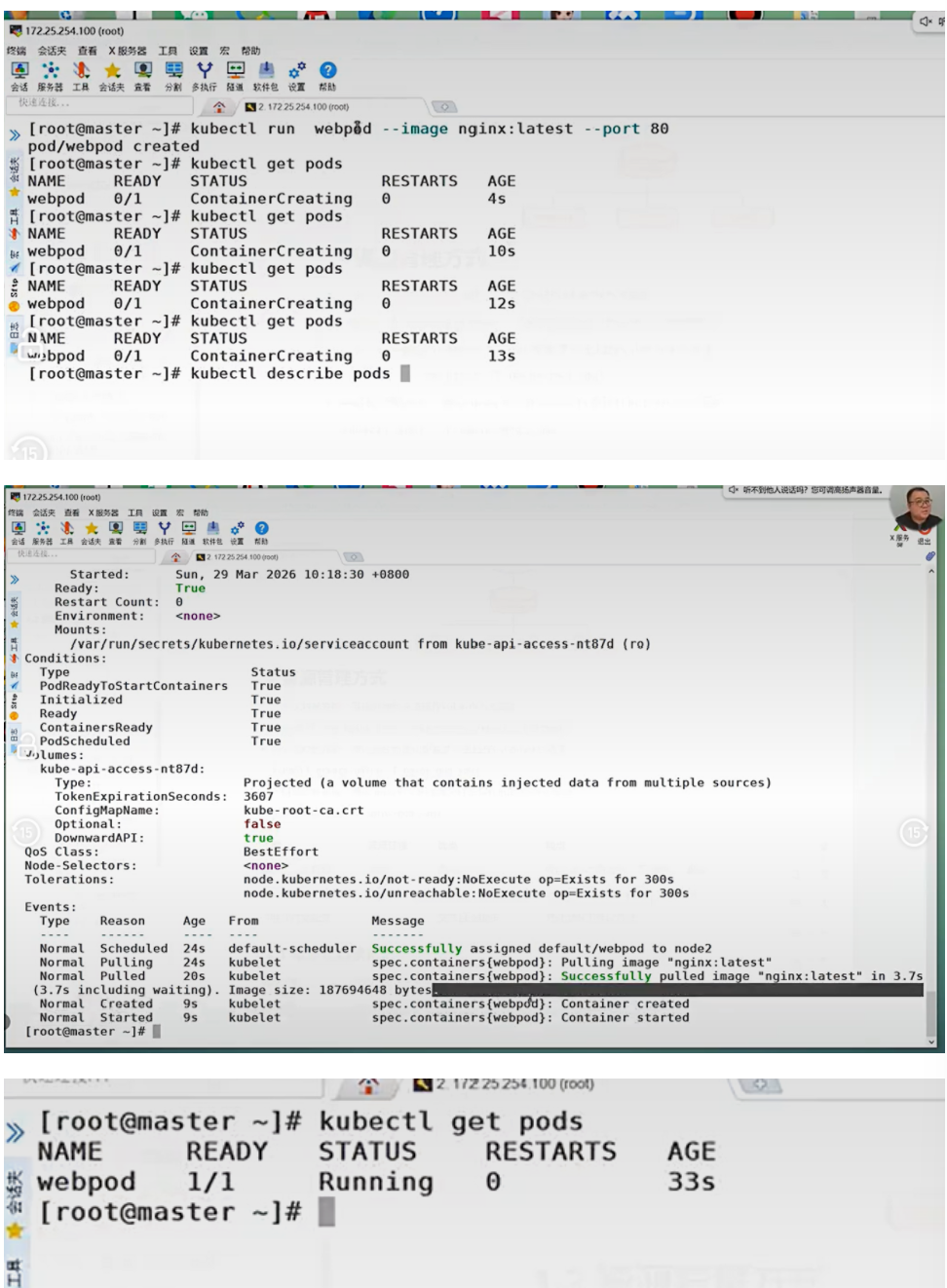
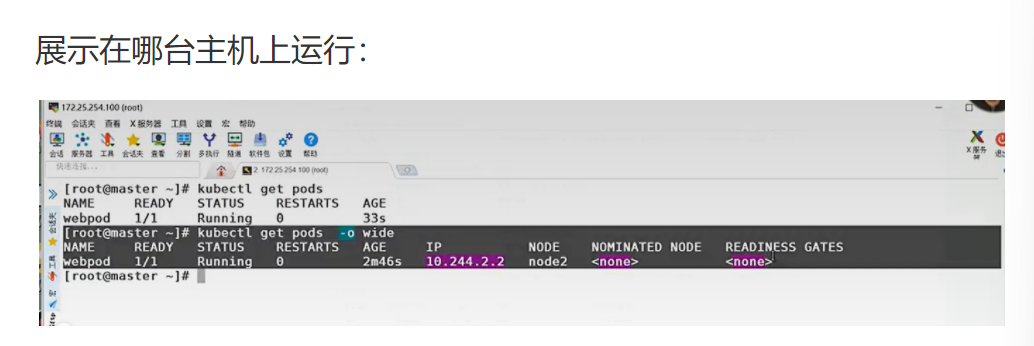
02(上)| K8s 资源管理全流程:命令、配置、生产避坑

目录

[Kubernetes 中的资源管理实战手册](#Kubernetes 中的资源管理实战手册)

[1.1 资源管理介绍](#1.1 资源管理介绍)

生活类比

核心解释

企业级生产应用

课后防宕机指南

[1.2 资源管理方式](#1.2 资源管理方式)

生活类比

核心解释

企业级生产应用

课后防宕机指南

[1.2.1 命令式对象管理](#1.2.1 命令式对象管理)

核心代码逐行解析

企业级生产应用

课后防宕机指南

[1.2.2 资源类型](#1.2.2 资源类型)

核心代码逐行解析

企业级生产应用

课后防宕机指南

[kubectl 常见命令操作](#kubectl 常见命令操作)

核心代码逐行解析

企业级生产应用

课后防宕机指南

[1.2.3 基本命令示例](#1.2.3 基本命令示例)

核心代码逐行解析

企业级生产应用

课后防宕机指南

[1.2.3 运行和调试命令示例](#1.2.3 运行和调试命令示例)

核心代码逐行解析

企业级生产应用

课后防宕机指南

[1.2.3 高级命令示例](#1.2.3 高级命令示例)

核心代码逐行解析

企业级生产应用

课后防宕机指南


Kubernetes 中的资源管理实战手册

1.1 资源管理介绍

原文

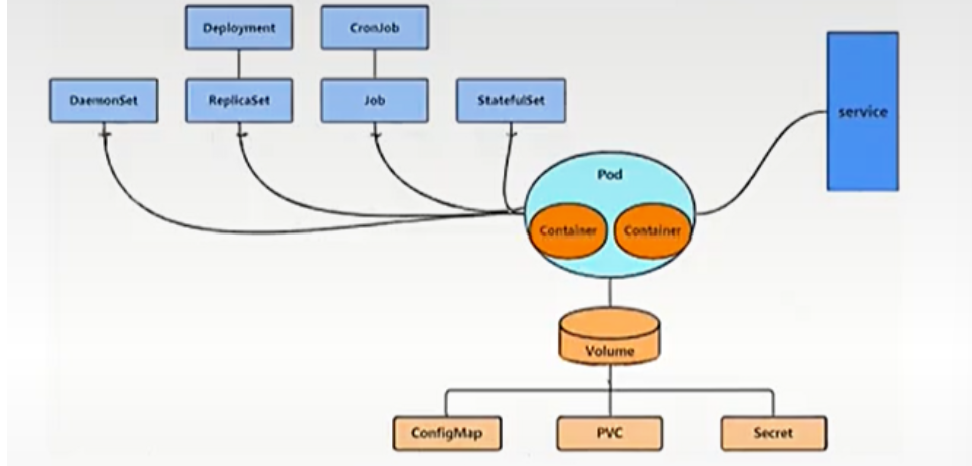
  • 在 kubernetes 中,所有的内容都抽象为资源,用户需要通过操作资源来管理 kubernetes。
  • kubernetes 的本质上就是一个集群系统,用户可以在集群中部署各种服务
  • 所谓的部署服务,其实就是在 kubernetes 集群中运行一个个的容器,并将指定的程序跑在容器中。
  • kubernetes 的最小管理单元是 pod 而不是容器,只能将容器放在 Pod 中,kubernetes 一般也不会直接管理 Pod, 而是通过 Pod 控制器来管理 Pod 的。
  • Pod 中服务的访问是由 kubernetes 提供的 Service 资源来实现。
  • Pod 中程序的数据需要持久化是由 kubernetes 提供的各种存储系统来实现

资源层级图(请在此处插入架构图)

复制代码
Drployiment CronJob
Demonset Replkcaset Job Statefuiset service
Pod
Volume
ConfigMap PVC Secret

生活类比

Kubernetes 就像一个大型物流公司:

  • 资源 = 物流公司的所有设施(仓库、货车、快递员、分拣中心)
  • Pod = 最小的运输单元(快递包裹),里面装着你的货物(容器)
  • Pod 控制器 = 快递调度员,负责管理包裹的收发、数量和位置
  • Service = 快递网点,统一对外提供收件和派件服务
  • 存储系统 = 仓库,用来存放需要长期保存的货物

核心解释

Kubernetes 采用 "一切皆资源" 的设计哲学,所有操作都通过 API 对资源进行 CRUD。容器不能直接运行在集群中,必须被 Pod 包裹。Pod 是一次性的、易逝的,所以需要控制器来保证其可用性和期望状态。

企业级生产应用

在千万级并发场景下,这种分层架构是高可用的基础:

  • 控制器保证服务副本数,单个 Pod 挂掉自动重建
  • Service 提供稳定的访问入口,Pod 漂移不影响客户端
  • 存储系统实现数据持久化,解决容器无状态问题

优化空间

  1. 使用 HPA 自动扩缩容,根据 CPU / 内存使用率动态调整 Pod 数量
  2. 采用 StatefulSet 管理有状态服务,保证网络标识和存储的稳定性
  3. 使用 PV/PVC 分离存储和计算,实现存储资源的动态调度

课后防宕机指南

常见错误 1:直接管理 Pod 而不使用控制器

  • 报错:Pod 意外终止后不会自动重建
  • 排查思路kubectl get pods查看 Pod 状态,检查是否有对应的 Deployment/StatefulSet

常见错误 2:Service 标签选择器与 Pod 标签不匹配

  • 报错:访问 Service 时出现 Connection Refused
  • 排查思路kubectl describe svc <service-name>查看 Endpoints 是否为空

1.2 资源管理方式

原文:命令式对象管理:直接使用命令去操作 kubernetes 资源

kubectl run nginx-pod --image=nginx:latest --port=80

  • 命令式对象配置:通过命令配置和配置文件去操作 kubernetes 资源kubectl create/patch -f nginx-pod.yaml
  • 声明式对象配置:通过 apply 命令和配置文件去操作 kubernetes 资源kubectl apply -f nginx-pod.yaml

表格

类型 适用环境 优点 缺点
命令式对象管理 测试 简单 只能操作活动对象,无法审计、跟踪
命令式对象配置 开发 可以审计、跟踪 项目大时,配置文件多,操作麻烦
声明式对象配置 开发 支持目录操作 意外情况下难以调试

生活类比

  • 命令式对象管理 = 口头告诉厨师 "给我做一份番茄炒蛋"
  • 命令式对象配置 = 写一张纸条给厨师 "番茄炒蛋:番茄 2 个,鸡蛋 3 个,盐少许"
  • 声明式对象配置 = 给厨师看一张番茄炒蛋的照片,说 "我就要这个样子的"

核心解释

三种方式代表了 Kubernetes 管理的不同阶段:

  1. 命令式:快速验证,适合临时测试
  2. 命令式配置:可以版本控制,但操作繁琐
  3. 声明式配置:生产环境标准,只关心最终状态,由 Kubernetes 负责实现

企业级生产应用

生产环境必须使用声明式对象配置:

  • 所有配置文件纳入 Git 版本控制
  • 使用 CI/CD 流水线自动 apply 配置
  • 支持回滚和审计,符合企业合规要求

优化空间

  1. 使用 Kustomize 或 Helm 管理复杂配置
  2. 采用 GitOps 模式,配置变更自动触发部署
  3. 使用 OPA Gatehouse 进行配置合规性检查

课后防宕机指南

常见错误 1:混合使用 kubectl create 和 kubectl apply

  • 报错The object already exists
  • 排查思路:统一使用 apply 管理所有资源,避免 create 和 apply 混用

常见错误 2:apply 时使用 --force 参数

  • 报错:可能导致资源被意外删除重建
  • 排查思路:除非明确知道后果,否则永远不要使用 --force 参数

1.2.1 命令式对象管理

原文:kubectl 是 kubernetes 集群的命令行工具,通过它能够对集群本身进行管理,并能够在集群上进行容器 化应用的安装部署

kubectl 命令的语法如下:

kubectl [command] [type] [name] [flags]

**comand:**指定要对资源执行的操作,例如 create、get、delete

**type:**指定资源类型,比如 deployment、pod、service

name: 指定资源的名称,名称大小写敏感

flags: 指定额外的可选参数

bash 复制代码
查看所有 pod
kubectl get pod

查看某个 pod
kubectl get pod pod_name

查看某个 pod, 以 yaml 格式展示结果
kubectl get pod pod_name -o yaml

核心代码逐行解析

bash 复制代码
kubectl get pod
  • 底层动作:向 Kubernetes API Server 发送 GET 请求,获取 default 命名空间下所有 Pod 资源的列表

  • 作用:快速查看集群中 Pod 的运行状态

  • :默认只显示 default 命名空间的 Pod,其他命名空间需要加-n <namespace>参数

    kubectl get pod pod_name -o yaml

  • 底层动作:向 API Server 发送 GET 请求,获取指定 Pod 的完整资源定义,并以 YAML 格式输出

  • 作用:查看 Pod 的详细配置和状态,用于问题排查

  • :输出内容包含 status 字段,这是只读的,不能直接修改后 apply

企业级生产应用

在生产环境中,kubectl 是最常用的排障工具:

  • 快速查看资源状态
  • 查看日志和事件
  • 临时进入容器调试

优化空间

  1. 配置 kubectl 别名和自动补全,提高操作效率
  2. 使用 kubectl 插件(如 kubectx、kubens)快速切换集群和命名空间
  3. 限制生产环境 kubectl 的访问权限,使用 RBAC 进行细粒度控制

课后防宕机指南

常见错误 1:误删生产环境 Pod

  • 报错:Pod 被删除,服务中断
  • 排查思路:如果是控制器管理的 Pod,会自动重建;如果是裸 Pod,需要重新创建

常见错误 2:使用 root 权限运行 kubectl

  • 报错:可能导致意外操作,造成严重后果
  • 排查思路:使用普通用户和 RBAC 权限运行 kubectl

1.2.2 资源类型

kubernetes 中所有的内容都抽象为资源

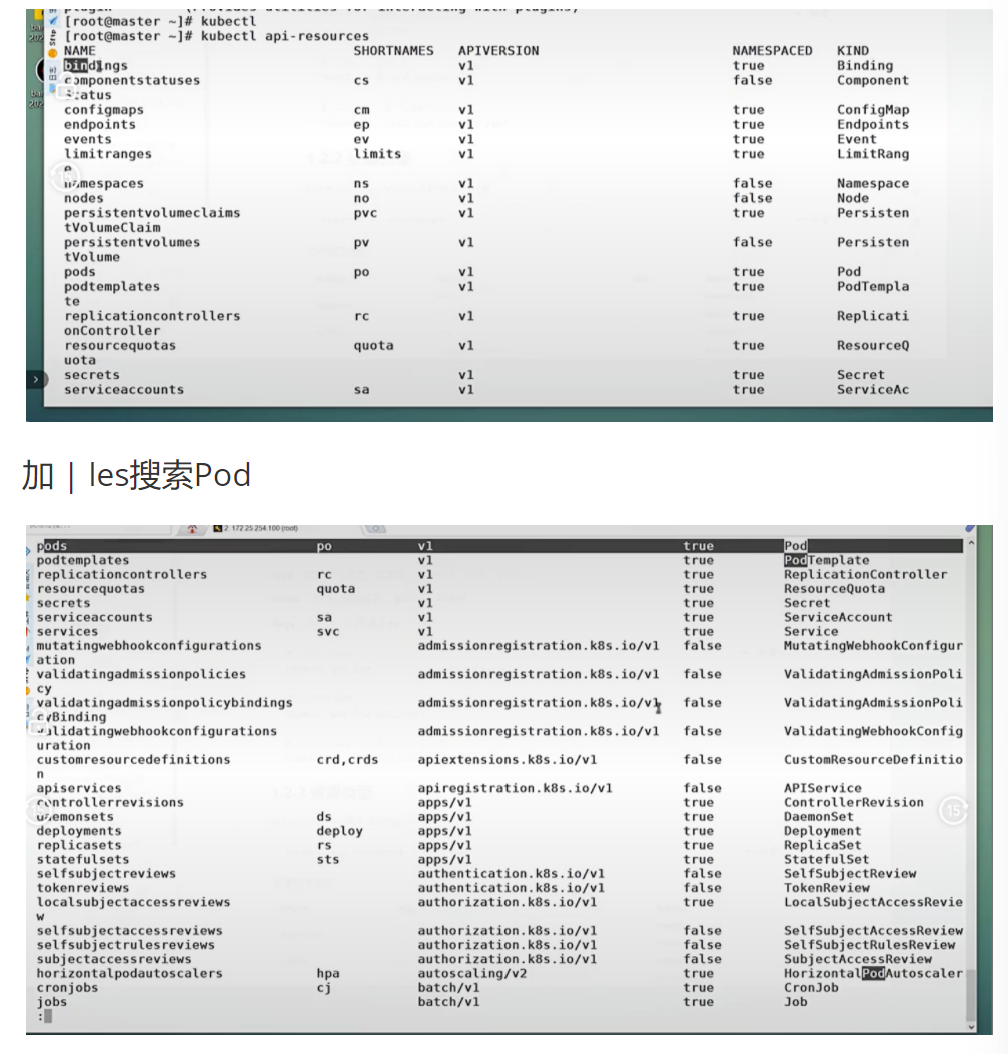
kubectl api-resources

资源类型表(部分)

pods po v1 true Pod
podtemplates v1 true PodTemplate
replicationcontrollers FC v1 true ReplicationController
resourcequotas quota v1 true ResourceQuota
secrets v1 true Secret
serviceaccounts 50 v1 true ServiceAccount
services SVC v1 true Service
mutatingwebookconfigurations admissionregistration.k8s.io/v1 false MutatingWebhookConfigur
validatingadmissionpolicies admissionregistration.k8s.io/v1 false ValidatingAdmissionPoli
validatingadmissionpolicybindings admissionregistration.kBs.io/v1 false ValidatingAdmissionPoli
validatingwebhookconfigurations admissionregistration.kbs.io/v1 false ValidatingWebhookConfig
customresourcefinitions crd,crds apiextensions.kBs.io/v1 false CustomResourceDefinition
apiservices apiregistration.kBs.io/v1 false APIService
controllerrevisions apps/v1 true ControllerRevision
daemonsets ds apps/v1 true DaemonSet
deployments deploy apps/v1 true Deployment
replicasets rs apps/v1 true ReplicaSet
statefulsets sts apps/v1 true StatefulSet
selfsubjectreviews authentication.kBs.io/v1 false SelfSubject Review
tokenreviews authentication.k8s.io/v1 false TokenReview
localsubjectaccessreviews authorization.k8s.io/v1 true LocalSubject AccessRevie
selfsubjectaccessreviews authorization.kBs.io/v1 false SelfSubject AccessReview
selfsubjectrulesreviews authorization.k8s.io/v1 false SelfSubject RulesReview
subjectaccessreviews authorization.kBs.io/v1 false Subject AccessReview
horizontalpodautoscalers hpa autoscaling/v2 true HorizontalPodAutoscaler
cronjobs cj batch/v1 true CronJob
jobs batch/v1 true Job

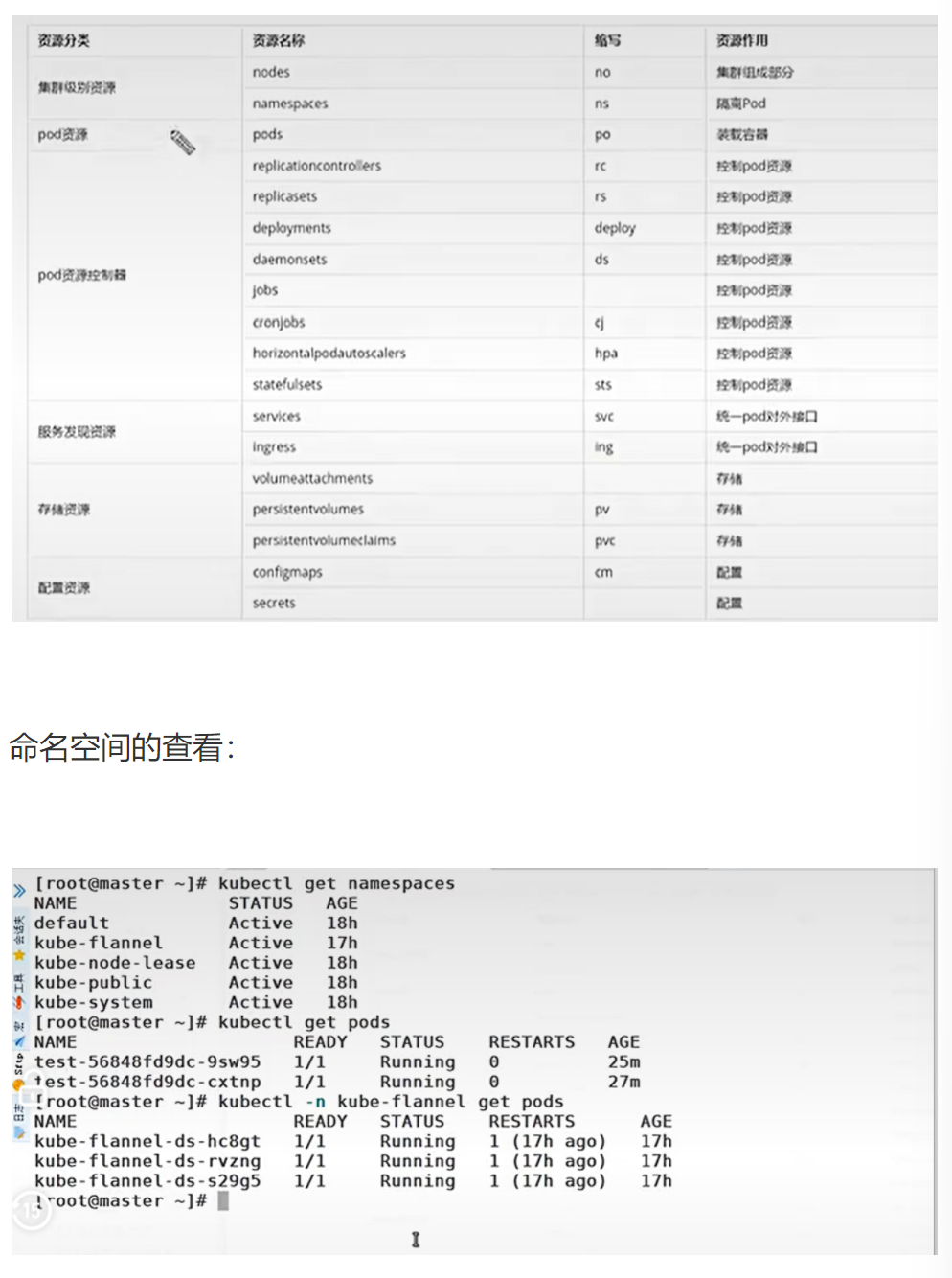
常用资源类型

资源分类 资源名称 缩写 资源作用
集群级别资源 nodes no 集群组成部分
namespaces ns 隔离 Pod
pod 资源 pods po 装载容器
pod 资源控制器 replicationcontrollers rc 控制 pod 资源
replicasets rs 控制 pod 资源
deployments deploy 控制 pod 资源
daemonsets ds 控制 pod 资源
jobs 控制 pod 资源
cronjobs cj 控制 pod 资源
horizontalpodautoscalers hpa 控制 pod 资源
statefulsets sts 控制 pod 资源
服务发现资源 services svc 统一 pod 对外接口
Ingress ing 统一 pod 对外接口
存储资源 volumeattachments 存储
persistentvolumes PV 存储
persistentvolumeclaims PVC 存储
配置资源 configmaps cm 配置
secrets 配置

命名空间的查看

bash 复制代码
[ root@master ~]# kubectl get namespaces
NAME STATUS AGE
default Active 17h
kube-flannel Active 18h
kube-node-lease Active 18h
kube-public Active 18h
kube-system Active 18h

[ root@master ~]# kubectl get pods
test-56848fd9dc-cxtnp 1/1 Running 0 25m
test-56848fd9dc-9sw95 1/1 Running 0 27m

[ root@master ~]# kubectl -n kube-flannel get pods
NAME READY STATUS RESTARTS AGE
kube-flannel-ds-hc8gt 1/1 Running 1(17h ago) 17h
kube-flannel-ds-rvzng 1/1 Running 1(17h ago) 17h
kube-flannel-ds-s29g5 1/1 Running 1(17h ago) 17h

核心代码逐行解析

复制代码
kubectl api-resources
  • 底层动作:向 API Server 发送请求,获取当前集群支持的所有 API 资源类型
  • 作用:查看集群支持的资源类型和缩写,是学习 Kubernetes 的必备命令
  • :不同 Kubernetes 版本支持的资源类型可能不同,升级集群后需要重新查看

bash

运行

复制代码
kubectl get namespaces
  • 底层动作:获取集群中所有命名空间的列表
  • 作用:查看集群的命名空间划分,是资源隔离的基础
  • :不要在 default 命名空间部署生产服务,应该为每个项目创建独立的命名空间

bash

运行

复制代码
kubectl -n kube-flannel get pods
  • 底层动作:获取 kube-flannel 命名空间下的所有 Pod
  • 作用:查看指定命名空间的资源状态
  • :如果省略-n参数,默认只查看 default 命名空间的资源

企业级生产应用

在生产环境中,资源类型的正确使用是集群稳定的关键:

  • 使用 Namespace 进行环境隔离(开发、测试、生产)
  • 使用 Deployment 管理无状态服务
  • 使用 StatefulSet 管理有状态服务(数据库、消息队列)
  • 使用 DaemonSet 部署节点级服务(监控、日志收集)

优化空间

  1. 使用 ResourceQuota 限制命名空间的资源使用
  2. 使用 LimitRange 限制 Pod 的资源请求和限制
  3. 使用 NetworkPolicy 进行 Pod 间的网络隔离

课后防宕机指南

常见错误 1:在 kube-system 命名空间部署业务服务

  • 报错:可能影响系统组件的正常运行
  • 排查思路:将业务服务部署在独立的命名空间中

常见错误 2:忘记指定命名空间,导致资源创建在错误的位置

  • 报错:找不到创建的资源
  • 排查思路 :使用kubectl get pods --all-namespaces查看所有命名空间的资源

kubectl 常见命令操作

原文

命令分类 命令 翻译 命令作用
基本命令 create 创建 创建一个资源
edit 编辑 编辑一个资源
get 获取 获取一个资源
patch 更新 更新一个资源
delete 删除 删除一个资源
explain 解释 展示资源文档
运行和调试 run 运行 在集群中运行一个指定的镜像
expose 暴露 暴露资源为 Service
describe 描述 显示资源内部信息
logs 日志 输出容器在 pod 中的日志
attach 缠绕 进入运行中的容器
exec 执行 执行容器中的一个命令
cp 复制 在 Pod 内外复制文件
rollout 发布管理 管理资源的发布
scale 规模 扩 (缩) 容 Pod 的数量
autoscale 自动调整 自动调整 Pod 的数量
高级命令 apply 应用 通过文件对资源进行配置
label 标签 更新资源上的标签
其他命令 cluster-info 集群信息 显示集群信息
version 版本 显示当前 Server 和 Client 的版本

原文

bash 复制代码
[root@master~]#vim test.yml
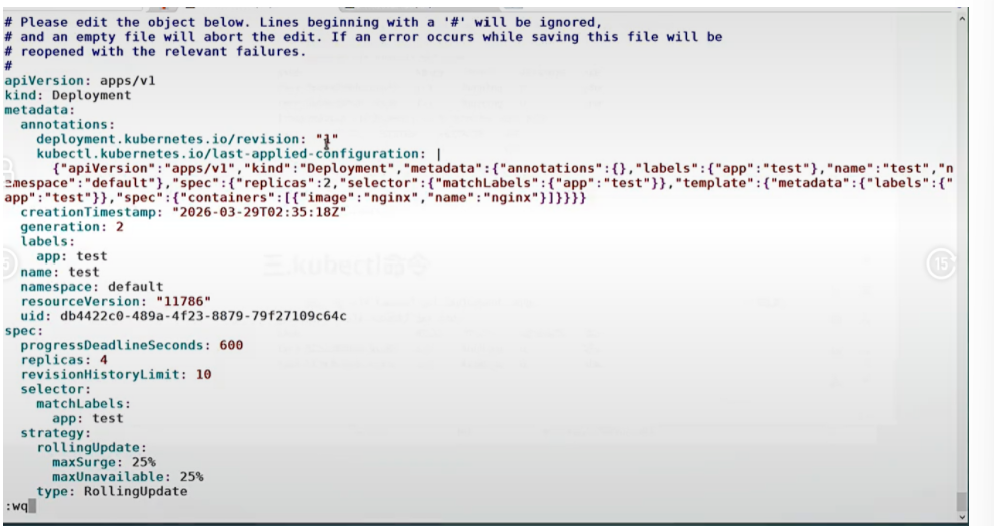
[ root@master ~]# kubectl edit deployments.apps test

编辑内容:

即改即生效

原文

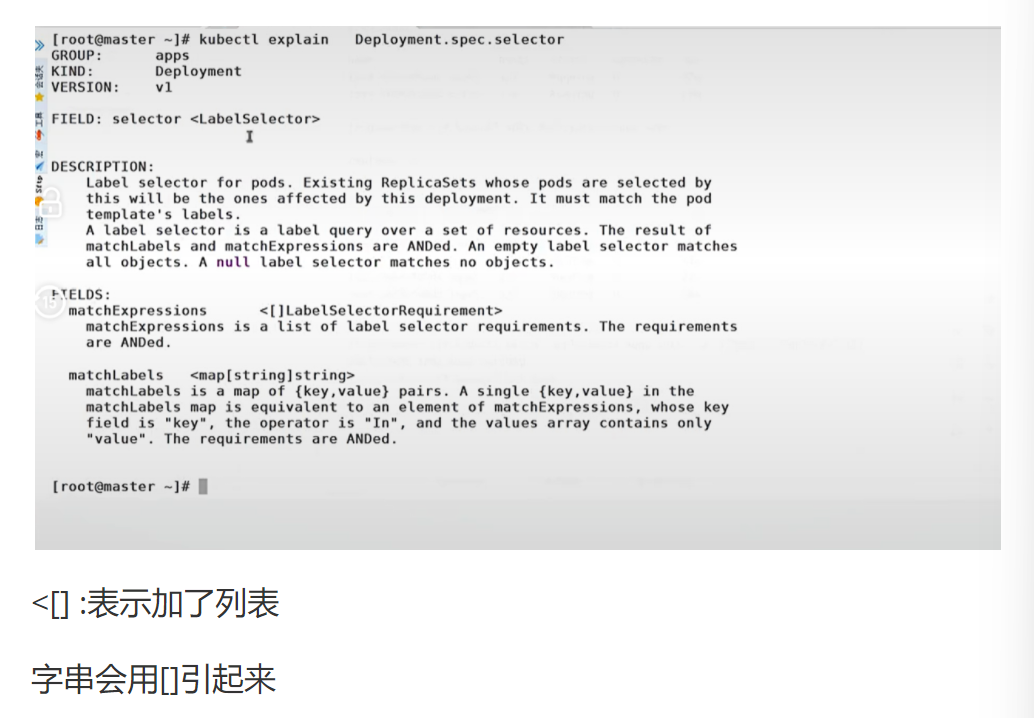
不知道意思的可以这样:

复制代码
[root@master~]# kubectl explain deployment.spec.replicas
apps
KIND: Deployment
VERSION: v1
FIELD: replicas <integer>
DESCRIPTION: Number of desired pods.This is a pointer to distinguish between explicit
zero and not specified.Defaults to1.

核心代码逐行解析

复制代码
kubectl edit deployments.apps test
  • 底层动作
    1. 从 API Server 获取 test Deployment 的当前配置
    2. 打开默认编辑器(vim)让用户编辑
    3. 保存退出后,将修改后的配置提交给 API Server
    4. API Server 验证配置无误后,更新资源状态
  • 作用:实时编辑运行中的资源配置
    • 编辑的是内存中的配置,不会更新原始的 YAML 文件
    • 如果配置有语法错误,会保存失败并提示
    • 生产环境不建议直接 edit,应该修改 YAML 文件后 apply

bash

运行

复制代码
kubectl explain deployment.spec.replicas
  • 底层动作:向 API Server 发送请求,获取 Deployment 资源 spec.replicas 字段的文档
  • 作用:查看资源字段的详细说明,是学习 Kubernetes API 的最佳方式
  • :不同 Kubernetes 版本的字段说明可能不同,要使用与集群版本匹配的文档

企业级生产应用

在生产环境中:

  • kubectl explain是最权威的 API 文档,比任何第三方资料都准确
  • kubectl edit只能用于紧急排障,正常变更应该通过 GitOps 流程
  • kubectl rollout用于管理 Deployment 的发布和回滚

优化空间

  1. 使用kubectl explain --recursive查看完整的资源结构
  2. 使用kubectl rollout history查看发布历史
  3. 使用kubectl rollout undo回滚到上一个版本

课后防宕机指南

常见错误 1:edit 时修改了只读字段

  • 报错the object has been modified; please apply your changes to the latest version and try again
  • 排查思路:重新获取资源配置,只修改可写字段

常见错误 2:edit 时误删了必要字段

  • 报错:资源配置验证失败
  • 排查思路:放弃修改,重新编辑,确保必要字段完整

1.2.3 基本命令示例

原文 :kubectl 的详细说明地址:https://kubernetes.io/docs/reference/generated/kubectl/kubectl-commands

#显示集群版本

复制代码
[root@k8s-master ~]# kubectl version
Client Version: v1.30.0
Kustomize Version: v5.0.4-0.20230601165947-6ce0bf390ce3
Server Version: v1.30.0

#显示集群信息

复制代码
[root@k8s-master ~]# kubectl cluster-info
Kubernetes control plane is running at https://172.25.254.100:6443
CoreDNS is running at https://172.25.254.100:6443/api/v1/namespaces/kube-system/services/kube-dns:dns/proxy

#创建一个 webcluster 控制器,控制器中 pod 数量为 2

复制代码
[root@k8s-master ~]# kubectl create deployment webcluster --image nginx --replicas 2

#查看控制器

复制代码
[root@k8s-master ~]# kubectl get deployments.apps
NAME READY UP-TO-DATE AVAILABLE AGE
web 3/3 3 3 69m

#查看资源帮助

复制代码
[root@k8s-master ~]# kubectl explain deployment
apps
KIND: Deployment
GROUP: apps
VERSION: v1
DESCRIPTION:
Deployment enables declarative updates for Pods and ReplicaSets.
FIELDS:
apiVersion <string>
APIVersion defines the versioned schema of this representation of an object.
Servers should convert recognized schemas to the latest internal value, and
may reject unrecognized values. More info:
https://git.k8s.io/community/contributors/devel/sig-architecture/api-conventions.md#resources

kind <string>
Kind is a string value representing the REST resource this object
represents. Servers may infer this from the endpoint the client submits
requests to. Cannot be updated. In CamelCase. More info:
https://git.k8s.io/community/contributors/devel/sig-architecture/api-conventions.md#types-kinds

metadata <ObjectMeta>
Standard object's metadata. More info:
https://git.k8s.io/community/contributors/devel/sig-architecture/api-conventions.md#metadata

spec <DeploymentSpec>
Specification of the desired behavior of the Deployment.

status <DeploymentStatus>
Most recently observed status of the Deployment.

#查看控制器参数帮助

复制代码
[root@k8s-master ~]# kubectl explain deployment.spec
GROUP: apps
KIND: Deployment
VERSION: v1
FIELD: spec <DeploymentSpec>
DESCRIPTION:
Specification of the desired behavior of the Deployment.
DeploymentSpec is the specification of the desired behavior of the Deployment.
FIELDS:
minReadySeconds <integer>
Minimum number of seconds for which a newly created pod should be ready without any of its container crashing, for it to be considered available. Defaults to 0 (pod will be considered available as soon as it is ready)

paused <boolean>
Indicates that the deployment is paused.

progressDeadlineSeconds <integer>
The maximum time in seconds for which a deployment to make progress before it is considered to be failed. The deployment controller will continue to process failed deployments and a condition with a ProgressDeadlineExceeded reason will be surfaced in the deployment status. Note that progress will not be estimated during the time a deployment is paused. Defaults to 600s.

replicas <integer>
Number of desired pods. This is a pointer to distinguish between explicit zero and not specified. Defaults to 1.

revisionHistoryLimit <integer>
The number of old ReplicaSets to retain to allow rollback. This is a pointer to distinguish between explicit zero and not specified. Defaults to 10.

selector <LabelSelector> -required
Label selector for pods. Existing ReplicaSets whose pods are selected by this will be the ones affected by this deployment. It must match the pod template's labels.

strategy <DeploymentStrategy>
The deployment strategy to use to replace existing pods with new ones.

template <PodTemplateSpec> -required
Template describes the pods that will be created. The only allowed template.spec.restartPolicy value is "Always".

#编辑控制器配置

复制代码
[root@k8s-master ~]# kubectl edit deployments.apps web

编辑内容:

yaml

复制代码
spec:
  progressDeadlineSeconds: 600
  replicas: 2

[root@k8s-master ~]# kubectl get deployments.apps
NAME READY UP-TO-DATE AVAILABLE AGE
web 2/2 2 2 73m

#利用补丁更改控制器配置

复制代码
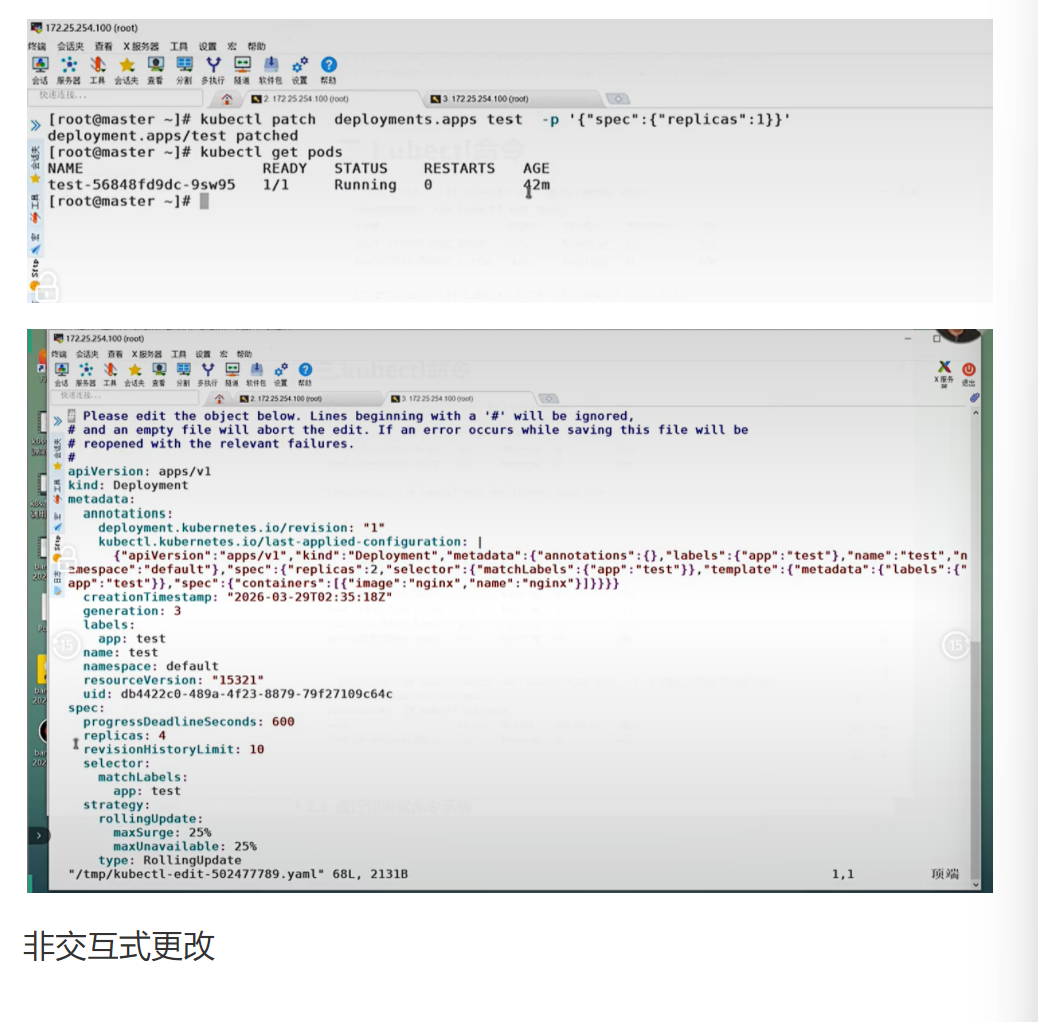
[root@k8s-master ~]# kubectl patch deployments.apps web -p '{"spec":{"replicas":4}}'
deployment.apps/web patched

[root@k8s-master ~]# kubectl get deployments.apps
NAME READY UP-TO-DATE AVAILABLE AGE
web 4/4 4 4 74m

#删除资源

复制代码
[root@k8s-master ~]# kubectl delete deployments.apps web
deployment.apps "web" deleted

[root@k8s-master ~]# kubectl get deployments.apps
No resources found in default namespace.

核心代码逐行解析

复制代码
kubectl create deployment webcluster --image nginx --replicas 2
  • 底层动作

    1. 向 API Server 发送 POST 请求,创建一个 Deployment 资源
    2. Deployment 控制器监听到新的 Deployment,创建一个 ReplicaSet
    3. ReplicaSet 控制器监听到新的 ReplicaSet,创建 2 个 Pod
    4. Scheduler 将 Pod 调度到合适的节点上
    5. Kubelet 在节点上拉取镜像并启动容器
  • 作用:快速创建一个部署,运行指定数量的 Pod 副本

    • --replicas参数默认值是 1,如果不指定只会创建 1 个 Pod

    • 创建的 Deployment 没有 Service,无法从集群外部访问

      kubectl patch deployments.apps web -p '{"spec":{"replicas":4}}'

  • 底层动作

    1. 向 API Server 发送 PATCH 请求,更新 web Deployment 的 spec.replicas 字段为 4
    2. Deployment 控制器发现期望副本数从 2 变为 4
    3. 创建新的 ReplicaSet(如果需要),并增加 Pod 数量到 4
  • 作用:部分更新资源配置,比 edit 更适合自动化脚本

    • JSON 格式必须正确,引号和逗号不能少
    • 只能更新可写字段,不能更新只读字段

企业级生产应用

在千万级并发场景下:

  • 使用kubectl scale或 HPA 进行快速扩缩容
  • 使用kubectl rollout进行灰度发布和回滚
  • 使用kubectl patch进行紧急配置变更

优化空间

  1. 设置minReadySeconds为 30-60 秒,确保新 Pod 完全就绪后再接收流量
  2. 设置revisionHistoryLimit为 5-10,保留足够的回滚历史
  3. 使用strategy配置滚动更新策略,避免服务中断

课后防宕机指南

常见错误 1:扩缩容时忘记设置资源请求和限制

  • 报错:Pod 无法调度,或者节点资源耗尽
  • 排查思路kubectl describe pod <pod-name>查看调度失败原因

常见错误 2 :删除 Deployment 时忘记加--cascade=orphan

  • 报错:所有关联的 ReplicaSet 和 Pod 都会被删除
  • 排查思路 :如果需要保留 Pod,使用kubectl delete deployment <name> --cascade=orphan

1.2.3 运行和调试命令示例

运行 pod

复制代码
[root@k8s-master ~]# kubectl run testpod --image nginx
pod/testpod created

[root@k8s-master ~]# kubectl get pods
NAME READY STATUS RESTARTS AGE
testpod 1/1 Running 0 7s

#端口暴露

复制代码
[root@k8s-master ~]# kubectl get services
NAME TYPE CLUSTER-IP EXTERNAL-IP PORT(S) AGE
kubernetes ClusterIP 10.96.0.1 <none> 443/TCP 2d14h

[root@k8s-master ~]# kubectl expose pod testpod --port 80 --target-port 80
service/testpod exposed

[root@k8s-master ~]# kubectl get services
NAME TYPE CLUSTER-IP EXTERNAL-IP PORT(S) AGE
kubernetes ClusterIP 10.96.0.1 <none> 443/TCP 2d14h
testpod ClusterIP 10.106.78.42 <none> 80/TCP 18s

[root@k8s-master ~]# curl 10.106.78.42
<!DOCTYPE html>
<html>
<head>
<title>Welcome to nginx!</title>

#查看资源详细信息

复制代码
[root@k8s-master ~]# kubectl describe pods testpod

#查看资源日志

复制代码
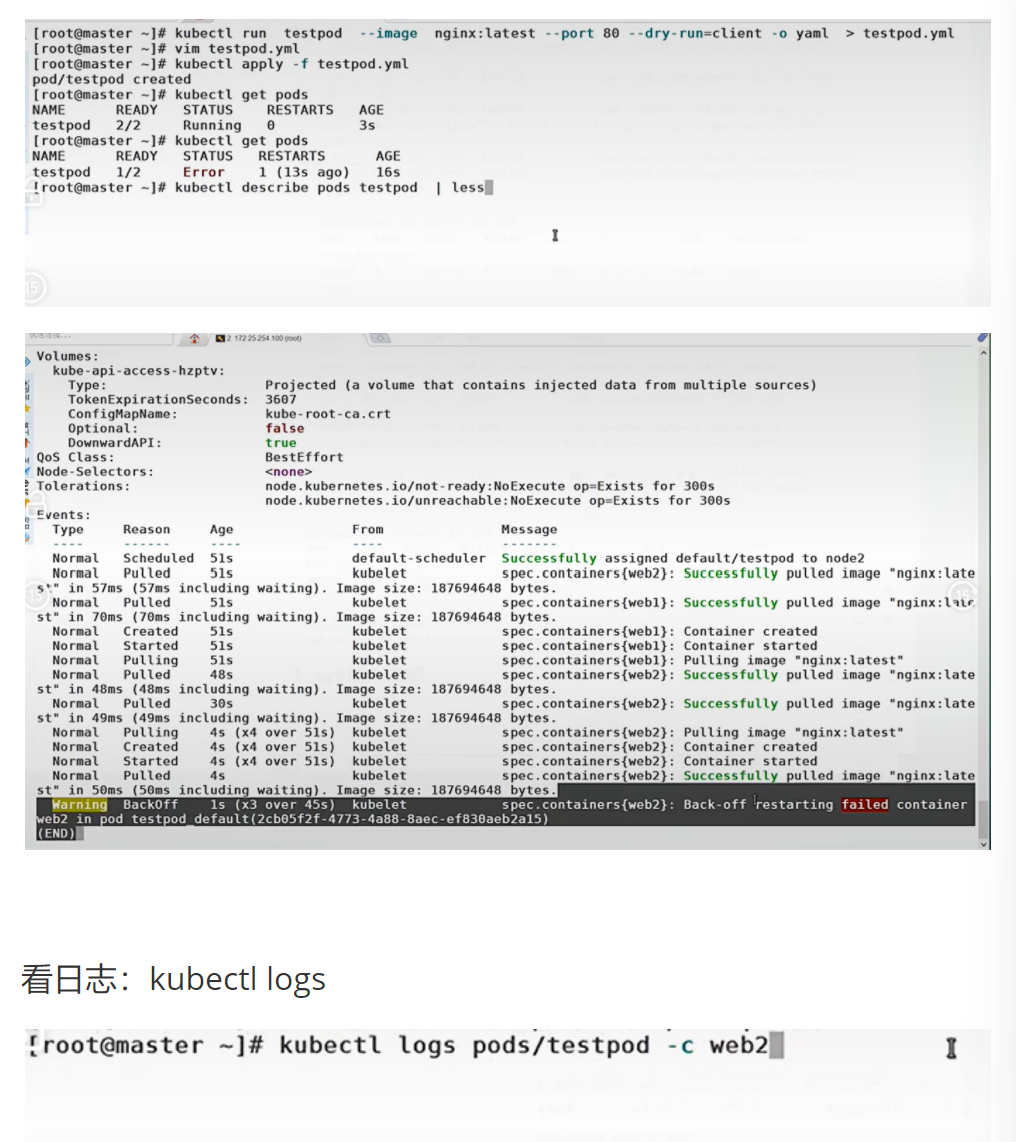
[root@k8s-master ~]# kubectl logs pods/testpod
/docker-entrypoint.sh: /docker-entrypoint.d/ is not empty, will attempt to perform configuration
/docker-entrypoint.sh: Looking for shell scripts in /docker-entrypoint.d/
2024/08/29 05:37:29 [notice] 1#1: using the "epoll" event method
2024/08/29 05:37:29 [notice] 1#1: nginx/1.27.1
2024/08/29 05:37:29 [notice] 1#1: built by gcc 12.2.0 (Debian 12.2.0-14)
2024/08/29 05:37:29 [notice] 1#1: OS: Linux 5.14.0-427.13.1.el9_4.x86_64
2024/08/29 05:37:29 [notice] 1#1: getrlimit(RLIMIT_NOFILE): 1073741816:1073741816
2024/08/29 05:37:29 [notice] 1#1: start worker processes
2024/08/29 05:37:29 [notice] 1#1: start worker process 29
10.244.0.0 - - [29/Aug/2024:05:41:11 +0000] "GET / HTTP/1.1" 200 615 "-" "curl/7.76.1" "-"
10.244.0.0 - - [29/Aug/2024:05:42:51 +0000] "GET / HTTP/1.1" 200 615 "-" "curl/7.76.1" "-"

#运行交互 pod

复制代码
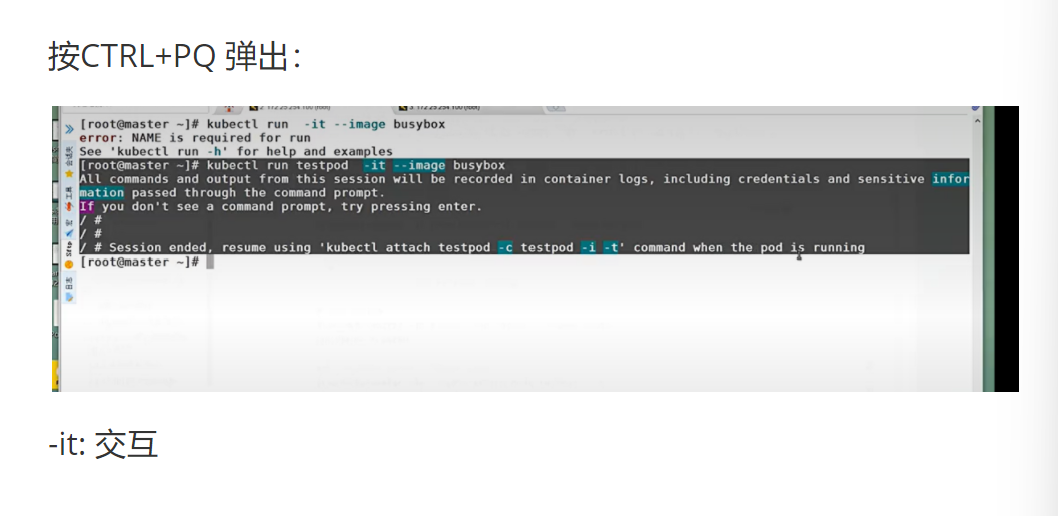
[root@k8s-master ~]# kubectl run -it testpod --image busybox
If you don't see a command prompt, try pressing enter.
/ #
# ctrl+pq退出不停止pod

#运行非交互 pod

复制代码
[root@k8s-master ~]# kubectl run nginx --image nginx
pod/nginx created

#进入到已经运行的容器,且容器有交互环境

复制代码
[root@k8s-master ~]# kubectl attach pods/testpod -it
If you don't see a command prompt, try pressing enter.
/ #

#在已经运行的 pod 中运行指定命令

复制代码
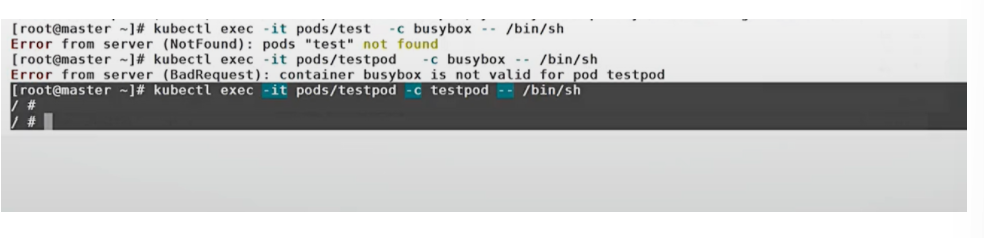
[root@k8s-master ~]# kubectl exec -it pods/nginx /bin/bash
kubectl exec [POD] [COMMAND] is DEPRECATED and will be removed in a future version. Use kubectl exec [POD] -- [COMMAND] instead.
root@nginx:/#

#复制文件到 pod 中

复制代码
[root@k8s-master ~]# kubectl cp anaconda-ks.cfg nginx:/

[root@k8s-master ~]# kubectl exec -it pods/nginx /bin/bash
kubectl exec [POD] [COMMAND] is DEPRECATED and will be removed in a future version. Use kubectl exec [POD] -- [COMMAND] instead.
root@nginx:/# ls
anaconda-ks.cfg boot docker-entrypoint.d etc lib media opt root sbin
dev home lib64 mnt proc run srv sys usr
bin docker-entrypoint.sh tmp var

#复制 pod 中的文件到本机

复制代码
[root@k8s-master ~]# kubectl cp nginx:/anaconda-ks.cfg anaconda-ks.cfg
tar: Removing leading `/' from member names

核心代码逐行解析

复制代码
kubectl expose pod testpod --port 80 --target-port 80
  • 底层动作

    1. 创建一个 ClusterIP 类型的 Service
    2. Service 的标签选择器自动设置为 testpod 的标签
    3. kube-proxy 在所有节点上更新 iptables 规则
    4. 访问 Service 的 ClusterIP:80 会被转发到 Pod 的 80 端口
  • 作用:为 Pod 提供一个稳定的访问入口

    • --port是 Service 暴露的端口,--target-port是 Pod 监听的端口

    • 如果 Pod 有多个容器,需要指定--container参数

      kubectl exec -it pods/nginx -- /bin/bash

  • 底层动作

    1. 向 API Server 发送 exec 请求
    2. API Server 将请求转发到 Pod 所在节点的 Kubelet
    3. Kubelet 调用容器运行时,在容器中执行 /bin/bash 命令
    4. 建立一个双向的 WebSocket 连接,实现交互式终端
  • 作用:进入运行中的容器进行调试

    • 必须使用--分隔 Pod 名称和命令,这是新的语法要求
    • 容器中必须有 /bin/bash 或 /bin/sh 才能进入交互式终端

企业级生产应用

在生产环境中:

  • kubectl logs是排查应用问题的首选工具
  • kubectl exec只能用于紧急调试,正常情况下不应该进入容器
  • kubectl cp用于临时复制文件,不应该用于部署应用

优化空间

  1. 使用kubectl logs -f实时查看日志
  2. 使用kubectl logs --previous查看上一个容器的日志
  3. 使用kubectl exec --执行非交互式命令,避免进入终端

课后防宕机指南

常见错误 1 :exec 时忘记加-it参数

  • 报错:无法进入交互式终端
  • 排查思路 :加上-it参数,-i表示标准输入,-t表示分配终端

常见错误 2:cp 时路径写错

  • 报错tar: /path: Cannot stat: No such file or directory
  • 排查思路:检查源路径和目标路径是否正确,Pod 中的路径必须是绝对路径

1.2.3 高级命令示例

原文

利用命令生成 yaml 模板文件

复制代码
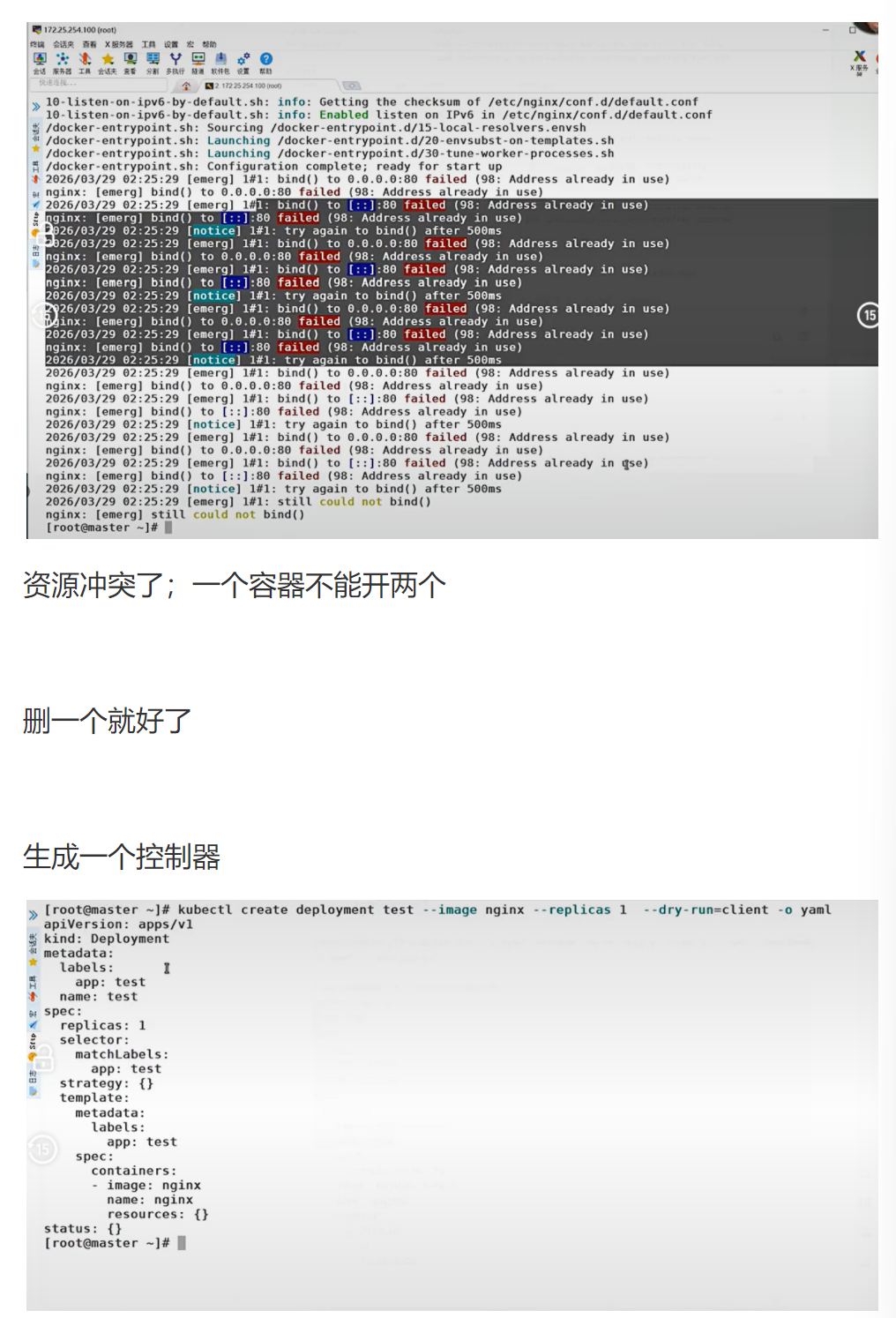
[root@k8s-master ~]# kubectl create deployment --image nginx webcluster --dry-run=client -o yaml > webcluster.yml

#利用 yaml 文件生成资源

复制代码
[root@k8s-master ~]# vim webcluster.yml

文件内容:

yaml

复制代码
apiVersion: apps/v1
kind: Deployment
metadata:
  creationTimestamp: null
  labels:
    app: webcluster
  name: webcluster
spec:
  replicas: 2
  selector:
    matchLabels:
      app: webcluster
  template:
    metadata:
      creationTimestamp: null
      labels:
        app: webcluster
    spec:
      containers:
      - image: nginx
        name: nginx

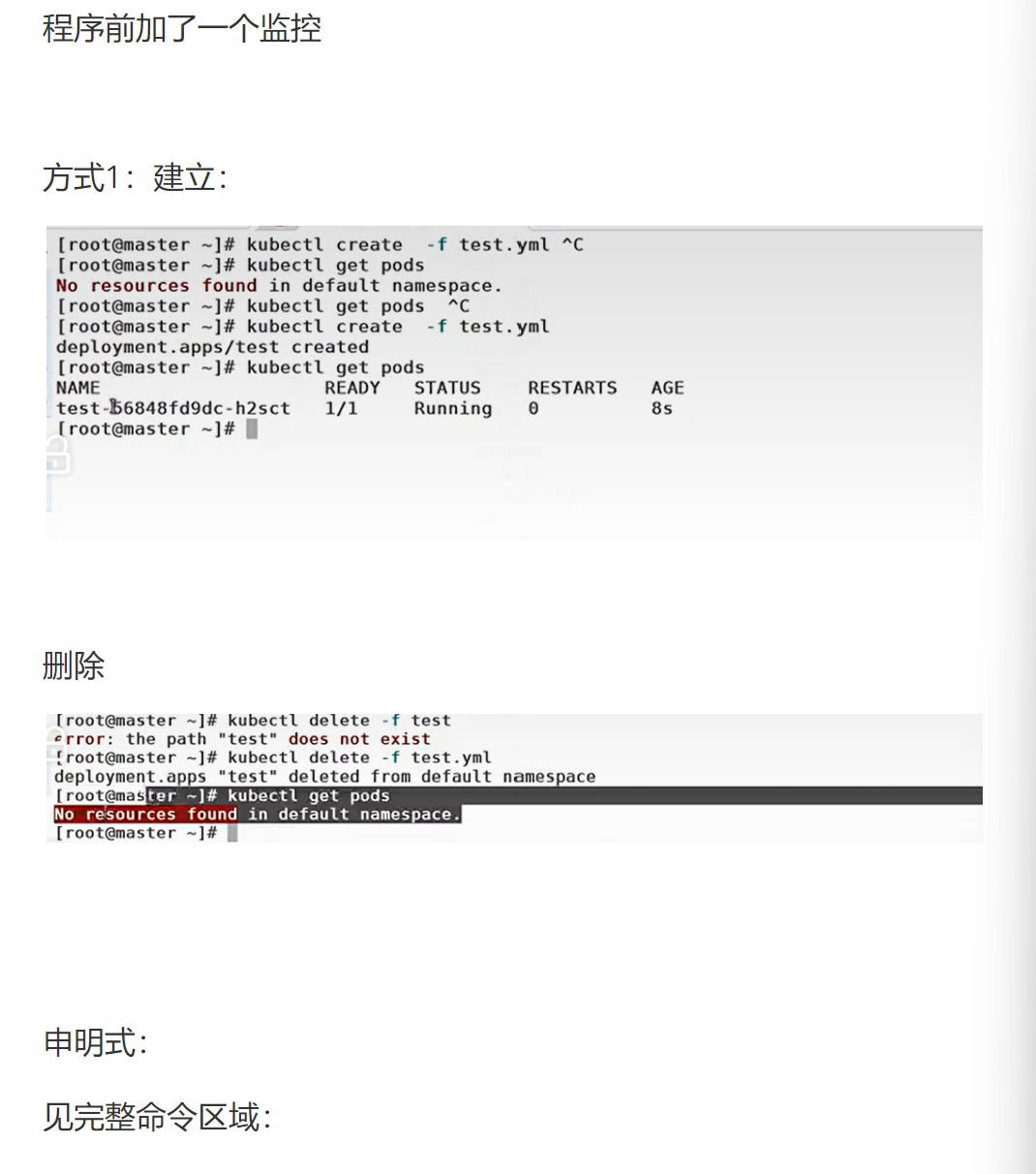
[root@k8s-master ~]# kubectl apply -f webcluster.yml
deployment.apps/webcluster created

[root@k8s-master ~]# kubectl get deployments.apps
NAME READY UP-TO-DATE AVAILABLE AGE
webcluster 2/2 2 2 21s

[root@k8s-master ~]# kubectl delete -f webcluster.yml
deployment.apps "webcluster" deleted

#管理资源标签

复制代码
[root@k8s-master ~]# kubectl run nginx --image nginx
[root@k8s-master ~]# kubectl get pods --show-labels
NAME READY STATUS RESTARTS AGE LABELS
nginx 1/1 Running 0 12s run=nginx

[root@k8s-master ~]# kubectl label pods nginx app=lee
[root@k8s-master ~]# kubectl get pods --show-labels
NAME READY STATUS RESTARTS AGE LABELS
nginx 1/1 Running 0 57s app=lee,run=nginx

#更改标签

复制代码
[root@k8s-master ~]# kubectl label pods nginx app=webcluster --overwrite

#删除标签

复制代码
[root@k8s-master ~]# kubectl label pods nginx app-
pod/nginx unlabeled

[root@k8s-master ~]# kubectl get pods nginx --show-labels
NAME READY STATUS RESTARTS AGE LABELS
nginx 1/1 Running 0 7m56s run=nginx

#标签是控制器识别 pod 的标识

复制代码
[root@k8s-master ~]# kubectl get pods --show-labels
NAME READY STATUS RESTARTS AGE LABELS
nginx 1/1 Running 0 11m run=nginx
webcluster-7c584f774b-66zbd 1/1 Running 0 2m10s app=webcluster,pod-template-hash=7c584f774b
webcluster-7c584f774b-9x2x2 1/1 Running 0 35m app=webcluster,pod-template-hash=7c584f774b

#删除 pod 上的标签

复制代码
[root@k8s-master ~]# kubectl label pods webcluster-7c584f774b-66zbd app-
pod/webcluster-7c584f774b-66zbd unlabeled

#控制器会重新启动新 pod

复制代码
[root@k8s-master ~]# kubectl get pods --show-labels
NAME READY STATUS RESTARTS AGE LABELS
nginx 1/1 Running 0 11m run=nginx
webcluster-7c584f774b-66zbd 1/1 Running 0 2m39s pod-template-hash=7c584f774b
webcluster-7c584f774b-9x2x2 1/1 Running 0 36m app=webcluster,pod-template-hash=7c584f774b
webcluster-7c584f774b-hgprn 1/1 Running 0 2s app=webcluster,pod-template-hash=7c584f774b

核心代码逐行解析

复制代码
kubectl create deployment --image nginx webcluster --dry-run=client -o yaml > webcluster.yml
  • 底层动作

    1. 在客户端生成 Deployment 的 YAML 配置
    2. 不向 API Server 发送任何请求
    3. 将生成的 YAML 输出到文件中
  • 作用:快速生成标准的 YAML 模板,避免手动编写容易出错

    • --dry-run=client表示只在客户端运行,不创建实际资源

    • 生成的 YAML 包含一些默认值,可以根据需要修改

      kubectl label pods webcluster-7c584f774b-66zbd app-

  • 底层动作

    1. 向 API Server 发送 PATCH 请求,删除 Pod 的 app 标签
    2. Deployment 控制器发现有一个 Pod 不再匹配标签选择器
    3. 创建一个新的 Pod 来替换它
    4. 旧的 Pod 不会被删除,只是不再被 Deployment 管理
  • 作用:演示标签选择器的工作原理

    • 删除标签时,标签名后面要加-
    • 这会导致控制器创建新的 Pod,可能会影响服务可用性

企业级生产应用

在生产环境中:

  • 使用--dry-run生成 YAML 模板是标准做法
  • 标签是 Kubernetes 的核心概念,用于资源选择和分组
  • 控制器通过标签选择器管理 Pod,这是 Kubernetes 声明式 API 的基础

优化空间

  1. 使用kubectl create--dry-run参数生成所有资源的 YAML 模板
  2. 制定标签规范,使用统一的标签命名方式
  3. 使用标签进行资源筛选和管理,提高运维效率

课后防宕机指南

常见错误 1:修改了 Pod 模板的标签,但没有修改 selector

  • 报错Deployment.apps "webcluster" is invalid: spec.template.metadata.labels: Invalid value: map[string]string{"app":"new-webcluster"}: selectordoes not match templatelabels`
  • 排查思路:确保 selector 和 template 的标签完全一致

常见错误 2:删除了控制器管理的 Pod 的标签

  • 报错:控制器会创建新的 Pod,导致 Pod 数量翻倍
  • 排查思路:重新添加标签,或者删除多余的 Pod
相关推荐
MXsoft6181 小时前
**365****天零宕机背后:高可用业务系统的监控设计逻辑**** **
运维
刃神太酷啦1 小时前
《网络基础全链路深度解析:从Socket编程到HTTPS与TCP/UDP内核机制》----《Hello Linux!》(25)
linux·运维·c语言·网络·c++·tcp/ip·https
IT大白鼠2 小时前
Linux系统安全及应用:技术配置与检测实战
linux·运维·系统安全
小肝一下2 小时前
3.linux——进程控制
linux·运维·服务器·进程控制
零壹AI实验室2 小时前
云原生微服务踩坑记:187个服务降到23个,故障率降低90%
微服务·云原生·架构
北山有鸟2 小时前
linux设备全解析
linux·运维·服务器
Jurio.2 小时前
当 AI 不再只是对话:Codex app 的自动化功能
运维·人工智能·ai·自动化·codex
珂玥c2 小时前
k8s集群切换master
云原生·容器·kubernetes
shanql2 小时前
系统安装:安装Ubuntu 26.04 LTS
linux·ubuntu