


专栏:Redis 修行录
个人主页:手握风云
目录
[一、Redis 单机集成 Spring](#一、Redis 单机集成 Spring)
[1.1. 项目创建](#1.1. 项目创建)
[1.2. 配置文件](#1.2. 配置文件)
[1.3. 创建 Controller](#1.3. 创建 Controller)
[二、String 类型操作](#二、String 类型操作)
[三、List 类型操作](#三、List 类型操作)
[四、Set 类型操作](#四、Set 类型操作)
[五、Hash 类型操作](#五、Hash 类型操作)
[六、Zset 类型操作](#六、Zset 类型操作)
一、Redis 单机集成 Spring
1.1. 项目创建
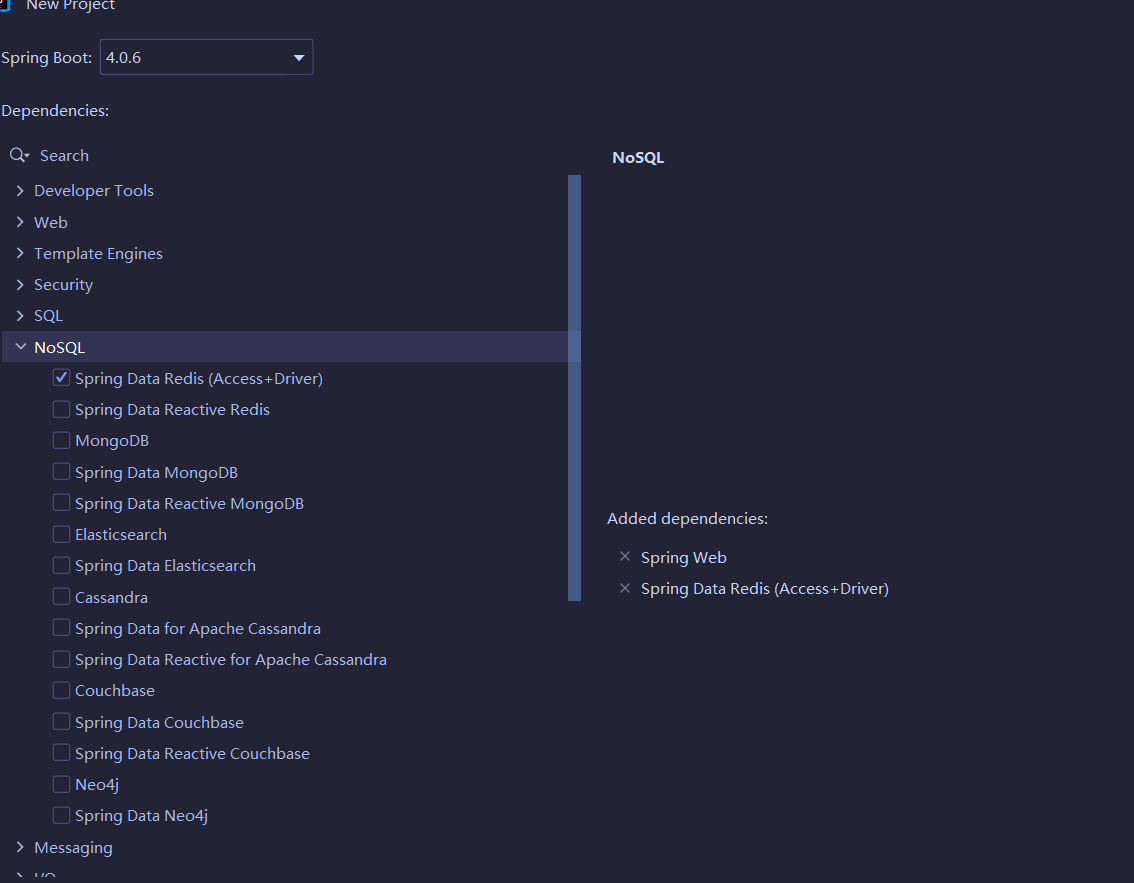
必选依赖:Spring Data Redis (Access+Driver) + Spring Web(接口测试)。
1.2. 配置文件
application.yml:
spring:
  data:
    redis:
      host: 127.0.0.1
      port: 8888
1.3. 创建 Controller
java
package com.yang.springredis;

import org.springframework.beans.factory.annotation.Autowired;
import org.springframework.data.redis.core.StringRedisTemplate;
import org.springframework.web.bind.annotation.RequestMapping;
import org.springframework.web.bind.annotation.RestController;

@RestController
@RequestMapping("/redis")
public class MyController {
    @Autowired
    private StringRedisTemplate redisTemplate;
}
注入 SpringRedisTemplate 这是 Spring 官方 Redis 字符串操作模板,继承自 RedisTemplate<String, String>,开箱即用。
二、String 类型操作
java
package com.yang.springredis;

import org.springframework.beans.factory.annotation.Autowired;
import org.springframework.data.redis.connection.RedisConnection;
import org.springframework.data.redis.core.StringRedisTemplate;
import org.springframework.web.bind.annotation.GetMapping;
import org.springframework.web.bind.annotation.RequestMapping;
import org.springframework.web.bind.annotation.ResponseBody;
import org.springframework.web.bind.annotation.RestController;

import java.util.concurrent.TimeUnit;

@RestController
@RequestMapping("/redis")
public class MyController {

    // 注入 StringRedisTemplate 实例
    @Autowired
    private StringRedisTemplate redisTemplate;

    @GetMapping("/testString")
    @ResponseBody
    public String testString() {
        // 利用 connection 作为回调参数,原生连接 Redis 服务器
        redisTemplate.execute((RedisConnection connection) -> {
            connection.flushAll();
            return null;
        });

        var valueOps = redisTemplate.opsForValue();

        // 基础的 Set 和 Get
        valueOps.set("LLM", "Gemini");
        System.out.println("谷歌大模型: " + valueOps.get("LLM"));

        // 指定过期时间
        valueOps.set("captcha", "9527", 60, TimeUnit.SECONDS);

        // 不存在才设置
        System.out.println(valueOps.setIfAbsent("order", "lock_by_user"));

        // 原子递增
        valueOps.set("article_view", "500");
        valueOps.increment("article_view");
        System.out.println(valueOps.get("article_view"));

        return "OK!";
    }
}
三、List 类型操作
java
@GetMapping("/testList")
@ResponseBody
public String testList() {
    redisTemplate.execute((RedisConnection connection) -> {
       connection.flushAll();
       return null;
    });

    var listOps = redisTemplate.opsForList();

    String listKey = "task_queue";

    // 左侧插入元素
    listOps.leftPush(listKey, "task1");

    // 一次插入多个元素
    listOps.leftPushAll(listKey, "task2", "task3");

    // 右侧插入元素
    listOps.rightPush(listKey, "task4");

    // 范围读取
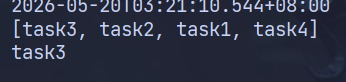
    List<String> allTasks = listOps.range(listKey, 0, -1);
    System.out.println(allTasks);

    // 弹出元素
    System.out.println(listOps.leftPop(listKey));

    return "OK!";
}
四、Set 类型操作
java
@GetMapping("/testSet")
@ResponseBody
public String testSet() {
    redisTemplate.execute((RedisConnection connection) -> {
        connection.flushAll();
        return null;
    });

    var setOps = redisTemplate.opsForSet();

    String tags = "tags";

    setOps.add(tags, "java", "python", "cpp", "java", "cpp");
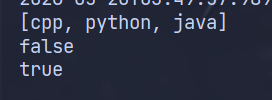
    Set<String> allTags = setOps.members(tags);
    System.out.println(allTags);

    System.out.println(setOps.isMember(tags, "redis"));
    System.out.println(setOps.isMember(tags, "python"));

    setOps.remove(tags, "java");

    return "OK!";
}
五、Hash 类型操作
java
@GetMapping("/testHash")
@ResponseBody
public String testHash() {
    redisTemplate.execute((RedisConnection connection) -> {
        connection.flushAll();
        return null;
    });

    var hashOps = redisTemplate.opsForHash();

    String userKey = "info";

    // 放入单个字段
    hashOps.put(userKey, "name", "John");
    hashOps.put(userKey, "role", "Developer");

    // 一次放入多个字段
    Map<String, String> extraInfo = new HashMap<>();
    extraInfo.put("age", "26");
    extraInfo.put("city", "San Francisco");
    hashOps.putAll(userKey, extraInfo);

    // 获取单个字段
    Object nameObj = hashOps.get(userKey, "name");
    String name = nameObj != null ? nameObj.toString() : "未知";
    System.out.println(name);

    // 获取所有字段
    Map<Object, Object> userMap = hashOps.entries(userKey);
    System.out.println(userMap);

    // 某个字段是否存在
    System.out.println(hashOps.hasKey(userKey, "email"));

    // 删除某个字段
    hashOps.delete(userKey, "city");

    return "OK!";
}
六、Zset 类型操作
java
@GetMapping("/testZset")
@ResponseBody
public String testZset() {
    redisTemplate.execute((RedisConnection connection) -> {
        connection.flushAll();
        return null;
    });

    var zsetOps = redisTemplate.opsForZSet();

    String leaderboardKey = "leaderboard";

    // 添加元素及分数
    zsetOps.add(leaderboardKey, "Developer_A", 85.0);
    zsetOps.add(leaderboardKey, "Developer_B", 92.5);
    zsetOps.add(leaderboardKey, "Developer_C", 78.0);

    // 为指定元素增加分数
    zsetOps.incrementScore(leaderboardKey, "Developer_A", 15.0);

    // 获取降序的前 3 名
    Set<ZSetOperations.TypedTuple<String>> topUsers = zsetOps.reverseRangeWithScores(leaderboardKey, 0, 2);
    StringBuilder builder = new StringBuilder();
    int rank = 0;
    if (topUsers != null) {
        for (ZSetOperations.TypedTuple<String> tuple : topUsers) {
            builder.append("第").append(++rank).append("名: ")
                    .append(tuple.getValue())
                    .append("(").append(tuple.getScore()).append("分) ");
        }
    }

    System.out.println(builder);

    // 获取某个具体元素的当前排名
    Long rankIndexB = zsetOps.reverseRank(leaderboardKey, "Developer_B");
    String retB = rankIndexB != null ? "第 " + (rankIndexB + 1) + " 名" : "未上榜";
    System.out.println(retB);

    return "OK!";
}