一、提示词工程的本质与核心原则
1.1 为什么提示词工程是大模型应用的核心?
大语言模型的本质是基于统计规律的下一个词预测器,它没有真正的 "理解" 能力,所有输出都完全依赖于输入的上下文。提示词就是我们给大模型的 "指令手册",决定了模型的行为、输出质量和边界。
工业级应用中,提示词工程贡献了 80% 的效果提升:
- 同样的模型,好的提示词可以让回答准确率从 60% 提升到 95% 以上
- 提示词是成本最低、见效最快的优化手段
- 所有大模型应用的业务逻辑最终都体现在提示词中
1.2 大模型的 "思维模式"
要写出好的提示词,必须先理解大模型的三个核心特性:
- 上下文依赖性:模型只会考虑当前对话窗口内的信息,不会 "记住" 窗口外的内容
- 概率性输出:相同的提示词可能会产生不同的输出,温度参数控制随机性
- 指令遵循能力:模型会严格遵循提示词中的明确指令,但对模糊指令的理解能力有限
1.3 工业级提示词设计六大核心原则
原则 1:明确角色设定
给模型一个清晰的专业身份,让它从该身份的角度思考和回答问题。
反面例子:解释什么是RAG技术
正面例子:
你是一位拥有10年经验的AI技术专家,擅长用通俗易懂的语言向初学者解释复杂技术概念。 请用3句话解释什么是RAG技术,要求: 1. 第一句话说明RAG的全称和核心思想 2. 第二句话说明RAG解决了什么问题 3. 第三句话说明RAG的主要应用场景
原则 2:任务分解与步骤化
复杂任务要拆解成清晰的步骤,引导模型逐步思考,避免跳跃性思维。
反面例子:分析这篇文章的优缺点
正面例子:
请按照以下步骤分析这篇文章:
首先总结文章的核心观点(不超过100字)
然后列出文章的3个主要优点
接着指出文章的2个不足之处
最后给出改进建议 文章内容: {article}
原则 3:明确输出格式
指定输出的格式(JSON、Markdown、列表等),方便后续程序处理。
反面例子:提取这段文本中的人名、地名和时间
正面例子:
从以下文本中提取人名、地名和时间,严格按照JSON格式输出,不要添加任何其他内容。 输出格式:
{
"names": "人名1", "人名2",
"locations": "地名1", "地名2",
"times": "时间1", "时间2"
}
文本: {text}
原则 4:添加约束条件
明确告诉模型 "不能做什么",避免幻觉和无关内容。
反面例子:回答用户的问题
正面例子:
请根据提供的上下文回答用户的问题,严格遵守以下规则:
只能使用上下文中的信息,不能使用你自己的知识
如果上下文中没有答案,直接回答"抱歉,我无法回答这个问题"
回答要简洁准确,不超过50字
上下文:
{context}
用户问题:
{question}
原则 5:少样本学习(Few-shot Learning)
给模型提供 1-3 个正确的示例,让它学习你期望的输出风格和格式。
反面例子:将以下句子转换为积极语气
正面例子:
将以下句子转换为积极语气,示例:
输入:这个产品不好用
输出:这个产品还有很大的改进空间
输入:我不喜欢这个设计
输出:这个设计可以做得更符合我的喜好
输入:
{sentence}
输出:
原则 6:迭代优化
提示词不是一次性写好的,需要通过不断测试和优化来提升效果。
- 先写一个基础版本的提示词
- 用测试集测试,收集失败案例
- 分析失败原因,修改提示词
- 重复上述步骤,直到达到预期效果
二、LangChain 2026 提示模板系统详解
LangChain 的提示模板系统解决了硬编码提示词的三大问题:
- 可维护性:提示词集中管理,避免散落在代码各处
- 可复用性:同一个模板可以在多个地方使用
- 可扩展性:支持动态参数、条件渲染、嵌套模板等高级功能
2.1 基础提示模板 PromptTemplate
用于生成字符串格式的提示词,适用于传统的补全模型。
基本用法
python
from langchain_core.prompts import PromptTemplate

# 创建模板
template = """
你是一个专业的翻译官,将{source_language}翻译为{target_language}。
原文:{text}
译文:
"""

prompt_template = PromptTemplate.from_template(template)

# 填充参数生成提示词
prompt = prompt_template.format(
    source_language="中文",
    target_language="英文",
    text="我爱编程"
)

print(prompt)
输出:
你是一个专业的翻译官,将中文翻译为英文。
原文:我爱编程
译文:
部分填充(Partial)
提前填充部分参数,生成新的模板:
python
# 提前填充源语言和目标语言
chinese_to_english_template = prompt_template.partial(
    source_language="中文",
    target_language="英文"
)

# 只需要填充文本参数
prompt = chinese_to_english_template.format(text="今天天气真好")
print(prompt)
2.2 聊天提示模板 ChatPromptTemplate
2026 年最常用的模板类型,用于生成聊天模型的消息列表,支持系统提示、用户提示、助手回复等多种角色。
基本用法
python
from langchain_core.prompts import ChatPromptTemplate

# 创建聊天模板
chat_template = ChatPromptTemplate.from_messages([
    ("system", "你是一个专业的{role},回答要简洁准确。"),
    ("human", "什么是{topic}?")
])

# 填充参数
messages = chat_template.format_messages(
    role="Python开发工程师",
    topic="装饰器"
)

print(messages)
输出:
python
[
    SystemMessage(content="你是一个专业的Python开发工程师,回答要简洁准确。"),
    HumanMessage(content="什么是装饰器?")
]
消息类型说明
| 消息类型 | 简写 | 用途 |
|---|---|---|
SystemMessage |
("system", "...") |
系统提示,设定模型角色和规则 |
HumanMessage |
("human", "...") |
用户消息 |
AIMessage |
("ai", "...") |
助手回复,用于少样本示例 |
ToolMessage |
("tool", "...") |
工具调用结果 |
少样本聊天模板
python
from langchain_core.prompts import ChatPromptTemplate, FewShotChatMessagePromptTemplate

# 定义示例
examples = [
    {
        "input": "这个产品不好用",
        "output": "这个产品还有很大的改进空间"
    },
    {
        "input": "我不喜欢这个设计",
        "output": "这个设计可以做得更符合我的喜好"
    }
]

# 单个示例的模板
example_prompt = ChatPromptTemplate.from_messages([
    ("human", "{input}"),
    ("ai", "{output}")
])

# 少样本模板
few_shot_prompt = FewShotChatMessagePromptTemplate(
    examples=examples,
    example_prompt=example_prompt
)

# 最终模板
final_prompt = ChatPromptTemplate.from_messages([
    ("system", "将以下句子转换为积极语气"),
    few_shot_prompt,
    ("human", "{input}")
])

# 生成提示词
messages = final_prompt.format_messages(input="这个功能太复杂了")
print(messages)
2.3 结构化输出模板 StructuredOutputParser
自动生成符合指定格式的提示词,并解析模型的输出为 Python 对象,是工业级应用中最常用的功能之一。
基本用法
python
from langchain_core.output_parsers import PydanticOutputParser
from pydantic import BaseModel, Field
from langchain_core.prompts import ChatPromptTemplate

# 定义输出结构
class PersonInfo(BaseModel):
    """人物信息"""
    name: str = Field(description="人物姓名")
    age: int = Field(description="人物年龄")
    occupation: str = Field(description="人物职业")
    hobbies: list[str] = Field(description="人物爱好列表")

# 创建解析器
parser = PydanticOutputParser(pydantic_object=PersonInfo)

# 创建模板
prompt = ChatPromptTemplate.from_messages([
    ("system", "从以下文本中提取人物信息,严格按照指定格式输出。\n{format_instructions}"),
    ("human", "{text}")
])

# 填充格式指令
prompt = prompt.partial(format_instructions=parser.get_format_instructions())

# 生成提示词
messages = prompt.format_messages(
    text="张三今年30岁,是一名软件工程师,喜欢编程、读书和跑步。"
)

print(messages[0].content)
输出:
python
从以下文本中提取人物信息,严格按照指定格式输出。
The output should be formatted as a JSON instance that conforms to the JSON schema below.

As an example, for the schema {"properties": {"foo": {"title": "Foo", "description": "a list of strings", "type": "array", "items": {"type": "string"}}}, "required": ["foo"]}}
the object {"foo": ["bar", "baz"]} is a well-formatted instance of the schema. The object {"properties": {"foo": ["bar", "baz"]}} is not well-formatted.

Here is the output schema:
{"properties": {"name": {"description": "人物姓名", "title": "Name", "type": "string"}, "age": {"description": "人物年龄", "title": "Age", "type": "integer"}, "occupation": {"description": "人物职业", "title": "Occupation", "type": "string"}, "hobbies": {"description": "人物爱好列表", "items": {"type": "string"}, "title": "Hobbies", "type": "array"}}, "required": ["name", "age", "occupation", "hobbies"]}
python
#### 与模型结合使用
```python
from core.llm_factory import LLMFactory

# 组合模板和模型
chain = prompt | LLMFactory.get_llm() | parser

# 调用链
result = chain.invoke({"text": "张三今年30岁,是一名软件工程师,喜欢编程、读书和跑步。"})

print(result)
2.4 管道组合:提示模板 + 模型
LangChain 2026 推荐使用|操作符组合提示模板和模型,这是最简洁、最强大的写法。
python
from langchain_core.prompts import ChatPromptTemplate
from core.llm_factory import LLMFactory

# 创建模板
prompt = ChatPromptTemplate.from_messages([
    ("system", "你是一个专业的{role}"),
    ("human", "{question}")
])

# 获取模型
llm = LLMFactory.get_llm()

# 组合成链
chain = prompt | llm

# 调用链
response = chain.invoke({
    "role": "数学老师",
    "question": "1+1等于几"
})

print(response.content)
三、工业级提示词最佳实践
3.1 提示词版本管理
在生产环境中,提示词会不断迭代优化,必须进行版本管理:
- 每个提示词都有唯一的版本号(如 v1.0、v1.1)
- 保留历史版本,方便回滚
- 记录每个版本的修改内容和效果
示例实现:
python
# prompt_templates.py
PROMPT_TEMPLATES = {
    "rag_answer": {
        "v1.0": {
            "description": "基础RAG回答模板",
            "template": ChatPromptTemplate.from_messages([
                ("system", "根据上下文回答问题"),
                ("human", "上下文:{context}\n问题:{question}")
            ])
        },
        "v1.1": {
            "description": "添加反幻觉约束",
            "template": ChatPromptTemplate.from_messages([
                ("system", "根据上下文回答问题,如果不知道就说不知道"),
                ("human", "上下文:{context}\n问题:{question}")
            ])
        },
        "v2.0": {
            "description": "添加引用标注要求",
            "template": ChatPromptTemplate.from_messages([
                ("system", "根据上下文回答问题,每个事实都要标注引用[数字]"),
                ("human", "上下文:{context}\n问题:{question}")
            ])
        }
    }
}

def get_prompt_template(name: str, version: str = "latest"):
    """获取指定版本的提示模板"""
    if name not in PROMPT_TEMPLATES:
        raise ValueError(f"提示模板不存在:{name}")

    templates = PROMPT_TEMPLATES[name]
    if version == "latest":
        # 返回最新版本
        latest_version = sorted(templates.keys())[-1]
        return templates[latest_version]["template"]
    else:
        if version not in templates:
            raise ValueError(f"版本不存在:{version}")
        return templates[version]["template"]
3.2 提示词 A/B 测试
同时运行多个版本的提示词,对比效果,选择最优版本:
python
def ab_test_prompt(question: str, context: str, versions: list[str]):
    """对多个版本的提示词进行A/B测试"""
    results = {}
    for version in versions:
        prompt = get_prompt_template("rag_answer", version)
        chain = prompt | LLMFactory.get_llm()
        response = chain.invoke({"context": context, "question": question})
        results[version] = response.content

    return results

# 使用示例
context = "RAG技术于2020年由Facebook提出,用于解决大模型的知识更新问题。"
question = "RAG技术是哪一年提出的?"

results = ab_test_prompt(question, context, ["v1.0", "v1.1", "v2.0"])
for version, answer in results.items():
    print(f"版本{version}:{answer}")
四、项目整合:实现提示词管理系统
现在我们将今天所学的内容整合到昨天搭建的 LangChain 2026 框架中,实现一个工业级的提示词管理系统。
4.1 创建提示模板文件
在core/目录下创建prompt_templates.py:
python
from langchain_core.prompts import ChatPromptTemplate
from typing import Dict, Any
from utils.logger import logger

# 提示模板仓库
PROMPT_REPOSITORY: Dict[str, Dict[str, Any]] = {
    # ====================== RAG相关模板 ======================
    "rag_answer": {
        "v1.0": {
            "description": "基础RAG回答模板",
            "template": ChatPromptTemplate.from_messages([
                ("system", "你是一个专业的知识问答助手。请根据以下参考资料回答用户的问题。"),
                ("human", "参考资料:\n{context}\n\n用户问题:\n{question}")
            ])
        },
        "v2.0": {
            "description": "工业级反幻觉RAG模板(带引用标注)",
            "template": ChatPromptTemplate.from_messages([
                ("system", """【系统指令】
你是一个严谨、可靠的知识问答助手。你的唯一任务是根据提供的参考资料回答用户的问题。
你必须严格遵守以下所有规则:
1. 严禁编造任何事实、数据、时间、人物、事件或引用。所有回答必须完全基于参考资料中的内容。
2. 如果参考资料中没有足够的信息来回答问题,必须明确回答:"抱歉,参考资料中没有足够的信息来回答这个问题。"
3. 绝对不能使用你自己训练数据中的任何知识,只能使用提供的参考资料。
4. 回答中的每个事实性陈述都必须标注对应的参考资料编号,格式为[数字]。例如:"RAG技术于2020年提出[1]。"
5. 标注的引用编号必须对应参考资料中确实包含该信息的文档。
6. 保持客观中立,只陈述参考资料中的事实,不要添加任何个人观点、推测或解释。

【参考资料】
{context}"""),
                ("human", "用户问题:\n{question}\n\n【你的回答】")
            ])
        }
    },

    # ====================== 查询优化相关模板 ======================
    "query_rewrite": {
        "v1.0": {
            "description": "查询重写模板",
            "template": ChatPromptTemplate.from_messages([
                ("system", """请将以下用户查询重写为更适合搜索引擎的查询语句。
要求:
1. 保留原查询的所有核心信息
2. 使用更规范、更准确的术语
3. 去除口语化表达
4. 只输出重写后的查询,不要添加任何其他内容"""),
                ("human", "原查询:{query}\n重写后的查询:")
            ])
        }
    },

    # ====================== 翻译相关模板 ======================
    "translation": {
        "v1.0": {
            "description": "通用翻译模板",
            "template": ChatPromptTemplate.from_messages([
                ("system", "你是一个专业的翻译官,将{source_language}翻译为{target_language}。翻译要准确、流畅、自然。"),
                ("human", "原文:{text}\n译文:")
            ])
        }
    }
}

def get_prompt(
    template_name: str,
    version: str = "latest",
    **kwargs
) -> ChatPromptTemplate:
    """
    获取指定版本的提示模板
    :param template_name: 模板名称
    :param version: 版本号,默认使用最新版本
    :param kwargs: 预填充的参数
    :return: ChatPromptTemplate实例
    """
    if template_name not in PROMPT_REPOSITORY:
        logger.error(f"提示模板不存在:{template_name}")
        raise ValueError(f"提示模板不存在:{template_name}")

    template_versions = PROMPT_REPOSITORY[template_name]

    # 获取最新版本
    if version == "latest":
        version = sorted(template_versions.keys())[-1]

    if version not in template_versions:
        logger.error(f"模板{template_name}不存在版本{version}")
        raise ValueError(f"模板{template_name}不存在版本{version}")

    template = template_versions[version]["template"]

    # 预填充参数
    if kwargs:
        template = template.partial(**kwargs)

    logger.debug(f"获取提示模板:{template_name} {version}")
    return template

def list_templates() -> Dict[str, list[str]]:
    """列出所有可用的提示模板和版本"""
    result = {}
    for name, versions in PROMPT_REPOSITORY.items():
        result[name] = list(versions.keys())
    return result
4.2 创建提示服务
在core/目录下创建prompt_service.py,封装提示模板的使用:
python
from typing import Dict, Any, Iterator, AsyncIterator
from langchain_core.runnables import Runnable
from core.llm_factory import LLMFactory
from core.prompt_templates import get_prompt
from utils.logger import logger
from utils.exceptions import GenerationError

class PromptService:
    """提示词服务类,封装提示模板与模型的组合调用"""

    @staticmethod
    def create_chain(
        template_name: str,
        version: str = "latest",
        provider: str = None,
        model_name: str = None,
        temperature: float = None,
        max_tokens: int = None,
        output_parser: Runnable = None
    ) -> Runnable:
        """
        创建提示模板+模型+解析器的执行链
        :param template_name: 提示模板名称
        :param version: 模板版本
        :param provider: 模型提供商
        :param model_name: 模型名称
        :param temperature: 温度参数
        :param max_tokens: 最大生成长度
        :param output_parser: 输出解析器
        :return: LangChain Runnable链
        """
        # 获取提示模板
        prompt = get_prompt(template_name, version)

        # 获取模型
        llm = LLMFactory.get_llm(provider, model_name, temperature, max_tokens)

        # 组合链
        chain = prompt | llm

        # 添加输出解析器
        if output_parser:
            chain = chain | output_parser

        return chain

    @staticmethod
    def generate(
        template_name: str,
        inputs: Dict[str, Any],
        version: str = "latest",
        provider: str = None,
        model_name: str = None,
        temperature: float = None,
        max_tokens: int = None,
        output_parser: Runnable = None
    ) -> Any:
        """
        同步生成结果
        :param inputs: 模板输入参数
        :return: 生成结果
        """
        try:
            chain = PromptService.create_chain(
                template_name, version, provider, model_name, temperature, max_tokens, output_parser
            )
            result = chain.invoke(inputs)

            if output_parser:
                logger.debug(f"生成结构化结果:{result}")
                return result
            else:
                logger.debug(f"生成文本结果:{result.content[:100]}...")
                return result.content.strip()

        except Exception as e:
            logger.error(f"生成失败:{str(e)}")
            raise GenerationError(str(e)) from e

    @staticmethod
    def stream_generate(
        template_name: str,
        inputs: Dict[str, Any],
        version: str = "latest",
        provider: str = None,
        model_name: str = None,
        temperature: float = None,
        max_tokens: int = None
    ) -> Iterator[str]:
        """流式生成结果"""
        try:
            chain = PromptService.create_chain(
                template_name, version, provider, model_name, temperature, max_tokens
            )

            for chunk in chain.stream(inputs):
                if chunk.content:
                    yield chunk.content

        except Exception as e:
            logger.error(f"流式生成失败:{str(e)}")
            yield "抱歉,生成回答时发生错误,请稍后重试。"

    @staticmethod
    async def astream_generate(
        template_name: str,
        inputs: Dict[str, Any],
        version: str = "latest",
        provider: str = None,
        model_name: str = None,
        temperature: float = None,
        max_tokens: int = None
    ) -> AsyncIterator[str]:
        """异步流式生成结果"""
        try:
            chain = PromptService.create_chain(
                template_name, version, provider, model_name, temperature, max_tokens
            )

            async for chunk in chain.astream(inputs):
                if chunk.content:
                    yield chunk.content

        except Exception as e:
            logger.error(f"异步流式生成失败:{str(e)}")
            yield "抱歉,生成回答时发生错误,请稍后重试。"
4.3 更新项目入口 main.py
添加提示服务的测试代码:
python
from dotenv import load_dotenv
load_dotenv()

from core.prompt_service import PromptService
from langchain_core.output_parsers import PydanticOutputParser
from pydantic import BaseModel, Field

def test_rag_prompt():
    """测试RAG提示模板"""
    print("=== 测试RAG回答模板 ===")
    context = """
    [1] RAG(检索增强生成)技术于2020年由Facebook AI研究院提出。
    [2] 它的核心思想是将外部知识库检索与大模型生成相结合。
    [3] RAG技术可以有效解决大模型的知识过时和幻觉问题。
    """

    answer = PromptService.generate(
        template_name="rag_answer",
        version="v2.0",
        inputs={
            "context": context,
            "question": "RAG技术是什么时候提出的?它解决了什么问题?"
        }
    )

    print(f"回答:{answer}\n")

def test_translation_prompt():
    """测试翻译模板"""
    print("=== 测试翻译模板 ===")
    result = PromptService.generate(
        template_name="translation",
        inputs={
            "source_language": "中文",
            "target_language": "英文",
            "text": "我爱编程,编程让我快乐。"
        }
    )
    print(f"翻译结果:{result}\n")

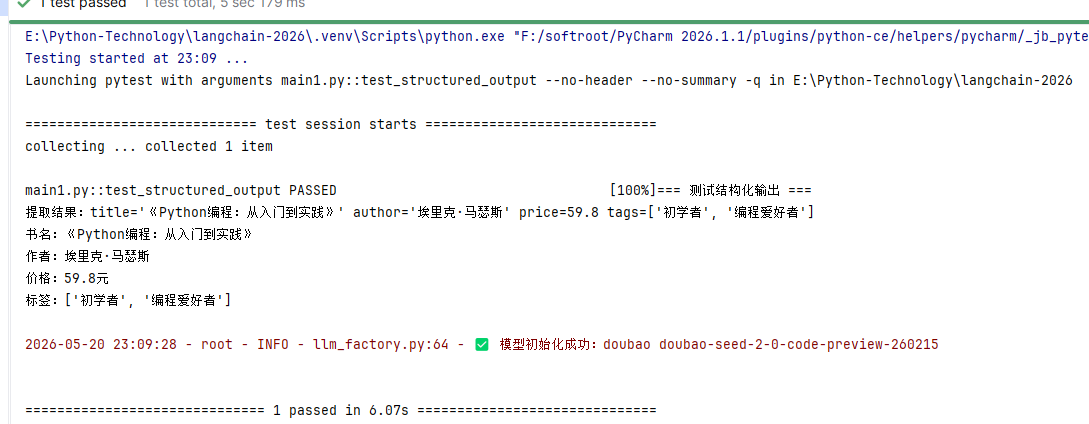
def test_structured_output():
    """测试结构化输出"""
    print("=== 测试结构化输出 ===")

    class BookInfo(BaseModel):
        title: str = Field(description="书名")
        author: str = Field(description="作者")
        price: float = Field(description="价格")
        tags: list[str] = Field(description="标签列表")

    parser = PydanticOutputParser(pydantic_object=BookInfo)

    # 创建自定义模板
    from langchain_core.prompts import ChatPromptTemplate
    prompt = ChatPromptTemplate.from_messages([
        ("system", "从以下文本中提取书籍信息,严格按照指定格式输出。\n{format_instructions}"),
        ("human", "{text}")
    ])

    # 临时添加到提示仓库
    from core.prompt_templates import PROMPT_REPOSITORY
    PROMPT_REPOSITORY["book_info"] = {
        "v1.0": {
            "description": "书籍信息提取模板",
            "template": prompt.partial(format_instructions=parser.get_format_instructions())
        }
    }

    result = PromptService.generate(
        template_name="book_info",
        inputs={
            "text": "《Python编程:从入门到实践》是埃里克·马瑟斯写的一本Python入门书籍,售价59.8元,适合初学者、编程爱好者阅读。"
        },
        output_parser=parser
    )

    print(f"提取结果:{result}")
    print(f"书名:{result.title}")
    print(f"作者:{result.author}")
    print(f"价格:{result.price}元")
    print(f"标签:{result.tags}\n")

if __name__ == "__main__":
    print("🚀 第2天:提示词工程与模板系统测试\n")

    test_rag_prompt()
    test_translation_prompt()
    test_structured_output()

    print("🎉 所有提示模板测试通过!")
4.4 运行验证