带你速通天机学堂准备面试
目录
[day03 - 学习计划和进度](#day03 - 学习计划和进度)
[day04 - 高并发优化](#day04 - 高并发优化)
day03 - 学习计划和进度
1查询学习记录
思路:根据课程id查课程信息->然后根据课程信息里面的小节id去查小节信息 ->最后封装即可
java//查询指定课程的学习记录 public LearningLessonDTO queryLearningRecordByCourse(Long courseId) { //1.获取当前用户 Long user = UserContext.getUser(); //2.查询lesson信息 LearningLesson learningLesson = lessonService.queryByUserAndCourseId(user, courseId); if(learningLesson == null){ throw new BizIllegalException("该用户未拥有该课程"); } //3.查询record表的小节学习进度 List<LearningRecord> records = lambdaQuery() .eq(LearningRecord::getLessonId, learningLesson.getId()) .list(); // 没有得到学习记录不能抛异常,别问我怎么知道的 // if(CollUtils.isEmpty(records)){ // return null; // } //4.设置LearningLessonDTO的信息 LearningLessonDTO learningLessonDTO = new LearningLessonDTO(); learningLessonDTO.setId(learningLesson.getId()); learningLessonDTO.setLatestSectionId(learningLesson.getLatestSectionId()); //5.复制小节记录集合到LearningRecordDTO List<LearningRecordDTO> dtos = BeanUtils.copyList(records, LearningRecordDTO.class); learningLessonDTO.setRecords(dtos); return learningLessonDTO; }
2提交学习记录
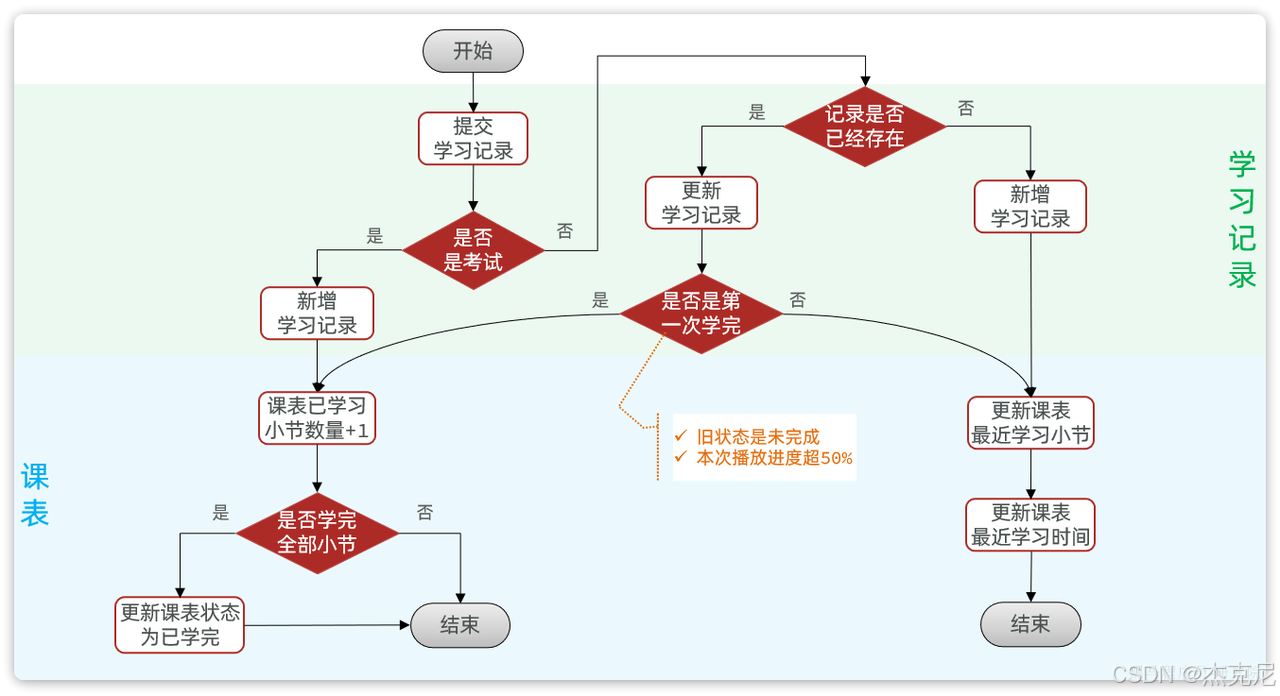
3学习进度统计?
java//提交学习记录 @Transactional public void addLearningRecord(LearningRecordFormDTO recordDTO) { Long user = UserContext.getUser(); SectionType type = recordDTO.getSectionType(); //判断是否已经考完试或者小节已经全部学完 boolean finished = false; if(type == SectionType.EXAM){ //考试流程 finished = handleExamRecord(user, recordDTO); }else{ //看视频流程 finished = handleVideoRecordWithRedis(user, recordDTO); } /** * 本来没有这个判断,但是使用了延迟队列的版本后就需要判断一下 * + 如果是第一次看完视频,taskHandler的延时队列里就没有该记录 * 没有该记录就无法更新成最新的课表信息(最新学习小节id、最新学习时间等) * 所以需要这里手动更新一下课表 * + 否则就不需要更新,因为并不是第一次看完视频的情况下 * 延时队列出元素后会更新课表信息,如果再次更新会造成重复更新 */ if(!finished){ return; } //更新课表 handleLearningLessonsChanges(recordDTO); } //添加考试记录 private boolean handleExamRecord(Long userId, LearningRecordFormDTO recordDTO) { LearningRecord learningRecord = new LearningRecord(); learningRecord.setFinished(true); learningRecord.setFinishTime(recordDTO.getCommitTime()); learningRecord.setSectionId(recordDTO.getSectionId()); learningRecord.setLessonId(recordDTO.getLessonId()); learningRecord.setUserId(userId); boolean save = save(learningRecord); if(!save){ throw new DbException("新增考试记录失败"); } return true; } /** * 异步延时阻塞队列版本(大致思路:优先查Redis记录->修改Redis记录->最后用户离开再把Redis记录持久化到数据库) * 减少了对数据库的操作,避免高并发 * @param userId * @param recordDTO * @return */ private boolean handleVideoRecordWithRedis(Long userId, LearningRecordFormDTO recordDTO) { //查询旧的学习记录 LearningRecord oldRecord = queryOldRecord(recordDTO.getLessonId(), recordDTO.getSectionId()); //1.没有旧的学习记录 if(oldRecord == null){ LearningRecord learningRecord = BeanUtils.copyBean(recordDTO, LearningRecord.class); learningRecord.setUserId(userId); //数据库新增学习记录 boolean save = save(learningRecord); if(!save){ throw new DbException("新增学习记录失败"); } return false; } //2.有学习记录,修改学习记录 //2.1如果该小节视频长度完成50%及以上且小节旧的状态为未完成,才让当前课程表的小节完成数量+1 boolean finished = false; //todo getDuration() 视频总时长 和getMoment() 当前观看进度? if(!oldRecord.getFinished() && recordDTO.getDuration() <= recordDTO.getMoment()*2){ finished = true; } //当前小节没有学完就将该小节信息添加到redis、延时队列 if(!finished){ LearningRecord nowRecord = new LearningRecord(); nowRecord.setLessonId(recordDTO.getLessonId()); nowRecord.setSectionId(recordDTO.getSectionId()); nowRecord.setMoment(recordDTO.getMoment()); nowRecord.setFinished(finished); nowRecord.setId(oldRecord.getId()); //添加到redis和延时队列 taskHandler.addLearningRecordTask(nowRecord); //如果不返回会执行另一个分支流程->重复更新小节学习记录 return finished; } //2.2更新小节学习,如果符合完成条件,则更新小节记录的完成时间和状态 boolean update = lambdaUpdate() .set(LearningRecord::getMoment, recordDTO.getMoment()) .set(finished, LearningRecord::getFinished, true) .set(finished, LearningRecord::getFinishTime, recordDTO.getCommitTime()) .eq(LearningRecord::getId, oldRecord.getId()) .update(); if(!update){ throw new DbException("更新学习记录失败"); } //3.如果是第一次学完,则清除redis中的学习记录 todo 为什么要删除? taskHandler.cleanRecordCache(recordDTO.getLessonId(), recordDTO.getSectionId()); return finished; }
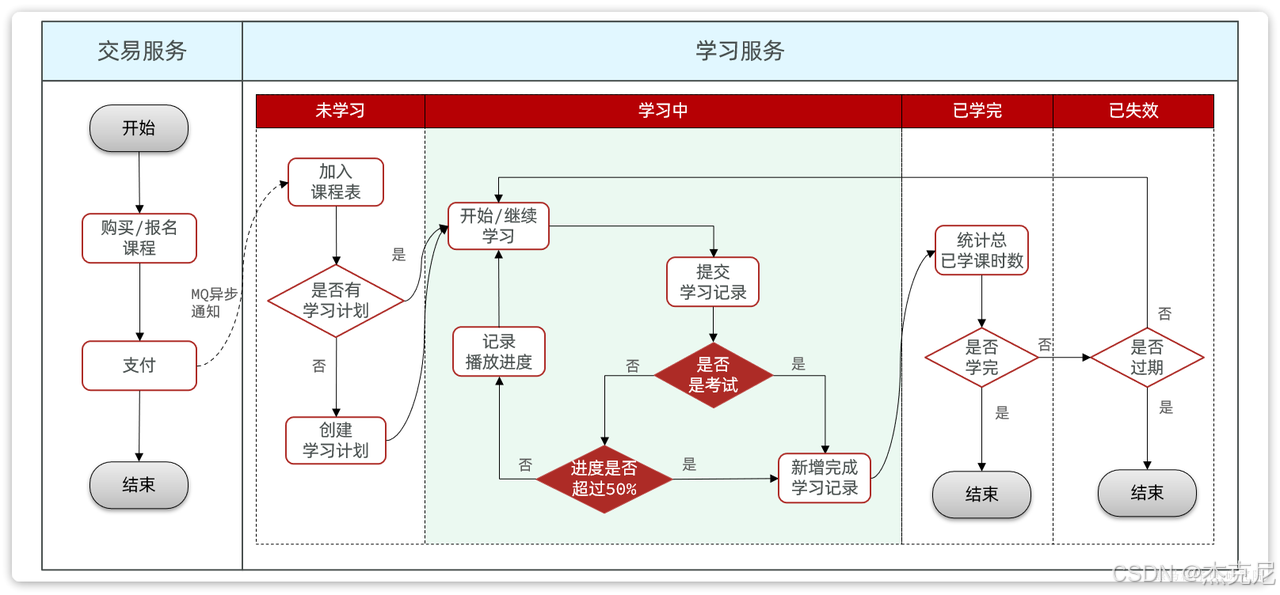
4该项目的延迟队列是怎么配置实现的?
- 核心组件构成
DelayTask.java
实现了 Java 的 Delayed 接口,作为延迟任务的基本单元
包含业务数据和截止时间(纳秒时间戳)
通过 compareTo() 方法实现任务优先级排序(按截止时间)
通过 getDelay() 方法计算剩余延迟时间
javapackage com.tianji.learning.utils; import lombok.Data; import java.time.Duration; import java.util.concurrent.Delayed; import java.util.concurrent.TimeUnit; /** * 延迟任务封装类 * <p> * 实现了Java的Delayed接口,用于在DelayQueue中存储延迟执行的任务。 * 每个任务包含业务数据和截止时间,当到达截止时间后任务才会被取出执行。 * </p> * * @param <D> 任务携带的业务数据类型 */ @Data public class DelayTask<D> implements Delayed { /** 任务携带的业务数据 */ private D data; /** 任务截止时间的纳秒时间戳(绝对时间) */ private long deadlineNanos; /** * 构造延迟任务 * * @param data 任务携带的业务数据 * @param delayTime 延迟时间,从当前时刻开始计算todo Duration delayTime? */ public DelayTask(D data, Duration delayTime) { this.data = data; // 计算任务的截止时间: 当前系统纳秒时间 + 延迟时间的纳秒数 this.deadlineNanos = System.nanoTime() + delayTime.toNanos(); } /** * 比较两个延迟任务的优先级 * <p> * DelayQueue是优先队列,会根据此方法的返回值对任务排序: * - 返回值 < 0: 当前任务优先级更高(更早到期) * - 返回值 > 0: 当前任务优先级更低(更晚到期) * - 返回值 = 0: 两个任务优先级相同 * </p> * <p> * 排序规则: 截止时间越早的任务优先级越高,会先被取出执行 * </p> * * @param o 要比较的另一个延迟任务 * @return 比较结果: -1(当前任务更早)、0(同时到期)、1(当前任务更晚) */ @Override public int compareTo(Delayed o) { // 计算两个任务的剩余延迟时间差值 long l = getDelay(TimeUnit.NANOSECONDS) - o.getDelay(TimeUnit.NANOSECONDS); if(l > 0){ return 1; // 当前任务延迟时间更长,优先级更低 }else if(l < 0){ return -1; // 当前任务延迟时间更短,优先级更高 }else { return 0; // 两个任务延迟时间相同 } } /** * 获取任务的剩余延迟时间 * <p> * DelayQueue会根据此方法的返回值判断任务是否到期: * - 返回值 <= 0: 任务已到期,可以被取出执行 * - 返回值 > 0: 任务未到期,继续等待 * </p> * * @param unit 时间单位,调用者指定返回值的单位 * @return 剩余延迟时间,如果已到期则返回0或负数 */ @Override public long getDelay(TimeUnit unit) { // 计算剩余时间: 截止时间 - 当前时间 // 使用Math.max确保不会返回负数todo convert? return unit.convert(Math.max(0, deadlineNanos - System.nanoTime()), TimeUnit.NANOSECONDS); } }LearningRecordDelayTaskHandler.java
主要的延迟队列处理器,使用 Spring 的 @Component 注解
内部维护一个 DelayQueue<DelayTask<RecordTaskData>> 队列
使用线程池处理延迟任务执行
javapackage com.tianji.learning.utils; import com.tianji.common.utils.JsonUtils; import com.tianji.common.utils.StringUtils; import com.tianji.learning.domain.po.LearningLesson; import com.tianji.learning.domain.po.LearningRecord; import com.tianji.learning.mapper.LearningRecordMapper; import com.tianji.learning.service.ILearningLessonService; import lombok.Data; import lombok.NoArgsConstructor; import lombok.RequiredArgsConstructor; import lombok.extern.slf4j.Slf4j; import org.springframework.data.redis.core.StringRedisTemplate; import org.springframework.stereotype.Component; import javax.annotation.PostConstruct; import javax.annotation.PreDestroy; import java.time.Duration; import java.time.LocalDateTime; import java.util.Objects; import java.util.concurrent.*; /** * todo SpringTask 定时任务 和延时队列有什么区别? * todo .高并发优化方案? day04 * 延迟阻塞队列工具 * 主要包含方法: * + 读取Redis中学习记录 * + 添加播放记录到Redis,并添加一个延迟检测任务到DelayQueue * + 删除Redis缓存中的指定小节的播放记录 * + 异步执行DelayQueue中的延迟检测任务,检测播放进度是否变化,如果无变化则写入数据库 */ @Slf4j @Component @RequiredArgsConstructor public class LearningRecordDelayTaskHandler { private final StringRedisTemplate redisTemplate; //todo ? private final DelayQueue<DelayTask<RecordTaskData>> queue = new DelayQueue<>(); private final static String RECORD_KEY_TEMPLATE = "learning:record:{}"; private final LearningRecordMapper recordMapper; private final ILearningLessonService lessonService; private static volatile boolean begin = true; //创建线程池todo 创建线程池都需要什么参数? ThreadPoolExecutor poolExecutor = new ThreadPoolExecutor(12, 12, 60, TimeUnit.SECONDS, new LinkedBlockingDeque<>(10)); //PostConstruct:在此类初始化后,并在属性被输入之后执行 //todo @PostConstruct 执行时机? @PostConstruct //初始化时会创建一个新线程,来执行handleDelayTask方法 public void init(){ //todo ?与new Thread () 核心区别? CompletableFuture.runAsync(this::handleDelayTask); } //PreDestroy:在此类实例销毁前设置destroy为false,使其延时队列任务监测方法停止,否则用户断开连接后,在新线程还会一直执行handleDelayTask @PreDestroy public void destroy(){ log.debug("关闭学习记录处理的延迟任务"); begin = false; } //由新线程开启的延时队列任务监测 private void handleDelayTask(){ while (begin){ try { // 1.尝试获取任务todo take? DelayTask<RecordTaskData> task = queue.take(); log.debug("获取到要处理的播放记录任务"); // poolExecutor.submit(new Runnable() { @Override public void run() { RecordTaskData data = task.getData(); //由于是阻塞队列(不会返回null),拿不到元素就会阻塞在这里一直等 // 2.读取Redis缓存 LearningRecord record = readRecordCache(data.getLessonId(), data.getSectionId()); log.info("从延迟队列获取到学习记录数据:{}", data); log.info("从Redis缓存中获取到学习记录数据:{}", record); if (record == null) { return; } // 3.比较数据 if(!Objects.equals(data.getMoment(), record.getMoment())){ // 4.如果不一致,播放进度在变化,无需持久化 return; } // 5.如果一致,证明用户离开了视频,需要持久化 // 5.1.更新学习记录 record.setFinished(null); recordMapper.updateById(record); // 5.2.更新课表 LearningLesson lesson = new LearningLesson(); lesson.setId(data.getLessonId()); lesson.setLatestSectionId(data.getSectionId()); lesson.setLatestLearnTime(LocalDateTime.now()); lessonService.updateById(lesson); log.debug("准备持久化学习记录信息"); } }); } catch (Exception e) { log.error("处理播放记录任务发生异常", e); } } } /** * 添加学习记录到Redis并提交到延时队列(异步) * @param record 学习记录 */ public void addLearningRecordTask(LearningRecord record){ // 1.添加数据到Redis缓存 writeRecordCache(record); // 2.提交延迟任务到延迟队列 DelayQueue queue.add(new DelayTask<>(new RecordTaskData(record), Duration.ofSeconds(20))); } /** * 将学习记录存储到Redis * @param record 学习记录对象{课表id, 小节id, 播放时长} */ public void writeRecordCache(LearningRecord record) { log.debug("更新学习记录的缓存数据"); try { // 1.数据转换 String json = JsonUtils.toJsonStr(new RecordCacheData(record)); // 2.写入Redis String key = StringUtils.format(RECORD_KEY_TEMPLATE, record.getLessonId()); redisTemplate.opsForHash().put(key, record.getSectionId().toString(), json); // 3.添加Redis的缓存过期时间 redisTemplate.expire(key, Duration.ofMinutes(1)); } catch (Exception e) { log.error("更新学习记录缓存异常", e); } } /** * 读取Redis中学习记录 * @param lessonId 课表id * @param sectionId 小节id * @return LearningRecord 学习记录 */ public LearningRecord readRecordCache(Long lessonId, Long sectionId){ try { // 1.读取Redis数据todo ? String key = StringUtils.format(RECORD_KEY_TEMPLATE, lessonId); Object cacheData = redisTemplate.opsForHash().get(key, sectionId.toString()); if (cacheData == null) { return null; } // 2.数据检查和转换todo 为什么要有这个数据转换? // Redis 里存的是 JSON 字符串 return JsonUtils.toBean(cacheData.toString(), LearningRecord.class); } catch (Exception e) { log.error("缓存读取异常", e); return null; } } /** * 删除Redis中已完成的学习记录缓存 * @param lessonId 课表id * @param sectionId 小节id */ public void cleanRecordCache(Long lessonId, Long sectionId){ // 删除数据 String key = StringUtils.format(RECORD_KEY_TEMPLATE, lessonId); redisTemplate.opsForHash().delete(key, sectionId.toString()); } /** * Redis中保存的学习记录对象 * 该对象与Redis中存储的学习记录属性保持一致 */ @Data @NoArgsConstructor private static class RecordCacheData{ private Long id; //小节id,不需要lessonId,lessonId是作为key保存在redis中 private Integer moment; private Boolean finished; public RecordCacheData(LearningRecord record) { this.id = record.getId(); this.moment = record.getMoment(); this.finished = record.getFinished(); } } /** * 延迟阻塞队列任务对象中保存的学习记录对象 * 该对象和上面的RecordCacheData有何不同? * + 该任务对象需要有lessonId方便查找再次redis的记录进行对比 * + 没有finished字段,此对象只是拿来和redis中的记录比较moment值 */ @Data @NoArgsConstructor private static class RecordTaskData{ /** 课表ID,用于定位Redis中的学习记录缓存 */ private Long lessonId; /** 小节ID,用于定位Redis中的学习记录缓存 */ private Long sectionId; /** 视频播放进度(秒),用于与Redis中的最新进度对比,判断用户是否仍在观看 */ private Integer moment; public RecordTaskData(LearningRecord record) { this.lessonId = record.getLessonId(); this.sectionId = record.getSectionId(); this.moment = record.getMoment(); } } }
5创建学习计划
java//创建学习计划 public void createLearningPlan(Long courseId, Integer freq) { Long user = UserContext.getUser(); LearningLesson lesson = queryByUserAndCourseId(user, courseId); if(lesson == null){ throw new BizIllegalException("课表中没有该课程"); } boolean update = this.lambdaUpdate() .set(LearningLesson::getWeekFreq, freq) .set(LearningLesson::getPlanStatus, PlanStatus.PLAN_RUNNING) .eq(LearningLesson::getId, lesson.getId()) .update(); if(!update){ throw new DbException("课表更新失败"); } }
6查询学习计划进度
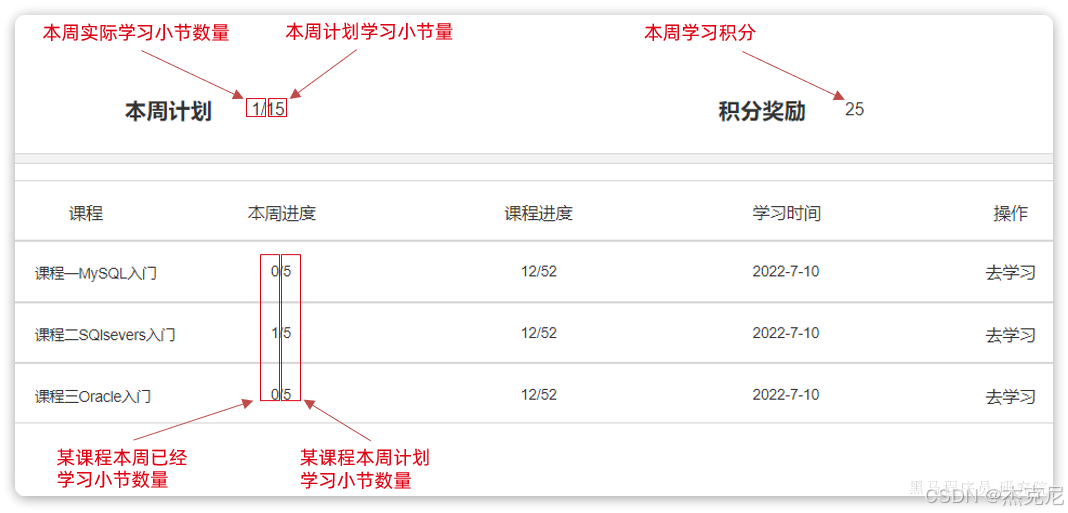
思路: 先查询积分->先查询已完成的小节总数量->所有计划小节总数量->所有计划课程集合->每个课程的相关信息(本周已学习小节/本周计划学习小节/课程已学习小节/课程总小节数量)->封装VO并返回
java//todo ? /*查询学习计划 * 这个方法最终返回给前端一个页面: 顶部统计区域 本周已学:10 节 本周计划:21 节 本周积分:0 下方课程列表 Java 课程(本周学 3 节 / 总共 50 节) MySQL 课程(本周学 5 节 / 总共 30 节) Vue 课程(本周学 2 节 / 总共 42 节) * */ public LearningPlanPageVO queryMyPlans(PageQuery query) { LearningPlanPageVO planPageVO = new LearningPlanPageVO(); //1.获取用户 Long user = UserContext.getUser(); //2.获取本周时间范围(复用) LocalDate now = LocalDate.now(); LocalDateTime weekBegin = DateUtils.getWeekBeginTime(now); LocalDateTime weekEnd = DateUtils.getWeekEndTime(now); //3.查询本周积分 QueryWrapper<PointsRecord> pointsWrapper = new QueryWrapper<>(); pointsWrapper.select("SUM(points) AS totalPoints"); pointsWrapper.eq("user_id", user); pointsWrapper.between("create_time", weekBegin, weekEnd); Map<String, Object> pointsMap = pointsRecordMapper.selectMaps(pointsWrapper).stream() .findFirst() .orElse(null); if (pointsMap != null && pointsMap.get("totalPoints") != null) { Object totalPoints = pointsMap.get("totalPoints"); // SUM返回的是BigDecimal类型,需要转换为Integer planPageVO.setWeekPoints(Integer.valueOf(totalPoints.toString())); } else { planPageVO.setWeekPoints(0); } //4.查询课程表信息 //4.1获取本周已完成小节总数 Integer weekFinished = recordMapper.selectCount(new LambdaQueryWrapper<LearningRecord>() .eq(LearningRecord::getUserId, user) .eq(LearningRecord::getFinished, true) .gt(LearningRecord::getFinishTime, weekBegin) .lt(LearningRecord::getFinishTime, weekEnd) ); planPageVO.setWeekFinished(weekFinished); //3.3获取用户所有计划小节数量 QueryWrapper<LearningLesson> wrapper = new QueryWrapper<>(); wrapper.select("SUM(week_freq) AS plansTotal"); wrapper.eq("user_id", user); wrapper.in("status", LessonStatus.NOT_BEGIN, LessonStatus.LEARNING); wrapper.eq("plan_status", PlanStatus.PLAN_RUNNING); Map<String, Object> map = getMap(wrapper); if(map != null && map.get("plansTotal") != null){ //得到结果 Object plansTotal = map.get("plansTotal"); //SUM类型默认为BigDecimal,所以需要转换为int Integer plans = Integer.valueOf(plansTotal.toString()); planPageVO.setWeekTotalPlan(plans); }else{ planPageVO.setWeekTotalPlan(0); } //3.4查询所有有计划的课程集合 Page<LearningLesson> lessonPage = lambdaQuery() .eq(LearningLesson::getUserId, user) .eq(LearningLesson::getPlanStatus, PlanStatus.PLAN_RUNNING) .in(LearningLesson::getStatus, LessonStatus.NOT_BEGIN, LessonStatus.LEARNING) .page(query.toMpPage("latest_learn_time", false)); //如果没有计划的课程返回一个空分页 List<LearningLesson> records = lessonPage.getRecords(); if(CollUtils.isEmpty(records)){ planPageVO.setTotal(0L); planPageVO.setPages(0L); planPageVO.setList(CollUtils.emptyList()); return planPageVO; } //4.查询课程相关信息 //查询每一门课程中的:本周已学小节、本周计划小节、小节已学数量、小节总数量、课程名字 //4.1远程批量查询课程集合 Map<Long, CourseSimpleInfoDTO> cinfos = queryCourseSimpleInfoList(records); //4.2远程批量查询各门课程本周已学小节 //这里我使用先查出已学小节的集合,然后遍历集合输出map<课表id, 已学小节数量> //也可以在mapper写sql查出,做法在在线文档就已经实现 Map<Long, Long> weekLearnedSections = recordMapper.selectList( new LambdaQueryWrapper<LearningRecord>() .eq(LearningRecord::getUserId, user) .eq(LearningRecord::getFinished,true) .gt(LearningRecord::getFinishTime, weekBegin) .lt(LearningRecord::getFinishTime, weekEnd) //对课表分组就是对课程分组,groupingBy分组时调用counting函数即可对分组中的数量进行统计,统计的结果就是已学小节数 ).stream().collect(Collectors.groupingBy(LearningRecord::getLessonId, Collectors.counting())); //4.2封装每个课程 List<LearningPlanVO> planVOS = records.stream().map(lesson -> { LearningPlanVO learningPlanVO = BeanUtils.copyBean(lesson, LearningPlanVO.class); //4.3设置该课程的信息(本来这里写的是远程获取,但是已经有了批量获取课程的方法了,为了提高效率所以这里使用map来直接获取) CourseSimpleInfoDTO cinfo = cinfos.get(lesson.getCourseId()); //小节总数量 learningPlanVO.setSections(cinfo.getSectionNum()); //课程名字 learningPlanVO.setCourseName(cinfo.getName()); //4.4设置该课程本周已学小节 Long sections = weekLearnedSections.get(lesson.getId()); //这里一定要判断一下,因为如果该课程用户本周并没有学习小节时,map就没有该记录 //所以要给一个默认值0 if(sections == null){ learningPlanVO.setWeekLearnedSections(0); }else{ learningPlanVO.setWeekLearnedSections(Integer.valueOf(sections.toString())); } return learningPlanVO; }).collect(Collectors.toList()); //5.封装pageVo return planPageVO.pageInfo(lessonPage.getTotal(), lessonPage.getPages(), planVOS); }
7时间工具类DateUtils的代码实现?
不会写也没事,工具类以后可以直接提取到代码中进行使用
javapackage com.tianji.common.utils; import cn.hutool.core.date.DateTime; import cn.hutool.core.date.LocalDateTimeUtil; import java.time.*; import java.time.format.DateTimeFormatter; import java.util.*; /** * 时间工具类,用于本地时间操作,包含LocalDateTimeUtil的所有方法和自定义的LocalDateTime的操作方法及常量 * * @author wusongsong * @version 1.0.0 1.0 * @see 1.0 * @since 从哪个版本开始支持该类的功能todo LocalDateTimeUtil? */ public class DateUtils extends LocalDateTimeUtil { public static final String DEFAULT_YEAR_FORMAT = "yyyy"; public static final String DEFAULT_MONTH_FORMAT = "yyyy-MM"; public static final String DEFAULT_MONTH_FORMAT_SLASH = "yyyy/MM"; public static final String DEFAULT_MONTH_FORMAT_EN = "yyyy年MM月"; public static final String DEFAULT_MONTH_FORMAT_COMPACT = "yyyyMM"; public static final String DEFAULT_WEEK_FORMAT = "yyyy-ww"; public static final String DEFAULT_WEEK_FORMAT_EN = "yyyy年ww周"; public static final String DEFAULT_DATE_FORMAT = "yyyy-MM-dd"; public static final String DEFAULT_DATE_FORMAT_EN = "yyyy年MM月dd日"; public static final String DEFAULT_DATE_FORMAT_COMPACT = "yyyyMMdd"; public static final String DEFAULT_DATE_TIME_FORMAT = "yyyy-MM-dd HH:mm:ss"; public static final String DEFAULT_DATE_TIME_COMPACT = "yyyyMMddHHmmss"; public static final String DEFAULT_TIME_FORMAT = "HH:mm:ss"; public static final String DAY = "DAY"; public static final String MONTH = "MONTH"; public static final String WEEK = "WEEK"; public static final long MAX_MONTH_DAY = 30L; public static final long MAX_3_MONTH_DAY = 90L; public static final long MAX_YEAR_DAY = 365L; public static final DateTimeFormatter SIGN_DATE_SUFFIX_FORMATTER = DateTimeFormatter.ofPattern(":yyyyMM"); public static final String TIME_ZONE_8 = "GMT+8"; /** * 获取utc时间 * * @param localDateTime 转化时间 * @return utc时间 */ public static LocalDateTime getUTCTime(LocalDateTime localDateTime) { ZoneId australia = ZoneId.of("Asia/Shanghai"); ZonedDateTime dateAndTimeInSydney = ZonedDateTime.of(localDateTime, australia); ZonedDateTime utcDate = dateAndTimeInSydney.withZoneSameInstant(ZoneOffset.UTC); return utcDate.toLocalDateTime(); } /** * 获取Asia时间 * * @param localDateTime 转化时间 * @return Asia时间 */ public static LocalDateTime getAsiaTime(LocalDateTime localDateTime) { ZoneId australia = ZoneId.of("Asia/Shanghai"); ZonedDateTime dateAndTimeInSydney = ZonedDateTime.of(localDateTime, ZoneOffset.UTC); ZonedDateTime utcDate = dateAndTimeInSydney.withZoneSameInstant(australia); return utcDate.toLocalDateTime(); } /** * 获取某一天的开始:0点0分 * * @param localDateTime 指定日期 * @return 转换后的时间 */ public static LocalDateTime getDayStartTime(LocalDateTime localDateTime) { if (localDateTime == null) { return null; } return localDateTime.toLocalDate().atStartOfDay(); } /** * 获取某一天的结束:23点 59分 59秒的时间 * * @param localDateTime 指定日期 * @return 转换后的时间 */ public static LocalDateTime getDayEndTime(LocalDateTime localDateTime) { if (localDateTime == null) { return null; } //todo 为什么这个可以获取某一天的结束? return LocalDateTime.of(localDateTime.toLocalDate(), LocalTime.MAX); } public static Date addDays(int i) { Calendar c = Calendar.getInstance(TimeZone.getTimeZone(TIME_ZONE_8)); c.add(Calendar.DAY_OF_MONTH, i); return c.getTime(); } public static LocalDate getMonthBegin(DateTime date) { return LocalDate.of(date.getYear(), date.getMonth(), 1); } public static LocalDate getMonthEnd(LocalDate date) { return LocalDate.of(date.getYear(), date.getMonthValue() + 1, 1).minusDays(1); } public static LocalDateTime getMonthBeginTime(LocalDate date) { return LocalDate.of(date.getYear(), date.getMonth(), 1).atStartOfDay(); } public static LocalDateTime getMonthEndTime(LocalDate date) { return LocalDate.of(date.getYear(), date.getMonthValue() + 1, 1) .minusDays(1).atTime(LocalTime.MAX); } public static LocalDateTime getWeekBeginTime(LocalDate now) { return now.minusDays(now.getDayOfWeek().getValue() - 1).atStartOfDay(); } public static LocalDateTime getWeekEndTime(LocalDate now) { return LocalDateTime.of(now.plusDays(8 - now.getDayOfWeek().getValue()), LocalTime.MAX); } /** * 获取最近15天日期(不包含当天),格式MM.dd * * @return */ public static List<String> last15Day(){ // 1.定义日期列表 List<String> days = new ArrayList<>(); // 2.获取15天前的时间 LocalDateTime time = now().minusDays(15); // 3.for循环遍历 for (int count = 0; count < 15; count++){ // 3.1.格式化时间 days.add(String.format("%s.%s", NumberUtils.repair0(time.getMonthValue(),2), NumberUtils.repair0(time.getDayOfMonth(), 2))); // 3.2.日期加1天 time = time.plusDays(1); } // 4.返回结果 return days; } }
8课程过期
编写一个SpringTask定时任务,定期检查learning_lesson表中的课程是否过期,如果过期则将课程状态修改为已过期。
javapackage com.tianji.learning.task; import com.baomidou.mybatisplus.core.conditions.query.LambdaQueryWrapper; import com.tianji.learning.domain.po.LearningLesson; import com.tianji.learning.enums.LessonStatus; import com.tianji.learning.service.ILearningLessonService; import lombok.RequiredArgsConstructor; import lombok.extern.slf4j.Slf4j; import org.springframework.scheduling.annotation.Scheduled; import org.springframework.stereotype.Component; import java.time.LocalDateTime; import java.util.List; /** * 学习课表过期检查定时任务 * <p> * 功能:定期检查 learning_lesson 表中的课程是否过期,如果过期则将课程状态修改为已过期 * </p> */ @Component @RequiredArgsConstructor @Slf4j public class LearningLessonExpireCheckTask { private final ILearningLessonService lessonService; /** * 每小时执行一次,检查并更新过期的学习课表 * cron表达式:0 0 * * * ? 表示每小时的第0分钟执行 */ @Scheduled(cron = "0 0 * * * ?") public void checkExpiredLessons() { log.info("开始执行学习课表过期检查任务..."); try { // 1. 查询所有已过期的学习课表 // 条件:expire_time 不为空 且 expire_time <= 当前时间 且 状态不是已过期 LambdaQueryWrapper<LearningLesson> queryWrapper = new LambdaQueryWrapper<>(); queryWrapper.isNotNull(LearningLesson::getExpireTime) .le(LearningLesson::getExpireTime, LocalDateTime.now()) .ne(LearningLesson::getStatus, LessonStatus.EXPIRED); List<LearningLesson> expiredLessons = lessonService.list(queryWrapper); if (expiredLessons == null || expiredLessons.isEmpty()) { log.info("没有发现过期的学习课表"); return; } log.info("发现 {} 个过期的学习课表,开始更新状态...", expiredLessons.size()); // 2. 批量更新状态为已过期 int updateCount = 0; for (LearningLesson lesson : expiredLessons) { boolean updated = lessonService.lambdaUpdate() .set(LearningLesson::getStatus, LessonStatus.EXPIRED) .eq(LearningLesson::getId, lesson.getId()) .update(); if (updated) { updateCount++; log.debug("课表 ID: {} 已更新为过期状态", lesson.getId()); } } log.info("学习课表过期检查任务完成,共更新 {} 个课表状态", updateCount); } catch (Exception e) { log.error("学习课表过期检查任务执行失败", e); } } }
- 确保启用定时任务
在启动类或配置类上添加 @EnableScheduling 注解:
java@SpringBootApplication @EnableScheduling // ← 启用 Spring 定时任务 public class LearningApplication { public static void main(String[] args) { SpringApplication.run(LearningApplication.class, args); } }
9方案思考
思考题:思考一下目前提交学习记录功能可能存在哪些问题?有哪些可以改进的方向?
多次查询数据库 → 性能差
没有做缓存(
- 学习计划页面是高频访问
- 每次都查 DB
- 没有缓存,压力大
)
- 手动内存分页,性能差,数据量大容易 OOM
- 查询全量学习记录再统计,占用内存大
- 多次数据库查询,IO 次数多
- 没有使用缓存,频繁访问压力大
- 手写分页逻辑容易出错
10面试题:
面试官:你在开发中参与了哪些功能开发让你觉得比较有挑战性?
答:我参与了整个学习中心的功能开发,其中有很多的学习辅助功能都很有特色。比如视频播放的进度记录。我们网站的课程是以录播视频为主,为了提高用户的学习体验,需要实现视频续播功能。这个功能本身并不复杂,只不过我们产品提出的要求比较高:
首先续播时间误差要控制在30秒以内。
而且要做到用户突然断开,甚至切换设备后,都可以继续上一次播放
要达成这个目的,使用传统的手段显然是不行的。
首先,要做到切换设备后还能续播,用户的播放进度必须保存在服务端,而不是客户端。
其次,用户突然断开或者切换设备,续播的时间误差不能超过30秒,那播放进度的记录频率就需要比较高。我们会在前端每隔15秒就发起一次心跳请求,提交最新的播放进度,记录到服务端。这样用户下一次续播时直接读取服务端的播放进度,就可以将时间误差控制在15秒左右。
注:此时面试官会追问:播放进度写到服务端保存在哪里?如果写在数据库,那写数据库的压力是不是太大了?等一系列问题,这个会在下一节内容中讲解。
day04 - 高并发优化
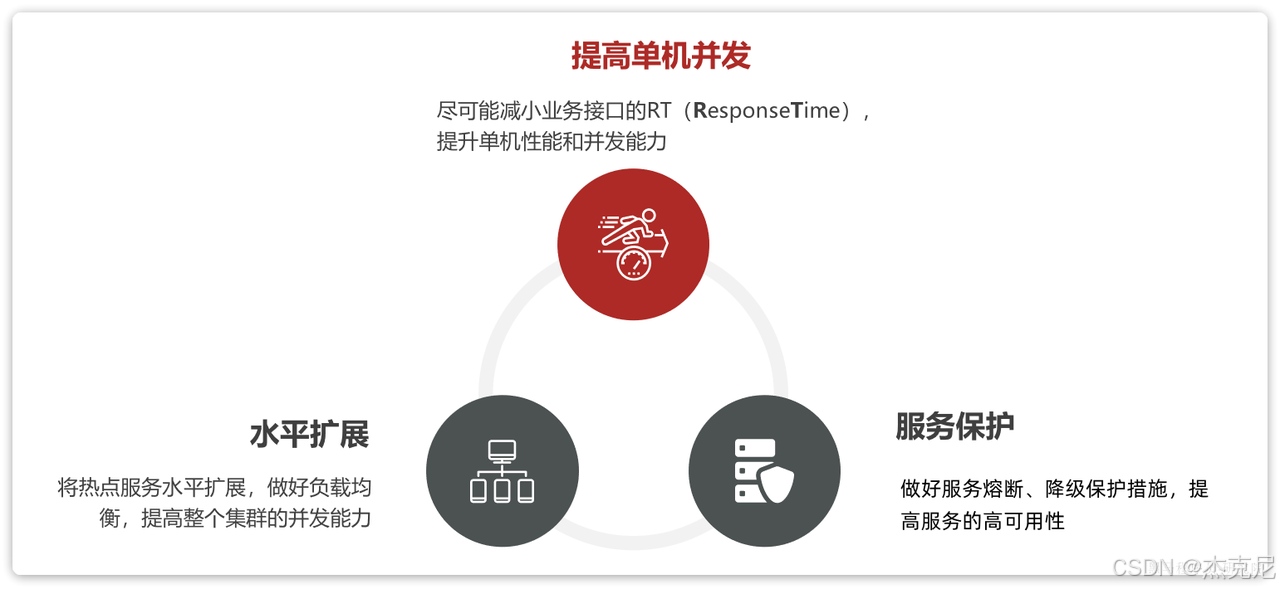
1并发优化方案有哪些?
1.1.单机并发能力
在机器性能一定的情况下,提高单机并发能力就是要尽可能缩短业务的响应时间(R esponseT ime),而对响应时间影响最大的往往是对数据库的操作。而从数据库角度来说,我们的业务无非就是读 或写两种类型。
对于读多写少的业务,其优化手段大家都比较熟悉了,主要包括两方面:
优化代码和SQL
添加缓存
对于写多读少的业务,大家可能较少碰到,优化的手段可能也不太熟悉,这也是我们要讲解的重点。
对于高并发写的优化方案有:
优化代码及SQL
变同步写为异步写
合并写请求
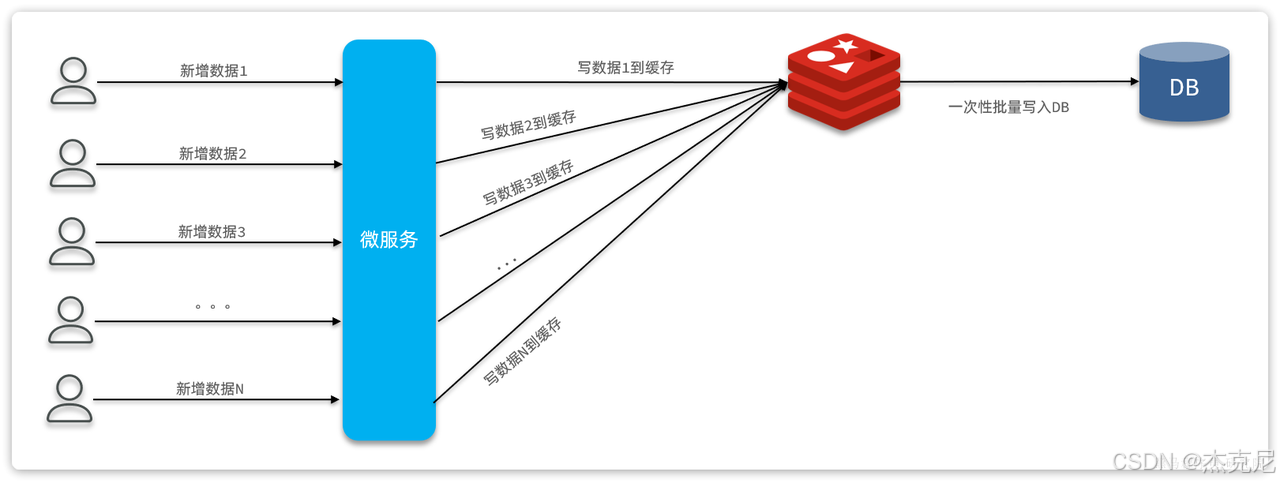
1.3.合并写请求
合并写请求方案其实是参考高并发读的优化思路:当读数据库并发较高时,我们可以把数据缓存到Redis,这样就无需访问数据库,大大减少数据库压力,减少响应时间。
既然读数据可以建立缓存,那么写数据可以不可以也缓存到Redis呢?
答案是肯定的,合并写请求就是指当写数据库并发较高时,不再直接写到数据库。而是先将数据缓存到Redis,然后定期将缓存中的数据批量写入数据库。
2面试
面试官:你在开发中参与了哪些功能开发让你觉得比较有挑战性?
答:我参与了整个学习中心的功能开发,其中有很多的学习辅助功能都很有特色。比如视频播放的进度记录。我们网站的课程是以录播视频为主,为了提高用户的学习体验,需要实现视频续播功能。这个功能本身并不复杂,只不过我们产品提出的要求比较高:
首先续播时间误差要控制在30秒以内。
而且要做到用户突然断开,甚至切换设备后,都可以继续上一次播放
要达成这个目的,使用传统的手段显然是不行的。
首先,要做到切换设备后还能续播,用户的播放进度必须保存在服务端,而不是客户端。
其次,用户突然断开或者切换设备,续播的时间误差不能超过30秒,那播放进度的记录频率就需要比较高。我们会在前端每隔15秒就发起一次心跳请求,提交最新的播放进度,记录到服务端。这样用户下一次续播时直接读取服务端的播放进度,就可以将时间误差控制在15秒左右。