欢迎加入开源鸿蒙PC社区:
atomgit仓库地址: https://atomgit.com/ai_lingshi/huxideng
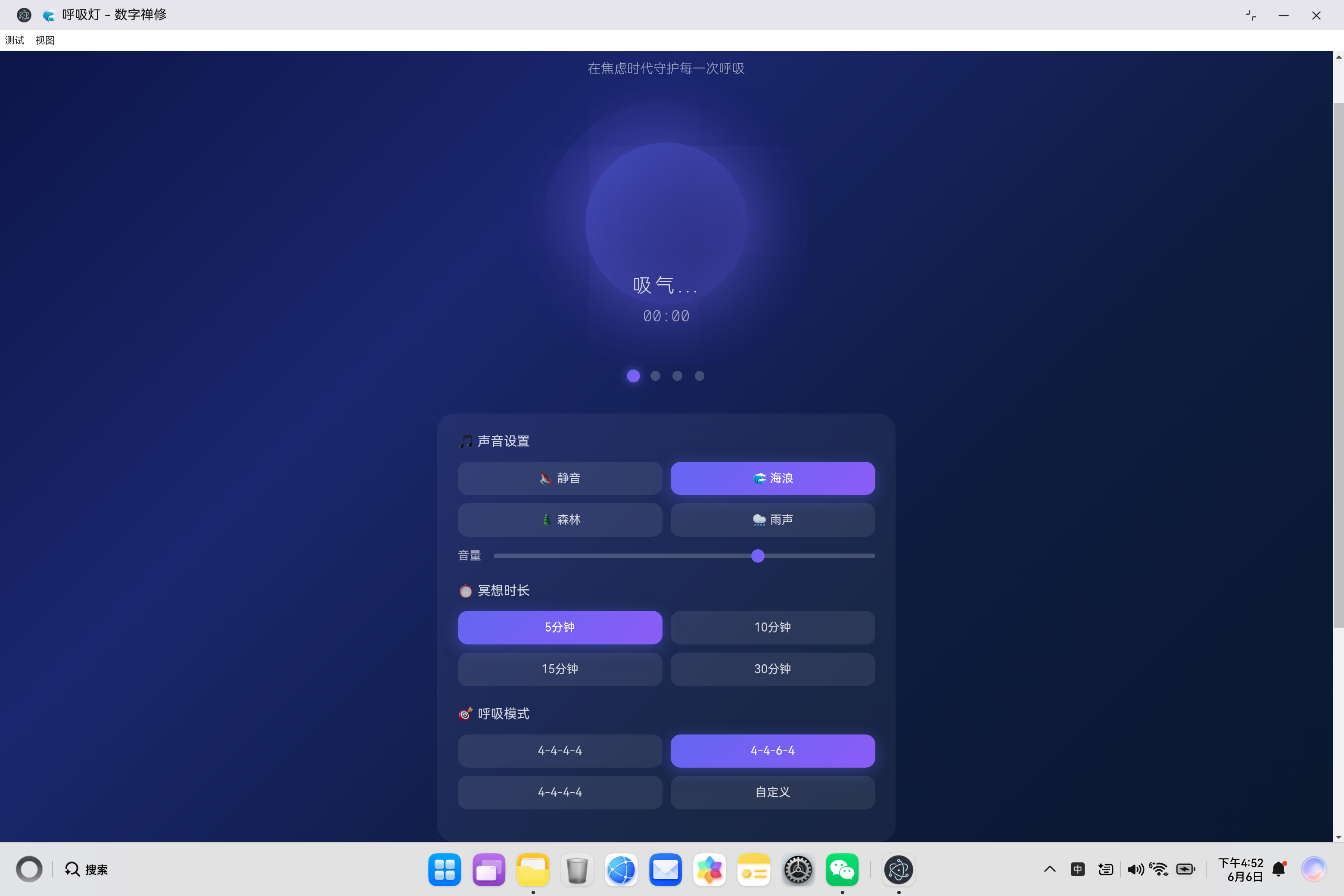
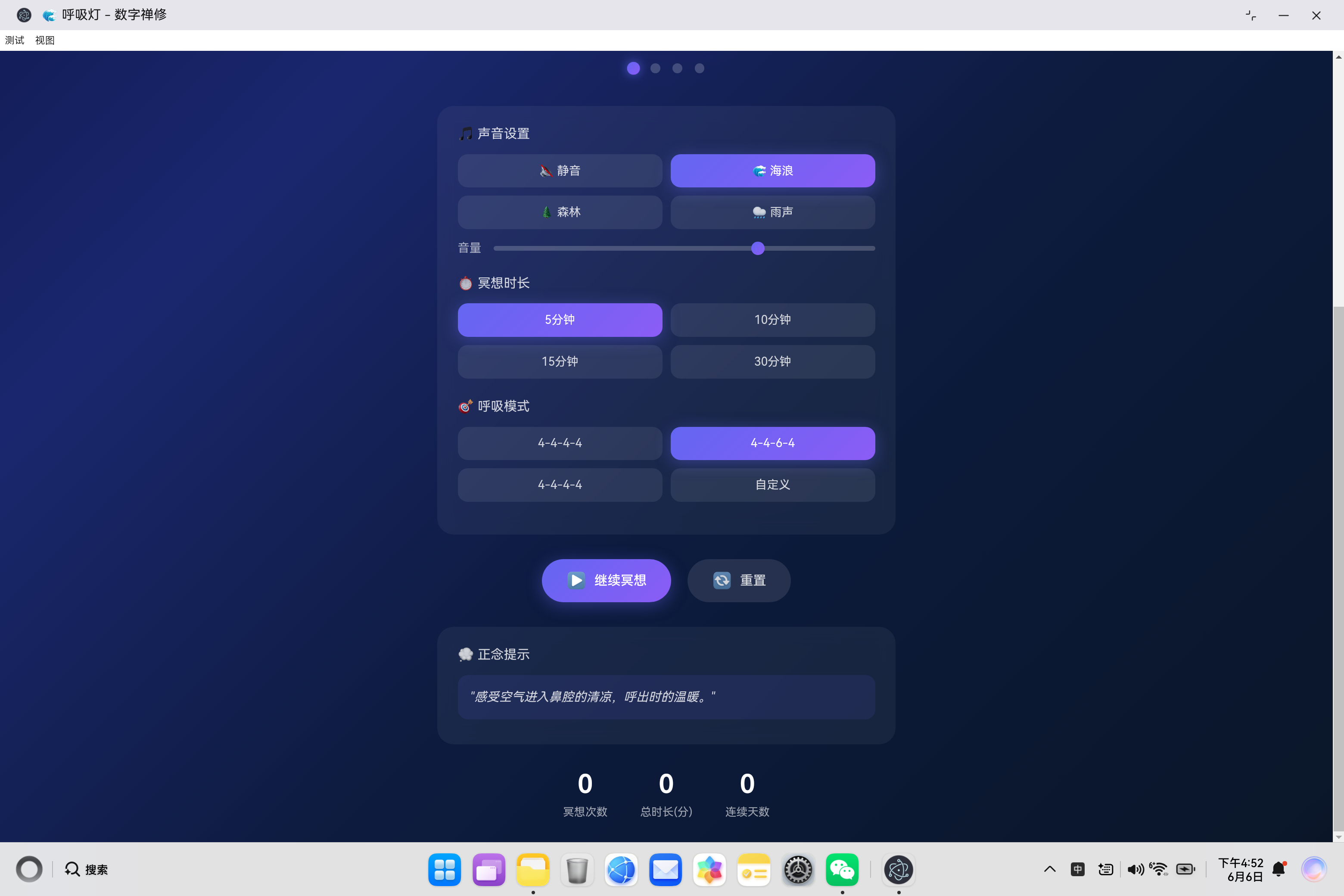
鸿蒙PC的白噪音呼吸灯
一、项目概述
在这个快节奏的焦虑时代,人们越来越需要一个简单有效的工具来帮助放松身心、缓解压力。呼吸灯应用应运而生,它是一款基于Web的数字禅修工具,通过可视化的呼吸引导和环境音效,帮助用户进行深呼吸练习,达到冥想放松的效果。
1.1 设计理念
| 理念 | 说明 |
|---|---|
| 极简设计 | 摒弃繁琐界面,专注呼吸本身 |
| 沉浸式体验 | 深色宇宙主题,营造宁静氛围 |
| 科学呼吸 | 基于呼吸生理学的节奏设计 |
| 个性化定制 | 支持多种呼吸模式和环境音效 |
1.2 核心功能
┌─────────────────────────────────────────────────────────┐
│                    呼吸灯应用架构                        │
├─────────────────────────────────────────────────────────┤
│  🌊 呼吸动画模块    │  🎵 环境音效模块    │  📊 统计模块    │
│  - 可视化呼吸引导   │  - Web Audio API   │  - 冥想次数     │
│  - 相位指示器      │  - 白噪音生成      │  - 总时长       │
│  - 实时计时器      │  - 音量控制        │  - 连续天数     │
├─────────────────────────────────────────────────────────┤
│  🎯 呼吸模式模块    │  💾 数据持久化      │                │
│  - 等长呼吸        │  - LocalStorage    │                │
│  - 放松呼吸        │  - 自动保存        │                │
│  - 箱式呼吸        │                    │                │
│  - 自定义模式      │                    │                │
└─────────────────────────────────────────────────────────┘
二、技术架构设计
2.1 整体架构
javascript
class BreathLightApp {
    constructor() {
        this.isRunning = false;
        this.breathPhase = 0; // 0:吸气, 1:屏息1, 2:呼气, 3:屏息2
        this.currentDuration = 10;
        this.currentPattern = 'equal';
        this.currentSound = 'none';
        this.stats = this.loadStats();
        // ...
    }
}
2.2 呼吸模式设计
javascript
this.breathPatterns = {
    equal: { inhale: 4, hold1: 4, exhale: 4, hold2: 4 },    // 等长呼吸
    relax: { inhale: 4, hold1: 4, exhale: 6, hold2: 4 },    // 放松呼吸
    box: { inhale: 4, hold1: 4, exhale: 4, hold2: 4 },      // 箱式呼吸
    custom: { inhale: 4, hold1: 4, exhale: 4, hold2: 4 }    // 自定义
};呼吸模式对比:
| 模式 | 吸气 | 屏息1 | 呼气 | 屏息2 | 特点 |
|---|---|---|---|---|---|
| 等长呼吸 | 4s | 4s | 4s | 4s | 平衡稳定,适合入门 |
| 放松呼吸 | 4s | 4s | 6s | 4s | 呼气更长,深度放松 |
| 箱式呼吸 | 4s | 4s | 4s | 4s | 军方常用,提升专注力 |
| 自定义 | 自定义 | 自定义 | 自定义 | 自定义 | 灵活调整 |
三、核心代码实现
3.1 呼吸动画系统
javascript
executeBreathPhase() {
    if (!this.isRunning) return;

    const pattern = this.currentPattern === 'custom'
        ? this.breathPatterns.custom
        : this.breathPatterns[this.currentPattern];

    const phases = [
        { text: '吸气...', duration: pattern.inhale * 1000, action: 'inhale' },
        { text: '屏息...', duration: pattern.hold1 * 1000, action: 'hold1' },
        { text: '呼气...', duration: pattern.exhale * 1000, action: 'exhale' },
        { text: '屏息...', duration: pattern.hold2 * 1000, action: 'hold2' }
    ];

    const currentPhase = phases[this.breathPhase];
    document.getElementById('breathText').textContent = currentPhase.text;
    this.animateBreath(currentPhase.action);

    this.breathInterval = setTimeout(() => {
        this.breathPhase = (this.breathPhase + 1) % 4;
        this.updateBreathIndicator();
        this.executeBreathPhase();
    }, currentPhase.duration);
}实现原理:
- 使用递归setTimeout实现呼吸相位切换
- 每个相位包含文字提示和动画动作
- 通过breathPhase变量追踪当前相位(0-3循环)
- 支持自定义呼吸时长
3.2 Web Audio API环境音效生成
javascript
generateAmbientSound() {
    const ctx = this.audioContext;

    const createNoise = () => {
        const bufferSize = ctx.sampleRate * 2;
        const buffer = ctx.createBuffer(1, bufferSize, ctx.sampleRate);
        const output = buffer.getChannelData(0);

        for (let i = 0; i < bufferSize; i++) {
            output[i] = Math.random() * 2 - 1;
        }

        const whiteNoise = ctx.createBufferSource();
        whiteNoise.buffer = buffer;
        whiteNoise.loop = true;

        return whiteNoise;
    };

    const noise = createNoise();
    const filter = ctx.createBiquadFilter();

    switch(this.currentSound) {
        case 'ocean':
            filter.type = 'lowpass';
            filter.frequency.value = 500;
            break;
        case 'forest':
            filter.type = 'bandpass';
            filter.frequency.value = 800;
            filter.Q.value = 0.5;
            break;
        case 'rain':
            filter.type = 'highpass';
            filter.frequency.value = 1000;
            break;
    }

    const gainNode = ctx.createGain();
    gainNode.gain.value = this.volume * 0.1;

    noise.connect(filter);
    filter.connect(gainNode);
    gainNode.connect(ctx.destination);

    noise.start(ctx.currentTime);
}技术亮点:
- 使用Web Audio API生成白噪音
- 通过滤波器塑造不同音效特征:
- 海浪:低通滤波(低频为主)
- 森林:带通滤波(中频为主)
- 雨声:高通滤波(高频为主)
- 无需外部音频文件,纯代码生成
3.3 数据持久化系统
javascript
loadStats() {
    const saved = localStorage.getItem('breathLightStats');
    if (saved) {
        return JSON.parse(saved);
    }
    return {
        sessionCount: 0,
        totalTime: 0,
        currentStreak: 0,
        lastDate: ''
    };
}

updateStats() {
    const today = new Date().toDateString();
    if (this.stats.lastDate !== today) {
        const yesterday = new Date();
        yesterday.setDate(yesterday.getDate() - 1);
        if (this.stats.lastDate === yesterday.toDateString()) {
            this.stats.currentStreak++;
        } else if (this.stats.lastDate !== '') {
            this.stats.currentStreak = 1;
        }
        this.stats.lastDate = today;
    }
    this.stats.sessionCount++;
    this.stats.totalTime += this.currentDuration;
    this.saveStats();
}连续天数算法:
- 检查上次冥想日期是否为昨天
- 如果是昨天,连续天数+1
- 如果不是昨天但有记录,重置为1
- 使用toDateString()比较日期
3.4 呼吸灯CSS动画
css
.breath-pulse {
    width: 180px;
    height: 180px;
    border-radius: 50%;
    background: linear-gradient(135deg, rgba(99, 102, 241, 0.4) 0%, rgba(139, 92, 246, 0.2) 100%);
    box-shadow:
        0 0 60px rgba(99, 102, 241, 0.4),
        0 0 120px rgba(139, 92, 246, 0.3),
        inset 0 0 60px rgba(99, 102, 241, 0.2);
    animation: breathe 4s ease-in-out infinite;
}

@keyframes breathe {
    0%, 100% {
        transform: scale(0.8);
        opacity: 0.6;
        box-shadow:
            0 0 40px rgba(99, 102, 241, 0.3),
            0 0 80px rgba(139, 92, 246, 0.2),
            inset 0 0 40px rgba(99, 102, 241, 0.1);
    }
    50% {
        transform: scale(1.1);
        opacity: 1;
        box-shadow:
            0 0 80px rgba(99, 102, 246, 0.5),
            0 0 160px rgba(139, 92, 246, 0.4),
            inset 0 0 80px rgba(99, 102, 241, 0.3);
    }
}动画设计:
- 使用CSS keyframes实现呼吸脉动效果
- 通过scale()实现放大缩小
- 通过box-shadow模拟光晕效果
- 渐变色增强视觉层次
四、界面设计
4.1 深色主题设计
css
body {
    background: linear-gradient(135deg, #0c1445 0%, #1a276e 30%, #0d1b3e 60%, #0a1628 100%);
    min-height: 100vh;
    color: #fff;
}色彩心理学:
- 深蓝紫色调营造宁静、神秘的氛围
- 渐变过渡平滑自然
- 适合冥想放松场景
4.2 毛玻璃效果
css
.control-panel {
    background: rgba(255, 255, 255, 0.05);
    border-radius: 20px;
    padding: 25px;
    backdrop-filter: blur(10px);
}视觉效果:
- backdrop-filter: blur(10px) 实现毛玻璃效果
- 半透明背景增加层次感
- 圆角设计柔和友好
4.3 相位指示器
html
<div class="breath-indicator">
    <div class="indicator-dot active"></div>
    <div class="indicator-dot"></div>
    <div class="indicator-dot"></div>
    <div class="indicator-dot"></div>
</div>
css
.indicator-dot.active {
    background: linear-gradient(135deg, #6366f1 0%, #8b5cf6 100%);
    box-shadow: 0 0 10px rgba(99, 102, 241, 0.8);
    transform: scale(1.3);
}
五、核心功能详解
5.1 呼吸控制流程
开始冥想
    ↓
初始化呼吸相位(0:吸气)
    ↓
显示"吸气..."提示
    ↓
执行吸气动画(放大)
    ↓
等待设定时长(如4秒)
    ↓
相位切换(1:屏息1)
    ↓
显示"屏息..."提示
    ↓
等待设定时长
    ↓
相位切换(2:呼气)
    ↓
显示"呼气..."提示
    ↓
执行呼气动画(缩小)
    ↓
等待设定时长
    ↓
相位切换(3:屏息2)
    ↓
循环至步骤3
5.2 计时器系统
javascript
startTimer() {
    this.timerInterval = setInterval(() => {
        if (!this.isRunning) return;

        this.elapsedTime++;
        const remaining = Math.max(0, this.currentDuration * 60 - this.elapsedTime);
        const minutes = Math.floor(remaining / 60);
        const seconds = remaining % 60;

        document.getElementById('breathTimer').textContent =
            `${minutes.toString().padStart(2, '0')}:${seconds.toString().padStart(2, '0')}`;

        if (remaining <= 0) {
            this.completeSession();
        }
    }, 1000);
}倒计时逻辑:
- 每秒更新剩余时间
- 使用padStart格式化两位数
- 时间结束时触发完成回调
5.3 正念提示系统
javascript
this.tips = [
    "专注于你的呼吸,感受气息进出身体的感觉。",
    "让思绪如浮云般飘过,不执着于任何念头。",
    "感受腹部随着呼吸起伏,放松全身肌肉。",
    "每一次呼气,都释放一份紧张与焦虑。",
    "呼吸是连接身体与心灵的桥梁。",
    "当注意力分散时,温柔地将它带回呼吸。",
    "感受空气进入鼻腔的清凉,呼出时的温暖。",
    "此刻,你只需要存在,不需要做任何事。"
];

showRandomTip() {
    const container = document.getElementById('tipsContainer');
    const randomTip = this.tips[Math.floor(Math.random() * this.tips.length)];
    container.innerHTML = `
        <div class="tip-card">
            <p>"${randomTip}"</p>
        </div>
    `;
}
六、性能优化
6.1 动画性能
javascript
animateBreath(action) {
    const pulse = document.querySelector('.breath-pulse');
    pulse.style.animation = 'none';

    setTimeout(() => {
        if (action === 'inhale') {
            pulse.style.animation = 'inhale 4s ease-in-out forwards';
        } else if (action === 'exhale') {
            pulse.style.animation = 'exhale 4s ease-in-out forwards';
        }
    }, 10);
}优化策略:
- 使用CSS动画而非JavaScript动画
- GPU加速transform属性
- 避免频繁DOM操作
6.2 音频资源管理
javascript
stopAmbientSound() {
    if (this.ambientSource) {
        this.ambientSource.stop();
        this.ambientSource = null;
    }
    if (this.audioContext) {
        this.audioContext.close();
        this.audioContext = null;
    }
}资源清理:
- 及时释放AudioContext
- 停止音频源防止内存泄漏
七、响应式设计
7.1 断点设置
css
@media (max-width: 480px) {
    .breath-circle {
        width: 250px;
        height: 250px;
    }

    .breath-pulse {
        width: 140px;
        height: 140px;
    }

    .sound-options,
    .duration-options,
    .pattern-options {
        grid-template-columns: 1fr;
    }

    .action-buttons {
        flex-direction: column;
    }
}
7.2 布局适配策略
| 设备类型 | 屏幕宽度 | 布局策略 |
|---|---|---|
| 桌面端 | >480px | 双列网格布局 |
| 移动端 | ≤480px | 单列布局,缩小呼吸灯尺寸 |
八、扩展功能建议
8.1 心率监测集成
javascript
// 伪代码:心率监测集成
async function startHeartRateMonitoring() {
    try {
        const sensor = await navigator.bluetooth.requestDevice({
            filters: [{ services: ['heart_rate'] }]
        });
        const server = await sensor.gatt.connect();
        const service = await server.getPrimaryService('heart_rate');
        const characteristic = await service.getCharacteristic('heart_rate_measurement');

        characteristic.addEventListener('characteristicvaluechanged', (event) => {
            const heartRate = event.target.value.getUint8(1);
            updateHeartRateDisplay(heartRate);
        });

        await characteristic.startNotifications();
    } catch (error) {
        console.error('心率监测启动失败:', error);
    }
}
8.2 多语言支持
javascript
const translations = {
    'zh-CN': {
        inhale: '吸气...',
        exhale: '呼气...',
        hold: '屏息...',
        start: '开始冥想',
        pause: '暂停冥想',
        reset: '重置'
    },
    'en': {
        inhale: 'Breathe in...',
        exhale: 'Breathe out...',
        hold: 'Hold...',
        start: 'Start Meditation',
        pause: 'Pause',
        reset: 'Reset'
    }
};
8.3 冥想社区分享
javascript
// 伪代码:分享功能
function shareSession(sessionData) {
    const shareData = {
        title: '我完成了一次冥想',
        text: `完成了${sessionData.duration}分钟的冥想练习!`,
        url: window.location.href
    };

    if (navigator.share) {
        navigator.share(shareData);
    } else {
        // 降级方案:复制链接
        navigator.clipboard.writeText(`${shareData.text} ${shareData.url}`);
        alert('已复制到剪贴板');
    }
}
九、技术价值
9.1 心理健康价值
| 方面 | 说明 |
|---|---|
| 压力缓解 | 通过深呼吸降低皮质醇水平 |
| 焦虑管理 | 正念呼吸帮助专注当下 |
| 睡眠改善 | 睡前冥想促进放松入睡 |
| 专注力提升 | 规律练习增强注意力 |
9.2 技术创新
- 无依赖运行:纯前端实现,无需后端支持
- Web Audio API:原生生成环境音效,无需外部资源
- LocalStorage:数据本地持久化,保护隐私
- 响应式设计:一次开发,多端适配
十、总结
10.1 项目成果
成功实现了一个完整的数字禅修应用,包含:
- 呼吸动画系统:可视化呼吸引导
- 环境音效生成:Web Audio API白噪音
- 多种呼吸模式:等长、放松、箱式、自定义
- 数据统计系统:冥想次数、时长、连续天数
- 正念提示:随机显示引导语
- 响应式设计:适配各种设备
10.2 未来展望
后续可扩展功能:
- 心率监测集成
- 多语言支持
- 冥想社区分享
- 睡眠追踪模式
- 智能呼吸建议