等保测评前一周,测评机构发来检查清单:"请提供所有网络设备的当前配置,并逐项标注是否符合基线要求。"
47台交换机+路由器,3个厂商,分布在12个门店。手工登录、display current-configuration、复制粘贴到Excel、逐项比对------两台设备做完已经过去40分钟,后面还有45台。更麻烦的是,三个月后又要审计,这些配置可能已经被变更过,你根本不知道。
后来我把这套流程完全自动化了:一键执行,10分钟完成47台设备的配置采集+基线比对+合规报告生成。这篇把完整方案写出来,覆盖华为VRP、Cisco IOS/IOS-XE、H3C Comware三种主流网络OS,可以直接拿去改。
一、为什么手工审计行不通
先看一个真实场景:某连锁企业等保整改,需要核查所有交换机的4项基线------
- SNMP Community 不能使用
public/private - NTP Server 必须配置为内网时间源
- 管理ACL 只允许堡垒机IP段SSH登录
- Banner 必须有合规警示语
47台设备,188个检查点。手工做要面对三个问题:
问题一:登录效率低。 SSH逐台登录、逐条输命令,中间还可能有设备响应慢、连接超时、命令格式不同(华为用display、Cisco用show、H3C用display但也支持部分show)。
问题二:比对靠肉眼。 配置文本几千行,逐行找那几项关键配置,容易漏。尤其是ACL,可能是编号ACL(acl 2000)也可能是有名ACL(acl name MGMT-ACL),不同厂商写法不同,肉眼比对很容易漏判。
问题三:没有审计轨迹。 这次查完了,下次变更了什么不知道。审计机构要的是"持续合规",不是"检查那一刻合规"。
自动化解决这三个问题的路径很清晰:并发采集 → 规则引擎逐项比对 → 结构化报告输出。
二、整体架构:三步自动化审计链路
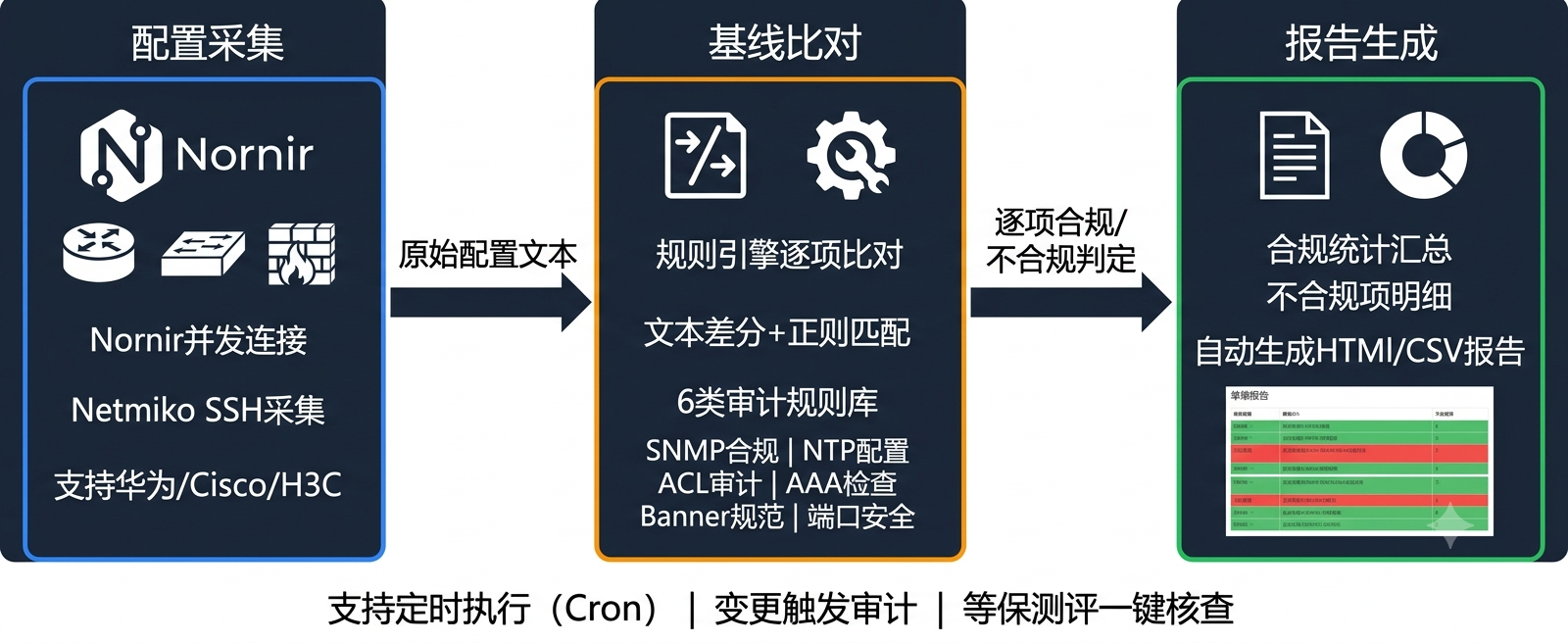
选型说明:
- Nornir 做并发连接管理。相比手写多线程,Nornir内置了并发控制、任务调度、失败重试,而且用YAML管理设备清单,新增设备只需加一行。
- Netmiko 做SSH连接和命令执行。它是Paramiko的上层封装,自动处理分页(
--More--)、自动检测设备类型、统一的send_command()接口。 - 规则引擎 用Python实现。每条规则是一个函数,输入设备配置文本,输出"合规/不合规+证据"。这样做的好处是规则可插拔------新增一条审计规则就是新增一个函数,不动原有代码。
三、第一步:用Nornir+Netmiko并发采集配置
3.1 设备清单(inventory/hosts.yaml)
yaml
# inventory/hosts.yaml
Core-SW-01:
  hostname: 10.1.1.1
  platform: huawei
  groups: [core, production]
  data:
    role: core-switch
    site: HQ

Access-SW-12:
  hostname: 10.1.2.12
  platform: cisco_ios
  groups: [access, production]
  data:
    role: access-switch
    site: Store-03

Router-Branch-05:
  hostname: 10.2.3.1
  platform: hp_comware
  groups: [router, branch]
  data:
    role: branch-router
    site: Branch-05
3.2 配置采集任务
python
# collect_configs.py
from nornir import InitNornir
from nornir_netmiko import netmiko_send_command
from nornir.core.task import Task, Result
from nornir_utils.plugins.functions import print_result
import datetime

def collect_running_config(task: Task) -> Result:
    """根据设备平台执行对应的show run命令"""
    platform = task.host.platform

    cmd_map = {
        "huawei": "display current-configuration",
        "cisco_ios": "show running-config",
        "cisco_ios_telnet": "show running-config",
        "hp_comware": "display current-configuration",  # H3C Comware
    }

    cmd = cmd_map.get(platform, "show running-config")
    result = netmiko_send_command(task, command_string=cmd,
                                   expect_string=r"[>#]")

    # 保存配置到文件
    timestamp = datetime.datetime.now().strftime("%Y%m%d_%H%M%S")
    filename = f"configs/{task.host.name}_{timestamp}.cfg"
    with open(filename, "w", encoding="utf-8") as f:
        f.write(result.result)

    # 如果设备支持,额外采集接口信息用于端口安全检查
    if platform in ("cisco_ios", "cisco_ios_telnet"):
        intf_result = netmiko_send_command(
            task, command_string="show interfaces status"
        )
        intf_file = f"configs/{task.host.name}_{timestamp}_interfaces.txt"
        with open(intf_file, "w", encoding="utf-8") as f:
            f.write(intf_result.result)

    return Result(host=task.host, result=f"Config saved: {filename}")


def main():
    nr = InitNornir(config_file="config.yaml")
    result = nr.run(task=collect_running_config)
    print_result(result)


if __name__ == "__main__":
    main()
3.3 Nornir配置文件(config.yaml)
yaml
# config.yaml
inventory:
  plugin: SimpleInventory
  options:
    host_file: "inventory/hosts.yaml"
    group_file: "inventory/groups.yaml"
    defaults_file: "inventory/defaults.yaml"

runner:
  plugin: threaded
  options:
    num_workers: 10  # 10个并发连接,47台设备约5分钟完成

logging:
  enabled: true
  level: INFO
踩坑1:分页处理
华为设备执行 display current-configuration 时默认分页(---- More ----),不加处理会卡住。Netmiko默认会处理分页,但需要确保 expect_string 正确匹配设备提示符。如果设备提示符不规范(比如有人改过),会超时。
python
# 踩坑修复:发送命令前先禁用分页
def collect_running_config_safe(task: Task) -> Result:
    platform = task.host.platform
    # 华为/H3C: 先关分页,某些旧版本不支持 screen-length 0 temporary
    if platform in ("huawei", "hp_comware"):
        try:
            netmiko_send_command(
                task, command_string="screen-length 0 temporary",
                expect_string=r"[>#]"
            )
        except Exception:
            pass  # 旧版本不支持temporary关键字,用下面的方式

    cmd_map = {
        "huawei": "display current-configuration",
        "cisco_ios": "show running-config",
        "hp_comware": "display current-configuration",
    }

    cmd = cmd_map.get(platform, "show running-config")
    # 关键:设置足够长的 read_timeout
    result = netmiko_send_command(
        task, command_string=cmd,
        expect_string=r"[>#]",
        read_timeout=60  # 大配置可能需要更长时间
    )
    # ...
四、第二步:规则引擎逐项比对
4.1 规则引擎框架
每条审计规则是一个独立的函数,输入设备配置文本和元信息,返回判定结果:
python
# audit_rules/base.py
from dataclasses import dataclass
from typing import Optional
from enum import Enum

class Severity(Enum):
    HIGH = "高"
    MEDIUM = "中"
    LOW = "低"

@dataclass
class AuditResult:
    device_name: str
    rule_name: str
    compliant: bool
    evidence: str
    severity: Severity
    suggestion: Optional[str] = None

class AuditRule:
    """审计规则基类"""
    name: str = ""
    description: str = ""

    def audit(self, config_text: str, device_info: dict) -> AuditResult:
        raise NotImplementedError
4.2 规则一:SNMP Community安全检查
python
# audit_rules/snmp.py
import re
from audit_rules.base import AuditRule, AuditResult, Severity

class SNMPCommunityCheck(AuditRule):
    name = "SNMP Community安全检查"
    description = "SNMP读写Community不能使用默认值public/private"

    # 各厂商的SNMP配置特征行
    PATTERNS = {
        "huawei": re.compile(
            r'snmp-agent community (read|write)(?: cipher)?\s+(\S+)', re.I
        ),
        "cisco_ios": re.compile(
            r'snmp-server community\s+(\S+)\s+(RO|RW)', re.I
        ),
        "hp_comware": re.compile(
            r'snmp-agent community (read|write)(?: cipher)?\s+(\S+)', re.I
        ),
    }

    DEFAULT_COMMUNITIES = {"public", "private"}

    def audit(self, config_text: str, device_info: dict) -> AuditResult:
        platform = device_info.get("platform", "")
        pattern = self.PATTERNS.get(platform)

        if not pattern:
            return AuditResult(
                device_name=device_info["name"],
                rule_name=self.name,
                compliant=True,
                evidence="非SNMP设备或无法识别厂商,跳过检查",
                severity=Severity.LOW
            )

        matches = pattern.findall(config_text)
        if not matches:
            return AuditResult(
                device_name=device_info["name"],
                rule_name=self.name,
                compliant=True,
                evidence="未配置SNMP Community(如果业务不需要SNMP,此项合规)",
                severity=Severity.LOW
            )

        violations = []
        for match in matches:
            if platform in ("huawei", "hp_comware"):
                perm, community = match
            else:
                community, perm = match

            if community.lower() in self.DEFAULT_COMMUNITIES:
                violations.append(f"{community}({perm})")

        if violations:
            return AuditResult(
                device_name=device_info["name"],
                rule_name=self.name,
                compliant=False,
                evidence=f"发现默认Community: {', '.join(violations)}",
                severity=Severity.HIGH,
                suggestion="修改为复杂度≥12位的随机字符串,且读写Community不同"
            )

        return AuditResult(
            device_name=device_info["name"],
            rule_name=self.name,
            compliant=True,
            evidence=f"已配置非默认Community,共{len(matches)}个",
            severity=Severity.LOW
        )
4.3 规则二:NTP配置检查
python
# audit_rules/ntp.py
import re
from audit_rules.base import AuditRule, AuditResult, Severity

class NTPConfigCheck(AuditRule):
    name = "NTP时间同步检查"
    description = "设备必须配置至少2个NTP Server,确保时间准确"

    def audit(self, config_text: str, device_info: dict) -> AuditResult:
        platform = device_info.get("platform", "")

        # 匹配各厂商的NTP Server配置
        ntp_patterns = [
            r'ntp(?:-server|-service)? (?:server|unicast-server|peer)?\s+(\d+\.\d+\.\d+\.\d+)',
            r'ntp server\s+(\d+\.\d+\.\d+\.\d+)',  # Cisco style
            r'ntp-service unicast-server\s+(\d+\.\d+\.\d+\.\d+)',  # Huawei/H3C
        ]

        ntp_servers = set()
        for pat in ntp_patterns:
            ntp_servers.update(re.findall(pat, config_text, re.I))

        if len(ntp_servers) == 0:
            return AuditResult(
                device_name=device_info["name"],
                rule_name=self.name,
                compliant=False,
                evidence="未配置任何NTP Server",
                severity=Severity.MEDIUM,
                suggestion="配置至少2个内网NTP Server(如 10.1.1.100, 10.1.1.101)"
            )

        if len(ntp_servers) < 2:
            return AuditResult(
                device_name=device_info["name"],
                rule_name=self.name,
                compliant=False,
                evidence=f"仅配置{len(ntp_servers)}个NTP Server: {ntp_servers}",
                severity=Severity.LOW,
                suggestion="建议配置≥2个NTP Server实现冗余"
            )

        return AuditResult(
            device_name=device_info["name"],
            rule_name=self.name,
            compliant=True,
            evidence=f"已配置{len(ntp_servers)}个NTP Server: {ntp_servers}",
            severity=Severity.LOW
        )
4.4 规则三:管理ACL检查(最复杂)
这是最有价值但也最容易写错的规则。不同厂商ACL写法差异极大:
python
# audit_rules/mgmt_acl.py
import re
from audit_rules.base import AuditRule, AuditResult, Severity

class ManagementACLCheck(AuditRule):
    name = "管理访问ACL检查"
    description = "SSH/Telnet/HTTP管理接口必须配置ACL限制访问来源IP"

    # 堡垒机/管理网段的预期IP段
    EXPECTED_MGMT_NETWORKS = ["10.100.1.", "10.100.2."]

    def _check_huawei(self, config_text: str) -> AuditResult:
        """检查华为/H3C设备的VTY ACL配置"""
        # 华为VTY下配ACL: user-interface vty 0 4 → acl 2000 inbound
        vty_sections = re.split(r'user-interface vty', config_text)

        for section in vty_sections[1:]:  # 跳过第一个空段
            # 检查是否有 acl xxx inbound
            acl_match = re.search(
                r'acl\s+(\d+)\s+inbound', section
            )
            if acl_match:
                # 找到ACL编号,再去查ACL定义
                acl_num = acl_match.group(1)
                acl_def = re.search(
                    rf'acl (?:number )?{acl_num}[\s\S]*?(?=acl |#|\Z)',
                    config_text
                )
                if acl_def:
                    acl_body = acl_def.group(0)
                    has_permit_mgmt = any(
                        net in acl_body
                        for net in self.EXPECTED_MGMT_NETWORKS
                    )
                    if has_permit_mgmt:
                        return AuditResult(
                            rule_name=self.name,
                            compliant=True,
                            evidence=f"VTY已绑定ACL {acl_num},包含管理网段规则",
                            severity=Severity.LOW
                        )

            # 有些设备用 acl ipv6 或直接配在 VTY 下
            if 'acl' not in section.lower():
                return AuditResult(
                    rule_name=self.name,
                    compliant=False,
                    evidence="VTY未配置ACL限制",
                    severity=Severity.HIGH,
                    suggestion="在VTY下配置 'acl 2000 inbound',ACL内仅允许堡垒机IP段"
                )

        return AuditResult(
            rule_name=self.name,
            compliant=False,
            evidence="未找到VTY配置或ACL绑定",
            severity=Severity.HIGH,
            suggestion="配置SSH访问控制列表"
        )

    def audit(self, config_text: str, device_info: dict) -> AuditResult:
        platform = device_info.get("platform", "")
        result = self._check_huawei(config_text)  # 华为和H3C语法接近
        result.device_name = device_info["name"]
        return result
踩坑2:H3C Comware 的 ACL 编号范围与华为不同
华为VRP和H3C Comware虽然命令相似,但ACL编号范围有差异:
- 华为:基本ACL 2000-2999,高级ACL 3000-3999
- H3C Comware V5:基本ACL 2000-2999 相同,但部分老版本ACL编号规则不同
处理方式是用厂商字段区分,hp_comware单独维护一套编号范围。
踩坑3:配置中有注释行干扰正则
部分管理员习惯在配置中写注释(华为用 #,Cisco 用 !),正则可能误匹配注释中的IP。需要先过滤注释行:
python
def strip_comments(config_text: str, platform: str) -> str:
    """过滤配置中的注释行"""
    comment_char = "#" if platform in ("huawei", "hp_comware") else "!"
    lines = config_text.split("\n")
    clean_lines = [
        line for line in lines
        if not line.strip().startswith(comment_char)
    ]
    return "\n".join(clean_lines)
五、第三步:合规报告自动生成
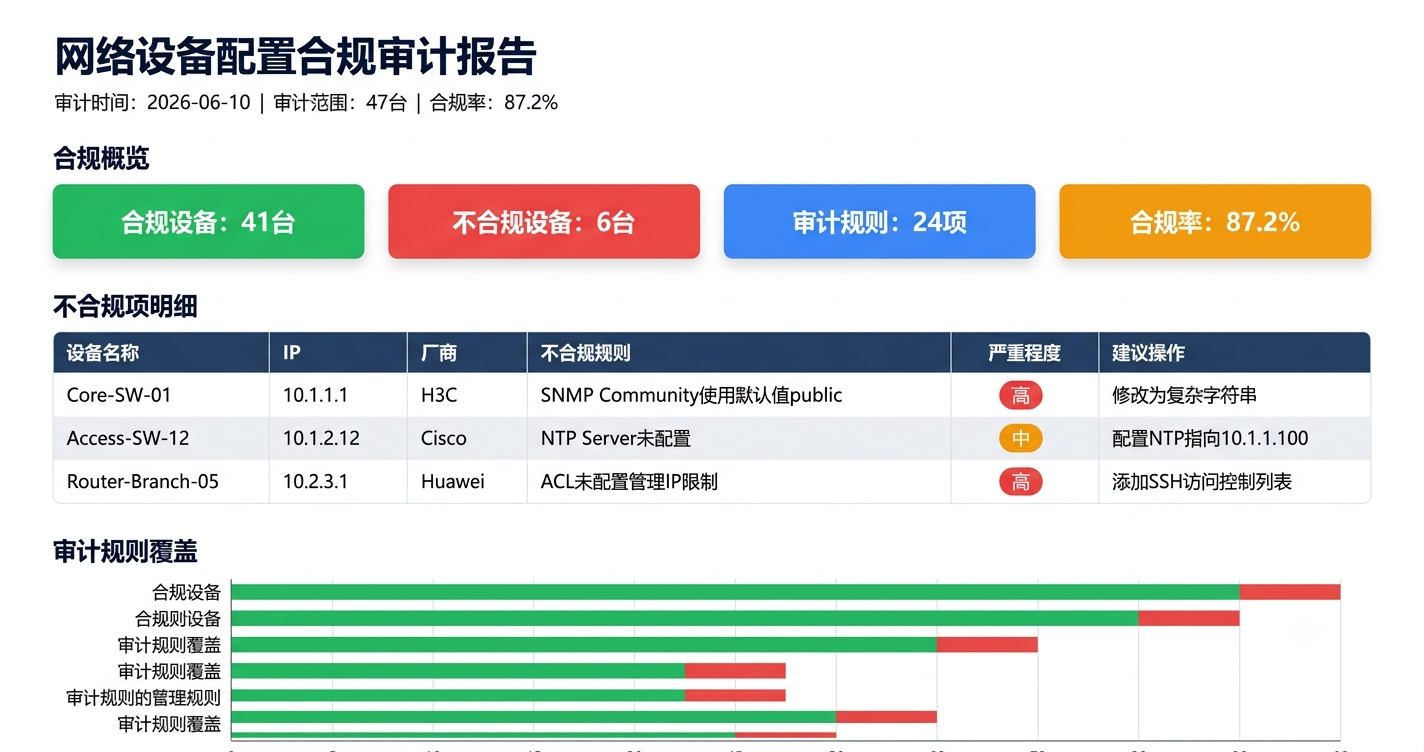
规则引擎跑完后,拿到的是 AuditResult 对象列表。接下来生成两种格式的报告:
python
# report_generator.py
from collections import Counter
from audit_rules.base import AuditResult, Severity

def generate_html_report(results: list[AuditResult], output_path: str):
    """生成HTML格式的合规审计报告"""
    total = len(results)
    compliant = sum(1 for r in results if r.compliant)
    non_compliant = total - compliant
    compliance_rate = (compliant / total * 100) if total > 0 else 0

    # 按严重程度统计不合规项
    high_severity = [r for r in results if not r.compliant and r.severity == Severity.HIGH]
    medium_severity = [r for r in results if not r.compliant and r.severity == Severity.MEDIUM]

    # 按设备聚合
    device_summary = {}
    for r in results:
        if r.device_name not in device_summary:
            device_summary[r.device_name] = {"compliant": 0, "non_compliant": 0}
        if r.compliant:
            device_summary[r.device_name]["compliant"] += 1
        else:
            device_summary[r.device_name]["non_compliant"] += 1

    html = f"""
<!DOCTYPE html>
<html>
<head>
    <meta charset="utf-8">
    <title>网络设备配置合规审计报告</title>
    <style>
        body {{ font-family: -apple-system, 'Microsoft YaHei', sans-serif; margin: 40px; }}
        .header {{ border-bottom: 3px solid #1e3a5f; padding-bottom: 20px; }}
        .summary {{ display: flex; gap: 20px; margin: 30px 0; }}
        .card {{ padding: 20px; border-radius: 8px; color: white; min-width: 120px; }}
        .card.green {{ background: #22c55e; }}
        .card.red {{ background: #ef4444; }}
        .card.orange {{ background: #f59e0b; }}
        table {{ width: 100%; border-collapse: collapse; margin-top: 20px; }}
        th, td {{ padding: 10px 15px; text-align: left; border-bottom: 1px solid #e5e7eb; }}
        th {{ background: #1e3a5f; color: white; }}
        .severity-high {{ background: #fef2f2; color: #dc2626; font-weight: bold; }}
        .severity-medium {{ background: #fffbeb; color: #d97706; font-weight: bold; }}
        tr:hover {{ background: #f9fafb; }}
    </style>
</head>
<body>
    <div class="header">
        <h1>网络设备配置合规审计报告</h1>
        <p>审计时间: {datetime.datetime.now().strftime('%Y-%m-%d %H:%M')} |
           审计范围: {len(device_summary)}台设备 |
           合规率: {compliance_rate:.1f}%</p>
    </div>

    <div class="summary">
        <div class="card green">
            <h3>合规项</h3>
            <h2>{compliant}</h2>
        </div>
        <div class="card red">
            <h3>不合规项</h3>
            <h2>{non_compliant}</h2>
        </div>
        <div class="card orange">
            <h3>高风险不合规</h3>
            <h2>{len(high_severity)}</h2>
        </div>
    </div>

    <h2>不合规明细</h2>
    <table>
        <tr><th>设备</th><th>审计规则</th><th>严重程度</th><th>证据</th><th>整改建议</th></tr>
"""

    for r in results:
        if not r.compliant:
            sev_class = "severity-high" if r.severity == Severity.HIGH else "severity-medium"
            html += f"""
        <tr>
            <td>{r.device_name}</td>
            <td>{r.rule_name}</td>
            <td class="{sev_class}">{r.severity.value}</td>
            <td>{r.evidence}</td>
            <td>{r.suggestion or '-'}</td>
        </tr>"""

    html += """
    </table>
    <p style="color: #6b7280; margin-top: 30px;">
        本报告由自动化审计工具生成,审计规则版本: v1.0
    </p>
</body>
</html>"""

    with open(output_path, "w", encoding="utf-8") as f:
        f.write(html)

    return output_path
六、定时执行与变更触发
审计不是为了测评那一刻,是为了持续知道"配置什么时候变了"。
python
# scheduler.py
import schedule
import time
from collect_configs import main as collect
from audit_engine import run_all_audits
from report_generator import generate_html_report

def daily_audit_job():
    """每日凌晨3点执行合规审计"""
    print(f"[{datetime.datetime.now()}] 开始每日配置合规审计...")
    configs = collect()
    results = run_all_audits(configs)
    report_path = generate_html_report(
        results,
        f"reports/audit_{datetime.date.today()}.html"
    )

    # 统计高风险不合规项,有变化时推送告警
    high_violations = [r for r in results
                       if not r.compliant and r.severity.name == "HIGH"]
    if high_violations:
        send_alert(f"合规审计发现{len(high_violations)}个高风险不合规项: {report_path}")

    print(f"审计完成,报告: {report_path}")

# 每天凌晨3点执行
schedule.every().day.at("03:00").do(daily_audit_job)

while True:
    schedule.run_pending()
    time.sleep(60)
实际生产环境中,我们用冠服云EMS平台的ITOM模块来管理这套审计任务的调度和告警。审计任务跑完后,如果有新增高风险不合规项------比如某台交换机刚被人改了SNMP Community------系统会自动创建一条P2级别的工单,指派给网络安全组处理,不需要人工盯着报告看。配置变更→自动审计→发现违规→创建工单→闭环跟踪,整条链路不用人来串。
七、部署Checklist
| 阶段 | 检查项 | 说明 |
|---|---|---|
| 环境准备 | Python 3.9+ | 推荐3.11+,asyncio性能更好 |
| 环境准备 | 安装依赖 | pip install nornir nornir-netmiko netmiko schedule |
| 环境准备 | 配置SSH免密或统一凭证 | 在 defaults.yaml 中配置 |
| 设备清单 | 整理设备IP和厂商类型 | hosts.yaml,每台设备的platform必须准确 |
| 设备清单 | 确认设备SSH可达 | 从审计服务器 telnet 测试每个IP的22端口 |
| 功能验证 | 单设备采集测试 | 先在hosts.yaml里只放1台测试设备跑通 |
| 功能验证 | 规则引擎测试 | 用已知合规/不合规的配置文本验证每条规则 |
| 功能验证 | 报告生成测试 | 检查HTML报告中的中文编码是否正确 |
| 生产部署 | 首次全量审计 | 建议非业务高峰期执行 |
| 生产部署 | 配置定时任务 | crontab或systemd timer,建议每天凌晨 |
| 生产部署 | 报告归档 | 配置rsync或对象存储保存历史报告 |
| 持续运营 | 规则库维护 | 新增合规要求时添加对应AuditRule子类 |
| 持续运营 | 告警联动 | 高风险不合规项对接工单系统或企业微信通知 |
八、总结
配置合规审计这件事,手工做费时费力还容易漏,自动化做一次投入持续受益。这套方案的核心思路不是"做一个大而全的平台",而是 "采集→比对→报告"三步链路,每步都可以独立替换:
- 采集层:不想用Nornir?换Ansible的
ios_command模块一样能实现 - 规则层:新增一条合规要求就是新增一个Python函数,不需要动架构
- 报告层:HTML改成CSV、改成飞书文档、改成对接审计系统都可以
关键是先跑起来。哪怕第一次只做2条规则(SNMP + NTP),把这47台设备跑通,你就已经有了一套能持续运行的合规基线。后面再加规则,就是往规则库里加函数的事。
本文给出的代码已在华为VRP V200R020、Cisco IOS 15.2、H3C Comware V7 环境验证通过。不同版本命令可能略有差异,建议先在测试设备上验证。