Dataset Cleaner
这个工具用于快速清洗 YOLO 检测数据集,适合在自动标注之后逐目标检查类别是否正确、图片是否需要删除或重新标注。
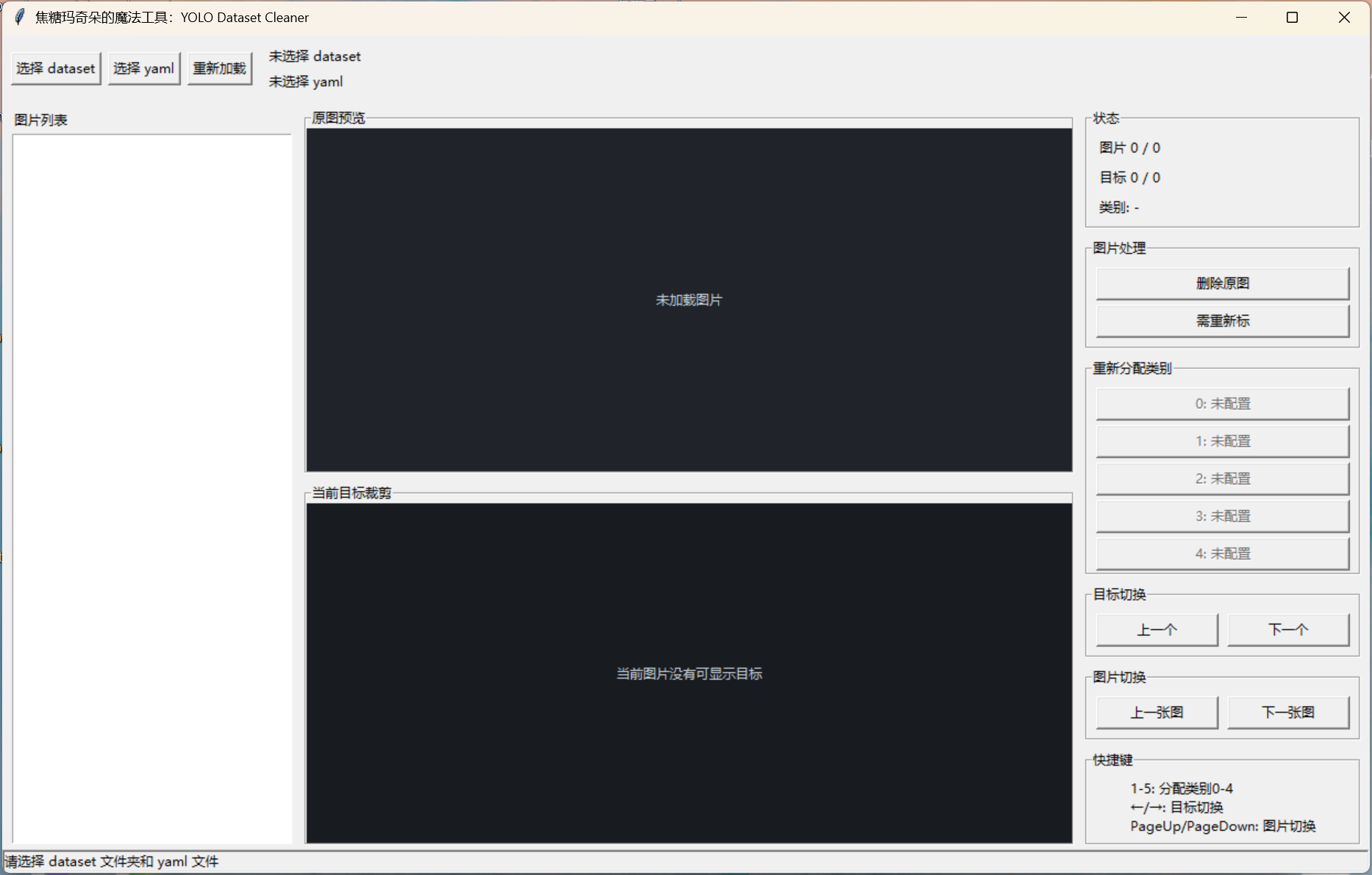
启动
推荐使用 yolov8 环境启动:
powershell
.\run_dataset_cleaner_yolov8.bat也可以在环境已配置好的情况下直接运行:
powershell
python .\dataset_clean_tool.py输入数据结构
默认读取 YOLO 数据集结构:
text
dataset/
  images/
    train/
    val/
    test/
  labels/
    train/
    val/
    test/
  dataset.yaml
也支持简单结构:
text
dataset/
  images/
  labels/
  dataset.yaml
图片和标签按相同相对路径对应:
text
images/train/a.jpg -> labels/train/a.txt
images/a.jpg       -> labels/a.txt
类别名从 YOLO yaml 的 names 字段读取,例如:
yaml
names:
  0: standing
  1: fall
  2: bending
最多显示 5 个类别按钮。
使用流程
- 点击
选择 dataset,选择数据集根目录。 - 点击
选择 yaml,选择 YOLO 训练 yaml。 - 在左侧图片列表中选择图片,或使用上一张/下一张切换。
- 查看原图预览,了解场景。
- 查看当前目标裁剪图和右侧类别色块。
- 如果类别错误,点击对应类别按钮。
- 如果整张图不适合训练,点击
删除原图。 - 如果图片有漏标,点击
需重新标。
界面说明
原图预览
原图会按窗口大小缩放显示,不使用原始尺寸。
所有目标框都会显示:
- 当前目标高亮显示。
- 其他目标用普通框显示。
当前目标裁剪
裁剪区域默认对 YOLO bbox 外扩 20%。
显示区域分为两部分:
- 左侧 3/4:当前目标裁剪图。
- 右侧 1/4:当前类别号、类别名、目标序号。
每个类别会分配不同颜色,方便快速判断。
类别按钮
类别按钮使用真实 YOLO 类别号:
text
0: standing
1: fall
2: bending
点击类别按钮后,会立即修改当前图片对应的 .txt 文件。
修改内容是当前目标所在行的第一个字段,也就是 class id。bbox 坐标不会改变。
图片处理
删除原图
不会物理删除,而是移动到:
text
dataset/_delete_/images/
dataset/_delete_/labels/
需重新标
用于目标缺漏、标注质量不适合直接修的图片,会移动到:
text
dataset/relabel/images/
dataset/relabel/labels/
移动时会尽量保持原始相对路径,避免 train/val/test 混在一起。
切换逻辑
目标切换
下一个:切到当前图片的下一个目标。- 当前图片最后一个目标继续点
下一个:跳到下一张图片的第一个目标。 上一个:切到当前图片的上一个目标。- 当前图片第一个目标继续点
上一个:跳到上一张图片的最后一个目标。
如果当前图片没有目标,目标切换按钮会直接切图。
图片切换
上一张图:切到上一张图片。下一张图:切到下一张图片。
快捷键
text
1-5: 分配类别 0-4
Left / Right: 切换目标
PageUp / PageDown: 切换图片
注意:数字键 1 对应类别 0,数字键 2 对应类别 1,以此类推。
注意事项
1. 点击类别按钮会立即写入 txt
没有额外保存按钮。
如果误点,可以再次点击正确类别改回来。
2. 删除和重标只是移动文件
删除原图 和 需重新标 都不会物理删除数据。
可以从 _delete_ 或 relabel 中手动恢复。
3. yaml 类别顺序要和训练模型一致
按钮类别来自 yaml 的 names 字段。
如果 yaml 和 txt 中 class id 不一致,会导致显示和修改结果错误。
4. 路径中建议避免特殊字符
工具支持中文路径,但训练阶段更建议使用 ASCII 文件名和路径。
5. 空标签图片
如果图片没有任何目标,裁剪区域会提示没有可显示目标。
这类图片是否保留取决于你的训练策略。当前工具不会自动删除空标签图片。
启动
可以将以下命令保存为:run_dataset_cleaner_yolov8.bat
bash
@echo off
cd /d "%~dp0"
call "C:\ProgramData\Anaconda3\Scripts\activate.bat" "C:\Users\zhang\.conda\envs\yolov8"
python "%~dp0dataset_clean_tool.py"
源码
dataset_clean_tool.py
python
from __future__ import annotations

import shutil
import random
from dataclasses import dataclass
from pathlib import Path
from tkinter import (
    BOTH,
    BOTTOM,
    DISABLED,
    END,
    LEFT,
    NORMAL,
    RIGHT,
    TOP,
    X,
    Y,
    Button,
    Canvas,
    Frame,
    Label,
    LabelFrame,
    Listbox,
    StringVar,
    Tk,
    filedialog,
    messagebox,
)
from tkinter import ttk

from PIL import Image, ImageDraw, ImageOps, ImageTk
import yaml


IMAGE_EXTS = {".jpg", ".jpeg", ".png", ".bmp", ".webp", ".tif", ".tiff"}
CROP_EXPAND_RATIO = 0.20
MAX_CLASSES = 5
CLASS_COLOR_POOL = [
    "#ef4444",
    "#f97316",
    "#eab308",
    "#22c55e",
    "#14b8a6",
    "#06b6d4",
    "#3b82f6",
    "#8b5cf6",
    "#ec4899",
    "#84cc16",
]


@dataclass
class LabelObject:
    class_id: int
    x_center: float
    y_center: float
    width: float
    height: float
    parts: list[str]


@dataclass
class DatasetItem:
    image_path: Path
    label_path: Path
    rel_image_path: Path
    rel_label_path: Path


class DatasetCleanerApp:
    def __init__(self, root: Tk) -> None:
        self.root = root
        self.root.title("焦糖玛奇朵的魔法工具:YOLO Dataset Cleaner")
        self.root.geometry("1240x760")
        self.root.minsize(980, 620)

        self.dataset_dir: Path | None = None
        self.names: dict[int, str] = {}
        self.class_colors: dict[int, str] = {}
        self.items: list[DatasetItem] = []
        self.item_index = 0
        self.object_index = 0
        self.current_objects: list[LabelObject] = []
        self.current_image: Image.Image | None = None
        self.scene_photo: ImageTk.PhotoImage | None = None
        self.crop_photo: ImageTk.PhotoImage | None = None

        self.status_var = StringVar(value="请选择 dataset 文件夹和 yaml 文件")
        self.dataset_var = StringVar(value="未选择 dataset")
        self.yaml_var = StringVar(value="未选择 yaml")
        self.item_var = StringVar(value="图片 0 / 0")
        self.object_var = StringVar(value="目标 0 / 0")
        self.class_var = StringVar(value="类别: -")

        self._build_ui()
        self._bind_keys()

    def _build_ui(self) -> None:
        top_bar = Frame(self.root, padx=8, pady=8)
        top_bar.pack(side=TOP, fill=X)

        load_buttons = Frame(top_bar)
        load_buttons.pack(side=LEFT, padx=(0, 12))
        Button(load_buttons, text="选择 dataset", command=self.choose_dataset).pack(side=LEFT, padx=(0, 6))
        Button(load_buttons, text="选择 yaml", command=self.choose_yaml).pack(side=LEFT, padx=(0, 6))
        Button(load_buttons, text="重新加载", command=self.reload_dataset).pack(side=LEFT)

        load_info = Frame(top_bar)
        load_info.pack(side=LEFT, fill=X, expand=True)
        Label(load_info, textvariable=self.dataset_var, anchor="w").pack(side=TOP, fill=X)
        Label(load_info, textvariable=self.yaml_var, anchor="w").pack(side=TOP, fill=X)

        body = Frame(self.root, padx=8, pady=4)
        body.pack(side=TOP, fill=BOTH, expand=True)

        left_panel = Frame(body)
        left_panel.pack(side=LEFT, fill=Y)

        Label(left_panel, text="图片列表", anchor="w").pack(side=TOP, fill=X)
        self.image_listbox = Listbox(left_panel, width=36, exportselection=False)
        self.image_listbox.pack(side=LEFT, fill=Y, expand=False)
        self.image_listbox.bind("<<ListboxSelect>>", self.on_listbox_select)

        center_panel = Frame(body)
        center_panel.pack(side=LEFT, fill=BOTH, expand=True, padx=10)

        scene_frame = LabelFrame(center_panel, text="原图预览")
        scene_frame.pack(side=TOP, fill=BOTH, expand=True)
        self.scene_canvas = Canvas(scene_frame, bg="#20242a", highlightthickness=0)
        self.scene_canvas.pack(fill=BOTH, expand=True)
        self.scene_canvas.bind("<Configure>", lambda _event: self.render_scene())

        crop_frame = LabelFrame(center_panel, text="当前目标裁剪")
        crop_frame.pack(side=TOP, fill=BOTH, expand=True, pady=(8, 0))
        self.crop_canvas = Canvas(crop_frame, bg="#181b20", highlightthickness=0, height=260)
        self.crop_canvas.pack(fill=BOTH, expand=True)
        self.crop_canvas.bind("<Configure>", lambda _event: self.render_crop())

        right_panel = Frame(body, width=250)
        right_panel.pack(side=RIGHT, fill=Y)
        right_panel.pack_propagate(False)

        info_frame = LabelFrame(right_panel, text="状态")
        info_frame.pack(side=TOP, fill=X)
        Label(info_frame, textvariable=self.item_var, anchor="w").pack(fill=X, padx=8, pady=(6, 2))
        Label(info_frame, textvariable=self.object_var, anchor="w").pack(fill=X, padx=8, pady=2)
        Label(info_frame, textvariable=self.class_var, anchor="w").pack(fill=X, padx=8, pady=(2, 6))

        action_frame = LabelFrame(right_panel, text="图片处理")
        action_frame.pack(side=TOP, fill=X, pady=(8, 0))
        Button(action_frame, text="删除原图", command=self.move_current_to_delete).pack(fill=X, padx=8, pady=(8, 4))
        Button(action_frame, text="需重新标", command=self.move_current_to_relabel).pack(fill=X, padx=8, pady=(0, 8))

        class_frame = LabelFrame(right_panel, text="重新分配类别")
        class_frame.pack(side=TOP, fill=X, pady=(8, 0))
        self.class_buttons: list[Button] = []
        for idx in range(MAX_CLASSES):
            btn = Button(class_frame, text=f"{idx}: 未加载", command=lambda i=idx: self.assign_class(i))
            btn.pack(fill=X, padx=8, pady=(8 if idx == 0 else 2, 2))
            self.class_buttons.append(btn)

        nav_obj_frame = LabelFrame(right_panel, text="目标切换")
        nav_obj_frame.pack(side=TOP, fill=X, pady=(8, 0))
        row = Frame(nav_obj_frame)
        row.pack(fill=X, padx=8, pady=8)
        Button(row, text="上一个", command=self.prev_object).pack(side=LEFT, fill=X, expand=True, padx=(0, 4))
        Button(row, text="下一个", command=self.next_object).pack(side=LEFT, fill=X, expand=True, padx=(4, 0))

        nav_img_frame = LabelFrame(right_panel, text="图片切换")
        nav_img_frame.pack(side=TOP, fill=X, pady=(8, 0))
        row2 = Frame(nav_img_frame)
        row2.pack(fill=X, padx=8, pady=8)
        Button(row2, text="上一张图", command=self.prev_image).pack(side=LEFT, fill=X, expand=True, padx=(0, 4))
        Button(row2, text="下一张图", command=self.next_image).pack(side=LEFT, fill=X, expand=True, padx=(4, 0))

        help_frame = LabelFrame(right_panel, text="快捷键")
        help_frame.pack(side=TOP, fill=X, pady=(8, 0))
        Label(help_frame, text="1-5: 分配类别0-4\n←/→: 目标切换\nPageUp/PageDown: 图片切换", justify=LEFT).pack(
            fill=X, padx=8, pady=8
        )

        bottom_bar = ttk.Label(self.root, textvariable=self.status_var, anchor="w", relief="sunken")
        bottom_bar.pack(side=BOTTOM, fill=X)

    def _bind_keys(self) -> None:
        self.root.bind("<Key>", self.on_key)
        self.root.bind("<Left>", lambda _event: self.prev_object())
        self.root.bind("<Right>", lambda _event: self.next_object())
        self.root.bind("<Prior>", lambda _event: self.prev_image())
        self.root.bind("<Next>", lambda _event: self.next_image())

    def choose_dataset(self) -> None:
        path = filedialog.askdirectory(title="选择 YOLO dataset 根目录")
        if not path:
            return
        self.dataset_dir = Path(path)
        self.dataset_var.set(str(self.dataset_dir))
        self.reload_dataset()

    def choose_yaml(self) -> None:
        path = filedialog.askopenfilename(
            title="选择 YOLO yaml",
            filetypes=(("YAML files", "*.yaml *.yml"), ("All files", "*.*")),
        )
        if not path:
            return
        try:
            self.names = load_names(Path(path))
        except Exception as exc:
            messagebox.showerror("读取 yaml 失败", str(exc))
            return
        self.yaml_var.set(str(path))
        self.class_colors = assign_class_colors(self.names)
        self.refresh_class_buttons()
        self.refresh_status()
        self.render_crop()

    def reload_dataset(self) -> None:
        if self.dataset_dir is None:
            return
        try:
            self.items = discover_dataset(self.dataset_dir)
        except Exception as exc:
            messagebox.showerror("加载 dataset 失败", str(exc))
            return
        self.item_index = 0
        self.object_index = 0
        self.refresh_image_listbox()
        self.load_current_item()
        self.status_var.set(f"已加载 {len(self.items)} 张图片")

    def refresh_image_listbox(self) -> None:
        self.image_listbox.delete(0, END)
        for item in self.items:
            self.image_listbox.insert(END, str(item.rel_image_path))
        if self.items:
            self.image_listbox.selection_set(self.item_index)
            self.image_listbox.see(self.item_index)

    def on_listbox_select(self, _event=None) -> None:
        selection = self.image_listbox.curselection()
        if not selection:
            return
        new_index = int(selection[0])
        if new_index == self.item_index:
            return
        self.item_index = new_index
        self.object_index = 0
        self.load_current_item()

    def load_current_item(self) -> None:
        self.current_image = None
        self.current_objects = []
        if not self.items:
            self.refresh_status()
            self.render_scene()
            self.render_crop()
            return

        self.item_index = clamp(self.item_index, 0, len(self.items) - 1)
        item = self.items[self.item_index]
        try:
            self.current_image = ImageOps.exif_transpose(Image.open(item.image_path)).convert("RGB")
        except Exception as exc:
            self.status_var.set(f"图片读取失败: {item.image_path} ({exc})")
            self.current_image = None
        self.current_objects = read_yolo_labels(item.label_path)
        if self.current_objects:
            self.object_index = clamp(self.object_index, 0, len(self.current_objects) - 1)
        else:
            self.object_index = 0
        self.select_listbox_row()
        self.refresh_status()
        self.render_scene()
        self.render_crop()

    def select_listbox_row(self) -> None:
        self.image_listbox.selection_clear(0, END)
        if self.items:
            self.image_listbox.selection_set(self.item_index)
            self.image_listbox.see(self.item_index)

    def refresh_class_buttons(self) -> None:
        for idx, btn in enumerate(self.class_buttons):
            name = self.names.get(idx)
            if name is None:
                btn.configure(text=f"{idx}: 未配置", state=DISABLED)
            else:
                btn.configure(text=f"{idx}: {name}", state=NORMAL)

    def refresh_status(self) -> None:
        total_items = len(self.items)
        self.item_var.set(f"图片 {self.item_index + 1 if total_items else 0} / {total_items}")
        total_objects = len(self.current_objects)
        self.object_var.set(f"目标 {self.object_index + 1 if total_objects else 0} / {total_objects}")
        obj = self.current_object()
        if obj is None:
            self.class_var.set("类别: -")
        else:
            label = self.names.get(obj.class_id, f"未知类别 {obj.class_id}")
            self.class_var.set(f"类别: {obj.class_id} - {label}")

    def current_item(self) -> DatasetItem | None:
        if not self.items:
            return None
        return self.items[self.item_index]

    def current_object(self) -> LabelObject | None:
        if not self.current_objects:
            return None
        return self.current_objects[self.object_index]

    def render_scene(self) -> None:
        self.scene_canvas.delete("all")
        if self.current_image is None:
            self.scene_canvas.create_text(
                self.scene_canvas.winfo_width() // 2,
                self.scene_canvas.winfo_height() // 2,
                text="未加载图片",
                fill="#c9d1d9",
            )
            return

        canvas_w = max(self.scene_canvas.winfo_width(), 1)
        canvas_h = max(self.scene_canvas.winfo_height(), 1)
        preview, scale, offset_x, offset_y = fit_image(self.current_image, canvas_w, canvas_h)
        draw = ImageDraw.Draw(preview)
        for idx, obj in enumerate(self.current_objects):
            color = "#ffdf5d" if idx == self.object_index else "#37d67a"
            box = yolo_box_to_pixels(obj, self.current_image.width, self.current_image.height)
            x1 = int(box[0] * scale + offset_x)
            y1 = int(box[1] * scale + offset_y)
            x2 = int(box[2] * scale + offset_x)
            y2 = int(box[3] * scale + offset_y)
            width = 4 if idx == self.object_index else 2
            draw.rectangle((x1, y1, x2, y2), outline=color, width=width)
            draw.text((x1 + 3, max(y1 - 16, 0)), str(obj.class_id), fill=color)

        self.scene_photo = ImageTk.PhotoImage(preview)
        self.scene_canvas.create_image(0, 0, anchor="nw", image=self.scene_photo)

    def render_crop(self) -> None:
        self.crop_canvas.delete("all")
        obj = self.current_object()
        canvas_w = max(self.crop_canvas.winfo_width(), 1)
        canvas_h = max(self.crop_canvas.winfo_height(), 1)
        if self.current_image is None or obj is None:
            self.crop_canvas.create_text(
                canvas_w // 2,
                canvas_h // 2,
                text="当前图片没有可显示目标",
                fill="#c9d1d9",
            )
            self.crop_photo = None
            return

        crop_box = expanded_box(obj, self.current_image.width, self.current_image.height, CROP_EXPAND_RATIO)
        crop = self.current_image.crop(crop_box)
        image_area_w = max(1, int(canvas_w * 0.75))
        label_area_w = max(1, canvas_w - image_area_w)
        preview, _scale, _offset_x, _offset_y = fit_image(crop, image_area_w, canvas_h)
        self.crop_photo = ImageTk.PhotoImage(preview)
        self.crop_canvas.create_image(0, 0, anchor="nw", image=self.crop_photo)
        self.render_crop_label_panel(obj, image_area_w, label_area_w, canvas_h)

    def render_crop_label_panel(self, obj: LabelObject, left_x: int, panel_w: int, panel_h: int) -> None:
        color = self.class_colors.get(obj.class_id, fallback_class_color(obj.class_id))
        text_color = readable_text_color(color)
        label = self.names.get(obj.class_id, f"未知类别 {obj.class_id}")
        self.crop_canvas.create_rectangle(left_x, 0, left_x + panel_w, panel_h, fill=color, outline=color)
        self.crop_canvas.create_line(left_x, 0, left_x, panel_h, fill="#0f1115", width=3)

        center_x = left_x + panel_w // 2
        title_font = ("Arial", max(12, min(18, panel_h // 12)), "bold")
        id_font = ("Arial", max(28, min(64, panel_w // 3, panel_h // 4)), "bold")
        name_font = ("Arial", max(14, min(34, panel_w // 7, panel_h // 7)), "bold")
        small_font = ("Arial", max(10, min(14, panel_h // 18)))

        self.crop_canvas.create_text(center_x, panel_h * 0.18, text="类别", fill=text_color, font=title_font)
        self.crop_canvas.create_text(center_x, panel_h * 0.38, text=str(obj.class_id), fill=text_color, font=id_font)
        self.crop_canvas.create_text(
            center_x,
            panel_h * 0.62,
            text=label,
            fill=text_color,
            font=name_font,
            width=max(40, panel_w - 18),
            justify="center",
        )
        self.crop_canvas.create_text(
            center_x,
            panel_h * 0.86,
            text=f"{self.object_index + 1}/{len(self.current_objects)}",
            fill=text_color,
            font=small_font,
        )

    def assign_class(self, class_id: int) -> None:
        if class_id not in self.names:
            return
        obj = self.current_object()
        item = self.current_item()
        if obj is None or item is None:
            return
        obj.class_id = class_id
        obj.parts[0] = str(class_id)
        write_yolo_labels(item.label_path, self.current_objects)
        self.status_var.set(f"已将当前目标改为 {class_id}: {self.names[class_id]}")
        self.refresh_status()
        self.render_scene()
        self.render_crop()

    def prev_object(self) -> None:
        if not self.current_objects:
            self.prev_image(select_last_object=True)
            return
        if self.object_index == 0:
            self.prev_image(select_last_object=True)
            return
        self.object_index -= 1
        self.refresh_status()
        self.render_scene()
        self.render_crop()

    def next_object(self) -> None:
        if not self.current_objects:
            self.next_image()
            return
        if self.object_index >= len(self.current_objects) - 1:
            self.next_image()
            return
        self.object_index += 1
        self.refresh_status()
        self.render_scene()
        self.render_crop()

    def prev_image(self, select_last_object: bool = False) -> None:
        if not self.items:
            return
        self.item_index = max(0, self.item_index - 1)
        self.object_index = 0
        self.load_current_item()
        if select_last_object and self.current_objects:
            self.object_index = len(self.current_objects) - 1
            self.refresh_status()
            self.render_scene()
            self.render_crop()

    def next_image(self) -> None:
        if not self.items:
            return
        self.item_index = min(len(self.items) - 1, self.item_index + 1)
        self.object_index = 0
        self.load_current_item()

    def move_current_to_delete(self) -> None:
        self.move_current_item("_delete_")

    def move_current_to_relabel(self) -> None:
        self.move_current_item("relabel")

    def move_current_item(self, bucket: str) -> None:
        item = self.current_item()
        if item is None or self.dataset_dir is None:
            return
        try:
            dest_image = unique_path(self.dataset_dir / bucket / "images" / item.rel_image_path)
            dest_label = unique_path(self.dataset_dir / bucket / "labels" / item.rel_label_path)
            move_file(item.image_path, dest_image)
            if item.label_path.exists():
                move_file(item.label_path, dest_label)
        except Exception as exc:
            messagebox.showerror("移动失败", str(exc))
            return

        moved_name = str(item.rel_image_path)
        del self.items[self.item_index]
        if self.item_index >= len(self.items):
            self.item_index = max(0, len(self.items) - 1)
        self.object_index = 0
        self.refresh_image_listbox()
        self.load_current_item()
        self.status_var.set(f"已移动到 {bucket}: {moved_name}")

    def on_key(self, event) -> None:
        if len(event.char) == 1 and event.char.isdigit():
            class_id = int(event.char) - 1
            if 0 <= class_id < MAX_CLASSES:
                self.assign_class(class_id)


def load_names(yaml_path: Path) -> dict[int, str]:
    with yaml_path.open("r", encoding="utf-8") as f:
        data = yaml.safe_load(f) or {}
    names = data.get("names")
    if isinstance(names, list):
        parsed = {idx: str(name) for idx, name in enumerate(names)}
    elif isinstance(names, dict):
        parsed = {int(key): str(value) for key, value in names.items()}
    else:
        raise ValueError("yaml 中没有可识别的 names 字段")
    if not parsed:
        raise ValueError("names 字段为空")
    return {idx: parsed[idx] for idx in sorted(parsed)[:MAX_CLASSES]}


def discover_dataset(dataset_dir: Path) -> list[DatasetItem]:
    images_dir = dataset_dir / "images"
    labels_dir = dataset_dir / "labels"
    if not images_dir.is_dir():
        raise FileNotFoundError(f"未找到 images 目录: {images_dir}")
    if not labels_dir.is_dir():
        raise FileNotFoundError(f"未找到 labels 目录: {labels_dir}")

    items: list[DatasetItem] = []
    for image_path in sorted(images_dir.rglob("*")):
        if not image_path.is_file() or image_path.suffix.lower() not in IMAGE_EXTS:
            continue
        rel_image = image_path.relative_to(images_dir)
        rel_label = rel_image.with_suffix(".txt")
        items.append(
            DatasetItem(
                image_path=image_path,
                label_path=labels_dir / rel_label,
                rel_image_path=rel_image,
                rel_label_path=rel_label,
            )
        )
    return items


def read_yolo_labels(label_path: Path) -> list[LabelObject]:
    if not label_path.exists():
        return []
    objects: list[LabelObject] = []
    with label_path.open("r", encoding="utf-8") as f:
        for line in f:
            stripped = line.strip()
            if not stripped:
                continue
            parts = stripped.split()
            if len(parts) < 5:
                continue
            try:
                objects.append(
                    LabelObject(
                        class_id=int(float(parts[0])),
                        x_center=float(parts[1]),
                        y_center=float(parts[2]),
                        width=float(parts[3]),
                        height=float(parts[4]),
                        parts=parts,
                    )
                )
            except ValueError:
                continue
    return objects


def write_yolo_labels(label_path: Path, objects: list[LabelObject]) -> None:
    label_path.parent.mkdir(parents=True, exist_ok=True)
    lines = [" ".join(obj.parts) for obj in objects]
    label_path.write_text("\n".join(lines) + ("\n" if lines else ""), encoding="utf-8")


def yolo_box_to_pixels(obj: LabelObject, image_w: int, image_h: int) -> tuple[float, float, float, float]:
    cx = obj.x_center * image_w
    cy = obj.y_center * image_h
    bw = obj.width * image_w
    bh = obj.height * image_h
    return cx - bw / 2, cy - bh / 2, cx + bw / 2, cy + bh / 2


def expanded_box(obj: LabelObject, image_w: int, image_h: int, ratio: float) -> tuple[int, int, int, int]:
    x1, y1, x2, y2 = yolo_box_to_pixels(obj, image_w, image_h)
    bw = x2 - x1
    bh = y2 - y1
    x1 -= bw * ratio
    y1 -= bh * ratio
    x2 += bw * ratio
    y2 += bh * ratio
    left = int(clamp(min(x1, x2), 0, image_w))
    top = int(clamp(min(y1, y2), 0, image_h))
    right = int(clamp(max(x1, x2), 0, image_w))
    bottom = int(clamp(max(y1, y2), 0, image_h))
    if right <= left:
        right = min(image_w, left + 1)
        left = max(0, right - 1)
    if bottom <= top:
        bottom = min(image_h, top + 1)
        top = max(0, bottom - 1)
    return left, top, right, bottom


def fit_image(image: Image.Image, target_w: int, target_h: int) -> tuple[Image.Image, float, int, int]:
    scale = min(target_w / image.width, target_h / image.height)
    new_w = max(1, int(image.width * scale))
    new_h = max(1, int(image.height * scale))
    resized = image.resize((new_w, new_h), Image.Resampling.LANCZOS)
    preview = Image.new("RGB", (target_w, target_h), "#20242a")
    offset_x = (target_w - new_w) // 2
    offset_y = (target_h - new_h) // 2
    preview.paste(resized, (offset_x, offset_y))
    return preview, scale, offset_x, offset_y


def unique_path(path: Path) -> Path:
    if not path.exists():
        return path
    stem = path.stem
    suffix = path.suffix
    parent = path.parent
    counter = 1
    while True:
        candidate = parent / f"{stem}_{counter}{suffix}"
        if not candidate.exists():
            return candidate
        counter += 1


def move_file(src: Path, dest: Path) -> None:
    dest.parent.mkdir(parents=True, exist_ok=True)
    shutil.move(str(src), str(dest))


def clamp(value: float | int, low: float | int, high: float | int) -> float | int:
    return max(low, min(value, high))


def assign_class_colors(names: dict[int, str]) -> dict[int, str]:
    colors = CLASS_COLOR_POOL.copy()
    random.Random(20260521).shuffle(colors)
    return {class_id: colors[index % len(colors)] for index, class_id in enumerate(sorted(names))}


def fallback_class_color(class_id: int) -> str:
    colors = CLASS_COLOR_POOL.copy()
    random.Random(20260521 + class_id).shuffle(colors)
    return colors[0]


def readable_text_color(hex_color: str) -> str:
    red = int(hex_color[1:3], 16)
    green = int(hex_color[3:5], 16)
    blue = int(hex_color[5:7], 16)
    luminance = (0.299 * red + 0.587 * green + 0.114 * blue) / 255
    return "#111318" if luminance > 0.62 else "#ffffff"


def main() -> int:
    root = Tk()
    app = DatasetCleanerApp(root)
    app.refresh_class_buttons()
    root.mainloop()
    return 0


if __name__ == "__main__":
    raise SystemExit(main())