Ultralytics:解读PSA模块
前言
- 由于本人水平有限,难免出现错漏,敬请批评改正。
- 更多精彩内容,可点击进入Python日常小操作专栏、OpenCV-Python小应用专栏、YOLO系列专栏、自然语言处理专栏、人工智能混合编程实践专栏或我的个人主页查看
- YOLOs-CPP:一个免费开源的YOLO全系列C++推理库(以YOLO26为例)
- PaddleOCR:Win10上安装使用PPOCRLabel标注工具
- 目标检测:使用自己的数据集微调DEIMv2进行物体检测
- 图像分割:PyTorch从零开始实现SegFormer语义分割
- 图像超分:使用自己的数据集微调Real-ESRGAN-x4plus进行超分重建
- 图像生成:PyTorch从零开始实现一个简单的扩散模型
- Stable Diffusion:使用自己的数据集微调 Stable Diffusion 3.5 LoRA 文生图模型
- 图像超分:使用自己的数据集微调Real-ESRGAN-x2plus进行超分重建
- Anomalib:使用Anomalib 2.1.0训练自己的数据集进行异常检测
- Anomalib:在Linux服务器上安装使用Anomalib 2.1.0
- 人工智能混合编程实践:C++调用封装好的DLL进行异常检测推理
- 人工智能混合编程实践:C++调用封装好的DLL进行FP16图像超分重建(v3.0)
- 隔离系统Python:源码编译3.11.8到自定义目录(含PGO性能优化)
- 在线机的Python环境迁移到离线机上
- Nuitka 将 Python 脚本封装为 .pyd 或 .so 文件
- Ultralytics:使用 YOLO11 进行速度估计
- Ultralytics:使用 YOLO11 进行物体追踪
- Ultralytics:使用 YOLO11 进行物体计数
- Ultralytics:使用 YOLO11 进行目标打码
- 人工智能混合编程实践:C++调用Python ONNX进行YOLOv8推理
- 人工智能混合编程实践:C++调用封装好的DLL进行YOLOv8实例分割
- 人工智能混合编程实践:C++调用Python ONNX进行图像超分重建
- 人工智能混合编程实践:C++调用Python AgentOCR进行文本识别
- 通过计算实例简单地理解PatchCore异常检测
- Python将YOLO格式实例分割数据集转换为COCO格式实例分割数据集
- YOLOv8 Ultralytics:使用Ultralytics框架训练RT-DETR实时目标检测模型
- 基于DETR的人脸伪装检测
- YOLOv7训练自己的数据集(口罩检测)
- YOLOv8训练自己的数据集(足球检测)
- YOLOv5:TensorRT加速YOLOv5模型推理
- YOLOv5:IoU、GIoU、DIoU、CIoU、EIoU
- 玩转Jetson Nano(五):TensorRT加速YOLOv5目标检测
- YOLOv5:添加SE、CBAM、CoordAtt、ECA注意力机制
- YOLOv5:yolov5s.yaml配置文件解读、增加小目标检测层
- Python将COCO格式实例分割数据集转换为YOLO格式实例分割数据集
- YOLOv5:使用7.0版本训练自己的实例分割模型(车辆、行人、路标、车道线等实例分割)
- 使用Kaggle GPU资源免费体验Stable Diffusion开源项目
- Stable Diffusion:在服务器上部署使用Stable Diffusion WebUI进行AI绘图(v2.0)
- Stable Diffusion:使用自己的数据集微调训练LoRA模型(v2.0)
相关介绍
Ultralytics 简介
Ultralytics 基于多年的计算机视觉和人工智能基础研究,创建了最先进的 (SOTA) YOLO 模型。我们的模型不断更新性能和灵活性,快速、准确且易于使用。他们擅长对象检测、跟踪、实例分割、语义分割、图像分类和姿势估计任务。
前提条件
- 熟悉Python、Pytorch
实验环境
bash
Package                  Version
------------------------ ------------
Python                   3.11.8
absl-py                  2.4.0
accelerate               1.13.0
annotated-doc            0.0.4
anyio                    4.13.0
calflops                 0.3.2
certifi                  2026.4.22
charset-normalizer       3.4.7
click                    8.3.3
colorama                 0.4.6
contourpy                1.3.3
cycler                   0.12.1
filelock                 3.29.0
flatbuffers              25.12.19
fonttools                4.62.1
fsspec                   2026.4.0
grpcio                   1.80.0
h11                      0.16.0
hf-xet                   1.5.0
httpcore                 1.0.9
httpx                    0.28.1
huggingface_hub          1.14.0
idna                     3.15
Jinja2                   3.1.6
kiwisolver               1.5.0
Markdown                 3.10.2
markdown-it-py           4.2.0
MarkupSafe               3.0.3
matplotlib               3.10.9
mdurl                    0.1.2
ml_dtypes                0.5.0
mpmath                   1.3.0
networkx                 3.6.1
numpy                    1.26.4
nvidia-cublas-cu12       12.8.3.14
nvidia-cuda-cupti-cu12   12.8.57
nvidia-cuda-nvrtc-cu12   12.8.61
nvidia-cuda-runtime-cu12 12.8.57
nvidia-cudnn-cu12        9.7.1.26
nvidia-cufft-cu12        11.3.3.41
nvidia-cufile-cu12       1.13.0.11
nvidia-curand-cu12       10.3.9.55
nvidia-cusolver-cu12     11.7.2.55
nvidia-cusparse-cu12     12.5.7.53
nvidia-cusparselt-cu12   0.6.3
nvidia-nccl-cu12         2.26.2
nvidia-nvjitlink-cu12    12.8.61
nvidia-nvtx-cu12         12.8.55
onnx                     1.19.0
onnxruntime-gpu          1.26.0
onnxslim                 0.1.94
opencv-python            4.6.0.66
packaging                26.2
pillow                   12.2.0
pip                      24.0
polars                   1.40.1
polars-runtime-32        1.40.1
protobuf                 7.34.1
psutil                   7.2.2
pycocotools              2.0.11
Pygments                 2.20.0
pyparsing                3.3.2
python-dateutil          2.9.0.post0
PyYAML                   6.0.3
regex                    2026.5.9
requests                 2.34.1
rich                     15.0.0
safetensors              0.7.0
scipy                    1.16.0
setuptools               65.5.0
shellingham              1.5.4
six                      1.17.0
sympy                    1.14.0
tabulate                 0.10.0
tensorboard              2.20.0
tensorboard-data-server  0.7.2
tokenizers               0.22.2
torch                    2.7.1+cu128
torchaudio               2.7.1+cu128
torchvision              0.22.1+cu128
tqdm                     4.67.3
transformers             5.8.1
triton                   3.3.1
typer                    0.25.1
typing_extensions        4.15.0
ultralytics              8.4.58
ultralytics-thop         2.0.19
urllib3                  2.7.0
Werkzeug                 3.1.8
PSA(位置敏感注意力模块)
PSA(Position-Sensitive Attention)是一种结合了 通道拆分 、自注意力 和 前馈网络 的轻量级注意力模块。它通过将输入特征沿通道维拆分为两部分,一部分直通,另一部分经过残差式注意力与 FFN 处理,最后拼接并通过 1×1 卷积融合输出。这种设计在保持计算效率的同时,能有效捕获全局上下文信息,常见于 YOLOv8 等网络中的 C2f 或 C2PSA 等增强模块。
代码实现
python
import cv2
import math
import torch
import numpy as np
import matplotlib.pyplot as plt
from torch import nn

def autopad(k, p=None, d=1):  # kernel, padding, dilation
    """Pad to 'same' shape outputs."""
    if d > 1:
        k = d * (k - 1) + 1 if isinstance(k, int) else [d * (x - 1) + 1 for x in k]  # actual kernel-size
    if p is None:
        p = k // 2 if isinstance(k, int) else [x // 2 for x in k]  # auto-pad
    return p

class Conv(nn.Module):
    """Standard convolution module with batch normalization and activation.

    Attributes:
        conv (nn.Conv2d): Convolutional layer.
        bn (nn.BatchNorm2d): Batch normalization layer.
        act (nn.Module): Activation function layer.
        default_act (nn.Module): Default activation function (SiLU).
    """

    default_act = nn.SiLU()  # default activation

    def __init__(self, c1, c2, k=1, s=1, p=None, g=1, d=1, act=True):
        """Initialize Conv layer with given parameters.

        Args:
            c1 (int): Number of input channels.
            c2 (int): Number of output channels.
            k (int): Kernel size.
            s (int): Stride.
            p (int, optional): Padding.
            g (int): Groups.
            d (int): Dilation.
            act (bool | nn.Module): Activation function.
        """
        super().__init__()
        self.conv = nn.Conv2d(c1, c2, k, s, autopad(k, p, d), groups=g, dilation=d, bias=False)
        self.bn = nn.BatchNorm2d(c2)
        self.act = self.default_act if act is True else act if isinstance(act, nn.Module) else nn.Identity()

    def forward(self, x):
        """Apply convolution, batch normalization and activation to input tensor.

        Args:
            x (torch.Tensor): Input tensor.

        Returns:
            (torch.Tensor): Output tensor.
        """
        return self.act(self.bn(self.conv(x)))

    def forward_fuse(self, x):
        """Apply convolution and activation without batch normalization.

        Args:
            x (torch.Tensor): Input tensor.

        Returns:
            (torch.Tensor): Output tensor.
        """
        return self.act(self.conv(x))

class Attention(nn.Module):
    """Attention module that performs self-attention on the input tensor.

    Args:
        dim (int): The input tensor dimension.
        num_heads (int): The number of attention heads.
        attn_ratio (float): The ratio of the attention key dimension to the head dimension.

    Attributes:
        num_heads (int): The number of attention heads.
        head_dim (int): The dimension of each attention head.
        key_dim (int): The dimension of the attention key.
        scale (float): The scaling factor for the attention scores.
        qkv (Conv): Convolutional layer for computing the query, key, and value.
        proj (Conv): Convolutional layer for projecting the attended values.
        pe (Conv): Convolutional layer for positional encoding.
    """

    def __init__(self, dim: int, num_heads: int = 8, attn_ratio: float = 0.5):
        """Initialize multi-head attention module.

        Args:
            dim (int): Input dimension.
            num_heads (int): Number of attention heads.
            attn_ratio (float): Attention ratio for key dimension.
        """
        super().__init__()
        self.num_heads = num_heads
        self.head_dim = dim // num_heads
        self.key_dim = int(self.head_dim * attn_ratio)
        self.scale = self.key_dim**-0.5
        nh_kd = self.key_dim * num_heads
        h = dim + nh_kd * 2
        self.qkv = Conv(dim, h, 1, act=False)
        self.proj = Conv(dim, dim, 1, act=False)
        self.pe = Conv(dim, dim, 3, 1, g=dim, act=False)

    def forward(self, x: torch.Tensor) -> torch.Tensor:
        """Forward pass of the Attention module.

        Args:
            x (torch.Tensor): The input tensor.

        Returns:
            (torch.Tensor): The output tensor after self-attention.
        """
        B, C, H, W = x.shape
        N = H * W
        qkv = self.qkv(x)
        q, k, v = qkv.view(B, self.num_heads, self.key_dim * 2 + self.head_dim, N).split(
            [self.key_dim, self.key_dim, self.head_dim], dim=2
        )

        attn = (q.transpose(-2, -1) @ k) * self.scale
        attn = attn.softmax(dim=-1)
        x = (v @ attn.transpose(-2, -1)).view(B, C, H, W) + self.pe(v.reshape(B, C, H, W))
        x = self.proj(x)
        return x

class PSA(nn.Module):
    """PSA class for implementing Position-Sensitive Attention in neural networks.

    This class encapsulates the functionality for applying position-sensitive attention and feed-forward networks to
    input tensors, enhancing feature extraction and processing capabilities.

    Attributes:
        c (int): Number of hidden channels after applying the initial convolution.
        cv1 (Conv): 1x1 convolution layer to reduce the number of input channels to 2*c.
        cv2 (Conv): 1x1 convolution layer to reduce the number of output channels to c1.
        attn (Attention): Attention module for position-sensitive attention.
        ffn (nn.Sequential): Feed-forward network for further processing.

    Methods:
        forward: Applies position-sensitive attention and feed-forward network to the input tensor.

    Examples:
        Create a PSA module and apply it to an input tensor
        >>> psa = PSA(c1=128, c2=128, e=0.5)
        >>> input_tensor = torch.randn(1, 128, 64, 64)
        >>> output_tensor = psa.forward(input_tensor)
    """

    def __init__(self, c1: int, c2: int, e: float = 0.5):
        """Initialize PSA module.

        Args:
            c1 (int): Input channels.
            c2 (int): Output channels.
            e (float): Expansion ratio.
        """
        super().__init__()
        assert c1 == c2
        self.c = int(c1 * e)
        self.cv1 = Conv(c1, 2 * self.c, 1, 1)
        self.cv2 = Conv(2 * self.c, c1, 1)

        self.attn = Attention(self.c, attn_ratio=0.5, num_heads=max(self.c // 64, 1))
        self.ffn = nn.Sequential(Conv(self.c, self.c * 2, 1), Conv(self.c * 2, self.c, 1, act=False))

    def forward(self, x: torch.Tensor) -> torch.Tensor:
        """Execute forward pass in PSA module.

        Args:
            x (torch.Tensor): Input tensor.

        Returns:
            (torch.Tensor): Output tensor after attention and feed-forward processing.
        """
        a, b = self.cv1(x).split((self.c, self.c), dim=1)
        b = b + self.attn(b)
        b = b + self.ffn(b)
        return self.cv2(torch.cat((a, b), 1))
功能
- 通道拆分 :通过 1×1 卷积
cv1将输入通道从c1扩展为2 * self.c,然后沿通道维均分为a和b两部分,其中self.c = int(c1 * e)。 - 残差注意力 :对
b应用Attention模块(自注意力 + 位置编码),并通过残差连接b = b + attn(b),增强全局上下文建模。 - 残差前馈网络 :对
b继续应用两层 1×1 卷积(升维至2c再降维回c),同样采用残差连接b = b + ffn(b),提升非线性表达。 - 特征融合 :将处理后的
b与原始直通的a拼接,再通过cv21×1 卷积压缩回原始通道数c1。
初始化参数
| 参数 | 类型 | 说明 |
|---|---|---|
c1 |
int | 输入通道数(必须等于输出通道数 c2) |
c2 |
int | 输出通道数(必须等于 c1) |
e |
float | 扩展比,控制隐藏通道 self.c = int(c1 * e)(默认 0.5) |
Attention的num_heads动态设置为max(self.c // 64, 1),确保至少为 1,避免除零错误。- 所有卷积步长均为 1,保持空间尺寸不变。
前向方法
forward(x):输入x([B, c1, H, W]),输出[B, c1, H, W]。
计算流程:
y = self.cv1(x)→[B, 2*self.c, H, W]a, b = y.split((self.c, self.c), dim=1)→ 各[B, self.c, H, W]b = b + self.attn(b)→ 残差自注意力b = b + self.ffn(b)→ 残差前馈cat = torch.cat((a, b), dim=1)→[B, 2*self.c, H, W]self.cv2(cat)→[B, c1, H, W]
使用示例
python
if __name__ == '__main__':
    # 1. 随机输入
    x = torch.randn(1, 64, 32, 32)

    # 2. 创建 PSA(输入输出通道相等,c1=64, e=0.5)
    psa = PSA(c1=64, c2=64, e=0.5)

    # 3. 前向传播
    with torch.no_grad():
        out = psa(x)
    print("输入形状:", x.shape)   # [1, 64, 32, 32]
    print("输出形状:", out.shape) # [1, 64, 32, 32]

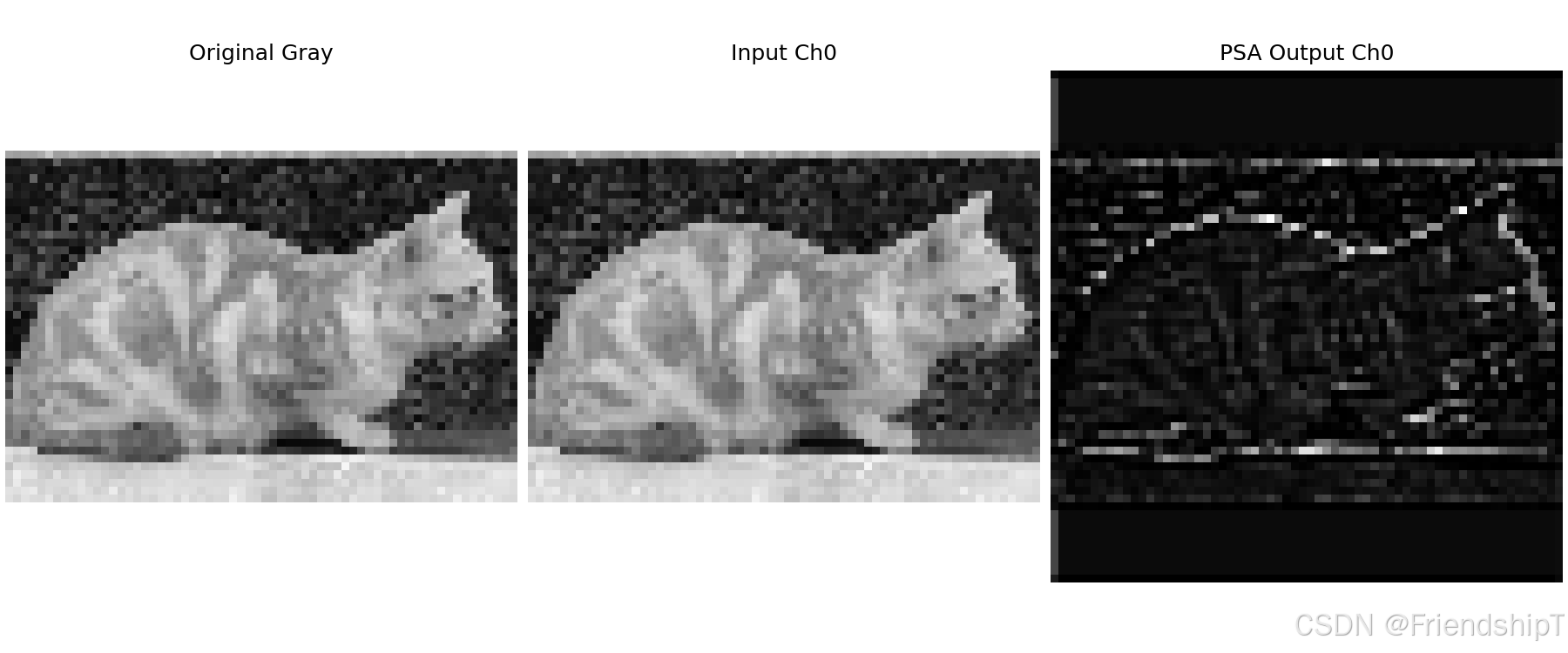
    # 4. 使用真实图像演示(扩展为多通道)
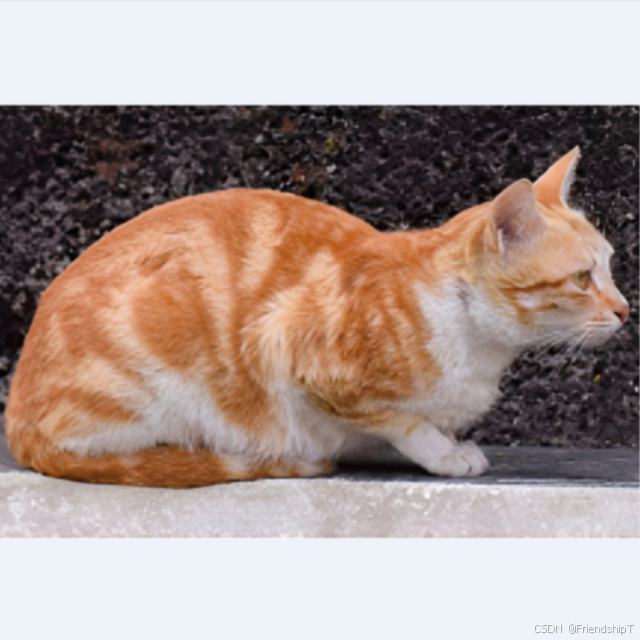
    img_path = "cat_640x640.png"
    img_bgr = cv2.imread(img_path)
    if img_bgr is not None:
        img_gray = cv2.cvtColor(cv2.resize(img_bgr, (64, 64)), cv2.COLOR_BGR2GRAY)
        img_tensor = torch.from_numpy(img_gray).float().unsqueeze(0).unsqueeze(0)  # [1,1,64,64]
        # 扩展通道至64
        x_img = img_tensor.repeat(1, 64, 1, 1)

        psa_img = PSA(c1=64, c2=64, e=0.5)
        with torch.no_grad():
            out_img = psa_img(x_img)

        inp_ch0 = x_img[0, 0].cpu().numpy()
        out_ch0 = out_img[0, 0].cpu().numpy()

        def norm(arr):
            return (arr - arr.min()) / (arr.max() - arr.min() + 1e-8)

        plt.figure(figsize=(12, 5), constrained_layout=True)
        plt.subplot(1, 3, 1)
        plt.imshow(img_gray, cmap='gray')
        plt.title("Original Gray")
        plt.axis("off")
        plt.subplot(1, 3, 2)
        plt.imshow(norm(inp_ch0), cmap='gray')
        plt.title("Input Ch0")
        plt.axis("off")
        plt.subplot(1, 3, 3)
        plt.imshow(norm(out_ch0), cmap='gray')
        plt.title("PSA Output Ch0")
        plt.axis("off")
        plt.savefig("psa_demo.png", dpi=150)
print("可视化已保存为 psa_demo.png")输出示例:
输入形状: torch.Size([1, 64, 32, 32])
输出形状: torch.Size([1, 64, 32, 32])
可视化已保存为 psa_demo.png
流程示意图
#mermaid-svg-p5oHBtxSVDvolTM7{font-family:"trebuchet ms",verdana,arial,sans-serif;font-size:16px;fill:#333;}@keyframes edge-animation-frame{from{stroke-dashoffset:0;}}@keyframes dash{to{stroke-dashoffset:0;}}#mermaid-svg-p5oHBtxSVDvolTM7 .edge-animation-slow{stroke-dasharray:9,5!important;stroke-dashoffset:900;animation:dash 50s linear infinite;stroke-linecap:round;}#mermaid-svg-p5oHBtxSVDvolTM7 .edge-animation-fast{stroke-dasharray:9,5!important;stroke-dashoffset:900;animation:dash 20s linear infinite;stroke-linecap:round;}#mermaid-svg-p5oHBtxSVDvolTM7 .error-icon{fill:#552222;}#mermaid-svg-p5oHBtxSVDvolTM7 .error-text{fill:#552222;stroke:#552222;}#mermaid-svg-p5oHBtxSVDvolTM7 .edge-thickness-normal{stroke-width:1px;}#mermaid-svg-p5oHBtxSVDvolTM7 .edge-thickness-thick{stroke-width:3.5px;}#mermaid-svg-p5oHBtxSVDvolTM7 .edge-pattern-solid{stroke-dasharray:0;}#mermaid-svg-p5oHBtxSVDvolTM7 .edge-thickness-invisible{stroke-width:0;fill:none;}#mermaid-svg-p5oHBtxSVDvolTM7 .edge-pattern-dashed{stroke-dasharray:3;}#mermaid-svg-p5oHBtxSVDvolTM7 .edge-pattern-dotted{stroke-dasharray:2;}#mermaid-svg-p5oHBtxSVDvolTM7 .marker{fill:#333333;stroke:#333333;}#mermaid-svg-p5oHBtxSVDvolTM7 .marker.cross{stroke:#333333;}#mermaid-svg-p5oHBtxSVDvolTM7 svg{font-family:"trebuchet ms",verdana,arial,sans-serif;font-size:16px;}#mermaid-svg-p5oHBtxSVDvolTM7 p{margin:0;}#mermaid-svg-p5oHBtxSVDvolTM7 .label{font-family:"trebuchet ms",verdana,arial,sans-serif;color:#333;}#mermaid-svg-p5oHBtxSVDvolTM7 .cluster-label text{fill:#333;}#mermaid-svg-p5oHBtxSVDvolTM7 .cluster-label span{color:#333;}#mermaid-svg-p5oHBtxSVDvolTM7 .cluster-label span p{background-color:transparent;}#mermaid-svg-p5oHBtxSVDvolTM7 .label text,#mermaid-svg-p5oHBtxSVDvolTM7 span{fill:#333;color:#333;}#mermaid-svg-p5oHBtxSVDvolTM7 .node rect,#mermaid-svg-p5oHBtxSVDvolTM7 .node circle,#mermaid-svg-p5oHBtxSVDvolTM7 .node ellipse,#mermaid-svg-p5oHBtxSVDvolTM7 .node polygon,#mermaid-svg-p5oHBtxSVDvolTM7 .node path{fill:#ECECFF;stroke:#9370DB;stroke-width:1px;}#mermaid-svg-p5oHBtxSVDvolTM7 .rough-node .label text,#mermaid-svg-p5oHBtxSVDvolTM7 .node .label text,#mermaid-svg-p5oHBtxSVDvolTM7 .image-shape .label,#mermaid-svg-p5oHBtxSVDvolTM7 .icon-shape .label{text-anchor:middle;}#mermaid-svg-p5oHBtxSVDvolTM7 .node .katex path{fill:#000;stroke:#000;stroke-width:1px;}#mermaid-svg-p5oHBtxSVDvolTM7 .rough-node .label,#mermaid-svg-p5oHBtxSVDvolTM7 .node .label,#mermaid-svg-p5oHBtxSVDvolTM7 .image-shape .label,#mermaid-svg-p5oHBtxSVDvolTM7 .icon-shape .label{text-align:center;}#mermaid-svg-p5oHBtxSVDvolTM7 .node.clickable{cursor:pointer;}#mermaid-svg-p5oHBtxSVDvolTM7 .root .anchor path{fill:#333333!important;stroke-width:0;stroke:#333333;}#mermaid-svg-p5oHBtxSVDvolTM7 .arrowheadPath{fill:#333333;}#mermaid-svg-p5oHBtxSVDvolTM7 .edgePath .path{stroke:#333333;stroke-width:2.0px;}#mermaid-svg-p5oHBtxSVDvolTM7 .flowchart-link{stroke:#333333;fill:none;}#mermaid-svg-p5oHBtxSVDvolTM7 .edgeLabel{background-color:rgba(232,232,232, 0.8);text-align:center;}#mermaid-svg-p5oHBtxSVDvolTM7 .edgeLabel p{background-color:rgba(232,232,232, 0.8);}#mermaid-svg-p5oHBtxSVDvolTM7 .edgeLabel rect{opacity:0.5;background-color:rgba(232,232,232, 0.8);fill:rgba(232,232,232, 0.8);}#mermaid-svg-p5oHBtxSVDvolTM7 .labelBkg{background-color:rgba(232, 232, 232, 0.5);}#mermaid-svg-p5oHBtxSVDvolTM7 .cluster rect{fill:#ffffde;stroke:#aaaa33;stroke-width:1px;}#mermaid-svg-p5oHBtxSVDvolTM7 .cluster text{fill:#333;}#mermaid-svg-p5oHBtxSVDvolTM7 .cluster span{color:#333;}#mermaid-svg-p5oHBtxSVDvolTM7 div.mermaidTooltip{position:absolute;text-align:center;max-width:200px;padding:2px;font-family:"trebuchet ms",verdana,arial,sans-serif;font-size:12px;background:hsl(80, 100%, 96.2745098039%);border:1px solid #aaaa33;border-radius:2px;pointer-events:none;z-index:100;}#mermaid-svg-p5oHBtxSVDvolTM7 .flowchartTitleText{text-anchor:middle;font-size:18px;fill:#333;}#mermaid-svg-p5oHBtxSVDvolTM7 rect.text{fill:none;stroke-width:0;}#mermaid-svg-p5oHBtxSVDvolTM7 .icon-shape,#mermaid-svg-p5oHBtxSVDvolTM7 .image-shape{background-color:rgba(232,232,232, 0.8);text-align:center;}#mermaid-svg-p5oHBtxSVDvolTM7 .icon-shape p,#mermaid-svg-p5oHBtxSVDvolTM7 .image-shape p{background-color:rgba(232,232,232, 0.8);padding:2px;}#mermaid-svg-p5oHBtxSVDvolTM7 .icon-shape .label rect,#mermaid-svg-p5oHBtxSVDvolTM7 .image-shape .label rect{opacity:0.5;background-color:rgba(232,232,232, 0.8);fill:rgba(232,232,232, 0.8);}#mermaid-svg-p5oHBtxSVDvolTM7 .label-icon{display:inline-block;height:1em;overflow:visible;vertical-align:-0.125em;}#mermaid-svg-p5oHBtxSVDvolTM7 .node .label-icon path{fill:currentColor;stroke:revert;stroke-width:revert;}#mermaid-svg-p5oHBtxSVDvolTM7 :root{--mermaid-font-family:"trebuchet ms",verdana,arial,sans-serif;} 输入 x (B, c1, H, W)
Conv 1x1: c1 -> 2*c (cv1)
split: a 和 b,各 c 通道
a 直通
b
Attention (自注意力 + 残差)
b = b + attn(b)
FFN (1x1升维→降维 + 残差)
b = b + ffn(b)
拼接 cat(a, b) -> (2*c)
Conv 1x1: 2*c -> c1 (cv2)
输出 (B, c1, H, W)
代码解读
__init__:- 检查
c1 == c2,若不相等则断言失败。 self.c = int(c1 * e):隐藏通道数。self.cv1:1×1 卷积,输入c1到2*c,为拆分做准备。self.cv2:1×1 卷积,从拼接后的2*c压缩回c1。self.attn:Attention模块,num_heads根据self.c动态计算,保证至少 1 个头。self.ffn:两层 1×1 卷积,先升维至2*c,再降维回c,第二层无激活(仅 BN),采用残差方式叠加。
- 检查
forward:- 调用
split将cv1输出均分为a和b。 - 对
b依次应用带残差的注意力和 FFN。 - 拼接
a和b并送入cv2。
- 调用
注意事项
- 输入输出通道必须相等:模块仅用于特征细化,不改变通道数。
self.c必须至少为 64 才能保证多头数正常 :代码中通过max(self.c // 64, 1)规避了头数为 0 的情况,因此即使self.c < 64也能运行,但头数仅为 1,可能影响注意力效果。- 空间尺寸不变:所有卷积步长为 1,填充 same,输入输出空间大小一致。
- 与
C2PSA的关系 :PSA 实际上是C2PSA内部的核心处理模块(C2PSA将其包装在 CSP 结构中),此处独立提供,可直接嵌入任意网络。
优缺点
优点
- 全局建模能力:自注意力提供长距离依赖,增强特征表示。
- 残差结构稳定:两个残差连接(注意力和 FFN)有助于梯度传播,训练深层网络更稳定。
- 轻量化设计:通道拆分和动态头数使计算量适中,适合移动端部署。
- 即插即用:输入输出通道一致,可灵活插入现有网络的任意位置。
缺点
- 计算复杂度:自注意力的复杂度与空间尺寸平方相关,在高分辨率特征图上开销较大。
- 头数动态计算可能不优 :
num_heads = max(c//64, 1)对通道数较小的层可能强制使用 1 个头,限制了建模多样性。 - 缺少全局池化或下采样:仅在固定分辨率上操作,不适用于跨尺度特征融合。
在 YOLOv8 的 C2f 或 C2PSA 中,PSA 通常作为增强模块用于提升小目标检测精度。使用时建议在较低分辨率特征图(如 16×16 或 8×8)上启用,以平衡性能与显存占用。
PSA 与 PSABlock 的区别
虽然 PSA 和 PSABlock 都使用了 Attention 模块和 FFN(前馈网络),但它们在 整体结构 、特征流动方式 和 设计目标 上存在显著差异。下表总结了二者的核心区别:
| 维度 | PSABlock | PSA |
|---|---|---|
| 结构类型 | 标准的 Transformer 风格块(顺序连接) | 带通道拆分的 CSP 风格块 |
| 输入输出关系 | 直接顺序处理,x → x + attn(x) → x + ffn(x) |
先拆分为 a 和 b,仅对 b 做注意力和 FFN,最后拼接融合 |
| 残差连接 | 每个子层(attn 和 ffn)均有残差,作用于同一通道流 | 残差仅作用于 b 分支,a 分支直通 |
| 通道数变化 | 输入输出通道数相等,内部 FFN 先升维再降维(通常 2 倍) | 输入 c1 → 先扩展为 2*c,拆分后 b 通道为 c,再通过 cv2 压缩回 c1 |
| 注意力头数设置 | 由用户传入 num_heads(固定) |
动态计算 num_heads = max(c // 64, 1),适应不同通道数 |
| 位置编码 | 位置编码在 Attention 内部使用深度卷积 |
同样使用 Attention 内部的位置编码,但 b 分支会叠加残差 |
| 计算量 | 所有通道均经过两个子层,计算量较大 | 仅一半通道(b)经过注意力和 FFN,另一半直通,计算量更轻 |
| 设计动机 | 提供标准的 Transformer 式处理,适合需要全局交互的场景 | 采用 CSP 思想,在降低计算量的同时保留注意力增益,适合轻量级网络 |
| 典型应用 | 作为 C2f 内部的增强块(如 YOLOv8 的某些变体) |
常被用于 C2PSA 或 PSA 模块中,作为独立的注意力单元 |
结构对比图
以下是 PSA 与 PSABlock 的结构对比图:
#mermaid-svg-DSINe6arMRp3fAxJ{font-family:"trebuchet ms",verdana,arial,sans-serif;font-size:16px;fill:#333;}@keyframes edge-animation-frame{from{stroke-dashoffset:0;}}@keyframes dash{to{stroke-dashoffset:0;}}#mermaid-svg-DSINe6arMRp3fAxJ .edge-animation-slow{stroke-dasharray:9,5!important;stroke-dashoffset:900;animation:dash 50s linear infinite;stroke-linecap:round;}#mermaid-svg-DSINe6arMRp3fAxJ .edge-animation-fast{stroke-dasharray:9,5!important;stroke-dashoffset:900;animation:dash 20s linear infinite;stroke-linecap:round;}#mermaid-svg-DSINe6arMRp3fAxJ .error-icon{fill:#552222;}#mermaid-svg-DSINe6arMRp3fAxJ .error-text{fill:#552222;stroke:#552222;}#mermaid-svg-DSINe6arMRp3fAxJ .edge-thickness-normal{stroke-width:1px;}#mermaid-svg-DSINe6arMRp3fAxJ .edge-thickness-thick{stroke-width:3.5px;}#mermaid-svg-DSINe6arMRp3fAxJ .edge-pattern-solid{stroke-dasharray:0;}#mermaid-svg-DSINe6arMRp3fAxJ .edge-thickness-invisible{stroke-width:0;fill:none;}#mermaid-svg-DSINe6arMRp3fAxJ .edge-pattern-dashed{stroke-dasharray:3;}#mermaid-svg-DSINe6arMRp3fAxJ .edge-pattern-dotted{stroke-dasharray:2;}#mermaid-svg-DSINe6arMRp3fAxJ .marker{fill:#333333;stroke:#333333;}#mermaid-svg-DSINe6arMRp3fAxJ .marker.cross{stroke:#333333;}#mermaid-svg-DSINe6arMRp3fAxJ svg{font-family:"trebuchet ms",verdana,arial,sans-serif;font-size:16px;}#mermaid-svg-DSINe6arMRp3fAxJ p{margin:0;}#mermaid-svg-DSINe6arMRp3fAxJ .label{font-family:"trebuchet ms",verdana,arial,sans-serif;color:#333;}#mermaid-svg-DSINe6arMRp3fAxJ .cluster-label text{fill:#333;}#mermaid-svg-DSINe6arMRp3fAxJ .cluster-label span{color:#333;}#mermaid-svg-DSINe6arMRp3fAxJ .cluster-label span p{background-color:transparent;}#mermaid-svg-DSINe6arMRp3fAxJ .label text,#mermaid-svg-DSINe6arMRp3fAxJ span{fill:#333;color:#333;}#mermaid-svg-DSINe6arMRp3fAxJ .node rect,#mermaid-svg-DSINe6arMRp3fAxJ .node circle,#mermaid-svg-DSINe6arMRp3fAxJ .node ellipse,#mermaid-svg-DSINe6arMRp3fAxJ .node polygon,#mermaid-svg-DSINe6arMRp3fAxJ .node path{fill:#ECECFF;stroke:#9370DB;stroke-width:1px;}#mermaid-svg-DSINe6arMRp3fAxJ .rough-node .label text,#mermaid-svg-DSINe6arMRp3fAxJ .node .label text,#mermaid-svg-DSINe6arMRp3fAxJ .image-shape .label,#mermaid-svg-DSINe6arMRp3fAxJ .icon-shape .label{text-anchor:middle;}#mermaid-svg-DSINe6arMRp3fAxJ .node .katex path{fill:#000;stroke:#000;stroke-width:1px;}#mermaid-svg-DSINe6arMRp3fAxJ .rough-node .label,#mermaid-svg-DSINe6arMRp3fAxJ .node .label,#mermaid-svg-DSINe6arMRp3fAxJ .image-shape .label,#mermaid-svg-DSINe6arMRp3fAxJ .icon-shape .label{text-align:center;}#mermaid-svg-DSINe6arMRp3fAxJ .node.clickable{cursor:pointer;}#mermaid-svg-DSINe6arMRp3fAxJ .root .anchor path{fill:#333333!important;stroke-width:0;stroke:#333333;}#mermaid-svg-DSINe6arMRp3fAxJ .arrowheadPath{fill:#333333;}#mermaid-svg-DSINe6arMRp3fAxJ .edgePath .path{stroke:#333333;stroke-width:2.0px;}#mermaid-svg-DSINe6arMRp3fAxJ .flowchart-link{stroke:#333333;fill:none;}#mermaid-svg-DSINe6arMRp3fAxJ .edgeLabel{background-color:rgba(232,232,232, 0.8);text-align:center;}#mermaid-svg-DSINe6arMRp3fAxJ .edgeLabel p{background-color:rgba(232,232,232, 0.8);}#mermaid-svg-DSINe6arMRp3fAxJ .edgeLabel rect{opacity:0.5;background-color:rgba(232,232,232, 0.8);fill:rgba(232,232,232, 0.8);}#mermaid-svg-DSINe6arMRp3fAxJ .labelBkg{background-color:rgba(232, 232, 232, 0.5);}#mermaid-svg-DSINe6arMRp3fAxJ .cluster rect{fill:#ffffde;stroke:#aaaa33;stroke-width:1px;}#mermaid-svg-DSINe6arMRp3fAxJ .cluster text{fill:#333;}#mermaid-svg-DSINe6arMRp3fAxJ .cluster span{color:#333;}#mermaid-svg-DSINe6arMRp3fAxJ div.mermaidTooltip{position:absolute;text-align:center;max-width:200px;padding:2px;font-family:"trebuchet ms",verdana,arial,sans-serif;font-size:12px;background:hsl(80, 100%, 96.2745098039%);border:1px solid #aaaa33;border-radius:2px;pointer-events:none;z-index:100;}#mermaid-svg-DSINe6arMRp3fAxJ .flowchartTitleText{text-anchor:middle;font-size:18px;fill:#333;}#mermaid-svg-DSINe6arMRp3fAxJ rect.text{fill:none;stroke-width:0;}#mermaid-svg-DSINe6arMRp3fAxJ .icon-shape,#mermaid-svg-DSINe6arMRp3fAxJ .image-shape{background-color:rgba(232,232,232, 0.8);text-align:center;}#mermaid-svg-DSINe6arMRp3fAxJ .icon-shape p,#mermaid-svg-DSINe6arMRp3fAxJ .image-shape p{background-color:rgba(232,232,232, 0.8);padding:2px;}#mermaid-svg-DSINe6arMRp3fAxJ .icon-shape .label rect,#mermaid-svg-DSINe6arMRp3fAxJ .image-shape .label rect{opacity:0.5;background-color:rgba(232,232,232, 0.8);fill:rgba(232,232,232, 0.8);}#mermaid-svg-DSINe6arMRp3fAxJ .label-icon{display:inline-block;height:1em;overflow:visible;vertical-align:-0.125em;}#mermaid-svg-DSINe6arMRp3fAxJ .node .label-icon path{fill:currentColor;stroke:revert;stroke-width:revert;}#mermaid-svg-DSINe6arMRp3fAxJ :root{--mermaid-font-family:"trebuchet ms",verdana,arial,sans-serif;} PSA (CSP风格)
输入 x
Conv 1x1
c1 → 2*c
split (通道拆分)
a 分支 (直通)
b 分支
b + Attention(b)
(残差)
b + FFN(b)
(残差)
concat (拼接)
Conv 1x1
2*c → c1
输出 x
PSABlock
输入 x
Attention
(含残差)
FFN
(含残差)
输出 x
说明
- PSABlock:标准顺序结构,所有通道依次经过 Attention 和 FFN,均带残差连接。
- PSA :CSP 风格,通过
cv1升维后拆分为a和b两路,仅b经过注意力和 FFN(带残差),a直通,最后拼接并压缩。
计算流程差异
- PSABlock:所有通道依次经过 Attention 和 FFN,残差连接保证了梯度流畅,但计算量相对较高。
- PSA :通过通道拆分,只有
b分支参与复杂的注意力和 FFN 计算,a分支直接保留原始特征。这种方式可视为一种 特征复用 和 计算减半 的策略,同时 CSP 结构也有利于梯度传播。
使用场景建议
- PSABlock:适合对精度要求较高,且显存充裕的场景,可作为常规 Transformer 块的替代品。
- PSA:适合资源受限(如移动端)或需要平衡速度与精度的场景,尤其适用于较大特征图(如 32×32 以上)时,可有效降低计算开销。
总结
PSABlock 是典型的 顺序化 Transformer 块 ,注重全通道的深度交互;而 PSA 是 CSP 风格的分支注意力模块 ,通过拆分实现局部-全局结合的优化。二者各有侧重,实际使用时可根据网络规模和硬件条件灵活选择。若追求极致轻量,优先考虑 PSA;若追求更高的表达力,PSABlock 可能更合适。
参考文献
1 https://docs.ultralytics.com/
2 https://github.com/ultralytics/ultralytics.git
- 由于本人水平有限,难免出现错漏,敬请批评改正。
- 更多精彩内容,可点击进入Python日常小操作专栏、OpenCV-Python小应用专栏、YOLO系列专栏、自然语言处理专栏、人工智能混合编程实践专栏或我的个人主页查看
- YOLOs-CPP:一个免费开源的YOLO全系列C++推理库(以YOLO26为例)
- PaddleOCR:Win10上安装使用PPOCRLabel标注工具
- 目标检测:使用自己的数据集微调DEIMv2进行物体检测
- 图像分割:PyTorch从零开始实现SegFormer语义分割
- 图像超分:使用自己的数据集微调Real-ESRGAN-x4plus进行超分重建
- 图像生成:PyTorch从零开始实现一个简单的扩散模型
- Stable Diffusion:使用自己的数据集微调 Stable Diffusion 3.5 LoRA 文生图模型
- 图像超分:使用自己的数据集微调Real-ESRGAN-x2plus进行超分重建
- Anomalib:使用Anomalib 2.1.0训练自己的数据集进行异常检测
- Anomalib:在Linux服务器上安装使用Anomalib 2.1.0
- 人工智能混合编程实践:C++调用封装好的DLL进行异常检测推理
- 人工智能混合编程实践:C++调用封装好的DLL进行FP16图像超分重建(v3.0)
- 隔离系统Python:源码编译3.11.8到自定义目录(含PGO性能优化)
- 在线机的Python环境迁移到离线机上
- Nuitka 将 Python 脚本封装为 .pyd 或 .so 文件
- Ultralytics:使用 YOLO11 进行速度估计
- Ultralytics:使用 YOLO11 进行物体追踪
- Ultralytics:使用 YOLO11 进行物体计数
- Ultralytics:使用 YOLO11 进行目标打码
- 人工智能混合编程实践:C++调用Python ONNX进行YOLOv8推理
- 人工智能混合编程实践:C++调用封装好的DLL进行YOLOv8实例分割
- 人工智能混合编程实践:C++调用Python ONNX进行图像超分重建
- 人工智能混合编程实践:C++调用Python AgentOCR进行文本识别
- 通过计算实例简单地理解PatchCore异常检测
- Python将YOLO格式实例分割数据集转换为COCO格式实例分割数据集
- YOLOv8 Ultralytics:使用Ultralytics框架训练RT-DETR实时目标检测模型
- 基于DETR的人脸伪装检测
- YOLOv7训练自己的数据集(口罩检测)
- YOLOv8训练自己的数据集(足球检测)
- YOLOv5:TensorRT加速YOLOv5模型推理
- YOLOv5:IoU、GIoU、DIoU、CIoU、EIoU
- 玩转Jetson Nano(五):TensorRT加速YOLOv5目标检测
- YOLOv5:添加SE、CBAM、CoordAtt、ECA注意力机制
- YOLOv5:yolov5s.yaml配置文件解读、增加小目标检测层
- Python将COCO格式实例分割数据集转换为YOLO格式实例分割数据集
- YOLOv5:使用7.0版本训练自己的实例分割模型(车辆、行人、路标、车道线等实例分割)
- 使用Kaggle GPU资源免费体验Stable Diffusion开源项目
- Stable Diffusion:在服务器上部署使用Stable Diffusion WebUI进行AI绘图(v2.0)
- Stable Diffusion:使用自己的数据集微调训练LoRA模型(v2.0)