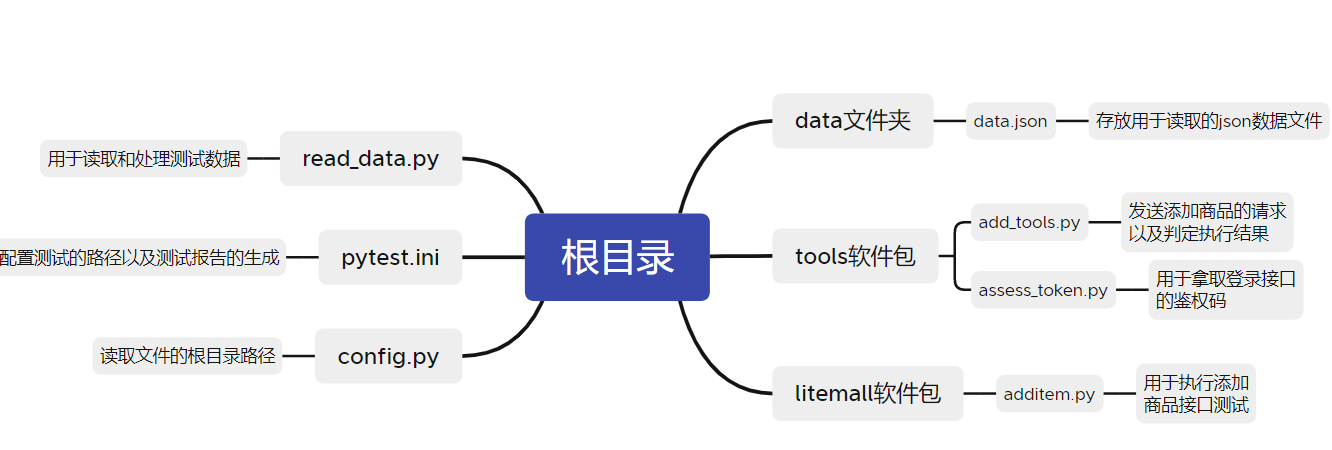
1、项目结构
2、拿取登录的鉴权码assess_token.py
python
import requests

def login_token():
    BASE_url="http://192.168.10.39:6255/wx/auth/login"

    json={"username":"user123","password":"user123"}

    res=requests.post(url=BASE_url,json=json)
    #需要结合实际的json格式,获取的格式为{data:{token:""}}
    token=res.json()["data"]['token']
    headers={'x-litemall-token':token}
return headers3、读取文件根目录的config.py
python
import os

BASE_DIR = os.path.dirname(__file__)
4、读取需要测试的json数据read_data.py
这是一个json文件(additems.json):
python
[
  {
    "goodsId":1135002,
    "number":1,
    "productId":204,
    "expect" : "成功"
  },
  {
    "goodsId":" ",
    "number":1,
    "productId":204,
    "expect" : "参数不对"
  },
  {
    "goodsId":1135002,
    "number":" ",
    "productId":204,
    "expect" : "系统内部错误"
  },
  {
    "goodsId":1135002,
    "number":1,
    "productId":" ",
    "expect" : "参数不对"
  }
]
这是读取数据的read_data.py
python
from config import BASE_DIR

import json

def goods_data():
    with open(BASE_DIR + '\\data\\additems.json',encoding='utf-8') as f:
        data1 = json.load(f)

    new_list = []

    for d in data1:
        new_list.append(tuple(d.values()))

    return new_list
5、发送添加商品的请求以及判定执行结果add_tools.py
python
import requests

from assess_token import login_token

def addgds(goodsId,number,productId):

    BASE_URL = "http://192.168.10.39:6255"


    url1 = f"{BASE_URL}/wx/cart/add"
    payload = {
    "goodsId":goodsId,
    "number":number,
    "productId":productId}

    resp = requests.post(url=url1, json=payload, timeout=10,headers=login_token())

    res_json = resp.json()

    # litemall 规范:errno=0 代表成功
    if res_json.get("errno") == 0:
        return res_json.get("errmsg")   # 成功标记
    else:
return res_json.get("errmsg") # 失败标记6、执行添加商品的接口测试additem.py
python
import pytest

from reas_data import goods_data

from tools.add_tools import addgds


class TestAdd:
    # 参数化:批量读取json内多组账号密码+预期结果
    @pytest.mark.parametrize('goodsId,number,productId,expect', goods_data())
    def test_add_pass(self, goodsId,number,productId,expect):

        actual_result = addgds(goodsId,number,productId)

        print(f"预期结果:{expect},实际结果:{actual_result}")
        # 断言:实际值 = 预期值,不相等则用例失败py

        assert expect in actual_result
7、配置pytest.ini文件
python
[pytest]
addopts = --capture=tee-sys --html=report/additem_report.html  --self-contained-html
testpaths = ./litemall
python_files = additem.py
python_classes = Test*
python_functions = test*
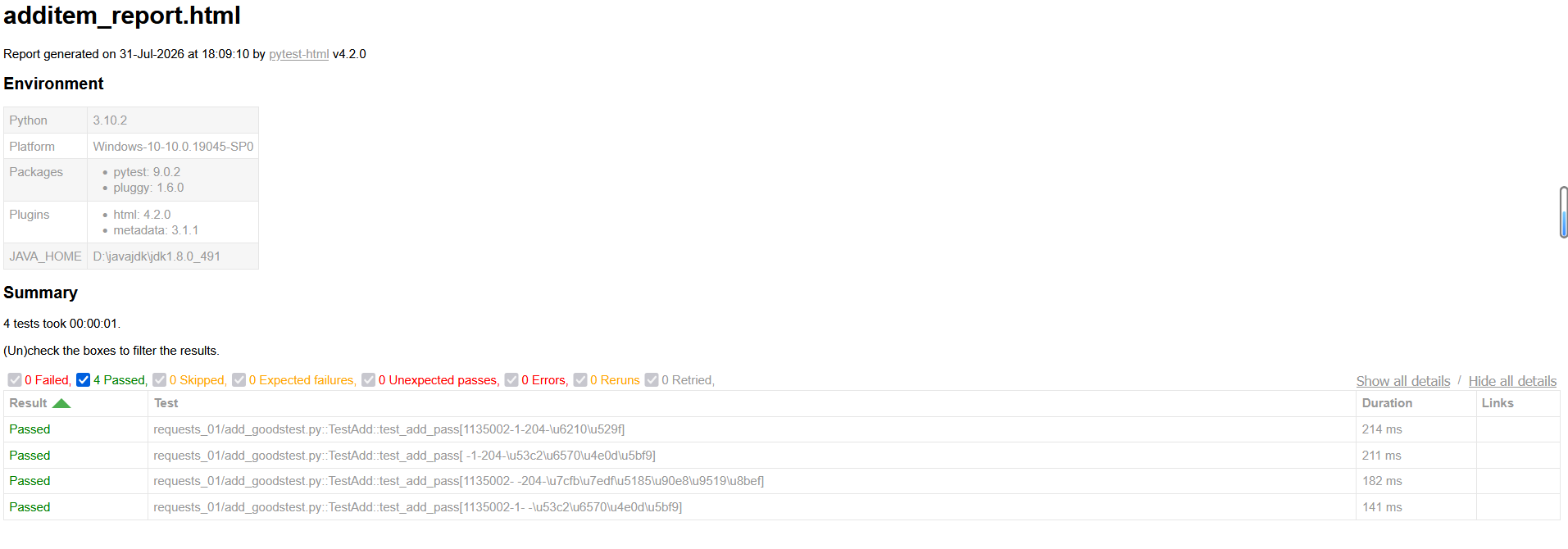
8、打开终端执行pytest生成测试报告