Linux 日志处理三剑客前置基础:特殊符号与正则表达式
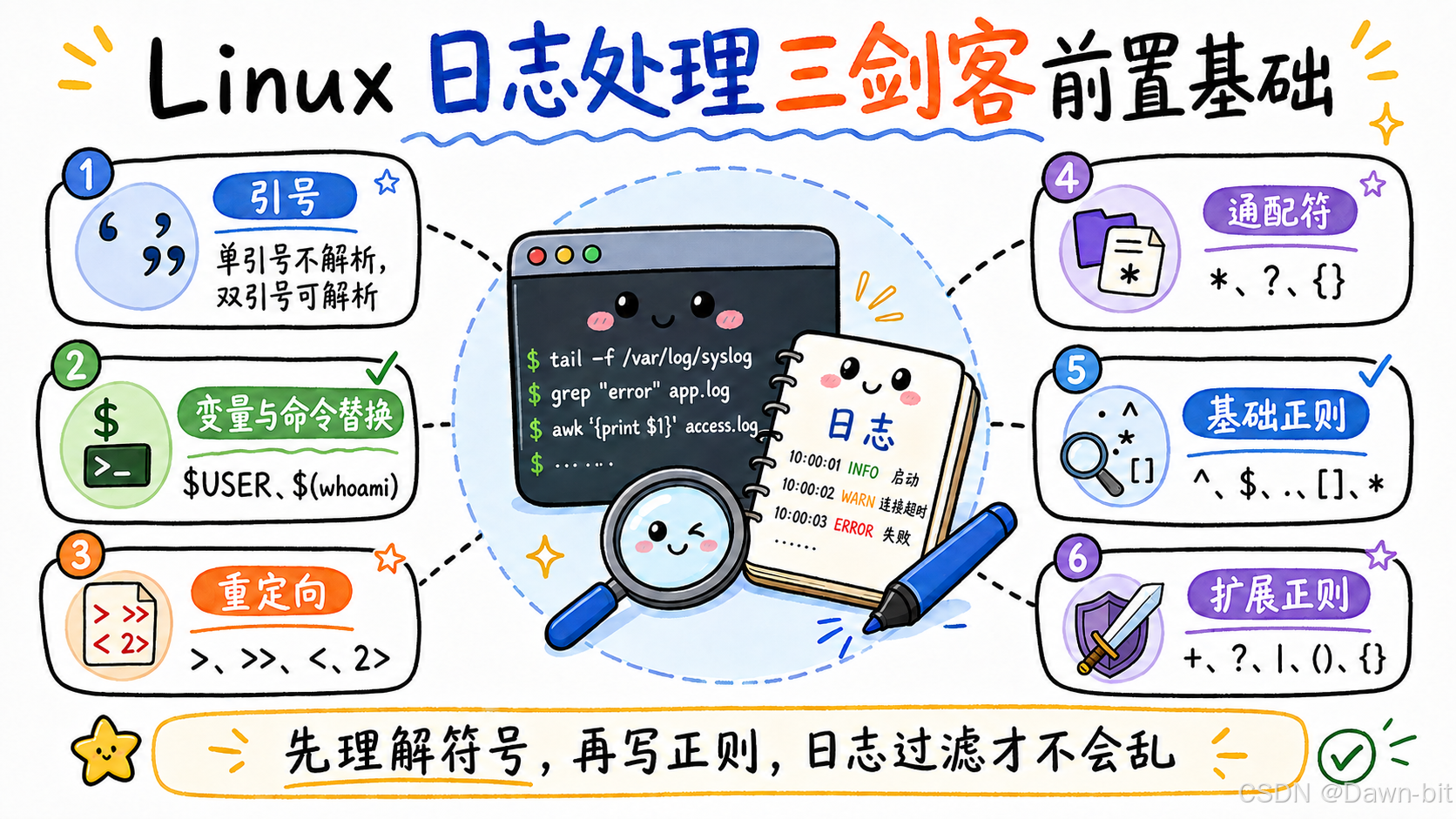
Linux 日志处理离不开"三剑客":grep、sed、awk。
不过在正式使用它们之前,有两块基础必须先搞清楚:
- Shell 特殊符号:比如引号、
$、反引号、重定向、通配符。 - 正则表达式:比如
^、$、.、[]、*、+、?、|、()、{}。
这两块如果没分清,后面写日志过滤命令时就很容易出现"看起来对,结果不对"的情况。
比如:
bash
grep '.' test.txt
grep '\.' test.txt
这两条命令只差一个反斜杠,但含义完全不同:
.在正则里表示任意单个字符。\.才表示真正的点号。
所以这篇先把日志处理前置基础整理清楚,后面再看 grep、sed、awk 会顺很多。
一、Linux 特殊符号

Linux 命令行里很多符号不是普通字符,它们会被 Shell 提前解析。
常见的有:
- 引号:控制内容是否被解析。
$:引用变量。- 反引号和
$():执行命令替换。 - 重定向:改变输入、输出、错误输出的方向。
- 通配符:匹配文件名。
- 大括号:批量展开内容。
1. 引号
引号最常见,但也最容易混。
单引号和双引号
| 符号 | 作用 |
|---|---|
' ' |
单引号,内容原样输出,不进行变量替换或命令替换 |
" " |
双引号,保留大部分普通字符,但允许变量替换和命令替换 |
示例:
bash
# 测试 echo 'Hello $USER' 和 echo "Hello $USER"
[root@atguigu ~]# echo 'Hello $USER'
Hello $USER

[root@atguigu ~]# echo "Hello $USER"
Hello root
这里的区别很明显:
- 单引号里的
$USER被当成普通字符串。 - 双引号里的
$USER会被解析成当前用户。
所以如果希望命令里的内容"别乱动,原样输出",优先用单引号;如果希望变量能生效,就用双引号。
2. 美元符号
$ 用来引用变量的值。
常见示例:
bash
[root@atguigu ~]# echo $USER
root

[root@atguigu ~]# echo $PATH
/usr/local/sbin:/usr/local/bin:/usr/sbin:/usr/bin:/root/bin
这里:
$USER表示当前用户。$PATH表示命令搜索路径。
后面写脚本、写日志处理命令时,经常会遇到 $1、$2、$NF 这类写法。它们在不同工具里含义不完全一样,比如 Shell 脚本里 $1 表示第一个参数,awk 里 $1 表示第一列。
3. 反引号
反引号用于命令替换,也就是把命令执行结果放到当前位置。
除了反引号,也可以使用 $()。实际写脚本时,更推荐 $(),因为它更清晰,也更适合嵌套。
示例:
bash
# 测试 echo '`hostname` ybc $(whoami) $USER {1..5}'
[root@atguigu ~]# echo '`hostname` ybc $(whoami) $USER {1..5}'
`hostname` ybc $(whoami) $USER {1..5}

# 测试 echo "`hostname` ybc $(whoami) $USER {1..5}"
[root@atguigu ~]# echo "`hostname` ybc $(whoami) $USER {1..5}"
atguigu ybc root root {1..5}

# 测试 echo `hostname` ybc $(whoami) $USER {1..5}
[root@atguigu ~]# echo `hostname` ybc $(whoami) $USER {1..5}
atguigu ybc root root 1 2 3 4 5
这 3 条命令可以看出几个细节:
- 单引号内所有内容都不解析。
- 双引号内会解析变量和命令替换,但
{1..5}不会展开。 - 不加引号时,变量、命令替换、大括号展开都会生效。
二、重定向符号
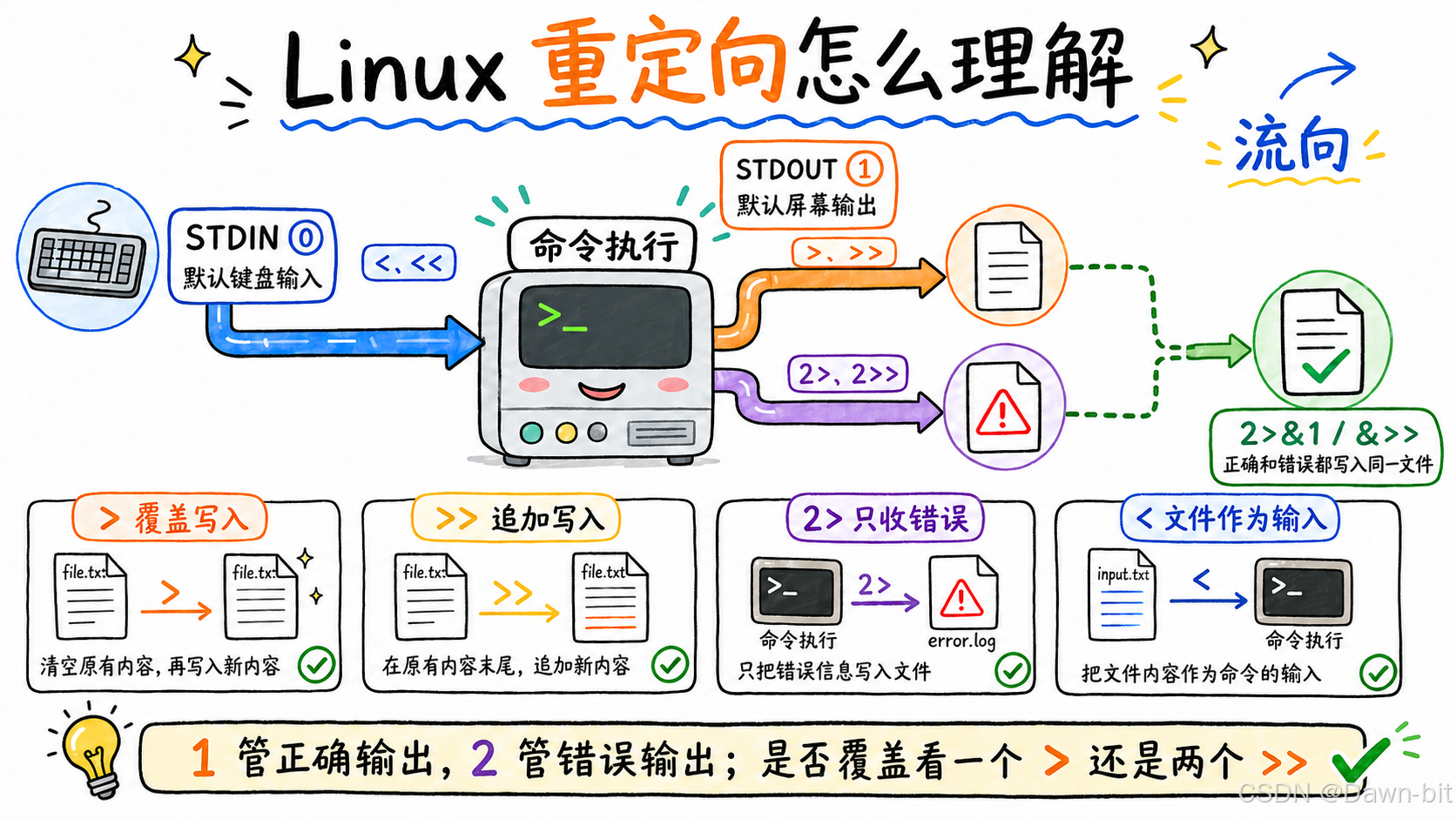
Linux 系统里,输入输出本质上都可以看成"文件流"。
常见的 3 个标准文件描述符:
| 编号 | 名称 | 默认设备 | 说明 |
|---|---|---|---|
0 |
STDIN 标准输入 | 键盘 | 命令读取输入数据 |
1 |
STDOUT 标准输出 | 显示器 | 命令执行成功后的正常输出 |
2 |
STDERR 标准错误 | 显示器 | 命令执行失败时的错误输出 |
重定向就是改变这些流的方向。
1. 输出重定向
覆盖输出:>
> 等价于 1>,表示把标准输出写入文件。如果文件不存在就创建;如果文件存在就覆盖。
bash
# 将 hello,world 输出到 test.txt
[root@atguigu ~]# echo 'hello,world' > test.txt

[root@atguigu ~]# ll
总用量 8
-rw-------. 1 root root 1289 7月   1 10:36 anaconda-ks.cfg
-rw-r--r--. 1 root root   11 7月   1 15:17 test.txt

[root@atguigu ~]# cat test.txt
hello,world注意:> 会覆盖原文件内容,生产环境里操作日志、配置文件时要特别小心。
追加输出:>>
>> 等价于 1>>,表示追加写入,不覆盖原内容。
bash
# 将 hello,linux 追加到 test.txt
[root@atguigu ~]# echo 'hello,linux' >> test.txt

[root@atguigu ~]# cat test.txt
hello,world
hello,linux
日志记录常用 >>,因为通常希望新内容追加到文件末尾,而不是把历史内容覆盖掉。
2. 输入重定向
输入重定向:<
< 等价于 0<,表示把文件内容作为命令输入。
准备测试文件:
bash
[root@atguigu ~]# cat test.txt
3
12
33
21
34
55
43
18
把 test.txt 作为 sort 的输入:
bash
[root@atguigu ~]# sort -n < test.txt
3
12
18
21
33
34
43
55
配合 xargs 分组:
bash
[root@atguigu ~]# xargs -n3 < test.txt
3 12 33
21 34 55
43 18
这里的 -n3 表示每 3 个参数分一组。
输入追加重定向:<<
<< 常见于多行输入,一般配合 cat 使用,也经常出现在 Shell 脚本中。
bash
# 向 test.txt 输入多行内容,到 EOF 结束
# 也可以这样写:cat << EOF > test.txt
[root@atguigu ~]# cat > test.txt << EOF
> hello
> world
> linux
> good
> EOF

[root@atguigu ~]# cat test.txt
hello
world
linux
good
EOF 不是固定写法,它只是一个结束标记。也可以写成 END、AAA,只要前后一致即可。
3. 错误重定向
覆盖错误输出:2>
2> 表示只把错误输出写入文件。
先看错误命令使用 > 的情况:
bash
# 测试1:命令错误,使用 > 或 1> 测试错误信息是否会输出到文件中
[root@atguigu ~]# ech 111 > test.txt
-bash: ech: 未找到命令

[root@atguigu ~]# cat test.txt
因为 > 只接收标准输出,不接收标准错误,所以错误信息仍然显示在屏幕上,文件中没有内容。
再看正确命令使用 2>:
bash
# 测试2:命令正确,使用 2> 测试输出到文件中的信息是什么
[root@atguigu ~]# echo 111 2> test.txt
111

[root@atguigu ~]# cat test.txt
命令正确时没有错误输出,所以 test.txt 还是空的。
最后看错误命令使用 2>:
bash
# 测试3:命令错误,使用 2> 测试错误信息是否会输出到文件中
[root@atguigu ~]# ech 111 2> test.txt

[root@atguigu ~]# cat test.txt
-bash: ech: 未找到命令
这次错误信息被写入了文件。
追加错误输出:2>>
2>> 表示把错误输出追加到文件末尾。
bash
# 测试追加错误输出
[root@atguigu ~]# ech 111 2>> test.txt

[root@atguigu ~]# cat test.txt
-bash: ech: 未找到命令
-bash: ech: 未找到命令
同时记录标准输出和错误输出
有时不管命令成功还是失败,都希望写入同一个文件。
常见写法:
bash
# 方式1:标准输出和错误输出都追加到 test.txt
echo 111 >> test.txt 2>> test.txt

# 方式2:把错误输出合并到标准输出,再追加到 test.txt
echo 111 >> test.txt 2>&1

# 方式3:标准输出和错误输出都追加到 test.txt
echo 111 &>> test.txt
其中 2>&1 的意思是:把 2 号错误输出合并到 1 号标准输出。
三、通配符
通配符主要用于匹配文件名。它是 Shell 层面的功能,不是正则表达式。
1. * 和 ?
| 通配符 | 含义 |
|---|---|
* |
匹配任意长度的任意字符 |
? |
匹配任意单个字符 |
示例:
bash
# 删除当前目录下的所有 txt 文件
[root@atguigu ~]# rm -f *.txt

# 查询 /etc 目录下,文件名以 p 开头的两个字符的 txt 文件
[root@atguigu ~]# ll /etc/p?.txt
举例说明:
*.txt可以匹配a.txt、test.txt、linux_note.txt。p?.txt可以匹配pa.txt、p1.txt,但不能匹配passwd.txt。
2. 大括号
大括号 {} 用于批量展开一系列值。
bash
#{xx,xx,xx} 表示花括号中的每个数据
[root@atguigu ~]# echo atguigu{A,C,X}
atguiguA atguiguC atguiguX

#{开始..结束} 表示从开始到结束的所有数据
[root@atguigu ~]# echo {a..z}
a b c d e f g h i j k l m n o p q r s t u v w x y z
批量创建文件:
bash
# 创建 file1.txt、file2.txt、file3.txt
[root@atguigu ~]# touch file{1,2,3}.txt

# 创建 file1.txt 到 file10.txt
[root@atguigu ~]# touch file{1..10}.txt
指定步长:
bash
# seq 命令:生成一系列数字,seq 开始 增量 结束
[root@atguigu ~]# seq 1 2 10
1
3
5
7
9

# 使用 {} 实现类似功能,{开始..结束..增量}
[root@atguigu ~]# echo {1..10..2}
1 3 5 7 9
备份文件时也很常用:
bash
# 完整写法
[root@atguigu ~]# cp test.txt test.txt.bak

# 使用 {} 简写
[root@atguigu ~]# cp test.txt{,.bak}
test.txt{,.bak} 会展开成:
bash
test.txt test.txt.bak所以整条命令等价于:
bash
cp test.txt test.txt.bak四、正则表达式
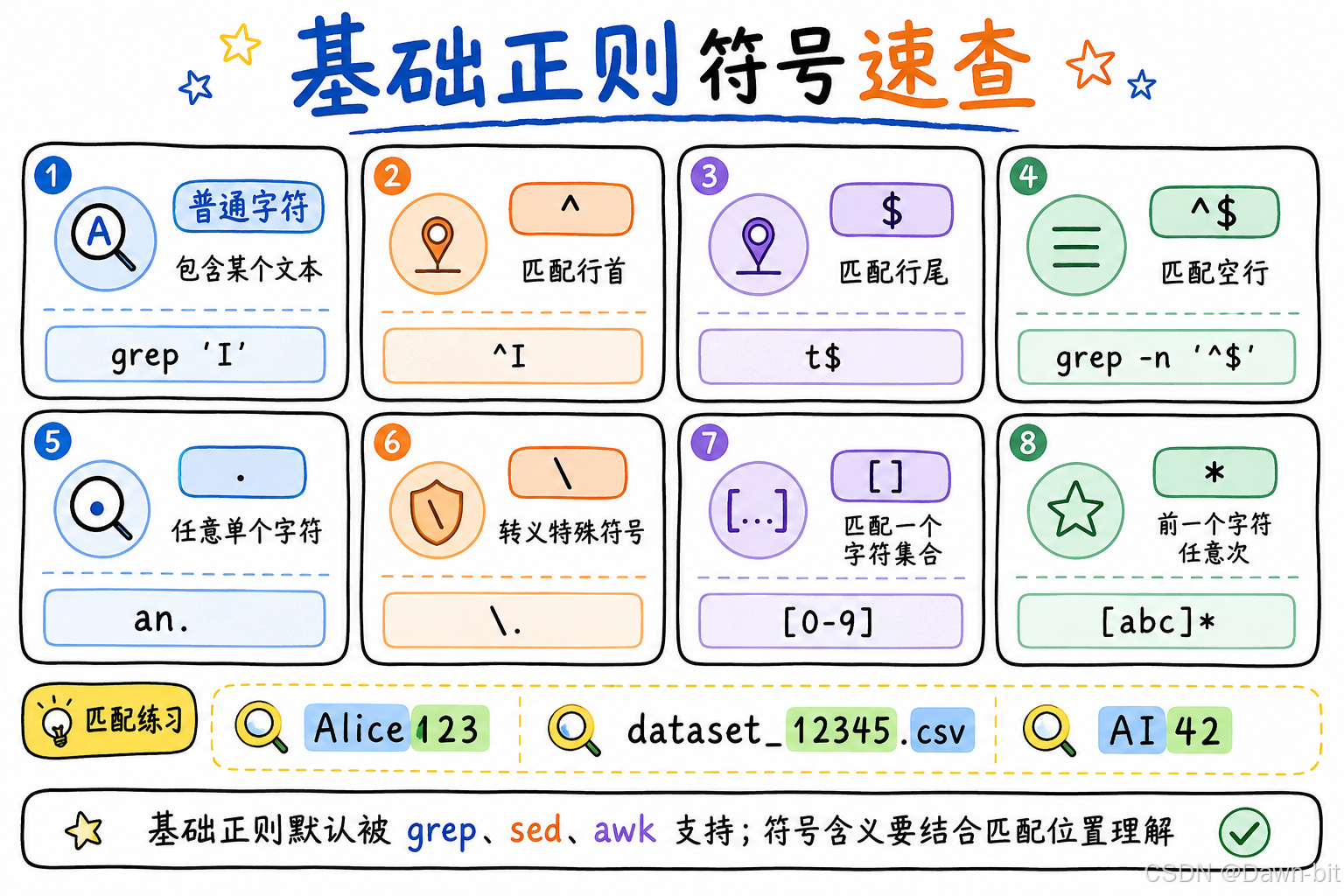
正则表达式,英文是 Regular Expression,简称 regex。
它的作用是定义一种"匹配规则",用来匹配字符串中的字符组合。
在 Linux 日志处理中,正则主要用于:
- 匹配某类日志行
- 查找指定关键字
- 提取异常信息
- 删除空行或注释
- 替换符合规则的内容
1. 正则和通配符的区别
正则和通配符很容易混,但它们不是一回事。
| 区别 | 用途 | 支持的命令 |
|---|---|---|
| 正则 | 匹配文件内容,也就是匹配字符 | grep、sed、awk、开发语言 |
| 通配符 | 匹配文件名,作为命令参数展开 | Linux 大部分命令都支持 |
简单记:
- 找文件名,用通配符。
- 查文件内容,用正则。
例如:
bash
ls *.log
grep 'ERROR' app.log
这里:
*.log是通配符,匹配日志文件名。ERROR是正则中的普通字符匹配,匹配文件内容。
2. 正则分类
常见正则分为基础正则和扩展正则。
| 特性 | 基础正则表达式 BRE | 扩展正则表达式 ERE |
|---|---|---|
| 元字符 | ^、$、.、*、[、] 等 |
?、+、{}、()、` |
| 工具支持 | grep 默认、sed 默认、awk 默认 |
grep -E、egrep、sed -r、awk |
注意:egrep 等价于 grep -E。
五、基础正则
三剑客默认支持基础正则。
先准备测试文件:
bash
[root@atguigu ~]# cat test.txt
Here is a sample text for you to test regular expressions
In 2023, Alice123 and Bob456@domain.com attended the TechCon789 event

where they discussed topics like AI42, machine learning models, and the 98765th experiment
The code snippet included functions like def process_data_345

and variables such as result_6789

Additionally, they referred to a dataset named dataset_12345.csv
and used a library called lib67890 to handle some complex computations
1. 包含匹配
直接写普通字符,表示匹配包含该字符的行。
bash
# 匹配 test.txt 中包含 I 的行
[root@atguigu ~]# grep 'I' test.txt
In 2023, Alice123 and Bob456@domain.com attended the TechCon789 event
where they discussed topics like AI42, machine learning models, and the 98765th experiment
这里匹配的是包含大写 I 的行。
2. 开始符 ^
^ 表示匹配行首。
bash
# 匹配 test.txt 中以 I 开头的行
[root@atguigu ~]# grep '^I' test.txt
In 2023, Alice123 and Bob456@domain.com attended the TechCon789 event
^I 的意思是:这一行必须以 I 开头。
3. 结束符 $
$ 表示匹配行尾。
bash
# 匹配 test.txt 中以 t 结尾的行
[root@atguigu ~]# grep 't$' test.txt
In 2023, Alice123 and Bob456@domain.com attended the TechCon789 event
where they discussed topics like AI42, machine learning models, and the 98765th experiment
如果结果看着不符合预期,可以使用 cat -A 文件 查看隐藏字符,比如行尾是否有空格、回车等。
4. 同时使用行首和行尾
^I$ 表示只匹配一整行只有 I 的行。
bash
# "^I$" 匹配只有 I 的行
[root@atguigu ~]# grep '^I$' test.txt
没有匹配结果,因为文件中没有单独一行 I。
追加一行:
bash
[root@atguigu ~]# echo I >> test.txt

[root@atguigu ~]# grep '^I$' test.txt
I
^$ 表示匹配空行。
bash
# 匹配 test.txt 中的空行并展示行号
[root@atguigu ~]# grep -n '^$' test.txt
3:
6:
8:排查配置文件时,^$ 很常用,可以用来过滤空行。
5. 符号 .
. 表示匹配任意单个字符,空行除外。
bash
# 匹配 test.txt 中包含 "an." 的行
[root@atguigu ~]# grep 'an.' test.txt
In 2023, Alice123 and Bob456@domain.com attended the TechCon789 event
where they discussed topics like AI42, machine learning models, and the 98765th experiment
and variables such as result_6789
and used a library called lib67890 to handle some complex computations
加 -o 可以只显示匹配到的内容:
bash
[root@atguigu ~]# grep -o 'an.' test.txt
and
and
and
and
and
这里 an. 可以匹配 and,因为 . 匹配了 d。
6. 转义符 \
如果要匹配特殊符号本身,需要使用反斜杠转义。
例如,如何匹配包含点号 . 的行?
下面这种写法不准确:
bash
grep '.' test.txt因为 . 在正则里表示任意单个字符,不是点号本身。
实际效果:
bash
[root@atguigu ~]# grep '.' test.txt
Here is a sample text for you to test regular expressions
In 2023, Alice123 and Bob456@domain.com attended the TechCon789 event
where they discussed topics like AI42, machine learning models, and the 98765th experiment
The code snippet included functions like def process_data_345
and variables such as result_6789
Additionally, they referred to a dataset named dataset_12345.csv
and used a library called lib67890 to handle some complex computations
I
正确写法:
bash
[root@atguigu ~]# grep '\.' test.txt
In 2023, Alice123 and Bob456@domain.com attended the TechCon789 event
Additionally, they referred to a dataset named dataset_12345.csv
\. 表示匹配真正的点号。
7. 字符集合 []
[] 表示匹配括号中出现的任意一个字符。
比如:
[123]表示匹配1或2或3。[0-9]表示匹配任意数字。[a-z]表示匹配任意小写字母。[A-Z]表示匹配任意大写字母。[a-zA-Z]表示匹配任意字母。[0-9a-zA-Z_]表示匹配任意字母、数字、下划线。
示例:
bash
# 匹配 test.txt 中包含 0 或 1 或 2 的行
[root@atguigu ~]# grep '[012]' test.txt
In 2023, Alice123 and Bob456@domain.com attended the TechCon789 event
where they discussed topics like AI42, machine learning models, and the 98765th experiment
Additionally, they referred to a dataset named dataset_12345.csv
and used a library called lib67890 to handle some complex computations注意:[012] 匹配的是单个字符 0、1、2,不是匹配 012 这个整体。
使用 -o 看得更清楚:
bash
[root@atguigu ~]# grep -o '[0-2]' test.txt
2
0
2
1
2
2
1
2
0
还有几个常见写法:
bash
# 匹配以 I 或 A 开头的行
grep '^[AI]' test.txt

# 匹配包含 . 或 ! 或空格的行
grep '[.! ]' test.txt
在 [] 中,很多特殊字符会失去特殊含义。比如 [.] 可以匹配点号。
8. and 和 [and] 的区别
这个点很重要。
bash
grep 'and' test.txt
grep '[and]' test.txt
它们含义不一样:
and:匹配连续的字符串and。[and]:匹配a、n、d中任意一个字符。
所以 [and] 匹配范围更宽,只要行里有 a 或 n 或 d,就会匹配。
9. 排除集合 [^]
[^abc] 表示匹配除了 a、b、c 以外的任意字符。
bash
#[abc] 表示匹配 a 或 b 或 c
#[^abc] 表示匹配除 a、b、c 以外的字符
[root@atguigu ~]# grep '[^abc]' test.txt
Here is a sample text for you to test regular expressions
In 2023, Alice123 and Bob456@domain.com attended the TechCon789 event
where they discussed topics like AI42, machine learning models, and the 98765th experiment
The code snippet included functions like def process_data_345
and variables such as result_6789
Additionally, they referred to a dataset named dataset_12345.csv
and used a library called lib67890 to handle some complex computations
I
这个结果可能看起来有点怪:为什么几乎都匹配到了?
原因是只要一行里存在任意一个"不是 a/b/c 的字符",整行就会被匹配。大部分文本行都符合这个条件。
10. 匹配任意次 *
* 表示前一个字符可以出现任意次,包括 0 次。
bash
# * 在字符后使用,表示匹配的字符可以出现任意次,即 0 次或 0 次以上
# 例如:[abc]* 表示匹配任意次数的 a 或 b 或 c
[root@atguigu ~]# grep '[abc]*' test.txt
Here is a sample text for you to test regular expressions
In 2023, Alice123 and Bob456@domain.com attended the TechCon789 event

where they discussed topics like AI42, machine learning models, and the 98765th experiment
The code snippet included functions like def process_data_345

and variables such as result_6789

Additionally, they referred to a dataset named dataset_12345.csv
and used a library called lib67890 to handle some complex computations
I
最后一行 I 并没有出现 a、b、c,但也匹配到了。
原因是 * 允许前面的内容出现 0 次。
11. 所有字符 .*
. 表示任意单个字符,* 表示前一个字符任意次。
组合起来:
bash
.*就表示匹配任意内容。
这是日志处理中非常常用的写法,比如:
bash
grep 'ERROR.*timeout' app.log含义是:匹配包含 ERROR,并且后面某个位置还有 timeout 的行。
六、扩展正则
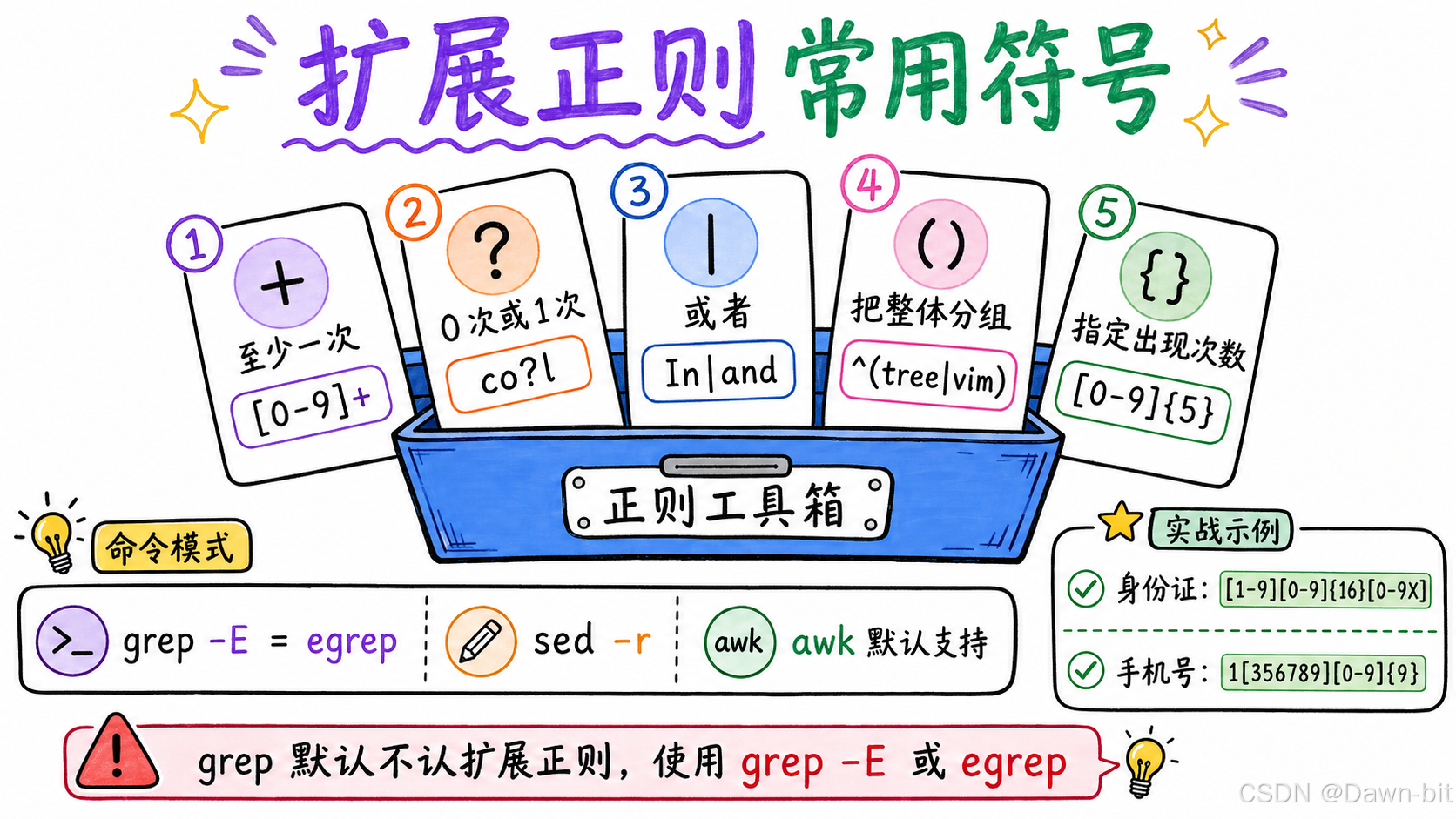
三剑客支持扩展正则的方式:
| 工具 | 扩展正则方式 |
|---|---|
grep |
使用 -E,即 grep -E |
egrep |
等价于 grep -E |
sed |
使用 -r |
awk |
默认支持 |
1. 匹配至少一次 +
+ 表示前一个字符至少出现 1 次。
例如 [0-9]+ 表示连续出现的数字。
直接用普通 grep:
bash
# 匹配 test.txt 中连续出现数字的行
[root@atguigu ~]# grep '[0-9]+' test.txt
没有结果,因为 grep 默认不支持扩展正则里的 +。
使用 egrep:
bash
[root@atguigu ~]# egrep -o '[0-9]+' test.txt
2023
123
456
789
42
98765
345
6789
12345
67890
也可以写成:
bash
grep -E -o '[0-9]+' test.txt2. 匹配 0 次或 1 次 ?
? 表示前一个字符出现 0 次或 1 次。
准备测试文件:
bash
[root@atguigu ~]# cat message.txt
I am cool.
I am col.
I am cl.
先看 *:
bash
# co*l:o 可以出现 0 次或多次
[root@atguigu ~]# egrep 'co*l' message.txt
[root@atguigu ~]# egrep 'co{0,}l' message.txt
I am cool.
I am col.
I am cl.
再看 +:
bash
# co+l:o 至少出现 1 次
[root@atguigu ~]# egrep 'co+l' message.txt
[root@atguigu ~]# egrep 'co{1,}l' message.txt
I am cool.
I am col.
最后看 ?:
bash
# co?l:o 出现 0 次或 1 次
[root@atguigu ~]# egrep 'co?l' message.txt
[root@atguigu ~]# egrep 'co{0,1}l' message.txt
I am col.
I am cl.
这几个写法可以这样记:
| 写法 | 含义 | 能匹配 |
|---|---|---|
co*l |
o 出现 0 次或多次 |
cl、col、cool |
co+l |
o 至少出现 1 次 |
col、cool |
co?l |
o 出现 0 次或 1 次 |
cl、col |
3. 或者 |
| 表示"或者"。
如果只是单个字符的"或",可以用 [];如果是字符串整体的"或",就用 |。
示例:匹配包含 In 或 and 的行。
bash
[root@atguigu ~]# egrep 'In|and' test.txt
In 2023, Alice123 and Bob456@domain.com attended the TechCon789 event
where they discussed topics like AI42, machine learning models, and the 98765th experiment
and variables such as result_6789
and used a library called lib67890 to handle some complex computations
4. 排除空行和注释
排查配置文件时,经常需要排除空行和注释。
比如 /etc/ssh/sshd_config 中,很多行是空行或 # 开头的注释。
方式一:先排除空行,再排除注释。
bash
# 错误结果
[root@atguigu ~]# egrep -nv '^$' /etc/ssh/sshd_config | grep -v '^#'这条命令的问题是:egrep -n 会在输出前加行号,比如:
bash
12:#PermitRootLogin yes此时这一行已经不是以 # 开头了,而是以行号 12: 开头,所以 grep -v '^#' 排不掉它。
正确写法:
bash
[root@atguigu ~]# egrep -nv '^$' /etc/ssh/sshd_config | egrep -v '#'方式二:直接用扩展正则一次排除空行和注释。
bash
[root@atguigu ~]# egrep -nv '^$|^#' /etc/ssh/sshd_config这里:
^$表示空行。^#表示以#开头的注释行。|表示或者。
5. 小括号 ()
小括号用于把内容作为一个整体。
示例:查看软件安装列表,并过滤出以 tree 或 vim 开头的软件。
bash
[root@atguigu ~]# rpm -qa | egrep '^tree|^vim'
[root@atguigu ~]# rpm -qa | egrep '^(tree|vim)'
第二种写法更清晰:
bash
^(tree|vim)含义是:以 tree 或 vim 开头。
如果不加括号,^tree|^vim 也能实现类似效果,但当表达式复杂后,可读性会变差。
6. 花括号 {}
{} 用于指定前一个字符出现的次数。
| 写法 | 含义 |
|---|---|
{x} |
必须出现 x 次 |
{x,y} |
出现 x 到 y 次 |
{x,} |
至少出现 x 次 |
{,y} |
最多出现 y 次 |
示例:查询 test.txt 中连续出现 5 个数字的行。
bash
[root@atguigu ~]# egrep '[0-9]{5}' test.txt
where they discussed topics like AI42, machine learning models, and the 98765th experiment
Additionally, they referred to a dataset named dataset_12345.csv
and used a library called lib67890 to handle some complex computations
7. 匹配身份证号和手机号
准备测试文件:
bash
[root@atguigu ~]# cat student.txt
张三 370102198705123456    #姓名 身份证号
李四 420901199008234567
王五 23010419761130123X
赵六 510105198504056789
孙七 320311199207182345
周八 13400134000    #姓名 手机号
吴九 13300133000
郑十 13200132000
钱伯 13100131000
孔仲 13000130000
匹配身份证号:
bash
# 身份证号的正则表达式:[1-9][0-9]{16}[0-9X]
[root@atguigu ~]# egrep '[1-9][0-9]{16}[0-9X]$' student.txt
张三 370102198705123456
李四 420901199008234567
王五 230104197611301234
赵六 510105198504056789
孙七 320311199207182345
这里的规则拆开看:
[1-9]:第一位不能是 0。[0-9]{16}:中间 16 位数字。[0-9X]:最后一位可以是数字或X。$:必须以身份证号结尾。
匹配手机号:
bash
# 手机号的正则表达式:1[356789][0-9]{9}
[root@atguigu ~]# egrep '1[356789][0-9]{9}$' student.txt
周八 13400134000
吴九 13300133000
郑十 13200132000
钱伯 13100131000
孔仲 13000130000
规则拆开看:
1:手机号以 1 开头。[356789]:第二位匹配 3、5、6、7、8、9。[0-9]{9}:后面 9 位数字。$:必须以手机号结尾。
七、常见易错点
1. 通配符和正则不要混用
bash
ls *.log
grep '.*ERROR.*' app.log
第一条里的 * 是通配符,用来匹配文件名。
第二条里的 .* 是正则,用来匹配文件内容。
2. . 默认不是点号
bash
grep '.' test.txt
grep '\.' test.txt.表示任意单个字符。\.表示真正的点号。
3. * 表示 0 次或多次
bash
grep '[abc]*' test.txt因为 * 允许出现 0 次,所以它很容易匹配出比预期更多的内容。
4. grep 默认不支持扩展正则
bash
grep '[0-9]+' test.txt
grep -E '[0-9]+' test.txt
egrep '[0-9]+' test.txt
如果要用 +、?、|、()、{} 这类扩展正则,建议直接使用:
bash
grep -E或者:
bash
egrep5. 带行号后再过滤注释要注意
bash
egrep -nv '^$' /etc/ssh/sshd_config | grep -v '^#'这条容易失效,因为 -n 加了行号后,注释行不再以 # 开头。
更直接的写法:
bash
egrep -nv '^$|^#' /etc/ssh/sshd_config八、常用速查总结
1. 特殊符号速查
| 符号 | 含义 |
|---|---|
' ' |
单引号,内容原样输出 |
" " |
双引号,允许变量和命令替换 |
$ |
引用变量 |
cmd |
命令替换 |
$(cmd) |
命令替换,推荐写法 |
> |
覆盖标准输出 |
>> |
追加标准输出 |
< |
文件作为标准输入 |
<< |
多行输入 |
2> |
覆盖错误输出 |
2>> |
追加错误输出 |
2>&1 |
错误输出合并到标准输出 |
* |
通配符,匹配任意长度文件名 |
? |
通配符,匹配单个字符 |
{} |
批量展开 |
2. 基础正则速查
| 正则 | 含义 |
|---|---|
abc |
匹配包含 abc 的行 |
^abc |
匹配以 abc 开头的行 |
abc$ |
匹配以 abc 结尾的行 |
^$ |
匹配空行 |
. |
任意单个字符 |
\. |
匹配点号 |
[abc] |
匹配 a、b、c 任意一个 |
[^abc] |
匹配非 a、b、c 的字符 |
[0-9] |
匹配任意数字 |
[a-z] |
匹配任意小写字母 |
* |
前一个字符出现 0 次或多次 |
.* |
匹配任意内容 |
3. 扩展正则速查
| 正则 | 含义 |
|---|---|
+ |
前一个字符至少出现 1 次 |
? |
前一个字符出现 0 次或 1 次 |
| ` | ` |
() |
分组,把内容作为整体 |
{x} |
出现 x 次 |
{x,y} |
出现 x 到 y 次 |
{x,} |
至少出现 x 次 |
{,y} |
最多出现 y 次 |
4. 常用命令组合
bash
# 查看非空、非注释配置
egrep -nv '^$|^#' /etc/ssh/sshd_config

# 匹配连续数字
egrep -o '[0-9]+' test.txt

# 匹配空行并显示行号
grep -n '^$' test.txt

# 匹配包含真正点号的行
grep '\.' test.txt

# 标准输出和错误输出都追加到日志
command >> run.log 2>&1

# 另一种写法
command &>> run.log
最后记住一句话:
通配符处理文件名,正则处理文件内容;基础正则默认可用,扩展正则要看工具参数。
这个边界分清楚后,后面再写日志过滤、文本替换、字段统计,命令就不容易乱。