文章目录
-
- 前言
- 项目效果展示
- 完整工程代码
-
- [1. scripts.py ------ RAG 核心处理函数](#1. scripts.py —— RAG 核心处理函数)
- [2. main.py ------ Streamlit 网页界面](#2. main.py —— Streamlit 网页界面)
- [技术原理:什么是 RAG](#技术原理:什么是 RAG)
-
- [1. 从直接问答到检索增强](#1. 从直接问答到检索增强)
- [2. RAG 中的两类模型](#2. RAG 中的两类模型)
- 代码逐模块详细解析
- 完整运行流程
-
- [1. 项目环境准备](#1. 项目环境准备)
- [2. 使用 uv 同步环境](#2. 使用 uv 同步环境)
- [3. 启动 Streamlit 服务](#3. 启动 Streamlit 服务)
- [4. 网页操作顺序](#4. 网页操作顺序)
- [5. 结束程序](#5. 结束程序)
- 常见问题与解决方法
-
- [问题1:API Key 无效或读取不到](#问题1:API Key 无效或读取不到)
- [问题2:PDF 加载后无内容](#问题2:PDF 加载后无内容)
- [问题3:Streamlit 端口被占用](#问题3:Streamlit 端口被占用)
- 问题4:中文显示乱码
- [问题5:模型回答与 PDF 无关](#问题5:模型回答与 PDF 无关)
- 问题6:每次提问都重新构建向量库
- 性能优化建议
-
- [1. 向量库缓存](#1. 向量库缓存)
- [2. 选择合适的文本块大小](#2. 选择合适的文本块大小)
- [3. 使用更快的嵌入模型](#3. 使用更快的嵌入模型)
- [4. 异步处理](#4. 异步处理)
- 项目扩展方向
- 总结
- 参考资料
前言
在前面的学习中,我们已经掌握了 Prompt Template、Output Parser 和 Chain 的基本用法。但之前的案例都是基于模型自身知识进行问答,无法回答涉及私有文档的问题。如何让大模型根据我们自己上传的 PDF 文档回答问题? 这正是 RAG(检索增强生成)要解决的核心问题。
本文基于课堂项目,使用《卢浮宫》PDF 作为知识来源,通过 Streamlit 构建了一个完整的网页问答工具。运行后,用户可以:
- 输入阿里云百炼 API Key
- 上传一份 PDF 文件
- 针对 PDF 内容提出问题
- 查看模型根据文档生成的回答
- 保留并查看多轮对话历史
本文适合已经了解 LangChain 基础组件(Prompt、Model、Parser、Chain)的读者,希望通过一个完整项目理解 RAG 的工作原理和实现方式。
最终效果:用户上传 PDF 后,可以像与 ChatGPT 对话一样提问,模型会基于 PDF 内容给出答案,并支持多轮连续对话。
项目效果展示
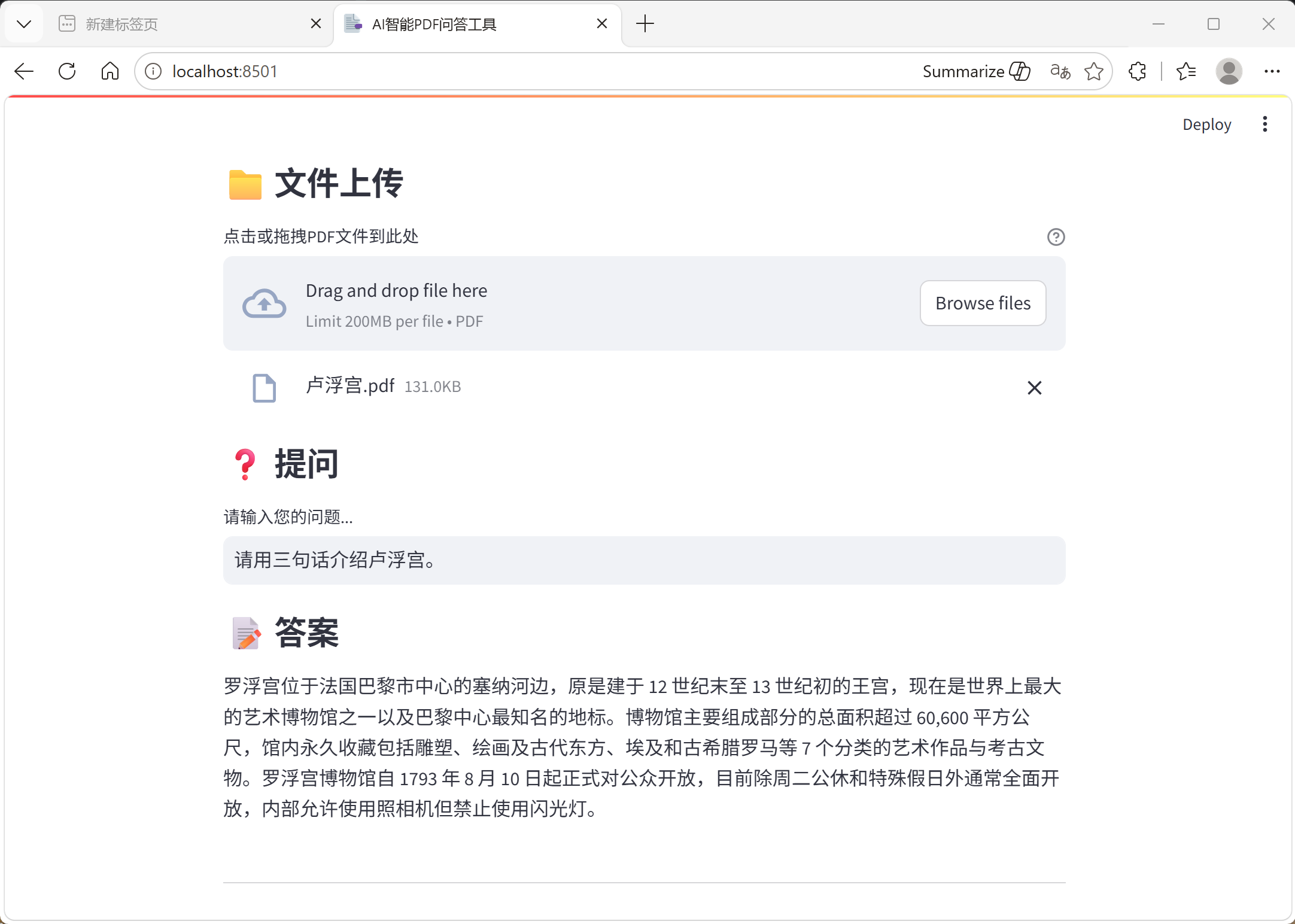
页面从上到下依次为:
- PDF 文件上传区域(支持拖拽)
- 问题输入框(上传 PDF 前禁用)
- 答案展示区域
完整工程代码
以下为项目完整代码,包含两个核心文件。
1. scripts.py ------ RAG 核心处理函数
python
import os

from langchain.chains import ConversationalRetrievalChain
from langchain_community.document_loaders import PyPDFLoader
from langchain_community.vectorstores import FAISS
from langchain_openai import ChatOpenAI
from langchain_text_splitters import RecursiveCharacterTextSplitter
from langchain_community.embeddings import DashScopeEmbeddings


def qa_agent(openai_api_key, memory, uploaded_file, question):
    # 实例化对话模型
    model = ChatOpenAI(
        model="qwen3.5-plus",
        openai_api_key=openai_api_key,
        openai_api_base="https://dashscope.aliyuncs.com/compatible-mode/v1"
    )

    # 实例化嵌入向量模型
    embeddings_model = DashScopeEmbeddings(
        model="text-embedding-v4",
        dashscope_api_key=openai_api_key
    )

    # 保存上传的PDF为临时文件
    file_content = uploaded_file.read()
    temp_file_path = "xxx.pdf"

    with open(temp_file_path, "wb") as temp_file:
        temp_file.write(file_content)

    # 加载PDF
    loader = PyPDFLoader(temp_file_path)
    docs = loader.load()

    # 切分文本
    text_splitter = RecursiveCharacterTextSplitter(
        chunk_size=500,
        chunk_overlap=50,
        separators=["\n", "。", "!", "?", ",", "、", ""]
    )

    texts = text_splitter.split_documents(docs)

    # 建立向量数据库
    db = FAISS.from_documents(texts, embeddings_model)
    retriever = db.as_retriever()

    # 创建检索问答链
    qa = ConversationalRetrievalChain.from_llm(
        llm=model,
        retriever=retriever,
        memory=memory
    )

    response = qa.invoke({"chat_history": memory, "question": question})
    return response
2. main.py ------ Streamlit 网页界面
python
import streamlit as st
from langchain.memory import ConversationBufferMemory
from scripts import qa_agent


# 初始化对话记忆
memory = ConversationBufferMemory(
    return_messages=True,
    memory_key="chat_history",
    output_key="answer"
)

# 初始化会话状态
if "memory" not in st.session_state:
    st.session_state["memory"] = memory

if "chat_history" not in st.session_state:
    st.session_state["chat_history"] = []


# 页面配置
st.set_page_config(
    page_title="AI智能PDF问答工具",
    page_icon="📑",
    layout="centered"
)

st.title("📑 AI智能PDF问答工具")

# API密钥输入
st.subheader("🔑 API设置")
openai_api_key = st.text_input(
    "请输入OpenAI API密钥",
    type="password",
    placeholder="sk-..."
)

st.divider()

# 文件上传
st.subheader("📁 文件上传")
uploaded_file = st.file_uploader(
    "点击或拖拽PDF文件到此处",
    type="pdf",
    help="支持PDF格式文件"
)

# 问题输入
st.subheader("❓ 提问")
question = st.text_input(
    "请输入您的问题...",
    disabled=not uploaded_file,
    placeholder="例如:请总结PDF的主要内容..."
)

# 处理逻辑
if uploaded_file and question:
    if not openai_api_key:
        st.warning("⚠️ 请先输入OpenAI API密钥")
    else:
        with st.spinner("🤖 AI正在思考中,请稍等..."):
            try:
                response = qa_agent(
                    openai_api_key,
                    st.session_state["memory"],
                    uploaded_file,
                    question
                )

                st.subheader("📝 答案")
                st.write(response["answer"])

                st.session_state["chat_history"] = response["chat_history"]

            except Exception as e:
                st.error(f"❌ 处理过程中发生错误: {str(e)}")

# 历史对话记录
if st.session_state["chat_history"]:
    st.divider()
    with st.expander("🗣️ 历史对话记录", expanded=False):
        for i in range(0, len(st.session_state["chat_history"]), 2):
            if i + 1 < len(st.session_state["chat_history"]):
                human_msg = st.session_state["chat_history"][i]
                ai_msg = st.session_state["chat_history"][i + 1]

                st.markdown(f"**👤 你**: {human_msg.content}")
                st.markdown(f"**🤖 AI**: {ai_msg.content}")

                if i < len(st.session_state["chat_history"]) - 2:
                    st.write("---")

        if st.button("🔄 清空对话历史"):
            st.session_state["memory"] = memory
            st.session_state["chat_history"] = []
            st.success("✅ 对话历史已清空")
            st.experimental_rerun()
技术原理:什么是 RAG
1. 从直接问答到检索增强
传统大模型问答只能依赖模型训练时学习到的知识,无法回答私有文档中的问题。
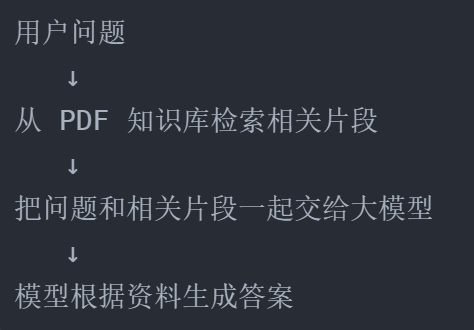
RAG(Retrieval-Augmented Generation,检索增强生成) 的基本思想是:
#mermaid-svg-TFKz5VpR71mq7pBH{font-family:"trebuchet ms",verdana,arial,sans-serif;font-size:16px;fill:#333;}@keyframes edge-animation-frame{from{stroke-dashoffset:0;}}@keyframes dash{to{stroke-dashoffset:0;}}#mermaid-svg-TFKz5VpR71mq7pBH .edge-animation-slow{stroke-dasharray:9,5!important;stroke-dashoffset:900;animation:dash 50s linear infinite;stroke-linecap:round;}#mermaid-svg-TFKz5VpR71mq7pBH .edge-animation-fast{stroke-dasharray:9,5!important;stroke-dashoffset:900;animation:dash 20s linear infinite;stroke-linecap:round;}#mermaid-svg-TFKz5VpR71mq7pBH .error-icon{fill:#552222;}#mermaid-svg-TFKz5VpR71mq7pBH .error-text{fill:#552222;stroke:#552222;}#mermaid-svg-TFKz5VpR71mq7pBH .edge-thickness-normal{stroke-width:1px;}#mermaid-svg-TFKz5VpR71mq7pBH .edge-thickness-thick{stroke-width:3.5px;}#mermaid-svg-TFKz5VpR71mq7pBH .edge-pattern-solid{stroke-dasharray:0;}#mermaid-svg-TFKz5VpR71mq7pBH .edge-thickness-invisible{stroke-width:0;fill:none;}#mermaid-svg-TFKz5VpR71mq7pBH .edge-pattern-dashed{stroke-dasharray:3;}#mermaid-svg-TFKz5VpR71mq7pBH .edge-pattern-dotted{stroke-dasharray:2;}#mermaid-svg-TFKz5VpR71mq7pBH .marker{fill:#333333;stroke:#333333;}#mermaid-svg-TFKz5VpR71mq7pBH .marker.cross{stroke:#333333;}#mermaid-svg-TFKz5VpR71mq7pBH svg{font-family:"trebuchet ms",verdana,arial,sans-serif;font-size:16px;}#mermaid-svg-TFKz5VpR71mq7pBH p{margin:0;}#mermaid-svg-TFKz5VpR71mq7pBH .label{font-family:"trebuchet ms",verdana,arial,sans-serif;color:#333;}#mermaid-svg-TFKz5VpR71mq7pBH .cluster-label text{fill:#333;}#mermaid-svg-TFKz5VpR71mq7pBH .cluster-label span{color:#333;}#mermaid-svg-TFKz5VpR71mq7pBH .cluster-label span p{background-color:transparent;}#mermaid-svg-TFKz5VpR71mq7pBH .label text,#mermaid-svg-TFKz5VpR71mq7pBH span{fill:#333;color:#333;}#mermaid-svg-TFKz5VpR71mq7pBH .node rect,#mermaid-svg-TFKz5VpR71mq7pBH .node circle,#mermaid-svg-TFKz5VpR71mq7pBH .node ellipse,#mermaid-svg-TFKz5VpR71mq7pBH .node polygon,#mermaid-svg-TFKz5VpR71mq7pBH .node path{fill:#ECECFF;stroke:#9370DB;stroke-width:1px;}#mermaid-svg-TFKz5VpR71mq7pBH .rough-node .label text,#mermaid-svg-TFKz5VpR71mq7pBH .node .label text,#mermaid-svg-TFKz5VpR71mq7pBH .image-shape .label,#mermaid-svg-TFKz5VpR71mq7pBH .icon-shape .label{text-anchor:middle;}#mermaid-svg-TFKz5VpR71mq7pBH .node .katex path{fill:#000;stroke:#000;stroke-width:1px;}#mermaid-svg-TFKz5VpR71mq7pBH .rough-node .label,#mermaid-svg-TFKz5VpR71mq7pBH .node .label,#mermaid-svg-TFKz5VpR71mq7pBH .image-shape .label,#mermaid-svg-TFKz5VpR71mq7pBH .icon-shape .label{text-align:center;}#mermaid-svg-TFKz5VpR71mq7pBH .node.clickable{cursor:pointer;}#mermaid-svg-TFKz5VpR71mq7pBH .root .anchor path{fill:#333333!important;stroke-width:0;stroke:#333333;}#mermaid-svg-TFKz5VpR71mq7pBH .arrowheadPath{fill:#333333;}#mermaid-svg-TFKz5VpR71mq7pBH .edgePath .path{stroke:#333333;stroke-width:2.0px;}#mermaid-svg-TFKz5VpR71mq7pBH .flowchart-link{stroke:#333333;fill:none;}#mermaid-svg-TFKz5VpR71mq7pBH .edgeLabel{background-color:rgba(232,232,232, 0.8);text-align:center;}#mermaid-svg-TFKz5VpR71mq7pBH .edgeLabel p{background-color:rgba(232,232,232, 0.8);}#mermaid-svg-TFKz5VpR71mq7pBH .edgeLabel rect{opacity:0.5;background-color:rgba(232,232,232, 0.8);fill:rgba(232,232,232, 0.8);}#mermaid-svg-TFKz5VpR71mq7pBH .labelBkg{background-color:rgba(232, 232, 232, 0.5);}#mermaid-svg-TFKz5VpR71mq7pBH .cluster rect{fill:#ffffde;stroke:#aaaa33;stroke-width:1px;}#mermaid-svg-TFKz5VpR71mq7pBH .cluster text{fill:#333;}#mermaid-svg-TFKz5VpR71mq7pBH .cluster span{color:#333;}#mermaid-svg-TFKz5VpR71mq7pBH div.mermaidTooltip{position:absolute;text-align:center;max-width:200px;padding:2px;font-family:"trebuchet ms",verdana,arial,sans-serif;font-size:12px;background:hsl(80, 100%, 96.2745098039%);border:1px solid #aaaa33;border-radius:2px;pointer-events:none;z-index:100;}#mermaid-svg-TFKz5VpR71mq7pBH .flowchartTitleText{text-anchor:middle;font-size:18px;fill:#333;}#mermaid-svg-TFKz5VpR71mq7pBH rect.text{fill:none;stroke-width:0;}#mermaid-svg-TFKz5VpR71mq7pBH .icon-shape,#mermaid-svg-TFKz5VpR71mq7pBH .image-shape{background-color:rgba(232,232,232, 0.8);text-align:center;}#mermaid-svg-TFKz5VpR71mq7pBH .icon-shape p,#mermaid-svg-TFKz5VpR71mq7pBH .image-shape p{background-color:rgba(232,232,232, 0.8);padding:2px;}#mermaid-svg-TFKz5VpR71mq7pBH .icon-shape .label rect,#mermaid-svg-TFKz5VpR71mq7pBH .image-shape .label rect{opacity:0.5;background-color:rgba(232,232,232, 0.8);fill:rgba(232,232,232, 0.8);}#mermaid-svg-TFKz5VpR71mq7pBH .label-icon{display:inline-block;height:1em;overflow:visible;vertical-align:-0.125em;}#mermaid-svg-TFKz5VpR71mq7pBH .node .label-icon path{fill:currentColor;stroke:revert;stroke-width:revert;}#mermaid-svg-TFKz5VpR71mq7pBH :root{--mermaid-font-family:"trebuchet ms",verdana,arial,sans-serif;} 上传 PDF
保存为临时文件 xxx.pdf
PyPDFLoader 读取文档
RecursiveCharacterTextSplitter
切分文本(chunk_size=500, overlap=50)
DashScopeEmbeddings
生成文本向量
FAISS 建立向量数据库
Retriever 检索相关文本块
ConversationalRetrievalChain
组合上下文和问题
qwen3.5-plus 生成答案
Streamlit 显示结果和对话历史
2. RAG 中的两类模型
项目同时使用了两类模型:
| 模型类型 | 课堂使用 | 职责 |
|---|---|---|
| 聊天模型 | ChatOpenAI(model="qwen3.5-plus") |
理解问题、阅读检索到的上下文、生成自然语言答案 |
| 嵌入模型 | DashScopeEmbeddings(model="text-embedding-v4") |
将文本转换成向量,计算不同文本之间的语义相似度 |
简单理解:
text
聊天模型:负责"说答案"
嵌入模型:负责"找资料"
代码逐模块详细解析
模块一:PDF 读取与临时文件保存
功能说明
Streamlit 的 file_uploader 返回的是上传文件对象,而 PyPDFLoader 需要文件路径。因此需要先将上传内容写入本地临时文件。
完整代码
python
file_content = uploaded_file.read()
temp_file_path = "xxx.pdf"

with open(temp_file_path, "wb") as temp_file:
    temp_file.write(file_content)

loader = PyPDFLoader(temp_file_path)
docs = loader.load()
核心实现逻辑
uploaded_file.read()读取的是二进制内容- 使用
"wb"模式写入,因为 PDF 是二进制文件,不能按普通文本方式写入 docs是一个文档列表,通常每一页会形成一个Document对象- 每个
Document包含page_content(文本内容)和metadata(来源、页码等信息)
调试提示
python
# 检查PDF加载是否成功
print(f"加载了 {len(docs)} 页")
print(f"第一页内容长度: {len(docs[0].page_content)} 字符")
模块二:文本切分
功能说明
将长文档切成较小的文本块,便于后续检索和模型处理。
完整代码
python
text_splitter = RecursiveCharacterTextSplitter(
    chunk_size=500,
    chunk_overlap=50,
    separators=["\n", "。", "!", "?", ",", "、", ""]
)

texts = text_splitter.split_documents(docs)
参数说明
| 参数 | 课堂值 | 作用 |
|---|---|---|
chunk_size |
500 | 每个文本块的目标最大长度(字符数) |
chunk_overlap |
50 | 相邻文本块保留约 50 个字符重叠 |
separators |
中文标点列表 | 优先在自然边界处分割文本 |
核心实现逻辑
为什么不能直接使用整篇 PDF?
- 内容可能超过模型上下文长度(如 128K 上下文也可能被长文档填满)
- 每次请求携带大量无关文本,费用和延迟增加
- 无关内容过多会干扰模型判断
- 很难准确定位与问题相关的段落
为什么需要重叠区域?
假设一句重要内容刚好位于两个文本块的边界。如果完全不重叠,这句话可能被截断:

设置 chunk_overlap=50 后,相邻文本块会共享部分内容,保留上下文连续性。
参数调优建议
| 场景 | 推荐设置 | 原因 |
|---|---|---|
| 事实问答 | chunk_size=300, overlap=50 |
更精确检索到关键信息 |
| 长段落总结 | chunk_size=800, overlap=100 |
保留更多上下文供模型理解 |
| 表格/法律条文 | 针对文档结构调整分隔符 | 避免在关键位置截断 |

模块三:Embedding 与 FAISS 向量检索
功能说明
将文本转换成向量,建立索引,实现语义相似度检索。
完整代码
python
embeddings_model = DashScopeEmbeddings(
    model="text-embedding-v4",
    dashscope_api_key=openai_api_key
)

db = FAISS.from_documents(texts, embeddings_model)
retriever = db.as_retriever()
核心实现逻辑
什么是文本向量?
计算机不能直接用"卢浮宫"和"博物馆"这样的文字计算语义相似度。嵌入模型会把文本转换成一组数字:
text
"卢浮宫是法国著名博物馆"
              ↓ Embedding
[0.018, -0.127, 0.346, ..., 0.052]   # 通常为 1024 或 1536 维
语义接近的文本,其向量在高维空间中的距离通常也更接近。
FAISS 做了什么?
FAISS.from_documents(texts, embeddings_model) 完成:
- 遍历所有文本块
- 调用嵌入模型生成每个文本块的向量
- 保存文本块及其向量
- 建立可进行相似度搜索的 FAISS 索引
#mermaid-svg-dB0nsKUQviW0UvM1{font-family:"trebuchet ms",verdana,arial,sans-serif;font-size:16px;fill:#333;}@keyframes edge-animation-frame{from{stroke-dashoffset:0;}}@keyframes dash{to{stroke-dashoffset:0;}}#mermaid-svg-dB0nsKUQviW0UvM1 .edge-animation-slow{stroke-dasharray:9,5!important;stroke-dashoffset:900;animation:dash 50s linear infinite;stroke-linecap:round;}#mermaid-svg-dB0nsKUQviW0UvM1 .edge-animation-fast{stroke-dasharray:9,5!important;stroke-dashoffset:900;animation:dash 20s linear infinite;stroke-linecap:round;}#mermaid-svg-dB0nsKUQviW0UvM1 .error-icon{fill:#552222;}#mermaid-svg-dB0nsKUQviW0UvM1 .error-text{fill:#552222;stroke:#552222;}#mermaid-svg-dB0nsKUQviW0UvM1 .edge-thickness-normal{stroke-width:1px;}#mermaid-svg-dB0nsKUQviW0UvM1 .edge-thickness-thick{stroke-width:3.5px;}#mermaid-svg-dB0nsKUQviW0UvM1 .edge-pattern-solid{stroke-dasharray:0;}#mermaid-svg-dB0nsKUQviW0UvM1 .edge-thickness-invisible{stroke-width:0;fill:none;}#mermaid-svg-dB0nsKUQviW0UvM1 .edge-pattern-dashed{stroke-dasharray:3;}#mermaid-svg-dB0nsKUQviW0UvM1 .edge-pattern-dotted{stroke-dasharray:2;}#mermaid-svg-dB0nsKUQviW0UvM1 .marker{fill:#333333;stroke:#333333;}#mermaid-svg-dB0nsKUQviW0UvM1 .marker.cross{stroke:#333333;}#mermaid-svg-dB0nsKUQviW0UvM1 svg{font-family:"trebuchet ms",verdana,arial,sans-serif;font-size:16px;}#mermaid-svg-dB0nsKUQviW0UvM1 p{margin:0;}#mermaid-svg-dB0nsKUQviW0UvM1 .label{font-family:"trebuchet ms",verdana,arial,sans-serif;color:#333;}#mermaid-svg-dB0nsKUQviW0UvM1 .cluster-label text{fill:#333;}#mermaid-svg-dB0nsKUQviW0UvM1 .cluster-label span{color:#333;}#mermaid-svg-dB0nsKUQviW0UvM1 .cluster-label span p{background-color:transparent;}#mermaid-svg-dB0nsKUQviW0UvM1 .label text,#mermaid-svg-dB0nsKUQviW0UvM1 span{fill:#333;color:#333;}#mermaid-svg-dB0nsKUQviW0UvM1 .node rect,#mermaid-svg-dB0nsKUQviW0UvM1 .node circle,#mermaid-svg-dB0nsKUQviW0UvM1 .node ellipse,#mermaid-svg-dB0nsKUQviW0UvM1 .node polygon,#mermaid-svg-dB0nsKUQviW0UvM1 .node path{fill:#ECECFF;stroke:#9370DB;stroke-width:1px;}#mermaid-svg-dB0nsKUQviW0UvM1 .rough-node .label text,#mermaid-svg-dB0nsKUQviW0UvM1 .node .label text,#mermaid-svg-dB0nsKUQviW0UvM1 .image-shape .label,#mermaid-svg-dB0nsKUQviW0UvM1 .icon-shape .label{text-anchor:middle;}#mermaid-svg-dB0nsKUQviW0UvM1 .node .katex path{fill:#000;stroke:#000;stroke-width:1px;}#mermaid-svg-dB0nsKUQviW0UvM1 .rough-node .label,#mermaid-svg-dB0nsKUQviW0UvM1 .node .label,#mermaid-svg-dB0nsKUQviW0UvM1 .image-shape .label,#mermaid-svg-dB0nsKUQviW0UvM1 .icon-shape .label{text-align:center;}#mermaid-svg-dB0nsKUQviW0UvM1 .node.clickable{cursor:pointer;}#mermaid-svg-dB0nsKUQviW0UvM1 .root .anchor path{fill:#333333!important;stroke-width:0;stroke:#333333;}#mermaid-svg-dB0nsKUQviW0UvM1 .arrowheadPath{fill:#333333;}#mermaid-svg-dB0nsKUQviW0UvM1 .edgePath .path{stroke:#333333;stroke-width:2.0px;}#mermaid-svg-dB0nsKUQviW0UvM1 .flowchart-link{stroke:#333333;fill:none;}#mermaid-svg-dB0nsKUQviW0UvM1 .edgeLabel{background-color:rgba(232,232,232, 0.8);text-align:center;}#mermaid-svg-dB0nsKUQviW0UvM1 .edgeLabel p{background-color:rgba(232,232,232, 0.8);}#mermaid-svg-dB0nsKUQviW0UvM1 .edgeLabel rect{opacity:0.5;background-color:rgba(232,232,232, 0.8);fill:rgba(232,232,232, 0.8);}#mermaid-svg-dB0nsKUQviW0UvM1 .labelBkg{background-color:rgba(232, 232, 232, 0.5);}#mermaid-svg-dB0nsKUQviW0UvM1 .cluster rect{fill:#ffffde;stroke:#aaaa33;stroke-width:1px;}#mermaid-svg-dB0nsKUQviW0UvM1 .cluster text{fill:#333;}#mermaid-svg-dB0nsKUQviW0UvM1 .cluster span{color:#333;}#mermaid-svg-dB0nsKUQviW0UvM1 div.mermaidTooltip{position:absolute;text-align:center;max-width:200px;padding:2px;font-family:"trebuchet ms",verdana,arial,sans-serif;font-size:12px;background:hsl(80, 100%, 96.2745098039%);border:1px solid #aaaa33;border-radius:2px;pointer-events:none;z-index:100;}#mermaid-svg-dB0nsKUQviW0UvM1 .flowchartTitleText{text-anchor:middle;font-size:18px;fill:#333;}#mermaid-svg-dB0nsKUQviW0UvM1 rect.text{fill:none;stroke-width:0;}#mermaid-svg-dB0nsKUQviW0UvM1 .icon-shape,#mermaid-svg-dB0nsKUQviW0UvM1 .image-shape{background-color:rgba(232,232,232, 0.8);text-align:center;}#mermaid-svg-dB0nsKUQviW0UvM1 .icon-shape p,#mermaid-svg-dB0nsKUQviW0UvM1 .image-shape p{background-color:rgba(232,232,232, 0.8);padding:2px;}#mermaid-svg-dB0nsKUQviW0UvM1 .icon-shape .label rect,#mermaid-svg-dB0nsKUQviW0UvM1 .image-shape .label rect{opacity:0.5;background-color:rgba(232,232,232, 0.8);fill:rgba(232,232,232, 0.8);}#mermaid-svg-dB0nsKUQviW0UvM1 .label-icon{display:inline-block;height:1em;overflow:visible;vertical-align:-0.125em;}#mermaid-svg-dB0nsKUQviW0UvM1 .node .label-icon path{fill:currentColor;stroke:revert;stroke-width:revert;}#mermaid-svg-dB0nsKUQviW0UvM1 :root{--mermaid-font-family:"trebuchet ms",verdana,arial,sans-serif;} 在线阶段
离线阶段
文本块1
卢浮宫位于巴黎
Embedding
向量 0.12, -0.34, ...
文本块2
博物馆藏品丰富
Embedding
向量 0.56, 0.78, ...
文本块3
建筑历史悠久
Embedding
向量 -0.23, 0.45, ...
FAISS 索引
用户问题
卢浮宫在哪里
Embedding
问题向量
检索到最相似的
文本块1
模型根据文本块1
生成答案
模块四:ConversationalRetrievalChain 与对话记忆
功能说明
将检索器、聊天模型和对话记忆组合成一个完整的问答链。
完整代码
python
# 创建对话记忆
memory = ConversationBufferMemory(
    return_messages=True,
    memory_key="chat_history",
    output_key="answer"
)

# 创建检索问答链
qa = ConversationalRetrievalChain.from_llm(
    llm=model,
    retriever=retriever,
    memory=memory
)

# 执行问答
response = qa.invoke({
    "chat_history": memory,
    "question": question
})
参数说明
| 参数 | 作用 |
|---|---|
return_messages=True |
以消息对象列表保存历史记录 |
memory_key="chat_history" |
Chain 中读取历史消息的键名 |
output_key="answer" |
把返回结果中的 answer 保存到记忆 |
核心实现逻辑
ConversationalRetrievalChain 把三个能力组合在一起:
text
对话历史 + 当前问题
          ↓
理解本轮检索需求
          ↓
Retriever 查找 PDF 相关片段
          ↓
聊天模型根据片段生成答案
          ↓
更新对话记忆
有了对话记忆,用户可以继续追问:
text
第一问:卢浮宫位于哪里?  → 回答:巴黎
第二问:它最初是做什么用的? → 模型理解"它"指卢浮宫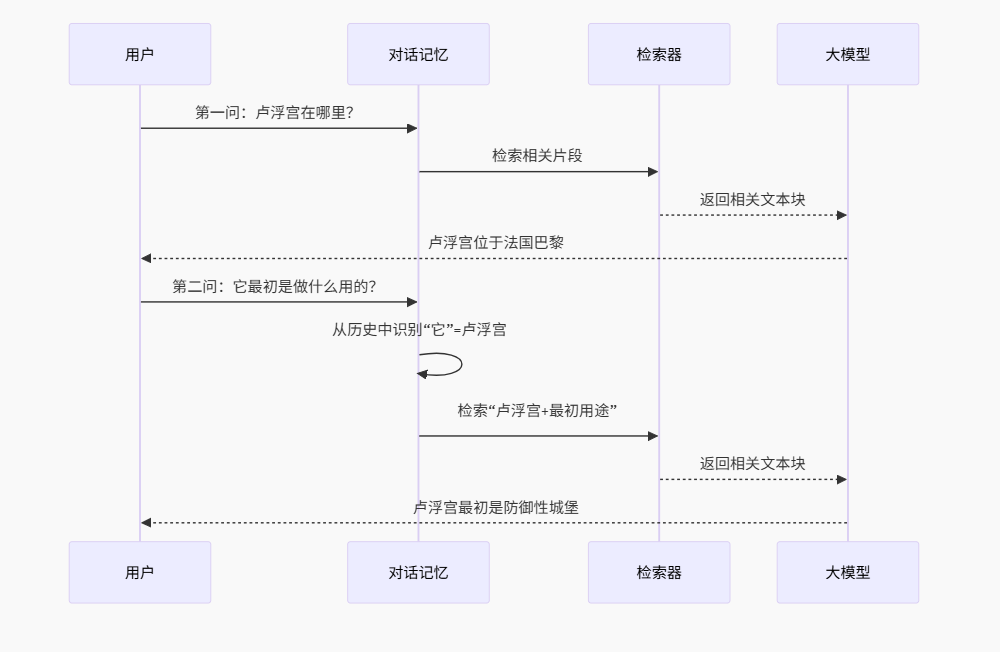
完整运行流程
1. 项目环境准备
项目结构:
text
rag/
├── .venv/                  # 虚拟环境
├── .python-version         # Python 3.10.18
├── pyproject.toml          # 项目依赖
├── uv.lock                 # 锁定依赖版本
└── 代码2/
    ├── main.py             # Streamlit 主程序
    ├── scripts.py          # RAG 核心函数
    └── 卢浮宫.pdf          # 测试文档
2. 使用 uv 同步环境
进入项目根目录:
powershell
Set-Location "D:\Jupyter_Projects\PythonProject\大模型学习\rag"同步依赖:
powershell
uv sync验证 Python 版本:
powershell
uv run python --version预期输出:
text
Python 3.10.183. 启动 Streamlit 服务
进入代码目录:
powershell
cd 代码2启动服务:
powershell
uv run streamlit run main.py启动成功后,终端显示:
text
Local URL: http://localhost:8501
Network URL: http://192.168.x.x:8501
4. 网页操作顺序
- 点击上传区域,选择
卢浮宫.pdf - 在问题输入框中输入问题(如"卢浮宫位于哪个城市?")
- 等待向量构建、检索和模型回答
- 查看回答与历史对话
第一次提问可能稍慢,因为程序需要读取 PDF、调用嵌入模型并建立 FAISS 索引。
5. 结束程序
回到正在运行 Streamlit 的终端,按 Ctrl + C 停止服务。
常见问题与解决方法
问题1:API Key 无效或读取不到
现象:
text
AuthenticationError: Invalid API key原因: API Key 不正确,或未设置环境变量。
解决方法:
- 确认在网页中正确输入了阿里云百炼 API Key
- 如果改为从环境变量读取,添加:
python
import os
openai_api_key = os.getenv("DASHSCOPE_API_KEY")
问题2:PDF 加载后无内容
现象:
text
docs 为空或 page_content 为空字符串原因 :PyPDFLoader 主要读取 PDF 中已有的文本层。如果 PDF 是扫描图片,加载后得不到有效文字。
解决方法:
- 使用 OCR 工具(如 PaddleOCR)先识别图片文字
- 或使用带文本层的 PDF 进行测试
问题3:Streamlit 端口被占用
现象:
text
OSError: [Errno 98] Address already in use原因:端口 8501 已被其他进程占用。
解决方法:
powershell
uv run streamlit run main.py --server.port 8502问题4:中文显示乱码
现象:页面显示乱码或方框。
原因:控制台或页面编码问题。
解决方法:
- 检查页面编码为 UTF-8
- 如果控制台乱码,在 PowerShell 中执行:
powershell
chcp 65001问题5:模型回答与 PDF 无关
现象:模型回答的内容不在 PDF 中。
原因:
- 检索到的片段不相关(切分参数或检索参数需调整)
- 模型没有严格基于资料回答
解决方法:
- 检查
chunk_size和chunk_overlap是否合适 - 在系统提示中增加约束:"请基于提供的文档片段回答,如果文档中没有相关信息,请说明"
- 验证检索结果:打印
retriever.get_relevant_documents(question)查看返回的片段
问题6:每次提问都重新构建向量库
现象:连续提问速度慢,且每次都有 Embedding 调用。
原因 :课堂代码中 qa_agent() 每次执行都会重新加载 PDF、切分、调用 Embedding、建立 FAISS。
解决方法:
- 缓存向量库:只在首次上传时构建
- 使用
st.session_state保存db或retriever对象
python
if "retriever" not in st.session_state:
    # 构建向量库
    st.session_state["retriever"] = retriever
性能优化建议
1. 向量库缓存
当前代码每次提问都重新构建向量库。优化方案:
python
if "vector_db" not in st.session_state:
    st.session_state["vector_db"] = FAISS.from_documents(texts, embeddings_model)

retriever = st.session_state["vector_db"].as_retriever()
2. 选择合适的文本块大小
- 事实问答:较小的
chunk_size(300-500)更精确 - 总结类问题:较大的
chunk_size(800-1000)保留更多上下文 - 建议通过实验确定最优参数
3. 使用更快的嵌入模型
text-embedding-v3比v4更快,但精度略低- 根据业务场景在速度和精度之间平衡
4. 异步处理
- PDF 解析和 Embedding 可异步执行
- Streamlit 本身不支持异步,可考虑使用后台任务
项目扩展方向
- 支持更多文档格式:添加 Word、TXT、Markdown、HTML 等格式
- 来源引用:在答案中标注内容来源页码
- 无答案提示:当文档没有相关信息时,明确告知用户
- 检索质量评估:显示检索到的相关片段,让用户判断可信度
- 多文档对话:支持同时上传多份 PDF
- 部署到云端:使用 Streamlit Cloud 或 Docker 部署
总结
本项目把一份 PDF 变成了可以对话的知识库,其核心不是"把 PDF 直接交给大模型",而是下面这条检索增强生成流程:
text
PDF 文档
   ↓
加载并提取文本
   ↓
按 500 字符切分,保留 50 字符重叠
   ↓
text-embedding-v4 生成向量
   ↓
FAISS 建立向量索引
   ↓
根据问题检索相关片段
   ↓
qwen3.5-plus 结合片段生成答案
   ↓
ConversationBufferMemory 保存对话
   ↓
Streamlit 展示网页结果
通过这次实践,我们不仅完成了一个可运行的 PDF 问答网页,也串联了多个重要知识点:
- uv 管理独立项目环境
- Streamlit 构建交互网页
- PyPDFLoader 读取 PDF
- RecursiveCharacterTextSplitter 切分长文档
- DashScope Embeddings 将文本转换成向量
- FAISS 完成相似度检索
- ConversationalRetrievalChain 组合检索、模型和记忆
st.session_state保存网页会话数据
这就是一个完整的入门级 RAG 应用。下一步可以继续优化向量缓存、来源引用、临时文件管理和无答案处理,把课堂演示逐渐改造成更稳定的实际项目。