一、为什么要用提示词模板
提示词优化在模型应用中非常重要。LangChain 提供模板类,用来协助优化提示词:可以构建自定义的基础提示词模板,支持变量注入,最终生成所需提示词。
1.1 三种模板各自管什么
-
PromptTemplate:通用提示词模板,支持动态注入信息(zero-shot)。
-
FewShotPromptTemplate:支持基于模板注入任意数量的示例信息。
-
ChatPromptTemplate:支持注入任意数量的历史会话信息。
1.2 为什么不自己拼字符串
-
在大型工程中更容易做标准化模板
-
Template 模板类支持 LangChain 框架的链式调用(Runnable 接口)
二、PromptTemplate(zero-shot)
2.1 标准写法:format 出字符串再 invoke
from langchain_core.prompts import PromptTemplate
from langchain_community.llms.tongyi import Tongyi

prompt_template = PromptTemplate.from_template(
    "我的邻居姓{lastname}, 刚生了{gender}, 帮忙起名字,请简略回答。"
)

# 变量注入,生成提示词文本
prompt_text = prompt_template.format(lastname="张", gender="女儿")

model = Tongyi(model="qwen-max")
res = model.invoke(input=prompt_text)
print(res)
2.2 基于 chain 链的写法
from langchain_core.prompts import PromptTemplate
from langchain_community.llms.tongyi import Tongyi

prompt_template = PromptTemplate.from_template(
    "我的邻居姓{lastname}, 刚生了{gender}, 帮忙起名字,请简略回答。"
)

model = Tongyi(model="qwen-max")
chain = prompt_template | model
res = chain.invoke(input={"lastname": "曹", "gender": "女儿"})
print(res)
zero-shot 思想下,可以基于 PromptTemplate 直接完成。few-shot 思想下,需要更换为 FewShotPromptTemplate。
三、FewShotPromptTemplate
3.1 五个核心参数
from langchain_core.prompts import FewShotPromptTemplate

FewShotPromptTemplate(
    examples=None,
    example_prompt=None,
    prefix=None,
    suffix=None,
    input_variables=None
)| 参数 | 含义 |
|---|---|
examples |
示例数据,list,内套字典 |
example_prompt |
示例数据的提示词模板 |
prefix |
组装提示词时,示例数据前的内容 |
suffix |
组装提示词时,示例数据后的内容 |
input_variables |
列表,注入的变量列表 |
3.2 组装并得到最终提示词
from langchain_core.prompts import FewShotPromptTemplate, PromptTemplate

example_template = PromptTemplate.from_template("单词:{word}, 反义词:{antonym}")

example_data = [
    {"word": "大", "antonym": "小"},
    {"word": "上", "antonym": "下"}
]

few_shot_prompt = FewShotPromptTemplate(
    example_prompt=example_template,
    examples=example_data,
    prefix="给出给定词的反义词,有如下示例:",
    suffix="基于示例告诉我:{input_word}的反义词是?",
    input_variables=['input_word']
)

prompt_text = few_shot_prompt.invoke(input={"input_word": "左"}).to_string()
print(prompt_text)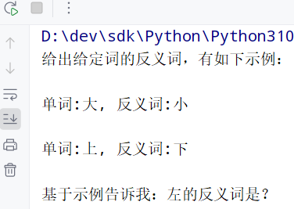
3.3 调用模型获得结果
from langchain_core.prompts import FewShotPromptTemplate, PromptTemplate
from langchain_community.chat_models.tongyi import ChatTongyi

example_template = PromptTemplate(
    input_variables=['word', 'antonym'],
    template="word: {word}, antonym: {antonym}"
)

example_data = [
    {"word": "大", "antonym": "小"},
    {"word": "上", "antonym": "下"}
]

few_shot_prompt = FewShotPromptTemplate(
    examples=example_data,
    example_prompt=example_template,
    prefix="给出给定词的反义词,有如下示例:",
    suffix="基于示例告诉我:{input_word}的反义词是?",
    input_variables=['input_word']
)

prompt_text = few_shot_prompt \
    .invoke(input={"input_word": "左"}) \
    .to_string()

model = ChatTongyi(model="qwen3-max")
for chunk in model.stream(input=prompt_text):
    print(chunk.content, end="", flush=True)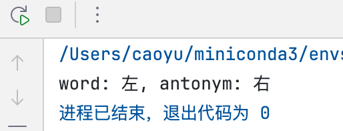
四、模板的 format 与 invoke
4.1 谁有这两个方法
在PromptTemplate(通用提示词模板)和FewShotPromptTemplate(FewShot提示词模板)的使用中,我们使用了如下:
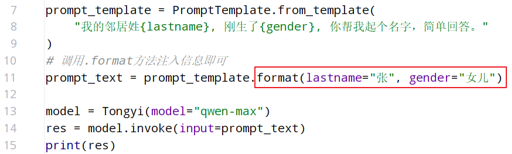
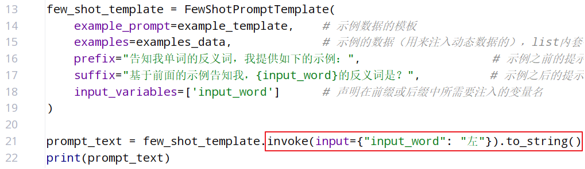
PromptTemplate、FewShotPromptTemplate、ChatPromptTemplate 都拥有 format 和 invoke 这两类方法。
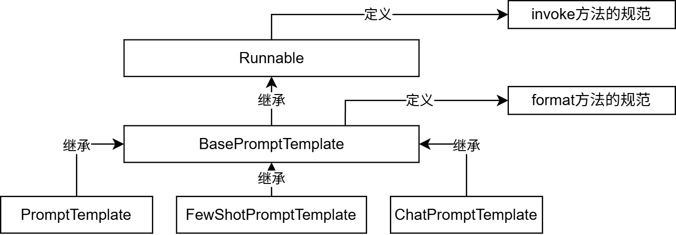
继承关系:Runnable 定义 invoke 规范 → BasePromptTemplate 定义 format 规范 → 三个具体模板类继承。
4.2 对照表
| 区别 | format | invoke |
|---|---|---|
| 功能 | 纯字符串替换,解析占位符生成提示词 | Runnable 接口标准方法,解析占位符生成提示词 |
| 返回值 | 字符串 | PromptValue 类对象 |
| 传参 | .format(k=v, k=v, ...) |
.invoke({"k": v, "k": v, ...}) |
| 解析 | 支持解析 {} 占位符 |
支持解析 {} 占位符和 MessagesPlaceholder 结构化占位符 |
后面注入聊天历史时,必须用 invoke ,format 注入不了 MessagesPlaceholder。
五、ChatPromptTemplate
5.1 from_messages 可以接多轮
通过 from_messages 从列表中获取多轮次会话作为聊天的基础模板。from_template 仅能接入一条消息,from_messages 可以接入一个 list 的消息。
from langchain_core.prompts import ChatPromptTemplate

ChatPromptTemplate.from_messages(
    [
        ("system", "........"),
        ("ai", "........"),
        # ......
        ("human", "........")
    ]
)
5.2 历史是动态的:MessagesPlaceholder
历史会话并不是静态的,而是随着对话不停积攒,因此需要动态注入 。用 MessagesPlaceholder 占位,必须用 invoke:
from langchain_core.prompts import ChatPromptTemplate
from langchain_core.prompts import MessagesPlaceholder

chat_template = ChatPromptTemplate.from_messages(
    [
        ("system", "........"),
        ("ai", "........"),
        MessagesPlaceholder("history"),
        ("human", "........")
    ]
)

history_data = [
    ("human", "..."),
    ("ai", "..."),
    ("human", "..."),
    ("ai", "...")
]

prompt_value = chat_template.invoke({"history": history_data})
MessagePlaceholder作为占位, 提供history作为占位的key, 基于invoke动态注入历史会话记录 ,必须是invoke,format无法注入。
5.3 结合聊天模型做 few-shot(求反义词)
from langchain_community.chat_models import ChatTongyi
from langchain_core.output_parsers import StrOutputParser
from langchain_core.prompts import ChatPromptTemplate, MessagesPlaceholder
from langchain_core.messages import HumanMessage, AIMessage

prompt = ChatPromptTemplate.from_messages(
    [
        ("system", "给出每个单词的反义词"),
        MessagesPlaceholder("history"),
        ("human", "{question}")
    ]
)
model = ChatTongyi(model="qwen3-max")
# StrOutputParser:内置结果解析器,直接提取结果文本,剔除其余元数据
chain = prompt | model | StrOutputParser()

# 无历史会话的提问
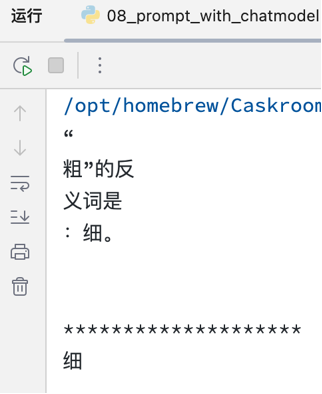
for chunk in chain.stream(input={"history": [], "question": "粗"}):
    print(chunk)
print("*" * 20)

# 带历史的提问
history = [
    HumanMessage(content="开心"),
    AIMessage(content="难过"),
    HumanMessage(content="高"),
    AIMessage(content="矮")
]
# 简化写法:
# history = [
#     ("human", "开心"), ("ai", "难过"),
#     ("human", "高"), ("ai", "矮")
# ]
for chunk in chain.stream(input={"history": history, "question": "粗"}):
    print(chunk)