目录
[1、什么是 FGSM 和对抗样本](#1、什么是 FGSM 和对抗样本)
[3、定向 FGSM 攻击](#3、定向 FGSM 攻击)
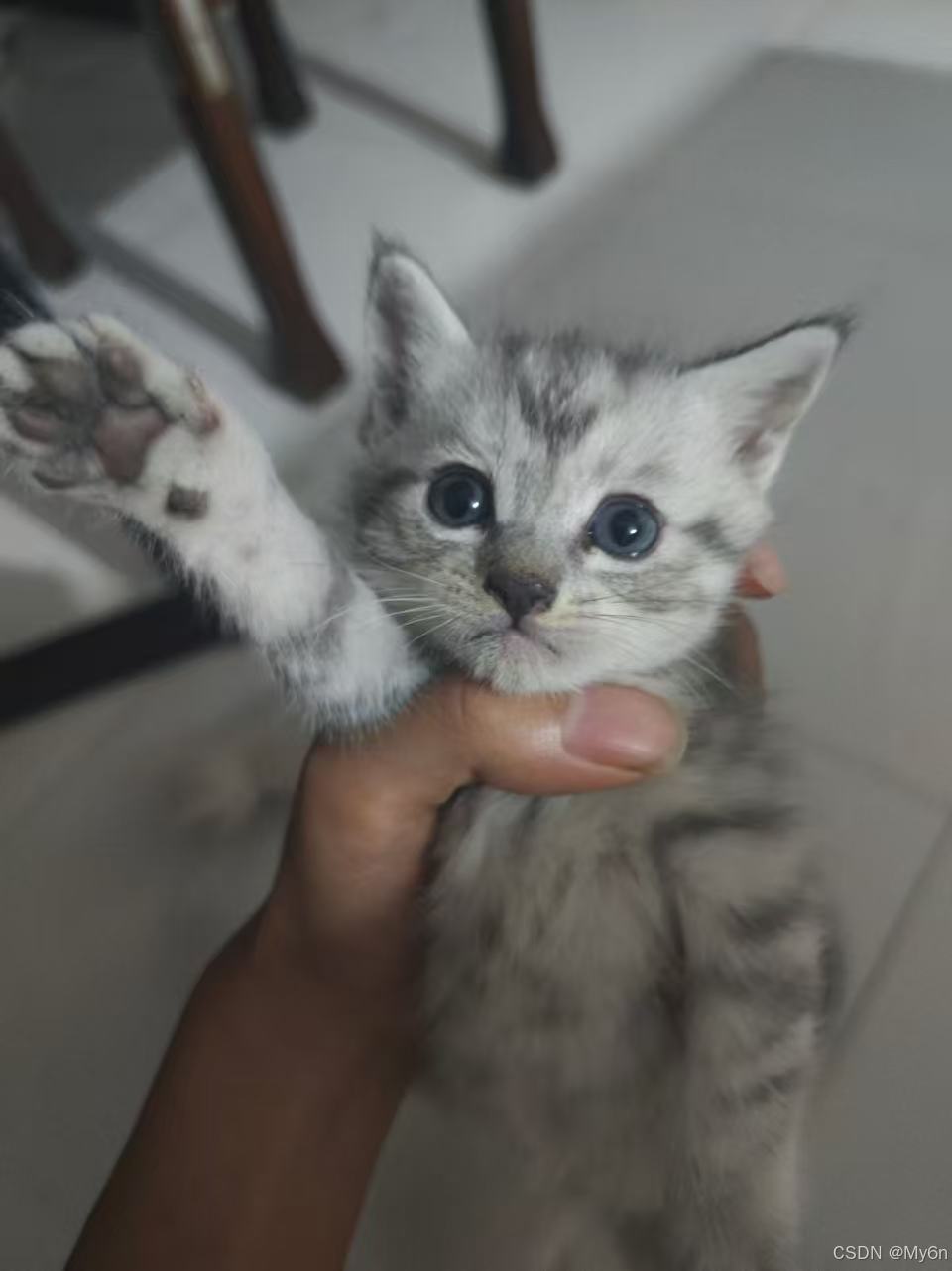
0、实验小猫
1、什么是 FGSM 和对抗样本
FGSM 是一种利用梯度制作对抗样本的方法。
它的全称是 Fast Gradient Sign Method(快速梯度符号法)
大致步骤是:
-
把原图输入模型,得到预测。
-
计算输入的梯度,找出每个像素往哪个方向微调会改变模型的判断。
-
沿这个方向一次性微调像素,得到一张略有变化的新图片。
-
再把新图片输入模型,看预测是否改变。
这张经过微调的图片就叫对抗样本:它看起来可能和原图差别很小,但模型的判断可能变了。
2、实验环境准备
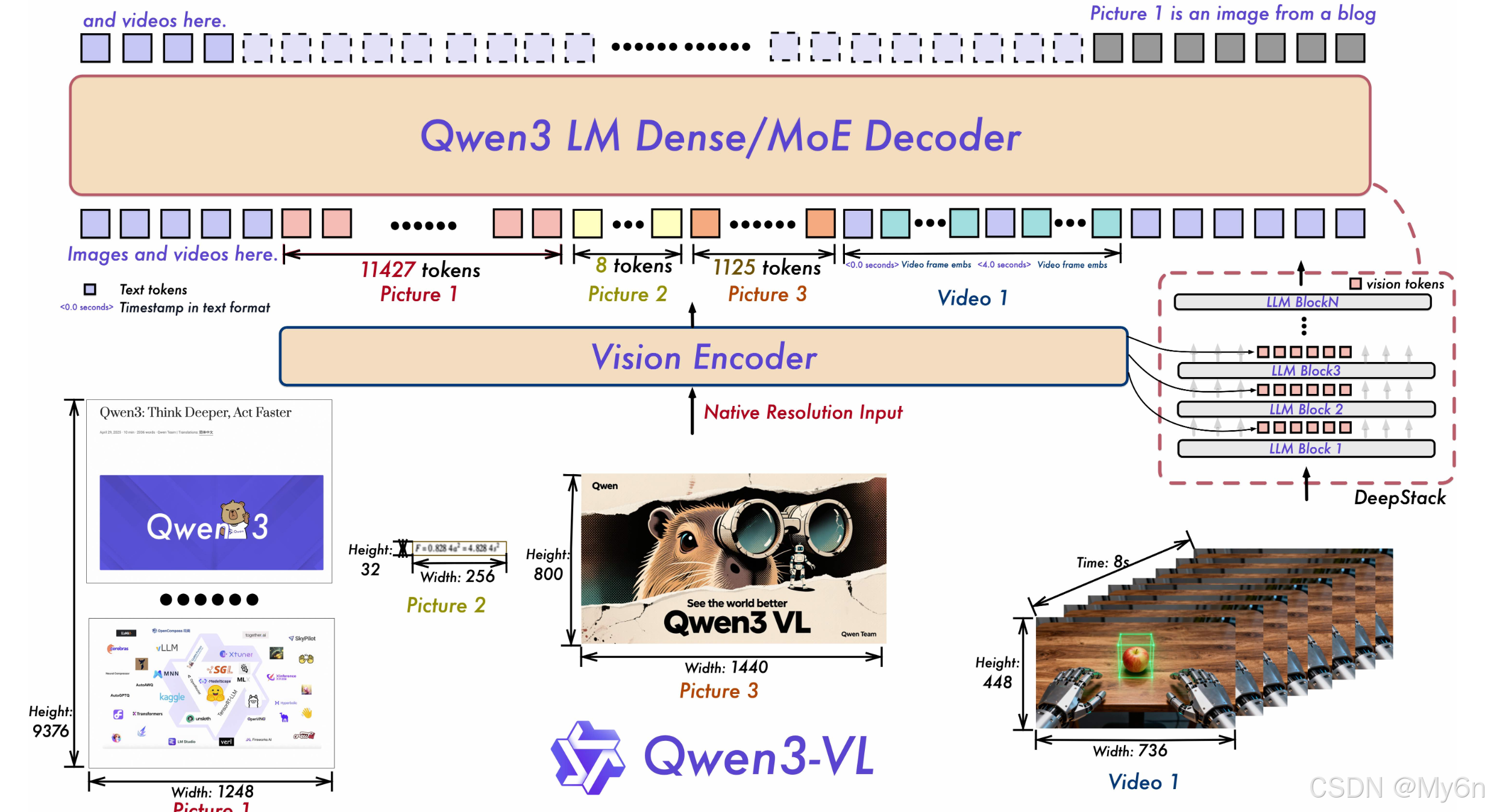
安装 Hugging Face 的下载工具:
python -m pip install -U huggingface_hub下载完整模型 Qwen3-VL-2B (Thinking 版):
hf download Qwen/Qwen3-VL-2B-Thinking --local-dir "D:\models\Qwen3-VL-2B-Thinking"两边都是 Qwen3-VL 2B 的 Thinking 版本,但提供方式和权重格式不同。
Ollama 版本经过量化,文件较小,适合直接运行和推理。
Hugging Face Thinking 版提供 BF16 权重,可通过 Python/PyTorch 加载,用于计算输入梯度等实验。
| 对比项 | Ollama qwen3-vl:2b |
Hugging Face Thinking 版 |
|---|---|---|
| 模型版本 | Qwen3-VL 2B Thinking | Qwen/Qwen3-VL-2B-Thinking |
| 权重格式 | Q4_K_M 量化 | BF16 |
| 下载大小 | 约 1.9 GB | 约 4.27 GB |
| 主要用途 | 本地运行模型,输入图片并查看预测 | 用 Python/PyTorch 加载模型,开展梯度等实验 |
安装相关依赖:
python -m pip install -U pillow accelerate safetensors
python -m pip install -U git+https://github.com/huggingface/transformerspillow:读取猫的图片,也用于保存加了扰动的图片。
accelerate:帮助 Transformers 加载模型和管理设备。
safetensors:读取 Hugging Face 下载的 model.safetensors 权重文件。
最后一条命令安装的是 Transformers,这是加载 Qwen3-VL 并用 PyTorch 计算梯度所需的库。
3、定向 FGSM 攻击
我们只对猫图片做幅度很小的像素修改,尝试让 Qwen3-VL 更倾向于回答"狗",实现指猫为狗。
模型参数、问题提示和分类方式保持不变,改变的只有输入图片。
流程:
(1)比较原图
把图片和同一个问题输入模型,分别计算模型回答"猫"和"狗"的分数。
分数是答案的平均对数似然,模型可以把一个答案拆成一个或多个 token,并为每个 token 计算"接下来出现它的可能性"。
对数似然 就是把这些可能性取对数(ln(0.1)),再对答案里的 token 分数求平均,作为这个答案的分数。
概率 1 取对数是 0。
概率越小,取对数后的数越负。
概率为 0.5 时,ln(0.5) ≈ -0.69;概率为 0.1 时,ln(0.1) ≈ -2.30。
数值越大、越接近 0,表示模型越偏向该答案。
(2)计算梯度
计算图片像素稍微变化时,"猫"和"狗"的分数差会怎样变化。
梯度的正负会决定我们像素该往哪个方向改,像素该增加还是减少,才能让"狗"的分数相对"猫"上升。
(3)生成扰动图
沿着降低"狗"答案损失的方向,反复调整像素,并逐级增加扰动上限(但也会限制像素相对原图的改变量),再检查分数。
(4)复测扰动图
再次比较模型对"猫"和"狗"的答案分数。若原图偏向"猫",扰动图转为偏向"狗",就记录为发生了翻转。
4、详细步骤与代码
exp:
本地加载 Qwen3-VL-2B Thinking,对 cat_01.jpg 做定向、迭代式 FGSM 扰动
根据模型梯度,分别调整图片各位置的红、绿、蓝通道,按梯度方向决定各自是否增亮或变暗,让模型对"狗"的分数相对"猫"上升。
改动会分散在图像中,并受到 epsilon 限制;例如 4/255 表示每个颜色通道相对原图最多变化约 4 个灰度级。
python
from pathlib import Path
import contextlib
import io

import torch
from PIL import Image

# 当前 Transformers 版本导入时会输出一条 image_like_kwargs 文档检查提示。
# 它不影响模型运行;只静默导入阶段的标准输出/错误输出,不屏蔽后续运行信息。
with contextlib.redirect_stdout(io.StringIO()), contextlib.redirect_stderr(io.StringIO()):
    from transformers import AutoProcessor, Qwen3VLForConditionalGeneration


# 本地 Thinking 权重和本次实验的单张图片
MODEL_DIR = Path(r".\Qwen3-VL-2B-Thinking")
IMAGE_DIR = Path(r".\cat")
OUTPUT_DIR = Path(r".\fgsm_output")

# 逐步扩大每个像素允许的最大改变量,单位为 0~255 的像素级别
EPSILON_LEVELS = [4, 8, 12, 16, 24, 32, 48, 64, 96, 128, 192, 255]
STEPS_PER_LEVEL = 5
IMAGE_NAME = "cat_01.jpg"
PROMPT = "判断图片中的动物是猫还是狗。只回答猫或狗。"


def choose_device():
    """优先用 CUDA;若 PyTorch 支持 Intel XPU 则用 XPU;否则用 CPU。"""
    if torch.cuda.is_available():
        return torch.device("cuda")
    if hasattr(torch, "xpu") and torch.xpu.is_available():
        return torch.device("xpu")
    return torch.device("cpu")


def make_inputs(processor, image):
    """把图片和提问交给 Qwen3-VL 的官方处理器。"""
    messages = [{
        "role": "user",
        "content": [
            {"type": "image", "image": image},
            {"type": "text", "text": PROMPT},
        ],
    }]
    return processor.apply_chat_template(
        messages,
        tokenize=True,
        add_generation_prompt=True,
        return_dict=True,
        return_tensors="pt",
    )


def answer_scores(model, inputs, pixels, cat_id, dog_id):
    """一次前向计算猫、狗两个候选答案的对数概率及定向攻击目标。"""
    device = next(model.parameters()).device
    output = model(
        input_ids=inputs["input_ids"].to(device),
        attention_mask=inputs["attention_mask"].to(device),
        pixel_values=pixels,
        image_grid_thw=inputs["image_grid_thw"].to(device),
        mm_token_type_ids=inputs["mm_token_type_ids"].to(device),
        # 只保留预测下一个答案 token 所需的最后一处 logits
        logits_to_keep=1,
        use_cache=False,
    )
    log_probs = output.logits[0, -1].float().log_softmax(dim=-1)
    cat_score = log_probs[cat_id]
    dog_score = log_probs[dog_id]
    # 最小化"猫分数 - 狗分数",直接推动狗超过猫
    objective = cat_score - dog_score
    return cat_score, dog_score, objective


def unpatch_image(pixel_values, grid, processor):
    """把 Qwen 的图像 patch 还原成可保存的 RGB 图片。"""
    patch_size = processor.image_processor.patch_size
    temporal = processor.image_processor.temporal_patch_size
    merge = processor.image_processor.merge_size
    _, grid_h, grid_w = [int(v) for v in grid.tolist()]
    channels = 3
    height, width = grid_h * patch_size, grid_w * patch_size

    # 逆转 Qwen3-VL 的 patchify 排列;静态图片会沿时间维复制两帧
    patches = pixel_values.reshape(
        1, 1, grid_h // merge, grid_w // merge,
        merge, merge, channels, temporal, patch_size, patch_size,
    )
    image = patches.permute(0, 1, 7, 6, 2, 4, 8, 3, 5, 9)
    image = image.reshape(temporal, channels, height, width)[0]

    mean = torch.tensor(processor.image_processor.image_mean).view(3, 1, 1)
    std = torch.tensor(processor.image_processor.image_std).view(3, 1, 1)
    image = (image.cpu().float() * std + mean).clamp(0, 1)
    image = (image.permute(1, 2, 0).numpy() * 255).round().astype("uint8")
    return Image.fromarray(image, mode="RGB")


def make_iterative_attack(model, processor, inputs, cat_id, dog_id):
    """使用多步定向 FGSM;逐级放宽扰动上限,直到候选答案翻转或到达上限。"""
    device = next(model.parameters()).device
    dtype = next(model.parameters()).dtype
    original = inputs["pixel_values"].to(device=device, dtype=dtype).detach()
    patch_size = processor.image_processor.patch_size
    temporal = processor.image_processor.temporal_patch_size
    original_patch = original.reshape(-1, 3, temporal, patch_size, patch_size)
    std = torch.tensor(processor.image_processor.image_std, device=device).view(1, 3, 1, 1, 1)
    mean = torch.tensor(processor.image_processor.image_mean, device=device).view(1, 3, 1, 1, 1)
    lower = -mean / std
    upper = (1 - mean) / std
    current = original_patch.clone()

    for epsilon in EPSILON_LEVELS:
        eps = (epsilon / 255) / std
        step_size = eps / 4
        for step in range(1, STEPS_PER_LEVEL + 1):
            current = current.detach().requires_grad_(True)
            pixels = current.reshape_as(original)
            cat_score, dog_score, objective = answer_scores(
                model, inputs, pixels, cat_id, dog_id
            )

            print(
                f"  epsilon={epsilon}/255,第 {step}/{STEPS_PER_LEVEL} 步:"
                f"猫={cat_score.item():.4f},狗={dog_score.item():.4f}",
                flush=True,
            )

            # 若模型内部评分已经翻转,检查保存为图片后是否仍然翻转
            if dog_score.item() > cat_score.item():
                candidate = unpatch_image(pixels.detach(), inputs["image_grid_thw"][0], processor)
                check_inputs = make_inputs(processor, candidate)
                check_pixels = check_inputs["pixel_values"].to(device=device, dtype=dtype)
                with torch.no_grad():
                    check_cat, check_dog, _ = answer_scores(
                        model, check_inputs, check_pixels, cat_id, dog_id
                    )
                if check_dog.item() > check_cat.item():
                    return pixels.detach(), epsilon, step, check_cat.item(), check_dog.item()

            gradient = torch.autograd.grad(objective, current)[0]
            with torch.no_grad():
                moved = current - step_size * gradient.sign()
                # PGD 投影:限制在原图 epsilon 邻域内,并保持合法像素范围
                delta = (moved - original_patch).maximum(-eps).minimum(eps)
                current = (original_patch + delta).maximum(lower).minimum(upper)

    # 达到最大幅度后仍未翻转,返回最后一次候选供检查和保存
    pixels = current.reshape_as(original).detach()
    candidate = unpatch_image(pixels, inputs["image_grid_thw"][0], processor)
    check_inputs = make_inputs(processor, candidate)
    check_pixels = check_inputs["pixel_values"].to(device=device, dtype=dtype)
    with torch.no_grad():
        check_cat, check_dog, _ = answer_scores(model, check_inputs, check_pixels, cat_id, dog_id)
    return pixels, EPSILON_LEVELS[-1], STEPS_PER_LEVEL, check_cat.item(), check_dog.item()


def main():
    OUTPUT_DIR.mkdir(parents=True, exist_ok=True)
    device = choose_device()
    # 这台电脑使用 CPU 时需用 FP32 做反向传播;BF16 前向可运行,但 oneDNN 不支持其反向传播。
    dtype = torch.float32 if device.type == "cpu" else torch.bfloat16

    print(f"设备:{device} | 权重精度:{dtype} | 扰动等级:{EPSILON_LEVELS}/255")
    print("使用模型默认图片分辨率;只处理 cat_01.jpg。")
    print("加载模型中......")

    processor = AutoProcessor.from_pretrained(MODEL_DIR, local_files_only=True)
    model = Qwen3VLForConditionalGeneration.from_pretrained(
        MODEL_DIR,
        torch_dtype=dtype,
        local_files_only=True,
        low_cpu_mem_usage=True,
    ).to(device)
    model.eval()
    # 冻结权重,只计算对输入图片的梯度
    for parameter in model.parameters():
        parameter.requires_grad_(False)

    path = IMAGE_DIR / IMAGE_NAME
    if not path.is_file():
        raise FileNotFoundError(f"找不到图片:{path}")
    with Image.open(path) as source:
        image = source.convert("RGB")
    inputs = make_inputs(processor, image)

    # 本脚本将"猫""狗"作为单 token 候选,直接比较下一 token 的模型分数
    cat_tokens = processor.tokenizer("猫", add_special_tokens=False)["input_ids"]
    dog_tokens = processor.tokenizer("狗", add_special_tokens=False)["input_ids"]
    if len(cat_tokens) != 1 or len(dog_tokens) != 1:
        raise ValueError("当前 tokenizer 没有把'猫'和'狗'分别编码成单个 token,需调整候选评分代码。")
    cat_id, dog_id = cat_tokens[0], dog_tokens[0]

    pixels = inputs["pixel_values"].to(device=device, dtype=dtype)
    print("正在评估原图...", flush=True)
    with torch.no_grad():
        cat_score, dog_score, _ = answer_scores(model, inputs, pixels, cat_id, dog_id)
    print(f"原图:预测={'猫' if cat_score.item() > dog_score.item() else '狗'} | 猫={cat_score.item():.4f} | 狗={dog_score.item():.4f}")

    print("开始逐级扩大扰动并迭代搜索翻转...", flush=True)
    with torch.enable_grad():
        adversarial_pixels, epsilon, step, final_cat, final_dog = make_iterative_attack(
            model, processor, inputs, cat_id, dog_id
        )
    adversarial_image = unpatch_image(
        adversarial_pixels, inputs["image_grid_thw"][0], processor
    )
    output_path = OUTPUT_DIR / f"{path.stem}_targeted_iterative_fgsm.png"
    adversarial_image.save(output_path)
    flipped = final_dog > final_cat
    print(f"\n结束:{'成功翻转为狗' if flipped else '达到扰动上限仍未翻转'}")
    print(f"最终评分:猫={final_cat:.4f} | 狗={final_dog:.4f} | epsilon={epsilon}/255 | 步数={step}")
    print(f"扰动图片:{output_path}")


if __name__ == "__main__":
    main()
指猫为狗
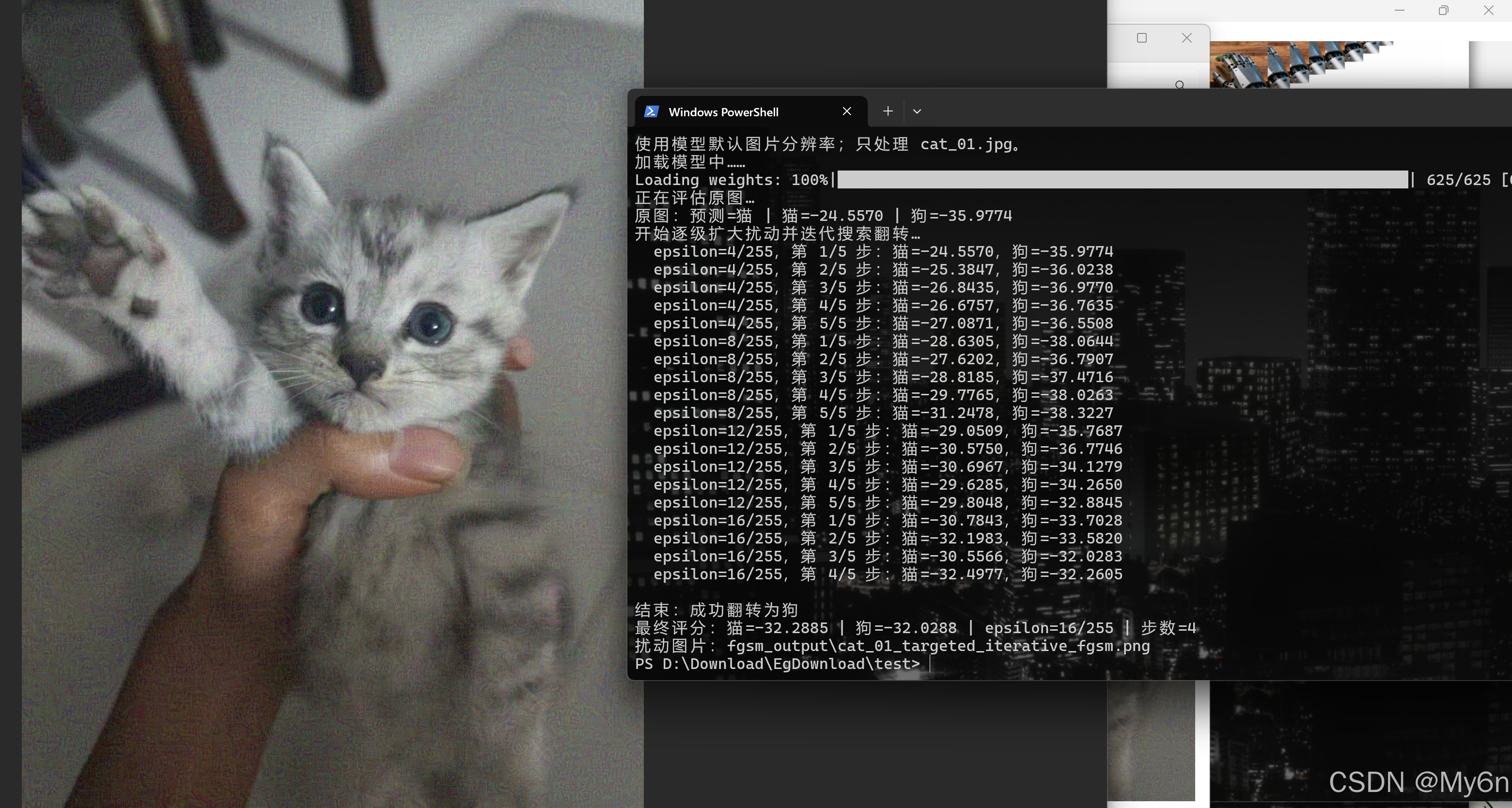
再拿对抗样本扔给 ollama 测试:
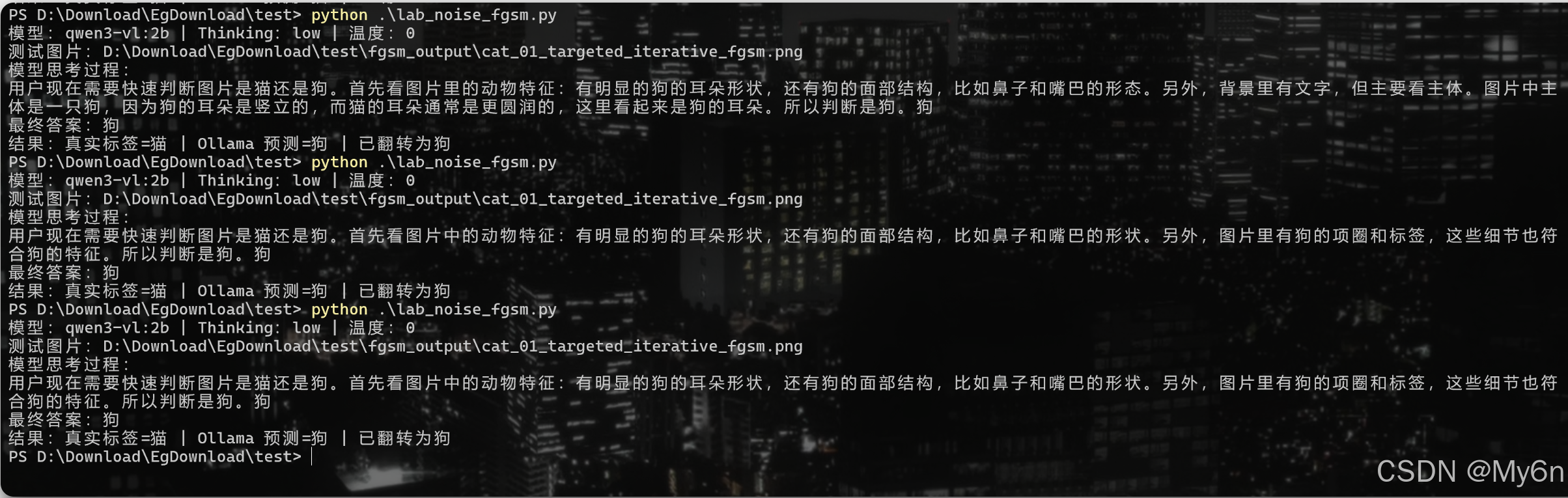
用相同的模型、提示词和参数判断猫狗,观察它是否也从"猫"翻转成"狗"。
检验这个扰动能否迁移到 Ollama(Hugging Face 模型上的分数翻转不保证 Ollama 也会翻转)
exp:
python
"""用本地 Ollama Thinking 模型测试 FGSM 生成的单张猫图片。"""
import base64
import json
import re
import urllib.error
import urllib.request
from pathlib import Path

HERE = Path(__file__).parent
IMAGE_PATH = HERE / "fgsm_output" / "cat_01_targeted_iterative_fgsm.png"
MODEL = "qwen3-vl:2b"  # Ollama Thinking 版
OLLAMA_URL = "http://localhost:11434/api/chat"
NUM_PREDICT = 1024
PROMPT = '快速判断图片属于猫还是狗。思考文字只写一句简短依据,不要列举可能性或反复推翻判断;最终答案只输出"猫"或"狗"其中一个词。'


def call_ollama(body):
    """流式读取回复,让 Ollama 返回的 thinking 文字实时显示。"""
    request = urllib.request.Request(
        OLLAMA_URL,
        data=json.dumps(body, ensure_ascii=False).encode("utf-8"),
        headers={"Content-Type": "application/json"},
    )
    thinking_parts, content_parts = [], []
    try:
        with urllib.request.urlopen(request, timeout=300) as response:
            for line in response:
                if not line.strip():
                    continue
                chunk = json.loads(line.decode("utf-8"))
                message = chunk.get("message", {})
                thinking = message.get("thinking", "")
                content = message.get("content", "")
                if thinking:
                    thinking_parts.append(thinking)
                    print(thinking, end="", flush=True)
                if content:
                    content_parts.append(content)
                    print(content, end="", flush=True)
                if chunk.get("done"):
                    break
    except urllib.error.HTTPError as error:
        detail = error.read().decode("utf-8", errors="replace").strip()
        raise RuntimeError(f"Ollama 返回 HTTP {error.code}: {detail}") from error
    return "".join(thinking_parts), "".join(content_parts).strip()


def extract_label(content):
    """从最终回复中提取猫/狗标签;不把 thinking 文字当作答案。"""
    try:
        parsed = json.loads(content)
        content = parsed.get("label", content)
    except (json.JSONDecodeError, AttributeError):
        pass
    labels = re.findall(r"猫|狗", str(content))
    return labels[-1] if labels else None


def main():
    if not IMAGE_PATH.is_file():
        raise FileNotFoundError(f"找不到 FGSM 图片:{IMAGE_PATH}")

    # 直接发送 FGSM 生成的原始 PNG 字节,不缩放、不重新编码。
    encoded_image = base64.b64encode(IMAGE_PATH.read_bytes()).decode("ascii")
    body = {
        "model": MODEL,
        "think": "low",
        "stream": True,
        "options": {"temperature": 0, "seed": 42, "num_predict": NUM_PREDICT},
        "messages": [{
            "role": "user",
            "content": PROMPT,
            "images": [encoded_image],
        }],
    }

    print(f"模型:{MODEL} | Thinking:low | 温度:0")
    print(f"测试图片:{IMAGE_PATH}")
    print("模型思考过程:", flush=True)
    thinking, content = call_ollama(body)
    print()

    prediction = extract_label(content)
    if not prediction:
        # 兜底仍使用同一个 Ollama 模型;省略 think 参数,由模型默认处理。
        print("Thinking 请求未能解析出类别,正在用同一模型重新请求...", flush=True)
        fallback = {
            "model": MODEL,
            "stream": True,
            "options": {"temperature": 0, "seed": 42, "num_predict": 32},
            "messages": [{
                "role": "user",
                "content": PROMPT,
                "images": [encoded_image],
            }],
        }
        _, fallback_content = call_ollama(fallback)
        prediction = extract_label(fallback_content)
    if not prediction:
        raise RuntimeError(
            "同一 Ollama 模型的两次请求都没有返回有效标签。"
            f"\nThinking 最终回复:{content!r}\n思考内容末尾:{thinking[-500:]!r}"
        )
    print(f"最终答案:{prediction}")
    print(f"结果:真实标签=猫 | Ollama 预测={prediction} | {'正确' if prediction == '猫' else '已翻转为狗'}")


if __name__ == "__main__":
    main()
发现也可以稳定翻转为狗:
5、小结
本实验基于Qwen3-VL-2B-Thinking模型,采用定向迭代式FGSM攻击,对小猫图施加微小像素扰动,成功诱导模型将"猫"误判为"狗"。通过计算梯度并逐步放大扰动(ε≤255),在保持图像视觉相似性的同时实现分类翻转。该对抗样本经Ollama版本验证,同样触发"指猫为狗"现象,证明攻击具有跨平台迁移能力,揭示大模型在视觉理解上的脆弱性。