Node.js使用nedb轻量级数据库测试脚本
NeDB 是一个轻量级嵌入式数据库,主要用在 Node.js projects, allowing you to store data directly in memory or local files.
其特征为:不用装数据库服务:数据直接存进程序进程或本地文件,开发和部署更简单;支持条件查询、排序、正则匹配等;支持内存和文本方式数据库使用。
更多的介绍见: https://dbdb.io/db/nedb
安装数据库
首先安装好NOde.js, 然后在自定义工程目录建立Node.js工程,通过控制台通过输入:
bash
npm install nedb或
bash
cnpm insrall nedb引入nedb数据库
脚本代码
这里Node.js工程文件名设定为index.js, 打开文件写入js测试脚本:
javascript
//注意搜索结果是乱序的,需要自行排序


// 加载模块
const nedb = require('nedb');

// 实例化连接对象(不带参数默认为内存数据库)
/*const db = new nedb({
  filename: '/data/save.db',
  autoload: true
}); */


const db = new nedb({
  filename: '',
  autoload: true
});


db.remove({}, { multi: true }, function (err, numRemoved) {
});

var doc1 = { name: 'd1'
               , n: 5
               , today: new Date()
               , nedbIsAwesome: true
               , notthere: null
               , notToBeSaved: undefined  // 该字段不会被保存
               , fruits: [ 'apple', 'orange', 'pear' ]
               , infos: { name: 'nedb' }
               };

setTimeout(function (){

// 插入单项
db.insert(
  doc1
, (err, ret) => {});

},500);

setTimeout(function (){
db.findOne({
  name: 'd1'
}, (err, result) => {

console.log(result.today);
console.log(result.infos.name);

});

} ,1000);


var doc2 = { name: 'd2'
               , n: 5
               , today: new Date()
               , nedbIsAwesome: true
               , notthere: null
               , notToBeSaved: undefined  // 该字段不会被保存
               , fruits: [ 'apple', 'orange', 'pear' ]
               , infos: { name: 'nedb' }
               };

var doc3 = { name: 'd3'
               , n: 6
               , today: new Date()
               , nedbIsAwesome: true
               , notthere: null
               , notToBeSaved: undefined  // 该字段不会被保存
               , fruits: [ 'peach', 'orange', 'pear' ]
               , infos: { name: 'nedb' }
               };

 var doc4 = { name: 'd4'
               , n: 6
               , today: new Date()
               , nedbIsAwesome: true
               , notthere: null
               , notToBeSaved: undefined  // 该字段不会被保存
               , fruits: [ 'orange', 'orange', 'pear' ]
               , infos: { name: 'nedb' }
               };

setTimeout(function (){
// 插入多项
db.insert(
  [
    doc2,
    doc3,
    doc4
  ]
, (err, ret) => {});

},1500);

setTimeout(function (){
// 查询多项
db.find({
    name: {
      $in: ['d2', 'd3', 'd4']
    }
  })
  .sort({
    _id: -1
 //    _id: 1
  })
  .exec((err, result) => {
  console.log(result.length);
  console.log(result[0].fruits[0]);
  console.log(result[1].fruits[0]);
  console.log(result[2].fruits[0]);
});

},2000)
脚本测试
通过控制台输入
bash
node inex启动测试,得到的测试结果为:
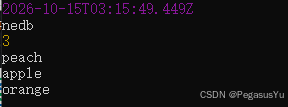
对应数据库的打开,插入,读取等功能。
注意事项
官方库已停止维护,但不影响作为轻量数据库在简单数据库应用场景的使用。
--End--