本文记录了openEuler 22.03 (LTS-SP1)的二级时间服务器用chronyd不能自动同步GPS时间服务器,改用ntpd同步GPS时间服务器成功的案例
一、环境简述
1、本环境中有两台GPS一级时间服务器,IP如下:
192.168.188.66
192.168.188.74
2、有一台openeuler系统的服务器拟作为网络中的二级时间服务器对全网进行授时
系统版本:
bash
[root@localhost ~]# cat /etc/os-release
NAME="openEuler"
VERSION="22.03 (LTS-SP1)"
ID="openEuler"
VERSION_ID="22.03"
PRETTY_NAME="openEuler 22.03 (LTS-SP1)"
ANSI_COLOR="0;31"
IP地址:192.168.168.33
二、问题现象
1、使用chronyd进行时间服务器同步设置
配置如下:
bash
[root@localhost ~]# egrep -v "^#|^$" /etc/chrony.conf
server 192.168.188.66 iburst
server 192.168.188.74 iburst
driftfile /var/lib/chrony/drift
makestep 1.0 3
rtcsync
allow 192.0.0.0/8
local stratum 10
keyfile /etc/chrony.keys
logdir /var/log/chrony
log measurements statistics tracking
2、启动服务
bash
[root@localhost ~]# systemctl start chronyd
[root@localhost ~]# systemctl status chronyd
● chronyd.service - NTP client/server
     Loaded: loaded (/usr/lib/systemd/system/chronyd.service; enabled; vendor preset: enabled)
     Active: active (running) since Fri 2024-06-21 20:37:38 CST; 5s ago
       Docs: man:chronyd(8)
             man:chrony.conf(5)
    Process: 392366 ExecStart=/usr/sbin/chronyd $OPTIONS (code=exited, status=0/SUCCESS)
   Main PID: 392368 (chronyd)
      Tasks: 1 (limit: 2469658)
     Memory: 360.0K
     CGroup: /system.slice/chronyd.service
             └─ 392368 /usr/sbin/chronyd

Jun 21 20:37:38 irmsogg1733 systemd[1]: Starting NTP client/server...
Jun 21 20:37:38 irmsogg1733 chronyd[392368]: chronyd version 4.1 starting (+CMDMON +NTP +REFCLOCK +RTC +PRIVDROP +SCFILTER +SIGND +ASY>
Jun 21 20:37:38 irmsogg1733 chronyd[392368]: Initial frequency -46.668 ppm
Jun 21 20:37:38 irmsogg1733 systemd[1]: Started NTP client/server.
服务正常启动
3、检查服务器同步情况
bash
[root@localhost ~]# chronyc sourcestats -v
                             .- Number of sample points in measurement set.
                            /    .- Number of residual runs with same sign.
                           |    /    .- Length of measurement set (time).
                           |   |    /      .- Est. clock freq error (ppm).
                           |   |   |      /           .- Est. error in freq.
                           |   |   |     |           /         .- Est. offset.
                           |   |   |     |          |          |   On the -.
                           |   |   |     |          |          |   samples. \
                           |   |   |     |          |          |             |
Name/IP Address            NP  NR  Span  Frequency  Freq Skew  Offset  Std Dev
==============================================================================
192.168.188.66               0   0     0     +0.000   2000.000     +0ns  4000ms
192.168.188.74               0   0     0     +0.000   2000.000     +0ns  4000ms
[root@localhost ~]# chronyc sources -v

  .-- Source mode  '^' = server, '=' = peer, '#' = local clock.
 / .- Source state '*' = current best, '+' = combined, '-' = not combined,
| /             'x' = may be in error, '~' = too variable, '?' = unusable.
||                                                 .- xxxx [ yyyy ] +/- zzzz
||      Reachability register (octal) -.           |  xxxx = adjusted offset,
||      Log2(Polling interval) --.      |          |  yyyy = measured offset,
||                                \     |          |  zzzz = estimated error.
||                                 |    |           \
MS Name/IP address         Stratum Poll Reach LastRx Last sample
===============================================================================
^? 192.168.188.66                 0   8     0     -     +0ns[   +0ns] +/-    0ns
^? 192.168.188.74                 0   8     0     -     +0ns[   +0ns] +/-    0ns
经长时间观察,服务器前面始终为?,发现无法完成自动同步将服务器状态转为"*"或"-"。
4、检查一级服务器授时能力
bash
[root@localhost ~]# chronyc activity -v
200 OK
2 sources online
0 sources offline
0 sources doing burst (return to online)
0 sources doing burst (return to offline)
0 sources with unknown address
[root@localhost ~]# chronyc tracking -v
Reference ID    : 7F7F0101 ()
Stratum         : 10
Ref time (UTC)  : Fri Jun 21 11:31:11 2024
System time     : 0.000000004 seconds slow of NTP time
Last offset     : +0.000000000 seconds
RMS offset      : 0.000000000 seconds
Frequency       : 44.979 ppm slow
Residual freq   : +0.000 ppm
Skew            : 0.000 ppm
Root delay      : 0.000000000 seconds
Root dispersion : 0.000000000 seconds
Update interval : 0.0 seconds
Leap status     : Normal
可以看到两个时间服务器源是在线的,但tracking信息不正常
5、手动同步时间测试
bash
[root@localhost ~]# ntpdate 192.168.188.66
21 Jun 19:19:21 ntpdate[391367]: adjust time server 192.168.188.66 offset +0.017640 sec
[root@localhost ~]# ntpdate 192.168.188.74
21 Jun 19:19:34 ntpdate[391368]: adjust time server 192.168.188.74 offset +0.012333 sec
[root@localhost ~]# chronyc -a makestep
200 OK
手动测试一级时间服务器时间同步正常,授时端口也正常,看来chronyd与该GPS时间服务器同步存在什么问题。
三、问题处理
1、卸载chronyd
考虑到一级GPS时间服务器能正常授时,chronyd又无法完成与一级GPS时间服务器的自动同步,于是卸载chronyd,改用ntpd进行尝试(ntpd和chronyd都能启动ntp时间服务器,同时运行是有冲突的,最好只保留一个)。
bash
[root@localhost ~]# yum remove chrony
Dependencies resolved.
=======================================================================================================================================
 Package                     Architecture             Version                             Repository                              Size
=======================================================================================================================================
Removing:
 chrony                      x86_64                   4.1-3.oe2203sp1                     @openEuler2203SP1LTS                   435 k
Removing unused dependencies:
 libedit                     x86_64                   3.1-29.oe2203sp1                    @openEuler2203SP1LTS                   232 k
 timedatex                   x86_64                   0.6-3.oe2203sp1                     @openEuler2203SP1LTS                    52 k

Transaction Summary
=======================================================================================================================================
Remove  3 Packages

Freed space: 718 k
Is this ok [y/N]: y
Running transaction check
Transaction check succeeded.
Running transaction test
Transaction test succeeded.
Running transaction
  Preparing        :                                                                                                               1/1
  Running scriptlet: chrony-4.1-3.oe2203sp1.x86_64                                                                                 1/1
  Running scriptlet: chrony-4.1-3.oe2203sp1.x86_64                                                                                 1/3
Removed /etc/systemd/system/multi-user.target.wants/chronyd.service.

  Erasing          : chrony-4.1-3.oe2203sp1.x86_64                                                                                 1/3
warning: /etc/chrony.conf saved as /etc/chrony.conf.rpmsave

  Running scriptlet: chrony-4.1-3.oe2203sp1.x86_64                                                                                 1/3
  Erasing          : libedit-3.1-29.oe2203sp1.x86_64                                                                               2/3
  Running scriptlet: timedatex-0.6-3.oe2203sp1.x86_64                                                                              3/3
Unit /etc/systemd/system/timedatex.service is masked, ignoring.

  Erasing          : timedatex-0.6-3.oe2203sp1.x86_64                                                                              3/3
  Running scriptlet: timedatex-0.6-3.oe2203sp1.x86_64                                                                              3/3
  Verifying        : chrony-4.1-3.oe2203sp1.x86_64                                                                                 1/3
  Verifying        : libedit-3.1-29.oe2203sp1.x86_64                                                                               2/3
  Verifying        : timedatex-0.6-3.oe2203sp1.x86_64                                                                              3/3

Removed:
  chrony-4.1-3.oe2203sp1.x86_64              libedit-3.1-29.oe2203sp1.x86_64              timedatex-0.6-3.oe2203sp1.x86_64

Complete!
2、安装ntpd
bash
[root@localhost ~] # yum install ntp
Last metadata expiration check: 0:51:16 ago on Fri 21 Jun 2024 07:47:25 PM CST.
Dependencies resolved.
=======================================================================================================================================
 Package                    Architecture            Version                                 Repository                            Size
=======================================================================================================================================
Installing:
 ntp                        x86_64                  4.2.8p15-7.oe2203sp1                    openEuler2203SP1LTS                  619 k
Installing dependencies:
 autogen                    x86_64                  5.18.16-3.oe2203sp1                     openEuler2203SP1LTS                  469 k
 libedit                    x86_64                  3.1-29.oe2203sp1                        openEuler2203SP1LTS                   92 k
 ntp-help                   noarch                  4.2.8p15-7.oe2203sp1                    openEuler2203SP1LTS                  1.3 M
Installing weak dependencies:
 ntpstat                    noarch                  0.6-4.oe2203sp1                         openEuler2203SP1LTS                   11 k
 timedatex                  x86_64                  0.6-3.oe2203sp1                         openEuler2203SP1LTS                   29 k

Transaction Summary
=======================================================================================================================================
Install  6 Packages

Total download size: 2.4 M
Installed size: 5.3 M
Is this ok [y/N]: y
Downloading Packages:
(1/6): libedit-3.1-29.oe2203sp1.x86_64.rpm                                                              19 MB/s |  92 kB     00:00
(2/6): autogen-5.18.16-3.oe2203sp1.x86_64.rpm                                                           29 MB/s | 469 kB     00:00
(3/6): ntpstat-0.6-4.oe2203sp1.noarch.rpm                                                              9.3 MB/s |  11 kB     00:00
(4/6): ntp-4.2.8p15-7.oe2203sp1.x86_64.rpm                                                              24 MB/s | 619 kB     00:00
(5/6): timedatex-0.6-3.oe2203sp1.x86_64.rpm                                                            3.7 MB/s |  29 kB     00:00
(6/6): ntp-help-4.2.8p15-7.oe2203sp1.noarch.rpm                                                         42 MB/s | 1.3 MB     00:00
---------------------------------------------------------------------------------------------------------------------------------------
Total                                                                                                   63 MB/s | 2.4 MB     00:00
Running transaction check
Transaction check succeeded.
Running transaction test
Transaction test succeeded.
Running transaction
  Preparing        :                                                                                                               1/1
  Running scriptlet: timedatex-0.6-3.oe2203sp1.x86_64                                                                              1/6
  Installing       : timedatex-0.6-3.oe2203sp1.x86_64                                                                              1/6
  Running scriptlet: timedatex-0.6-3.oe2203sp1.x86_64                                                                              1/6
Unit /etc/systemd/system/timedatex.service is masked, ignoring.

  Installing       : ntp-help-4.2.8p15-7.oe2203sp1.noarch                                                                          2/6
  Installing       : libedit-3.1-29.oe2203sp1.x86_64                                                                               3/6
  Installing       : autogen-5.18.16-3.oe2203sp1.x86_64                                                                            4/6
  Installing       : ntpstat-0.6-4.oe2203sp1.noarch                                                                                5/6
  Running scriptlet: ntp-4.2.8p15-7.oe2203sp1.x86_64                                                                               6/6
  Installing       : ntp-4.2.8p15-7.oe2203sp1.x86_64                                                                               6/6
  Running scriptlet: ntp-4.2.8p15-7.oe2203sp1.x86_64                                                                               6/6
  Verifying        : autogen-5.18.16-3.oe2203sp1.x86_64                                                                            1/6
  Verifying        : libedit-3.1-29.oe2203sp1.x86_64                                                                               2/6
  Verifying        : ntp-4.2.8p15-7.oe2203sp1.x86_64                                                                               3/6
  Verifying        : ntp-help-4.2.8p15-7.oe2203sp1.noarch                                                                          4/6
  Verifying        : ntpstat-0.6-4.oe2203sp1.noarch                                                                                5/6
  Verifying        : timedatex-0.6-3.oe2203sp1.x86_64                                                                              6/6

Installed:
  autogen-5.18.16-3.oe2203sp1.x86_64             libedit-3.1-29.oe2203sp1.x86_64           ntp-4.2.8p15-7.oe2203sp1.x86_64
  ntp-help-4.2.8p15-7.oe2203sp1.noarch           ntpstat-0.6-4.oe2203sp1.noarch            timedatex-0.6-3.oe2203sp1.x86_64

Complete!
3、配置ntpd
bash
[root@localhost chrony]# egrep -v "^#|^$" /etc/ntp.conf
driftfile /var/lib/ntp/drift
restrict default nomodify notrap nopeer noepeer noquery
restrict source nomodify notrap noepeer noquery
restrict 127.0.0.1
restrict ::1
server 192.168.188.66 iburst
server 192.168.188.74 iburst
tos maxclock 5
includefile /etc/ntp/crypto/pw
keys /etc/ntp/keys
4、启动ntpd
bash
[root@localhost chrony]# systemctl start ntpd5、查看服务状态
bash
[root@localhost chrony]# systemctl status ntpd
● ntpd.service - Network Time Service
     Loaded: loaded (/usr/lib/systemd/system/ntpd.service; enabled; vendor preset: disabled)
     Active: active (running) since Fri 2024-06-21 20:40:16 CST; 2min 38s ago
   Main PID: 392489 (ntpd)
      Tasks: 2 (limit: 2469658)
     Memory: 1.6M
     CGroup: /system.slice/ntpd.service
             └─ 392489 /usr/sbin/ntpd -u ntp:ntp -g

Jun 21 20:40:16 localhost ntpd[392489]: Listen and drop on 1 v4wildcard 0.0.0.0:123
Jun 21 20:40:16 localhost ntpd[392489]: Listen normally on 2 lo 127.0.0.1:123
Jun 21 20:40:16 localhost ntpd[392489]: Listen normally on 3 bond0 192.168.168.33:123
Jun 21 20:40:16 localhost ntpd[392489]: Listen normally on 4 lo [::1]:123
Jun 21 20:40:16 localhost ntpd[392489]: Listening on routing socket on fd #23 for interface updates
Jun 21 20:40:16 localhost ntpd[392489]: kernel reports TIME_ERROR: 0x41: Clock Unsynchronized
Jun 21 20:40:16 localhost ntpd[392489]: kernel reports TIME_ERROR: 0x41: Clock Unsynchronized
Jun 21 20:40:16 localhost systemd[1]: Started Network Time Service.
6、检查时间同步情况
bash
[root@localhost chrony]# ntpq -p
     remote           refid      st t when poll reach   delay   offset  jitter
==============================================================================
+192.168.188.66   .GPS.            1 u   11   64   77    1.705  +15.730  12.199
*192.168.188.74   .GPS.            1 u    8   64   77    1.670  +16.038  12.284
发现ntpd能够正常跟踪一级GPS时间服务器,相关数据显示正常。
7、使能ntpd让其开机启动
bash
[root@localhost chrony]# systemctl enable ntpd
Created symlink /etc/systemd/system/multi-user.target.wants/ntpd.service → /usr/lib/systemd/system/ntpd.service.
8、通过网内其它主机进行时间同步测试
其它主机chronyd将时间服务器设置为二级服务器192.168.168.33进行同步测试
bash
[root@localhost2 ~]# chronyc sources -v

  .-- Source mode  '^' = server, '=' = peer, '#' = local clock.
 / .- Source state '*' = current best, '+' = combined, '-' = not combined,
| /             'x' = may be in error, '~' = too variable, '?' = unusable.
||                                                 .- xxxx [ yyyy ] +/- zzzz
||      Reachability register (octal) -.           |  xxxx = adjusted offset,
||      Log2(Polling interval) --.      |          |  yyyy = measured offset,
||                                \     |          |  zzzz = estimated error.
||                                 |    |           \
MS Name/IP address         Stratum Poll Reach LastRx Last sample
===============================================================================
^* 192.168.168.33                  2   6   377    17  -4658us[-7129us] +/-   11ms
可以看到,能正确获取到时间,且显示二级服务器192.168.168.33处于第二层。
9、检查时间获取情况
bash
[root@localhost2 ~]#  chronyc tracking -v
Reference ID    : 0AE31121 (192.168.168.33)
Stratum         : 3
Ref time (UTC)  : Fri Jun 21 14:13:29 2024
System time     : 0.000004623 seconds fast of NTP time
Last offset     : +0.000003086 seconds
RMS offset      : 0.000103144 seconds
Frequency       : 16.338 ppm slow
Residual freq   : +0.001 ppm
Skew            : 0.072 ppm
Root delay      : 0.001930163 seconds
Root dispersion : 0.007009792 seconds
Update interval : 64.7 seconds
Leap status     : Normal
10、用时间同步检查工具检查
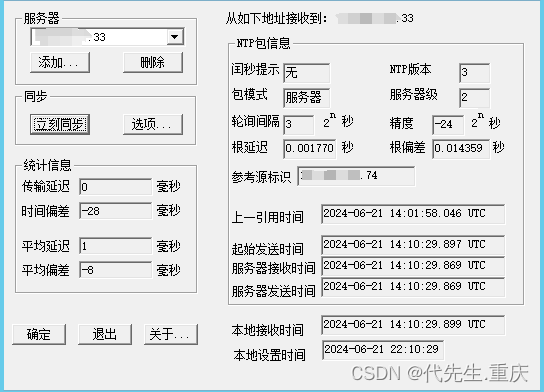
可以看到 二级服务器192.168.168.33是从一级时间服务器192.168.188.74获取的时间,与"ntpq -p"检查结果一致,确认二级时间服务器自动同步GPS时间服务器并进行分发的配置ok,运行完成正常。
四、问题分析
网络中的GPS一级时间服务器启用时间较早,估计使用了较早的时间协议。chronyd对比ntpd能更快地且更准确地同步系统时钟,但ntp更多的NTP运行协议,它支持RFC 5905的所有操作模式,包括广播、多播和manycast服务器/客户端,它还支持自动密钥协议(RFC 5906)来使用公钥加密对服务器进行身份验证,因此本例可能就是因为chronyd不能完全支持GPS一级时间服务器的NTP协议,而使用ntpd则能较好地运行。
附:本文中相关配置详解见《ntpd和chronyd时间服务器配置样例及详解》