✨感谢您阅读本篇文章,文章内容是个人学习笔记的整理,如果哪里有误的话还请您指正噢✨
✨ 个人主页:余辉zmh--CSDN博客
✨ 文章所属专栏:Linux篇--CSDN博客

文章目录
一.序列化和反序列化
为什么需要序列化和反序列化
1.计算机内存中的数据是结构化的
- 在C/C++,java,Python等语言中,通常使用结构体(struct ),类(class),字典(dict),列表(list)等来组织数据。
- 这些结构在内存中有复杂的布局,包含指针,对象引用,类型信息等。
2.网络文件只能处理"字节流"或"字符串"
- 网络传输和文件存储的本质都是一串字节,没有结构和类型信息。
- 直接把内存中的结构体或对象写到网络或文件另一端是很难正确还原,甚至会因为平台差异(比如大小端,对齐方式等)导致数据错乱。
3.序列化的作用
- 发送方把内存中的结构化数据(比如对象,结构体)转化为字节流或者字符串,这样才能安全通过网络发送或写入文件,这个过程叫做序列化 ;(结构化数据------>字节流/字符串)
4.反序列化的作用
- 接收方拿到字节流或字符串后,需要还原成原来的结构化数据,才能继续完成数据的处理,这个过程叫做反序列化 ;(字节流/字符串------>结构化数据)
为什么应用层双方要定制协议来约定
1.让双方"说同一种语言"
- 协议是双方约定好的一套数据格式和通信规则,就像双方沟通时用的"语言"或"规则"
- 如果没有统一的协议,A发送的数据,B可能根本"看不懂"或理解错。
2.明确数据格式和内容
- 协议规定了数据包里每一部分的含义,比如:消息头,消息体,字段顺序,数据类型等。
- 这样双方都知道每个字节,每个字段代表什么,怎么解析。
3.保证数据完整和正确
- 协议可以加上长度,校验码等,防止数据丢失,粘包,拆包等问题。
- 没有协议,数据容易出错,调试也很困难。
4.方便扩展和维护
- 有协议,后续加字段,改格式都可以有版本号,兼容性设计,方便升级。
举个例子:
- 如果A发:
{"op": "+", "x":5, "y": 3},B就知道这是"加法请求",操作数是5和3。 - 如果没有协议,A发"5+3",B可能就以为是字符串,也可能以为是别的意思,容易出错。
总结:
应用层定制协议,就是为了让双方能"看懂"彼此发的数据,保证通信正确,可靠,可扩展。这是所有网络通信,分布式系统的基础
注意点:
-
协议是约定数据格式和通信规则;
-
序列化和反序列是"执行规则的工具",把数据变成协议规定的样子,或者从协议规定的样子还原回来。
-
序列化和反序列化是协议约定的实现方式之一,但本身不是协议!
二.实现一个网络计算器
光听理论没啥用,不如自己实现一个简单的网络计算器,在实现的过程中自定义一个协议,然后通过序列化和反序列化来实现,理解其中实现的过程,然后再使用现成的协议实现方法来感受一下。
socket套接字封装
Socket.hpp:封装TCP 套接字的创建、绑定、监听、连接、接受、关闭等常用操作,简化网络编程流程;在后续写其他的网络程序中可以直接将当前文件拿过来用。
cpp
#pragma once

#include <iostream>
#include <unistd.h>
#include <string.h>
#include <cstring>
#include <sys/types.h>
#include <sys/stat.h>
#include <sys/socket.h>
#include <arpa/inet.h>
#include <netinet/in.h>
#include "Log.hpp"

extern Log log;

enum{
    SOCKET_ERR=2,
    BIND_ERR,
    LISTEN_ERR
};

const int backlog = 10;


// 套接字封装
class MySocket{
public:
    MySocket()
    :_sockfd(0)
    {}

    ~MySocket()
    {}

public:
    // 创建套接字
    void Socket(){
        _sockfd = socket(AF_INET, SOCK_STREAM, 0);
        if(_sockfd < 0){
            log(Fatal, "socket error, errno: %d, strerror: %s", errno, strerror(errno));
            exit(SOCKET_ERR);
        }
    }

    // 绑定套接字
    void Bind(const uint16_t &port){
        struct sockaddr_in local;
        memset(&local, 0, sizeof(local));
        local.sin_family = AF_INET;
        local.sin_port = htons(port);
        local.sin_addr.s_addr = INADDR_ANY;

        if(bind(_sockfd, (const struct sockaddr *)&local, sizeof(local)) < 0){
            log(Fatal, "bind error, errno: %d, strerror: %s", errno, strerror(errno));
            exit(BIND_ERR);
        }
    }

    // 监听
    void Listen(){
        if(listen(_sockfd, backlog) < 0){
            log(Fatal, "listen error, errno: %d, strerror: %s", errno, strerror(errno));
            exit(LISTEN_ERR);
        }
    }

    // 获取客户端连接请求
    int Accept(std::string *clientip, uint16_t *clientport){
        struct sockaddr_in client;
        socklen_t len = sizeof(client);

        int newfd = accept(_sockfd, (struct sockaddr *)&client, &len);
        if(newfd < 0){
            log(Warning, "accept error, errno: %d, strerror: %s", errno, strerror(errno));
            return -1;
        }

        char ip[64];
        inet_ntop(AF_INET, &client.sin_addr, ip, sizeof(ip));
        *clientip = ip;
        *clientport = ntohs(client.sin_port);

        return newfd;
    }

    // 客户端发送请求连接服务器
    bool Connect(const std::string &serverip, const uint16_t &serverport){
        struct sockaddr_in server;
        memset(&server, 0, sizeof(server));
        server.sin_family = AF_INET;
        server.sin_port = htons(serverport);
        inet_pton(AF_INET, serverip.c_str(), &(server.sin_addr));

        int n = connect(_sockfd, (const struct sockaddr *)&server, sizeof(server));
        if(n < 0){
            std::cerr << "connect error, errno: " << errno << " strerror: " << strerror(errno) << std::endl;
            return false;
        }
        return true;
    }

    // 关闭文件描述符
    void Close(){
        close(_sockfd);
    }

    // 获取文件描述符
    int Fd(){
        return _sockfd;
    }

private:
    int _sockfd;
};
协议定制封装
Protocol.hpp:实现了网络通信中请求与响应的数据结构、序列化与反序列化方法,以及数据包的协议编解码函数。
cpp
#pragma once

#include <iostream>
#include <string>
#include <jsoncpp/json/json.h>

const std::string blank_space_sep = " ";
const std::string protocol_sep = "\n";

// 添加报头 "len"\n"有效载荷"\n
std::string Encode(const std::string &content){
    std::string package = std::to_string(content.size());
    package += protocol_sep;
    package += content;
    package += protocol_sep;

    return package;
}

// 去除报头 截取有效载荷
bool Decode(std::string &package, std::string *content){
    std::size_t pos = package.find(protocol_sep);
    if (pos == std::string::npos){
        return false;
    }

    std::string len_str = package.substr(0, pos);
    std::size_t len = std::stoi(len_str);

    std::size_t total_len = len_str.size() + len + 2;
    if(package.size() < total_len){
        return false;
    }
    *content = package.substr(pos + 1, len);
    // 移除处理过的报文
    package.erase(0, total_len);

    return true;
}

class Request{
public:
    Request(const int &data1, const int &data2, const char &op)
    :_x(data1), _y(data2), _op(op)
    {}
    Request()
    {}

    bool Serialize(std::string *out){
        // 序列化 构建有效载荷   "x op y"
        std::string s = std::to_string(_x);
        s += blank_space_sep;
        s += _op;
        s += blank_space_sep;
        s += std::to_string(_y);
        *out = s;
        return true;
    }

    bool Deserialize(const std::string &in){
        // 反序列化 将字符串数据转换为结构化数据
        std::size_t left = in.find(blank_space_sep);
        if (left == std::string::npos){
            return false;
        }
        std::string part_x = in.substr(0, left);

        std::size_t right = in.rfind(blank_space_sep);
        if (right == std::string::npos){
            return false;
        }
        std::string part_y = in.substr(right + 1);

        if (left + 2 != right){
            return false;
        }

        _op = in[left + 1];
        _x = std::stoi(part_x);
        _y = std::stoi(part_y);
        return true;
    }

    void DebugPrint(){
        std::cout << "构建一个新的请求: " << _x << _op << _y << " = ?" << std::endl;
    }

    ~Request()
    {}
private:
public:
    int _x;
    int _y;
    char _op;
};


class Response{
public:
    Response(const int &result, const int &code)
    : _result(result), _code(code)
    {}
    Response()
    {}

    bool Serialize(std::string *out){
        // 序列化 构建有效载荷 "result code"
        std::string s = std::to_string(_result);
        s += blank_space_sep;
        s += std::to_string(_code);
        *out = s;
        return true;
    }

    bool Deserialize(const std::string &in){
        // 反序列化 将字符串数据转换为结构化数据
        std::size_t pos = in.find(blank_space_sep);
        if (pos == std::string::npos){
            return false;
        }
        std::string part1 = in.substr(0, pos);
        std::string part2 = in.substr(pos + 1);


        _result = std::stoi(part1);
        _code = std::stoi(part2);
        return true;
    }

    void DebugPrint(){
        std::cout << "响应结果: " << _result <<" "<< _code << std::endl;
    }

    ~Response()
    {}
private:
public:
    int _result;
    int _code;
};功能模块分析:
1.协议常量定义
blank_spack_sep:空格分隔符(用于 DEBUG 模式下的字符串协议)。protocol_sep:协议分隔符(\n,用于报头和报文的分隔)。
2. 协议编解码函数
2.1 Encode函数
-
功能:为数据报文添加报头(长度信息),形成"长度+内容+分隔符"的格式,便于网络传输时粘包/拆包处理。
-
用法:
std::string package = Encode(content);
2.2 Decode函数
-
功能:从接收到的数据流中解析出一个完整的数据报文(根据报头长度),并移除已处理的数据。
-
用法:
bool ok = Decode(package, &content);
3. Request 类(请求数据结构)
-
成员变量:_x, _y, _op(操作数和操作符)
-
构造函数:支持初始化和默认构造
-
Serialize:
- 功能:将请求对象序列化为字符串
-
Deserialize:
- 功能:将字符串反序列化为请求对象
-
DebugPrint:打印请求内容,便于调试
4. Response 类(响应数据结构)
-
成员变量:_result, _code(结果和状态码)
-
构造函数:支持初始化和默认构造
-
Serialize:
- 功能:将响应对象序列化为字符串
-
Deserialize:
- 功能:将字符串反序列化为响应对象
-
DebugPrint:打印响应内容,便于调试
TCP版服务器封装
TCPServer.hpp:
cpp
#pragma once

#include <functional>
#include <string>
#include "Socket.hpp"
#include "Log.hpp"

extern Log log;

// 定义了回调函数类型,便于后续将请求处理逻辑与网络收发解耦
using func_t = std::function<std::string(std::string &package)>;

const uint16_t defaulport = 28080;

// 服务器的启动和运行封装
class TCPServer{
public:
    TCPServer(const uint16_t port = defaulport, func_t callback = nullptr)
    : _port(port), _callback(callback)
    {}

    void InitServer(){
        _listensock.Socket();
        _listensock.Bind(_port);
        _listensock.Listen();
        log(INFO, "Init TCPServer ... done!");
    }

    void StartServer(){
        while(true){
            std::string clientip;
            uint16_t clientport;
            int sockfd = _listensock.Accept(&clientip, &clientport);
            if(sockfd < 0){
                continue;
            }
            log(INFO, "Accept a new link, sockfd: %d, clientip: %s, clientport: %d",
                sockfd, clientip.c_str(), clientport);

            // 提供服务--- 多进程版
            if (fork() == 0){
                // child
                _listensock.Close();
                std::string inbuffer_stream;
                while(true){
                    char buffer[128];
                    // 接收请求
                    ssize_t n = read(sockfd, buffer, sizeof(buffer));
                    if(n > 0){
                        buffer[n] = 0;
                        inbuffer_stream+=buffer;
                        log(Debug, "Debug: %s", inbuffer_stream.c_str());

                        // 处理请求 直到缓存区中没有有效报文
                        while(true){
                            std::string info = _callback(inbuffer_stream);
                            if (info.empty()){
                                break;
                            }
                            // 发送响应
                            write(sockfd, info.c_str(), info.size());
                        }
                    }
                    else if(n == 0){
                        break;
                    }
                    else{
                        break;
                    }
                }

                exit(0);
            }
            // father
            close(sockfd);
        }
    }

    ~TCPServer()
    {}
private:
    uint16_t _port;
    MySocket _listensock;
    func_t _callback;
};
TCPServer 类:TCP 服务器封装
1.成员变量
-
_port:服务器监听端口。
-
_listensock:监听套接字(MySocket 类型,负责底层 socket 操作)。
-
_callback:回调函数,用于处理收到的请求数据。
2 构造与析构
-
构造函数支持指定端口和回调函数,并有默认参数。
-
析构函数负责资源清理。
3 InitServer()
-
功能:初始化服务器,创建 socket、绑定端口、开始监听。
-
日志记录初始化过程。
4 StartServer()
-
功能:主循环,接受客户端连接,fork 子进程处理每个客户端请求。
-
处理流程:
- 1.接收新连接,获取客户端 IP 和端口。
- 2.fork 子进程,子进程负责与客户端通信,父进程关闭连接描述符。
- 3.子进程循环读取客户端数据,调用回调函数处理请求数据,并将响应结果返回客户端。
服务器对请求的处理实现单独用另一个类来封装。
ServerCal.hpp:
cpp
#pragma once

#include <iostream>
#include "Protocol.hpp"


enum{
    DIV_ZERO = 1,
    MOD_ZERO,
    OTHER_OPER,
};

// 服务器处理请求功能封装
class ServerCal{
public:
    ServerCal()
    {}

    Response CalculatorHelper(const Request &req){
        Response resp(0, 0);
        switch(req._op){
            case '+':
                resp._result = req._x + req._y;
                break;
            case '-':
                resp._result = req._x - req._y;
                break;
            case '*':
                resp._result = req._x * req._y;
                break;
            case '/':{
                if(req._y == 0){
                    resp._code = DIV_ZERO;
                }
                else{
                    resp._result = req._x / req._y;
                }
            }
            break;
            case '%':{
                if(req._y == 0){
                    resp._code = MOD_ZERO;
                }
                else{
                    resp._result = req._x % req._y;
                }
            }
            break;
            default:
                resp._code = OTHER_OPER;
                break;
        }

        return resp;
    }
    std::string Calculator(std::string &package){
        Request req;
        std::string content;
        // 获取请求的有效载荷
        bool r = Decode(package, &content);     // 请求报文:"len\nx op y\n" ---> content: "x op y"
        if(!r){
            return "";
        }
        // 将请求报文反序列化
        r = req.Deserialize(content);           // content: "x op y" ---> req._x = x, req._y = y, req._op =op
        if(!r){
            return "";
        }

        content = "";
        // 处理请求报文 获取回应报文的结构化数据
        Response resp = CalculatorHelper(req);  // 计算得到 resp._result, resp._code
        // 将响应报文序列化
        resp.Serialize(&content);               // resp._result, resp._code ---> "result code"
        // 添加报头
        content = Encode(content);              // "result code" ---> 响应报文:"len\nresult code\n"

        return content;
    }

    ~ServerCal()
    {}
};
ServerCal 类:服务器处理请求功能封装
1.主要成员方法
Response CalculatorHelper(const Request &req)
-
功能:根据请求中的操作符(+、-、*、/、%),对操作数进行相应的计算。
-
错误处理:
- 除法和取模时,如果除数为0,返回特定错误码(
DIV_ZERO、MOD_ZERO)。 - 不支持的操作符返回
OTHER_OPER错误码。
- 除法和取模时,如果除数为0,返回特定错误码(
-
返回值:返回一个 Response 对象,包含计算结果和状态码。
std::string Calculator(std::string &package)
- 功能:服务器对外的主要回调接口。
- 1.解包:调用 Decode 提取有效载荷。
- 2.反序列化:将字符串内容反序列化为 Request 对象。
- 3.业务处理:调用 CalculatorHelper 进行实际计算。
- 4.序列化:将 Response 对象序列化为字符串。
- 5.加包头:调用 Encode 生成带报头的响应字符串。
- 6.返回值:最终返回一个完整的响应报文字符串
ServerCal 类实现了服务器端的请求解析、运算处理、错误判断和响应生成,让 TCP 服务器可以专注于网络通信,而把具体的业务处理交给 ServerCal,实现两个功能模块之间的解耦!
服务端主程序
Servercal.cc:用来启动TCPServer服务器。
cpp
#include "TCPServer.hpp"
#include "Protocol.hpp"
#include "ServerCal.hpp"
#include <iostream>

static void Usage(std::string proc){
    std::cout << "\nUsage: " << proc << "port\n"
              << std::endl;
}

int main(int argc, char *argv[]){
    if(argc != 2){
        Usage(argv[0]);
    }
    uint16_t serverip = std::stoi(argv[1]);
    ServerCal cal;
    // 绑定一个回调函数作为参数
    TCPServer *tsvr = new TCPServer(serverip, std::bind(&ServerCal::Calculator, &cal, std::placeholders::_1));
    tsvr->InitServer();
    tsvr->StartServer();
    return 0;
}
客户端主程序
ClientCal.cc:实现一个自动化的算术运算客户端,能够批量生成请求、与服务器通信、解析响应并输出结果。
cpp
#include <iostream>
#include <string>
#include <unistd.h>
#include <ctime>
#include <cassert>
#include "TCPServer.hpp"
#include "Protocol.hpp"
#include "Socket.hpp"

const std::string opers = "+-*/%^=";

static void Usage(std::string proc){
    std::cout << "\nUsage: " << proc << " serverip serverport\n"
              << std::endl;
}

int main(int args, char *argv[]){
    if (args != 3){
        Usage(argv[0]);
        exit(0);
    }

    std::string serverip = argv[1];
    uint16_t serverport = std::stoi(argv[2]);

    MySocket sockfd;
    sockfd.Socket();
    bool r = sockfd.Connect(serverip, serverport);
    if(!r){
        return 1;
    }

    srand(time(nullptr) ^ getpid());
    int cnt = 1;

    std::string inbuffer_stream;
    while (cnt <= 5){
        int x = rand() % 10 + 1;
        int y = rand() % 10;
        char op = opers[rand() % opers.size()];

        std::cout << "==========" << "第" << cnt << "个请求..." << "==========" << std::endl;
        // 构建一个新的请求
        Request req(x, y, op);
        req.DebugPrint();
        std::string package;
        req.Serialize(&package);    // 序列化
        package = Encode(package);  // 添加报头

        // 发送请求
        write(sockfd.Fd(), package.c_str(), package.size());
        std::cout << "发送了一个请求报文: " << package << std::endl;

        // 接收响应
        char buffer[128];
        ssize_t n = read(sockfd.Fd(), buffer, sizeof(buffer));
        if(n > 0){
            buffer[n] = 0;
            inbuffer_stream += buffer;
            std::cout << "接收到一个响应报文: " << inbuffer_stream << std::endl;

            std::string content;
            bool r = Decode(inbuffer_stream, &content);  // 获取有效载荷
            assert(r);

            Response resp;
            r = resp.Deserialize(content);               // 反序列化
            assert(r);

            resp.DebugPrint();
        }
        std::cout << "================================================" << std::endl;
        cnt++;
        sleep(1);
    }
    return 0;
}
测试结果
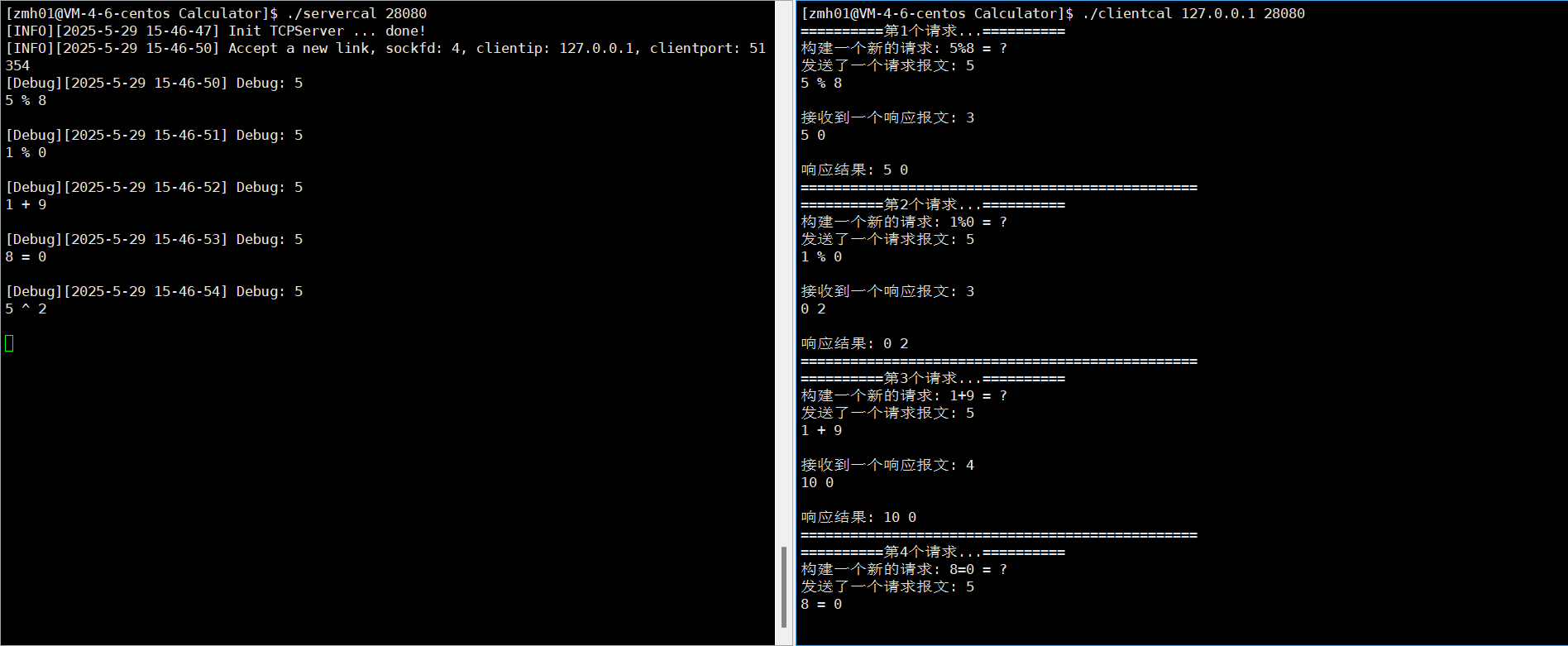
三.第三方库Jsoncpp
安装Jsoncpp
Centos安装指令:
shell
sudo yum install -y jsoncpp-develUbuntu安装指令:
shell
sudo apt-get update
sudo apt-get install -y libjsoncpp-dev注意事项:
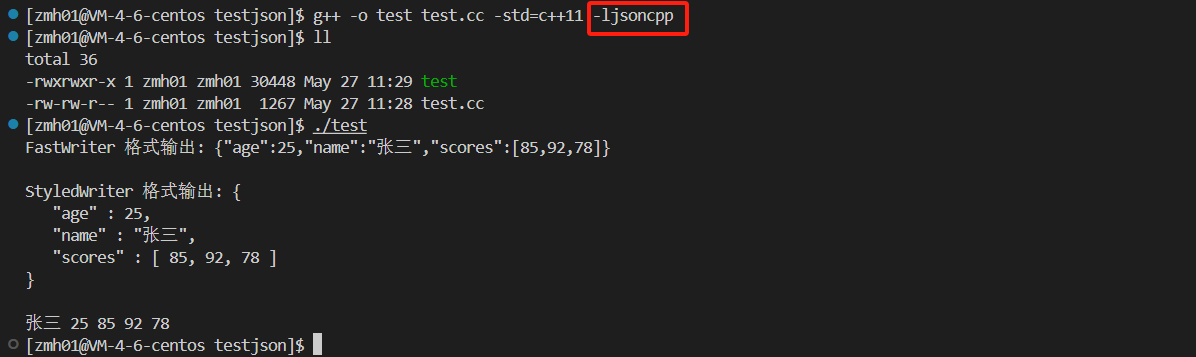
jsoncpp属于第三方库,所以编译时,需要加上-ljsoncpp选项。
Jsoncpp的使用
1.Json::Value类
- 是jsoncpp中用来表示任意JSON数据(对象,数组,字符串,数字,布尔,null)的万能容器。
2.Json::Writer类(及其子类FastWriter,StyledWriter)
Writer及其子类用于将Json::Value对象序列化为字符串,也就是把内存中的JSON结构转成文本。FastWriter:紧凑格式,输出一行,适合网络传输StyledWriter:美化格式,带缩进,适合用户阅读
3.Json::Reader类
- 将JSON字符串解析为Json::Value对象,也就是反序列化。
4.代码示例
cpp
#include <iostream>
#include <string>
#include <jsoncpp/json/json.h>

int main(){
    // 1.创建JSON对象
    Json::Value root;
    root["name"] = "张三";
    root["age"] = 25;
    root["scores"] = Json::Value(Json::arrayValue);
    root["scores"].append(85);
    root["scores"].append(92);
    root["scores"].append(78);

    // 2.序列化方法一:使用 FastWriter(紧凑格式)
    Json::FastWriter writer1;
    std::string json_str1 = writer1.write(root);
    std::cout << "FastWriter 格式输出: " << json_str1 << std::endl;

    // 3.序列化方法二:使用 StyledWriter(美化格式)
    Json::StyledWriter writer2;
    std::string json_str2 = writer2.write(root);
    std::cout << "StyledWriter 格式输出: " << json_str2 << std::endl;


    // 4.反序列化
    Json::Value v;
    Json::Reader reader;
    bool r = reader.parse(json_str1, v);
    if(r){
        // 读取数据
        std::string name = v["name"].asString();
        int age = v["age"].asInt();
        std::cout << name << " " << age << " ";

        // 读取数组
        for (int i = 0; i<v["scores"].size(); i++){
            int scores = v["scores"][i].asInt();
            std::cout << scores << " ";
        }
        std::cout << std::endl;
    }

    return 0;
}
修改Protocol.hpp
序列化与反序列化的多模式支持 :通过 #ifdef DEBUG,支持两种协议格式(自定义协议格式和 JSON)。
cpp
#pragma once

#include <iostream>
#include <string>
#include <jsoncpp/json/json.h>

// 定义宏使用自定义的协议格式 未定义使用JSON
//#define DEBUG 1

const std::string blank_space_sep = " ";
const std::string protocol_sep = "\n";

// 添加报头 "len"\n"有效载荷"\n
std::string Encode(const std::string &content){
    std::string package = std::to_string(content.size());
    package += protocol_sep;
    package += content;
    package += protocol_sep;

    return package;
}

// 去除报头 截取有效载荷
bool Decode(std::string &package, std::string *content){
    std::size_t pos = package.find(protocol_sep);
    if (pos == std::string::npos){
        return false;
    }

    std::string len_str = package.substr(0, pos);
    std::size_t len = std::stoi(len_str);

    std::size_t total_len = len_str.size() + len + 2;
    if(package.size() < total_len){
        return false;
    }
    *content = package.substr(pos + 1, len);
    // 移除处理过的报文
    package.erase(0, total_len);

    return true;
}

class Request{
public:
    Request(const int &data1, const int &data2, const char &op)
    :_x(data1), _y(data2), _op(op)
    {}
    Request()
    {}

    bool Serialize(std::string *out){
#ifdef DEBUG
        // 序列化 构建有效载荷   "x op y"
        std::string s = std::to_string(_x);
        s += blank_space_sep;
        s += _op;
        s += blank_space_sep;
        s += std::to_string(_y);
        *out = s;
        return true;
#else
        // 创建Json对象
        Json::Value root;
        root["x"]=_x;
        root["y"] = _y;
        root["op"]=_op;

        // 序列化
        Json::FastWriter writer;       // FastWriter   (紧凑格式)
        //Json::StyledWriter writer;   // StyledWriter (美化格式)
        *out = writer.write(root);
        return true;
#endif
    }

    bool Deserialize(const std::string &in){
#ifdef DEBUG
        // 反序列化 将字符串数据转换为结构化数据
        std::size_t left = in.find(blank_space_sep);
        if (left == std::string::npos){
            return false;
        }
        std::string part_x = in.substr(0, left);

        std::size_t right = in.rfind(blank_space_sep);
        if (right == std::string::npos){
            return false;
        }
        std::string part_y = in.substr(right + 1);

        if (left + 2 != right){
            return false;
        }

        _op = in[left + 1];
        _x = std::stoi(part_x);
        _y = std::stoi(part_y);
        return true;
#else
        // 反序列化
        Json::Value root;
        Json::Reader reader;
        bool r = reader.parse(in, root);
        if(!r){
            return false;
        }
        _x = root["x"].asInt();
        _y = root["y"].asInt();
        _op = root["op"].asInt();
        return true;
#endif
    }

    void DebugPrint(){
        std::cout << "构建一个新的请求: " << _x << _op << _y << " = ?" << std::endl;
    }

    ~Request()
    {}
private:
public:
    int _x;
    int _y;
    char _op;
};


class Response{
public:
    Response(const int &result, const int &code)
    : _result(result), _code(code)
    {}
    Response()
    {}

    bool Serialize(std::string *out){
#ifdef DEBUG
        // 序列化 构建有效载荷 "result code"
        std::string s = std::to_string(_result);
        s += blank_space_sep;
        s += std::to_string(_code);
        *out = s;
        return true;
#else
        // 创建Json对象
        Json::Value root;
        root["result"] = _result;
        root["code"] = _code;
        // 序列化
        Json::FastWriter writer;
        //Json::StyledWriter writer;
        *out = writer.write(root);
        return true;
#endif
    }

    bool Deserialize(const std::string &in){
#ifdef DEBUG
        // 反序列化 将字符串数据转换为结构化数据
        std::size_t pos = in.find(blank_space_sep);
        if (pos == std::string::npos){
            return false;
        }
        std::string part1 = in.substr(0, pos);
        std::string part2 = in.substr(pos + 1);


        _result = std::stoi(part1);
        _code = std::stoi(part2);
        return true;
#else
        // 反序列化
        Json::Value root;
        Json::Reader reader;
        bool r = reader.parse(in, root);
        if(!r){
            return false;
        }
        _result = root["result"].asInt();
        _code = root["code"].asInt();
        return true;
#endif
    }

    void DebugPrint(){
        std::cout << "响应结果: " << _result <<" "<< _code << std::endl;
    }

    ~Response()
    {}
private:
public:
    int _result;
    int _code;
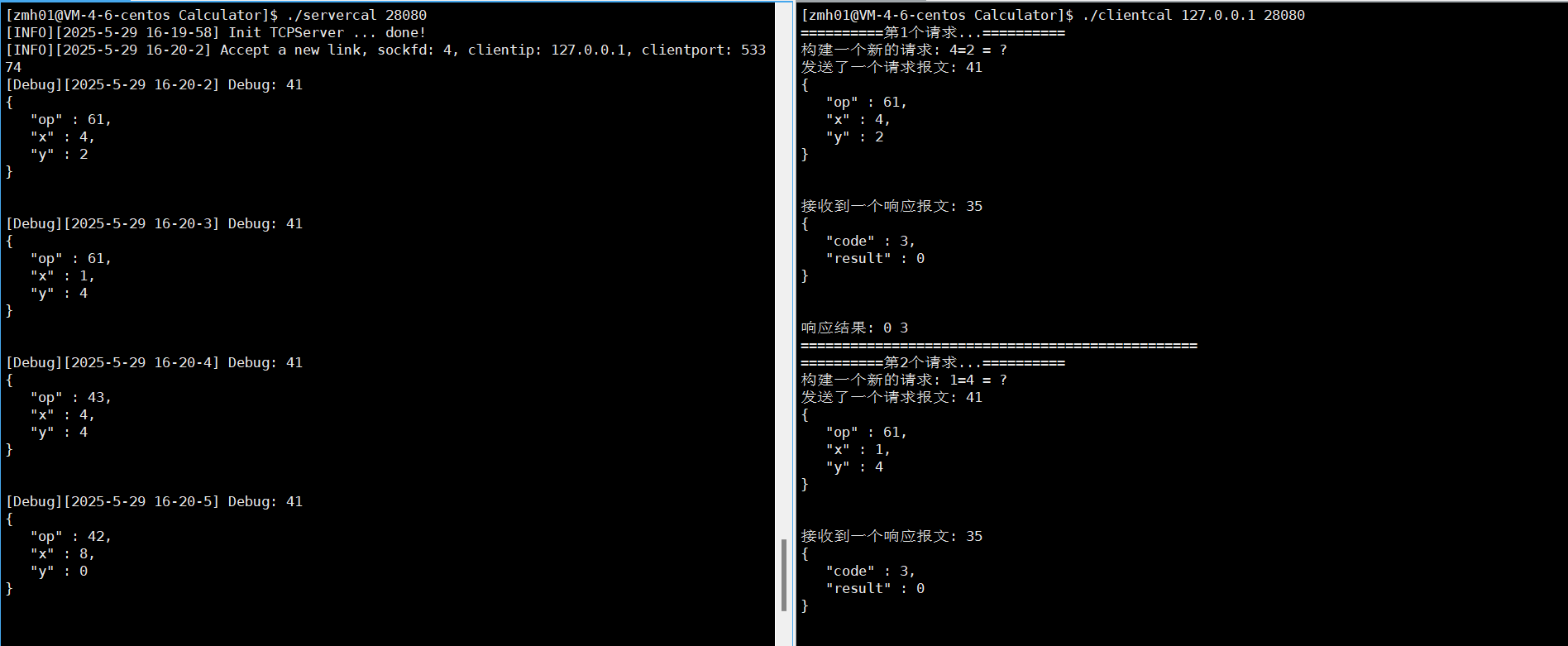
};运行结果:
FastWriter格式:
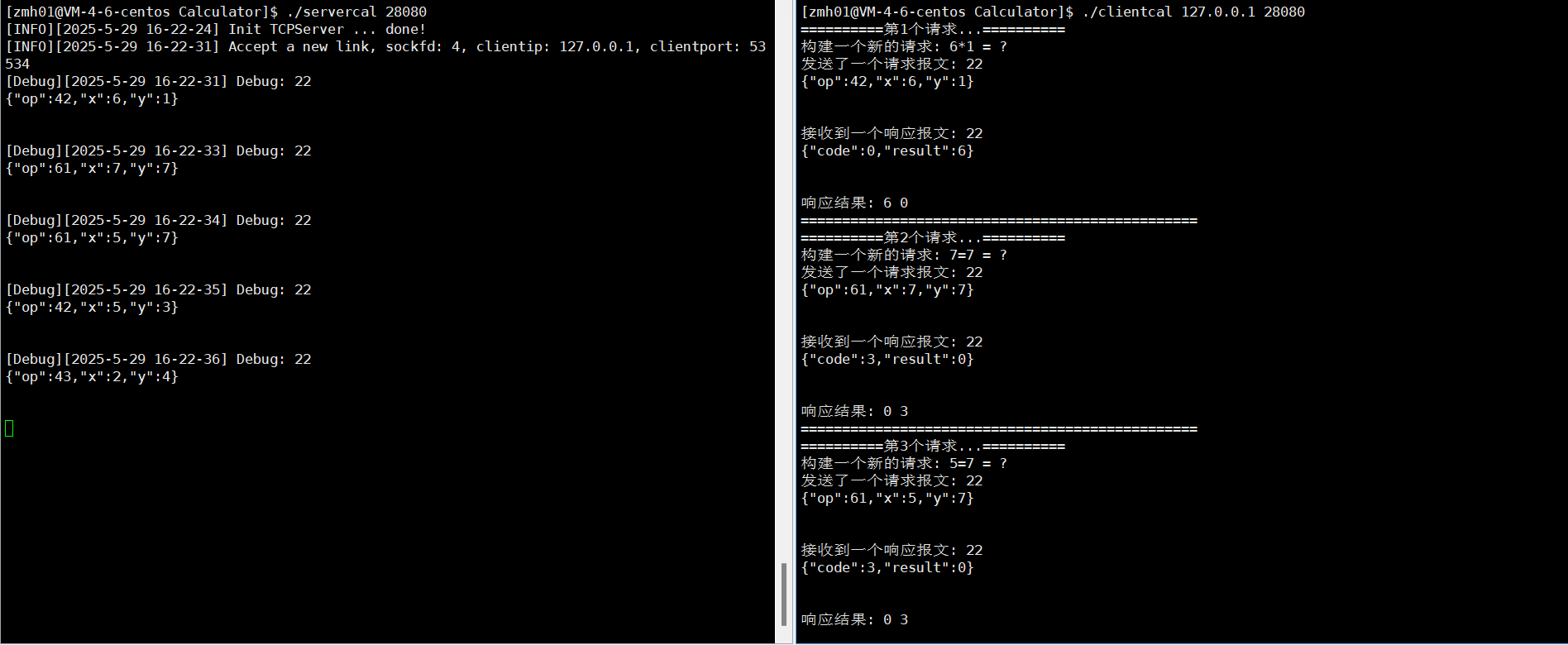
StyledWriter格式:
以上就是关于序列化和反序列化的讲解,如果哪里有错的话,可以在评论区指正,也欢迎大家一起讨论学习,如果对你的学习有帮助的话,点点赞关注支持一下吧!!!