在 Kubernetes 集群中,如何在保障应用高可用的同时有效地管理资源,一直是运维人员和开发者关注的重点。随着微服务架构的普及,集群内各个服务的负载波动日趋明显,传统的手动扩缩容方式已无法满足实时性和弹性需求。
Cluster Autoscaler(简称 CA) 作为 Kubernetes 官方提供的自动伸缩组件,通过监控调度器中未能调度的 Pod,并自动调整节点数量,为集群资源的动态调配提供了一种高效解决方案。
Kubernetes 的自动伸缩分为三个维度:
- Pod 级别:Horizontal Pod Autoscaler (HPA) 根据 CPU/内存等指标调整 Pod 副本数;
- 节点级别:Cluster Autoscaler (CA) 动态调整集群节点数量;
- 资源粒度:Vertical Pod Autoscaler (VPA) 动态调整 Pod 的 Request/Limit。
本篇文章,就来详细介绍下 CA 的原理和实践。
Cluster Autoscaler 工作原理
CA 抽象出了一个 NodeGroup 的概念,与之对应的是云厂商的伸缩组服务。CA 通过 CloudProvider 提供的 NodeGroup 计算集群内节点资源,以此来进行伸缩。
CA 启动后,CA 会定期(默认 10s)检查未调度的 Pod 和 Node 的资源使用情况,并进行相应的 Scale UP 和 Scale Down 操作。
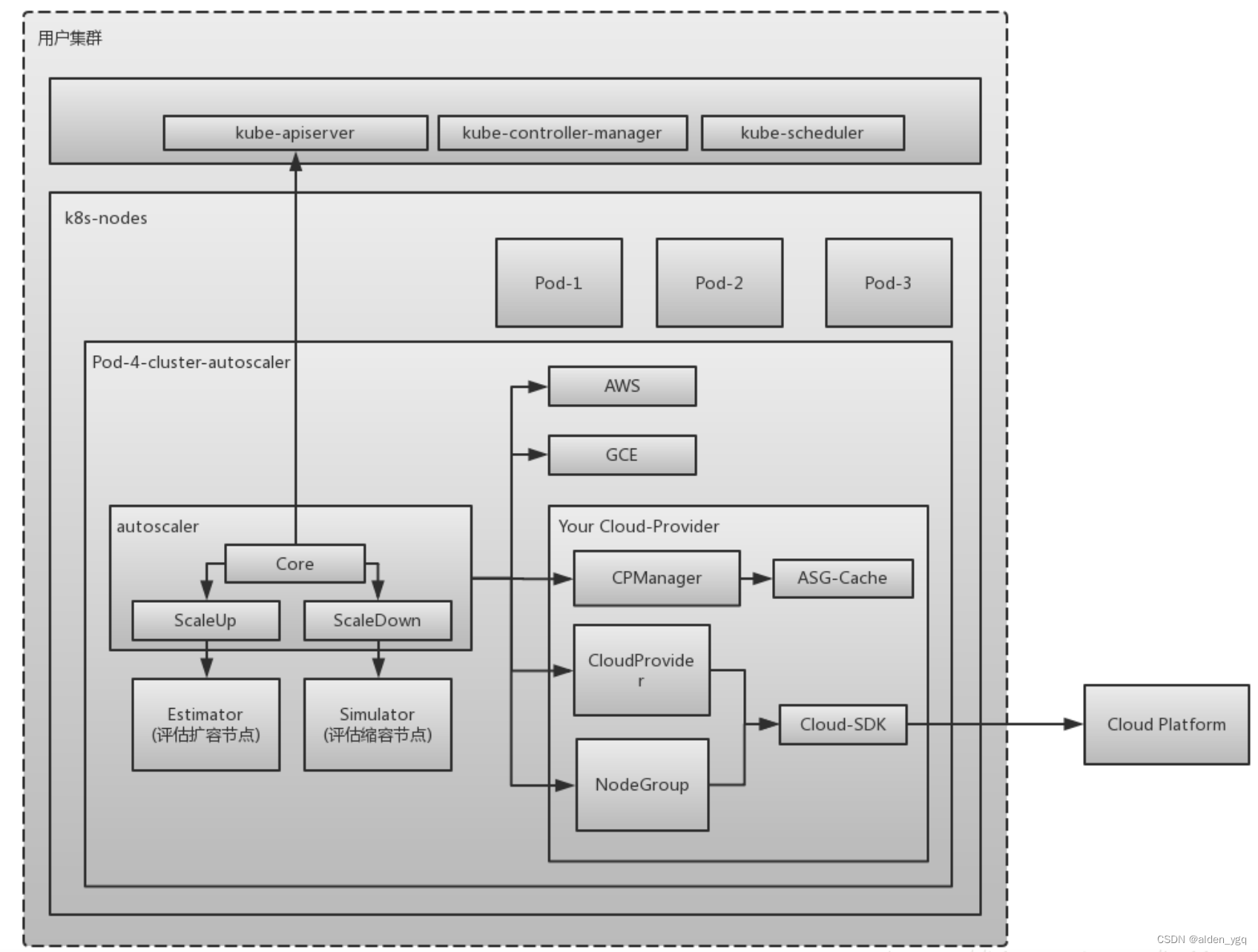
CA 由以下几个模块组成:
- autoscaler: 核心模块,负责整体扩缩容功能;
- estimator: 负责评估计算扩容节点;
- simulator: 负责模拟调度,计算缩容节点;
- CA cloud-provider: 与云交互进行节点的增删操作。社区目前仅支持AWS和GCE,其他云厂商需要自己实现CloudProvider和NodeGroup相关接口。
CA的架构如下:
接下来,我们来看下 CA 的扩缩容时的具体工作流程(原理)。
扩容原理(Scale UP)
当 Cluster Autoscaler 发现有 Pod 由于资源不足而无法调度时,就会通过调用 Scale UP 执行扩容操作。
CA 扩容时会根据扩容策略,选择合适的 NodeGroup。为了业务需要,集群中可能会有不同规格的 Node,我们可以创建多个 NodeGroup,在扩容时会根据 --expander 选项配置指定的策略,选择一个扩容的节点组,支持如下五种策略:
- random: 随机选择一个 NodeGroup。如果未指定,则默认为此策略;
- most-pods: 选择能够调度最多 Pod 的 NodeGroup,比如有的 Pod 未调度是因为
nodeSelector,此策略会优先选择能满足的 NodeGroup 来保证大多数的 Pod 可以被调度; - least-waste: 为避免浪费,此策略会优先选择能满足 Pod 需求资源的最小资源类型的 NodeGroup。
- price: 根据 CloudProvider 提供的价格模型,选择最省钱的 NodeGroup;
- priority: 通过配置优先级来进行选择,用起来比较麻烦,需要额外的配置,可以看Priority based expander for cluster-autoscaler。
如果有需要,也可以平衡相似 NodeGroup 中的 Node 数量,避免 NodeGroup 达到 MaxSize 而导致无法加入新 Node。通过 --balance-similar-node-groups 选项配置,默认为 false。
再经过一系列的操作后,最终计算出要扩容的 Node 数量及 NodeGroup,使用 CloudProvider 执行 IncreaseSize 操作,增加云厂商的伸缩组大小,从而完成扩容操作。
CA 扩容流程
Cluster Autoscaler 的扩容核心在于对集群资源的实时监控和决策,其主要工作流程如下:
- 监控未调度的 Pod: 当 Kubernetes 调度器发现某个 Pod 因为资源不足而无法被调度到现有节点时,CA 会监测到因无法调度而 Pending 的 Pod,进而触发 CA 扩容操作。CA 扩容的触发条件如下:
- Pod 因资源不足(CPU/Memory/GPU)无法调度;
- Pod 因节点选择器(NodeSelector)、亲和性(Affinity)或污点容忍(Tolerations)不匹配无法调度;
- 节点资源碎片化导致无法容纳 Pod(例如剩余资源分散在不同节点)。
- 节点模板选择: CA 根据每个节点池的节点模板进行调度判断,挑选合适的节点模板。若有多个模板合适,即有多个可扩的节点池备选,CA 会调用 expanders 从多个模板挑选最优模板并对对应节点池进行扩容。选择了 NodeGroup 之后,便会调用云平台的 API 创建新的节点,并加入到集群中。
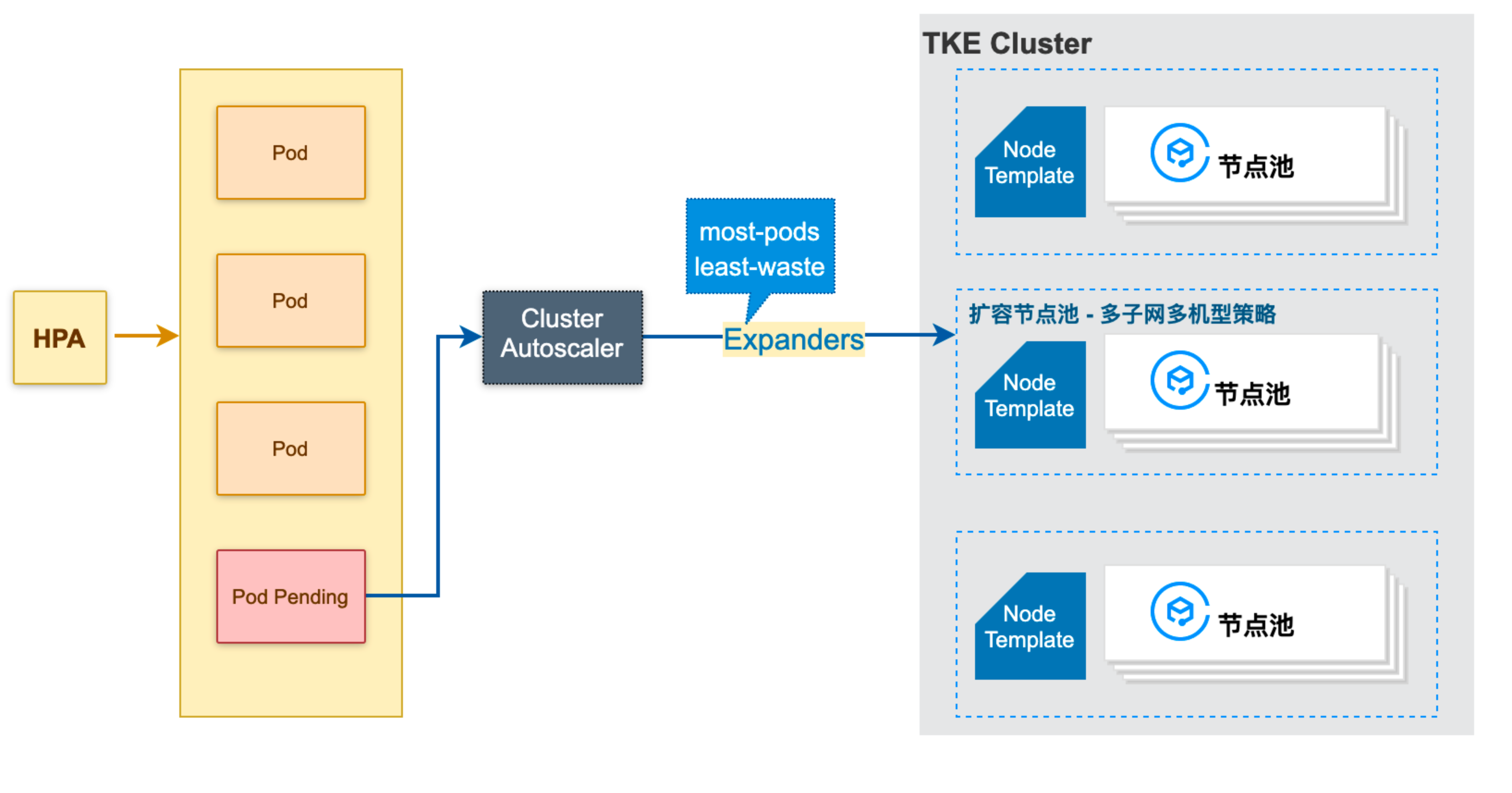
- 节点加入与 Pod 调度: 新增节点加入后,调度器重新调度之前未能分配的 Pod,满足业务需求。
CA ScaleUp 源码剖析
CA 扩容时调用,ScaleUp 的源码剖析如下:
go
func ScaleUp(context *context.AutoscalingContext, processors *ca_processors.AutoscalingProcessors, clusterStateRegistry *clusterstate.ClusterStateRegistry, unschedulablePods []*apiv1.Pod, nodes []*apiv1.Node, daemonSets []*appsv1.DaemonSet, nodeInfos map[string]*schedulernodeinfo.NodeInfo, ignoredTaints taints.TaintKeySet) (*status.ScaleUpStatus, errors.AutoscalerError) {

    ......
    // 验证当前集群中所有 ready node 是否来自于 nodeGroups,取得所有非组内的 node
    nodesFromNotAutoscaledGroups, err := utils.FilterOutNodesFromNotAutoscaledGroups(nodes, context.CloudProvider)
    if err != nil {
        return &status.ScaleUpStatus{Result: status.ScaleUpError}, err.AddPrefix("failed to filter out nodes which are from not autoscaled groups: ")
    }

    nodeGroups := context.CloudProvider.NodeGroups()
    gpuLabel := context.CloudProvider.GPULabel()
    availableGPUTypes := context.CloudProvider.GetAvailableGPUTypes()

    // 资源限制对象,会在 build cloud provider 时传入
    // 如果有需要可在 CloudProvider 中自行更改,但不建议改动,会对用户造成迷惑
    resourceLimiter, errCP := context.CloudProvider.GetResourceLimiter()
    if errCP != nil {
        return &status.ScaleUpStatus{Result: status.ScaleUpError}, errors.ToAutoscalerError(
            errors.CloudProviderError,
            errCP)
    }

    // 计算资源限制
    // nodeInfos 是所有拥有节点组的节点与示例节点的映射
    // 示例节点会优先考虑真实节点的数据,如果 NodeGroup 中还没有真实节点的部署,则使用 Template 的节点数据
    scaleUpResourcesLeft, errLimits := computeScaleUpResourcesLeftLimits(context.CloudProvider, nodeGroups, nodeInfos, nodesFromNotAutoscaledGroups, resourceLimiter)
    if errLimits != nil {
        return &status.ScaleUpStatus{Result: status.ScaleUpError}, errLimits.AddPrefix("Could not compute total resources: ")
    }

    // 根据当前节点与 NodeGroups 中的节点来计算会有多少节点即将加入集群中
    // 由于云服务商的伸缩组 increase size 操作并不是同步加入 node,所以将其统计,以便于后面计算节点资源
    upcomingNodes := make([]*schedulernodeinfo.NodeInfo, 0)
    for nodeGroup, numberOfNodes := range clusterStateRegistry.GetUpcomingNodes() {
        ......
    }
    klog.V(4).Infof("Upcoming %d nodes", len(upcomingNodes))

    // 最终会进入选择的节点组
    expansionOptions := make(map[string]expander.Option, 0)
    ......
    // 出于某些限制或错误导致不能加入新节点的节点组,例如节点组已达到 MaxSize
    skippedNodeGroups := map[string]status.Reasons{}
    // 综合各种情况,筛选出节点组
    for _, nodeGroup := range nodeGroups {
    ......
    }
    if len(expansionOptions) == 0 {
        klog.V(1).Info("No expansion options")
        return &status.ScaleUpStatus{
            Result:                 status.ScaleUpNoOptionsAvailable,
            PodsRemainUnschedulable: getRemainingPods(podEquivalenceGroups, skippedNodeGroups),
            ConsideredNodeGroups:   nodeGroups,
        }, nil
    }

    ......
    // 选择一个最佳的节点组进行扩容,expander 用于选择一个合适的节点组进行扩容,默认为 RandomExpander,flag: expander
    // random 随机选一个,适合只有一个节点组
    // most-pods 选择能够调度最多 pod 的节点组,比如有 noSchedulerPods 是有 nodeSelector 的,它会优先选择此类节点组以满足大多数 pod 的需求
    // least-waste 优先选择能满足 pod 需求资源的最小资源类型的节点组
    // price 根据价格模型,选择最省钱的
    // priority 根据优先级选择
    bestOption := context.ExpanderStrategy.BestOption(options, nodeInfos)
    if bestOption != nil && bestOption.NodeCount > 0 {
    ......
        newNodes := bestOption.NodeCount

        // 考虑到 upcomingNodes, 重新计算本次新加入节点
        if context.MaxNodesTotal > 0 && len(nodes)+newNodes+len(upcomingNodes) > context.MaxNodesTotal {
            klog.V(1).Infof("Capping size to max cluster total size (%d)", context.MaxNodesTotal)
            newNodes = context.MaxNodesTotal - len(nodes) - len(upcomingNodes)
            if newNodes < 1 {
                return &status.ScaleUpStatus{Result: status.ScaleUpError}, errors.NewAutoscalerError(
                    errors.TransientError,
                    "max node total count already reached")
            }
        }

        createNodeGroupResults := make([]nodegroups.CreateNodeGroupResult, 0)

        // 如果节点组在云服务商端处不存在,会尝试创建根据现有信息重新创建一个云端节点组
        // 但是目前所有的 CloudProvider 实现都没有允许这种操作,这好像是个多余的方法
        // 云服务商不想,也不应该将云端节点组的创建权限交给 ClusterAutoscaler
        if !bestOption.NodeGroup.Exist() {
            oldId := bestOption.NodeGroup.Id()
            createNodeGroupResult, err := processors.NodeGroupManager.CreateNodeGroup(context, bestOption.NodeGroup)
        ......
        }

        // 得到最佳节点组的示例节点
        nodeInfo, found := nodeInfos[bestOption.NodeGroup.Id()]
        if !found {
            // This should never happen, as we already should have retrieved
            // nodeInfo for any considered nodegroup.
            klog.Errorf("No node info for: %s", bestOption.NodeGroup.Id())
            return &status.ScaleUpStatus{Result: status.ScaleUpError, CreateNodeGroupResults: createNodeGroupResults}, errors.NewAutoscalerError(
                errors.CloudProviderError,
                "No node info for best expansion option!")
        }

        // 根据 CPU、Memory及可能存在的 GPU 资源(hack: we assume anything which is not cpu/memory to be a gpu.),计算出需要多少个 Nodes
        newNodes, err = applyScaleUpResourcesLimits(context.CloudProvider, newNodes, scaleUpResourcesLeft, nodeInfo, bestOption.NodeGroup, resourceLimiter)
        if err != nil {
            return &status.ScaleUpStatus{Result: status.ScaleUpError, CreateNodeGroupResults: createNodeGroupResults}, err
        }

        // 需要平衡的节点组
        targetNodeGroups := []cloudprovider.NodeGroup{bestOption.NodeGroup}
        // 如果需要平衡节点组,根据 balance-similar-node-groups flag 设置。
        // 检测相似的节点组,并平衡它们之间的节点数量
        if context.BalanceSimilarNodeGroups {
        ......
        }
        // 具体平衡策略可以看 (b *BalancingNodeGroupSetProcessor) BalanceScaleUpBetweenGroups 方法
        scaleUpInfos, typedErr := processors.NodeGroupSetProcessor.BalanceScaleUpBetweenGroups(context, targetNodeGroups, newNodes)
        if typedErr != nil {
            return &status.ScaleUpStatus{Result: status.ScaleUpError, CreateNodeGroupResults: createNodeGroupResults}, typedErr
        }
        klog.V(1).Infof("Final scale-up plan: %v", scaleUpInfos)
        // 开始扩容,通过 IncreaseSize 扩容
        for _, info := range scaleUpInfos {
            typedErr := executeScaleUp(context, clusterStateRegistry, info, gpu.GetGpuTypeForMetrics(gpuLabel, availableGPUTypes, nodeInfo.Node(), nil), now)
            if typedErr != nil {
                return &status.ScaleUpStatus{Result: status.ScaleUpError, CreateNodeGroupResults: createNodeGroupResults}, typedErr
            }
        }
        ......
    }
    ......
}
缩容原理(Scale Down)
缩容是一个可选的功能,通过 --scale-down-enabled 选项配置,默认为 true。在 CA 监控 Node 资源时,如果发现有 Node 满足以下三个条件时,就会标记这个 Node 为 unneeded:
- Node 上运行的所有的 Pod 的 CPU 和内存之和小于该 Node 可分配容量的
50%。可通过--scale-down-utilization-threshold选项改变这个配置; - Node 上所有的 Pod 都可以被调度到其他节点;
- Node 没有表示不可缩容的
annotaition。
如果一个 Node 被标记为 unneeded 超过 10 分钟(可通过 --scale-down-unneeded-time 选项配置),则使用 CloudProvider 执行 DeleteNodes 操作将其删除。一次最多删除一个 unneeded Node,但空 Node 可以批量删除,每次最多删除 10 个(通过 --max-empty-bulk-delete 选项配置)。
实际上并不是只有这一个判定条件,还会有其他的条件来阻止删除这个 Node,比如 NodeGroup 已达到 MinSize,或在过去的 10 分钟内有过一次 Scale UP 操作(通过 --scale-down-delay-after-add 选项配置)等等,更详细可查看 How does scale-down work?。
在决定缩容前,CA 会通过调度器模拟 Pod 迁移过程,确保其他节点有足够资源接收被迁移的 Pod。若模拟失败(如资源不足或亲和性冲突),则放弃缩容。
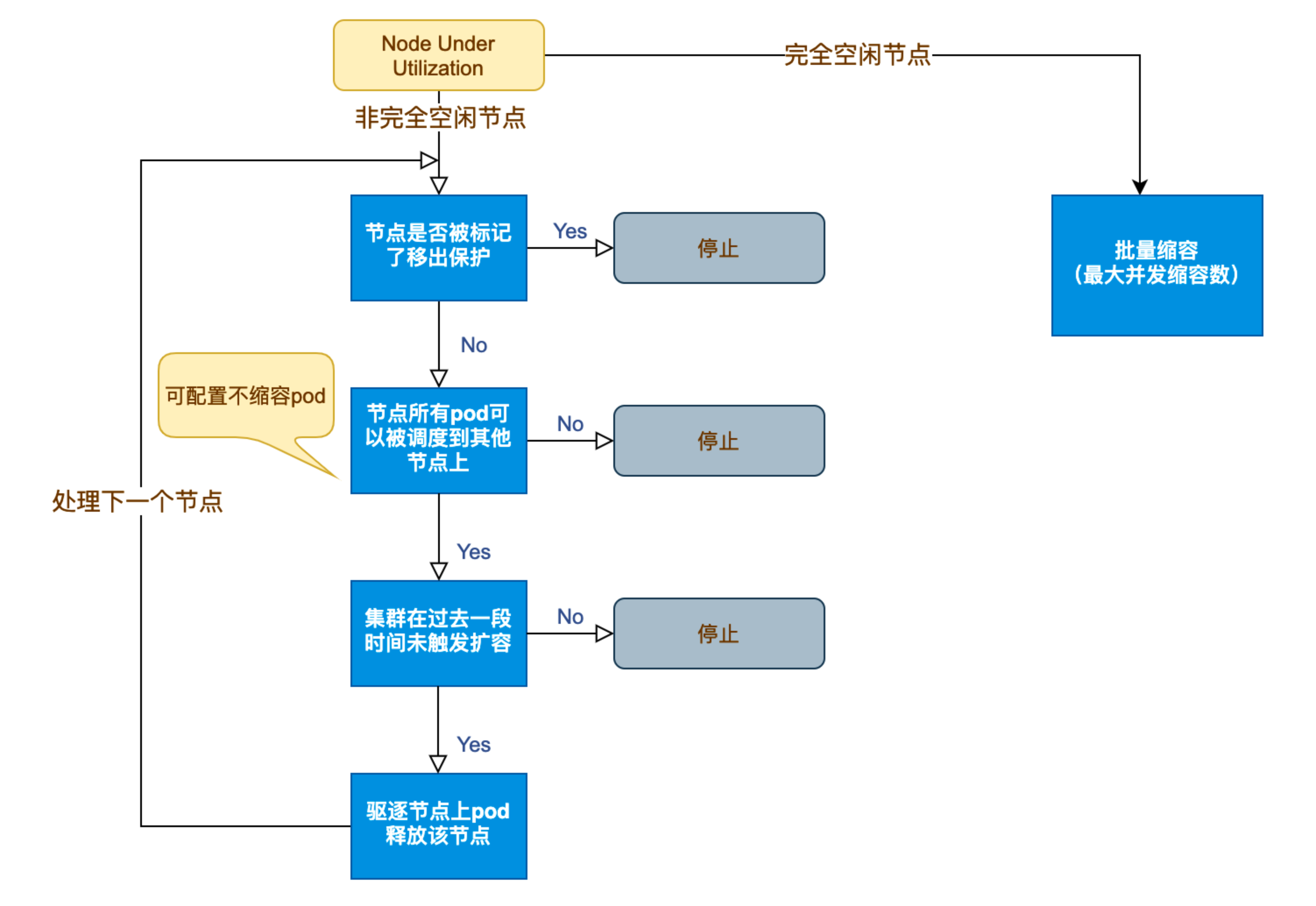
CA 缩容流程
- CA 监测到分配率(即 Request 值,取 CPU 分配率和 MEM 分配率的最大值)低于设定的节点。计算分配率时,可以设置 Daemonset 类型不计入 Pod 占用资源;
- CA 判断集群的状态是否可以触发缩容,需要满足如下要求:
- 节点利用率低于阈值(默认
50%); - 节点上所有 Pod 均能迁移到其他节点(包括容忍 PDB 约束);
- 节点持续空闲时间超过
scale-down-unneeded-time(默认 10 分钟)。
- 节点利用率低于阈值(默认
- CA 判断该节点是否符合缩容条件。可以按需设置以下不缩容条件(满足条件的节点不会被 CA 缩容):
- 节点上有 pod 被 PodDisruptionBudget 控制器限制;
- 节点上有命名空间是 kube-system 的 pods;
- 节点上的 pod 不是被控制器创建,例如不是被 deployment, replica set, job, statefulset 创建;
- 节点上有 pod 使用了本地存储;
- 节点上 pod 驱逐后无处可去,即没有其他node能调度这个 pod;
- 节点有注解:
"cluster-autoscaler.kubernetes.io/scale-down-disabled": "true"(在 CA 1.0.3 或更高版本中受支持)。
- CA 驱逐节点上的 Pod 后释放/关机节点。
- 完全空闲节点可并发缩容(可设置最大并发缩容数);
- 非完全空闲节点逐个缩容。
Cluster Autoscaler 在缩容时会检查 PodDisruptionBudget (PDB),确保驱逐 Pod 不会违反最小可用副本数约束。若 Pod 受 PDB 保护且驱逐可能导致违反约束,则该节点不会被缩容。
与云服务提供商的集成
Cluster Autoscaler 原生支持多个主流云平台,如 AWS、GCP、Azure 等。它通过调用云服务 API 来实现节点的创建和销毁。实践中需要注意:
- 认证与权限: 确保 Cluster Autoscaler 拥有足够的权限调用云平台的相关 API,通常需要配置相应的 IAM 角色或 API 密钥。
- 节点组配置: 集群内通常会预先划分多个节点组,每个节点组对应不同的资源规格和用途。在扩缩容决策时,Autoscaler 会根据 Pod 的资源需求选择最合适的节点组。
- 多节点组配置示例(以 AWS 为例):
yaml
apiVersion: eksctl.io/v1alpha5
kind: ClusterConfig
nodeGroups:
  - name: ng-spot
    instanceType: m5.large
    spot: true
    minSize: 0
    maxSize: 10
    labels:
      node-type: spot
  - name: ng-on-demand
    instanceType: m5.xlarge
    minSize: 1
    maxSize: 5
    labels:
      node-type: on-demand
通过标签区分节点组,CA 可根据 Pod 的 nodeSelector 选择扩缩容目标组。
- 混合云注意事项: 若集群跨公有云和本地数据中心,需确保 CA 仅管理云上节点组,避免误删物理节点。可通过注释排除本地节点组:
yaml
metadata:
  annotations:
    cluster-autoscaler.kubernetes.io/scale-down-disabled: "true"
如何实现 CloudProvider?
如果使用上述中已实现接入的云厂商,只需要通过 --cloud-provider 选项指定来自哪个云厂商就可以,如果想要对接自己的 IaaS 或有特定的业务逻辑,就需要自己实现 CloudProvider Interface 与 NodeGroup Interface。并将其注册到 builder 中,用于通过 --cloud-provider 参数指定。
builder 在 cloudprovider/builder 中的 builder_all.go 中注册,也可以在其中新建一个自己的 build,通过 go 文件的 +build 编译参数来指定使用的 CloudProvider。
CloudProvider 接口与 NodeGroup 接口在 cloud_provider.go 中定义,其中需要注意的是 Refresh 方法,它会在每一次循环(默认 10 秒)的开始时调用,可在此时请求接口并刷新 NodeGroup 状态,通常的做法是增加一个 manager 用于管理状态。有不理解的部分可参考其他 CloudProvider 的实现。
go
type CloudProvider interface {
    // Name returns name of the cloud provider.
    Name() string

    // NodeGroups returns all node groups configured for this cloud provider.
    // 会在一此循环中多次调用此方法,所以不适合每次都请求云厂商服务,可以在 Refresh 时存储状态
    NodeGroups() []NodeGroup

    // NodeGroupForNode returns the node group for the given node, nil if the node
    // should not be processed by cluster autoscaler, or non-nil error if such
    // occurred. Must be implemented.
    // 同上
    NodeGroupForNode(*apiv1.Node) (NodeGroup, error)

    // Pricing returns pricing model for this cloud provider or error if not available.
    // Implementation optional.
    // 如果不使用 price expander 就可以不实现此方法
    Pricing() (PricingModel, errors.AutoscalerError)

    // GetAvailableMachineTypes get all machine types that can be requested from the cloud provider.
    // Implementation optional.
    // 没用,不需要实现
    GetAvailableMachineTypes() ([]string, error)

    // NewNodeGroup builds a theoretical node group based on the node definition provided. The node group is not automatically
    // created on the cloud provider side. The node group is not returned by NodeGroups() until it is created.
    // Implementation optional.
    // 通常情况下,不需要实现此方法,但如果你需要 ClusterAutoscaler 创建一个默认的 NodeGroup 的话,也可以实现。
    // 但其实更好的做法是将默认 NodeGroup 写入云端的伸缩组
    NewNodeGroup(machineType string, labels map[string]string, systemLabels map[string]string,
        taints []apiv1.Taint, extraResources map[string]resource.Quantity) (NodeGroup, error)

    // GetResourceLimiter returns struct containing limits (max, min) for resources (cores, memory etc.).
    // 资源限制对象,会在 build 时传入,通常情况下不需要更改,除非在云端有显示的提示用户更改的地方,否则使用时会迷惑用户
    GetResourceLimiter() (*ResourceLimiter, error)

    // GPULabel returns the label added to nodes with GPU resource.
    // GPU 相关,如果集群中有使用 GPU 资源,需要返回对应内容。 hack: we assume anything which is not cpu/memory to be a gpu.
    GPULabel() string

    // GetAvailableGPUTypes return all available GPU types cloud provider supports.
    // 同上
    GetAvailableGPUTypes() map[string]struct{}

    // Cleanup cleans up open resources before the cloud provider is destroyed, i.e. go routines etc.
    // CloudProvider 只会在启动时被初始化一次,如果每次循环后有需要清除的内容,在这里处理
    Cleanup() error

    // Refresh is called before every main loop and can be used to dynamically update cloud provider state.
    // In particular the list of node groups returned by NodeGroups can change as a result of CloudProvider.Refresh().
    // 会在 StaticAutoscaler RunOnce 中被调用
    Refresh() error
}

// NodeGroup contains configuration info and functions to control a set
// of nodes that have the same capacity and set of labels.
type NodeGroup interface {
    // MaxSize returns maximum size of the node group.
    MaxSize() int

    // MinSize returns minimum size of the node group.
    MinSize() int

    // TargetSize returns the current target size of the node group. It is possible that the
    // number of nodes in Kubernetes is different at the moment but should be equal
    // to Size() once everything stabilizes (new nodes finish startup and registration or
    // removed nodes are deleted completely). Implementation required.
    // 响应的是伸缩组的节点数,并不一定与 kubernetes 中的节点数保持一致
    TargetSize() (int, error)

    // IncreaseSize increases the size of the node group. To delete a node you need
    // to explicitly name it and use DeleteNode. This function should wait until
    // node group size is updated. Implementation required.
    // 扩容的方法,增加伸缩组的节点数
    IncreaseSize(delta int) error

    // DeleteNodes deletes nodes from this node group. Error is returned either on
    // failure or if the given node doesn't belong to this node group. This function
    // should wait until node group size is updated. Implementation required.
    // 删除的节点一定要在该节点组中
    DeleteNodes([]*apiv1.Node) error
    // DecreaseTargetSize decreases the target size of the node group. This function
    // doesn't permit to delete any existing node and can be used only to reduce the
    // request for new nodes that have not been yet fulfilled. Delta should be negative.
    // It is assumed that cloud provider will not delete the existing nodes when there
    // is an option to just decrease the target. Implementation required.
    // 当 ClusterAutoscaler 发现 kubernetes 节点数与伸缩组的节点数长时间不一致,会调用此方法来调整
    DecreaseTargetSize(delta int) error

    // Id returns an unique identifier of the node group.
    Id() string

    // Debug returns a string containing all information regarding this node group.
    Debug() string

    // Nodes returns a list of all nodes that belong to this node group.
    // It is required that Instance objects returned by this method have Id field set.
    // Other fields are optional.
    // This list should include also instances that might have not become a kubernetes node yet.
    // 返回伸缩组中的所有节点,哪怕它还没有成为 kubernetes 的节点
    Nodes() ([]Instance, error)

    // TemplateNodeInfo returns a schedulernodeinfo.NodeInfo structure of an empty
    // (as if just started) node. This will be used in scale-up simulations to
    // predict what would a new node look like if a node group was expanded. The returned
    // NodeInfo is expected to have a fully populated Node object, with all of the labels,
    // capacity and allocatable information as well as all pods that are started on
    // the node by default, using manifest (most likely only kube-proxy). Implementation optional.
    // ClusterAutoscaler 会将节点信息与节点组对应,来判断资源条件,如果是一个空的节点组,那么就会通过此方法来虚拟一个节点信息。
    TemplateNodeInfo() (*schedulernodeinfo.NodeInfo, error)

    // Exist checks if the node group really exists on the cloud provider side. Allows to tell the
    // theoretical node group from the real one. Implementation required.
    Exist() bool

    // Create creates the node group on the cloud provider side. Implementation optional.
    // 与 CloudProvider.NewNodeGroup 配合使用
    Create() (NodeGroup, error)

    // Delete deletes the node group on the cloud provider side.
    // This will be executed only for autoprovisioned node groups, once their size drops to 0.
    // Implementation optional.
    Delete() error

    // Autoprovisioned returns true if the node group is autoprovisioned. An autoprovisioned group
    // was created by CA and can be deleted when scaled to 0.
    Autoprovisioned() bool
}
实践中的常见问题与最佳实践
部署与配置
- 安装方式: Cluster Autoscaler 可以通过 Helm Chart 或直接使用官方提供的 YAML 清单进行部署。安装完成后,建议结合日志和监控系统,对其运行状态进行持续观察;
- 关键参数配置: 根据集群规模和业务需求,合理配置参数非常关键。例如:
--scale-down-delay-after-add:设定新增节点后多久开始进行缩容判断;--max-node-provision-time:控制节点从请求到成功加入集群的最长时间。
- 日志与监控: 建议将 Autoscaler 的日志与集群监控系统(如 Prometheus)集成,以便及时发现和解决问题;
- 关键参数详解:
| 参数 | 默认值 | 说明 |
|---|---|---|
--scale-down-delay-after-add |
10m | 扩容后等待多久开始缩容判断 |
-scale-down-unneeded-time |
10m | 节点持续空闲多久后触发缩容 |
--expander |
random | 扩容策略(支持 priority, most-pods, least-waste) |
--skip-nodes-with-local-storage |
true | 跳过含本地存储的节点缩容 |
- 资源请求(Request)的重要性: CA 完全依赖 Pod 的
resources.requests计算节点资源需求。若未设置 Request 或设置过低,可能导致:- 扩容决策错误(节点资源不足);
- 缩容激进(误判节点利用率低)。
建议结合 VPA 或人工审核确保 Request 合理。
常见问题
- Pod 长时间处于等待状态: 可能是由于资源请求过高或节点配置不足,建议检查 Pod 定义和节点组资源规格是否匹配;
- 节点频繁扩缩容: 这种情况可能导致集群不稳定。通过调整缩容延迟和扩容策略,可以避免频繁的节点创建和销毁;
- 云平台 API 限额: 在大规模伸缩场景下,需注意云服务商对 API 调用的限额,合理配置重试和等待机制;
- DaemonSet Pod 阻碍缩容: 若节点仅运行 DaemonSet Pod(如日志收集组件),默认情况下 CA 不会缩容该节点。可通过以下注解允许缩容:
yaml
kind: DaemonSet
metadata:
  annotations:
cluster-autoscaler.kubernetes.io/daemonset-taint-eviction: "true"- 僵尸节点(Zombie Node)问题: 若云平台 API 返回节点已删除但 Kubernetes 未更新状态,CA 会持续尝试缩容。可通过
--node-deletion-retries(默认3)控制重试次数。
最佳实践
- 与 HPA 结合: 将 CA 与 HPA 联合使用,可以实现从 Pod 级别到节点级别的全方位自动扩缩,提升资源利用率和集群弹性。HPA 会根据当前 CPU 负载更改部署或副本集的副本数。如果负载增加,则 HPA 将创建新的副本,集群中可能有足够的空间,也可能没有足够的空间。如果没有足够的资源,CA 将尝试启动一些节点,以便 HPA 创建的 Pod 可以运行。如果负载减少,则 HPA 将停止某些副本。结果,某些节点可能变得利用率过低或完全为空,然后 CA 将终止这些不需要的节点;
- 定期评估和调整配置: 根据实际业务负载和集群运行情况,定期回顾和优化 Autoscaler 的配置,确保扩缩容策略始终符合当前需求;
- 充分测试: 在生产环境部署前,建议在测试环境中模拟高负载和低负载场景,对扩缩容逻辑进行充分验证,避免意外情况影响业务;
- 成本优化策略:
- 使用 Spot 实例节点组:通过多 AZ 和实例类型分散中断风险;
- 设置
--expander=priority:为成本更低的节点组分配更高优先级; - 启用
--balance-similar-node-groups:均衡相似节点组的节点数量。
- 稳定性保障:
- 为关键组件(如 Ingress Controller)设置 Pod 反亲和性,避免单点故障;
- 使用
podDisruptionBudget防止缩容导致服务不可用:
yaml
apiVersion: policy/v1
kind: PodDisruptionBudget
metadata:
  name: zk-pdb
spec:
  minAvailable: 2
  selector:
    matchLabels:
      app: zookeeper
案例分享
以某大型电商平台为例,该平台在促销期间流量激增,通过配置 Cluster Autoscaler,实现了在高峰期自动扩容,而在流量恢复正常后及时缩容。实践中,他们不仅调整了扩缩容相关的时间参数,还结合应用流量监控,提前预估负载变化,确保集群资源始终处于最优状态。通过这种自动化手段,既保证了业务的高可用性,也大幅降低了运维成本。
- 案例补充: 某金融公司未配置
podDisruptionBudget,导致缩容时 Kafka Pod 同时被驱逐,引发消息堆积。解决方案:- 为 Kafka 设置
minAvailable: 2的 PDB; - 调整
scale-down-delay-after-add至 30 分钟,避免促销后立即缩容
- 为 Kafka 设置
- 参数调优示例:
yaml
# 生产环境推荐配置(兼顾响应速度与稳定性)
command:
  - ./cluster-autoscaler
  - --v=4
  - --stderrthreshold=info
  - --cloud-provider=aws
  - --skip-nodes-with-local-storage=false
  - --expander=least-waste
  - --scale-down-delay-after-add=20m
  - --scale-down-unneeded-time=15m
  --balance-similar-node-groups=true
总结
Kubernetes Cluster Autoscaler 为集群的自动伸缩提供了一种高效、智能的解决方案。通过对未调度 Pod 的实时监控和云平台 API 的调用,Cluster Autoscaler 能够根据实际负载动态调整集群规模,实现资源的按需分配。结合实际生产环境中的部署经验和最佳实践,合理配置和调优 Autoscaler,不仅可以提升集群的弹性,还能有效降低运维成本。随着云原生生态系统的不断发展,Cluster Autoscaler 也在不断演进,未来将为更复杂的场景提供更加完善的支持。
未来演进方向:
- 预测性伸缩: 基于历史负载预测资源需求;
- GPU 弹性调度: 支持动态创建/释放 GPU 节点;
- 多集群协同: 跨集群资源池化,实现全局弹性。