一、前言
上一篇文章围绕 Spring AI 的 Chat Memory(聊天记忆)功能展开,先是通过代码演示了不使用 Chat Memory 时,大模型因无状态无法记住上下文(如用户姓名)的情况,随后展示了使用基于内存的 Chat Memory 后,大模型能关联历史对话的效果。同时,剖析了其实现原理 ------ 通过拦截请求拼接历史上下文发送给大模型,并介绍了 ChatMemory 接口及默认实现,还探讨了将对话记录持久化到 MySQL 的自定义方案及相关问题解决,为构建连续对话能力提供了思路。接下来,我们将继续深入探索 Spring AI 的更多功能。
二、方法调用
1、简介
方法调用,Tool Calling(或者说是Function Calling),允许大模型去调用一些我们的方法或者接口。例如:
1、信息检索
此类工具可用于从外部来源检索信息,例如数据库、网络服务、文件系统或网络搜索引擎。其目的是扩充模型的知识储备,使模型能够回答原本无法回答的问题。因此,它们可应用于检索增强生成(RAG)场景。举例来说,工具可用于获取特定地点的当前天气、检索最新的新闻文章,或查询数据库中的特定记录。
2、执行操作
此类工具可用于在软件系统中执行操作,例如发送电子邮件、在数据库中创建新记录、提交表单或触发工作流。其目的是自动化那些原本需要人工干预或专门编程才能完成的任务。例如,工具可用于为与聊天机器人交互的客户预订航班、在网页上填写表单,或在代码生成场景中基于自动化测试(TDD)实现 Java 类。
2、注意点
需要注意的是要想使用Tool Calling(Function Calling)需要大模型本身支持,如果模型不支持那无法实现。Spring 官网中为我们提供了一个表格,记录了那些大模型支持函数调用。可以参考一下链接
https://docs.spring.io/spring-ai/reference/api/chat/comparison.html
三、代码演示
遗憾的是DeepSeek暂时不支持Function Call,所以我们不得不换一个模型。这里我们使用阿里的Qwen3大模型来实验,并且采用本地ollama部署。
1、引入依赖
xml
    <dependency>
      <groupId>org.springframework.ai</groupId>
      <artifactId>spring-ai-starter-model-ollama</artifactId>
    </dependency>
2、编写配置文件
说明一下:由于本项目中使用了多个模型Deepseek、Ollama(部署的是Qwen3),所以配置文件需要一定的调整。
yaml
server:
  port: 8080
spring:
  application:
    name: spring-ai-demo
  datasource:
    driver-class-name: com.mysql.cj.jdbc.Driver
    url: jdbc:mysql://${MYSQL_HOST:127.0.0.1}:${MYSQL_PORT:3306}/learn?useUnicode=true&characterEncoding=utf-8&useSSL=false&serverTimezone=UTC
    password: zaige806
    username: root
  ai:
    chat:
      memory:
        repository:
          jdbc:
            initialize-schema: always
            platform: mysql
            schema: classpath:schema/schema-@@platform@@.sql
      client:
        enabled: false #这个为false则不会自动装配ChatClientBuilder
    model:
chat: #这个参数为空,ChatModel则不会自动装配 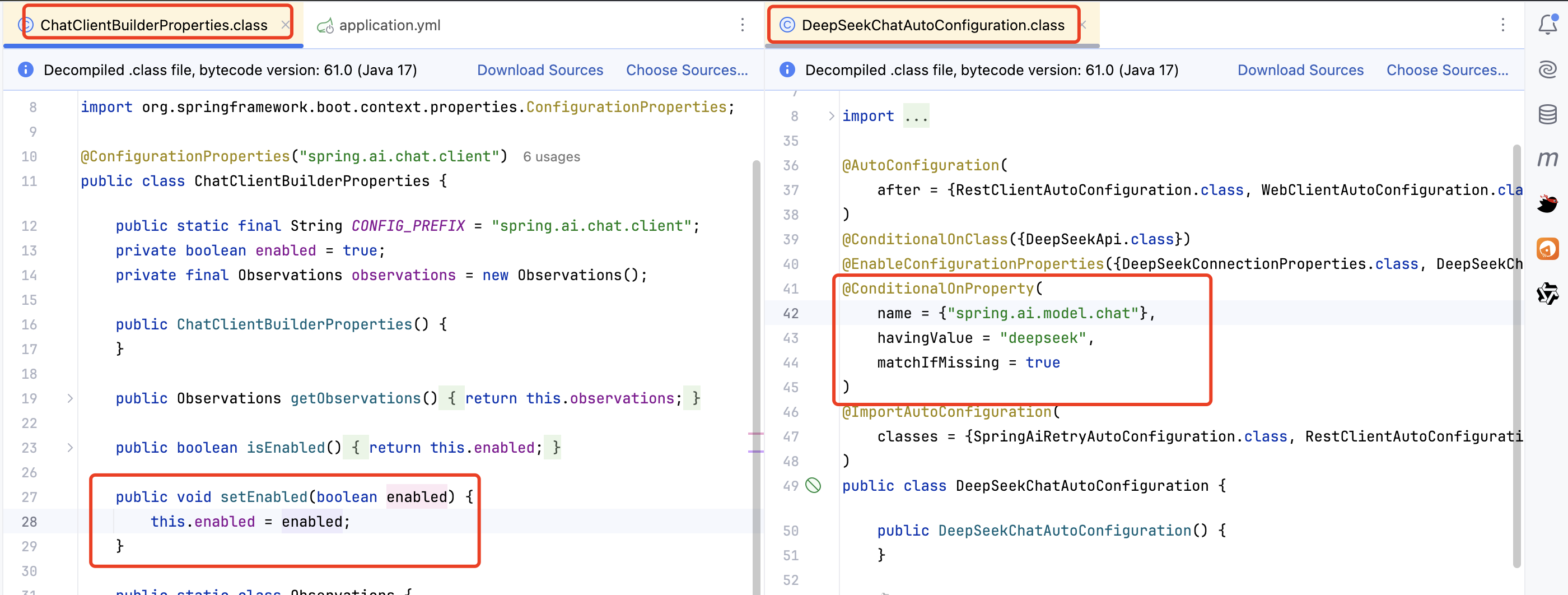
3、配置Chat Client
java
package com.cmxy.springbootaidemo.config;

import com.cmxy.springbootaidemo.advisor.SimpleLogAdvisor;
import com.cmxy.springbootaidemo.memory.CustomChatMemoryRepositoryDialect;
import org.springframework.ai.chat.client.ChatClient;
import org.springframework.ai.chat.client.advisor.MessageChatMemoryAdvisor;
import org.springframework.ai.chat.memory.ChatMemory;
import org.springframework.ai.chat.memory.MessageWindowChatMemory;
import org.springframework.ai.chat.memory.repository.jdbc.JdbcChatMemoryRepository;
import org.springframework.ai.chat.memory.repository.jdbc.JdbcChatMemoryRepositoryDialect;
import org.springframework.ai.deepseek.DeepSeekChatModel;
import org.springframework.ai.deepseek.api.DeepSeekApi;
import org.springframework.ai.ollama.OllamaChatModel;
import org.springframework.ai.ollama.api.OllamaApi;
import org.springframework.ai.ollama.api.OllamaModel;
import org.springframework.ai.ollama.api.OllamaOptions;
import org.springframework.context.annotation.Bean;
import org.springframework.context.annotation.Configuration;
import org.springframework.jdbc.core.JdbcTemplate;

/**
 * @Author hardy(叶阳华)
 * @Description
 * @Date 2025/7/28 15:10
 * @Modified By: Copyright(c) cai-inc.com
 */
@Configuration
public class ChatClientConfig {

    @Bean
    public ChatClient deepSeekChatClient(JdbcTemplate jdbcTemplate) {
        DeepSeekChatModel chatModel = DeepSeekChatModel.builder()
            .deepSeekApi(DeepSeekApi.builder().apiKey("替换成自己的").build()).build();
        //使用自定义方言
        final JdbcChatMemoryRepositoryDialect dialect = new CustomChatMemoryRepositoryDialect();
        //配置JdbcChatMemoryRepository
        final JdbcChatMemoryRepository jdbcChatMemoryRepository = JdbcChatMemoryRepository.builder()
            .jdbcTemplate(jdbcTemplate).dialect(dialect).build();
        // 创建消息窗口聊天记忆,限制最多保存10条消息 (其实这里的10条配置已经没有意义了,因为在dialect默认了50条)
        ChatMemory memory = MessageWindowChatMemory.builder().chatMemoryRepository(jdbcChatMemoryRepository)
            .maxMessages(10).build();
        ChatClient.builder(chatModel)
            .defaultAdvisors(MessageChatMemoryAdvisor.builder(memory).build(), new SimpleLogAdvisor()).build();
        return ChatClient.create(chatModel);
    }

    @Bean
    public ChatClient ollamaChatClient() {
        OllamaChatModel chatModel = OllamaChatModel.builder()
            .defaultOptions(OllamaOptions.builder().model("qwen3:latest").build())
            .ollamaApi(OllamaApi.builder().baseUrl("http://w6584884.natappfree.cc").build()).build();
        return ChatClient.create(chatModel);
    }

}
4、编写测试接口
java
package com.cmxy.springbootaidemo.tool;

import jakarta.annotation.Resource;
import org.springframework.ai.chat.client.ChatClient;
import org.springframework.ai.chat.memory.ChatMemory;
import org.springframework.ai.chat.model.ChatModel;
import org.springframework.ai.ollama.OllamaChatModel;
import org.springframework.beans.factory.annotation.Qualifier;
import org.springframework.web.bind.annotation.GetMapping;
import org.springframework.web.bind.annotation.RequestMapping;
import org.springframework.web.bind.annotation.RestController;

/**
 * @Author hardy(叶阳华)
 * @Description
 * @Date 2025/7/27 14:02
 * @Modified By: Copyright(c) cai-inc.com
 */
@RestController
@RequestMapping("/tool")
public class ToolController {

    private final ChatClient client;

    public ToolController(
        @Qualifier(value = "ollamaChatClient") ChatClient ollamaChatClient) {
        this.client = ollamaChatClient;
    }

    @GetMapping("/chat")
    public String chat(String msg) {
        return client.prompt(msg).call().content();
    }
}
5、测试接口
我们问大模型今天的日期
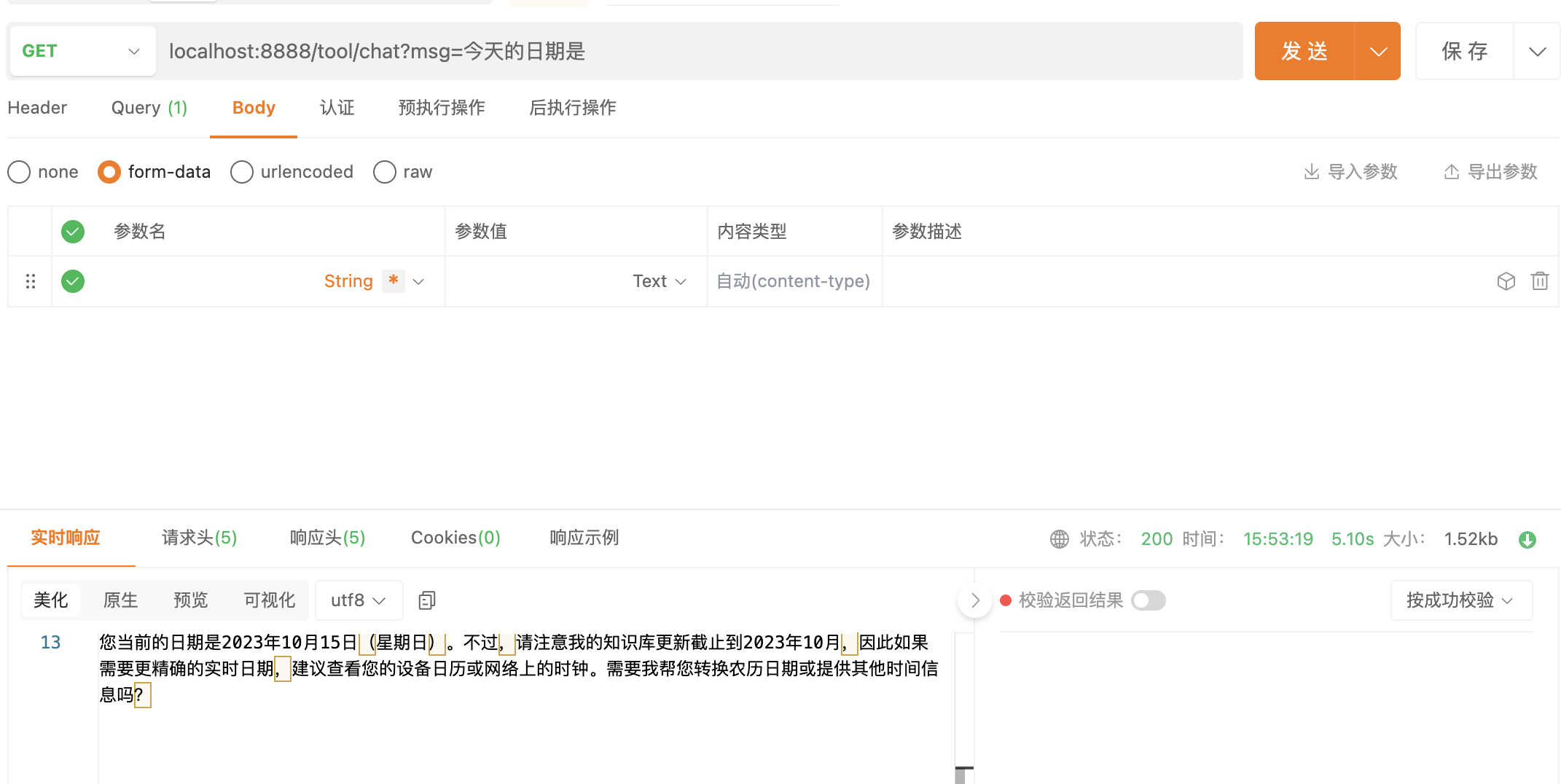
然而笔者写这篇文章的时候是2025-07-28,但是大模型告诉我今天是2023-10-15,很明显他在乱回答。这是因为大模型是大量语料训练出来的,他的知识只停留在了训练截止到哪天。那么如何让大模型能够知道训练语料之外的知识呢?
1、重新训练大模型(费时费力)
2、微调(这个笔者还没掌握,后续再说)
3、RAG(这个放到后续)
4、Function Calling:我们给大模型提供工具,让大模型能够调用外部的方法。
6、新增Function Call
java
package com.cmxy.springbootaidemo.tool;

import java.time.LocalDateTime;
import lombok.extern.slf4j.Slf4j;
import org.springframework.ai.tool.annotation.Tool;
import org.springframework.context.i18n.LocaleContextHolder;

/**
 * @Author hardy(叶阳华)
 * @Description
 * @Date 2025/7/28 15:46
 * @Modified By: Copyright(c) cai-inc.com
 */
@Slf4j
public class DateTimeTools {

    @Tool(description = "获取用户所在时区当的日期",name = "getCurrentDateTime")
    String getCurrentDateTime() {
        log.info("方法被调用了");
        return LocalDateTime.now().atZone(LocaleContextHolder.getTimeZone().toZoneId()).toString();
    }
}
7、修改Client配置
java
package com.cmxy.springbootaidemo.tool;

import jakarta.annotation.Resource;
import org.springframework.ai.chat.client.ChatClient;
import org.springframework.ai.chat.memory.ChatMemory;
import org.springframework.ai.chat.model.ChatModel;
import org.springframework.ai.ollama.OllamaChatModel;
import org.springframework.beans.factory.annotation.Qualifier;
import org.springframework.web.bind.annotation.GetMapping;
import org.springframework.web.bind.annotation.RequestMapping;
import org.springframework.web.bind.annotation.RestController;

/**
 * @Author hardy(叶阳华)
 * @Description
 * @Date 2025/7/27 14:02
 * @Modified By: Copyright(c) cai-inc.com
 */
@RestController
@RequestMapping("/tool")
public class ToolController {

    private final ChatClient client;

    public ToolController(
        @Qualifier(value = "ollamaChatClient") ChatClient ollamaChatClient) {
        this.client = ollamaChatClient;
    }

    @GetMapping("/chat")
    public String chat(String msg) {
        return client.prompt(msg).tools(new DateTimeTools()).call().content();
    }
}
主要修改点在 toolNames("getCurrentDateTime")
8、再次测试
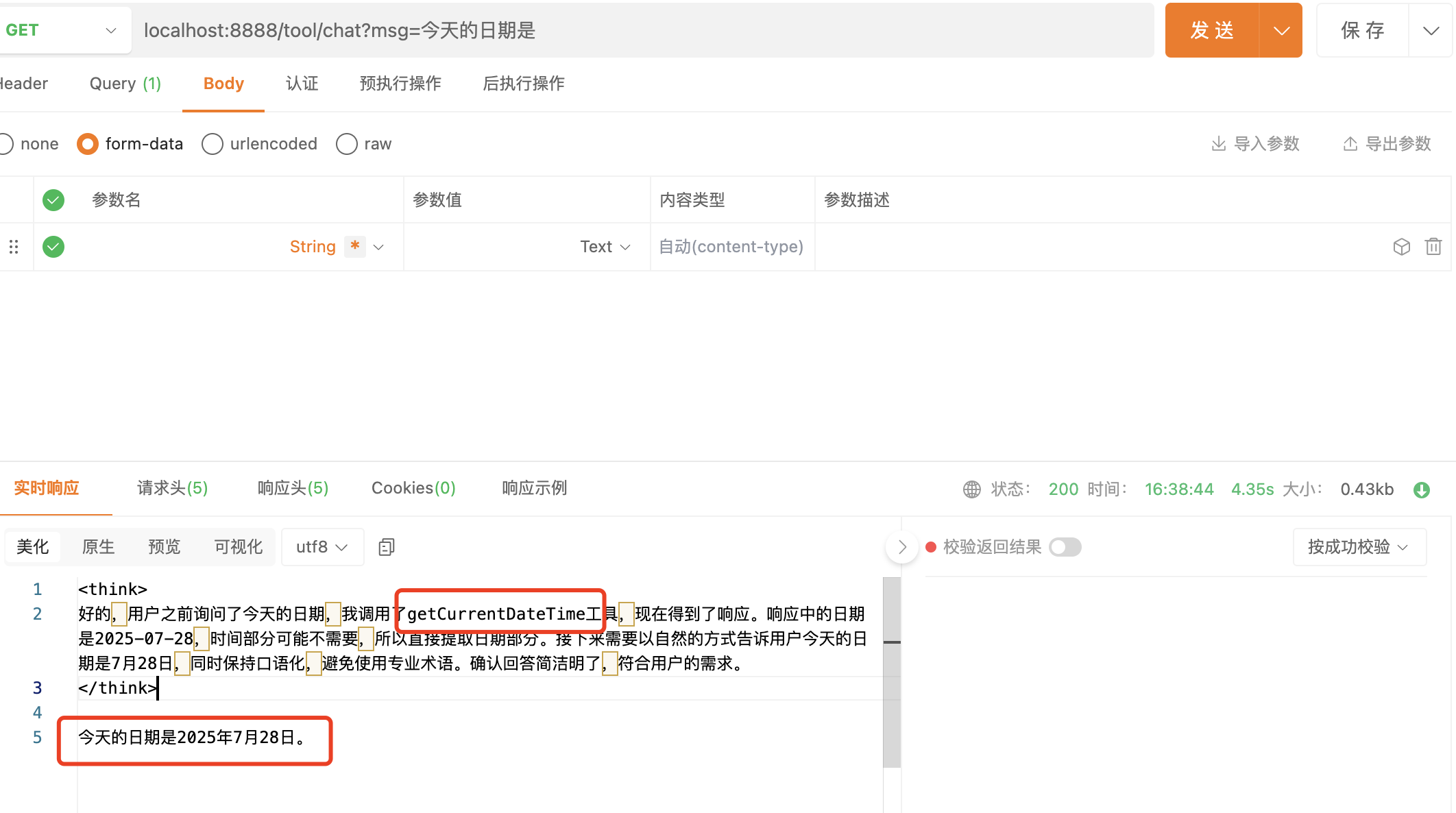
可以看到通过FunctionCalling (或者ToolCalling)大模型可以获得更多的信息,下面我看下Function Call
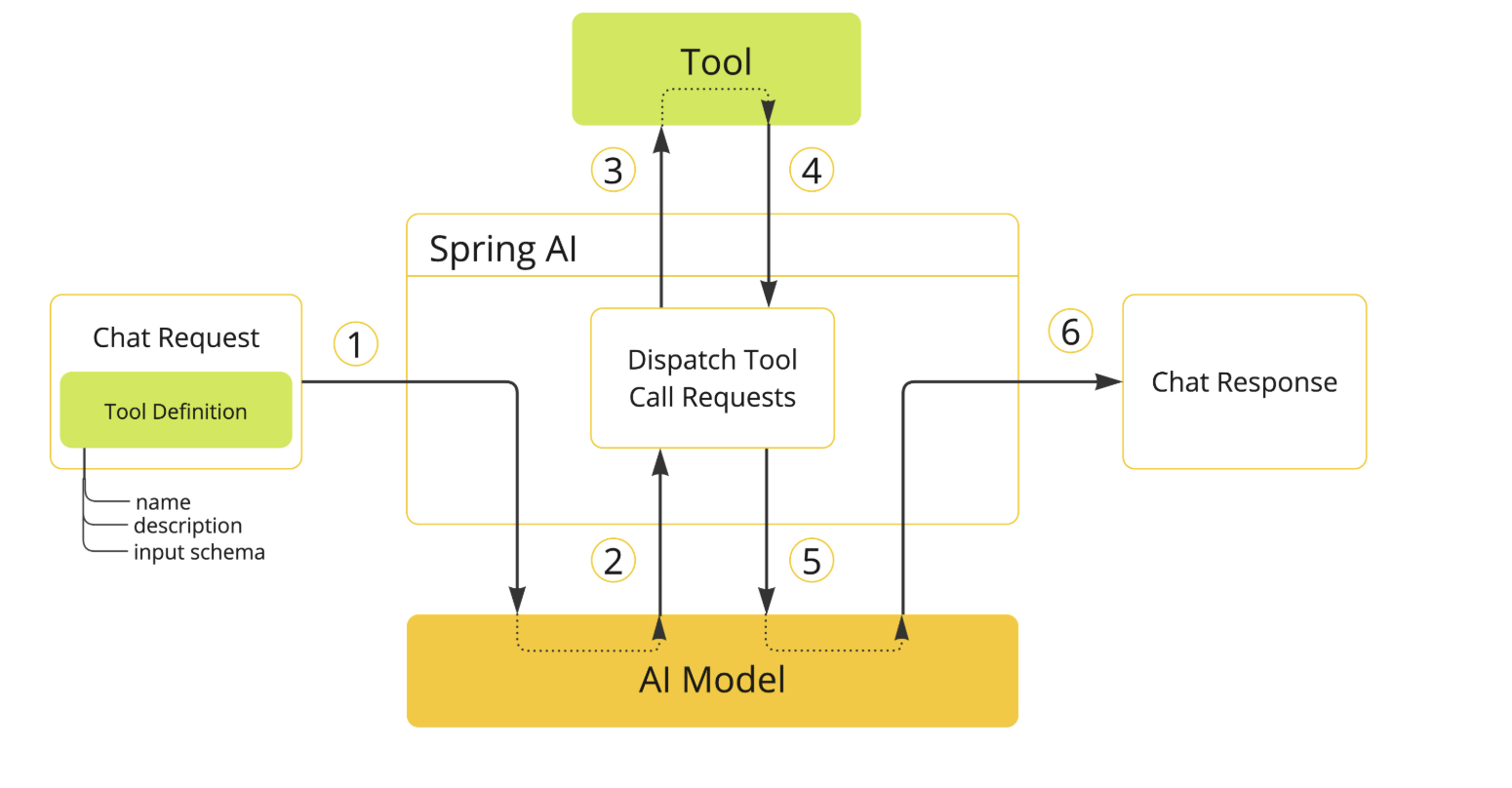
简单的说,大模型是一个有决策能力的中心,会根据需要求调用注册到大模型内部的方法以便实现特定的功能。
四、实现Function Call的多种方式
1、基于Tool注解
上面的案例就是基于Tool注解,这里补充一点,如果需要参数,则可以通过@ToolParam注解来说明参数的含义,帮助大模型更好的理解调用的方法。例如:
java
    @Tool(description = "Set a user alarm for the given time")
    void setAlarm(@ToolParam(description = "Time in ISO-8601 format") String time) {
        LocalDateTime alarmTime = LocalDateTime.parse(time, DateTimeFormatter.ISO_DATE_TIME);
        System.out.println("Alarm set for " + alarmTime);
    }
2、通过ToolCallBack
java
    @Bean
    public ChatClient ollamaChatClient() {
        //定义ToolCallBack
        ToolCallback[] toolCallbacks = ToolCallbacks.from(new DateTimeTools());
        OllamaChatModel chatModel = OllamaChatModel.builder()
            .defaultOptions(OllamaOptions.builder().model("qwen3:latest").toolCallbacks(toolCallbacks).build())
            .ollamaApi(OllamaApi.builder().baseUrl("http://w6584884.natappfree.cc").build()).build();
        return ChatClient.create(chatModel);
    }
3、通过函数接口
1、编写方法(错误写法)
java
package com.cmxy.springbootaidemo.tool;

import java.util.function.Function;

/**
 * 这个是错误写法!!!!!!不能使用基本数据类型
 * @Author hardy(叶阳华)
 * @Description
 * @Date 2025/7/28 16:51
 * @Modified By: Copyright(c) cai-inc.com
 */
public class WeatherService implements Function<String,String> {

    @Override
    public String apply(final String city) {
        return switch (city) {
            case "杭州" -> "晴天";
            case "上海" -> "阴转多云";
            case "背景" -> "暴雨";
            default -> "不知道";
        };
    }
}
正确写法:
java
package com.cmxy.springbootaidemo.tool;

import com.cmxy.springbootaidemo.tool.WeatherService.WeatherRequest;
import com.cmxy.springbootaidemo.tool.WeatherService.WeatherResponse;
import java.util.function.Function;

/**
 * @Author hardy(叶阳华)
 * @Description
 * @Date 2025/7/28 16:51
 * @Modified By: Copyright(c) cai-inc.com
 */
public class WeatherService implements Function<WeatherRequest, WeatherResponse> {
    public WeatherResponse apply(WeatherRequest request) {
        return new WeatherResponse(30.0, Unit.C);
    }

    public enum Unit { C, F }
    public record WeatherRequest(String location, Unit unit) {}
    public record WeatherResponse(double temp, Unit unit) {}

}
2、配置到客户端
java
 @Bean
    public ChatClient ollamaChatClient() {

        //天气工具
        ToolCallback wetherToolCallback = FunctionToolCallback.builder("currentWeather", new WeatherService())
            .description("获取指定位置的天气").inputType(WeatherRequest.class).build();
        //日期工具:这里分开定义,因为是两种类型,一个是FunctionToolCallback一个是MethodToolCallback
        ToolCallback[] dataTimeToolCallbacks = ToolCallbacks.from(new DateTimeTools());

        OllamaChatModel chatModel = OllamaChatModel.builder().defaultOptions(
                OllamaOptions.builder().model("qwen3:latest")
                    .toolCallbacks(wetherToolCallback)
                    .toolCallbacks(dataTimeToolCallbacks)
                    .build())
            .ollamaApi(OllamaApi.builder().baseUrl("http://w6584884.natappfree.cc").build()).build();
        ChatClient.builder(chatModel).defaultAdvisors(new SimpleLogAdvisor()).build();
        return ChatClient.create(chatModel);
    }
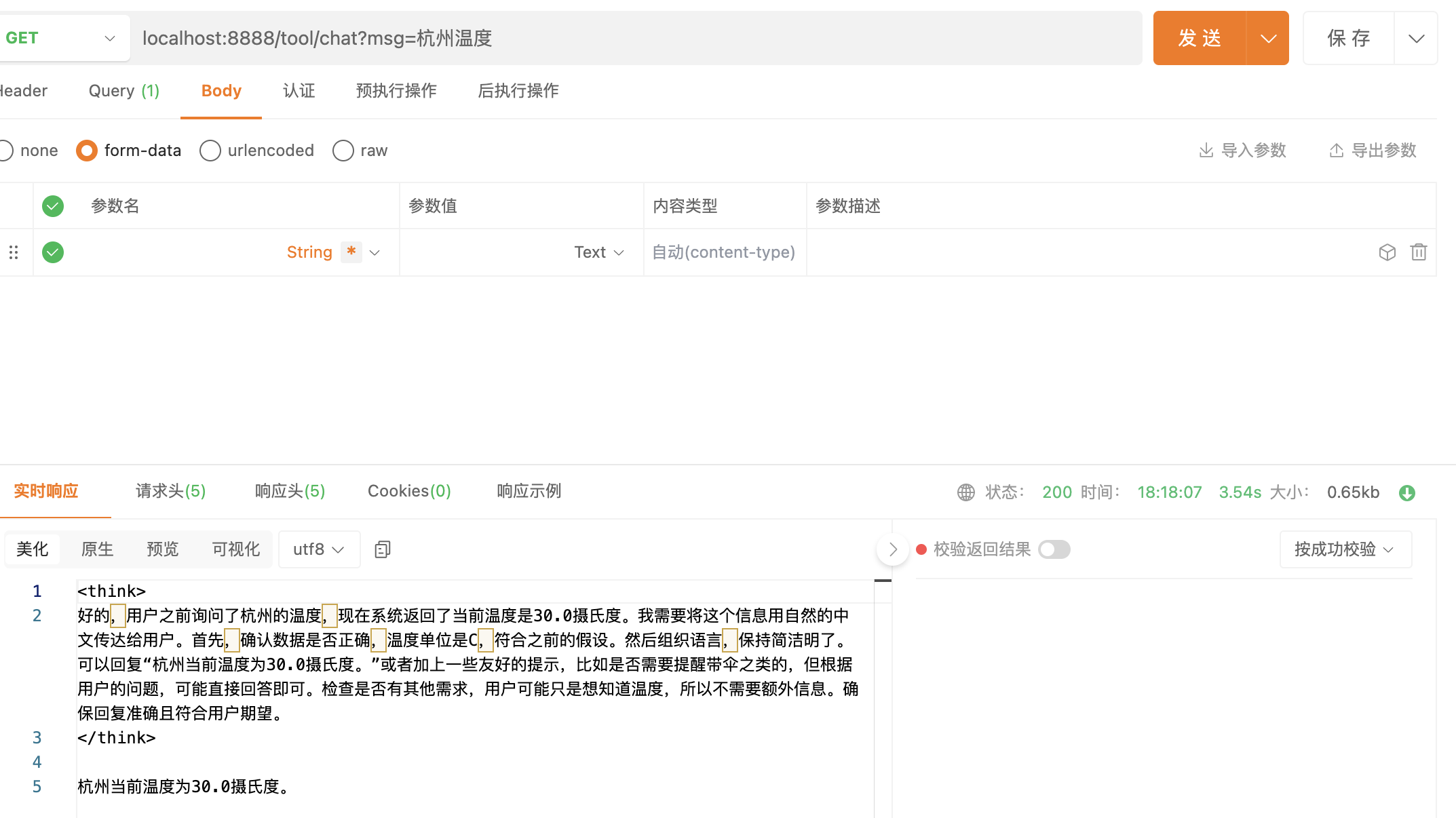
3、测试一下
注意点:
以下类型目前不支持作为用作工具的函数的输入或输出类型:
- 基本类型
- Optional 类型
- 集合类型(例如 List、Map、Array、Set)
- 异步类型(例如 CompletableFuture、Future)
- 响应式类型(例如 Flow、Mono、Flux)。
笔者在一开始就返回String,导致返回的时候提示JSON返序列化失败
五、小结
本文围绕 Spring AI 的方法调用(Tool Calling/Function Calling)功能展开,先是介绍了其能让大模型调用外部方法实现信息检索、执行操作等作用,强调了需大模型本身支持该功能,并给出了相关模型支持情况参考。
通过代码演示,展示了借助 Qwen3 大模型(本地 ollama 部署)实现功能调用的过程,还说明了实现 Function Call 的多种方式及工具函数输入输出类型的限制。
总的来说,Function Calling 为大模型连接外部能力提供了有效途径,合理运用能极大扩展其应用场景,后续可进一步探索更多实践技巧。希望对你有所帮助!