对接gemini-2.5-flash-image-preview教程
一、前置准备
1. 明确模型要求
本次对接的gemini-2.5-flash-image-preview模型,继承Gemini系列多模态特性,支持文本生成图片、文本结合图片编辑等功能。需注意该模型不支持仅输出图片,必须配置["TEXT", "IMAGE"]双模态输出;所有生成图片均含SynthID水印,当前支持英语、西班牙语(墨西哥)、日语、简体中文、印地语等语言提示词,暂不支持音频或视频输入。
2. 环境配置
- 安装基础网络请求工具:如Python的
requests库、JavaScript的axios库,用于向指定BaseURL发送API请求。 - 准备Base64编码工具:若涉及图片编辑,需将本地图片转为Base64格式传入请求参数。
- 获取Gemini API密钥(
GEMINI_API_KEY):用于身份验证,需在请求头或参数中携带(若BaseURL接口已集成密钥管理,可省略此步骤)。
二、核心功能对接步骤
1. 文本生成图片(Text-to-Image)
通过文本提示词生成对应图片,以下为不同编程语言实现示例,均基于指定BaseURL(http://api.aaigc.top)开发。
Python实现
python
import requests
import base64
from io import BytesIO
from PIL import Image

# 配置基础信息
BASE_URL = "http://api.aaigc.top"
ENDPOINT = "/v1beta/models/gemini-2.5-flash-image-preview:generateContent"  # 接口端点(参考Gemini API规范,以实际为准)
API_KEY = "你的GEMINI_API_KEY"  # 接口集成密钥时可删除

# 文本提示词
prompt = "3D渲染风格:戴礼帽、长翅膀的小猪,飞越满是绿色植物的未来科幻城市,城市高楼林立且带霓虹灯光"

# 构造请求参数
payload = {
    "contents": [{"parts": [{"text": prompt}]}],
    "generationConfig": {"responseModalities": ["TEXT", "IMAGE"]}  # 必须双模态输出
}

# 构造请求头
headers = {
    "Content-Type": "application/json",
    "Authorization": f"Bearer {API_KEY}"  # 接口集成密钥时可删除
}

# 发送请求并处理响应
response = requests.post(f"{BASE_URL}{ENDPOINT}", json=payload, headers=headers)
response.raise_for_status()
data = response.json()

# 解析文本与图片
for part in data["candidates"][0]["content"]["parts"]:
    if "text" in part and part["text"]:
        print("模型文本回复:", part["text"])
    elif "inlineData" in part and part["inlineData"]["data"]:
        image_data = base64.b64decode(part["inlineData"]["data"])
        image = Image.open(BytesIO(image_data))
        image.save("gemini-text-to-image.png")
        image.show()
        print("图片已保存:gemini-text-to-image.png")
JavaScript实现(Node.js环境)
javascript
const axios = require('axios');
const fs = require('fs');
const path = require('path');

// 配置基础信息
const BASE_URL = "http://api.aaigc.top";
const ENDPOINT = "/v1beta/models/gemini-2.5-flash-image-preview:generateContent";
const API_KEY = "你的GEMINI_API_KEY";

// 文本提示词
const prompt = "3D渲染风格:戴礼帽、长翅膀的小猪,飞越满是绿色植物的未来科幻城市,城市高楼林立且带霓虹灯光";

// 构造请求参数
const payload = {
    "contents": [{"parts": [{"text": prompt}]}],
    "generationConfig": {"responseModalities": ["TEXT", "IMAGE"]}
};

// 构造请求头
const headers = {
    "Content-Type": "application/json",
    "Authorization": `Bearer ${API_KEY}`
};

// 发送请求并处理响应
async function generateImageFromText() {
    try {
        const response = await axios.post(`${BASE_URL}${ENDPOINT}`, payload, { headers });
        const data = response.data;

        for (const part of data.candidates[0].content.parts) {
            if (part.text) {
                console.log("模型文本回复:", part.text);
            } else if (part.inlineData && part.inlineData.data) {
                const imageBuffer = Buffer.from(part.inlineData.data, 'base64');
                const savePath = path.join(__dirname, "gemini-text-to-image.png");
                fs.writeFileSync(savePath, imageBuffer);
                console.log(`图片已保存:${savePath}`);
            }
        }
    } catch (error) {
        console.error("请求失败:", error.response?.data || error.message);
    }
}

generateImageFromText();
2. 图片编辑(Image + Text-to-Image)
传入Base64格式原始图片与编辑提示词,模型将按要求修改图片,关键步骤如下:
前置操作:图片转Base64(Python示例)
python
import base64

def image_to_base64(image_path):
    with open(image_path, "rb") as image_file:
        return base64.b64encode(image_file.read()).decode("utf-8")

# 转换本地图片
original_image_path = "original-image.png"
image_base64 = image_to_base64(original_image_path)
Python编辑图片示例
python
import requests
import base64
from io import BytesIO
from PIL import Image

# 配置基础信息(同文本生成图片)
BASE_URL = "http://api.aaigc.top"
ENDPOINT = "/v1beta/models/gemini-2.5-flash-image-preview:generateContent"
API_KEY = "你的GEMINI_API_KEY"

# 原始图片Base64编码
original_image_path = "original-image.png"
image_base64 = image_to_base64(original_image_path)

# 编辑提示词
edit_prompt = "在人物身旁添加一只白色羊驼,羊驼面向人物,整体风格与原图保持一致(如原图写实,羊驼也需写实)"

# 构造请求参数
payload = {
    "contents": [
        {
            "parts": [
                {"text": edit_prompt},
                {"inlineData": {"mimeType": "image/png", "data": image_base64}}  # 匹配图片实际格式
            ]
        }
    ],
    "generationConfig": {"responseModalities": ["TEXT", "IMAGE"]}
}

# 构造请求头(同文本生成图片)
headers = {
    "Content-Type": "application/json",
    "Authorization": f"Bearer {API_KEY}"
}

# 发送请求并解析响应
response = requests.post(f"{BASE_URL}{ENDPOINT}", json=payload, headers=headers)
response.raise_for_status()
data = response.json()

# 保存编辑后图片
for part in data["candidates"][0]["content"]["parts"]:
    if "inlineData" in part and part["inlineData"]["data"]:
        image_data = base64.b64decode(part["inlineData"]["data"])
        edited_image = Image.open(BytesIO(image_data))
        edited_image.save("gemini-edited-image.png")
        edited_image.show()
        print("编辑后图片已保存:gemini-edited-image.png")
    elif "text" in part and part["text"]:
        print("模型编辑说明:", part["text"])
三、常见问题与注意事项
- 仅输出文本:需在提示词中明确包含"生成图片""更新图片"等指令,如将"添加羊驼"改为"生成添加羊驼后的图片"。
- 生成中断:重试请求或简化提示词,避免单次提示包含过多元素。
- Base64编码错误 :确保编码完整(无多余空格/换行),且
mimeType与图片格式一致(JPG对应image/jpeg,PNG对应image/png)。 - 地区可用性:若提示"服务暂不可用",需确认当前地区是否开放该模型功能,可参考BaseURL接口的地区支持说明。
四、案例
1.以下为一张卡哇伊风格的快乐小熊贴纸。背景为设定的白色,整体采用清晰轮廓和大胆配色,整个设计十分生动和吸引人

Create a [image type] for [brand/concept] with the text "[text to render]" in a [font style]. The design should be [style description], with a [color scheme].

 1from google import genai
 2from google.genai import types
 3from PIL import Image
 4from io import BytesIO
 5
 6client = genai.Client()
 7
 8# Generate an image from a text prompt
 9response = client.models.generate_content(
10    model="gemini-2.5-flash-image-preview",
11    contents="Create a modern, minimalist logo for a coffee shop called 'The Daily Grind'. The text should be in a clean, bold, sans-serif font. The design should feature a simple, stylized icon of a a coffee bean seamlessly integrated with the text. The color scheme is black and white.",
12)
13
14image_parts = [
15    part.inline_data.data
16    for part in response.candidates[0].content.parts
17    if part.inline_data
18]
19
20if image_parts:
21    image = Image.open(BytesIO(image_parts[0]))
22    image.save('logo_example.png')
23    image.show()
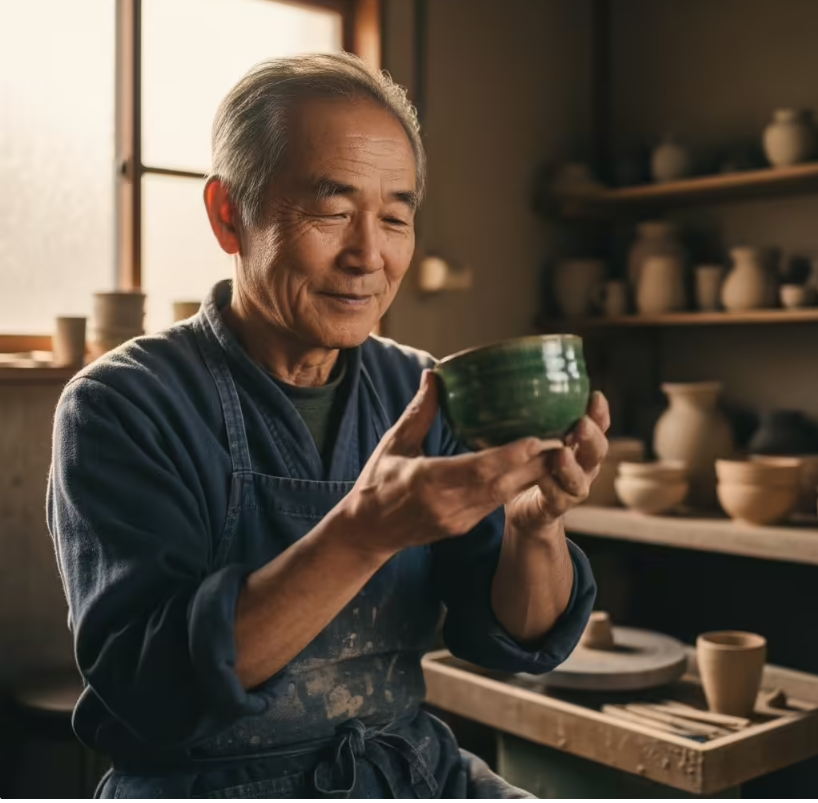
2.以下为官方生成的一位老年陶瓷艺术家的特写柔和的金色阳光透过窗户洒进画面,照亮了陶土的细腻质感和老人脸上的皱纹。
A [style] sticker of a [subject], featuring [key characteristics] and a [color palette]. The design should have [line style] and [shading style]. The background must be white.

 1from google import genai
 2from google.genai import types
 3from PIL import Image
 4from io import BytesIO
 5
 6client = genai.Client()
 7
 8# Generate an image from a text prompt
 9response = client.models.generate_content(
10    model="gemini-2.5-flash-image-preview",
11    contents="A photorealistic close-up portrait of an elderly Japanese ceramicist with deep, sun-etched wrinkles and a warm, knowing smile. He is carefully inspecting a freshly glazed tea bowl. The setting is his rustic, sun-drenched workshop with pottery wheels and shelves of clay pots in the background. The scene is illuminated by soft, golden hour light streaming through a window, highlighting the fine texture of the clay and the fabric of his apron. Captured with an 85mm portrait lens, resulting in a soft, blurred background (bokeh). The overall mood is serene and masterful.",
12)
13
14image_parts = [
15    part.inline_data.data
16    for part in response.candidates[0].content.parts
17    if part.inline_data
18]
19
20if image_parts:
21    image = Image.open(BytesIO(image_parts[0]))
22    image.save('photorealistic_example.png')
23    image.show()
3.猫猫在双子座星空下的豪华餐厅里吃香蕉。哇哦,猫猫桌子上还摆着刀叉和酒杯,餐厅里其他桌子上也有客人,真是充满了细节。

 1    from google import genai
 2    from google.genai import types
 3    from PIL import Image
 4    from io import BytesIO
 5
 6    client = genai.Client()
 7
 8    # Generate an image from a text prompt
 9    response = client.models.generate_content(
10    model="gemini-2.5-flash-image-preview",
11    contents="A photorealistic close-up portrait of an elderly Japanese ceramicist with deep, sun-etched wrinkles and a warm, knowing smile. He is carefully inspecting a freshly glazed tea bowl. The setting is his rustic, sun-drenched workshop with pottery wheels and shelves of clay pots in the background. The scene is illuminated by soft, golden hour light streaming through a window, highlighting the fine texture of the clay and the fabric of his apron. Captured with an 85mm portrait lens, resulting in a soft, blurred background (bokeh). The overall mood is serene and masterful.",
12    )
13
14    image_parts = [
15    part.inline_data.data
16    for part in response.candidates[0].content.parts
17    if part.inline_data
18    ]
19
20    if image_parts:
21    image = Image.open(BytesIO(image_parts[0]))
22    image.save('photorealistic_example.png')