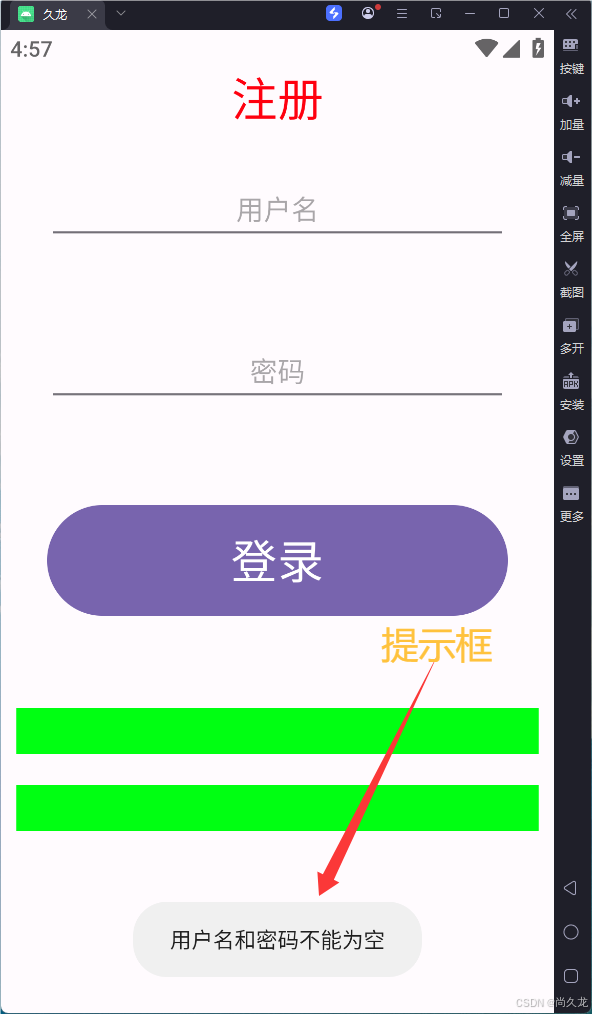
整个界面的功能是:当没有用户名和密码输入时,点击了登录按钮,在屏幕下方就会有一个"用户名和密码不能为空的提示":
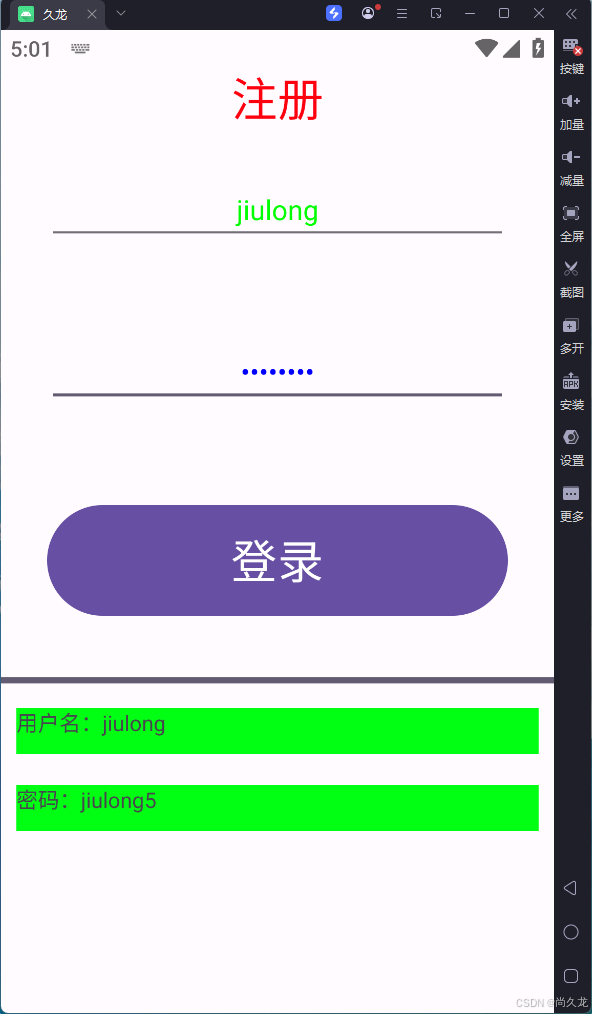
如果输入了用户名和密码的话,此时点击登录按钮,在按钮下面就会出现一个进度条,进度条开始涨涨到头后,在第一个绿色文本框中显示"用户名:+刚刚输入的用户名",
在第二个绿色文本框中显示"密码:+刚刚输入的密码":
以上就是今天的学习内容,下面来看看今天的代码吧,首先是布局文件:
XML
<?xml version="1.0" encoding="utf-8"?>
<LinearLayout xmlns:android="http://schemas.android.com/apk/res/android"
    xmlns:app="http://schemas.android.com/apk/res-auto"
    xmlns:tools="http://schemas.android.com/tools"
    android:id="@+id/main"
    android:layout_width="match_parent"
    android:layout_height="match_parent"
    tools:context=".JinDuTiao_Activity"
    android:orientation="vertical"
    android:gravity="center_horizontal">

   <TextView
       android:layout_width="match_parent"
       android:layout_height="wrap_content"
       android:text="注册"
       android:textSize="30dp"
       android:gravity="center_horizontal"
       android:textColor="#FF000F"
       />
    <EditText
        android:id="@+id/name"
        android:layout_width="match_parent"
        android:layout_height="wrap_content"
        android:hint="用户名"
        android:gravity="center_horizontal"
        android:textColor="#00FF00"
        android:layout_margin="30dp"
        />
    <EditText
        android:id="@+id/pwd"
        android:layout_width="match_parent"
        android:layout_height="wrap_content"
        android:hint="密码"
        android:gravity="center_horizontal"
        android:textColor="#0000FF"
        android:layout_margin="30dp"
        android:inputType="textPassword"
        android:maxLength="8"
        />

    <Button
        android:layout_width="match_parent"
        android:layout_height="80dp"
        android:text="登录"
        android:textSize="30dp"
        android:layout_margin="30dp"
        android:onClick="DengLu"/>

    <ProgressBar
        android:id="@+id/Pro_Bar"
        android:layout_width="match_parent"
        android:layout_height="wrap_content"
        style="?android:attr/progressBarStyleHorizontal"
        android:visibility="invisible"
        />
    <TextView
        android:id="@+id/Tv1"
        android:layout_width="match_parent"
        android:layout_height="30dp"
        android:background="#00FF12"
        android:layout_margin="10dp"
        />
    <TextView
        android:id="@+id/Tv2"
        android:layout_width="match_parent"
        android:layout_height="30dp"
        android:background="#00FF12"
        android:layout_margin="10dp"
        />

</LinearLayout>
接下来就是Activity.java文件了:
java
package com.example.android1;

import android.os.Bundle;
import android.view.View;
import android.widget.EditText;
import android.widget.ProgressBar;
import android.widget.TextView;
import android.widget.Toast;

import androidx.activity.EdgeToEdge;
import androidx.appcompat.app.AppCompatActivity;
import androidx.core.graphics.Insets;
import androidx.core.view.ViewCompat;
import androidx.core.view.WindowInsetsCompat;

public class JinDuTiao_Activity extends AppCompatActivity {

    @Override
    protected void onCreate(Bundle savedInstanceState) {
        super.onCreate(savedInstanceState);
        EdgeToEdge.enable(this);
        setContentView(R.layout.activity_jin_du_tiao);
        ViewCompat.setOnApplyWindowInsetsListener(findViewById(R.id.main), (v, insets) -> {
            Insets systemBars = insets.getInsets(WindowInsetsCompat.Type.systemBars());
            v.setPadding(systemBars.left, systemBars.top, systemBars.right, systemBars.bottom);
            return insets;
        });
    }

//****************************  从这里往下是今天的程序  ********************************
    public void DengLu(View V){
        EditText nameEDT = findViewById(R.id.name);   //拿到用户名输入框对象
        EditText pwdEDT = findViewById(R.id.pwd);     //拿到密码输入框对象
        ProgressBar Pro_Bar = findViewById(R.id.Pro_Bar);   //拿到进度条对象
        TextView TV1 = findViewById(R.id.Tv1);    //拿到文本框对象1
        TextView TV2 = findViewById(R.id.Tv2);    //拿到文本框对象2

        String name = nameEDT.getText().toString();   //获得用户名输入框对象中的文本转成字符串类型  放到  字符串类型的变量name中
        String pwd = pwdEDT.getText().toString();     //获得密码输入框对象中的文本转成字符串类型  放到  字符串类型的变量pwd中
        //1、判断姓名密码是否为空
        if (name.isEmpty() || pwd.isEmpty()){   //判断用户名和密码是不是空
            //2、如果为空,则提示
            //无焦点提示
            Toast.makeText(this,"用户名和密码不能为空",Toast.LENGTH_SHORT).show();   //参数1:环境上下文    参数2:提示文本   参数3:提示持续时间

        }
        //3、如果都不为空,则出现进度条
        else{
            Pro_Bar.setVisibility(View.VISIBLE);                 //进度条设置成显示出来
            new Thread(){                                        //新建一个线程
                public void run(){                               //定义一个无返回函数
                    for (int i=0; i<=100; i++){                  //for循环  i的取值从0到100  作为进度条值
                        Pro_Bar.setProgress(i);                  //设置进度条的值为i
                        try {
                            Thread.sleep(30);              //延时30毫秒
                        } catch (InterruptedException e) {
                            throw new RuntimeException(e);
                        }
                    }
                    TV1.setText("用户名:"+name);                 //文本框显示 用户名
                    TV2.setText("密码:"+pwd);                    //文本框显示 密码
                }
            }.start();                                           //线程开始
        }


    }
}