资源列表
准备三台Ubuntu的服务器,配置好网络。
| 操作系统 | 配置 | 主机名 | IP | 所需软件 |
|---|---|---|---|---|
| Ubuntu 22.04 | 2C4G | master | 192.168.146.10 | Docker Ce、kube-apiserver、kube-controller-manager、kube-scheduler、kubelet、Etcd、kube-proxy |
| Ubuntu 22.04 | 2C4G | node1 | 192.168.146.11 | Docker CE、kubectl、kube-proxy、Flnnel |
| Ubuntu 22.04 | 2C4G | node2 | 192.168.146.12 | Docker CE、kubectl、kube-proxy、Flnnel |
基础环境
-
修改主机名
sudo hostnamectl set-hostname master
sudo hostnamectl set-hostname node1
sudo hostnamectl set-hostname node2 -
切换root用户
su -
-
绑定hosts解析
cat >> /etc/hosts << EOF
192.168.146.10 master
192.168.146.11 node1
192.168.146.12 node2
EOF
一、环境准备(三台主机都要执行)
- 在正式开始部署kubernetes集群之前,先要进行如下准备工作。基础环境相关配置操作,在三台主机master、node01、node02上都需要执行。
1.1、安装常用软件
# 更新软件仓库
sudo apt update

# 安装常用软件
sudo apt install vim lrzsz unzip wget net-tools tree bash-completion telnet -y
1.2、关闭交换分区
-
kubeadm不支持swap交换分区
临时关闭
swapoff -a
永久关闭
sed -i '/swap/s/^/#/' /etc/fstab
1.3、开启IPv4转发和内核优化
cat <<EOF | sudo tee /etc/sysctl.d/k8s.conf
net.bridge.bridge-nf-call-iptables  = 1
net.bridge.bridge-nf-call-ip6tables = 1
net.ipv4.ip_forward            = 1
EOF
sudo sysctl --system
1.4、时间同步
sudo apt -y install ntpdate
ntpdate ntp.aliyun.com
二、安装Docker(三台主机都要执行)
- 所有节点都要操作
- 在Ubuntu系统中安装Docker时,官方推荐Ubuntu系统最好是64位,可以在终端执行
uname -a命令查看当前系统是否位64位操作系统。
2.1、卸载残留Docker软件包
for pkg in docker.io docker-doc docker-compose docker-compose-v2 podman-docker containerd runc; do sudo apt-get remove $pkg; done2.2、更新软件包
-
在终端中执行以下命令来更新Ubuntu软件包列表和已安装软件的版本升级
sudo apt update
sudo apt upgrade
2.3、安装Docker依赖
-
Docker在Ubuntu上依赖一些软件包,执行以下命令来安装这些依赖
apt-get -y install ca-certificates curl gnupg lsb-release
2.4、添加Docker官方GPG密钥
-
执行以下命令来添加Docker官方的GPG密钥
最终回显OK表示运行命令正确
curl -fsSL http://mirrors.aliyun.com/docker-ce/linux/ubuntu/gpg | sudo apt-key add -
2.5、添加Docker软件源
-
注意:该命令需要使用
root权限 -
执行以下命令来添加Docker的软件源
需要管理员交互式按一下回车键
sudo add-apt-repository "deb [arch=amd64] http://mirrors.aliyun.com/docker-ce/linux/ubuntu $(lsb_release -cs) stable"
2.6、安装Docker
-
执行以下命令安装Docker-20.10版本,新版本Docker和k8s-1.23不兼容
sudo apt install docker-ce=5:20.10.143-0ubuntu-jammy docker-ce-cli=5:20.10.143-0ubuntu-jammy containerd.io -y
2.7、配置用户组(可选)
-
默认情况下,只有root用户和Docker组的用户才能运行Docker命令。我们可以将当前用户添加到Docker组,以避免每次使用时都需要使用sudo。
-
注意:重新登录才能使更改生效
sudo usermod -aG docker $USER
2.8、安装工具
apt-get -y install apt-transport-https ca-certificates curl software-properties-common2.9、开启Docker
systemctl start docker
systemctl enable docker
2.10、配置Docker加速器
vim /etc/docker/daemon.json
{
    "registry-mirrors": [
        "https://registry.docker-cn.com",
        "http://hub-mirror.c.163.com",
        "https://docker.mirrors.ustc.edu.cn",
        "https://kfwkfulq.mirror.aliyuncs.com",
        "https://docker.rainbond.cc"
    ],
    "insecure-registries": ["http://192.168.57.200:8099"]
}

# 重启Docker
systemctl daemon-reload
systemctl restart docker
三、部署Kubernetes集群
- 准备好基础环境和Docker环境,下面就开始通过kubeadm来部署kubernetes集群
3.1、配置Kubernetes的APT源(三台主机都要执行)
-
这里使用aliyun的源
安装软件包
apt-get install -y apt-transport-https ca-certificates curl
下载Kubernetes GPG密钥
curl -fsSLo /usr/share/keyrings/kubernetes-archive-keyring.gpg https://mirrors.aliyun.com/kubernetes/apt/doc/apt-key.gpg
将GPG密钥添加到APT的密钥管理中
cat /usr/share/keyrings/kubernetes-archive-keyring.gpg | sudo apt-key add -
指定软件仓库位置
echo "deb https://mirrors.aliyun.com/kubernetes/apt/ kubernetes-xenial main" | sudo tee /etc/apt/sources.list.d/kubernetes.list
更新软件仓库
apt-get update
3.2、查看Kubernetes可用版本
apt-cache madison kubeadm3.3、安装kubeadm管理工具三台主机都要执行
-
kubectl:命令行管理工具、kubeadm:安装K8S集群工具、kubelet管理容器工具
安装1.23版本的Kubernetes,因为1.23以后Kubernetes就不再支持Docker做底层容器运行时
apt-get install -y kubelet=1.23.0-00 kubeadm=1.23.0-00 kubectl=1.23.0-00
锁定版本,防止自动升级
apt-mark hold kubelet kubeadm kubectl docker docker-ce docker-ce-cli
查看版本
kubelet --version
kubeadm version
kubectl version
3.4、设置Kubelet开机启动三台主机都要执行
systemctl enable kubelet四、kubeadm初始化集群
4.1、master节点生成初始化配置文件
root@master:~# kubeadm config print init-defaults > init-config.yaml4.2、master节点修改初始化配置文件
root@master:~# vim init-config.yaml
apiVersion: kubeadm.k8s.io/v1beta3
bootstrapTokens:
- groups:
  - system:bootstrappers:kubeadm:default-node-token
  token: abcdef.0123456789abcdef
  ttl: 24h0m0s
  usages:
  - signing
  - authentication
kind: InitConfiguration
localAPIEndpoint:
  advertiseAddress: 192.168.146.10  # master节点IP地址
  bindPort: 6443
nodeRegistration:
  criSocket: /var/run/dockershim.sock
  imagePullPolicy: IfNotPresent
  name: master   # 如果使用域名保证可以解析,或直接使用IP地址
  taints: null
---
apiServer:
  timeoutForControlPlane: 4m0s
apiVersion: kubeadm.k8s.io/v1beta3
certificatesDir: /etc/kubernetes/pki
clusterName: kubernetes
controllerManager: {}
dns: {}
etcd:
  local:
    dataDir: /var/lib/etcd
imageRepository: registry.aliyuncs.com/google_containers # 默认地址国内无法访问,修改为国内地址
kind: ClusterConfiguration
kubernetesVersion: 1.23.0   # 指定kubernetes部署的版本
networking:
  dnsDomain: cluster.local
  serviceSubnet: 10.96.0.0/12   # service资源的网段,集群内部的网络
  podSubnet: 10.244.0.0/16  # 新增加Pod资源网段,需要与下面的pod网络插件地址一致
scheduler: {}
4.3、master节点拉取所需镜像
在教室局域网
# 局域网有打包好的镜像
wget http://192.168.57.200/Software/k8s-1.23.tar.xz
tar -xvf k8s-1.23.tar.xz
cd k8s-1.23/
# 批量导入镜像
for img in `ls *.tar`;do  docker load -i $img;done
使用公网安装镜像
# 查看初始化需要的镜像
root@master:~# kubeadm config images list --config=init-config.yaml
registry.aliyuncs.com/google_containers/kube-apiserver:v1.23.0
registry.aliyuncs.com/google_containers/kube-controller-manager:v1.23.0
registry.aliyuncs.com/google_containers/kube-scheduler:v1.23.0
registry.aliyuncs.com/google_containers/kube-proxy:v1.23.0
registry.aliyuncs.com/google_containers/pause:3.6
registry.aliyuncs.com/google_containers/etcd:3.5.1-0
registry.aliyuncs.com/google_containers/coredns:v1.8.6

# 拉取所需镜像
root@master:~# kubeadm config images pull --config=init-config.yaml
[config/images] Pulled registry.aliyuncs.com/google_containers/kube-apiserver:v1.23.0
[config/images] Pulled registry.aliyuncs.com/google_containers/kube-controller-manager:v1.23.0
[config/images] Pulled registry.aliyuncs.com/google_containers/kube-scheduler:v1.23.0
[config/images] Pulled registry.aliyuncs.com/google_containers/kube-proxy:v1.23.0
[config/images] Pulled registry.aliyuncs.com/google_containers/pause:3.6
[config/images] Pulled registry.aliyuncs.com/google_containers/etcd:3.5.1-0
[config/images] Pulled registry.aliyuncs.com/google_containers/coredns:v1.8.6


# 查看拉取的镜像
root@master:~# docker images
REPOSITORY                                                        TAG       IMAGE ID       CREATED       SIZE
registry.aliyuncs.com/google_containers/kube-apiserver            v1.23.0   e6bf5ddd4098   2 years ago   135MB
registry.aliyuncs.com/google_containers/kube-proxy                v1.23.0   e03484a90585   2 years ago   112MB
registry.aliyuncs.com/google_containers/kube-controller-manager   v1.23.0   37c6aeb3663b   2 years ago   125MB
registry.aliyuncs.com/google_containers/kube-scheduler            v1.23.0   56c5af1d00b5   2 years ago   53.5MB
registry.aliyuncs.com/google_containers/etcd                      3.5.1-0   25f8c7f3da61   2 years ago   293MB
registry.aliyuncs.com/google_containers/coredns                   v1.8.6    a4ca41631cc7   2 years ago   46.8MB
hello-world                                                       latest    feb5d9fea6a5   2 years ago   13.3kB
registry.aliyuncs.com/google_containers/pause                     3.6       6270bb605e12   2 years ago   683kB
4.4、master初始化集群
root@master:~# kubeadm init --config=init-config.yaml
[init] Using Kubernetes version: v1.23.0
[preflight] Running pre-flight checks
	[WARNING SystemVerification]: this Docker version is not on the list of validated versions: 28.5.1. Latest validated version: 20.10
[preflight] Pulling images required for setting up a Kubernetes cluster
[preflight] This might take a minute or two, depending on the speed of your internet connection
[preflight] You can also perform this action in beforehand using 'kubeadm config images pull'
[certs] Using certificateDir folder "/etc/kubernetes/pki"
[certs] Generating "ca" certificate and key
[certs] Generating "apiserver" certificate and key
[certs] apiserver serving cert is signed for DNS names [kubernetes kubernetes.default kubernetes.default.svc kubernetes.default.svc.cluster.local master] and IPs [10.96.0.1 192.168.146.10]
[certs] Generating "apiserver-kubelet-client" certificate and key
[certs] Generating "front-proxy-ca" certificate and key
[certs] Generating "front-proxy-client" certificate and key
[certs] Generating "etcd/ca" certificate and key
[certs] Generating "etcd/server" certificate and key
[certs] etcd/server serving cert is signed for DNS names [localhost master] and IPs [192.168.146.10 127.0.0.1 ::1]
[certs] Generating "etcd/peer" certificate and key
[certs] etcd/peer serving cert is signed for DNS names [localhost master] and IPs [192.168.146.10 127.0.0.1 ::1]
[certs] Generating "etcd/healthcheck-client" certificate and key
[certs] Generating "apiserver-etcd-client" certificate and key
[certs] Generating "sa" key and public key
[kubeconfig] Using kubeconfig folder "/etc/kubernetes"
[kubeconfig] Writing "admin.conf" kubeconfig file
[kubeconfig] Writing "kubelet.conf" kubeconfig file
[kubeconfig] Writing "controller-manager.conf" kubeconfig file
[kubeconfig] Writing "scheduler.conf" kubeconfig file
[kubelet-start] Writing kubelet environment file with flags to file "/var/lib/kubelet/kubeadm-flags.env"
[kubelet-start] Writing kubelet configuration to file "/var/lib/kubelet/config.yaml"
[kubelet-start] Starting the kubelet
[control-plane] Using manifest folder "/etc/kubernetes/manifests"
[control-plane] Creating static Pod manifest for "kube-apiserver"
[control-plane] Creating static Pod manifest for "kube-controller-manager"
[control-plane] Creating static Pod manifest for "kube-scheduler"
[etcd] Creating static Pod manifest for local etcd in "/etc/kubernetes/manifests"
[wait-control-plane] Waiting for the kubelet to boot up the control plane as static Pods from directory "/etc/kubernetes/manifests". This can take up to 4m0s
[apiclient] All control plane components are healthy after 16.012671 seconds
[upload-config] Storing the configuration used in ConfigMap "kubeadm-config" in the "kube-system" Namespace
[kubelet] Creating a ConfigMap "kubelet-config-1.23" in namespace kube-system with the configuration for the kubelets in the cluster
NOTE: The "kubelet-config-1.23" naming of the kubelet ConfigMap is deprecated. Once the UnversionedKubeletConfigMap feature gate graduates to Beta the default name will become just "kubelet-config". Kubeadm upgrade will handle this transition transparently.
[upload-certs] Skipping phase. Please see --upload-certs
[mark-control-plane] Marking the node master as control-plane by adding the labels: [node-role.kubernetes.io/master(deprecated) node-role.kubernetes.io/control-plane node.kubernetes.io/exclude-from-external-load-balancers]
[mark-control-plane] Marking the node master as control-plane by adding the taints [node-role.kubernetes.io/master:NoSchedule]
[bootstrap-token] Using token: abcdef.0123456789abcdef
[bootstrap-token] Configuring bootstrap tokens, cluster-info ConfigMap, RBAC Roles
[bootstrap-token] configured RBAC rules to allow Node Bootstrap tokens to get nodes
[bootstrap-token] configured RBAC rules to allow Node Bootstrap tokens to post CSRs in order for nodes to get long term certificate credentials
[bootstrap-token] configured RBAC rules to allow the csrapprover controller automatically approve CSRs from a Node Bootstrap Token
[bootstrap-token] configured RBAC rules to allow certificate rotation for all node client certificates in the cluster
[bootstrap-token] Creating the "cluster-info" ConfigMap in the "kube-public" namespace
[kubelet-finalize] Updating "/etc/kubernetes/kubelet.conf" to point to a rotatable kubelet client certificate and key
[addons] Applied essential addon: CoreDNS
[addons] Applied essential addon: kube-proxy

Your Kubernetes control-plane has initialized successfully!

To start using your cluster, you need to run the following as a regular user:

  mkdir -p $HOME/.kube
  sudo cp -i /etc/kubernetes/admin.conf $HOME/.kube/config
  sudo chown $(id -u):$(id -g) $HOME/.kube/config

Alternatively, if you are the root user, you can run:

  export KUBECONFIG=/etc/kubernetes/admin.conf

You should now deploy a pod network to the cluster.
Run "kubectl apply -f [podnetwork].yaml" with one of the options listed at:
  https://kubernetes.io/docs/concepts/cluster-administration/addons/

Then you can join any number of worker nodes by running the following on each as root:

kubeadm join 192.168.146.10:6443 --token abcdef.0123456789abcdef \
	--discovery-token-ca-cert-hash sha256:aab6686ab77de88c3c7ab10e9b3685401bbfb43b2da3917fafd8e4d54939ccd6
排错:做初始化集群这一步的时候一直报错
1.我就改了一下init-config.yaml这个文件
# 编辑配置文件
vim /root/init-config.yaml
在 ClusterConfiguration 部分添加或修改:
apiVersion: kubeadm.k8s.io/v1beta2
kind: ClusterConfiguration
kubernetesVersion: v1.23.0
imageRepository: registry.aliyuncs.com/google_containers  # 添加这一行,指定国内镜像源
# 其他配置(如 controlPlaneEndpoint、networking 等)保持不变
说明 :registry.aliyuncs.com/google_containers 是阿里云同步的 k8s.gcr.io 镜像仓库,国内可直接访问。
2.修改配置后,先手动拉取镜像确认是否成功:
kubeadm config images pull --config=/root/init-config.yaml若拉取成功,会显示类似:
[config/images] Pulled registry.aliyuncs.com/google_containers/kube-apiserver:v1.23.0
[config/images] Pulled registry.aliyuncs.com/google_containers/kube-controller-manager:v1.23.0
...(所有镜像拉取完成)
3.重新执行初始化
镜像拉取成功后,再次初始化集群:
kubeadm init --config=/root/init-config.yaml这次就成功了
4.5、master节点复制k8s认证文件到用户的home目录
root@master:~# mkdir -p $HOME/.kube
root@master:~# sudo cp -i /etc/kubernetes/admin.conf $HOME/.kube/config
root@master:~# sudo chown $(id -u):$(id -g) $HOME/.kube/config
4.6、Node节点加入集群
-
直接把
master节点初始化之后的最后回显的token复制粘贴到node节点回车即可,无须做任何配置node1
root@node1:~# kubeadm join 192.168.146.10:6443 --token abcdef.0123456789abcdef \
--discovery-token-ca-cert-hash sha256:aab6686ab77de88c3c7ab10e9b3685401bbfb43b2da3917fafd8e4d54939ccd6
[preflight] Running pre-flight checks
[preflight] Reading configuration from the cluster...
[preflight] FYI: You can look at this config file with 'kubectl -n kube-system get cm kubeadm-config -o yaml'
W1028 08:58:29.306872 18472 utils.go:69] The recommended value for "resolvConf" in "KubeletConfiguration" is: /run/systemd/resolve/resolv.conf; the provided value is: /run/systemd/resolve/resolv.conf
[kubelet-start] Writing kubelet configuration to file "/var/lib/kubelet/config.yaml"
[kubelet-start] Writing kubelet environment file with flags to file "/var/lib/kubelet/kubeadm-flags.env"
[kubelet-start] Starting the kubelet
[kubelet-start] Waiting for the kubelet to perform the TLS Bootstrap...This node has joined the cluster:
- Certificate signing request was sent to apiserver and a response was received.
- The Kubelet was informed of the new secure connection details.
Run 'kubectl get nodes' on the control-plane to see this node join the cluster.
node2
root@node2:~# kubeadm join 192.168.146.10:6443 --token abcdef.0123456789abcdef \
--discovery-token-ca-cert-hash sha256:aab6686ab77de88c3c7ab10e9b3685401bbfb43b2da3917fafd8e4d54939ccd6
[preflight] Running pre-flight checks
[preflight] Reading configuration from the cluster...
[preflight] FYI: You can look at this config file with 'kubectl -n kube-system get cm kubeadm-config -o yaml'
W1028 08:58:51.753240 19754 utils.go:69] The recommended value for "resolvConf" in "KubeletConfiguration" is: /run/systemd/resolve/resolv.conf; the provided value is: /run/systemd/resolve/resolv.conf
[kubelet-start] Writing kubelet configuration to file "/var/lib/kubelet/config.yaml"
[kubelet-start] Writing kubelet environment file with flags to file "/var/lib/kubelet/kubeadm-flags.env"
[kubelet-start] Starting the kubelet
[kubelet-start] Waiting for the kubelet to perform the TLS Bootstrap...This node has joined the cluster:
- Certificate signing request was sent to apiserver and a response was received.
- The Kubelet was informed of the new secure connection details.
Run 'kubectl get nodes' on the control-plane to see this node join the cluster.
4.7、在master主机查看节点状态
-
在初始化k8s-master时并没有网络相关的配置,所以无法跟node节点通信,因此状态都是"Not Ready"。但是通过kubeadm join加入的node节点已经在master上可以看到
root@master:~# kubectl get node
NAME STATUS ROLES AGE VERSION
master NotReady control-plane,master 4m3s v1.23.0
node1 NotReady93s v1.23.0
node2 NotReady90s v1.23.0
五、安装flannel网络插件
- flannel是一个轻量级的网络插件,基于虚拟网络的方式,使用了多种后端实现,如基于Overlay的VXLAN和基于Host-Gateway的方式。它创建了一个覆盖整个集群的群集网络,使得Pod可以跨节点通信
5.1、安装flannel网络插件master
-
可以使用的网络插件有很多,本次使用flannel
下载kube-flannel.yml文件
root@master:~# wget https://raw.githubusercontent.com/flannel-io/flannel/master/Documentation/kube-flannel.yml
如果下载失败也可以手动创建kube-flannel.yml文件
root@master:~# vim kube-flannel.yml
kind: Namespace
apiVersion: v1
metadata:
name: kube-flannel
labels:
k8s-app: flannel
pod-security.kubernetes.io/enforce: privilegedkind: ClusterRole
apiVersion: rbac.authorization.k8s.io/v1
metadata:
labels:
k8s-app: flannel
name: flannel
rules:- apiGroups:
- ""
resources: - pods
verbs: - get
- ""
- apiGroups:
- ""
resources: - nodes
verbs: - get
- list
- watch
- ""
- apiGroups:
- ""
resources: - nodes/status
verbs: - patch
- ""
kind: ClusterRoleBinding
apiVersion: rbac.authorization.k8s.io/v1
metadata:
labels:
k8s-app: flannel
name: flannel
roleRef:
apiGroup: rbac.authorization.k8s.io
kind: ClusterRole
name: flannel
subjects:- kind: ServiceAccount
name: flannel
namespace: kube-flannel
apiVersion: v1
kind: ServiceAccount
metadata:
labels:
k8s-app: flannel
name: flannel
namespace: kube-flannelkind: ConfigMap
apiVersion: v1
metadata:
name: kube-flannel-cfg
namespace: kube-flannel
labels:
tier: node
k8s-app: flannel
app: flannel
data:
cni-conf.json: |
{
"name": "cbr0",
"cniVersion": "0.3.1",
"plugins": [
{
"type": "flannel",
"delegate": {
"hairpinMode": true,
"isDefaultGateway": true
}
},
{
"type": "portmap",
"capabilities": {
"portMappings": true
}
}
]
}
net-conf.json: |
{
"Network": "10.244.0.0/16",
"EnableNFTables": false,
"Backend": {
"Type": "vxlan"
}
}apiVersion: apps/v1
kind: DaemonSet
metadata:
name: kube-flannel-ds
namespace: kube-flannel
labels:
tier: node
app: flannel
k8s-app: flannel
spec:
selector:
matchLabels:
app: flannel
template:
metadata:
labels:
tier: node
app: flannel
spec:
affinity:
nodeAffinity:
requiredDuringSchedulingIgnoredDuringExecution:
nodeSelectorTerms:
- matchExpressions:
- key: kubernetes.io/os
operator: In
values:
- linux
hostNetwork: true
priorityClassName: system-node-critical
tolerations:
- operator: Exists
effect: NoSchedule
serviceAccountName: flannel
initContainers:
- name: install-cni-plugin
#image: docker.io/flannel/flannel-cni-plugin:v1.6.0-flannel1
image: 192.168.57.200:8099/k8s-1.23/flannel-cni-plugin:v1.6.0-flannel1 # 使用局域网镜像
command:
- cp
args:
- -f
- /flannel
- /opt/cni/bin/flannel
volumeMounts:
- name: cni-plugin
mountPath: /opt/cni/bin
- name: install-cni
#image: docker.io/flannel/flannel:v0.26.1
image: 192.168.57.200:8099/k8s-1.23/flannel:v0.26.1 # 使用局域网镜像
command:
- cp
args:
- -f
- /etc/kube-flannel/cni-conf.json
- /etc/cni/net.d/10-flannel.conflist
volumeMounts:
- name: cni
mountPath: /etc/cni/net.d
- name: flannel-cfg
mountPath: /etc/kube-flannel/
containers:
- name: kube-flannel
#image: docker.io/flannel/flannel:v0.26.1
image: 192.168.57.200:8099/k8s-1.23/flannel:v0.26.1 # 使用局域网镜像
command:
- /opt/bin/flanneld
args:
- --ip-masq
- --kube-subnet-mgr
resources:
requests:
cpu: "100m"
memory: "50Mi"
securityContext:
privileged: false
capabilities:
add: ["NET_ADMIN", "NET_RAW"]
env:
- name: POD_NAME
valueFrom:
fieldRef:
fieldPath: metadata.name
- name: POD_NAMESPACE
valueFrom:
fieldRef:
fieldPath: metadata.namespace
- name: EVENT_QUEUE_DEPTH
value: "5000"
volumeMounts:
- name: run
mountPath: /run/flannel
- name: flannel-cfg
mountPath: /etc/kube-flannel/
- name: xtables-lock
mountPath: /run/xtables.lock
volumes:
- name: run
hostPath:
path: /run/flannel
- name: cni-plugin
hostPath:
path: /opt/cni/bin
- name: cni
hostPath:
path: /etc/cni/net.d
- name: flannel-cfg
configMap:
name: kube-flannel-cfg
- name: xtables-lock
hostPath:
path: /run/xtables.lock
type: FileOrCreate - apiGroups:
安装kube-flannel
root@master:~# kubectl apply -f kube-flannel.yml
namespace/kube-flannel unchanged
clusterrole.rbac.authorization.k8s.io/flannel unchanged
clusterrolebinding.rbac.authorization.k8s.io/flannel unchanged
serviceaccount/flannel unchanged
configmap/kube-flannel-cfg unchanged
daemonset.apps/kube-flannel-ds unchanged
5.2、查看节点状态
# 查看Node节点状态
root@master:~# kubectl get node
NAME     STATUS   ROLES                  AGE     VERSION
master   Ready    control-plane,master   6m31s   v1.23.0
node1    Ready    <none>                 4m1s    v1.23.0
node2    Ready    <none>                 3m58s   v1.23.0
# 查看所有Pod状态
root@master:~# kubectl get pod -A
NAMESPACE      NAME                             READY   STATUS    RESTARTS   AGE
kube-flannel   kube-flannel-ds-24zvx            1/1     Running   0          72s
kube-flannel   kube-flannel-ds-297b4            1/1     Running   0          72s
kube-flannel   kube-flannel-ds-x4zkl            1/1     Running   0          72s
kube-system    coredns-6d8c4cb4d-58lcm          1/1     Running   0          7m1s
kube-system    coredns-6d8c4cb4d-vqbw4          1/1     Running   0          7m1s
kube-system    etcd-master                      1/1     Running   0          7m14s
kube-system    kube-apiserver-master            1/1     Running   0          7m16s
kube-system    kube-controller-manager-master   1/1     Running   0          7m16s
kube-system    kube-proxy-bwsdq                 1/1     Running   0          4m47s
kube-system    kube-proxy-jsvmj                 1/1     Running   0          4m44s
kube-system    kube-proxy-znwcq                 1/1     Running   0          7m1s
kube-system    kube-scheduler-master            1/1     Running   0          7m15s
# 查看组件状态
root@master:~# kubectl get cs
Warning: v1 ComponentStatus is deprecated in v1.19+
NAME                 STATUS    MESSAGE                         ERROR
scheduler            Healthy   ok
controller-manager   Healthy   ok
etcd-0               Healthy   {"health":"true","reason":""}
5.3、开启kubectl命令补全功能
apt install bash-completion -y
source /usr/share/bash-completion/bash_completion
source <(kubectl completion bash)
echo "source <(kubectl completion bash)" >> ~/.bashrc
六、安装KubePi
KubePi 是一个现代化的 K8s 面板。KubePi 允许管理员导入多个 Kubernetes 集群,并且通过权限控制,将不同 cluster、namespace 的权限分配给指定用户;允许开发人员管理 Kubernetes 集群中运行的应用程序并对其进行故障排查,供开发人员更好地处理 Kubernetes 集群中的复杂性。

6.1快速开始
docker run --privileged -d --restart=unless-stopped -p 80:80 1panel/kubepi

# 用户名: admin
# 密码: kubepi
你也可以通过 1Panel 应用商店 快速部署 KubePi。
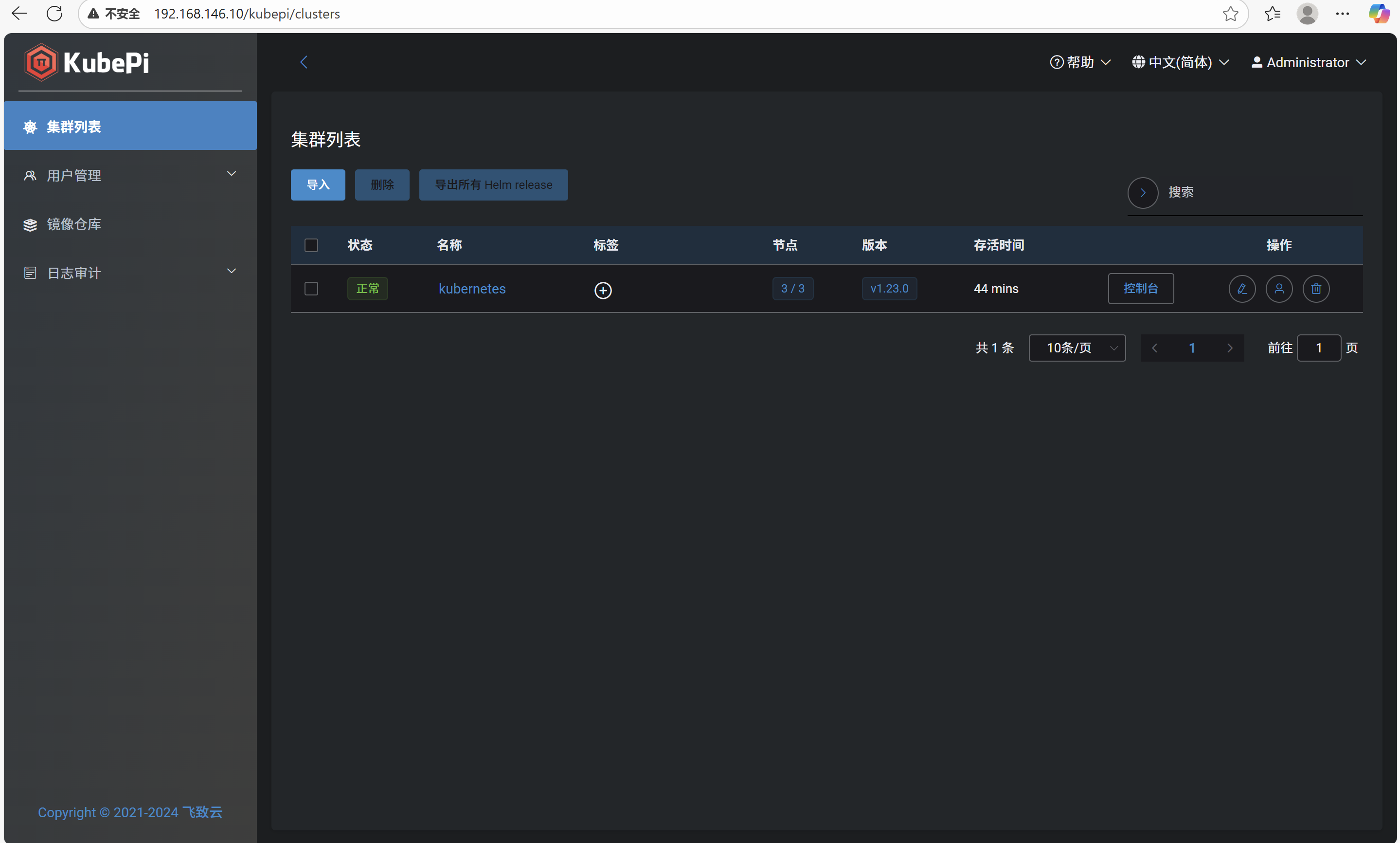
点击导入
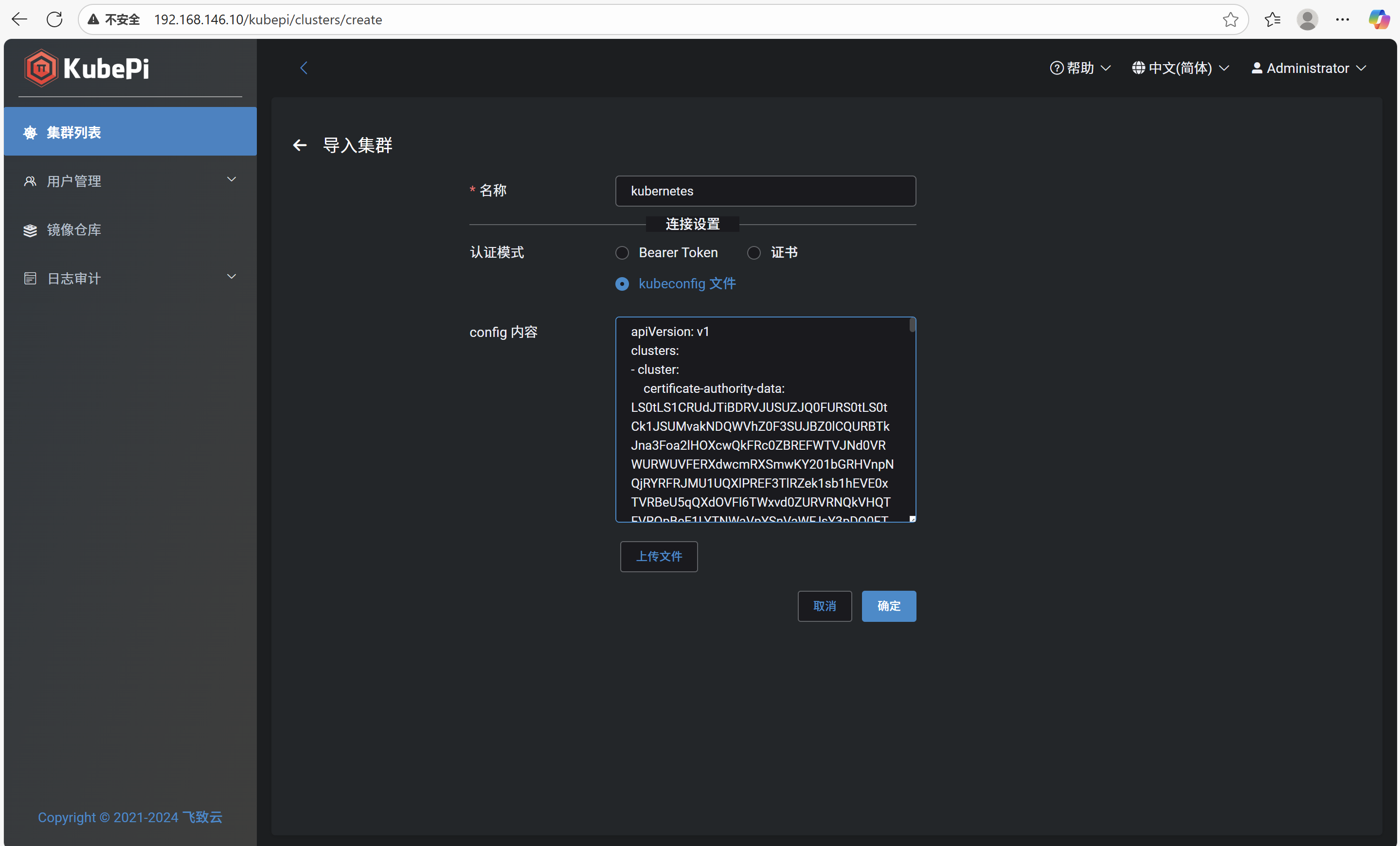
查看master上的kubeconfig文件
root@master:~# cat ~/.kube/config
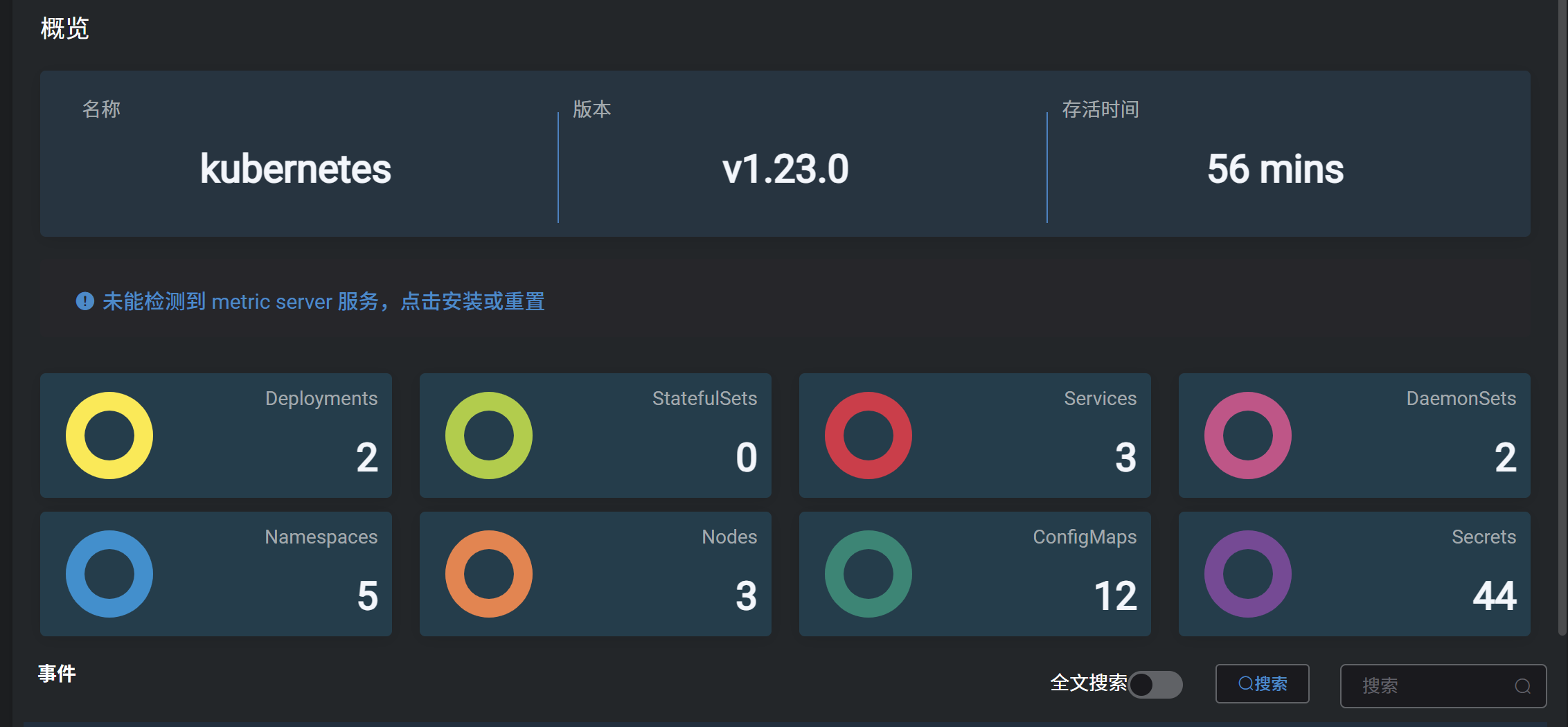
点击概览
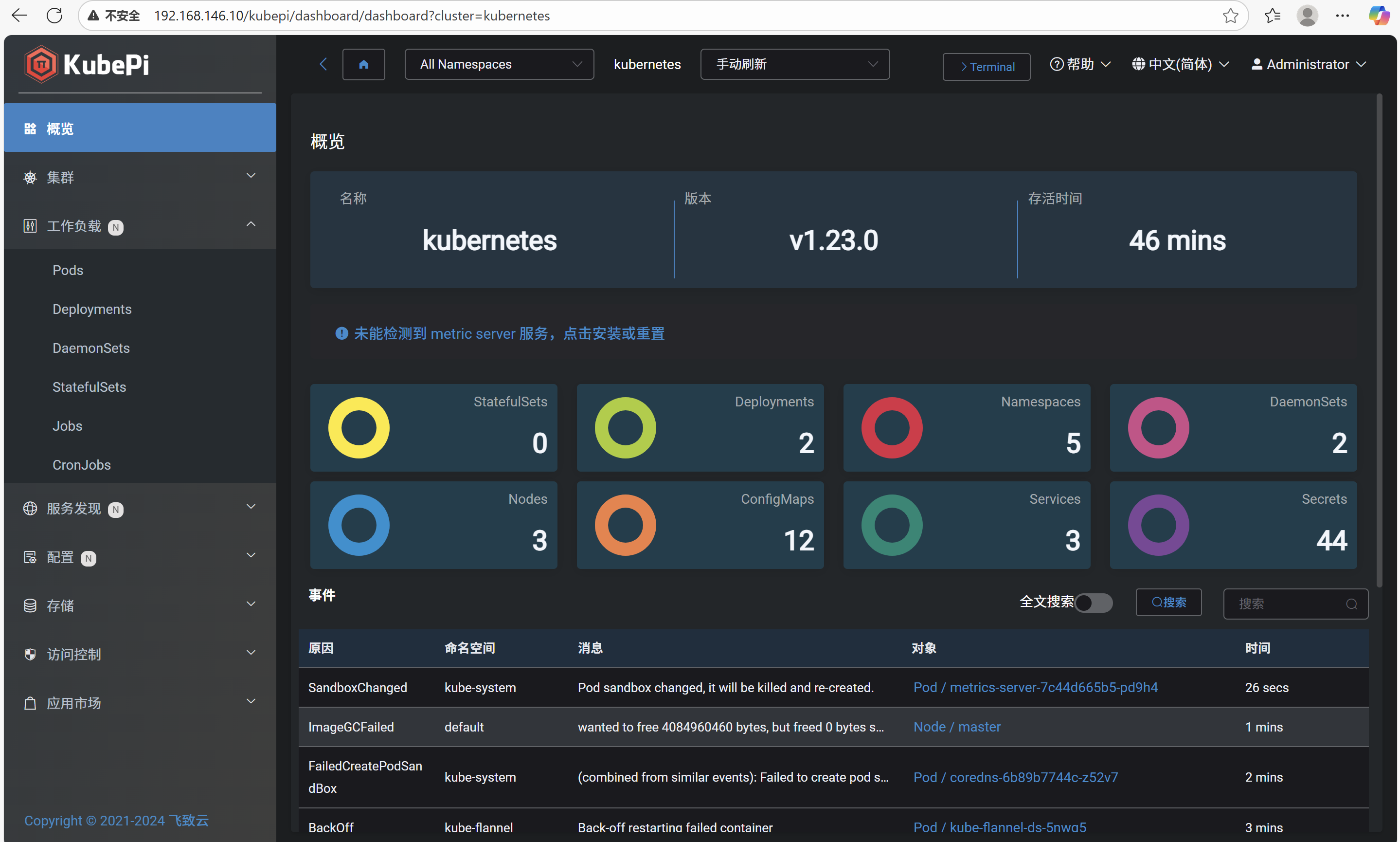
点击蓝色警告

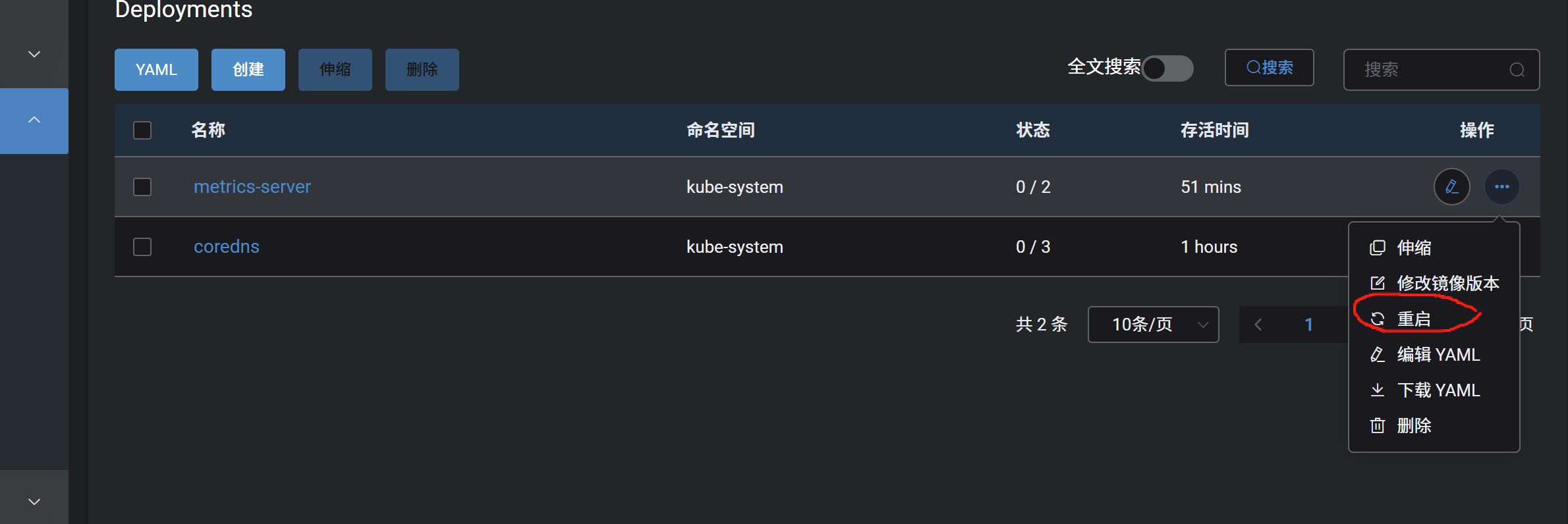
修改配置,点击工作负载,再点击Deployments,点击metrics-server操作里面的第一个按钮
++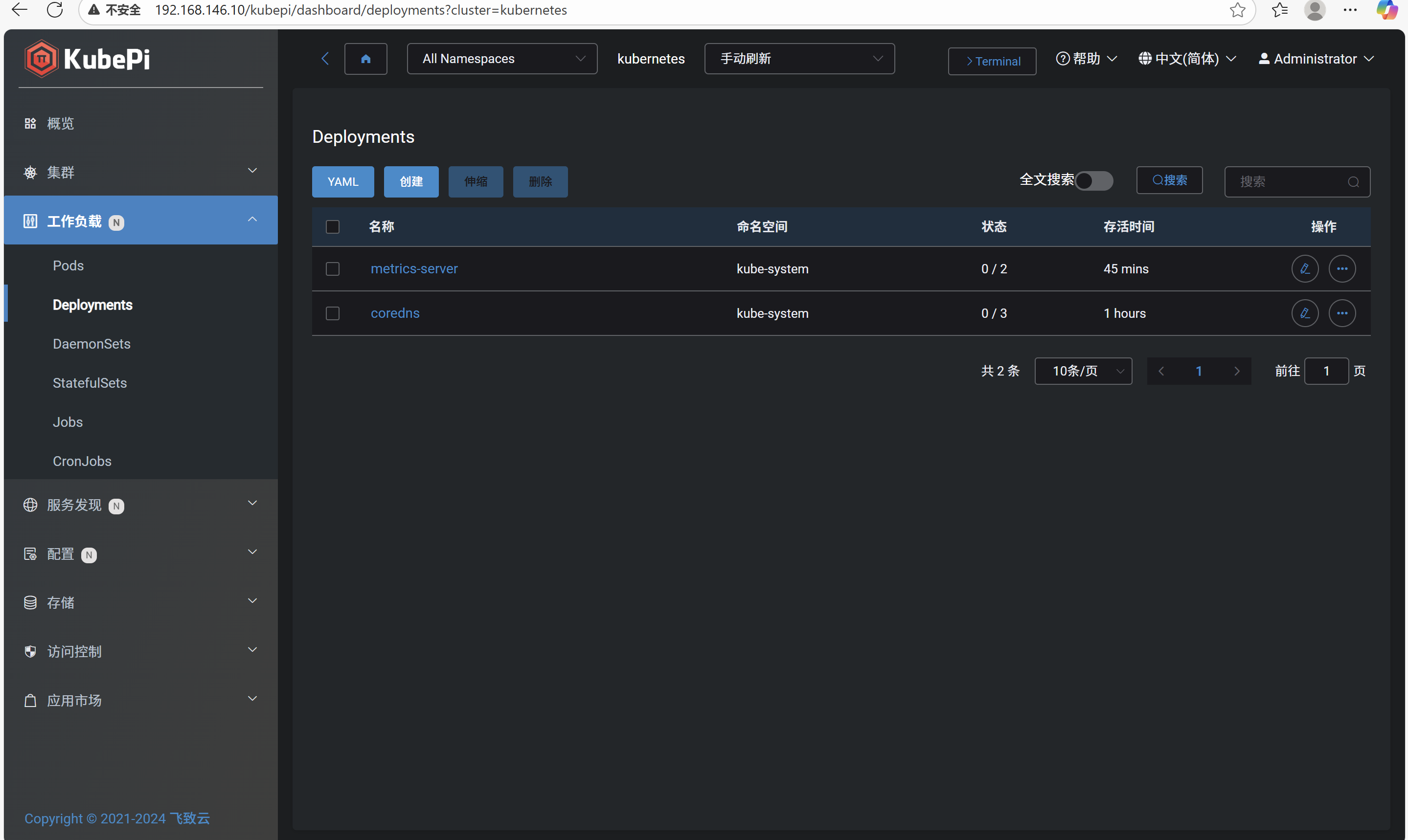 ++
++
在参数里添加:
忽略tls安全设置
--kubelet-insecure-tls
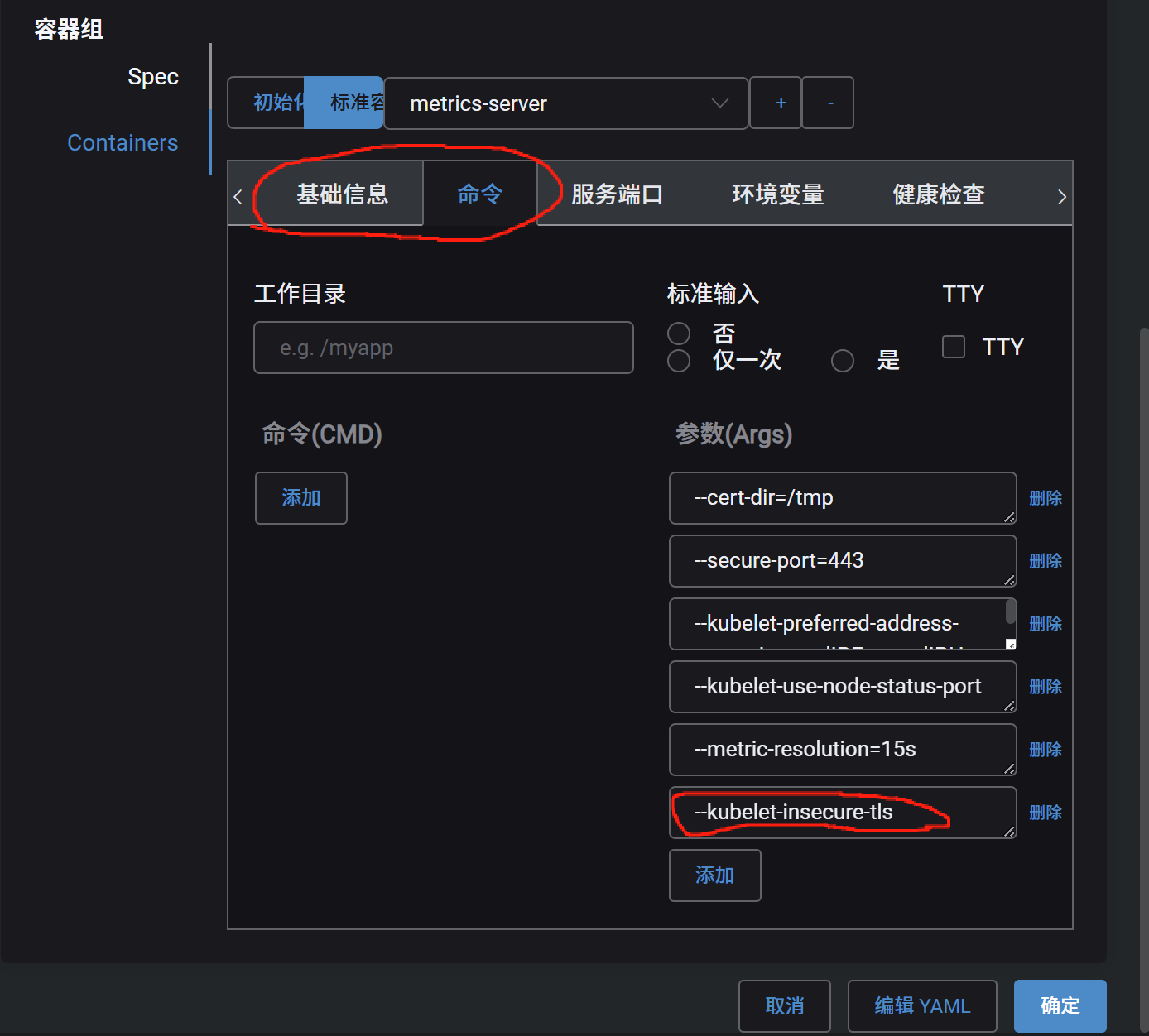
点击重启