文章目录
在winform项目开发中,需要实现渐变色。本文就详细介绍如何实现。效果如下:
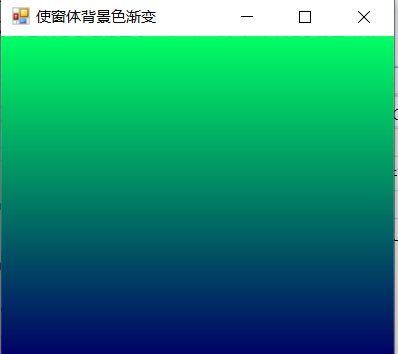
实现方案
利用Color类中FromArgb属性,通过for循环,修改color颜色,并使用Graphics类绘制
知识点
Color
FromArgb:
csharp
public static System.Drawing.Color FromArgb (int red, int green, int blue);参数:
- red :Int32 新Color的红色分量值。 有效值为 0 到 255。
- green Int32 新Color的绿色组件值。 有效值为 0 到 255。
- blue Int32 新Color的蓝色分量值。 有效值为 0 到 255。
返回
Color
csharp
Color color1 = new Color();
for(int i=0;i<=255;i++)
{
    color1.FromArgb(1,i,100);
}
SolidBrush
定义单色画笔。 画笔用于填充图形形状,如矩形、椭圆、扇形、多边形和封闭路径。 此类不能被继承。
SolidBrush(Color) 初始化指定颜色的新 SolidBrush 对象。
csharp
Color color1 = new Color();
for(int i=0;i<=255;i++)
{
    color1.FromArgb(1,i,100);
    SolidBrush SBrush = new SolidBrush(color);//实例化一个单色画笔类对象SBrush
}
Pen
定义用于绘制直线和曲线的对象。 此类不能被继承。
Pen(Brush, Single): 用指定的 Pen 和 Color 属性初始化 Width 类的新实例。
参数
- brush :Brush.一个 Brush,决定此 Pen 的特征。
- width :Single。新 Pen 的宽度。
csharp
Color color1 = new Color();
for(int i=0;i<=255;i++)
{
    color1.FromArgb(1,i,100);
    SolidBrush SBrush = new SolidBrush(color);//实例化一个单色画笔类对象SBrush
    Pen pen = new Pen(SBrush, 1);//实例化一个用于绘制直线和曲线的对象pen
}
Graphics
封装一个 GDI+ 绘图图面。 此类不能被继承。
方法
DrawRectangle:绘制由坐标对、宽度和高度指定的矩形。
DrawRectangle(Pen, Int32, Int32, Int32, Int32):绘制由坐标对、宽度和高度指定的矩形。
参数
-
pen :Pen。确定矩形的颜色、宽度和样式的 Pen。
-
x : Int32,要绘制的矩形左上角的 x 坐标。
-
y : Int32,要绘制的矩形左上角的 y 坐标。
-
width: Int32 ,要绘制的矩形的宽度。
-
height: Int32.要绘制的矩形的高度。
OnPaintBackground(PaintEventArgs)
Control.OnPaintBackground(PaintEventArgs) 方法
绘制控件的背景。
代码展示
csharp
protected override void OnPaintBackground(PaintEventArgs e)
{
    int intLocation, intHeight;//定义两个int型的变量intLocation、intHeight
    intLocation = this.ClientRectangle.Location.Y;//为变量intLocation赋值
    intHeight = this.ClientRectangle.Height / 200;//为变量intHeight赋值
    for (int i =255; i >= 0; i--)
    {
        Color color = new Color();//定义一个Color类型的实例color
        //为实例color赋值
        color = Color.FromArgb(1, i, 100);
        SolidBrush SBrush = new SolidBrush(color);//实例化一个单色画笔类对象SBrush
        Pen pen = new Pen(SBrush, 1);//实例化一个用于绘制直线和曲线的对象pen
        e.Graphics.DrawRectangle(pen, this.ClientRectangle.X, intLocation, this.Width, intLocation + intHeight);//绘制图形
        intLocation = intLocation + intHeight;//重新为变量intLocation赋值
    }
}