通过的mp4文件一般都是由 音频:AAC 视频:H264 组成
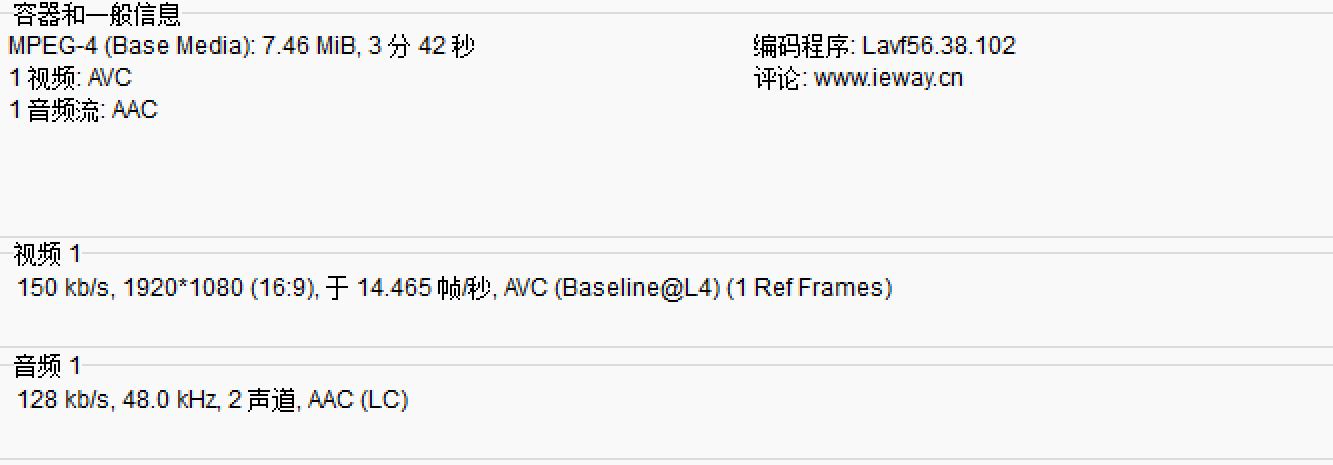
可以通过mediainfo这款软件进行查看
一.提取AAC音频
1.查找音频流
cpp
/ 1. 打开输入文件
    if ((ret = avformat_open_input(&fmt_ctx, argv[1], NULL, NULL)) < 0) {
        fprintf(stderr, "Could not open input file: %s\n", av_err2str(ret));
        return 1;
    }

    // 2. 查找流信息
    if ((ret = avformat_find_stream_info(fmt_ctx, NULL)) < 0) {
        fprintf(stderr, "Could not find stream information: %s\n", av_err2str(ret));
        avformat_close_input(&fmt_ctx);
        return 1;
    }
    // dump媒体信息
    av_dump_format(fmt_ctx, 0, argv[1], 0);

    // 3. 查找音频流
    for (int i = 0; i < fmt_ctx->nb_streams; i++) {
        if (fmt_ctx->streams[i]->codecpar->codec_type == AVMEDIA_TYPE_AUDIO) {
            audio_stream_index = i;
            break;
        }
    }
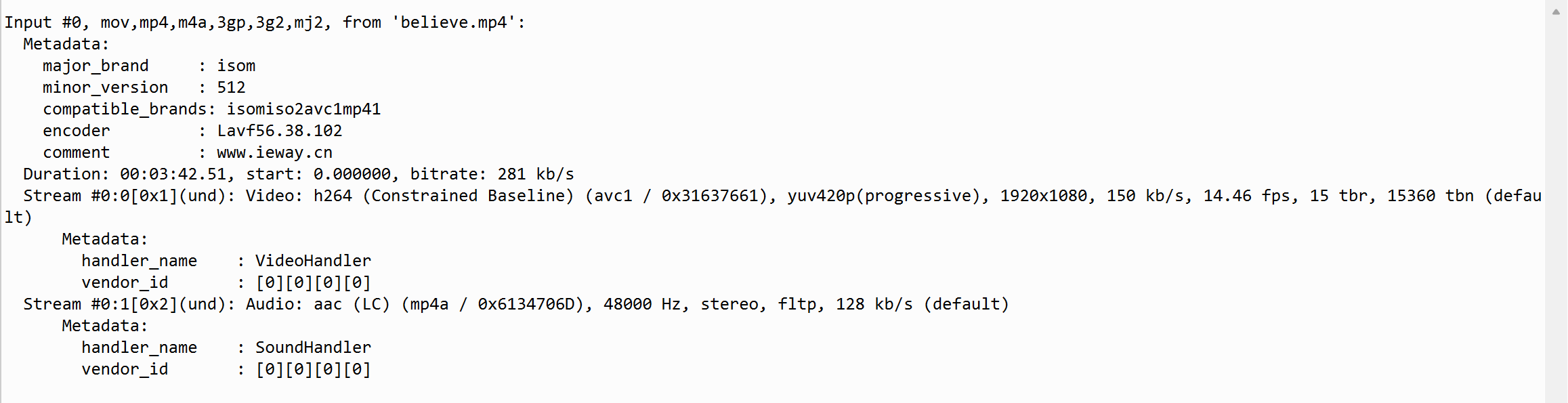
av_format_open_input avformat_find_stream_info 打开文件 初始化流信息
而av_dump_format就是打印fmt_ctx中的信息
2.读取并解码对应的音频帧
cpp
while (av_read_frame(fmt_ctx, pkt) >= 0) {
        // 只处理音频流
        if (pkt->stream_index == audio_stream_index) {
            char adts_header_buf[7] = {0};
            adts_header(adts_header_buf, pkt->size,
                        fmt_ctx->streams[audio_stream_index]->codecpar->profile,
                        fmt_ctx->streams[audio_stream_index]->codecpar->sample_rate,
                        fmt_ctx->streams[audio_stream_index]->codecpar->ch_layout.nb_channels);
              fwrite(adts_header_buf, 1, 7, outfile);  // 写adts header , ts流不适用,ts流分离出来的packet带了adts header
              int len = fwrite( pkt->data, 1, pkt->size, outfile);   // 写adts data
              if(len != pkt->size)
              {
                  av_log(NULL, AV_LOG_DEBUG, "warning, length of writed data isn't equal pkt.size(%d, %d)\n",
                         len,
                         pkt->size);
              }
            }
        av_packet_unref(pkt);
    }
对于MP4文件,通过ffmpeg解码出的 一帧aac数据 通常是没有adts_header的,至于aac音频格式可以查看一下的图片
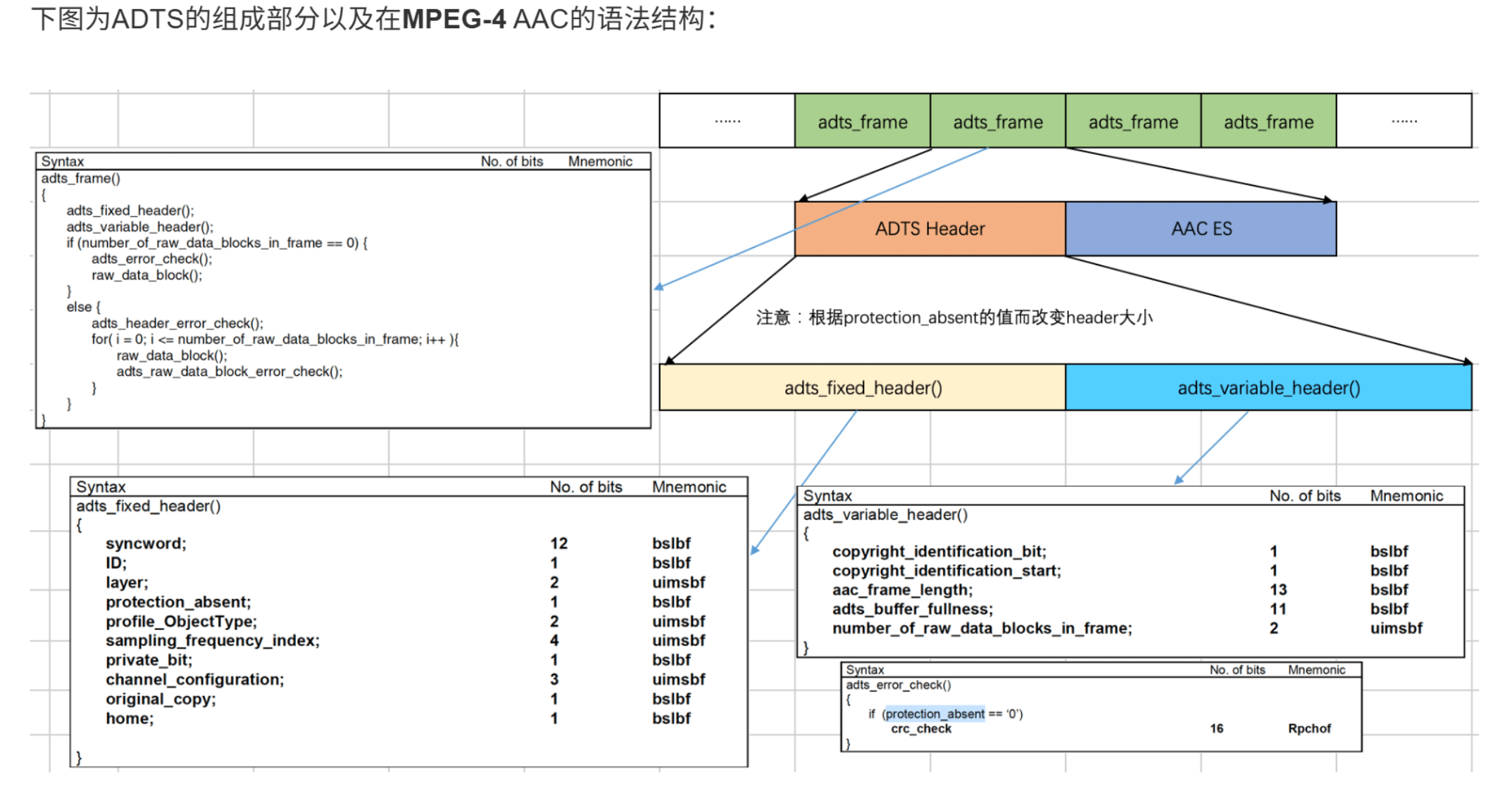
对于aac来说 要存储一帧数据 需要adts_header(固定头+可变头) + aac ES(也就是从MP4中提取的一帧数据),而对于.ts 类型的 容器 提取出来的一帧pakcet 是带有adts_header的所以不需要自己配置adts_head。
所以我们需要自己 写一个adts_header 这里注意一般aac采用的BE模式 (大端存储)
cpp
int adts_header(char * const p_adts_header, const int data_length,
const int profile, const int samplerate,
const int channels)
{
int sampling_frequency_index = 3; // 默认使用48000hz
int adtsLen = data_length + 7;
int frequencies_size = sizeof(sampling_frequencies) / sizeof(sampling_frequencies[0]);
int i = 0;
for(i = 0; i < frequencies_size; i++)
{
if(sampling_frequencies[i] == samplerate)
{
sampling_frequency_index = i;
break;
}
}
if(i >= frequencies_size)
{
printf("unsupport samplerate:%d\n", samplerate);
return -1;
}
p_adts_header[0] = 0xff; //syncword:0xfff 高8bits
p_adts_header[1] = 0xf0; //syncword:0xfff 低4bits
p_adts_header[1] |= (0 << 3); //MPEG Version:0 for MPEG-4,1 for MPEG-2 1bit
p_adts_header[1] |= (0 << 1); //Layer:0 2bits
p_adts_header[1] |= 1; //protection absent:1 1bit
p_adts_header[2] = (profile)<<6; //profile:profile 2bits
p_adts_header[2] |= (sampling_frequency_index & 0x0f)<<2; //sampling frequency index:sampling_frequency_index 4bits
p_adts_header[2] |= (0 << 1); //private bit:0 1bit
p_adts_header[2] |= (channels & 0x04)>>2; //channel configuration:channels 高1bit
p_adts_header[3] = (channels & 0x03)<<6; //channel configuration:channels 低2bits
p_adts_header[3] |= (0 << 5); //original:0 1bit
p_adts_header[3] |= (0 << 4); //home:0 1bit
p_adts_header[3] |= (0 << 3); //copyright id bit:0 1bit
p_adts_header[3] |= (0 << 2); //copyright id start:0 1bit
p_adts_header[3] |= ((adtsLen & 0x1800) >> 11); //frame length:value 高2bits
p_adts_header[4] = (uint8_t)((adtsLen & 0x7f8) >> 3); //frame length:value 中间8bits
p_adts_header[5] = (uint8_t)((adtsLen & 0x7) << 5); //frame length:value 低3bits
p_adts_header[5] |= 0x1f; //buffer fullness:0x7ff 高5bits
p_adts_header[6] = 0xfc; //11111100 //buffer fullness:0x7ff 低6bits
// number_of_raw_data_blocks_in_frame:
// 表示ADTS帧中有number_of_raw_data_blocks_in_frame + 1个AAC原始帧。
return 0;
}然后再先写入adts_header 再写入 pkt
最后通过ffplay 就可以播放这个音频了
3.完整代码
cpp
#include <stdio.h>
#include <stdlib.h>
#include <libavformat/avformat.h>
#include <libavcodec/avcodec.h>
#include <libavutil/opt.h>
#include <libavutil/channel_layout.h>
#include <libavutil/samplefmt.h>
const int sampling_frequencies[] = {
96000, // 0x0
88200, // 0x1
64000, // 0x2
48000, // 0x3
44100, // 0x4
32000, // 0x5
24000, // 0x6
22050, // 0x7
16000, // 0x8
12000, // 0x9
11025, // 0xa
8000 // 0xb
// 0xc d e f是保留的
};
int adts_header(char * const p_adts_header, const int data_length,
const int profile, const int samplerate,
const int channels)
{
int sampling_frequency_index = 3; // 默认使用48000hz
int adtsLen = data_length + 7;
int frequencies_size = sizeof(sampling_frequencies) / sizeof(sampling_frequencies[0]);
int i = 0;
for(i = 0; i < frequencies_size; i++)
{
if(sampling_frequencies[i] == samplerate)
{
sampling_frequency_index = i;
break;
}
}
if(i >= frequencies_size)
{
printf("unsupport samplerate:%d\n", samplerate);
return -1;
}
p_adts_header[0] = 0xff; //syncword:0xfff 高8bits
p_adts_header[1] = 0xf0; //syncword:0xfff 低4bits
p_adts_header[1] |= (0 << 3); //MPEG Version:0 for MPEG-4,1 for MPEG-2 1bit
p_adts_header[1] |= (0 << 1); //Layer:0 2bits
p_adts_header[1] |= 1; //protection absent:1 1bit
p_adts_header[2] = (profile)<<6; //profile:profile 2bits
p_adts_header[2] |= (sampling_frequency_index & 0x0f)<<2; //sampling frequency index:sampling_frequency_index 4bits
p_adts_header[2] |= (0 << 1); //private bit:0 1bit
p_adts_header[2] |= (channels & 0x04)>>2; //channel configuration:channels 高1bit
p_adts_header[3] = (channels & 0x03)<<6; //channel configuration:channels 低2bits
p_adts_header[3] |= (0 << 5); //original:0 1bit
p_adts_header[3] |= (0 << 4); //home:0 1bit
p_adts_header[3] |= (0 << 3); //copyright id bit:0 1bit
p_adts_header[3] |= (0 << 2); //copyright id start:0 1bit
p_adts_header[3] |= ((adtsLen & 0x1800) >> 11); //frame length:value 高2bits
p_adts_header[4] = (uint8_t)((adtsLen & 0x7f8) >> 3); //frame length:value 中间8bits
p_adts_header[5] = (uint8_t)((adtsLen & 0x7) << 5); //frame length:value 低3bits
p_adts_header[5] |= 0x1f; //buffer fullness:0x7ff 高5bits
p_adts_header[6] = 0xfc; //11111100 //buffer fullness:0x7ff 低6bits
// number_of_raw_data_blocks_in_frame:
// 表示ADTS帧中有number_of_raw_data_blocks_in_frame + 1个AAC原始帧。
return 0;
}
int main(int argc, char *argv[]) {
AVFormatContext *fmt_ctx = NULL;
AVPacket *pkt = NULL;
FILE *outfile = NULL;
int audio_stream_index = -1;
int ret;
if (argc != 3) {
fprintf(stderr, "Usage: %s <input.mp3> <output.pcm>\n", argv[0]);
return 1;
}
// 1. 打开输入文件
if ((ret = avformat_open_input(&fmt_ctx, argv[1], NULL, NULL)) < 0) {
fprintf(stderr, "Could not open input file: %s\n", av_err2str(ret));
return 1;
}
// 2. 查找流信息
if ((ret = avformat_find_stream_info(fmt_ctx, NULL)) < 0) {
fprintf(stderr, "Could not find stream information: %s\n", av_err2str(ret));
avformat_close_input(&fmt_ctx);
return 1;
}
// dump媒体信息
av_dump_format(fmt_ctx, 0, argv[1], 0);
// 3. 查找音频流
for (int i = 0; i < fmt_ctx->nb_streams; i++) {
if (fmt_ctx->streams[i]->codecpar->codec_type == AVMEDIA_TYPE_AUDIO) {
audio_stream_index = i;
break;
}
}
if (audio_stream_index == -1) {
fprintf(stderr, "Could not find audio stream\n");
avformat_close_input(&fmt_ctx);
return 1;
}
// 8. 打开输出文件
outfile = fopen(argv[2], "wb");
// 9. 分配帧和包
pkt = av_packet_alloc();
// 10. 读取并解码所有帧
while (av_read_frame(fmt_ctx, pkt) >= 0) {
// 只处理音频流
if (pkt->stream_index == audio_stream_index) {
char adts_header_buf[7] = {0};
adts_header(adts_header_buf, pkt->size,
fmt_ctx->streams[audio_stream_index]->codecpar->profile,
fmt_ctx->streams[audio_stream_index]->codecpar->sample_rate,
fmt_ctx->streams[audio_stream_index]->codecpar->ch_layout.nb_channels);
fwrite(adts_header_buf, 1, 7, outfile); // 写adts header , ts流不适用,ts流分离出来的packet带了adts header
int len = fwrite( pkt->data, 1, pkt->size, outfile); // 写adts data
if(len != pkt->size)
{
av_log(NULL, AV_LOG_DEBUG, "warning, length of writed data isn't equal pkt.size(%d, %d)\n",
len,
pkt->size);
}
}
av_packet_unref(pkt);
}
failed:
// 关闭输入文件
if(fmt_ctx)
{
avformat_close_input(&fmt_ctx);
}
if(outfile)
{
fclose(outfile);
}
return 0;
}二.提取H264(AVC)视频
1.读取文件并读取码率信息
cpp
if(argc < 3)
    {
        printf("usage inputfile outfile\n");
        return -1;
    }
    FILE *outfp=fopen(argv[2],"wb");
    printf("in:%s out:%s\n", argv[1], argv[2]);

    // 根据url打开码流,并选择匹配的解复用器
    ret = avformat_open_input(&ifmt_ctx,argv[1], NULL, NULL);
    if(ret != 0)
    {
        printf("[error]avformat_open_input: %s\n", av_get_err(ret));
        return -1;
    }

    // 读取媒体文件的部分数据包以获取码流信息
    ret = avformat_find_stream_info(ifmt_ctx, NULL);
    if(ret < 0)
    {
        printf("[error]avformat_find_stream_info: %s\n", av_get_err(ret));
        avformat_close_input(&ifmt_ctx);
        return -1;
    }

    // 查找出哪个码流是video/audio/subtitles
    videoindex = -1;
    // 推荐的方式
    videoindex = av_find_best_stream(ifmt_ctx, AVMEDIA_TYPE_VIDEO, -1, -1, NULL, 0);
    if(videoindex == -1)
    {
        printf("Didn't find a video stream.\n");
        avformat_close_input(&ifmt_ctx);
        return -1;
    }

    // 分配数据包
    pkt = av_packet_alloc();
2.配置比特流过滤器
什么是比特流过滤器?
比特流过滤器 是FFmpeg中一种特殊的处理模块,它的作用是在不进行完整解码(不解开压缩) 的情况下,对已编码的压缩数据流 (如H.264、AAC数据包)本身的封装格式或元数据进行转换、修正或补充,使其符合另一种标准或协议的要求。
简单来说就是虽然mp4文件中存放的确实是 压缩的H264数据包但是 它的格式相比正常的H264流有区别,也就是说数据确实通过H264进行压缩的,但是封装格式有区别,像我们前面提取AAC音频流,通过加入adts_header这个操作本身就是相当于在使用比特流过滤器

cpp
 const AVBitStreamFilter *bsfilter = av_bsf_get_by_name("h264_mp4toannexb");
    AVBSFContext *bsf_ctx = NULL;
    // 2 初始化过滤器上下文
    av_bsf_alloc(bsfilter, &bsf_ctx); //AVBSFContext;
    // 3 添加解码器属性
    avcodec_parameters_copy(bsf_ctx->par_in, ifmt_ctx->streams[videoindex]->codecpar);
    av_bsf_init(bsf_ctx);
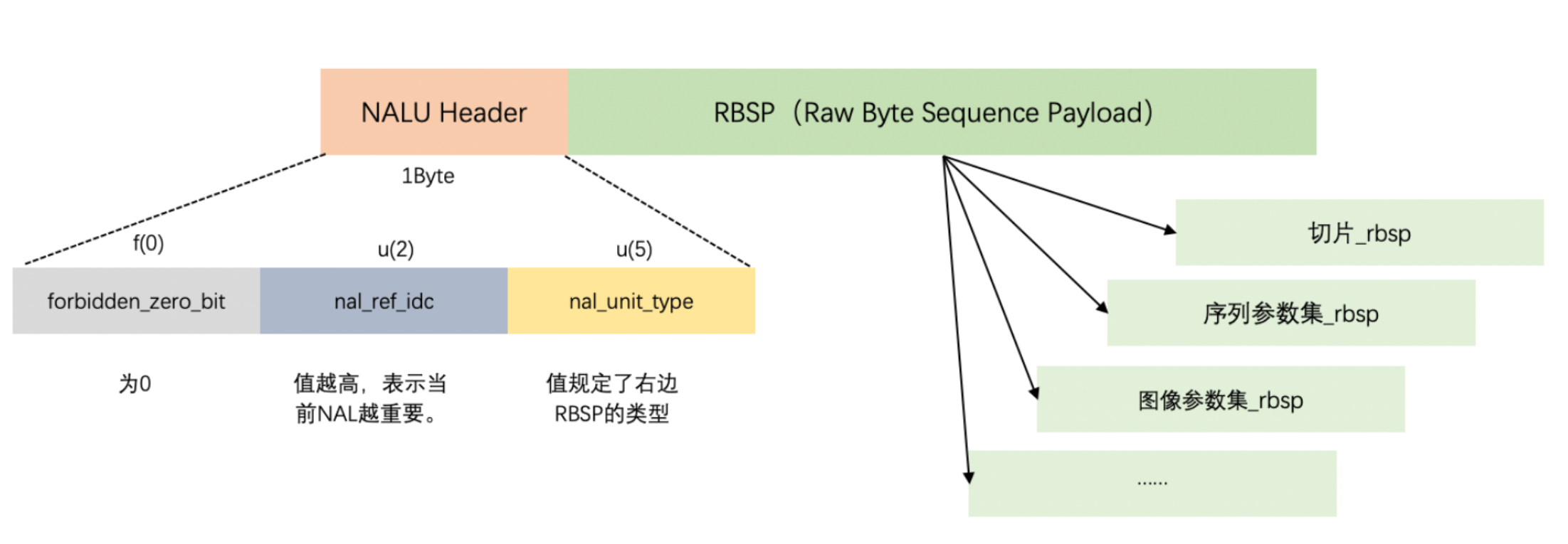
MP4的 AAC 格式 是 【NALU长度】【NALU】
而AAC流格式是startcode NALU startcode NALU startcode可以理解成一个标记NALU开始的一个标识符通常是00000001或者000001 ,所以说我们需要通过 重封装NALU 后 才是一个标准的 H264流数据,而对于TS容器的 一帧数据 可以直接写入 文件,因为他存储的是标准的H264流数据。
具体的AAC 格式 可以参考视频编码之H.264 · 秦城季&音视频 这篇的介绍。
3.从容器MP4中读取 帧数据,并将帧数据发道 比特流过滤器,通过recieve接收处理好的一帧NALU,然后写入文件。
cpp
while (0 == file_end)
    {
        if((ret = av_read_frame(ifmt_ctx, pkt)) < 0)
        {
            // 没有更多包可读
            file_end = 1;
            printf("read file end: ret:%d\n", ret);
        }
        if(ret == 0 && pkt->stream_index == videoindex)
        {
    int input_size = pkt->size;
            int out_pkt_count = 0;
            if (av_bsf_send_packet(bsf_ctx, pkt) != 0) // bitstreamfilter内部去维护内存空间
            {
                av_packet_unref(pkt);   // 你不用了就把资源释放掉
                continue;       // 继续送
            }
            av_packet_unref(pkt);   // 释放资源
            while(av_bsf_receive_packet(bsf_ctx, pkt) == 0)
            {
                out_pkt_count++;
                // printf("fwrite size:%d\n", pkt->size);
                size_t size = fwrite(pkt->data, 1, pkt->size, outfp);
                if(size != pkt->size)
                {
                    printf("fwrite failed-> write:%u, pkt_size:%u\n", size, pkt->size);
                }
                av_packet_unref(pkt);
            }
            if(out_pkt_count >= 2)
            {
                printf("cur pkt(size:%d) only get 1 out pkt, it get %d pkts\n",
                       input_size, out_pkt_count);
            }
 }
        else
        {
            if(ret == 0)
                av_packet_unref(pkt);        // 释放内存
        }
    }
4.完整代码
cpp
#include <stdio.h>
#include <libavutil/log.h>
#include <libavformat/avio.h>
#include <libavformat/avformat.h>
#include <libavcodec/bsf.h>


static char err_buf[128] = {0};
static char* av_get_err(int errnum)
{
    av_strerror(errnum, err_buf, 128);
    return err_buf;
}

/*
AvCodecContext->extradata[]中为nalu长度
*   codec_extradata:
*   1, 64, 0, 1f, ff, e1, [0, 18], 67, 64, 0, 1f, ac, c8, 60, 78, 1b, 7e,
*   78, 40, 0, 0, fa, 40, 0, 3a, 98, 3, c6, c, 66, 80,
*   1, [0, 5],68, e9, 78, bc, b0, 0,
*/

//ffmpeg -i 2018.mp4 -codec copy -bsf:h264_mp4toannexb -f h264 tmp.h264
//ffmpeg 从mp4上提取H264的nalu h
int main(int argc, char **argv)
{
    AVFormatContext *ifmt_ctx = NULL;
    int             videoindex = -1;
    AVPacket        *pkt = NULL;
    int             ret = -1;
    int             file_end = 0; // 文件是否读取结束

    if(argc < 3)
    {
        printf("usage inputfile outfile\n");
        return -1;
    }
    FILE *outfp=fopen(argv[2],"wb");
    printf("in:%s out:%s\n", argv[1], argv[2]);

    // 根据url打开码流,并选择匹配的解复用器
    ret = avformat_open_input(&ifmt_ctx,argv[1], NULL, NULL);
    if(ret != 0)
    {
        printf("[error]avformat_open_input: %s\n", av_get_err(ret));
        return -1;
    }

    // 读取媒体文件的部分数据包以获取码流信息
    ret = avformat_find_stream_info(ifmt_ctx, NULL);
    if(ret < 0)
    {
        printf("[error]avformat_find_stream_info: %s\n", av_get_err(ret));
        avformat_close_input(&ifmt_ctx);
        return -1;
    }

    // 查找出哪个码流是video/audio/subtitles
    videoindex = -1;
    // 推荐的方式
    videoindex = av_find_best_stream(ifmt_ctx, AVMEDIA_TYPE_VIDEO, -1, -1, NULL, 0);
    if(videoindex == -1)
    {
        printf("Didn't find a video stream.\n");
        avformat_close_input(&ifmt_ctx);
        return -1;
    }

    // 分配数据包
    pkt = av_packet_alloc();

    // 1 获取相应的比特流过滤器
    //FLV/MP4/MKV等结构中,h264需要h264_mp4toannexb处理。添加SPS/PPS等信息。
    // FLV封装时,可以把多个NALU放在一个VIDEO TAG中,结构为4B NALU长度+NALU1+4B NALU长度+NALU2+...,
    // 需要做的处理把4B长度换成00000001或者000001
    const AVBitStreamFilter *bsfilter = av_bsf_get_by_name("h264_mp4toannexb");
    AVBSFContext *bsf_ctx = NULL;
    // 2 初始化过滤器上下文
    av_bsf_alloc(bsfilter, &bsf_ctx); //AVBSFContext;
    // 3 添加解码器属性
    avcodec_parameters_copy(bsf_ctx->par_in, ifmt_ctx->streams[videoindex]->codecpar);
    av_bsf_init(bsf_ctx);

    file_end = 0;
    while (0 == file_end)
    {
        if((ret = av_read_frame(ifmt_ctx, pkt)) < 0)
        {
            // 没有更多包可读
            file_end = 1;
            printf("read file end: ret:%d\n", ret);
        }
        if(ret == 0 && pkt->stream_index == videoindex)
        {
#if 1
            int input_size = pkt->size;
            int out_pkt_count = 0;
            if (av_bsf_send_packet(bsf_ctx, pkt) != 0) // bitstreamfilter内部去维护内存空间
            {
                av_packet_unref(pkt);   // 你不用了就把资源释放掉
                continue;       // 继续送
            }
            av_packet_unref(pkt);   // 释放资源
            while(av_bsf_receive_packet(bsf_ctx, pkt) == 0)
            {
                out_pkt_count++;
                // printf("fwrite size:%d\n", pkt->size);
                size_t size = fwrite(pkt->data, 1, pkt->size, outfp);
                if(size != pkt->size)
                {
                    printf("fwrite failed-> write:%u, pkt_size:%u\n", size, pkt->size);
                }
                av_packet_unref(pkt);
            }
            if(out_pkt_count >= 2)
            {
                printf("cur pkt(size:%d) only get 1 out pkt, it get %d pkts\n",
                       input_size, out_pkt_count);
            }
#else       // TS流可以直接写入
            size_t size = fwrite(pkt->data, 1, pkt->size, outfp);
            if(size != pkt->size)
            {
                printf("fwrite failed-> write:%u, pkt_size:%u\n", size, pkt->size);
            }
            av_packet_unref(pkt);
#endif
        }
        else
        {
            if(ret == 0)
                av_packet_unref(pkt);        // 释放内存
        }
    }
    if(outfp)
        fclose(outfp);
    if(bsf_ctx)
        av_bsf_free(&bsf_ctx);
    if(pkt)
        av_packet_free(&pkt);
    if(ifmt_ctx)
        avformat_close_input(&ifmt_ctx);
    printf("finish\n");

    return 0;
}