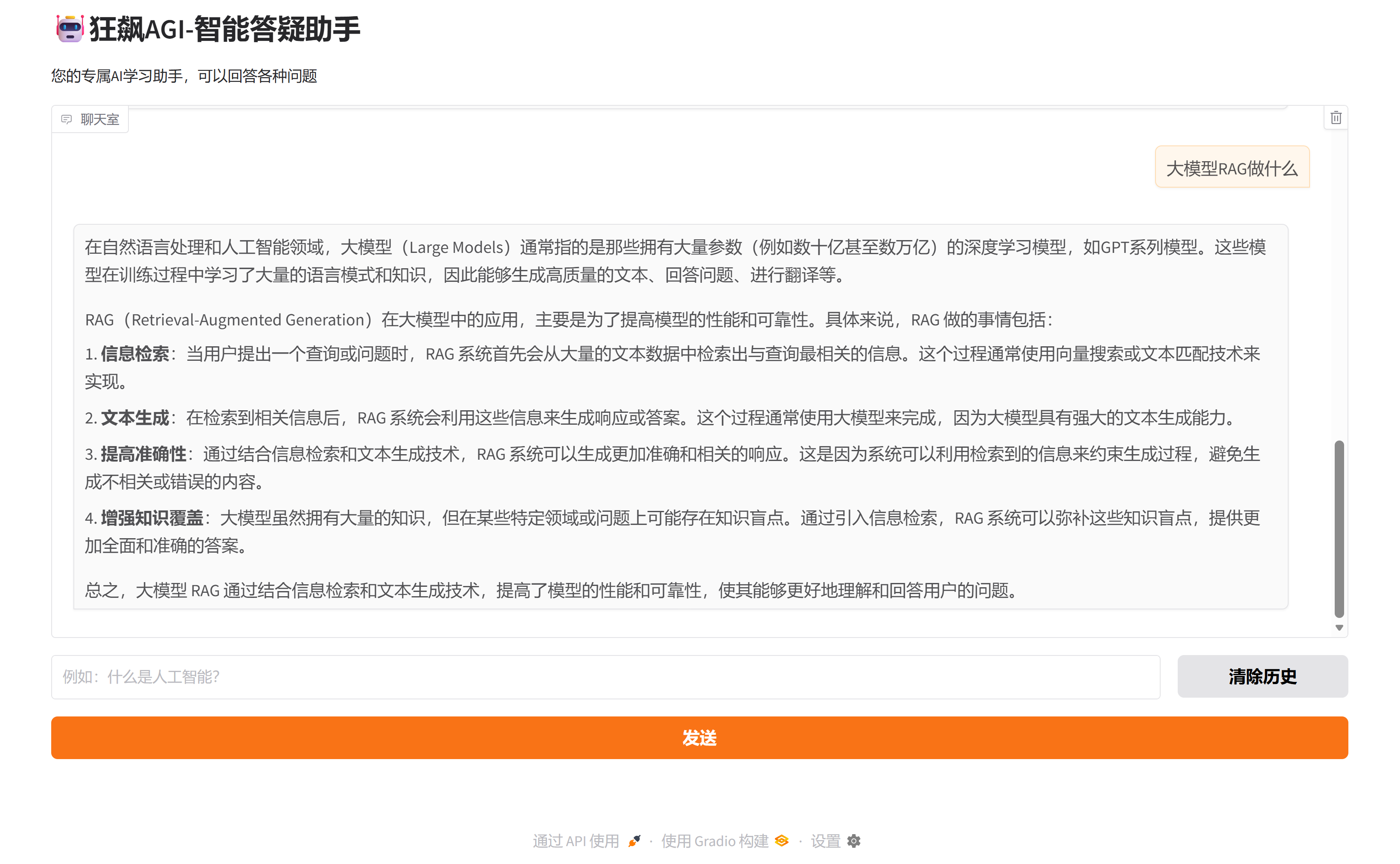
狂飙AGI-智能答疑助手
-
-
- 一、项目展示
- 二、环境准备
-
- [1 智谱API Key获取](#1 智谱API Key获取)
-
- [1.1 登录官网](#1.1 登录官网)
- [1.2 添加新的API Key](#1.2 添加新的API Key)
- [1.3 点击复制API Key(备用)](#1.3 点击复制API Key(备用))
- [2 虚拟环境配置](#2 虚拟环境配置)
-
- [2.1 创建虚拟环境](#2.1 创建虚拟环境)
- [2.2 安装依赖包](#2.2 安装依赖包)
- 三、代码实现
-
-
- [3.1 导入依赖包](#3.1 导入依赖包)
- [3.2 设置API Key](#3.2 设置API Key)
- [3.3 设置Chatbot类](#3.3 设置Chatbot类)
- [3.4 定义记忆返回函数及记忆清除函数](#3.4 定义记忆返回函数及记忆清除函数)
- [3.5 Gradio界面构建](#3.5 Gradio界面构建)
- [3.6 项目完整代码](#3.6 项目完整代码)
-
- 四、效果演示
-
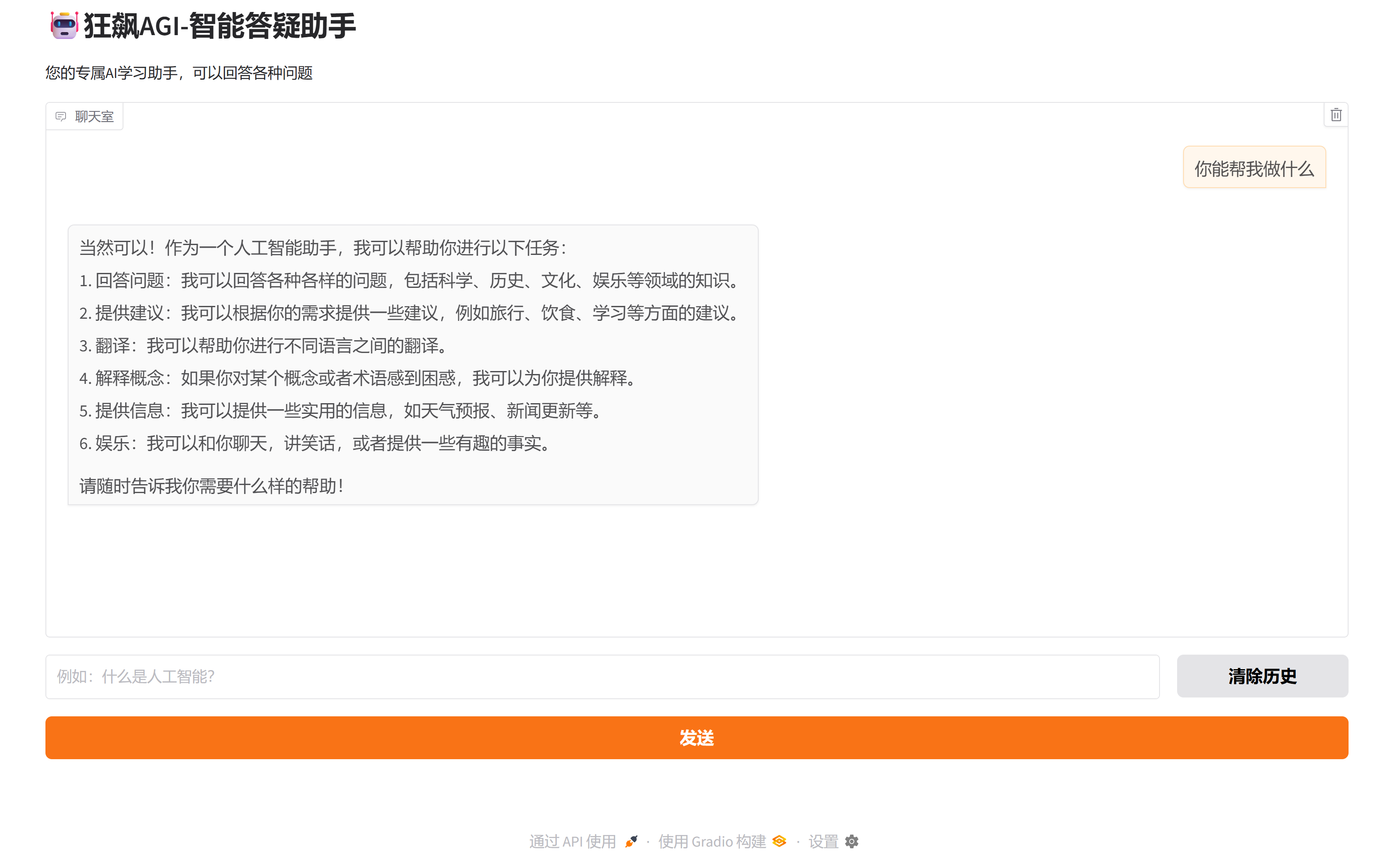
一、项目展示
二、环境准备
1 智谱API Key获取
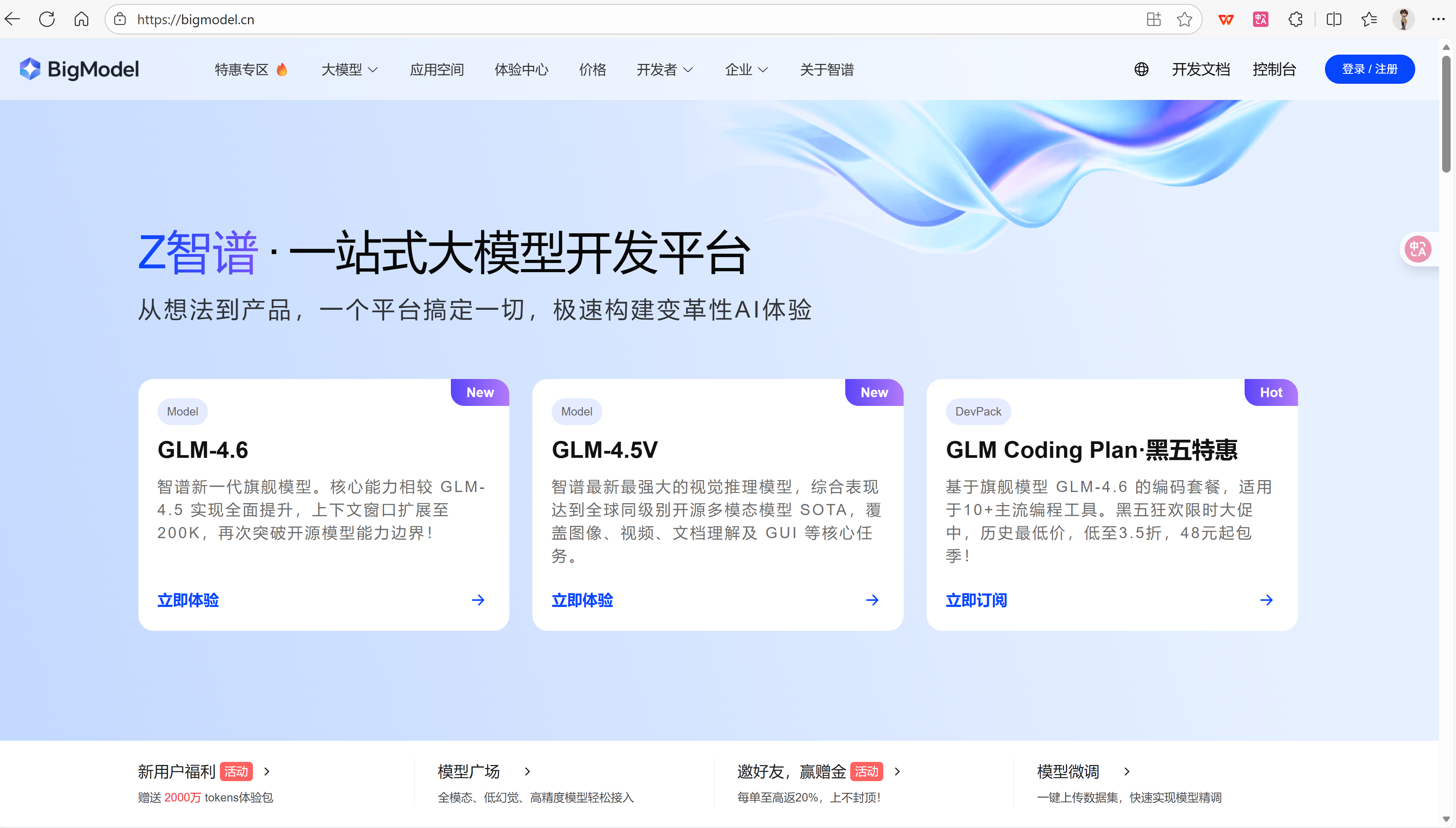
1.1 登录官网
官网网址 :https://bigmodel.cn/
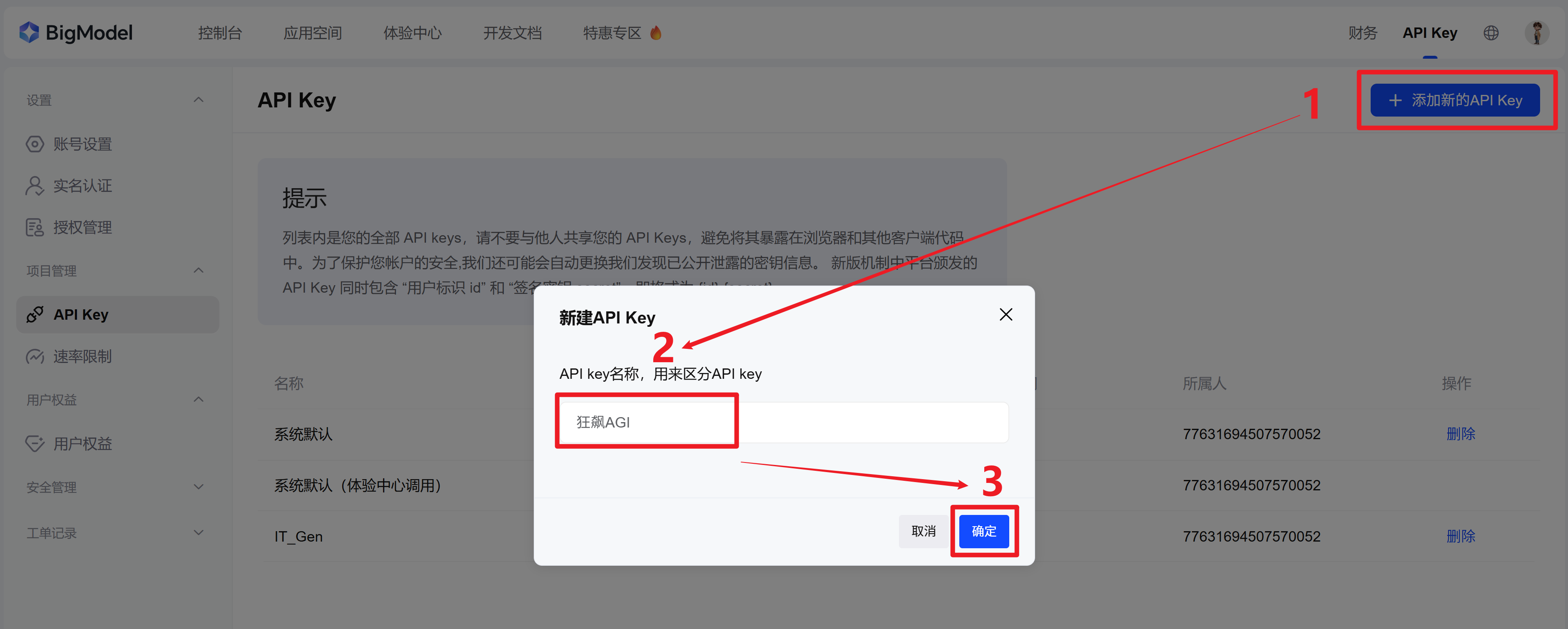
1.2 添加新的API Key
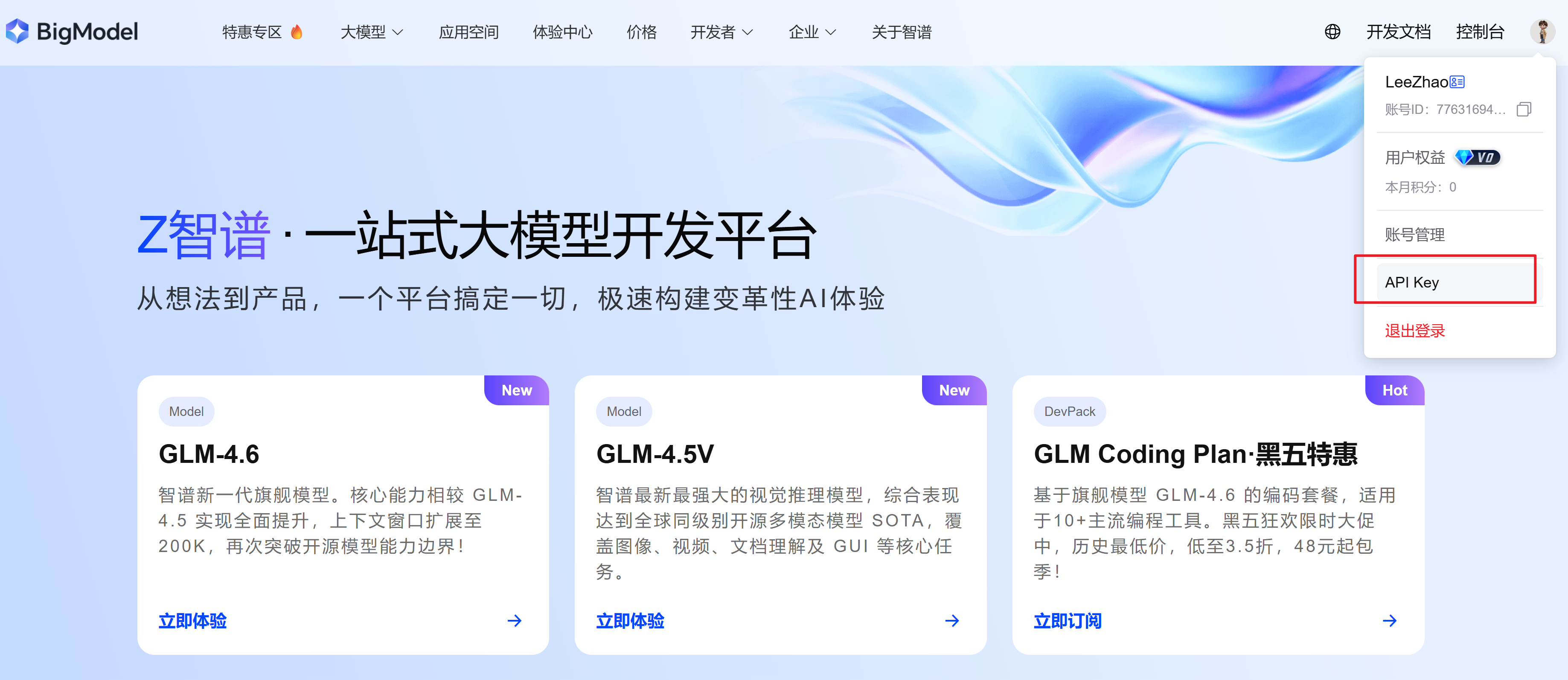
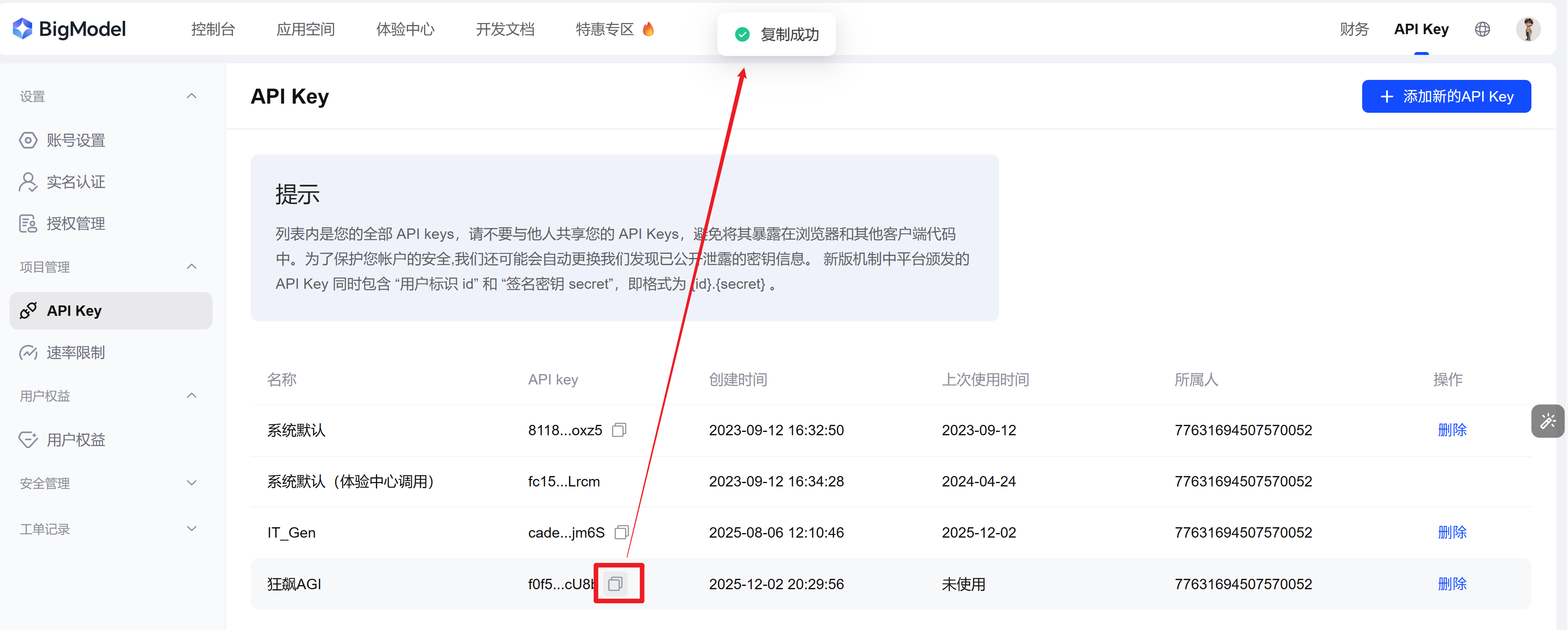
1.3 点击复制API Key(备用)
2 虚拟环境配置
2.1 创建虚拟环境
shell
conda create -n KBAGI python=3.102.2 安装依赖包
bash
pip install openai gradio三、代码实现
3.1 导入依赖包
python
import gradio as gr
from openai import OpenAI
3.2 设置API Key
python
Zhipu_API_KEY="XXXXXXXXXX【替换为1.3复制的API Key】XXXXXXXXXXXXXX"
Zhipu_base_url="https://open.bigmodel.cn/api/paas/v4/"
3.3 设置Chatbot类
python
class ChatBot:
    def __init__(self):
        self.client = OpenAI(
            api_key=Zhipu_API_KEY,
            base_url=Zhipu_base_url
        )
        self.conversation = [
            {"role": "system", "content": "你是一个有用的AI助手"}
        ]

    def chat(self, user_input: str) -> str:
        # 添加用户消息
        self.conversation.append({"role": "user", "content": user_input})

        # 调用API
        response = self.client.chat.completions.create(
            model="glm-4-air-250414",
            messages=self.conversation,
            temperature=0.7
        )

        # 获取AI回复
        ai_response = response.choices[0].message.content

        # 添加到对话历史
        self.conversation.append({"role": "assistant", "content": ai_response})

        return ai_response

    def clear_history(self):
        """清除对话历史,保留系统提示"""
        self.conversation = self.conversation[:1]

# 创建全局聊天机器人实例
bot = ChatBot()
3.4 定义记忆返回函数及记忆清除函数
python
def respond(message, history):
    """
    处理用户输入并返回AI回复
    """
    try:
        response = bot.chat(message)
        # 将新消息添加到历史记录中
        history.append({"role": "user", "content": message})
        history.append({"role": "assistant", "content": response})
        return history
    except Exception as e:
        error_msg = f"抱歉,我遇到了一个错误: {str(e)}"
        history.append({"role": "user", "content": message})
        history.append({"role": "assistant", "content": error_msg})
        return history

def clear_chat_history():
    """
    清除聊天历史
    """
    bot.clear_history()
    return []
3.5 Gradio界面构建
python
with gr.Blocks(title="狂飙AGI-智能答疑助手") as demo:
    gr.Markdown("# 🤖狂飙AGI-智能答疑助手")
    gr.Markdown("您的专属AI学习助手,可以回答各种问题")

    # 聊天界面
    chatbot = gr.Chatbot(
        label="聊天室",
        height=500,
        type="messages"
    )

    # 输入组件
    with gr.Row():
        msg = gr.Textbox(
            label="输入您的问题",
            placeholder="例如:什么是人工智能?",
            container=False,
            scale=9
        )
        clear_btn = gr.Button("清除历史", scale=1)

    # 提交按钮
    submit_btn = gr.Button("发送", variant="primary")

    # 绑定事件
    # 当用户按下回车或点击发送按钮时提交
    msg.submit(respond, [msg, chatbot], [chatbot]).then(
        lambda: "", None, msg, queue=False
    )
    submit_btn.click(respond, [msg, chatbot], [chatbot]).then(
        lambda: "", None, msg, queue=False
    )

    # 清除历史按钮
    clear_btn.click(clear_chat_history, None, chatbot, queue=False)

if __name__ == "__main__":
    demo.launch()
3.6 项目完整代码
python
import gradio as gr
from openai import OpenAI

Zhipu_API_KEY="XXXXXXXXXX【替换为1.3复制的API Key】XXXXXXXXXXXXXX"
Zhipu_base_url="https://open.bigmodel.cn/api/paas/v4/"

class ChatBot:
    def __init__(self):
        self.client = OpenAI(
            api_key=Zhipu_API_KEY,
            base_url=Zhipu_base_url
        )
        self.conversation = [
            {"role": "system", "content": "你是一个有用的AI助手"}
        ]

    def chat(self, user_input: str) -> str:
        # 添加用户消息
        self.conversation.append({"role": "user", "content": user_input})

        # 调用API
        response = self.client.chat.completions.create(
            model="glm-4-air-250414",
            messages=self.conversation,
            temperature=0.7
        )

        # 获取AI回复
        ai_response = response.choices[0].message.content

        # 添加到对话历史
        self.conversation.append({"role": "assistant", "content": ai_response})

        return ai_response

    def clear_history(self):
        """清除对话历史,保留系统提示"""
        self.conversation = self.conversation[:1]

# 创建全局聊天机器人实例
bot = ChatBot()

def respond(message, history):
    """
    处理用户输入并返回AI回复
    """
    try:
        response = bot.chat(message)
        # 将新消息添加到历史记录中
        history.append({"role": "user", "content": message})
        history.append({"role": "assistant", "content": response})
        return history
    except Exception as e:
        error_msg = f"抱歉,我遇到了一个错误: {str(e)}"
        history.append({"role": "user", "content": message})
        history.append({"role": "assistant", "content": error_msg})
        return history

def clear_chat_history():
    """
    清除聊天历史
    """
    bot.clear_history()
    return []

with gr.Blocks(title="狂飙AGI-智能答疑助手") as demo:
    gr.Markdown("# 🤖狂飙AGI-智能答疑助手")
    gr.Markdown("您的专属AI学习助手,可以回答各种问题")

    # 聊天界面
    chatbot = gr.Chatbot(
        label="聊天室",
        height=500,
        type="messages"
    )

    # 输入组件
    with gr.Row():
        msg = gr.Textbox(
            label="输入您的问题",
            placeholder="例如:什么是人工智能?",
            container=False,
            scale=9
        )
        clear_btn = gr.Button("清除历史", scale=1)

    # 提交按钮
    submit_btn = gr.Button("发送", variant="primary")

    # 绑定事件
    # 当用户按下回车或点击发送按钮时提交
    msg.submit(respond, [msg, chatbot], [chatbot]).then(
        lambda: "", None, msg, queue=False
    )
    submit_btn.click(respond, [msg, chatbot], [chatbot]).then(
        lambda: "", None, msg, queue=False
    )

    # 清除历史按钮
    clear_btn.click(clear_chat_history, None, chatbot, queue=False)

if __name__ == "__main__":
    demo.launch(server_name="127.0.0.1", server_port=7860)
四、效果演示