前言
做AI训练、优化SEO或者控风险,都离不开大量靠谱数据,但自己搞爬虫真的头大,写代码费时间,换个网站就可能失效,IP还总被封。Bright Data新出的AI Scraper Studio就是来解决这些麻烦的,以AI驱动重构数据抓取逻辑,为行业带来颠覆性的解决方案。
下面说点实在的,怎么用、比老办法好在哪都讲清楚。
一、 选择 数据采集方案 对 比指南
在实际业务中,我们可以使用Bright Data主流的数据管道搭建方式:Web Scraper API、IDE、以及全新AI Scraper Studio。不同方案各有优劣,适合不同团队和需求场景------
1、 Web Scraper API
适合完全不会代码的人,直接用现成的模板,几分钟就能上线。好处是不用自己维护,只给成功抓取的数据花钱,批量拉常规数据很省心。但缺点也明显,只能抓模板里有的内容,想改字段、调逻辑就没辙了。
2、 IDE自定义开发
要是团队里有会写代码的,又有特殊需求,选这个。理论上啥网站、啥数据都能抓,能精细控制爬虫逻辑,还能用上Bright Data的全球代理防封。但坑也在这------得自己写脚本、自己维护,新添一个采集网站就要重搞代码,上线慢、运维累。
3、 全新AI Scraper Studio(推荐!)
AI Scraper Studio结合上面两者优势,通过自然语言prompt生成爬虫脚本,既实现了零代码、极速上线,又保留了扩展性和代码级定制能力,更适合需快速扩展多域、追求极致效率与弹性的现代数据团队。 其具有以下优势
- Prompt驱动极速爬虫:输入自然语言即可自动生成Scraper脚本与API,分钟级上线;无需深度开发。
- 自愈与扩展性:集成Bright Data全球代理与解封核心,轻点"再生成"即可应对网站变动,无惧反爬。
- 全可见可控:难以用prompt完全描述的场景,也可进入IDE手动优化脚本,灵活支持各类复杂定制。
- 自动化交付与调度:支持API/Webhook/云端推送(S3、Azure、GCS),满足大规模持续运行与集成需求。
- 高性价比和企业级服务:只为有效结果付费;高并发、弹性调度,一站式客服和专业支持。
(1)选择Prompt方式爬取数据
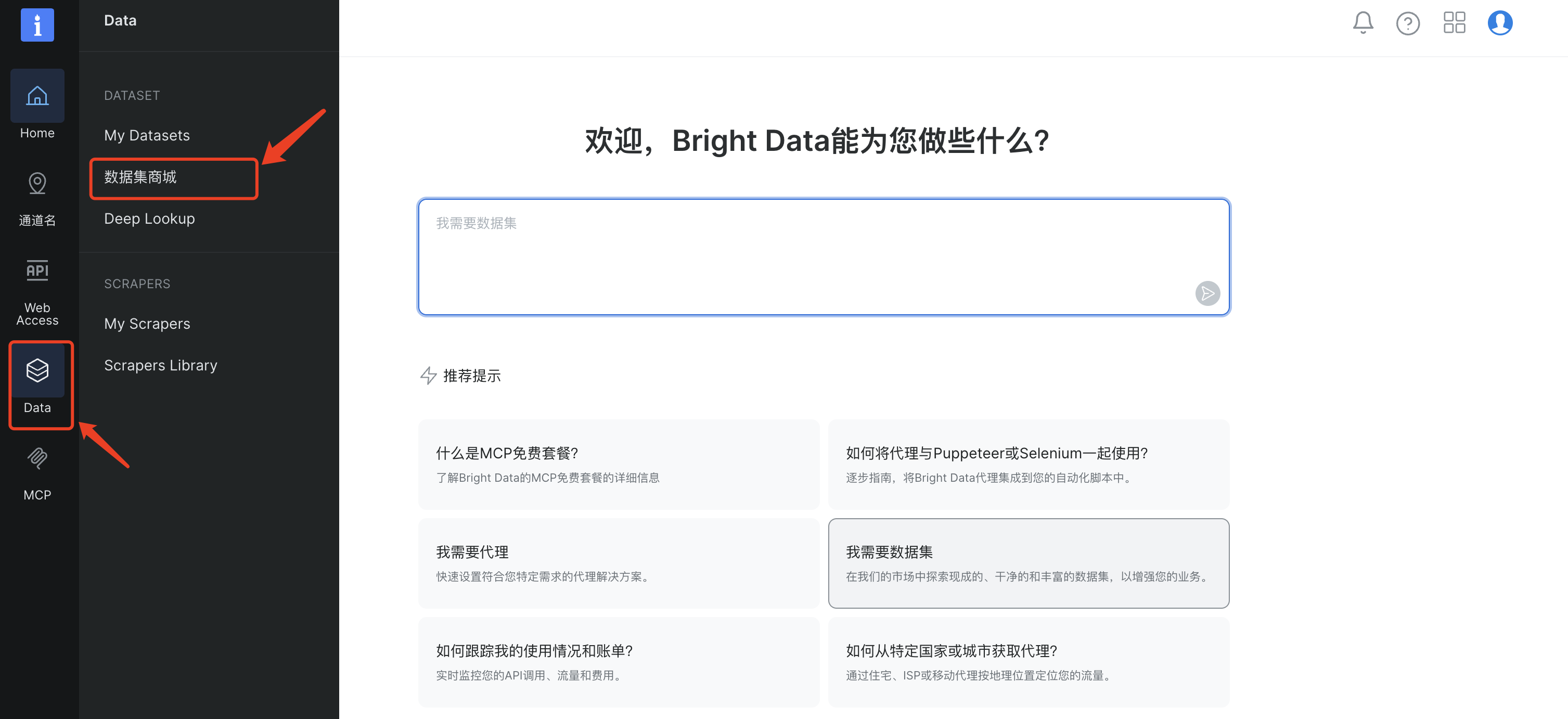
首先需要登录到Bright Data 用户控制面板,选择左侧菜单中"Data"的二级目录"数据集商城"
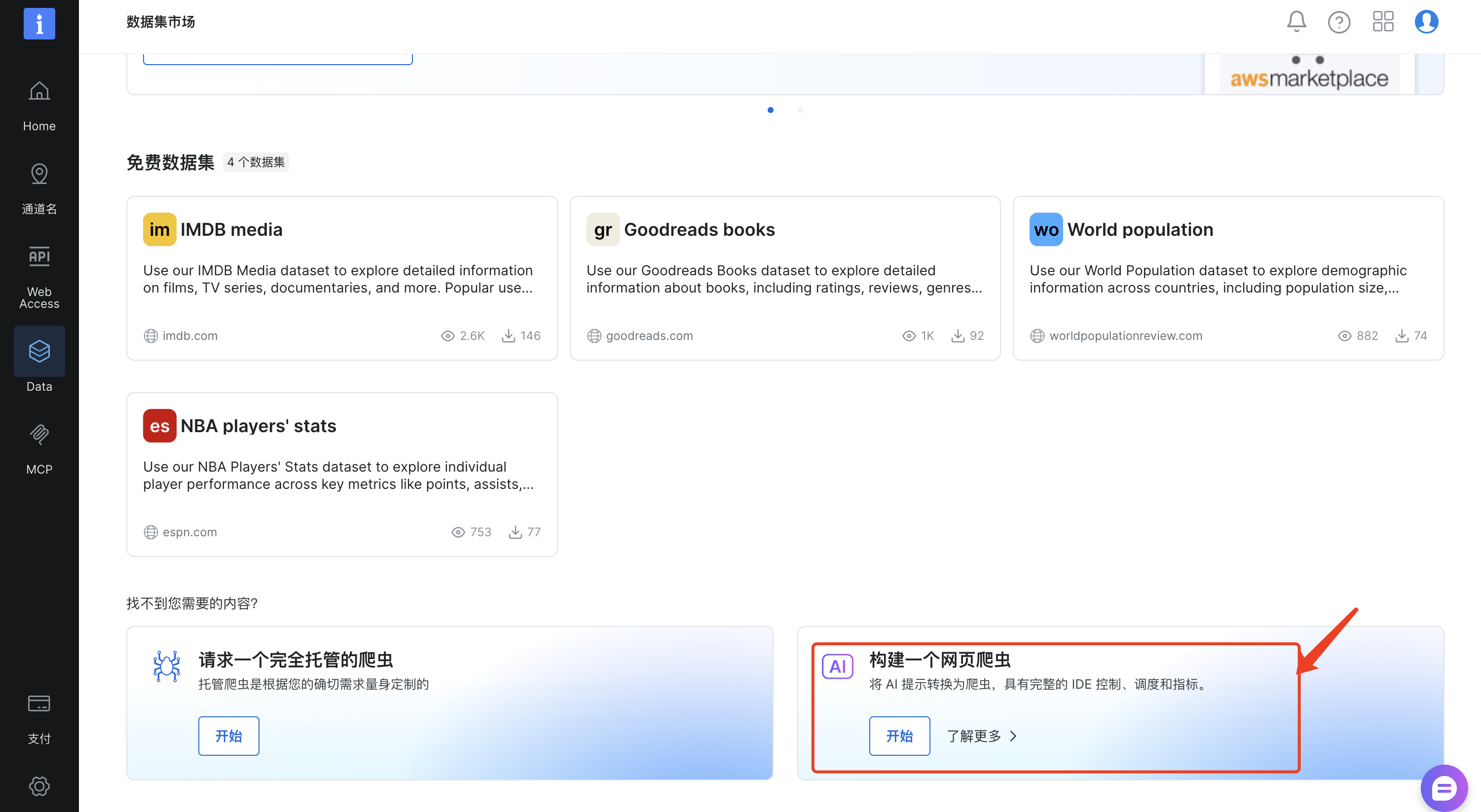
在下面选择"构建一个网页爬虫",它能够将 AI 提示转换为爬虫,具有完整的 IDE 控制、调度和指标,点击"开始"
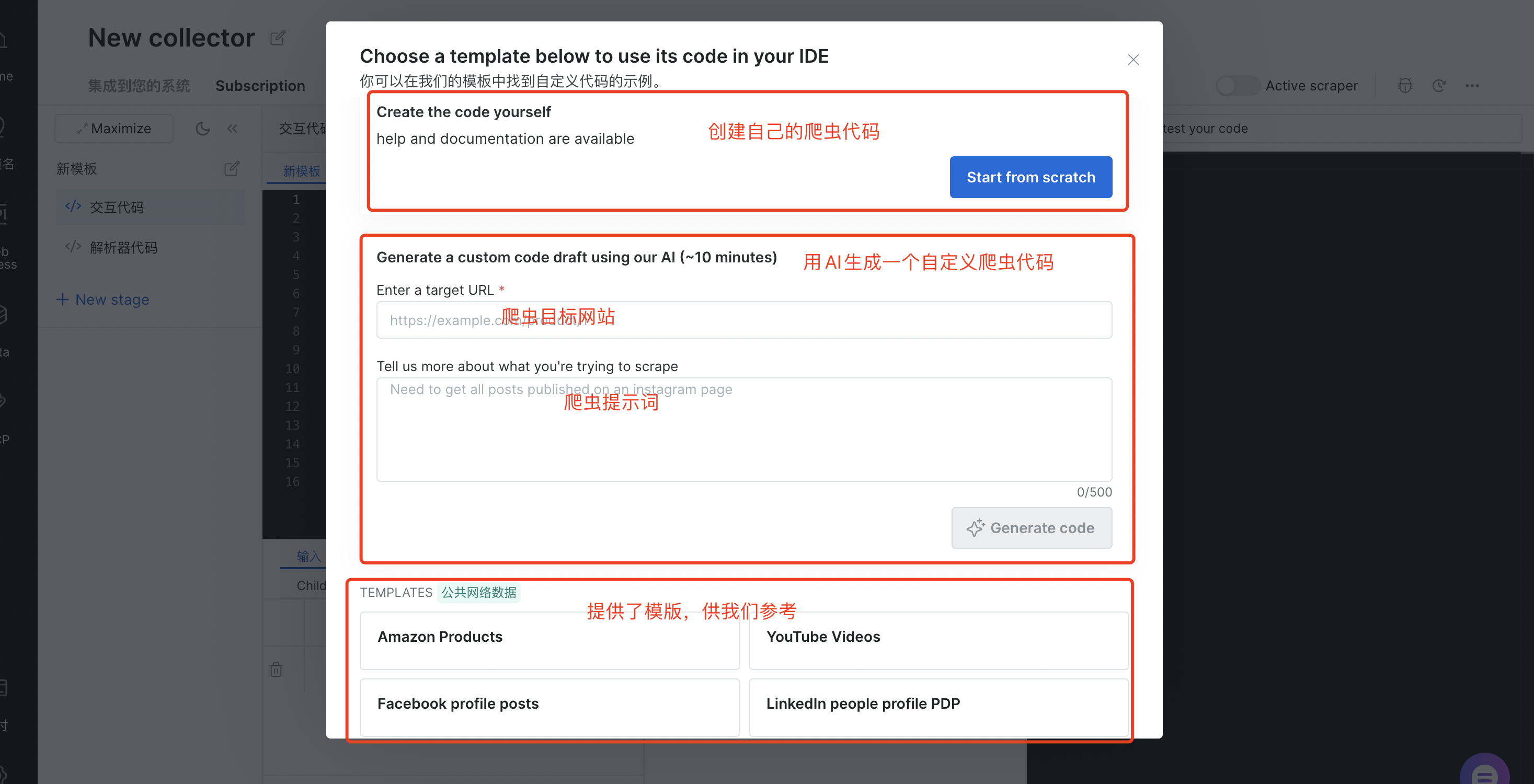
之后出现弹框,我们可以直接创建自己的爬虫代码,也可以用AI帮我们生成自定义爬虫代码(需要填写目标网站、爬虫提示词),AI Scraper Studio提供了模版供我们选择,比如:Amazon Products、Youtube Videos、Faceboos profile posts、LinkedIn people profile PDP等等
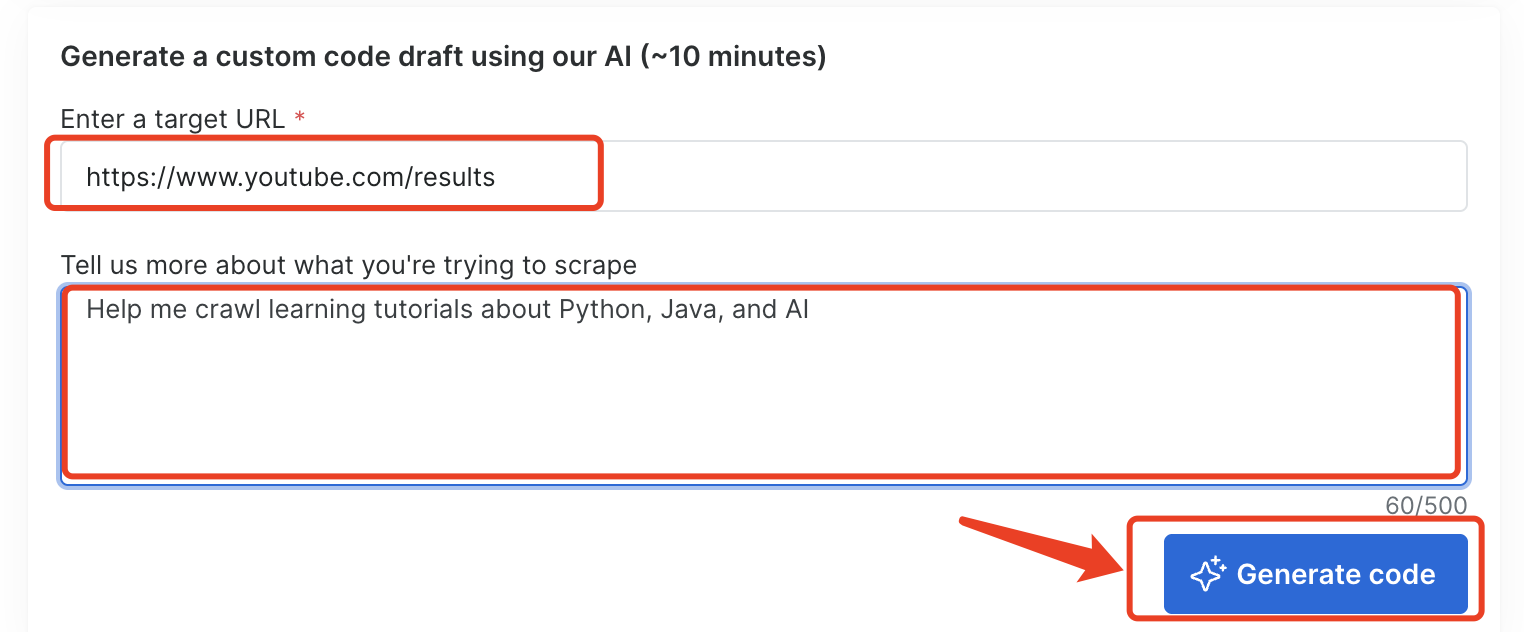
这里我选择让AI为我生成一个自定义爬虫
爬虫目标网站:
https://www.youtube.com/results`
`
爬虫提示词:
Help me crawl learning tutorials about Python, Java, and AI`
`
然后点击"Generate code"
(2)代码生成
接下来等待爬虫代码自动生成
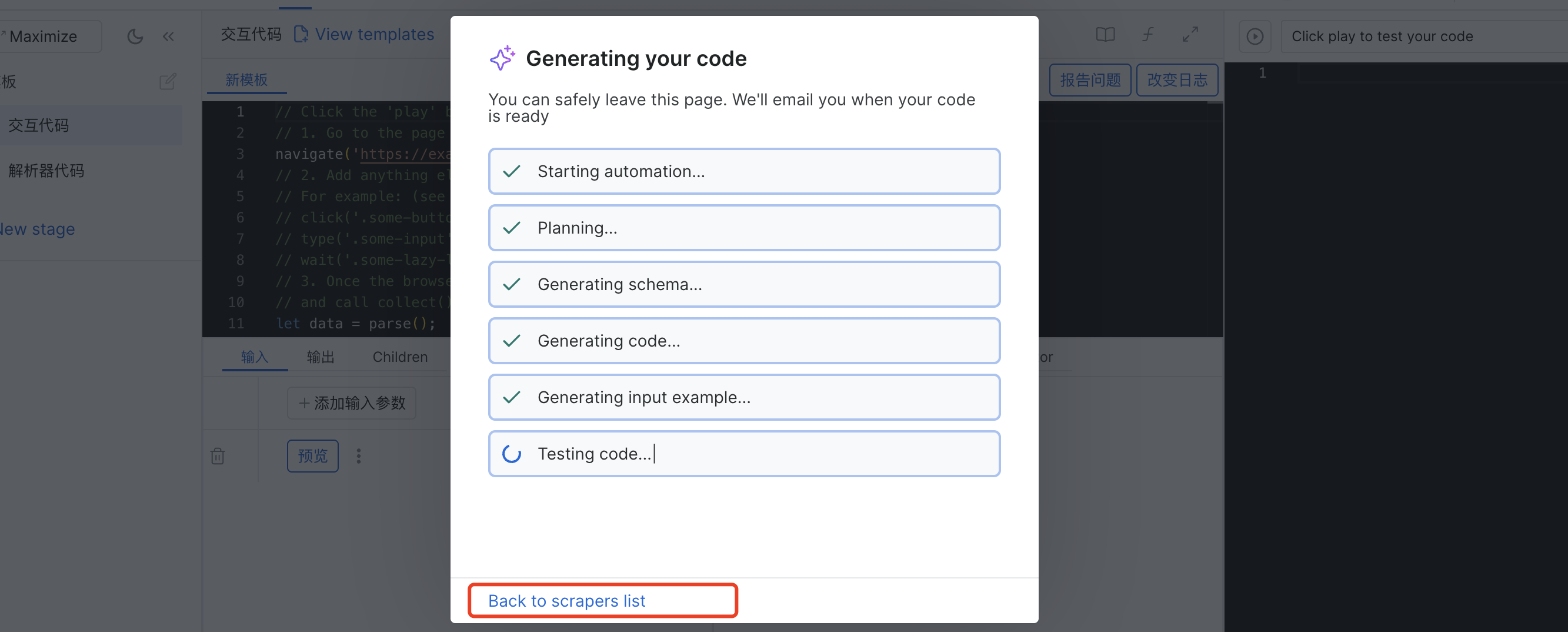
可以点击上面的"Back to scrapers list",在我的爬虫列表看到新建的爬虫状态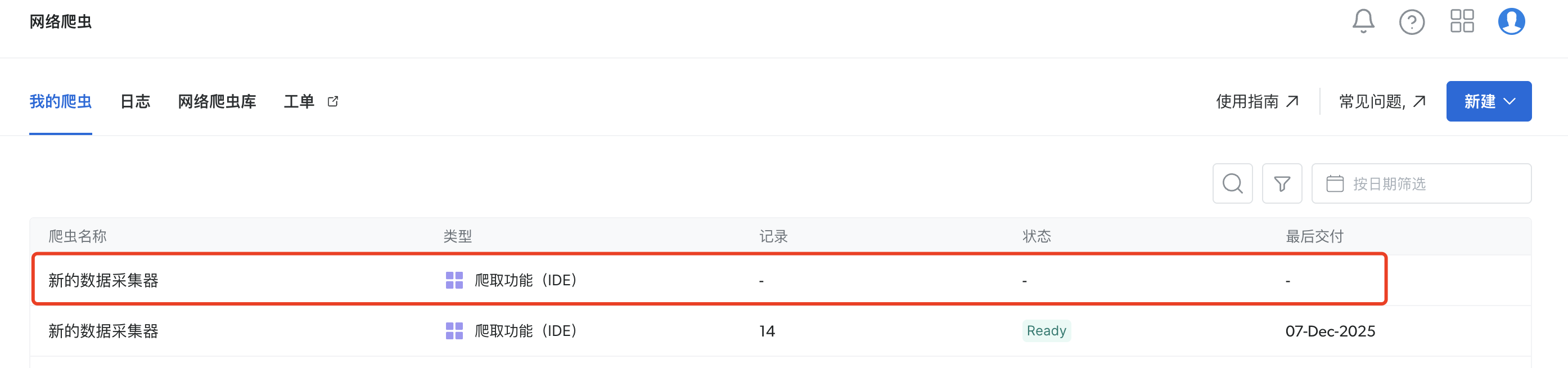
(3)运行爬虫代码
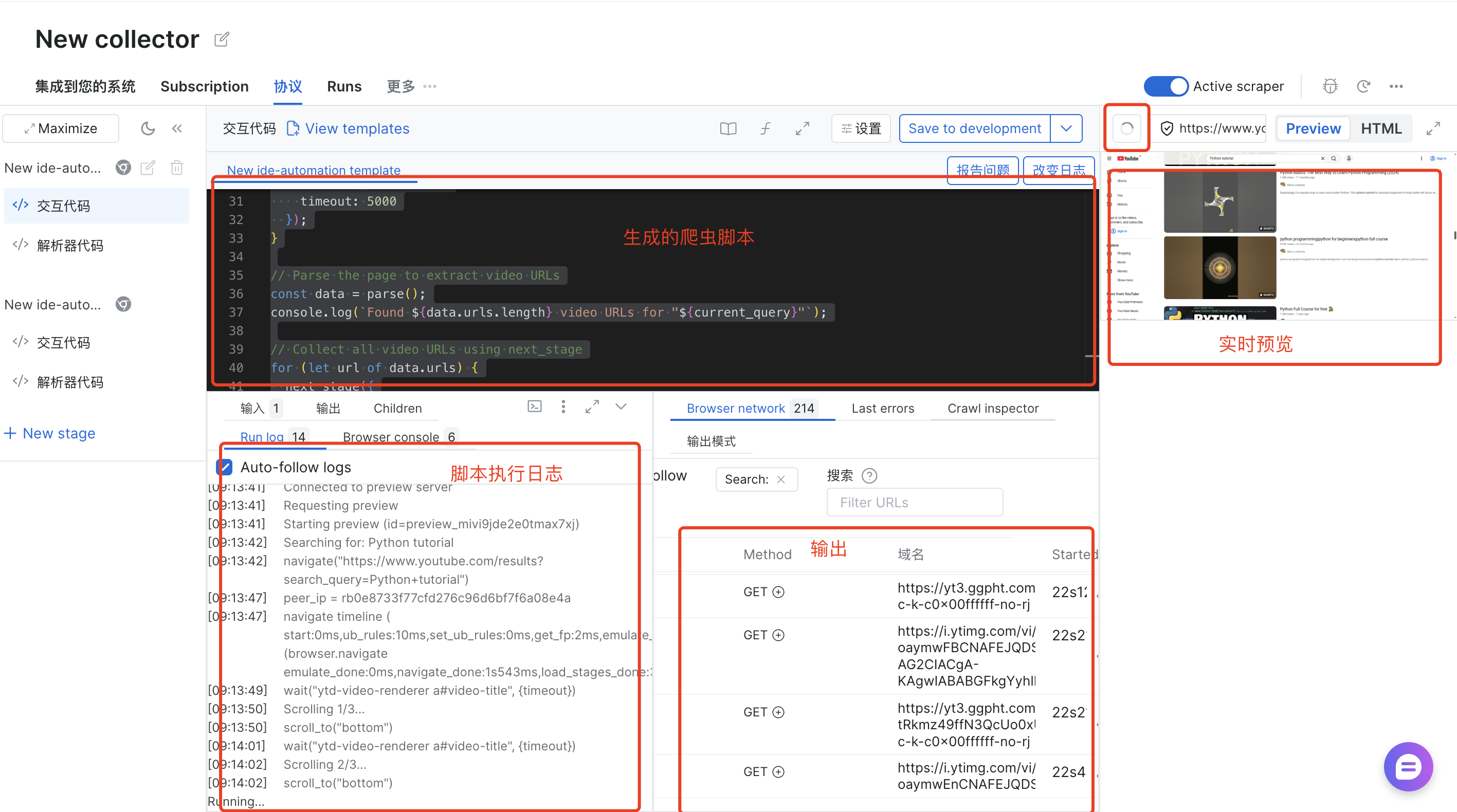
随后我们可以在页面看到生成的代码,点击右侧的执行按钮(运行爬冲代码,可以在下面的"输入"选项卡中指定要使用的输入),可以看到脚本实时执行,以及实时输出,实时爬取
// Navigate to the base URL and search for tutorials`
`const base_url = 'https://www.youtube.com';`
`const search_queries = ['Python tutorial', 'Java tutorial', 'AI learning tutorial'];`

`// Get the current search query from input or use the first one`
`const current_query = input.search_query || search_queries[0];`
`const current_index = search_queries.indexOf(current_query);`
`console.log(`Searching for: ${current_query}`);`

`// Build the search URL`
`const search_url = new URL(`${base_url}/results`);`
`search_url.searchParams.set('search_query', current_query);`

`// Navigate to the search results page`
`navigate(search_url.href);`

`// Wait for video results to load`
`const video_selector = 'ytd-video-renderer a#video-title';`
`wait(video_selector, {`
`  timeout: 30000`
`});`

`// Scroll to load more videos (YouTube uses infinite scroll)`
`// We'll scroll a few times to get more results`
`const max_scrolls = 3;`
`for (let i = 0; i < max_scrolls; i++) {`
`  console.log(`Scrolling ${i + 1}/${max_scrolls}...`);`
`  scroll_to('bottom');`
`  // Wait for new videos to appear after scrolling`
`  wait(video_selector, {`
`    timeout: 5000`
`  });`
`}`

`// Parse the page to extract video URLs`
`const data = parse();`
`console.log(`Found ${data.urls.length} video URLs for "${current_query}"`);`

`// Collect all video URLs using next_stage`
`for (let url of data.urls) {`
`  next_stage({`
`    url: url`
`  });`
`}`

`// If there are more search queries to process, rerun with the next query`
`if (current_index < search_queries.length - 1) {`
`  const next_query = search_queries[current_index + 1];`
`  console.log(`Moving to next search query: ${next_query}`);`
`  rerun_stage({`
`    search_query: next_query`
`  });`
`}`
`
(4)执行数据采集器
在"集成到您的系统"tab,点击"Start",执行刚刚的脚本
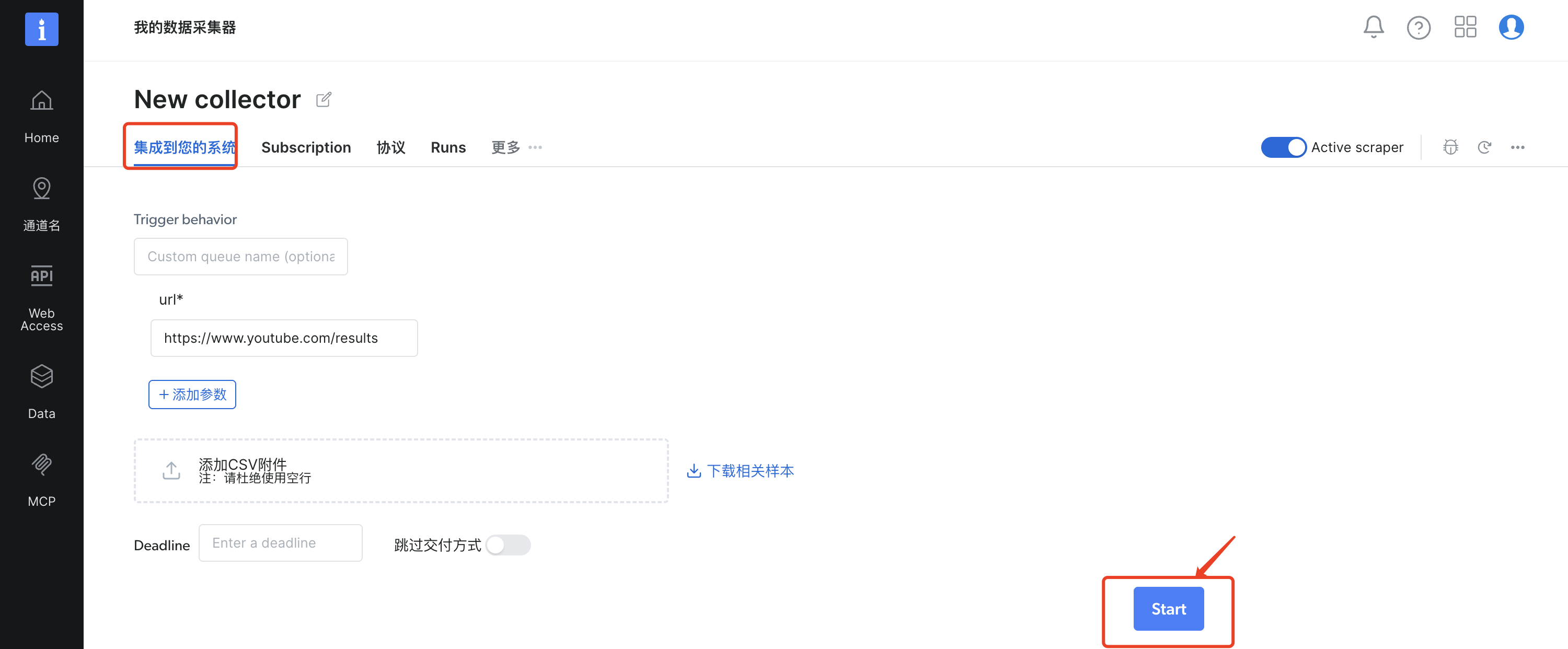
在我的爬虫列表中可以看到,新建的数据采集器正在执行

(5)下载结果
可以在Runs tab下看到最终的爬虫结果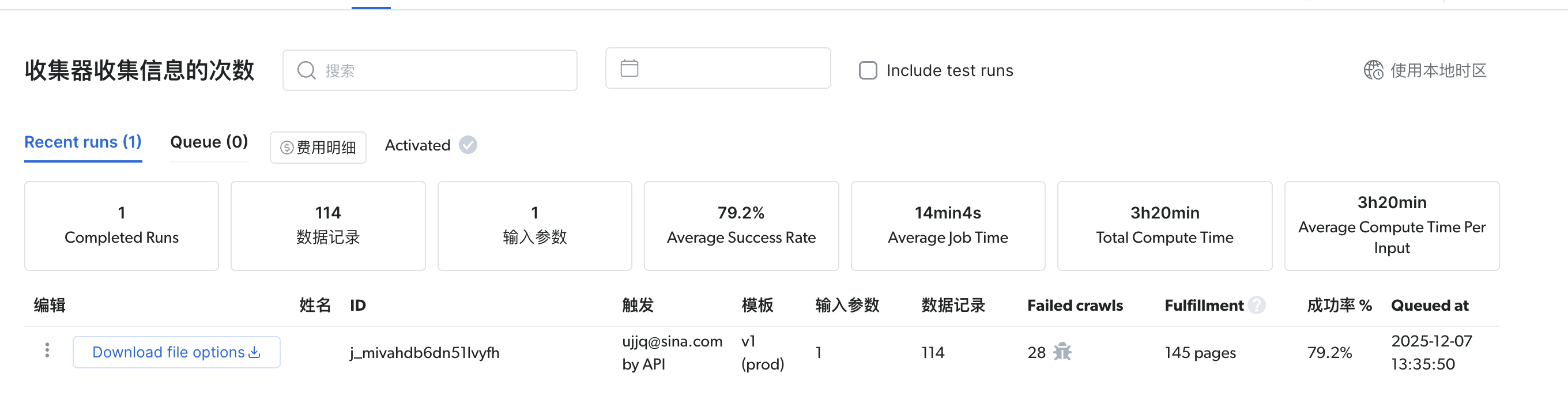
点击左侧的"Download file options"按钮,下载爬取结果,下面为结果中一部分
{`
`    "video_title": "Python Tutorial for Beginners with VS Code 🐍",`
`    "channel_name": "Dave Gray",`
`    "channel_url": "https://www.youtube.com/@DaveGrayTeachesCode",`
`    "subscriber_count": 426000,`
`    "view_count": 597000,`
`    "like_count": 11000,`
`    "video_description": "Web Dev Roadmap for Beginners (Free!): https://bit.ly/DaveGrayWebDevRoadmap In this Python tutorial for beginners with VS Code, you will learn why you should learn Python, how to install Python, Web Dev Roadmap for Beginners (Free!): https://bit.ly/DaveGrayWebDevRoadmap In this Python tutorial for beginners with VS Code, you will learn why you should learn Python, how to install Python,",`
`    "video_duration": "13:55",`
`    "video_thumbnail": "https://i.ytimg.com/vi/6i3e-j3wSf0/maxresdefault.jpg",`
`    "video_url": "https://www.youtube.com/watch?v=6i3e-j3wSf0",`
`    "comments": [`
`      {`
`        "author": "@DaNOliveiraDaN",`
`        "comment_text": "Just started a Python course for beginners (Harvardx) and in the first class the teacher just said: open VSC and type this code. I didn't know where to get it, how to get it, if I needed to install python, how to install it, nothing. Needed to come here to learn that. Thank YOU and screw that teacher.",`
`        "comment_likes": "331",`
`        "comment_date": "1 year ago"`
`      },`
`      {`
`        "author": "@Piper_Pilot_Ventures",`
`        "comment_text": "Hello! I just got python today and started to learn. I was sooooo confuesd about downloading python on virtua; studio code and I am so glad I found this video! You really went into detail, took your time, and went through the steps flaulessly. This really helped me and I hope to learn more from you. THANK YOU!",`
`        "comment_likes": "10",`
`        "comment_date": "1 year ago"`
`      },`
`      {`
`        "author": "@almightyyotto",`
`        "comment_text": "This video saved me big time before an assignment was due. After watching I learned more than I anticipated/was supposed to. Either way thanks Dave, I'll be back again.",`
`        "comment_likes": "11",`
`        "comment_date": "1 year ago"`
`      },`
`      {`
`        "author": "@MegaJohn144",`
`        "comment_text": "I only install a new version of Python once a year when the new version comes out, but here's a word of caution for all Windows users. I keep forgetting this and having to re-learn it the hard way. Run the setup in Admin mode. Don't take any of the defaults when you understand Python. Click the option whare you choose what to install. Be sure and add Python to your PATH, and install Python for ALL user. Do everything in admin mode. I forgot to do this and wound up having to install and uninstall three times before I finally got it right. Up till now, I have been using Sublime Text for my development, but I saw some new videos about using VS Code. I am going to try it, and this is the reason why I am watching this.",`
`        "comment_likes": "16",`
`        "comment_date": "2 years ago"`
`      },`
`      {`
`        "author": "@kcell2042",`
`        "comment_text": "There are many other Python courses, but I've been waiting for Dave's Python course. Thank you!",`
`        "comment_likes": "27",`
`        "comment_date": "2 years ago"`
`      }`
`    ],`
`    "related_videos": [`
`      {`
`        "title": "Python Basics for Beginners | Python tutorial",`
`        "channel": "Dave Gray",`
`        "url": "https://www.youtube.com/watch?v=fLAfa-BQtOQ",`
`        "views": "139K views",`
`        "publish_time": "2 years ago"`
`      },`
`      {`
`        "title": "Python Full Course for Beginners | Complete All-in-One Tutorial | 9 Hours",`
`        "channel": "Dave Gray",`
`        "url": "https://www.youtube.com/watch?v=H2EJuAcrZYU",`
`        "views": "989K views",`
`        "publish_time": "2 years ago"`
`      },`
`      {`
`        "title": "8 Rules For Learning to Code in 2025...and should you?",`
`        "channel": "Travis Media",`
`        "url": "https://www.youtube.com/watch?v=EMWNZtCYg5s&pp=ugUEEgJlbg%3D%3D",`
`        "views": "708K views",`
`        "publish_time": "11 months ago"`
`      },`
`      {`
`        "title": "Python Full Course for Beginners [2025]",`
`        "channel": "Programming with Mosh",`
`        "url": "https://www.youtube.com/watch?v=K5KVEU3aaeQ",`
`        "views": "4.4M views",`
`        "publish_time": "9 months ago"`
`      },`
`      {`
`        "title": "Learn Python for beginners in 1 hour",`
`        "channel": "Emmanuel Udoiwod",`
`        "url": "https://www.youtube.com/watch?v=7bl8JoWm6CY",`
`        "views": "2.3K views",`
`        "publish_time": "3 years ago"`
`      },`
`      {`
`        "title": "Python Operators for Beginners | Python tutorial",`
`        "channel": "Dave Gray",`
`        "url": "https://www.youtube.com/watch?v=7BxUaeROVXI",`
`        "views": "73K views",`
`        "publish_time": "2 years ago"`
`      },`
`      {`
`        "title": "100 Pilots Fight For A Private Jet",`
`        "channel": "MrBeast",`
`        "url": "https://www.youtube.com/watch?v=8bMh8azh3CY&pp=ugUEEgJlbg%3D%3D",`
`        "views": "23M views",`
`        "publish_time": "12 hours ago"`
`      },`
`    ],`
`    "input": {`
`      "search_query": "Python tutorial",`
`      "url": "https://www.youtube.com/results"`
`    }`
`  },`
`- 它到底解决了啥实际问题?
AI Scraper Studio 针对数据采集领域的核心痛点,破解了传统爬虫技术难以突破的工程与业务瓶颈,比自己写爬虫强太多,这些痛点都能解决:
- 降本提效:告别人工编写、维护爬虫的高成本,AI 自动生成采集规则,新域拓展效率翻倍。
- 稳定抗封:内置智能反爬适配引擎,自动切换代理、调控请求频率,解决多站采集易挂、数据不一致问题。
- 灵活迭代:可视化低代码配置,业务变化或网站升级时,无需大量改码即可快速调整采集流程。
- 快速交付:分钟级上线采集任务,适配市场快速变化的时间窗口,抢占业务先机。
- 低门槛高弹性:一站式生产级方案,无需复杂技术架构,按需弹性扩容,中小企业也能轻松上手。
总结
AI Scraper Studio把复杂的爬虫技术变简单了------会打字就能用,不管是帮运营爬竞品数据,还是给AI团队攒训练素材,都不用再求着技术写代码。真碰到特殊需求,比如只抓某类时间范围内的内容,直接进IDE小改一下就行,不用推翻重来。现在注册就有免费试用,每月5000次请求足够小团队试遍常用场景,哪怕只是偶尔需要批量抓数据,也不用花冤枉钱请人开发。想省心搞数据的话,直接点专属链接注册,上手快,试一次就知道比自己瞎折腾能省多少事。