上篇博客我们学习了系统IO接口,几乎每一个接口都会使用到fd,那么fd到底是什么呢,本篇博客就会带你了解文件描述符--fd
1.⽂件描述符fd定义
通过对open函数的学习,我们知道了⽂件描述符就是⼀个⼩整数
2.fd :0 & 1 & 2
我们看看创建多个文件,每个文件的fd是多少
myfile.c代码:
cpp
#include <stdio.h>
#include <sys/types.h>
#include <sys/stat.h>
#include <fcntl.h>
#include <unistd.h>
#include <string.h>

int main()
{
    umask(0);
    int fd1 = open("log1.txt", O_CREAT | O_WRONLY | O_TRUNC, 0666);
    int fd2 = open("log2.txt", O_CREAT | O_WRONLY | O_TRUNC, 0666);
    int fd3 = open("log3.txt", O_CREAT | O_WRONLY | O_TRUNC, 0666);
    int fd4 = open("log4.txt", O_CREAT | O_WRONLY | O_TRUNC, 0666);
    if (fd1 < 0)
    {
        perror("fd1 open");
        return 1;
    }
    if (fd2 < 0)
    {
        perror("fd2 open");
        return 1;
    }
    if (fd3 < 0)
    {
        perror("fd3 open");
        return 1;
    }
    if (fd4 < 0)
    {
        perror("fd4 open");
        return 1;
    }
    printf ("fd1 : %d\n", fd1);
    printf ("fd2 : %d\n", fd2);
    printf ("fd3 : %d\n", fd3);
    printf ("fd4 : %d\n", fd4);
    close(fd1);
    close(fd2);
    close(fd3);
    close(fd4);
    return 0;
}
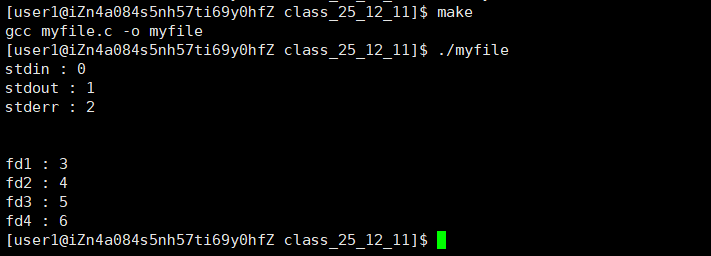
运行结果如下:

他们使一个一个递增的,并且最开始是3,那么0,1,2去哪儿呢??
Linux进程默认情况下会有3个缺省打开的⽂件描述符,分别是标准输⼊0, 标准输出1, 标准错
误2
0,1,2对应的物理设备⼀般是:键盘,显⽰器,显⽰器
可是我们也学过c语言的标准输入,标准输出,标准错误
同样的c++也有对应的cin,cout,cerr

这些与我们现在学习的系统级别的0,1,2有什么联系呢??
如果我们仔细观察fopen的函数,其实就会发现他调用的是FILE,但是我们从来没有真正认识FILE,其实他就是一个c语言提供的一个struct结构体
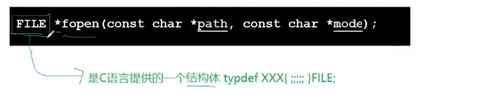
而且我们从上一篇博客知道,每个语言层的接口背后一定会调用系统层的IO函数,而系统层只认fd ,也就是文件描述符,所以我们可以百分百确定,在FILE这个结构体内,一定会有一个变量,记录着fd!!!
现在我们来验证一下我们的猜测,将c语言里面的std_fd打印出来
myfile.c代码:
cpp
#include <stdio.h>
#include <sys/types.h>
#include <sys/stat.h>
#include <fcntl.h>
#include <unistd.h>
#include <string.h>

int main()
{
    printf("stdin : %d\n", stdin->_fileno);
    printf("stdout : %d\n", stdout->_fileno);
    printf("stderr : %d\n", stderr->_fileno);
    printf("\n\n");
    umask(0);
    int fd1 = open("log1.txt", O_CREAT | O_WRONLY | O_TRUNC, 0666);
    int fd2 = open("log2.txt", O_CREAT | O_WRONLY | O_TRUNC, 0666);
    int fd3 = open("log3.txt", O_CREAT | O_WRONLY | O_TRUNC, 0666);
    int fd4 = open("log4.txt", O_CREAT | O_WRONLY | O_TRUNC, 0666);
    if (fd1 < 0)
    {
        perror("fd1 open");
        return 1;
    }
    if (fd2 < 0)
    {
        perror("fd2 open");
        return 1;
    }
    if (fd3 < 0)
    {
        perror("fd3 open");
        return 1;
    }
    if (fd4 < 0)
    {
        perror("fd4 open");
        return 1;
    }
    printf ("fd1 : %d\n", fd1);
    printf ("fd2 : %d\n", fd2);
    printf ("fd3 : %d\n", fd3);
    printf ("fd4 : %d\n", fd4);
    close(fd1);
    close(fd2);
    close(fd3);
    close(fd4);
    return 0;
}
结论正确!!
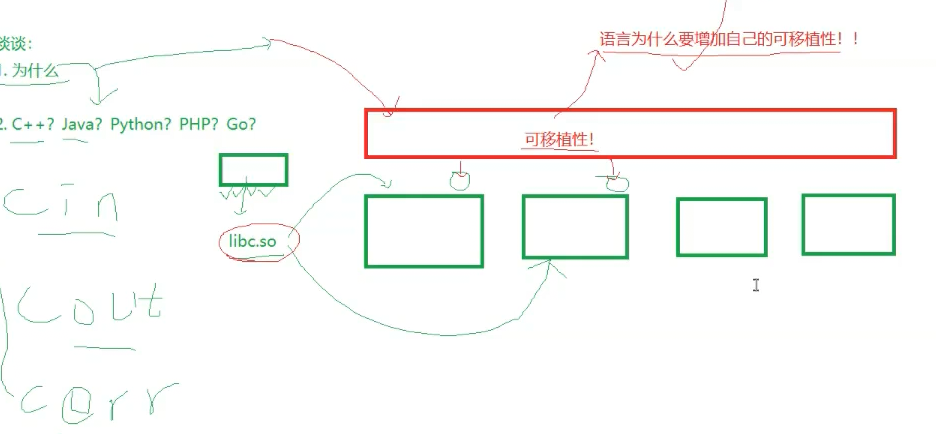
3.为什么要底层封装fd
我们一直用c语言做例子,其实c++,java等等等语言底层调用文件接口都会存在fd封装,可是为什么要这么做呢
-
屏蔽系统差异,实现跨平台(可移植性) 不同系统的底层 IO 接口完全不同:Linux 用
fd(int)+open/read,Windows 用句柄(HANDLE)+CreateFile/ReadFile。封装后会提供统一的抽象接口 (如 C 的FILE*、Java 的FileInputStream),开发者不用写系统判断代码,一行代码跨 Linux/Windows/macOS -
提升易用性,降低开发成本 裸 fd 是原始系统调用,需要手动处理返回值、缓冲区、字节数,代码繁琐易出错;封装后提供人性化功能(比如 C 的
FILE*有用户态缓冲、fprintf格式化读写,Java 的流支持按行读取),开发者只需关注 "怎么读写",不用关心底层 fd 操作 -
增强安全性,避免资源问题 裸 fd 容易出现泄漏(忘关 fd)、非法操作(用已关闭的 fd 读写)、缓冲区越界;封装后会自动管理资源(如 C++ 的 RAII 自动关闭 fd、Java 的
try-with-resources自动释放),还会强制处理错误,减少风险 -
提供高级抽象功能裸 fd 只能处理字节流,封装后支持按行、按对象、按字符编码(如 UTF-8)读写,这些高级功能是开发中刚需,不用开发者自己造轮子
4.深入认识文件描述符fd
想一想我们学习的时候,什么数据结构会用到0,1,2,3,4...来查找对应内容
答案是数组!
下面我将为你解答一下,文件从磁盘到内存,以及进程如何管理文件的全过程
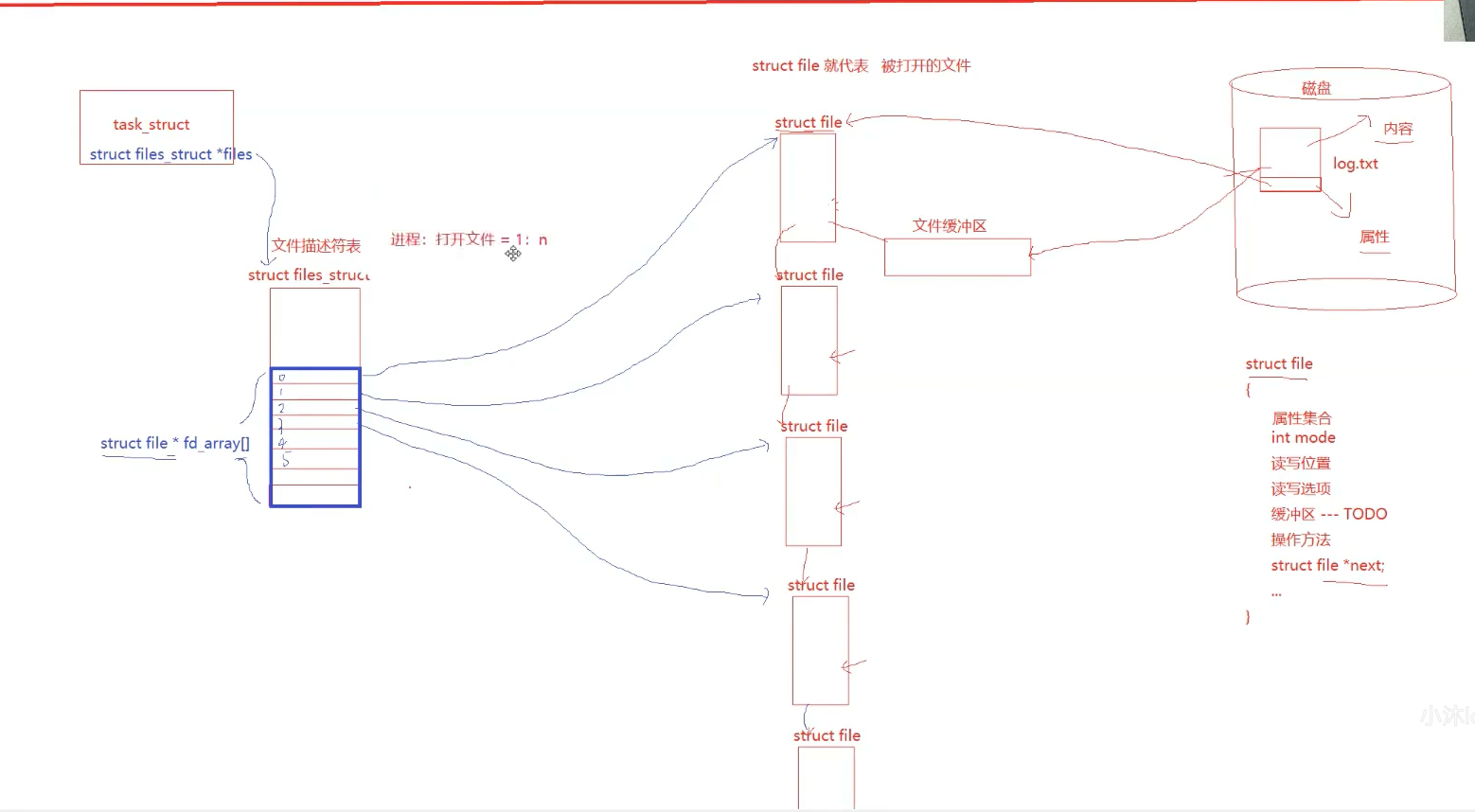
如上图,我们先要知道一个进程可能会管理多个文件,同时这些文件有的可能要被打开,有的正在使用,有的打算关闭,而且系统里面存在多个进程,最后可能会有100个进程10000个文件,那么这些进程该怎么管理这些文件呢,我们类比一下就会想到进程调度,也是1:n的管理关系,采用的是链表链接struct的形式管理的
所以我们也可以这样做
系统先读取磁盘文件到一个结构体struct_file里面,这个结构体保存着文件的属性集合,mode,读写位置等等等,其中还有一个缓冲区,这个缓冲区存放在文件的内容,文件的属性交给了其他变量
进程会打开很多个文件,于是这些被打开的文件就用链表连接起来,形成一个struct file*指针
同时进程有一个struct files_struct表(文件描述符表),里面有一个数组,是file*类型的指证数组,所以0,1,2,3...下标就对应数组里面的file*,而file*又表示打开的文件,与最开始形成闭环,完美阐释了什么叫做先描述再组织!
所以总的来说
⽂件描述符就是从0开始的⼩整数。当我们打开⽂件时,操作系统在内存中要创建相应的 数据结构来描述⽬标⽂件。于是就有了file结构体。表⽰⼀个已经打开的⽂件对象。⽽进程执⾏open系
统调⽤,所以必须让进程和⽂件关联起来。每个进程都有⼀个指针*files, 指向⼀张表files_struct,该表最重要的部分就是包含⼀个指针数组,每个元素都是⼀个指向打开⽂件的指针!所以,本质上,⽂件 描述符就是该数组的下标。所以,只要拿着⽂件描述符,就可以找到对应的⽂件
下面是linux底层源码

5.⽂件描述符的分配规则
我们知道文件描述符会从3开始,一直往后,那么假如我们将0关掉,然后再打开一个文件,fd又会是多少呢,是0,还是3?
下面我们来做实验:
myfile.c:
cpp
#include <stdio.h>
#include <sys/types.h>
#include <sys/stat.h>
#include <fcntl.h>
#include <unistd.h>
#include <string.h>

int main()
{
    //printf("stdin : %d\n", stdin->_fileno);
    //printf("stdout : %d\n", stdout->_fileno);
    //printf("stderr : %d\n", stderr->_fileno);
    //printf("\n\n");
    close(0);
    umask(0);
    int fd = open("fd.txt", O_CREAT | O_WRONLY | O_TRUNC, 0666);
    if (fd < 0)
    {
        perror("fd open");
        return 1;
    }
    printf("fd : %d\n", fd);
    close(fd);
    //int fd1 = open("log1.txt", O_CREAT | O_WRONLY | O_TRUNC, 0666);
    //int fd2 = open("log2.txt", O_CREAT | O_WRONLY | O_TRUNC, 0666);
    //int fd3 = open("log3.txt", O_CREAT | O_WRONLY | O_TRUNC, 0666);
    //int fd4 = open("log4.txt", O_CREAT | O_WRONLY | O_TRUNC, 0666);
    //if (fd1 < 0)
    //{
    //    perror("fd1 open");
    //    return 1;
    //}
    //if (fd2 < 0)
    //{
    //    perror("fd2 open");
    //    return 1;
    //}
    //if (fd3 < 0)
    //{
    //    perror("fd3 open");
    //    return 1;
    //}
    //if (fd4 < 0)
    //{
    //    perror("fd4 open");
    //    return 1;
    //}
    //printf ("fd1 : %d\n", fd1);
    //printf ("fd2 : %d\n", fd2);
    //printf ("fd3 : %d\n", fd3);
    //printf ("fd4 : %d\n", fd4);
    //close(fd1);
    //close(fd2);
    //close(fd3);
    //close(fd4);
    return 0;
}
运行结果是0,所以说明文件描述符分配规则就是从0开始,一直往后找空缺,有空缺就将返回对应下标,即fd

6.重定向
我们之前谈过很多重定向,但是重定向到底是什么,怎么实现的,我们没有了解,下面我们用一组代码来开始探索重定向操作
myfile.c:
cpp
#include <stdio.h>
#include <sys/types.h>
#include <sys/stat.h>
#include <fcntl.h>
#include <unistd.h>
#include <string.h>

int main()
{
    //printf("stdin : %d\n", stdin->_fileno);
    //printf("stdout : %d\n", stdout->_fileno);
    //printf("stderr : %d\n", stderr->_fileno);
    //printf("\n\n");
    close(1);
    umask(0);
    int fd = open("log.txt", O_CREAT | O_WRONLY | O_TRUNC, 0666);
    if (fd < 0)
    {
        perror("fd open");
        return 1;
    }
    printf("fd : %d\n", fd);
    //close(fd);
    //int fd1 = open("log1.txt", O_CREAT | O_WRONLY | O_TRUNC, 0666);
    //int fd2 = open("log2.txt", O_CREAT | O_WRONLY | O_TRUNC, 0666);
    //int fd3 = open("log3.txt", O_CREAT | O_WRONLY | O_TRUNC, 0666);
    //int fd4 = open("log4.txt", O_CREAT | O_WRONLY | O_TRUNC, 0666);
    //if (fd1 < 0)
    //{
    //    perror("fd1 open");
    //    return 1;
    //}
    //if (fd2 < 0)
    //{
    //    perror("fd2 open");
    //    return 1;
    //}
    //if (fd3 < 0)
    //{
    //    perror("fd3 open");
    //    return 1;
    //}
    //if (fd4 < 0)
    //{
    //    perror("fd4 open");
    //    return 1;
    //}
    //printf ("fd1 : %d\n", fd1);
    //printf ("fd2 : %d\n", fd2);
    //printf ("fd3 : %d\n", fd3);
    //printf ("fd4 : %d\n", fd4);
    //close(fd1);
    //close(fd2);
    //close(fd3);
    //close(fd4);
    return 0;
}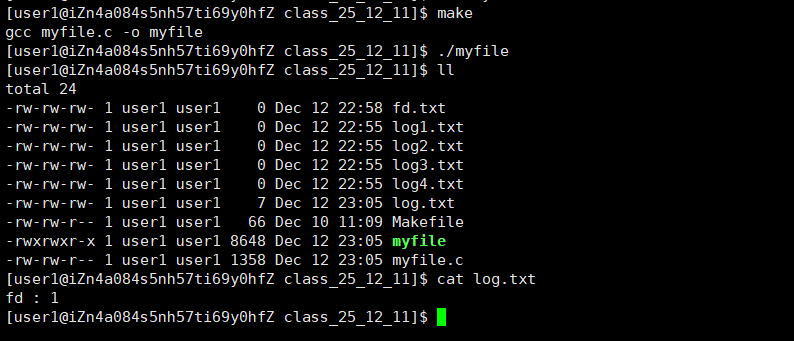
咦?为什么没有在显示屏输出fd : 1,而是将这句话打印到了log.txt文件了呢??
此时,我们发现,本来应该输出到显⽰器上的内容,输出到了⽂件 myfile 当中,其中,fd=1。这
种现象叫做输出重定向。常⻅的重定向有: > , >> , <,<<
那这个现象是怎么发生的呢?
我们首先关闭了1,那么我们创建的log.txt描述符就找到了这个空缺,所以fd就为1,而printf是c语言提供的输出,底层默认输出到stdout,而stdout是语言层封装的,底层只认识fd=1的文件,所以此时stdout就被替换为了log.txt,即向log.txt输出fd : 1,所以会出现这个情况,这就是重定向操作
如果你仔细观察myfile.c代码,就会发现我们没有close(fd),那如果我们将close(fd)加上会发什么呢?(请每次./myfile前将log.txt删掉,不然无法创建新的文件来进行实验)
myfile.c:
cpp
#include <stdio.h>
#include <sys/types.h>
#include <sys/stat.h>
#include <fcntl.h>
#include <unistd.h>
#include <string.h>

int main()
{
    //printf("stdin : %d\n", stdin->_fileno);
    //printf("stdout : %d\n", stdout->_fileno);
    //printf("stderr : %d\n", stderr->_fileno);
    //printf("\n\n");
    close(1);
    umask(0);
    int fd = open("log.txt", O_CREAT | O_WRONLY | O_TRUNC, 0666);
    if (fd < 0)
    {
        perror("fd open");
        return 1;
    }
    printf("fd : %d\n", fd);
    close(fd);
    //close(fd);
    //int fd1 = open("log1.txt", O_CREAT | O_WRONLY | O_TRUNC, 0666);
    //int fd2 = open("log2.txt", O_CREAT | O_WRONLY | O_TRUNC, 0666);
    //int fd3 = open("log3.txt", O_CREAT | O_WRONLY | O_TRUNC, 0666);
    //int fd4 = open("log4.txt", O_CREAT | O_WRONLY | O_TRUNC, 0666);
    //if (fd1 < 0)
    //{
    //    perror("fd1 open");
    //    return 1;
    //}
    //if (fd2 < 0)
    //{
    //    perror("fd2 open");
    //    return 1;
    //}
    //if (fd3 < 0)
    //{
    //    perror("fd3 open");
    //    return 1;
    //}
    //if (fd4 < 0)
    //{
    //    perror("fd4 open");
    //    return 1;
    //}
    //printf ("fd1 : %d\n", fd1);
    //printf ("fd2 : %d\n", fd2);
    //printf ("fd3 : %d\n", fd3);
    //printf ("fd4 : %d\n", fd4);
    //close(fd1);
    //close(fd2);
    //close(fd3);
    //close(fd4);
    return 0;
}
东西去哪儿呢,为什么显示屏没有,log.txt也没有内容??
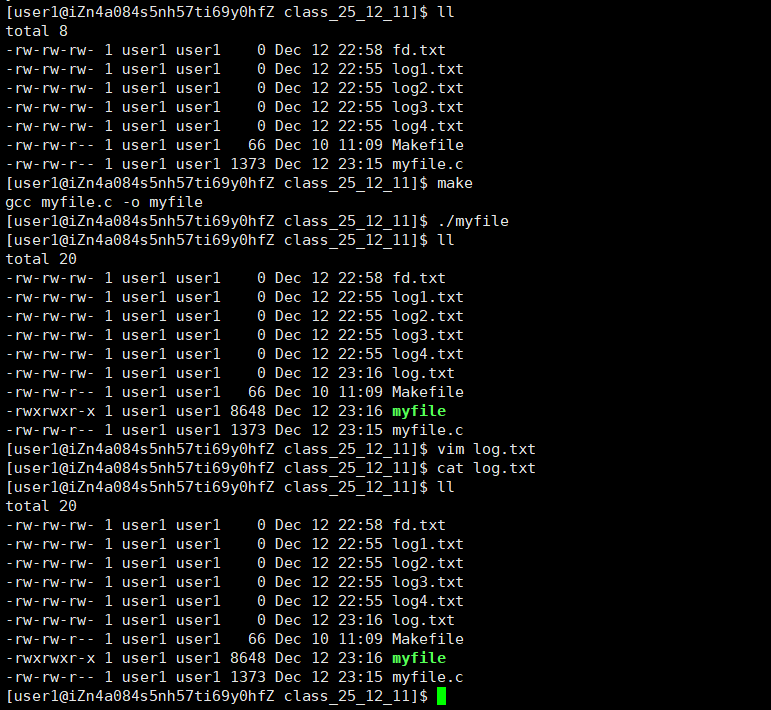
要解决这个问题,需要我们学习缓冲区才可以理解,现在不做讲解!
但是我们要更改一次文件描述符,需要先close要改到的位置,然后再open,非常麻烦,有没有简单点的方法呢??答案是有的,那就是使用函数dup2();
下面是man dup2的定义
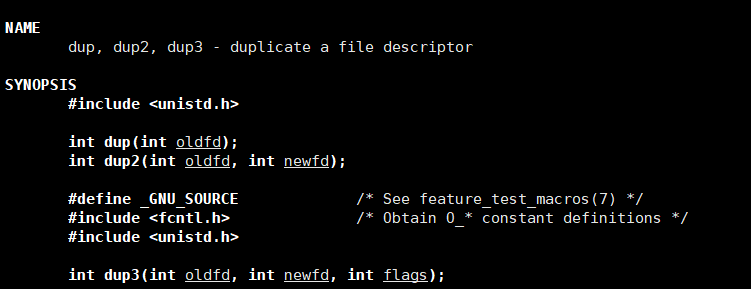
怎么使用呢,比如我们要把fd 指向 1,那么就是dup2(fd, 1),但是只是指针指向,并不会将fd与1交换值
下面是myfile.c验证:
cpp
#include <stdio.h>
#include <sys/types.h>
#include <sys/stat.h>
#include <fcntl.h>
#include <unistd.h>
#include <string.h>

int main()
{
    //printf("stdin : %d\n", stdin->_fileno);
    //printf("stdout : %d\n", stdout->_fileno);
    //printf("stderr : %d\n", stderr->_fileno);
    //printf("\n\n");
    //close(1);
    umask(0);
    int fd = open("log.txt", O_CREAT | O_WRONLY | O_TRUNC, 0666);
    if (fd < 0)
    {
        perror("fd open");
        return 1;
    }
    dup2(fd, 1);
    close(fd);
    printf("fd : %d\n", fd);
    printf("Hello Linux\n");
    printf("Hello World\n");
    printf("see you tomorrow\n");
    fprintf(stdout, "Hello stdout!\n");
    fprintf(stdout, "Hello stdout!\n");
    fprintf(stdout, "Hello stdout!\n");
    //close(fd);
    //int fd1 = open("log1.txt", O_CREAT | O_WRONLY | O_TRUNC, 0666);
    //int fd2 = open("log2.txt", O_CREAT | O_WRONLY | O_TRUNC, 0666);
    //int fd3 = open("log3.txt", O_CREAT | O_WRONLY | O_TRUNC, 0666);
    //int fd4 = open("log4.txt", O_CREAT | O_WRONLY | O_TRUNC, 0666);
    //if (fd1 < 0)
    //{
    //    perror("fd1 open");
    //    return 1;
    //}
    //if (fd2 < 0)
    //{
    //    perror("fd2 open");
    //    return 1;
    //}
    //if (fd3 < 0)
    //{
    //    perror("fd3 open");
    //    return 1;
    //}
    //if (fd4 < 0)
    //{
    //    perror("fd4 open");
    //    return 1;
    //}
    //printf ("fd1 : %d\n", fd1);
    //printf ("fd2 : %d\n", fd2);
    //printf ("fd3 : %d\n", fd3);
    //printf ("fd4 : %d\n", fd4);
    //close(fd1);
    //close(fd2);
    //close(fd3);
    //close(fd4);
    return 0;
}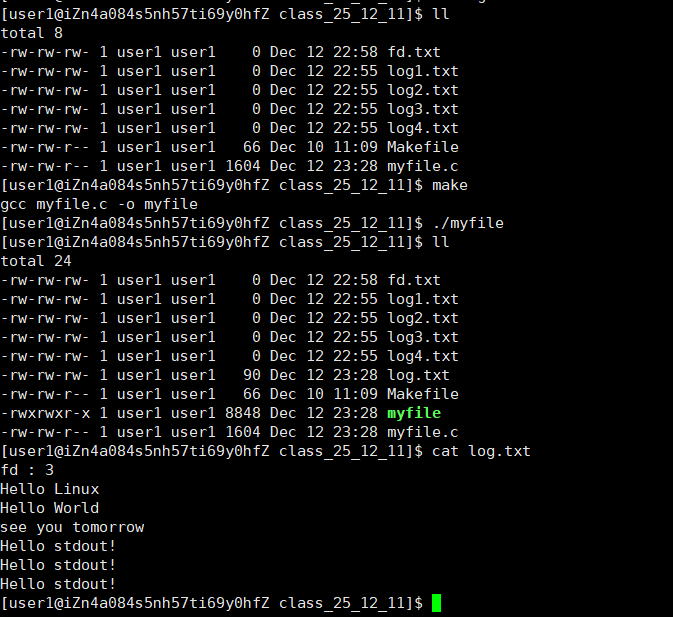
符合预期~~
所以有了上面的知识,现在我们可以知道了
> 无非就是dup2(fd1, fd2)并且清空写入
>> 无非就是dup2(fd1, fd2) 并且添加写入
...
我们还可以完成类似cat的操作:
myfile.c:
cpp
#include <stdio.h>
#include <sys/types.h>
#include <sys/stat.h>
#include <fcntl.h>
#include <unistd.h>
#include <string.h>

int main(int argc, char* argv[])
{
    if (argc != 2)
    {
        return 1;
    }
    int fd = open(argv[1], O_RDONLY);
    if (fd < 0)
    {
        perror("fd open");
        return 1;
    }
    dup2(fd, 0);
    close(fd);
    while (1)
    {
        char buffer[64];
        int n = read(0, buffer, sizeof(buffer) - 1);
        if (n > 0)
        {
            buffer[n] = '\0';
            printf("%s", buffer);
        }
        else
        {
            break;
        }
    }
    return 0;
}

//int main()
//{
//    //printf("stdin : %d\n", stdin->_fileno);
//    //printf("stdout : %d\n", stdout->_fileno);
//    //printf("stderr : %d\n", stderr->_fileno);
//    //printf("\n\n");
//    //close(1);
//    umask(0);
//    int fd = open("log.txt", O_CREAT | O_WRONLY | O_TRUNC, 0666);
//    if (fd < 0)
//    {
//        perror("fd open");
//        return 1;
//    }
//    dup2(fd, 1);
//    close(fd);
//    printf("fd : %d\n", fd);
//    printf("Hello Linux\n");
//    printf("Hello World\n");
//    printf("see you tomorrow\n");
//    fprintf(stdout, "Hello stdout!\n");
//    fprintf(stdout, "Hello stdout!\n");
//    fprintf(stdout, "Hello stdout!\n");
//    //close(fd);
//    //int fd1 = open("log1.txt", O_CREAT | O_WRONLY | O_TRUNC, 0666);
//    //int fd2 = open("log2.txt", O_CREAT | O_WRONLY | O_TRUNC, 0666);
//    //int fd3 = open("log3.txt", O_CREAT | O_WRONLY | O_TRUNC, 0666);
//    //int fd4 = open("log4.txt", O_CREAT | O_WRONLY | O_TRUNC, 0666);
//    //if (fd1 < 0)
//    //{
//    //    perror("fd1 open");
//    //    return 1;
//    //}
//    //if (fd2 < 0)
//    //{
//    //    perror("fd2 open");
//    //    return 1;
//    //}
//    //if (fd3 < 0)
//    //{
//    //    perror("fd3 open");
//    //    return 1;
//    //}
//    //if (fd4 < 0)
//    //{
//    //    perror("fd4 open");
//    //    return 1;
//    //}
//    //printf ("fd1 : %d\n", fd1);
//    //printf ("fd2 : %d\n", fd2);
//    //printf ("fd3 : %d\n", fd3);
//    //printf ("fd4 : %d\n", fd4);
//    //close(fd1);
//    //close(fd2);
//    //close(fd3);
//    //close(fd4);
//    return 0;
//}
原本read(0)是从键盘 读取输入,重定向后,read(0)会从命令行参数指定的文件 中读取内容,相当于 Shell 中的<重定向(比如./a.out test.txt等价于./a.out < test.txt)