本篇博客我们将真正理解Linux下一切皆文件的概念与文件缓存区,并且编写一个简单的libc,话不多说,我们现在开始~~
1.了解stderr,补充重定向
在这之前,我们将重新理解一下重定向以及err(标准错误)
cpp
#include <iostream>
#include <cstdio>


int main()
{
    std::cout << "hello cout" << std::endl;
    printf("hello printf\n");

    std::cerr << "hello cerr" << std::endl;
    fprintf(stderr, "hello stderr\n");
    return 0;
}
按照我们之前的理解,我们前两句将写入标准输出,后面两句将写到标准错误文件中

我们在加入重定向操作后,标准错误输出在显示屏上,而标准输出输出在log.txt中,为什么呢
因为我们>会打开第一个文件,也就是标准输出,而没有打开标准错误,那如果我们要输出标准输出,而将标准错误输出到log.txt中呢,此时我们就要再次理解>了,其实>并不是真正的写法,而是fd>...,fd是你要替换的文件描述符
所以可以这样写:

这里要挨着一起才行,那要是我们想要标准输出在一个文件,标准错误在一个文件呢
那么只需要使用下面代码就行:

那要是我们想在一个文件输出这些内容呢,有两种写法:
写法一:
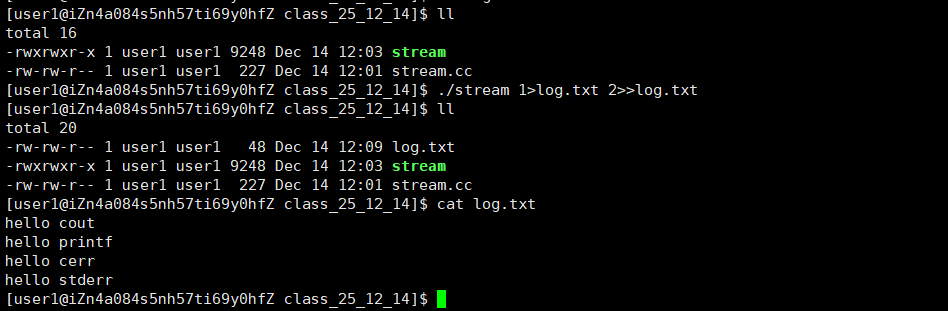
写法二:

为什么要有标准错误呢?下图是原因:

2.一切皆文件
⾸先,在windows中是⽂件的东西,它们在linux中也是⽂件;其次⼀些在windows中不是⽂件的东
西,⽐如进程、磁盘、显⽰器、键盘这样硬件设备也被抽象成了⽂件,你可以使⽤访问⽂件的⽅法访 问它们获得信息;甚⾄管道,也是⽂件;将来我们要学习⽹络编程中的socket(套接字)这样的东西, 使⽤的接⼝跟⽂件接⼝也是⼀致的。
这样做最明显的好处是,开发者仅需要使⽤⼀套 API 和开发⼯具,即可调取 Linux 系统中绝⼤部分的资源。举个简单的例⼦,Linux 中⼏乎所有读(读⽂件,读系统状态,读PIPE)的操作都可以⽤
read 函数来进⾏;⼏乎所有更改(更改⽂件,更改系统参数,写 PIPE)的操作都可以⽤ write 函
数来进⾏
之前我们讲过,当打开⼀个⽂件时,操作系统为了管理所打开的⽂件,都会为这个⽂件创建⼀个file结构体,该结构体定义在 /usr/src/kernels/3.10.0-1160.71.1.el7.x86_64/include/linux/fs.h 下,以下展⽰了该结构部分我们关系的内容:
cpp
struct file {
    ...
    struct inode *f_inode; /* cached value */
    const struct file_operations *f_op;
    ...
    atomic_long_t f_count; // 表⽰打开⽂件的引⽤计数,如果有多个⽂件指针指
    向它,就会增加f_count的值。
    unsigned int f_flags; // 表⽰打开⽂件的权限
    fmode_t f_mode; // 设置对⽂件的访问模式,例如:只读,只写等。所
    有的标志在头⽂件<fcntl.h> 中定义
    loff_t f_pos; // 表⽰当前读写⽂件的位置
    ...
} __attribute__((aligned(4))); /* lest something weird decides that 2 is OK
*/
我们下面来看一下图,来理解一下为什么linux下一切皆文件:
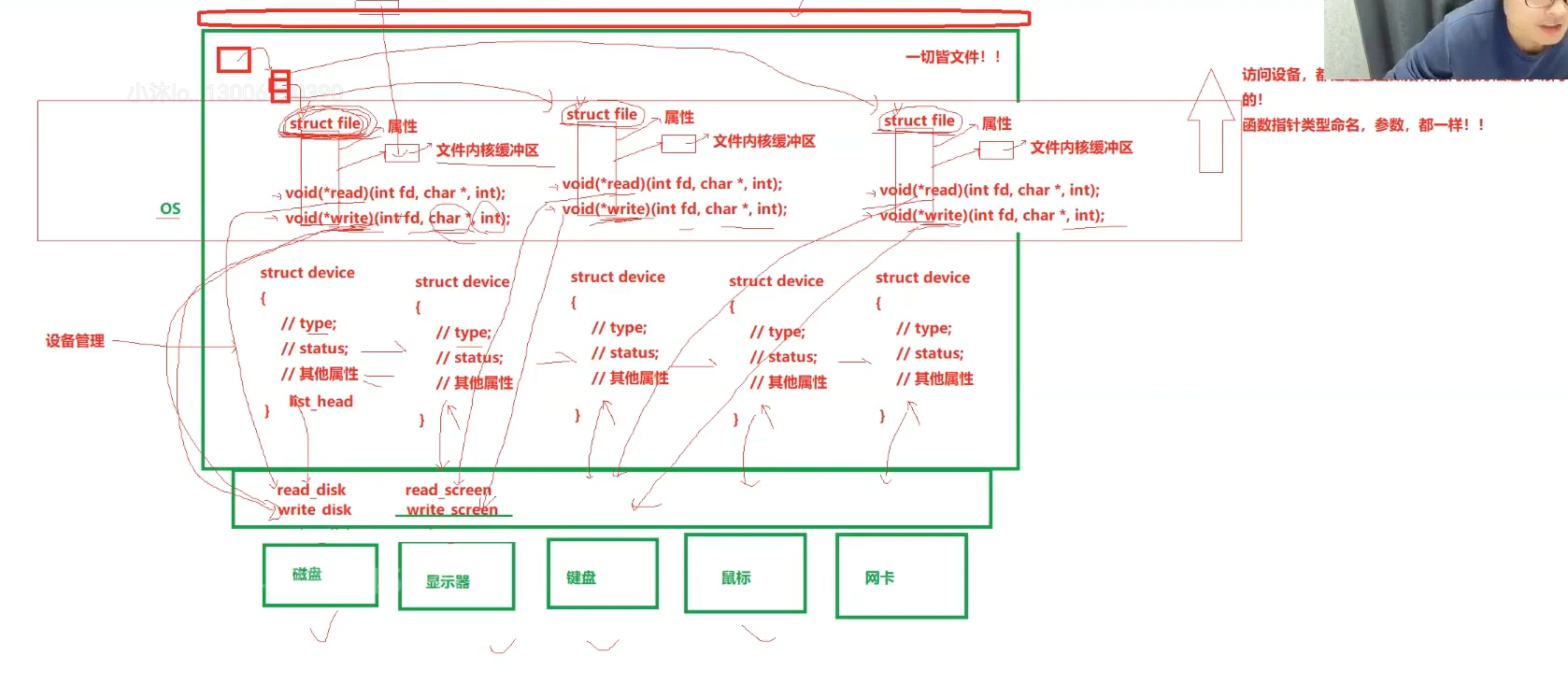
1. 核心思路:用「struct file」统一封装所有资源
Linux 内核会给所有硬件设备(磁盘、显示器、键盘、网卡等) ,都套一层「struct file结构体」的壳:
- 图中 OS 层的多个
struct file,就是对应不同设备的 "文件抽象"; - 每个
struct file里包含:文件属性、内核缓冲区(用来缓存设备数据),以及 **read/write等函数指针 **(这是 "文件接口" 的核心)。
2. 设备的具体逻辑:「struct device + 硬件操作函数」
图的下层是设备管理层 和实际硬件:
struct device:对应每个具体硬件(磁盘、显示器、键盘等),记录设备的类型、状态等属性;- 硬件操作函数:比如磁盘对应
read disk/write disk(实际读 / 写磁盘的逻辑),显示器对应read screen/write screen(实际读 / 写显示器的逻辑)。
3. "一切皆文件" 的关键:函数指针绑定「统一接口 ↔ 设备逻辑」
struct file里的read/write函数指针,会绑定到对应设备的实际操作函数:
- 比如 "磁盘对应的
struct file",它的read指针会指向read disk(实际读磁盘),write指针指向write disk(实际写磁盘) - 比如 "显示器对应的
struct file",它的write指针会指向write screen(实际写显示器,也就是显示内容)
4. 用户层的体验:只用 "文件操作" 就能控制所有设备
当你在用户层调用read()/write()时:
- 不用关心操作的是 "磁盘文件" 还是 "显示器"------ 你只需要操作对应的
struct file(也就是 "文件描述符" 对应的结构体) - 内核会通过
struct file里的函数指针,自动调用对应设备的实际操作逻辑(比如写显示器就调用write screen,读磁盘就调用read disk)
Linux "一切皆文件" 的本质,是用struct file做统一抽象,通过函数指针把 "文件接口" 和 "设备的实际逻辑" 绑定起来------ 不管是磁盘、显示器还是键盘,用户都只用一套 "文件操作(open/read/write/close)" 来控制,内核帮你屏蔽了不同设备的差异。这张图正是把 "抽象层(struct file)、设备层(struct device)、硬件逻辑" 的绑定关系画了出来
3.缓冲区
1.什么是缓冲区
缓冲区是内存空间的⼀部分。也就是说,在内存空间中预留了⼀定的存储空间,这些存储空间⽤来缓 冲输⼊或输出的数据,这部分预留的空间就叫做缓冲区。缓冲区根据其对应的是输⼊设备还是输出设备,分为输⼊缓冲区和输出缓冲区
2.为什么要引⼊缓冲区机制
读写⽂件时,如果不会开辟对⽂件操作的缓冲区,直接通过系统调⽤对磁盘进⾏操作(读、写等),那么 每次对⽂件进⾏⼀次读写操作时,都需要使⽤读写系统调⽤来处理此操作,即需要执⾏⼀次系统调⽤,执⾏⼀次系统调⽤将涉及到CPU状态的切换,即从⽤⼾空间切换到内核空间,实现进程上下⽂的切换,这将损耗⼀定的CPU时间,频繁的磁盘访问对程序的执⾏效率造成很⼤的影响。
为了减少使⽤系统调⽤的次数,提⾼效率,我们就可以采⽤缓冲机制 。⽐如我们从磁盘⾥取信息,可以在磁盘⽂件进⾏操作时,可以⼀次从⽂件中读出⼤量的数据到缓冲区中,以后对这部分的访问就不需要再使⽤系统调⽤了,等缓冲区的数据取完后再去磁盘中读取,这样就可以减少磁盘的读写次数,再加上计算机对缓冲区的操作远快于对磁盘的操作,故应⽤缓冲区可极⼤提⾼计算机的运⾏速度。⼜⽐如,我们使⽤打印机打印⽂档,由于打印机的打印速度相对较慢,我们先把⽂档输出到打印机相应的缓冲区,打印机再⾃⾏逐步打印,这时我们的CPU可以处理别的事情。可以看出,缓冲区就是块内存区,它⽤在输⼊输出设备和CPU之间,⽤来缓存数据。它使得低速的输⼊输出设备和⾼速的CPU能够协调⼯作,避免低速的输⼊输出设备占⽤CPU,解放出CPU,使其能够提⾼效率⼯作
3.解决open与close问题
下面我们来看一段之前的代码:
cpp
#include <stdio.h>
#include <sys/stat.h>
#include <sys/types.h>
#include <fcntl.h>
#include <unistd.h>

int main()
{
    close(1);
    int fd = open("file.txt", O_CREAT | O_WRONLY | O_APPEND, 0666);
    if (fd < 0)
    {
        perror("fd open");
        return 1;
    }
    printf("hello fd\n");
    printf("hello fd\n");
    printf("hello fd\n");
    return 0;
}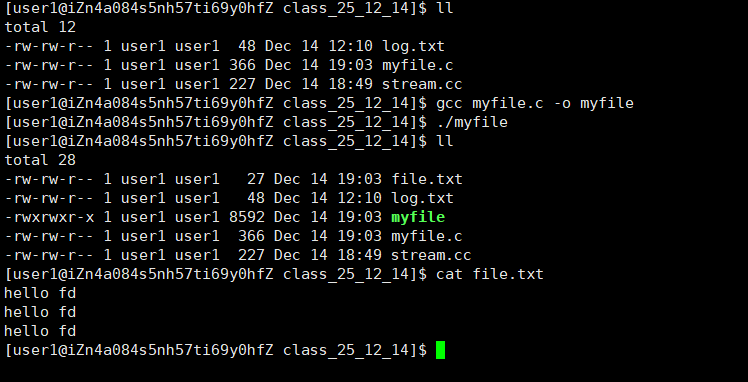
此时我们将内容打印到了file.txt中
要是我们关闭fd呢
cpp
#include <stdio.h>
#include <sys/stat.h>
#include <sys/types.h>
#include <fcntl.h>
#include <unistd.h>

int main()
{
    close(1);
    int fd = open("file.txt", O_CREAT | O_WRONLY | O_APPEND, 0666);
    if (fd < 0)
    {
        perror("fd open");
        return 1;
    }
    printf("hello fd\n");
    printf("hello fd\n");
    printf("hello fd\n");
    close(fd);
    return 0;
}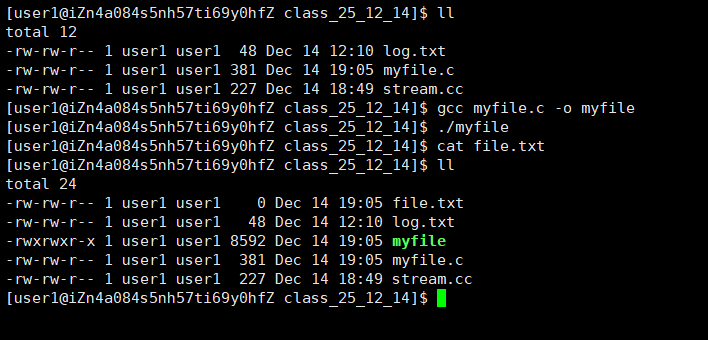
此时为什么什么都没有呢??内容去哪里啦??
先别急,如果我们在此基础上使用系统调用(write)
cpp
#include <stdio.h>
#include <sys/stat.h>
#include <sys/types.h>
#include <fcntl.h>
#include <unistd.h>
#include <string.h>

int main()
{
    close(1);
    int fd = open("file.txt", O_CREAT | O_WRONLY | O_APPEND, 0666);
    if (fd < 0)
    {
        perror("fd open");
        return 1;
    }
    printf("hello fd\n");
    printf("hello fd\n");
    printf("hello fd\n");
    const char* message = "hello write\n";
    write(fd, message, strlen(message));
    close(fd);
    return 0;
}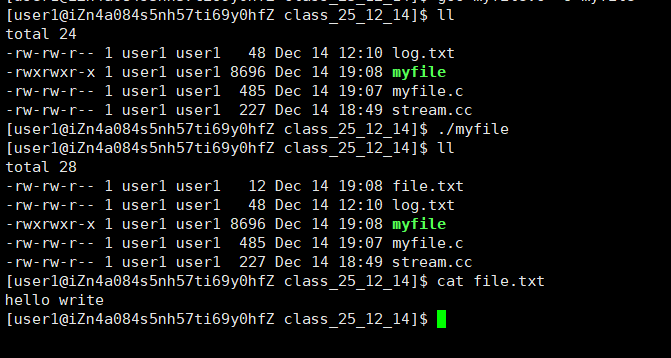
虽然printf的内容没了,但是write还是有的
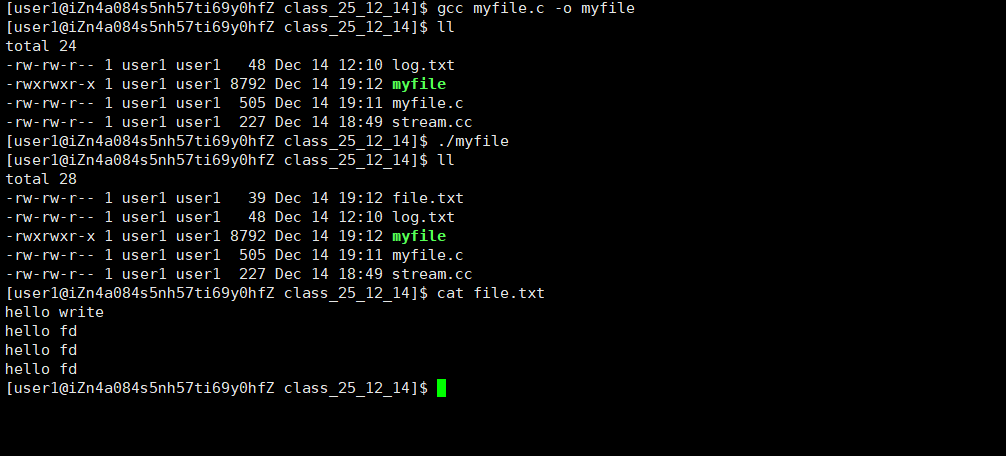
这是因为缓冲区的存在,c语言会给我们一个缓冲区,我们会先将内容输出到c语言缓冲区,等到时机合适会将该缓冲区刷新到系统缓冲区,而write会直接将内容输出到系统缓冲区,所以会出现只要write内容,要想实现printf也输出,只需要手动刷新一下c语言缓冲区即可
cpp
#include <stdio.h>
#include <sys/stat.h>
#include <sys/types.h>
#include <fcntl.h>
#include <unistd.h>
#include <string.h>

int main()
{
    close(1);
    int fd = open("file.txt", O_CREAT | O_WRONLY | O_APPEND, 0666);
    if (fd < 0)
    {
        perror("fd open");
        return 1;
    }
    printf("hello fd\n");
    printf("hello fd\n");
    printf("hello fd\n");
    const char* message = "hello write\n";
    write(fd, message, strlen(message));
    fflush(stdout);
    close(fd);
    return 0;
}
4.c语言缓冲区与系统缓冲区
可是为什么刚刚没有刷新缓冲区呢,为什么需要一个c语言缓冲区呢,下图将为你讲解:
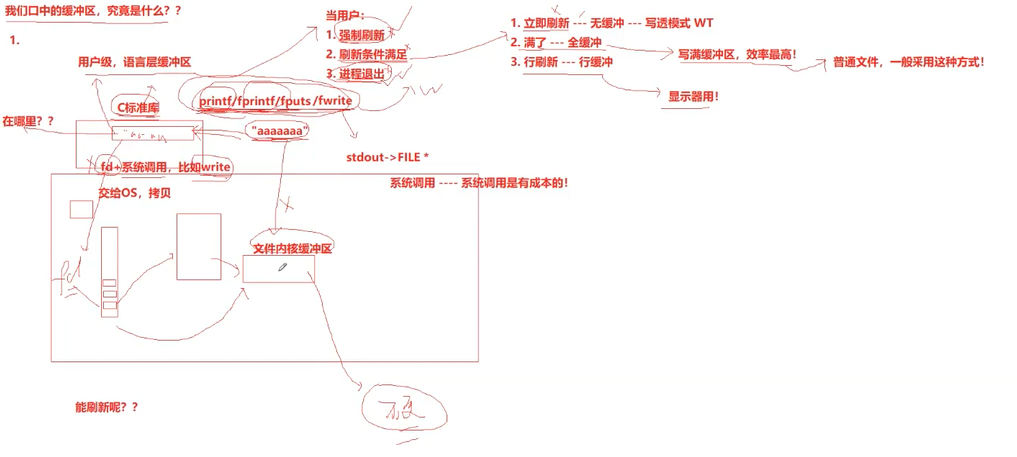
首先需要知道,如果不要c语言缓冲区,那么printf一次,语言层就往系统层刷一次缓冲区,会极大浪费系统资源,如果我们有一个c语言缓冲区,等合适的时机在刷,就会极大降低系统负担,举个例子,你要下楼丢垃圾,你是选择一个一个丢,还是选择把垃圾装在一起丢?为了节约力气和时间,肯定选择一起丢嘛
而合适的时机是什么呢
1.强制刷新
就是fflush
2.进程退出
在main函数里面也就是return的时候
3.刷新条件满足
1.立即刷新->无缓冲->语言层输出一句话立马刷新到系统缓冲区里面
2.满了刷新->全缓冲->c语言缓冲区满了,必须要向系统缓冲区刷新了(文件用)
3.行刷新->行缓冲->一行一行从c缓冲区刷新到系统缓冲区(显示器用)
那么有了上面的基础,我们来解答一下为什么close会出现无内容的情况
很简单,因为我们先将内容放在了c语言缓冲区,此时在没有满足任何一种缓冲区刷新的情况下我们就将fd关闭,导致缓冲区内容无处可刷,所以显示无内容
5.应用
cpp
#include <stdio.h>
#include <string.h>
#include <unistd.h>
int main()
{
    //语言层调用
    printf("hello printf\n");
    fprintf(stdout, "hello fprintf\n");
    const char* message1 = "hello fwrite\n";
    fwrite(message1, strlen(message1), 1, stdout);
    //系统层调用
    const char* message2 = "hello write\n";
    write(1, message2, strlen(message2));
    fork();
    return 0;
}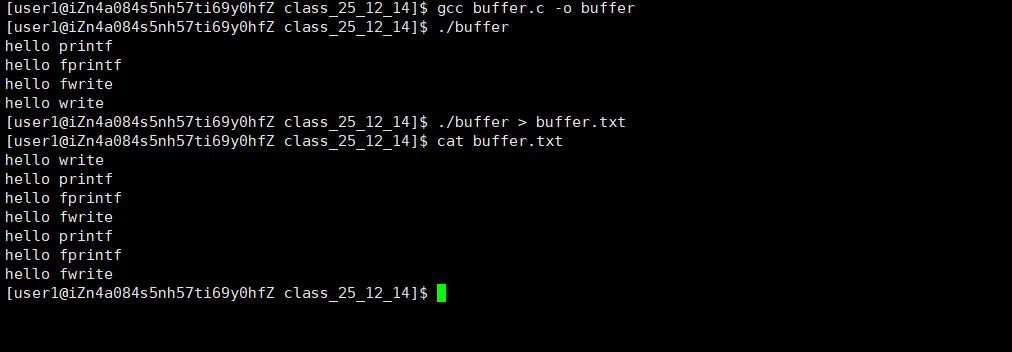
为什么两个答案不一样呢?
我们先来看看第一个直接使用,因为我们前面讲过,显示器是行刷新,所以我们一行一行刷新,fork的子进程与父进程缓冲区都是空的,所以只有四个输出
第二个重定向操作后,就从显示器刷新变味了文件刷新,也就是全缓冲,此时父进程缓冲区是语言层的三个输出,fork之后的子进程会拷贝一份父进程pcb,包括缓冲区,所以此时进程结束两个进程刷新缓冲区,就出现了两分语言层输出,而write是系统调用,所以直接输出到系统缓冲区,只有一个
4.简单的libc编写
Makefile:
cpp
code : mystdio.c usercode.c
	gcc $^ -o $@
.PHONY : clean
clean :
	rm -f code
mystdio.h:
cpp
#pragma once
#include <stdio.h>

#define MAX 1024
//刷新方式
#define NONE_FLUSH (1 << 0)
#define LINE_FLUSH (1 << 1)
#define FULL_FLUSH (1 << 2)

typedef struct IO_FILE
{
    int fileno; //文件描述符
    int flag; //标志位
    char outbuffer[MAX]; //缓冲区
    int bufferlen; //缓冲区元素个数
    int flush_method; //刷新方式
}MyFile;

MyFile* MyFopen(const char* path, const char* mode);
void MyFclose(MyFile*);
int MyFwrite(MyFile* , void* str, int len);
void MyFFlush(MyFile* );
mystdio.c:
cpp
#include "mystdio.h"
#include <sys/types.h>
#include <sys/stat.h>
#include <fcntl.h>
#include <string.h>
#include <stdlib.h>
#include <unistd.h>

static MyFile* BuyFile(int fd, int flag)
{
    MyFile* f = (MyFile*)malloc(sizeof(MyFile));
    if (f == NULL)
    {
        return NULL;
    }
    f->bufferlen = 0;
    f->fileno = fd;
    f->flag = flag;
    f->flush_method = LINE_FLUSH;
    memset(f->outbuffer, 0, sizeof(f->outbuffer));
    return f;
}

MyFile* MyFopen(const char* path, const char* mode)
{
    int fd = -1;
    int flag = 0;
    if (strcmp(mode, "w") == 0)
    {
        flag = O_CREAT | O_WRONLY | O_TRUNC;
        fd = open(path, flag, 0666);
    }
    else if (strcmp(mode, "r") == 0)
    {
        flag = O_RDONLY;
        fd = open(path, flag);
    }
    else if (strcmp(mode, "a") == 0)
    {
        flag = O_CREAT | O_WRONLY | O_APPEND;
        fd = open(path, flag, 0666);
    }
    else
    {
        //TODO
    }
    if (fd < 0)
    {
        return NULL;
    }
    return BuyFile(fd, flag);
}

void MyFclose(MyFile* file)
{
    MyFFlush(file);
}

int MyFwrite(MyFile* file, void* str, int len)
{
    //拷贝
    memcpy(file->outbuffer + file->bufferlen, str, len);
    file->bufferlen += len;
    //行刷新
    if ((file->flush_method & LINE_FLUSH) && file->outbuffer[file->bufferlen - 1] == '\n')
    {
        MyFFlush(file);
    }
    return 0;
}

void MyFFlush(MyFile* file)
{
    if (file->bufferlen == 0)
    {
        return;
    }
    int n = write(file->fileno, file->outbuffer, file->bufferlen);
    (void)n;
    file->bufferlen = 0;
}
usercode.c:
cpp
#include "mystdio.h"
#include <string.h>
#include <unistd.h>
int main()
{
    MyFile* filep = MyFopen("./log.txt", "a");
    if (!filep)
    {
        perror("filep open\n");
        return 1;
    }
    //char* message = (char*)"hello my_libc\n"; //带/n行刷新
    char* message = (char*)"hello my_libc!!!"; //不带就是全刷新
    //MyFwrite(filep, message, strlen(message));
    int cnt = 10;
    while (cnt--)
    {
        MyFwrite(filep, message, strlen(message));
        printf("filep->outbuffer : %s\n", filep->outbuffer);
        sleep(1);
    }
    MyFclose(filep);
    return 0;
}