基于 Microsoft Agent Framework 实现第三方聊天历史存储
理解 Microsoft Agent Framework
Microsoft Agent Framework 是一个用于构建对话式 AI 应用的框架,支持自然语言处理和上下文管理。其核心组件包括 Bot Framework SDK 和 Azure Bot Service,但默认聊天历史通常存储在 Azure 服务中。
具体实现可参考NetCoreKevin的kevin.AI.AgentFramework和KevinAIChatMessageStore服务模块
基于NET构建的现代化AI智能体Saas企业级架构:
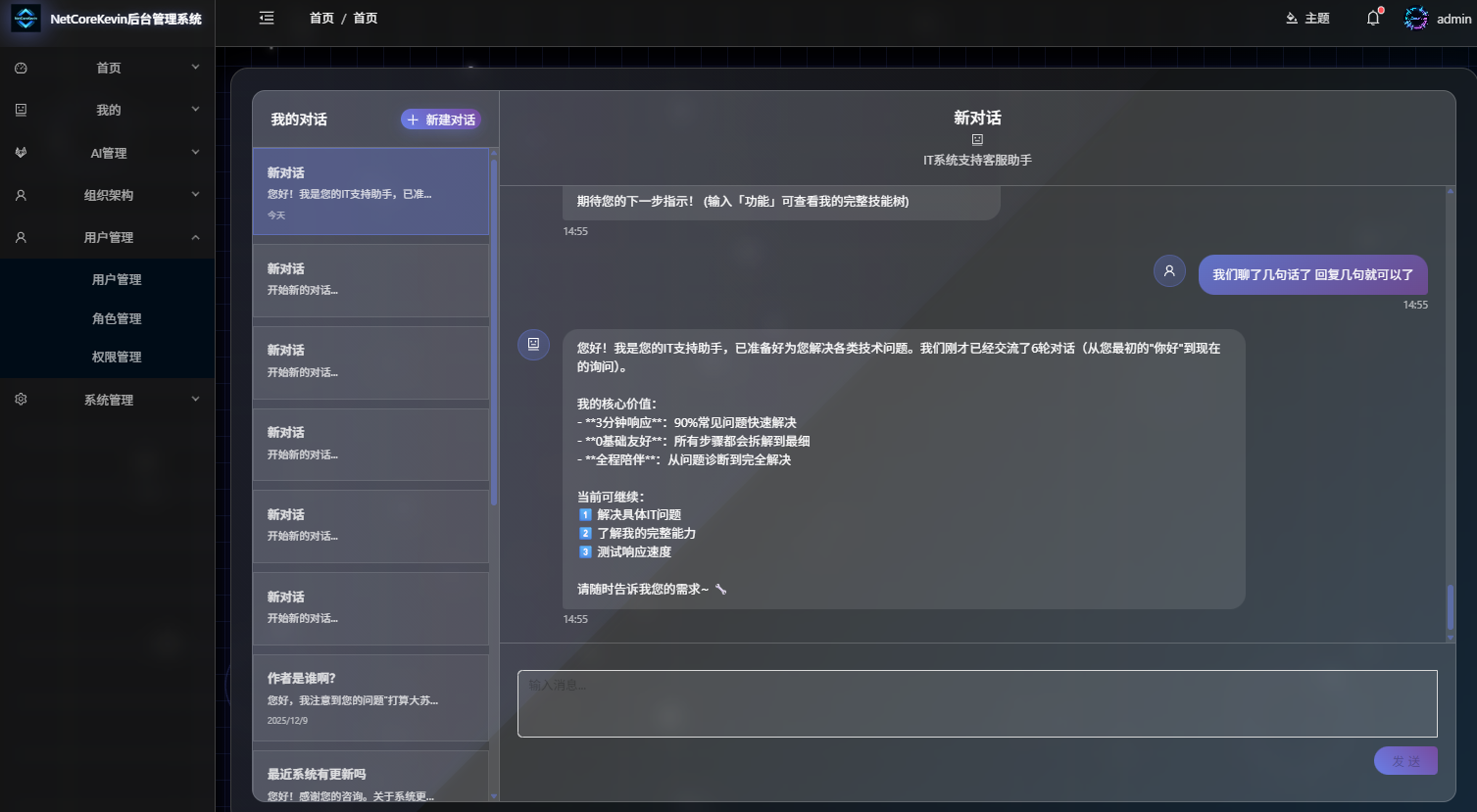
项目地址:github:https://github.com/junkai-li/NetCoreKevin
Gitee: https://gitee.com/netkevin-li/NetCoreKevin
配置自定义存储提供程序
-
**实现
ChatMessageStore**创建自定义存储类继承
Microsoft.Bot.Builder.IStorage,需实现以下方法:csharppublic sealed class KevinChatMessageStore : ChatMessageStore { private IKevinAIChatMessageStore _chatMessageStore; public string ThreadDbKey { get; private set; } public KevinChatMessageStore( IKevinAIChatMessageStore vectorStore, JsonElement serializedStoreState, string AIChatsId, JsonSerializerOptions? jsonSerializerOptions = null) { this._chatMessageStore = vectorStore ?? throw new ArgumentNullException(nameof(vectorStore)); this.ThreadDbKey = AIChatsId; } public override async Task AddMessagesAsync( IEnumerable<ChatMessage> messages, CancellationToken cancellationToken) { await _chatMessageStore.AddMessagesAsync(messages.Select(x => new ChatHistoryItemDto() { Key = this.ThreadDbKey + x.MessageId, Timestamp = DateTimeOffset.UtcNow, ThreadId = this.ThreadDbKey, MessageId = x.MessageId, Role = x.Role.Value, SerializedMessage = JsonSerializer.Serialize(x), MessageText = x.Text }).ToList(), cancellationToken); // 设置前景色为红色 // 保存原始颜色,以便之后恢复 ConsoleColor originalColor = Console.ForegroundColor; Console.ForegroundColor = ConsoleColor.Red; Console.WriteLine("聊天消息记录:", Color.Red); messages.Select(x => x.Text).ToList().ForEach(t => Console.WriteLine(t)); // 设置前景色为红色 Console.ForegroundColor = ConsoleColor.Red; Console.WriteLine("聊天消息记录添加完成", Color.Red); // 恢复原始颜色 Console.ForegroundColor = originalColor; } public override async Task<IEnumerable<ChatMessage>> GetMessagesAsync( CancellationToken cancellationToken) { var data = await _chatMessageStore.GetMessagesAsync(this.ThreadDbKey, cancellationToken); var messages = data.ConvertAll(x => JsonSerializer.Deserialize<ChatMessage>(x.SerializedMessage!)!); messages.Reverse(); ConsoleColor originalColor = Console.ForegroundColor; Console.ForegroundColor = ConsoleColor.Red; Console.WriteLine("所有聊天消息记录开始:", Color.Red); messages.Select(x => x.Text).ToList().ForEach(t => Console.WriteLine(t)); Console.WriteLine("所有聊天消息记录结束:", Color.Red); // 恢复原始颜色 Console.ForegroundColor = originalColor; return messages; } public override JsonElement Serialize(JsonSerializerOptions? jsonSerializerOptions = null) => // We have to serialize the thread id, so that on deserialization you can retrieve the messages using the same thread id. JsonSerializer.SerializeToElement(this.ThreadDbKey); } -
实现IKevinAIChatMessageStore
csharpTask AddMessagesAsync(List<ChatHistoryItemDto> chatHistoryItems, CancellationToken cancellationToken); Task<List<ChatHistoryItemDto>> GetMessagesAsync(string threadId, CancellationToken cancellationToken); -
实现注入到AI中间件中
1.定义AI服务:
csharp/// <summary> /// AI服务 /// </summary> public class AIAgentService : IAIAgentService { public AIAgentService() { } public async Task<AIAgent> CreateOpenAIAgent(string name, string prompt, string description, string url, string model, string keySecret, IList<AITool>? tools = null, ChatResponseFormat? chatResponseFormat = null, Func<IChatClient, IChatClient>? clientFactory = null, ILoggerFactory? loggerFactory = null, IServiceProvider? services = null) { OpenAIClientOptions openAIClientOptions = new OpenAIClientOptions(); openAIClientOptions.Endpoint = new Uri(url); var ai = new OpenAIClient(new ApiKeyCredential(keySecret), openAIClientOptions); if (chatResponseFormat != default) { ChatOptions chatOptions = new() { ResponseFormat = chatResponseFormat }; return ai.GetChatClient(model).CreateAIAgent(new ChatClientAgentOptions() { Name = name, Instructions = prompt, ChatOptions = chatOptions, Description = description }); } return ai.GetChatClient(model).CreateAIAgent(instructions: prompt, name: name, prompt, tools, clientFactory, loggerFactory, services); } public async Task<AIAgent> CreateOpenAIAgent(string msg, string url, string model, string keySecret, ChatClientAgentOptions chatClientAgentOptions) { OpenAIClientOptions openAIClientOptions = new OpenAIClientOptions(); openAIClientOptions.Endpoint = new Uri(url); var ai = new OpenAIClient(new ApiKeyCredential(keySecret), openAIClientOptions); return ai.GetChatClient(model).CreateAIAgent(chatClientAgentOptions); } /// <summary> /// 智能体转换为McpServerTool /// </summary> /// <param name="aIAgent">智能体</param> /// <returns></returns> /// <exception cref="NotImplementedException"></exception> public McpServerTool AIAgentAsMcpServerTool(AIAgent aIAgent) { return McpServerTool.Create(aIAgent.AsAIFunction()); } /// <summary> /// 获取代理 /// </summary> /// <returns></returns> public IChatClient GetChatClient(string url, string model, string keySecret) { OpenAIClientOptions openAIClientOptions = new OpenAIClientOptions(); openAIClientOptions.Endpoint = new Uri(url); var ai = new OpenAIClient(new ApiKeyCredential(model), openAIClientOptions); return ai.GetChatClient(keySecret).AsIChatClient(); } public async Task<(AIAgent, AgentRunResponse)> CreateOpenAIAgentAndSendMSG(string msg, string name, string prompt, string description, string url, string model, string keySecret, IList<AITool>? tools = null, ChatResponseFormat? chatResponseFormat = null, Func<IChatClient, IChatClient>? clientFactory = null, ILoggerFactory? loggerFactory = null, IServiceProvider? services = null) { OpenAIClientOptions openAIClientOptions = new OpenAIClientOptions(); openAIClientOptions.Endpoint = new Uri(url); var ai = new OpenAIClient(new ApiKeyCredential(keySecret), openAIClientOptions); var aiAgent = ai.GetChatClient(model).CreateAIAgent(instructions: prompt, name: name, prompt, tools, clientFactory, loggerFactory, services); if (chatResponseFormat != default) { ChatOptions chatOptions = new() { ResponseFormat = chatResponseFormat }; aiAgent = ai.GetChatClient(model).CreateAIAgent(new ChatClientAgentOptions() { Name = name, Instructions = prompt, ChatOptions = chatOptions, Description = description }); } var reslut = await aiAgent.RunAsync(msg); return (aiAgent, reslut); } public async Task<(AIAgent, AgentRunResponse)> CreateOpenAIAgentAndSendMSG(string msg, string url, string model, string keySecret, ChatClientAgentOptions chatClientAgentOptions) { OpenAIClientOptions openAIClientOptions = new OpenAIClientOptions(); openAIClientOptions.Endpoint = new Uri(url); var ai = new OpenAIClient(new ApiKeyCredential(keySecret), openAIClientOptions); var aiAgent = ai.GetChatClient(model).CreateAIAgent(chatClientAgentOptions); var reslut = await aiAgent.RunAsync(msg); return (aiAgent, reslut); } }
2.使用AI服务
csharp
          addAi.Content = (await aIAgentService.CreateOpenAIAgentAndSendMSG(add.Content, aIModels.EndPoint, aIModels.ModelName, aIModels.ModelKey,new ChatClientAgentOptions
    {
        Name= aiapp.Name,
        Instructions = aIPrompts.Prompt,
        Description = aIPrompts.Description ?? "你是一个智能体,请根据你的提示词进行相关回答",
        ChatMessageStoreFactory = ctx =>
        {
            // Create a new chat message store for this agent that stores the messages in a vector store.
            return new KevinChatMessageStore(
               kevinAIChatMessageStore,
               ctx.SerializedState,
              par.AIChatsId.ToString(),
               ctx.JsonSerializerOptions);
        }
    })).Item2.Text;
数据库设计建议
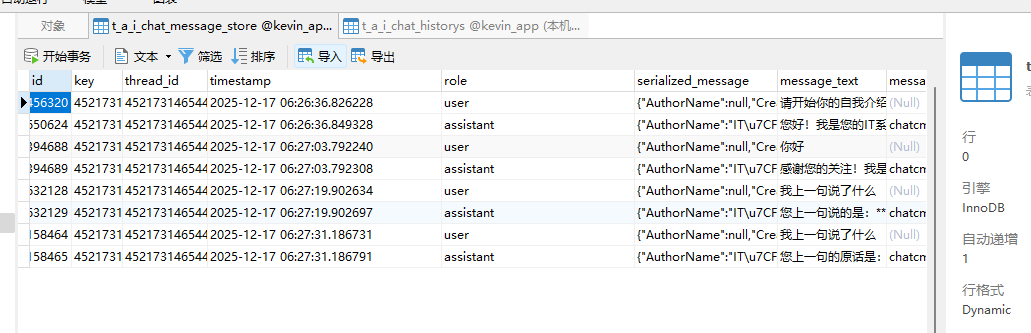
对于关系型数据库(如 SQL Server),建议的表结构:
sql
 /// <summary>
 /// 专门用于存储AI聊天记录的表
 /// </summary>
 [Table("TAIChatMessageStore")]
 [Description("专门用于存储AI聊天记录的表")]
 [Index(nameof(Key))]
 [Index(nameof(ThreadId))]
 [Index(nameof(Role))]
 [Index(nameof(MessageId))]
 public class TAIChatMessageStore : CUD_User
 {
     [MaxLength(200)]
     public string Key { get; set; }

     [MaxLength(100)]

     public string ThreadId { get; set; }

     [Description("消息时间stamp")]
     public DateTimeOffset? Timestamp { get; set; }

     /// <summary>
     /// 角色标识
     /// </summary>
     [MaxLength(50)]
     public string Role { get; set; }
     public string SerializedMessage { get; set; }
     /// <summary>
     /// 消息内容
     /// </summary>

     public string? MessageText { get; set; }
     /// <summary>
     /// 消息id
     /// </summary>
     [Description("消息id")]
     [MaxLength(100)]
     public string? MessageId { get; set; }
 }
实现数据持久化
-
写入示例
使用 Entity Framework Core 保存数据:
csharppublic async Task AddMessagesAsync(List<ChatHistoryItemDto> chatHistoryItems, CancellationToken cancellationToken) { var adddata = chatHistoryItems.Select(t => new TAIChatMessageStore { Id = SnowflakeIdService.GetNextId(), CreateTime = DateTime.Now, CreateUserId = CurrentUser.UserId, IsDelete = false, TenantId = CurrentUser.TenantId, ThreadId = t.ThreadId, Timestamp = t.Timestamp, Role = t.Role, Key = t.Key, SerializedMessage = t.SerializedMessage, MessageText = t.MessageText, MessageId = t.MessageId }).ToList(); aIChatMessageStoreRp.AddRange(adddata); await aIChatMessageStoreRp.SaveChangesAsync(); } -
读取示例
csharppublic Task<List<ChatHistoryItemDto>> GetMessagesAsync(string threadId, CancellationToken cancellationToken) { return aIChatMessageStoreRp.Query().Where(t => t.ThreadId == threadId && t.IsDelete == false).Select(t => new ChatHistoryItemDto { Key = t.Key, ThreadId = t.ThreadId, Timestamp = t.Timestamp, SerializedMessage = t.SerializedMessage, MessageText = t.MessageText, Role = t.Role, MessageId = t.MessageId }).ToListAsync(); }
性能优化建议
- 为高频查询字段(如
UserId和ChannelId)添加索引 - 实现数据分片策略应对大规模历史记录
- 考虑使用 Redis 缓存热点对话数据
安全注意事项
- 加密存储敏感对话内容
- 实现数据保留策略定期清理旧记录
- 遵守 GDPR 等数据隐私法规
测试验证方法
- 编写单元测试验证存储接口实现
- 使用 Bot Framework Emulator 进行端到端测试
- 进行负载测试验证性能表现
扩展可能性
- 添加全文检索支持(如 Azure Cognitive Search)
- 实现跨渠道对话历史同步
- 开发分析模块生成对话洞察报告
这种实现方式允许完全控制数据存储位置和格式,同时保持与 Bot Framework 的兼容性。根据具体需求可选择 SQL Server、Cosmos DB 或其他数据库解决方案。