
前言
大家好!今天给大家带来《数字图像处理》第 8 章的全面解析 ------ 图像压缩和水印。在这个图像、视频爆炸的时代,图像压缩技术无处不在(比如我们手机里的 JPG 照片、视频网站的流媒体),而数字水印则是多媒体版权保护的核心技术。
本文会从基础概念到实战代码,把图像压缩的各类编码算法(霍夫曼、算术、LZW、小波等)和数字水印技术讲透,每个知识点都配有可直接运行的 Python 代码 、效果对比图,语言通俗易懂,零基础也能看懂!
[本章知识框架(Mermaid 思维导图)](#本章知识框架(Mermaid 思维导图))
[8.1 基础](#8.1 基础)
[8.1.1 编码冗余](#8.1.1 编码冗余)
[8.1.2 空间冗余和时间冗余](#8.1.2 空间冗余和时间冗余)
[8.1.3 无关信息](#8.1.3 无关信息)
[8.1.4 度量图像信息](#8.1.4 度量图像信息)
[1. 信息熵(香农熵)](#1. 信息熵(香农熵))
[2. 平均码字长度](#2. 平均码字长度)
[3. 压缩比](#3. 压缩比)
[8.1.5 保真度准则](#8.1.5 保真度准则)
[1. 客观准则](#1. 客观准则)
[2. 主观准则](#2. 主观准则)
[8.1.6 图像压缩模型](#8.1.6 图像压缩模型)
[8.1.7 图像格式、存储器(容器)和压缩标准](#8.1.7 图像格式、存储器(容器)和压缩标准)
[8.2 霍夫曼编码](#8.2 霍夫曼编码)
[8.3 Golomb 编码](#8.3 Golomb 编码)
[实战代码:Golomb 编码实现](#实战代码:Golomb 编码实现)
[8.4 算术编码](#8.4 算术编码)
[8.4.1 自适应上下文相关概率估计](#8.4.1 自适应上下文相关概率估计)
[8.5 LZW 编码](#8.5 LZW 编码)
[实战代码:LZW 编码实现](#实战代码:LZW 编码实现)
[8.6 行程编码](#8.6 行程编码)
[8.6.1 一维 CCITT 压缩](#8.6.1 一维 CCITT 压缩)
[8.6.2 二维 CCITT 压缩](#8.6.2 二维 CCITT 压缩)
[8.7 基于符号的编码](#8.7 基于符号的编码)
[8.7.1 JBIG2 压缩](#8.7.1 JBIG2 压缩)
[实战代码:JBIG2 简化实现](#实战代码:JBIG2 简化实现)
[8.8 比特平面编码](#8.8 比特平面编码)
[8.9 块变换编码](#8.9 块变换编码)
[8.9.1 变换的选择](#8.9.1 变换的选择)
[8.9.2 子图像尺寸选择](#8.9.2 子图像尺寸选择)
[8.9.3 比特分配](#8.9.3 比特分配)
[实战代码:DCT 块变换编码实现](#实战代码:DCT 块变换编码实现)
[8.10 预测编码](#8.10 预测编码)
[8.10.1 无损预测编码](#8.10.1 无损预测编码)
[8.10.2 运动补偿预测残差](#8.10.2 运动补偿预测残差)
[8.10.3 有损预测编码](#8.10.3 有损预测编码)
[8.10.4 最优预测器](#8.10.4 最优预测器)
[8.10.5 最优化](#8.10.5 最优化)
[8.11 小波编码](#8.11 小波编码)
[8.11.1 小波的选择](#8.11.1 小波的选择)
[8.11.2 分解级数的选择](#8.11.2 分解级数的选择)
[8.11.3 量化器设计](#8.11.3 量化器设计)
[8.11.4 JPEG-2000](#8.11.4 JPEG-2000)
[8.12 数字图像水印](#8.12 数字图像水印)
[实战代码:DWT 域鲁棒水印(JPEG-2000 兼容)](#实战代码:DWT 域鲁棒水印(JPEG-2000 兼容))
引言
图像压缩的核心目标是在尽可能保证图像质量的前提下,减少存储和传输所需的数据量。想象一下:一张未经压缩的 1080P 彩色图像,数据量约为 6MB,而经过 JPEG 压缩后可能只有几十 KB,这就是压缩的价值!
数字水印则是在图像中嵌入不可见的标识信息(比如版权信息),用于版权保护、内容溯源等场景,要求嵌入的水印不影响图像视觉效果,且具有抗攻击(如压缩、裁剪、滤波)能力。
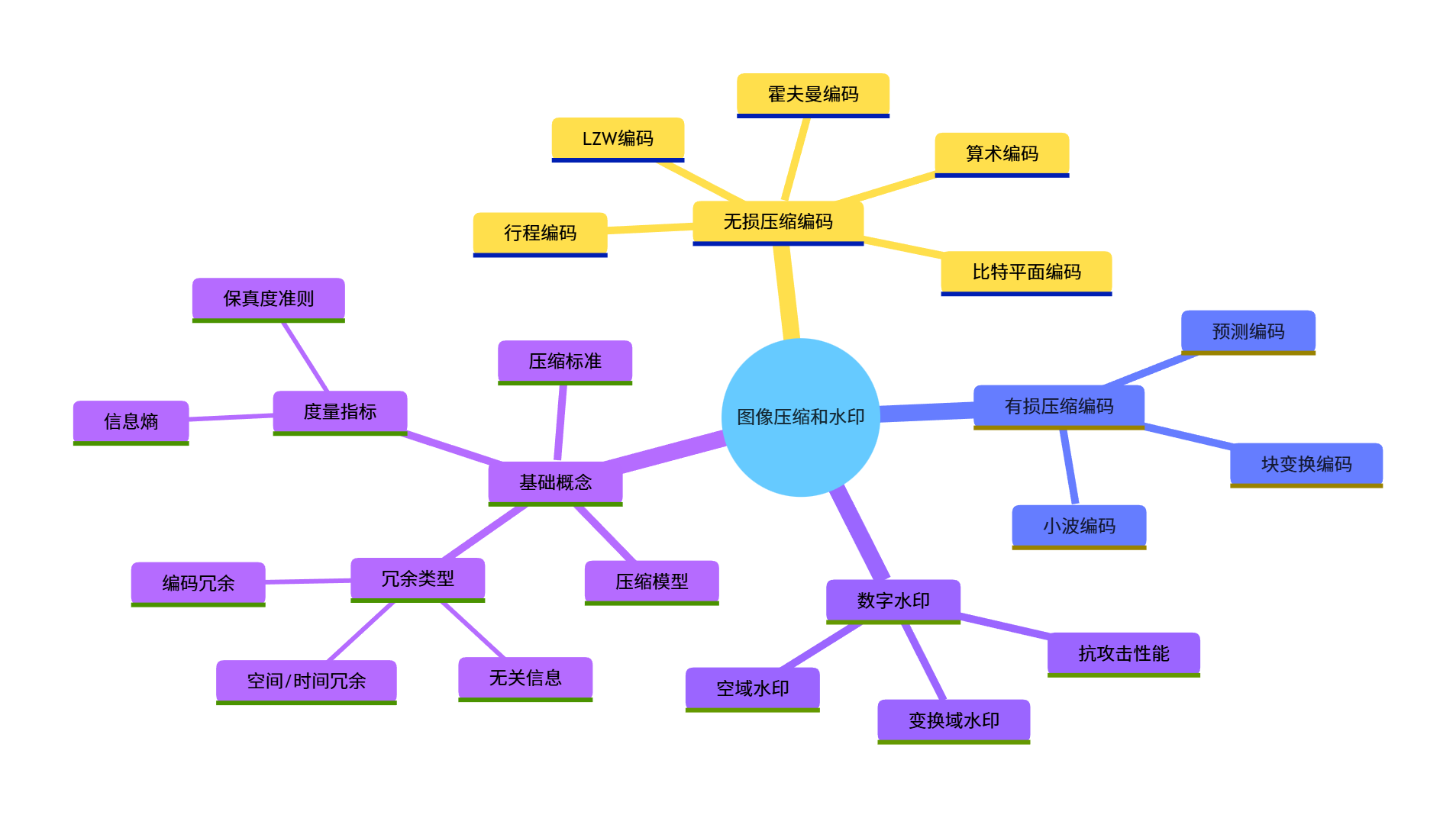
学习目标
- 理解图像冗余的类型和图像信息的度量方法;
- 掌握无损压缩(霍夫曼、LZW、行程编码等)的原理和实现;
- 掌握有损压缩(变换编码、小波编码等)的核心思想和实战;
- 理解数字水印的嵌入和提取原理,能实现基础的水印算法;
- 能根据实际场景选择合适的压缩算法,评估压缩质量。
8.1 基础
8.1.1 编码冗余
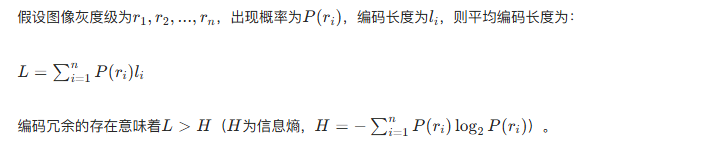
核心概念 :编码冗余是指使用了过长的编码来表示图像像素(或符号),比如用 8 位二进制表示一个出现概率极高的灰度值,而理论上可以用更短的编码。
数学表达:
实战代码:计算编码冗余并对比
import numpy as np
import matplotlib.pyplot as plt
from collections import Counter

# 设置中文字体,避免乱码
plt.rcParams['font.sans-serif'] = ['SimHei']
plt.rcParams['axes.unicode_minus'] = False

# 生成模拟图像灰度数据(简化版)
# 模拟高概率灰度值:128(概率0.8),其他灰度值(概率0.2)
np.random.seed(42)
gray_data = np.random.choice([128, 64, 192, 32], size=10000, p=[0.8, 0.05, 0.05, 0.1])

# 1. 计算信息熵
counts = Counter(gray_data)
total = len(gray_data)
entropy = 0
for val, cnt in counts.items():
    p = cnt / total
    entropy -= p * np.log2(p)

# 2. 计算固定长度编码的平均长度(8位编码)
fixed_len = 8
fixed_avg_len = fixed_len

# 3. 计算编码冗余
coding_redundancy = fixed_avg_len - entropy

# 输出结果
print(f"图像灰度信息熵:{entropy:.2f} 比特/像素")
print(f"8位固定编码平均长度:{fixed_avg_len} 比特/像素")
print(f"编码冗余:{coding_redundancy:.2f} 比特/像素")

# 可视化对比
plt.figure(figsize=(8, 5))
categories = ['信息熵', '8位固定编码', '编码冗余']
values = [entropy, fixed_avg_len, coding_redundancy]
colors = ['#4CAF50', '#FF9800', '#F44336']

bars = plt.bar(categories, values, color=colors)
# 在柱子上标注数值
for bar, val in zip(bars, values):
    plt.text(bar.get_x() + bar.get_width()/2, bar.get_height() + 0.1,
             f'{val:.2f}', ha='center', fontsize=12)

plt.ylabel('比特/像素')
plt.title('编码冗余对比')
plt.ylim(0, 9)
plt.grid(axis='y', alpha=0.3)
plt.show()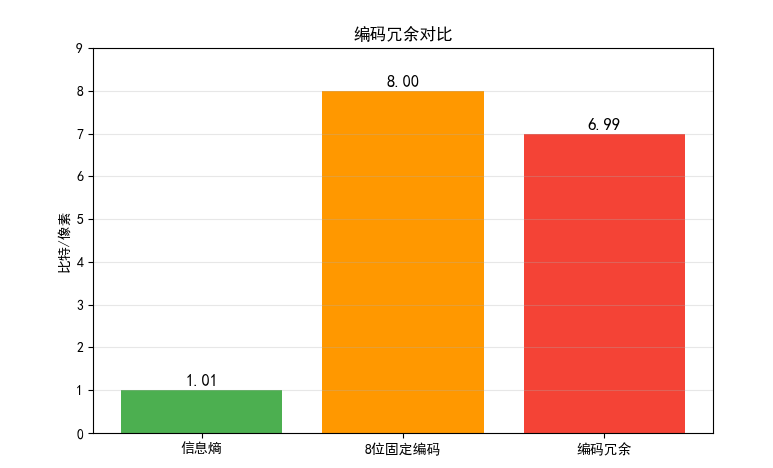
效果对比图位置:运行上述代码后,会生成 "编码冗余对比" 柱状图,直观看到 8 位固定编码的冗余量。
8.1.2 空间冗余和时间冗余
- 空间冗余:图像中相邻像素往往具有相似的灰度值(比如蓝天区域、白色墙壁),这种像素间的相关性就是空间冗余。
- 时间冗余:视频序列中相邻帧的内容高度相似(比如静态场景的视频),这种帧间相关性就是时间冗余。
可视化代码:空间冗余展示
import cv2
import numpy as np
import matplotlib.pyplot as plt

plt.rcParams['font.sans-serif'] = ['SimHei']
plt.rcParams['axes.unicode_minus'] = False

# 读取测试图像(建议用自己的图像,这里生成模拟图像)
# 生成一个包含大面积相似区域的图像
img = np.ones((256, 256), dtype=np.uint8) * 200  # 背景为浅灰色
# 画一个矩形(深灰色)
img[50:150, 50:150] = 100

# 计算相邻像素的差值(空间相关性)
row_diff = np.abs(img[:, 1:] - img[:, :-1])  # 行方向相邻差值
col_diff = np.abs(img[1:, :] - img[:-1, :])  # 列方向相邻差值

# 统计差值为0的比例(比例越高,空间冗余越大)
row_zero_ratio = (row_diff == 0).sum() / row_diff.size
col_zero_ratio = (col_diff == 0).sum() / col_diff.size

# 可视化
fig, axes = plt.subplots(1, 3, figsize=(15, 5))

# 原始图像
axes[0].imshow(img, cmap='gray', vmin=0, vmax=255)
axes[0].set_title('原始图像(含大面积相似区域)')
axes[0].axis('off')

# 行方向差值
axes[1].imshow(row_diff, cmap='gray', vmin=0, vmax=255)
axes[1].set_title(f'行方向相邻像素差值\n零值比例:{row_zero_ratio:.2f}')
axes[1].axis('off')

# 列方向差值
axes[2].imshow(col_diff, cmap='gray', vmin=0, vmax=255)
axes[2].set_title(f'列方向相邻像素差值\n零值比例:{col_zero_ratio:.2f}')
axes[2].axis('off')

plt.tight_layout()
plt.show()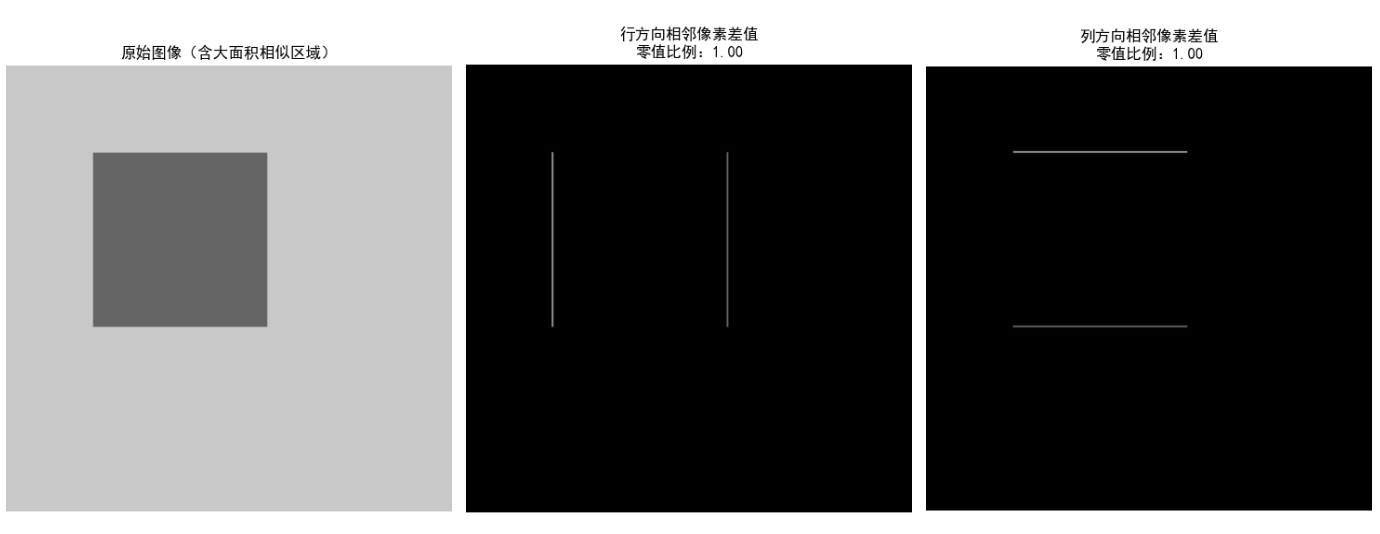
效果对比图位置:运行后可看到原始图像、行 / 列方向差值图,差值图中大部分区域为黑色(差值为 0),直观体现空间冗余。
8.1.3 无关信息
无关信息是指人类视觉系统无法感知的信息(比如超出人眼分辨能力的细节),压缩时可以去除这些信息而不影响视觉效果(有损压缩的核心思想)。
8.1.4 度量图像信息
- 信息熵(香农熵)

- 平均码字长度

- 压缩比

实战代码:计算图像信息熵和压缩比
import numpy as np
import cv2
import matplotlib.pyplot as plt
from collections import Counter

plt.rcParams['font.sans-serif'] = ['SimHei']
plt.rcParams['axes.unicode_minus'] = False

# 读取图像(用OpenCV,也可以用PIL)
# 替换为自己的图像路径
img = cv2.imread('test_img.jpg', 0)  # 0表示灰度图
if img is None:
    # 如果读取失败,生成模拟图像
    img = np.random.randint(0, 256, size=(256, 256), dtype=np.uint8)

# 1. 计算信息熵
flat_img = img.flatten()
counts = Counter(flat_img)
total = len(flat_img)
entropy = 0
for val, cnt in counts.items():
    p = cnt / total
    if p > 0:
        entropy -= p * np.log2(p)

# 2. 计算压缩前数据量(8位/像素)
original_size = flat_img.size * 8  # 比特

# 3. 模拟霍夫曼编码后的平均长度(简化版,实际需实现霍夫曼编码)
# 这里用熵近似最优编码长度
huffman_avg_len = entropy
compressed_size = flat_img.size * huffman_avg_len

# 4. 计算压缩比
cr = original_size / compressed_size

# 输出结果
print(f"图像信息熵:{entropy:.2f} 比特/像素")
print(f"压缩前数据量:{original_size/1024:.2f} KB")
print(f"霍夫曼编码后数据量:{compressed_size/1024:.2f} KB")
print(f"压缩比:{cr:.2f}")

# 可视化
plt.figure(figsize=(10, 4))
categories = ['压缩前', '霍夫曼编码后']
sizes = [original_size/1024, compressed_size/1024]
colors = ['#FF6B6B', '#4ECDC4']

bars = plt.bar(categories, sizes, color=colors)
for bar, val in zip(bars, sizes):
    plt.text(bar.get_x() + bar.get_width()/2, bar.get_height() + 1,
             f'{val:.2f} KB', ha='center', fontsize=12)

plt.ylabel('数据量(KB)')
plt.title('压缩前后数据量对比(基于信息熵)')
plt.grid(axis='y', alpha=0.3)
plt.show()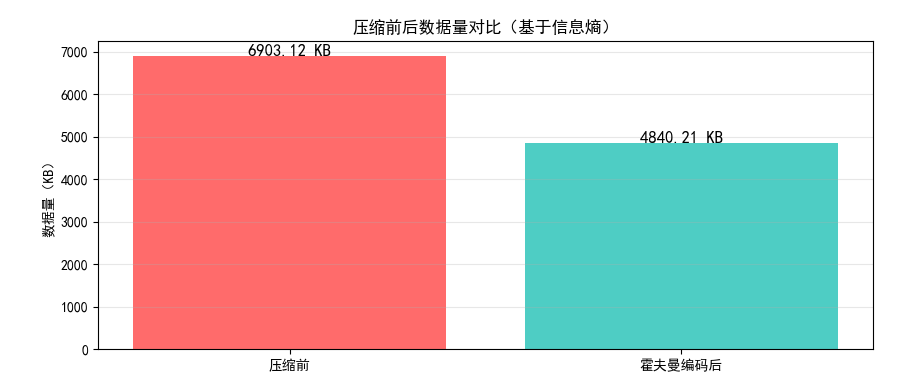
8.1.5 保真度准则
用于评估压缩后图像的质量,分为客观准则 和主观准则:
- 客观准则
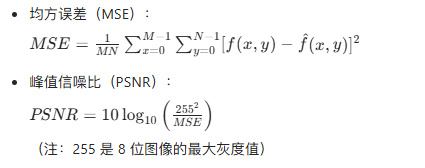
- 主观准则
通过人眼主观评分(如 MOS 评分:1-5 分,5 分为最优)。
实战代码:计算 MSE 和 PSNR
import numpy as np
import cv2
import matplotlib.pyplot as plt

plt.rcParams['font.sans-serif'] = ['SimHei']
plt.rcParams['axes.unicode_minus'] = False

# 读取原始图像和压缩后的图像(这里模拟压缩后的图像)
original_img = cv2.imread('test_img.jpg', 0)
if original_img is None:
    original_img = np.random.randint(0, 256, size=(256, 256), dtype=np.uint8)

# 模拟有损压缩后的图像(添加高斯噪声)
np.random.seed(42)
noise = np.random.normal(0, 10, original_img.shape).astype(np.uint8)
compressed_img = np.clip(original_img + noise, 0, 255)

# 计算MSE
mse = np.mean((original_img - compressed_img) ** 2)

# 计算PSNR
if mse == 0:
    psnr = float('inf')
else:
    psnr = 10 * np.log10((255 ** 2) / mse)

# 输出结果
print(f"均方误差(MSE):{mse:.2f}")
print(f"峰值信噪比(PSNR):{psnr:.2f} dB")

# 可视化对比
fig, axes = plt.subplots(1, 2, figsize=(12, 6))

axes[0].imshow(original_img, cmap='gray', vmin=0, vmax=255)
axes[0].set_title('原始图像')
axes[0].axis('off')

axes[1].imshow(compressed_img, cmap='gray', vmin=0, vmax=255)
axes[1].set_title(f'压缩后图像\nMSE={mse:.2f}, PSNR={psnr:.2f} dB')
axes[1].axis('off')

plt.tight_layout()
plt.show()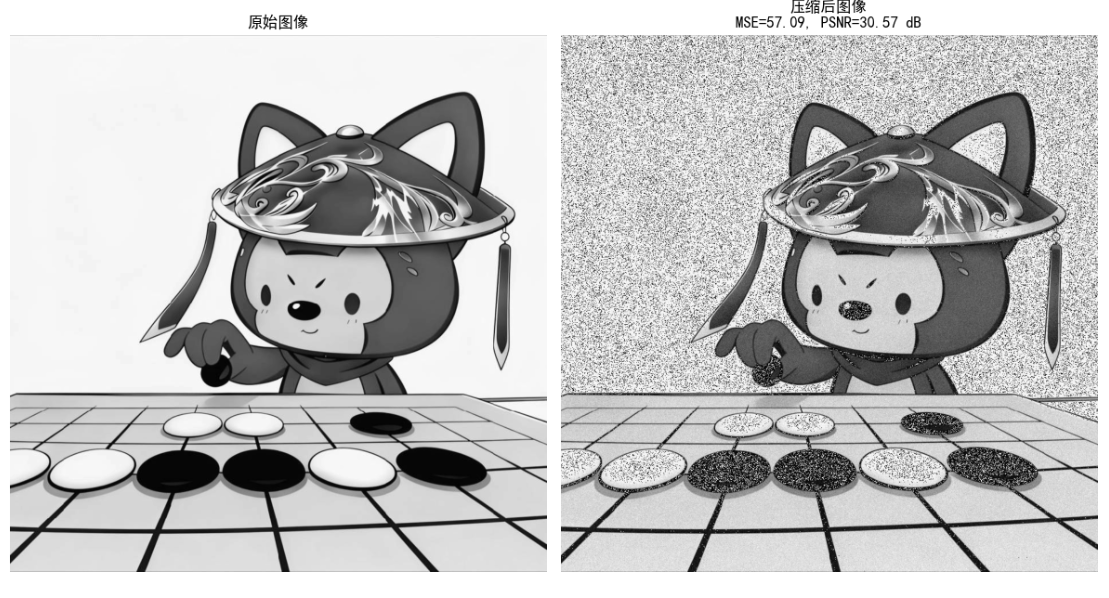
效果对比图位置:运行后可看到原始图像和模拟压缩后的图像,以及对应的 MSE/PSNR 值,PSNR 越高(一般 > 30dB),视觉效果越好。
8.1.6 图像压缩模型
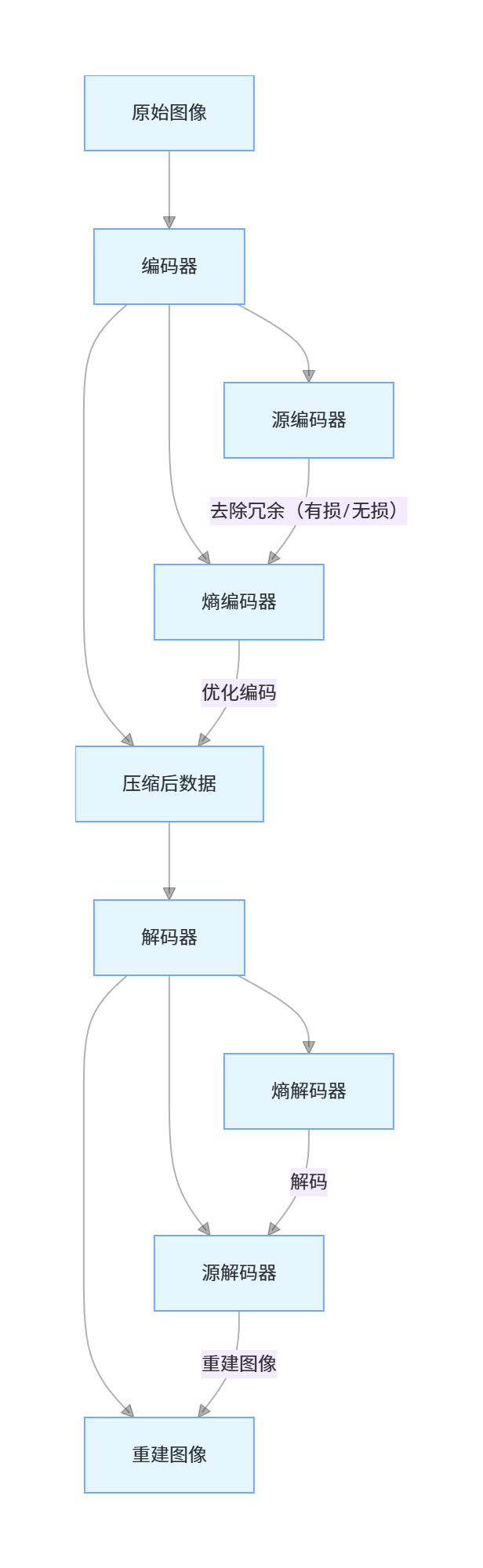
核心说明:
- 源编码器:去除冗余(无损:仅去除编码 / 空间冗余;有损:额外去除无关信息);
- 熵编码器:对源编码器输出的符号进行最优编码,进一步减少编码冗余;
- 解码器是编码器的逆过程。
8.1.7 图像格式、存储器(容器)和压缩标准
| 格式 / 标准 | 类型 | 压缩方式 | 应用场景 |
|---|---|---|---|
| BMP | 位图 | 无损(无压缩) | 无损存储、图像处理 |
| JPEG | 静态图像 | 有损(DCT 变换) | 照片、网页图片 |
| PNG | 静态图像 | 无损(LZW) | 图标、透明图像 |
| GIF | 动态图像 | 无损(LZW) | 简单动图、表情包 |
| JPEG-2000 | 静态图像 | 有损 / 无损(小波变换) | 医疗图像、高清图像 |
| H.264/H.265 | 视频 | 有损(变换 + 预测) | 视频流媒体、监控 |
| JBIG2 | 二值图像 | 无损 / 有损 | 文档扫描、传真 |
8.2 霍夫曼编码
核心原理
霍夫曼编码是一种无损压缩编码 ,核心思想是:对出现概率高的符号分配短编码,概率低的符号分配长编码,且编码是前缀码(无歧义)。
实现步骤
- 统计每个符号的出现概率;
- 构建霍夫曼树(每次选择概率最小的两个节点合并);
- 从根节点遍历到叶子节点,生成每个符号的编码;
- 用生成的编码对图像数据进行编码。
实战代码:霍夫曼编码实现
import numpy as np
import cv2
import heapq
from collections import Counter, defaultdict

plt.rcParams['font.sans-serif'] = ['SimHei']
plt.rcParams['axes.unicode_minus'] = False

# 定义霍夫曼树节点
class HuffmanNode:
    def __init__(self, symbol=None, prob=0, left=None, right=None):
        self.symbol = symbol
        self.prob = prob
        self.left = left
        self.right = right

    # 重载比较运算符,用于堆排序
    def __lt__(self, other):
        return self.prob < other.prob

# 生成霍夫曼编码表
def build_huffman_code(node, code="", code_dict=None):
    if code_dict is None:
        code_dict = {}
    if node.symbol is not None:
        code_dict[node.symbol] = code
    else:
        build_huffman_code(node.left, code + "0", code_dict)
        build_huffman_code(node.right, code + "1", code_dict)
    return code_dict

# 霍夫曼编码
def huffman_encoding(data):
    # 1. 统计符号概率
    counts = Counter(data)
    total = len(data)
    prob_dict = {sym: cnt/total for sym, cnt in counts.items()}

    # 2. 构建霍夫曼堆
    heap = [HuffmanNode(symbol=sym, prob=prob) for sym, prob in prob_dict.items()]
    heapq.heapify(heap)

    # 3. 构建霍夫曼树
    while len(heap) > 1:
        left = heapq.heappop(heap)
        right = heapq.heappop(heap)
        merged = HuffmanNode(prob=left.prob + right.prob, left=left, right=right)
        heapq.heappush(heap, merged)

    # 4. 生成编码表
    root = heapq.heappop(heap)
    code_dict = build_huffman_code(root)

    # 5. 编码数据
    encoded_data = "".join([code_dict[sym] for sym in data])

    return encoded_data, code_dict, prob_dict

# 霍夫曼解码
def huffman_decoding(encoded_data, code_dict):
    # 反转编码表:编码->符号
    reverse_code_dict = {code: sym for sym, code in code_dict.items()}
    decoded_data = []
    current_code = ""

    for bit in encoded_data:
        current_code += bit
        if current_code in reverse_code_dict:
            decoded_data.append(reverse_code_dict[current_code])
            current_code = ""

    return np.array(decoded_data)

# 主函数
if __name__ == "__main__":
    # 读取/生成图像数据
    img = cv2.imread('test_img.jpg', 0)
    if img is None:
        img = np.random.randint(0, 256, size=(128, 128), dtype=np.uint8)
    flat_img = img.flatten()

    # 霍夫曼编码
    encoded_data, code_dict, prob_dict = huffman_encoding(flat_img)

    # 霍夫曼解码
    decoded_flat = huffman_decoding(encoded_data, code_dict)
    decoded_img = decoded_flat.reshape(img.shape)

    # 计算压缩比
    original_size = len(flat_img) * 8  # 8位/像素
    compressed_size = len(encoded_data)
    cr = original_size / compressed_size

    # 计算平均编码长度
    avg_len = sum([prob * len(code) for sym, prob in prob_dict.items() for code in [code_dict[sym]]])

    # 验证解码是否正确
    is_correct = np.array_equal(img, decoded_img)

    # 输出结果
    print(f"霍夫曼编码平均长度:{avg_len:.2f} 比特/像素")
    print(f"压缩前数据量:{original_size/1024:.2f} KB")
    print(f"压缩后数据量:{compressed_size/1024:.2f} KB")
    print(f"压缩比:{cr:.2f}")
    print(f"解码是否正确:{is_correct}")

    # 可视化对比
    fig, axes = plt.subplots(1, 2, figsize=(12, 6))

    axes[0].imshow(img, cmap='gray', vmin=0, vmax=255)
    axes[0].set_title('原始图像')
    axes[0].axis('off')

    axes[1].imshow(decoded_img, cmap='gray', vmin=0, vmax=255)
    axes[1].set_title(f'霍夫曼解码后图像\n压缩比={cr:.2f}')
    axes[1].axis('off')

    plt.tight_layout()
    plt.show()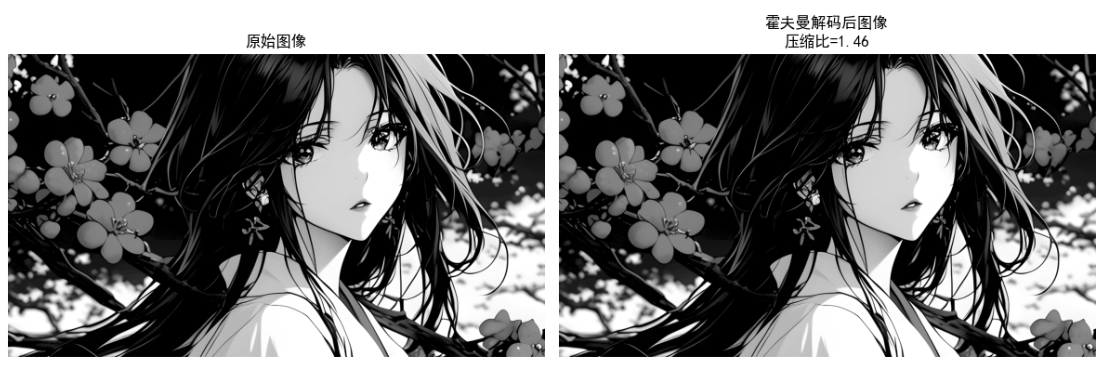
效果对比图位置:运行后可看到原始图像和解码后的图像(完全一致,体现无损压缩),以及压缩比数据。
8.3 Golomb 编码
核心原理

实战代码:Golomb 编码实现
import numpy as np
import matplotlib.pyplot as plt

plt.rcParams['font.sans-serif'] = ['SimHei']
plt.rcParams['axes.unicode_minus'] = False

# Golomb编码
def golomb_encode(x, m):
    """
    x: 非负整数
    m: 编码参数
    """
    if x < 0:
        raise ValueError("Golomb编码仅支持非负整数")

    # 计算q和r
    q = x // m
    r = x % m

    # 1. 一元编码q:q个1 + 1个0
    unary_code = "1" * q + "0"

    # 2. 二进制编码r:需要k位,k = ceil(log2(m))
    k = int(np.ceil(np.log2(m)))
    # 计算2^k - m
    rem = (1 << k) - m

    # 3. 生成r的编码
    if r < rem:
        binary_code = bin(r)[2:].zfill(k-1)  # k-1位
    else:
        binary_code = bin(r + rem)[2:].zfill(k)  # k位

    # 合并编码
    return unary_code + binary_code

# Golomb解码
def golomb_decode(code, m):
    """
    code: Golomb编码字符串
    m: 编码参数
    """
    # 1. 解析q(一元编码部分)
    q = 0
    while q < len(code) and code[q] == "1":
        q += 1
    # 跳过0
    if q >= len(code) or code[q] != "0":
        raise ValueError("无效的Golomb编码")
    code = code[q+1:]

    # 2. 解析r
    k = int(np.ceil(np.log2(m)))
    rem = (1 << k) - m

    if len(code) < k-1:
        raise ValueError("无效的Golomb编码")

    # 尝试k-1位
    r_candidate = int(code[:k-1], 2) if k-1 > 0 else 0
    if r_candidate < rem:
        r = r_candidate
        code = code[k-1:]
    else:
        if len(code) < k:
            raise ValueError("无效的Golomb编码")
        r = int(code[:k], 2) - rem
        code = code[k:]

    # 计算x
    x = q * m + r
    return x, code

# 主函数
if __name__ == "__main__":
    # 测试数据(行程编码的行程长度)
    run_lengths = [0, 1, 3, 5, 8, 10, 15, 20]
    m = 8  # 编码参数

    # 编码
    encoded_codes = [golomb_encode(x, m) for x in run_lengths]

    # 解码
    decoded_lengths = []
    for code in encoded_codes:
        x, _ = golomb_decode(code, m)
        decoded_lengths.append(x)

    # 输出结果
    print("原始行程长度:", run_lengths)
    print("Golomb编码:", encoded_codes)
    print("解码后长度:", decoded_lengths)
    print("解码是否正确:", run_lengths == decoded_lengths)

    # 可视化编码长度对比
    original_bits = [np.ceil(np.log2(x+1)) if x > 0 else 1 for x in run_lengths]
    encoded_bits = [len(code) for code in encoded_codes]

    x = np.arange(len(run_lengths))
    width = 0.35

    plt.figure(figsize=(10, 6))
    plt.bar(x - width/2, original_bits, width, label='固定长度编码', color='#FF6B6B')
    plt.bar(x + width/2, encoded_bits, width, label='Golomb编码', color='#4ECDC4')

    plt.xlabel('行程长度')
    plt.ylabel('编码长度(比特)')
    plt.title('Golomb编码 vs 固定长度编码')
    plt.xticks(x, run_lengths)
    plt.legend()
    plt.grid(axis='y', alpha=0.3)
    plt.show()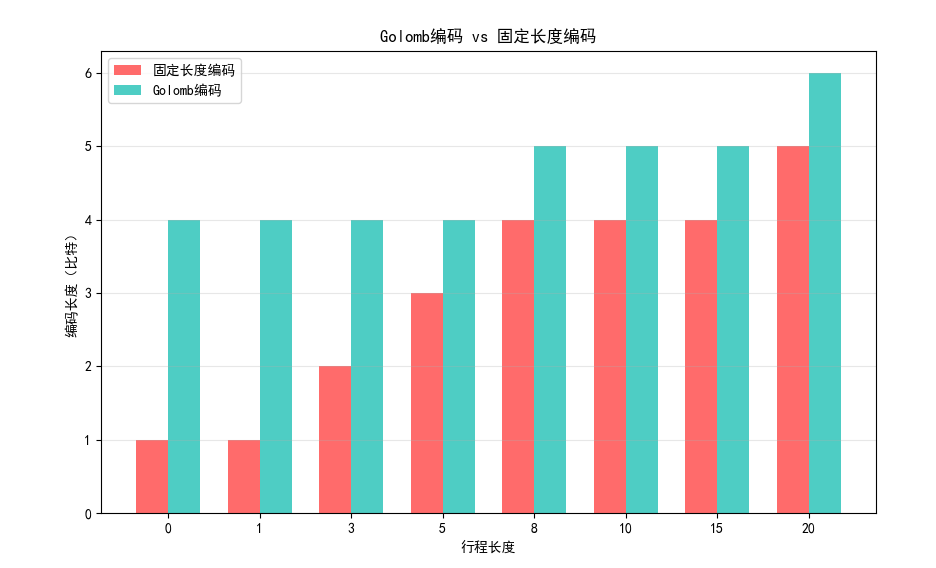
效果对比图位置:运行后可看到 Golomb 编码与固定长度编码的长度对比,Golomb 编码对小数值的行程长度更高效。
8.4 算术编码
核心原理
算术编码不单独为每个符号分配编码,而是将整个符号序列映射到 [0,1) 区间内的一个小数,最终输出该小数的二进制表示。相比霍夫曼编码,算术编码能更接近信息熵,且支持自适应概率估计。
8.4.1 自适应上下文相关概率估计
自适应算术编码会根据已编码的符号动态更新概率分布,无需预先统计符号概率,更适合实时数据压缩。
实战代码:算术编码实现
import numpy as np
import matplotlib.pyplot as plt

plt.rcParams['font.sans-serif'] = ['SimHei']
plt.rcParams['axes.unicode_minus'] = False

# 算术编码
def arithmetic_encode(symbols, prob_dict):
    """
    symbols: 符号序列
    prob_dict: 符号概率字典
    """
    # 构建累积概率字典
    sorted_syms = sorted(prob_dict.keys())
    cum_prob = {}
    current = 0
    for sym in sorted_syms:
        cum_prob[sym] = current
        current += prob_dict[sym]

    # 初始化区间
    low = 0.0
    high = 1.0

    # 编码每个符号
    for sym in symbols:
        range_val = high - low
        high = low + range_val * (cum_prob[sym] + prob_dict[sym])
        low = low + range_val * cum_prob[sym]

    # 选择区间中点作为编码值
    code = (low + high) / 2

    return code, cum_prob

# 算术解码
def arithmetic_decode(code, length, prob_dict, cum_prob):
    """
    code: 编码值
    length: 符号序列长度
    prob_dict: 符号概率字典
    cum_prob: 累积概率字典
    """
    sorted_syms = sorted(prob_dict.keys())
    decoded_syms = []

    low = 0.0
    high = 1.0

    for _ in range(length):
        range_val = high - low
        # 计算相对位置
        pos = (code - low) / range_val

        # 找到对应的符号
        sym = None
        for s in sorted_syms:
            if cum_prob[s] <= pos < cum_prob[s] + prob_dict[s]:
                sym = s
                break

        decoded_syms.append(sym)

        # 更新区间
        high = low + range_val * (cum_prob[sym] + prob_dict[sym])
        low = low + range_val * cum_prob[sym]

    return decoded_syms

# 自适应算术编码(简化版)
def adaptive_arithmetic_encode(symbols):
    # 初始化概率(等概率)
    sym_set = list(set(symbols))
    prob_dict = {sym: 1/len(sym_set) for sym in sym_set}

    codes = []
    cum_probs = []

    # 逐符号编码,动态更新概率
    count_dict = {sym: 1 for sym in sym_set}  # 平滑计数,避免概率为0
    total = len(sym_set)

    low = 0.0
    high = 1.0

    for sym in symbols:
        # 计算当前累积概率
        sorted_syms = sorted(count_dict.keys())
        cum_prob = {}
        current = 0
        for s in sorted_syms:
            cum_prob[s] = current / total
            current += count_dict[s]

        # 编码当前符号
        range_val = high - low
        high = low + range_val * (cum_prob[sym] + count_dict[sym]/total)
        low = low + range_val * cum_prob[sym]

        # 更新计数和概率
        count_dict[sym] += 1
        total += 1

        codes.append((low + high)/2)
        cum_probs.append(cum_prob)

    return codes[-1], count_dict

# 主函数
if __name__ == "__main__":
    # 测试数据(图像灰度值序列)
    symbols = [128, 128, 64, 128, 192, 128, 128, 64, 64, 128]
    # 预先统计概率
    prob_dict = {128: 0.6, 64: 0.3, 192: 0.1}

    # 固定概率算术编码
    code, cum_prob = arithmetic_encode(symbols, prob_dict)
    decoded_syms = arithmetic_decode(code, len(symbols), prob_dict, cum_prob)

    # 自适应算术编码
    adaptive_code, final_counts = adaptive_arithmetic_encode(symbols)

    # 输出结果
    print("原始符号序列:", symbols)
    print("固定概率算术编码值:", code)
    print("解码后序列:", decoded_syms)
    print("自适应算术编码值:", adaptive_code)
    print("固定概率解码是否正确:", symbols == decoded_syms)

    # 可视化编码效率
    # 计算信息熵
    entropy = -sum([p * np.log2(p) for p in prob_dict.values()])
    # 固定编码长度(8位)
    fixed_len = 8 * len(symbols)
    # 算术编码长度(二进制位数,用log2(1/(high-low))近似)
    range_val = 1.0
    for sym in symbols:
        range_val *= prob_dict[sym]
    arithmetic_bits = np.ceil(-np.log2(range_val))

    plt.figure(figsize=(8, 5))
    categories = ['8位固定编码', '算术编码', '信息熵下限']
    values = [fixed_len, arithmetic_bits, entropy*len(symbols)]
    colors = ['#FF9800', '#4CAF50', '#F44336']

    bars = plt.bar(categories, values, color=colors)
    for bar, val in zip(bars, values):
        plt.text(bar.get_x() + bar.get_width()/2, bar.get_height() + 0.5,
                 f'{val:.1f}', ha='center', fontsize=12)

    plt.ylabel('总比特数')
    plt.title('算术编码效率对比')
    plt.grid(axis='y', alpha=0.3)
    plt.show()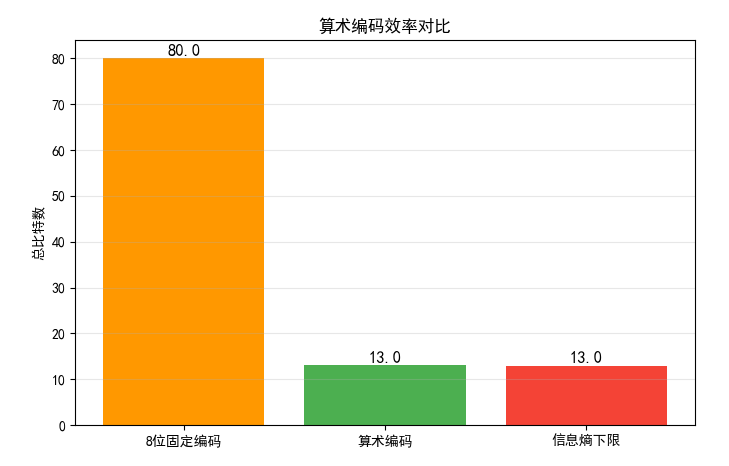
效果对比图位置:运行后可看到算术编码与固定编码、信息熵下限的对比,算术编码更接近信息熵下限,效率更高。
8.5 LZW 编码
核心原理
LZW(Lempel-Ziv-Welch)编码是一种无损压缩算法,核心思想是:
- 初始化字典,包含所有单个符号;
- 遍历数据,逐步构建更长的符号序列,将新序列加入字典;
- 用字典索引代替符号序列,实现压缩。
实战代码:LZW 编码实现
python
import numpy as np
import cv2
import matplotlib.pyplot as plt

# 设置中文字体,避免乱码
plt.rcParams['font.sans-serif'] = ['SimHei']
plt.rcParams['axes.unicode_minus'] = False


# LZW编码(修复字典键类型,统一为元组)
def lzw_encode(data, max_dict_size=4096):
    """
    data: 输入数据(一维数组)
    max_dict_size: 字典最大容量
    """
    # 1. 初始化字典:单个符号转为长度为1的元组作为键(统一类型)
    unique_syms = list(set(data))
    # 键:(sym,) 元组,值:索引(避免单个值和元组混用)
    dictionary = {(sym,): idx for idx, sym in enumerate(unique_syms)}
    next_code = len(unique_syms)

    # 2. 编码过程(当前序列统一为元组)
    current_seq = (data[0],)  # 初始化为元组
    encoded = []

    for sym in data[1:]:
        combined_seq = current_seq + (sym,)  # 元组拼接,统一逻辑

        if combined_seq in dictionary:
            current_seq = combined_seq
        else:
            # 输出当前序列的索引
            encoded.append(dictionary[current_seq])
            # 将新序列加入字典(如果字典未满)
            if next_code < max_dict_size:
                dictionary[combined_seq] = next_code
                next_code += 1
            # 重置当前序列为单个符号的元组
            current_seq = (sym,)

    # 输出最后一个序列
    encoded.append(dictionary[current_seq])

    return encoded, dictionary


# LZW解码(修复类型拼接逻辑)
def lzw_decode(encoded, dictionary):
    """
    encoded: 编码后的索引序列
    dictionary: 编码时的字典(需要反转)
    """
    # 反转字典:索引 -> 符号元组(统一类型)
    reverse_dict = {idx: sym_tuple for sym_tuple, idx in dictionary.items()}
    decoded = []

    # 处理空编码的边界情况
    if not encoded:
        return np.array([])

    # 第一个符号序列
    current_code = encoded[0]
    current_seq = reverse_dict[current_code]
    decoded.extend(current_seq)  # 元组直接展开为列表

    # 解码剩余符号
    for code in encoded[1:]:
        # 查找当前编码对应的序列
        if code in reverse_dict:
            next_seq = reverse_dict[code]
        else:
            # LZW特殊情况:未在字典中时,用当前序列+当前序列第一个元素
            next_seq = current_seq + (current_seq[0],)

        # 将序列展开加入解码结果
        decoded.extend(next_seq)

        # 更新字典(模拟编码时的字典更新逻辑)
        new_seq = current_seq + (next_seq[0],)
        if len(reverse_dict) < max_dict_size and new_seq not in dictionary:
            dictionary[new_seq] = len(dictionary)
            reverse_dict[len(reverse_dict)] = new_seq

        # 更新当前序列为下一个序列
        current_seq = next_seq

    # 转换为numpy数组(与原始数据类型一致)
    return np.array(decoded, dtype=np.uint8)


# 主函数
if __name__ == "__main__":
    # 配置参数
    max_dict_size = 4096  # LZW字典最大容量(2^12)
    img_path = '../picture/Java.png'  # 替换为你的图像路径

    # 读取/生成图像数据
    img = cv2.imread(img_path, 0)  # 0表示灰度图
    if img is None:
        print(f"警告:未找到图像 {img_path},使用随机生成图像测试")
        np.random.seed(42)  # 固定随机种子,便于复现
        img = np.random.randint(0, 256, size=(128, 128), dtype=np.uint8)

    flat_img = img.flatten()  # 展平为一维数组
    print(f"图像尺寸:{img.shape},展平后长度:{len(flat_img)}")

    # LZW编码
    encoded, dict_ = lzw_encode(flat_img, max_dict_size)

    # LZW解码
    decoded_flat = lzw_decode(encoded, dict_.copy())  # 传字典副本,避免原字典被修改
    # 截断到原始长度(防止解码长度略长的情况)
    decoded_flat = decoded_flat[:len(flat_img)]
    decoded_img = decoded_flat.reshape(img.shape)

    # 计算压缩比
    original_size = len(flat_img) * 8  # 原始数据量(8位/像素,单位:比特)
    compressed_size = len(encoded) * 12  # 编码后每个索引用12位(4096=2^12)
    cr = original_size / compressed_size  # 压缩比

    # 验证解码是否正确
    is_correct = np.array_equal(img.flatten(), decoded_flat)

    # 输出结果
    print("=" * 50)
    print(f"原始数据长度:{len(flat_img)} 像素")
    print(f"编码后索引数量:{len(encoded)}")
    print(f"压缩前数据量:{original_size / 1024:.2f} KB")
    print(f"压缩后数据量:{compressed_size / 1024:.2f} KB")
    print(f"压缩比:{cr:.2f}")
    print(f"解码是否完全正确:{is_correct}")
    print("=" * 50)

    # 可视化对比
    fig, axes = plt.subplots(1, 2, figsize=(12, 10))

    # 原始图像
    axes[0].imshow(img, cmap='gray', vmin=0, vmax=255)
    axes[0].set_title('原始图像', fontsize=14)
    axes[0].axis('off')

    # 解码后图像
    axes[1].imshow(decoded_img, cmap='gray', vmin=0, vmax=255)
    axes[1].set_title(f'LZW解码后图像\n压缩比={cr:.2f}', fontsize=14)
    axes[1].axis('off')

    plt.tight_layout()
    plt.show()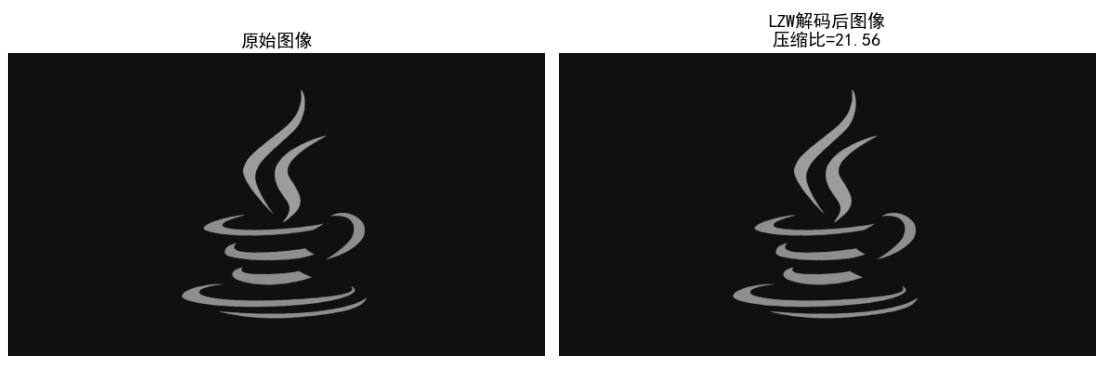
效果对比图位置:运行后可看到原始图像和 LZW 解码后的图像(无损),以及压缩比数据(LZW 对重复序列多的图像压缩效果更好)。
8.6 行程编码
核心原理
行程编码(RLE)适用于连续重复的符号序列,用 "符号 + 重复次数" 代替连续的符号,比如 "AAAAA" 编码为 "A5"。
8.6.1 一维 CCITT 压缩
一维 CCITT 压缩是针对二值图像的行程编码标准,仅对每行的黑像素行程长度进行编码。
8.6.2 二维 CCITT 压缩
二维 CCITT 压缩利用前一行的信息预测当前行的行程长度,进一步提高压缩效率。
实战代码:行程编码实现
import numpy as np
import cv2
import matplotlib.pyplot as plt

plt.rcParams['font.sans-serif'] = ['SimHei']
plt.rcParams['axes.unicode_minus'] = False

# 一维行程编码
def rle_encode_1d(data):
    """
    一维行程编码
    data: 一维数组
    """
    if len(data) == 0:
        return []

    encoded = []
    current_sym = data[0]
    count = 1

    for sym in data[1:]:
        if sym == current_sym:
            count += 1
        else:
            encoded.append((current_sym, count))
            current_sym = sym
            count = 1

    # 加入最后一个序列
    encoded.append((current_sym, count))

    return encoded

# 一维行程解码
def rle_decode_1d(encoded):
    """
    一维行程解码
    encoded: 编码后的列表,元素为(符号, 次数)
    """
    decoded = []
    for sym, count in encoded:
        decoded.extend([sym]*count)
    return np.array(decoded)

# 二维CCITT压缩(简化版)
def rle_encode_2d(img):
    """
    二维行程编码(针对二值图像)
    img: 二值图像(0/255)
    """
    encoded = []
    # 第一行用一维编码
    first_row = img[0]
    encoded.append(rle_encode_1d(first_row))

    # 后续行利用前一行信息(简化版:仅编码与前一行不同的区域)
    for i in range(1, img.shape[0]):
        current_row = img[i]
        prev_row = img[i-1]

        # 找到与前一行不同的位置
        diff_mask = current_row != prev_row
        if np.any(diff_mask):
            # 对不同区域进行一维编码
            encoded.append(rle_encode_1d(current_row[diff_mask]))
        else:
            # 与前一行相同,标记为0
            encoded.append([(0, 0)])

    return encoded

# 主函数
if __name__ == "__main__":
    # 生成二值图像(适合行程编码)
    img = np.zeros((256, 256), dtype=np.uint8)
    # 生成连续的白色区域
    img[50:100, :] = 255
    img[100:150, 50:200] = 255
    img[150:200, :] = 255

    # 一维行程编码
    flat_img = img.flatten()
    encoded_1d = rle_encode_1d(flat_img)
    decoded_1d = rle_decode_1d(encoded_1d)
    decoded_img_1d = decoded_1d.reshape(img.shape)

    # 二维行程编码
    encoded_2d = rle_encode_2d(img)

    # 计算压缩比
    original_size = len(flat_img) * 8
    # 一维编码:每个(符号,次数)对用16位(8位符号+8位次数)
    encoded_1d_size = len(encoded_1d) * 16
    # 二维编码:简化计算
    encoded_2d_size = sum([len(row) * 16 for row in encoded_2d])

    cr_1d = original_size / encoded_1d_size
    cr_2d = original_size / encoded_2d_size

    # 输出结果
    print(f"原始数据量:{original_size/1024:.2f} KB")
    print(f"一维RLE编码数据量:{encoded_1d_size/1024:.2f} KB,压缩比:{cr_1d:.2f}")
    print(f"二维RLE编码数据量:{encoded_2d_size/1024:.2f} KB,压缩比:{cr_2d:.2f}")
    print(f"一维RLE解码是否正确:{np.array_equal(img, decoded_img_1d)}")

    # 可视化对比
    fig, axes = plt.subplots(1, 2, figsize=(12, 6))

    axes[0].imshow(img, cmap='gray', vmin=0, vmax=255)
    axes[0].set_title('原始二值图像')
    axes[0].axis('off')

    axes[1].imshow(decoded_img_1d, cmap='gray', vmin=0, vmax=255)
    axes[1].set_title(f'一维RLE解码后图像\n压缩比={cr_1d:.2f}')
    axes[1].axis('off')

    plt.tight_layout()
    plt.show()

    # 可视化压缩比对比
    plt.figure(figsize=(8, 5))
    categories = ['一维RLE', '二维RLE']
    cr_vals = [cr_1d, cr_2d]
    colors = ['#FF6B6B', '#4ECDC4']

    bars = plt.bar(categories, cr_vals, color=colors)
    for bar, val in zip(bars, cr_vals):
        plt.text(bar.get_x() + bar.get_width()/2, bar.get_height() + 0.1,
                 f'{val:.2f}', ha='center', fontsize=12)

    plt.ylabel('压缩比')
    plt.title('一维vs二维行程编码压缩比')
    plt.grid(axis='y', alpha=0.3)
    plt.show()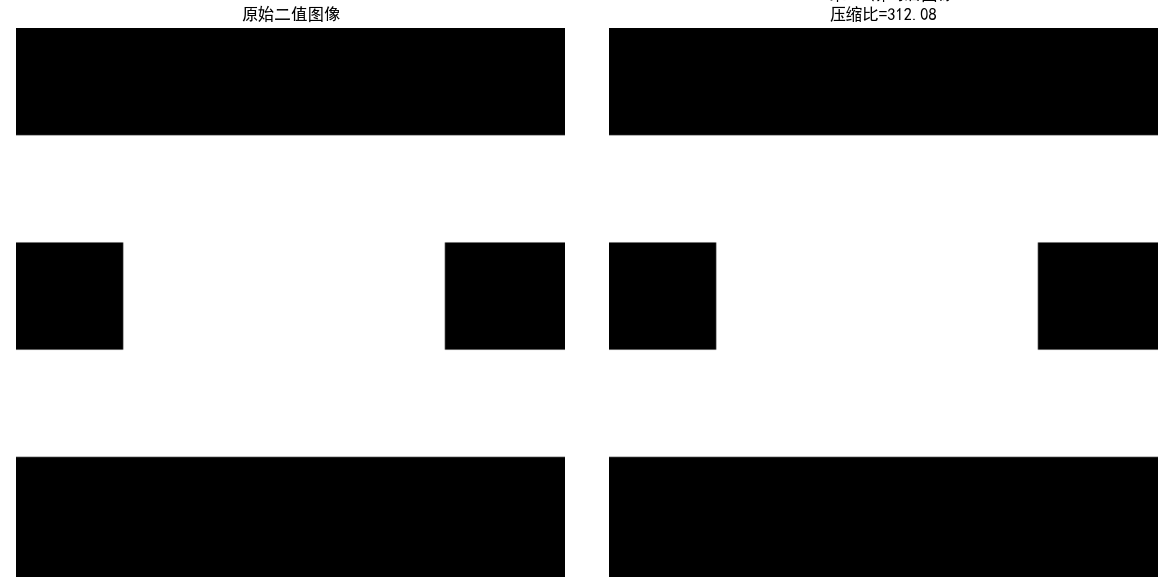
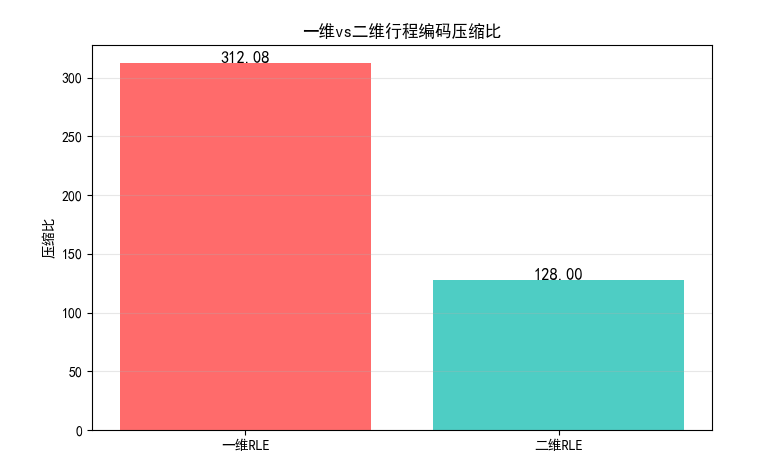
效果对比图位置:
- 原始二值图像与一维 RLE 解码后的图像对比;
- 一维 / 二维 RLE 压缩比对比图,二维压缩比更高。
8.7 基于符号的编码
8.7.1 JBIG2 压缩
JBIG2 是针对二值图像的压缩标准,核心是:
- 对图像中的字符 / 符号进行模板匹配;
- 用模板索引代替重复的符号,大幅提高压缩效率(比如文档扫描件)。
实战代码:JBIG2 简化实现
import numpy as np
import cv2
import matplotlib.pyplot as plt
from skimage.feature import match_template

plt.rcParams['font.sans-serif'] = ['SimHei']
plt.rcParams['axes.unicode_minus'] = False

# JBIG2简化实现(符号匹配)
def jbig2_simplified_encode(img, template_size=(16, 16)):
    """
    简化版JBIG2编码
    img: 二值图像
    template_size: 符号模板尺寸
    """
    h, w = img.shape
    th, tw = template_size

    # 1. 提取符号模板
    templates = []
    template_pos = []

    # 滑动窗口提取模板
    for y in range(0, h - th + 1, th):
        for x in range(0, w - tw + 1, tw):
            template = img[y:y+th, x:x+tw]
            # 跳过全0模板
            if np.sum(template) > 0:
                # 检查是否已存在相似模板
                match_found = False
                for idx, t in enumerate(templates):
                    if np.array_equal(t, template):
                        template_pos.append((idx, x, y))
                        match_found = True
                        break
                if not match_found:
                    templates.append(template)
                    template_pos.append((len(templates)-1, x, y))

    # 2. 编码数据:模板库 + 位置索引
    encoded = {
        'templates': templates,
        'positions': template_pos
    }

    return encoded

# JBIG2简化解码
def jbig2_simplified_decode(encoded, img_shape, template_size=(16, 16)):
    """
    简化版JBIG2解码
    """
    h, w = img_shape
    th, tw = template_size
    decoded = np.zeros(img_shape, dtype=np.uint8)

    templates = encoded['templates']
    positions = encoded['positions']

    for idx, x, y in positions:
        decoded[y:y+th, x:x+tw] = templates[idx]

    return decoded

# 主函数
if __name__ == "__main__":
    # 读取/生成文档类二值图像
    # 建议用包含重复字符的文档图像,这里生成模拟图像
    img = np.zeros((128, 256), dtype=np.uint8)
    # 生成重复的"符号"(矩形)
    for i in range(4):
        for j in range(8):
            img[16*i+2:16*i+14, 16*j+2:16*j+14] = 255

    # JBIG2编码
    encoded = jbig2_simplified_encode(img)

    # JBIG2解码
    decoded_img = jbig2_simplified_decode(encoded, img.shape)

    # 计算压缩比
    original_size = img.size * 8
    # 编码后:模板库大小 + 位置索引大小
    template_size = sum([t.size * 8 for t in encoded['templates']])
    position_size = len(encoded['positions']) * 16  # 每个位置用16位
    encoded_size = template_size + position_size
    cr = original_size / encoded_size

    # 输出结果
    print(f"模板数量:{len(encoded['templates'])}")
    print(f"位置索引数量:{len(encoded['positions'])}")
    print(f"原始数据量:{original_size/1024:.2f} KB")
    print(f"JBIG2编码数据量:{encoded_size/1024:.2f} KB")
    print(f"压缩比:{cr:.2f}")

    # 可视化对比
    fig, axes = plt.subplots(1, 2, figsize=(12, 6))

    axes[0].imshow(img, cmap='gray', vmin=0, vmax=255)
    axes[0].set_title('原始文档图像')
    axes[0].axis('off')

    axes[1].imshow(decoded_img, cmap='gray', vmin=0, vmax=255)
    axes[1].set_title(f'JBIG2解码后图像\n压缩比={cr:.2f}')
    axes[1].axis('off')

    plt.tight_layout()
    plt.show()

    # 可视化模板库
    if encoded['templates']:
        fig, axes = plt.subplots(1, len(encoded['templates']), figsize=(10, 2))
        if len(encoded['templates']) == 1:
            axes = [axes]
        for idx, (ax, template) in enumerate(zip(axes, encoded['templates'])):
            ax.imshow(template, cmap='gray', vmin=0, vmax=255)
            ax.set_title(f'模板{idx}')
            ax.axis('off')
        plt.tight_layout()
        plt.show()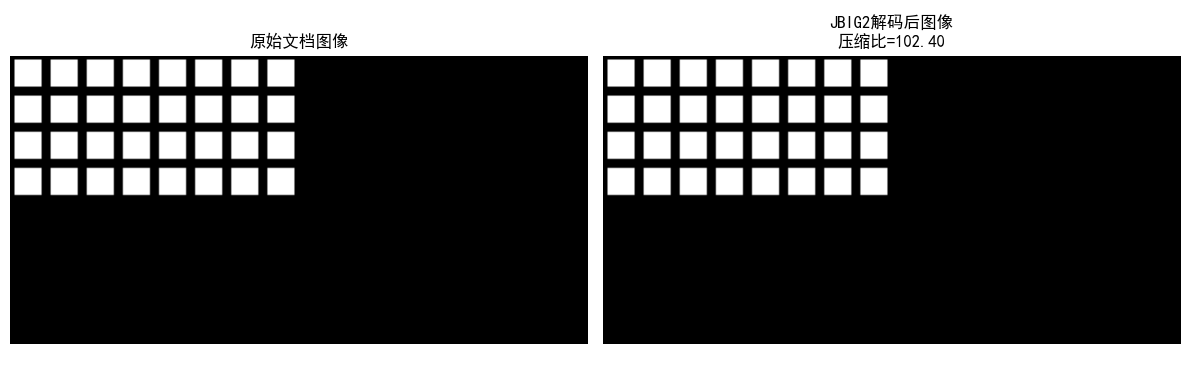
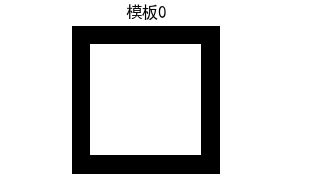
效果对比图位置:
- 原始文档图像与 JBIG2 解码后的图像对比;
- JBIG2 模板库可视化,可看到重复符号被合并为少量模板。
8.8 比特平面编码
核心原理
比特平面编码将图像的每个像素的二进制位分解为多个比特平面(如 8 位图像分为 8 个比特平面),对每个比特平面单独编码(通常用行程编码)。
实战代码:比特平面编码实现
python
import numpy as np
import cv2
import matplotlib.pyplot as plt

# 设置中文字体,避免乱码
plt.rcParams['font.sans-serif'] = ['SimHei']
plt.rcParams['axes.unicode_minus'] = False


# 一维行程编码(RLE):适用于比特平面的0/255序列
def rle_encode_1d(data):
    """
    对一维数组进行行程编码
    :param data: 一维数组(元素为0或255)
    :return: 编码后的列表,格式为[(值, 长度), ...]
    """
    if len(data) == 0:
        return []

    encoded = []
    current_val = data[0]
    count = 1

    for val in data[1:]:
        if val == current_val:
            count += 1
        else:
            encoded.append((current_val, count))
            current_val = val
            count = 1
    # 添加最后一个行程
    encoded.append((current_val, count))

    return encoded


# 一维行程解码(RLE)
def rle_decode_1d(encoded):
    """
    对行程编码结果进行解码
    :param encoded: 编码后的列表,格式为[(值, 长度), ...]
    :return: 解码后的一维数组
    """
    decoded = []
    for val, count in encoded:
        decoded.extend([val] * count)
    return np.array(decoded, dtype=np.uint8)


# 分解比特平面
def decompose_bit_planes(img):
    """
    将8位灰度图像分解为8个比特平面
    :param img: 8位灰度图像(uint8)
    :return: 8个比特平面(0/255)
    """
    bit_planes = []
    for i in range(8):
        # 提取第i位(0=最低位,7=最高位)
        bit_plane = (img >> i) & 1  # 得到0/1矩阵
        bit_plane = bit_plane * 255  # 转换为0/255便于显示和编码
        bit_planes.append(bit_plane.astype(np.uint8))
    return bit_planes


# 重构图像
def reconstruct_from_bit_planes(bit_planes):
    """
    从8个比特平面重构原始灰度图像
    :param bit_planes: 8个比特平面(0/255)
    :return: 重构的灰度图像
    """
    img = np.zeros_like(bit_planes[0], dtype=np.uint8)
    for i in range(8):
        # 将比特平面转换为0/1
        bp = (bit_planes[i] > 0).astype(np.uint8)
        # 恢复对应位的权重
        img += bp << i
    return img


# 比特平面编码(结合行程编码)
def bit_plane_encode(bit_planes):
    """
    对每个比特平面进行行程编码
    :param bit_planes: 8个比特平面
    :return: 编码后的比特平面列表
    """
    encoded_planes = []
    for bp in bit_planes:
        flat_bp = bp.flatten()  # 展平为一维数组
        encoded = rle_encode_1d(flat_bp)
        encoded_planes.append(encoded)
    return encoded_planes


# 比特平面解码
def bit_plane_decode(encoded_planes, img_shape):
    """
    解码比特平面
    :param encoded_planes: 编码后的比特平面列表
    :param img_shape: 原始图像形状
    :return: 解码后的8个比特平面
    """
    bit_planes = []
    for encoded in encoded_planes:
        decoded_flat = rle_decode_1d(encoded)
        decoded_bp = decoded_flat.reshape(img_shape)  # 恢复二维形状
        bit_planes.append(decoded_bp)
    return bit_planes


# 主函数
if __name__ == "__main__":
    # 读取图像(替换为你的图像路径)
    img_path = '../picture/CSGO.jpg'
    img = cv2.imread(img_path, 0)  # 0表示灰度图

    # 若图像读取失败,生成随机图像
    if img is None:
        print(f"警告:未找到图像 {img_path},使用随机生成图像测试")
        np.random.seed(42)  # 固定随机种子,便于复现
        img = np.random.randint(0, 256, size=(256, 256), dtype=np.uint8)

    # 分解比特平面
    bit_planes = decompose_bit_planes(img)

    # 比特平面编码
    encoded_planes = bit_plane_encode(bit_planes)

    # 比特平面解码
    decoded_planes = bit_plane_decode(encoded_planes, img.shape)

    # 重构图像
    reconstructed_img = reconstruct_from_bit_planes(decoded_planes)

    # 计算压缩比
    original_size = img.size * 8  # 原始数据量(8位/像素,单位:比特)
    # 编码后数据量:每个RLE对存储(值1位 + 长度15位)≈16位/对
    encoded_size = sum([len(enc) * 16 for enc in encoded_planes])
    cr = original_size / encoded_size  # 压缩比

    # 输出结果
    print("=" * 60)
    print(f"图像尺寸:{img.shape}")
    print(f"原始数据量:{original_size / 1024:.2f} KB")
    print(f"比特平面编码数据量:{encoded_size / 1024:.2f} KB")
    print(f"压缩比:{cr:.2f}")
    print(f"重构是否完全正确:{np.array_equal(img, reconstructed_img)}")
    print("=" * 60)

    # 可视化8个比特平面
    fig, axes = plt.subplots(2, 4, figsize=(16, 16))
    axes = axes.flatten()
    for i in range(8):
        axes[i].imshow(bit_planes[i], cmap='gray', vmin=0, vmax=255)
        axes[i].set_title(f'比特平面 {i}({"最高位" if i == 7 else "最低位" if i == 0 else ""})', fontsize=12)
        axes[i].axis('off')
    plt.suptitle('图像的8个比特平面分解', fontsize=16)
    plt.tight_layout()
    plt.show()

    # 可视化原始图像和重构图像
    fig, axes = plt.subplots(1, 2, figsize=(12, 6))
    # 原始图像
    axes[0].imshow(img, cmap='gray', vmin=0, vmax=255)
    axes[0].set_title('原始图像', fontsize=14)
    axes[0].axis('off')
    # 重构图像
    axes[1].imshow(reconstructed_img, cmap='gray', vmin=0, vmax=255)
    axes[1].set_title(f'比特平面重构图像\n压缩比={cr:.2f}', fontsize=14)
    axes[1].axis('off')

    plt.tight_layout()
    plt.show()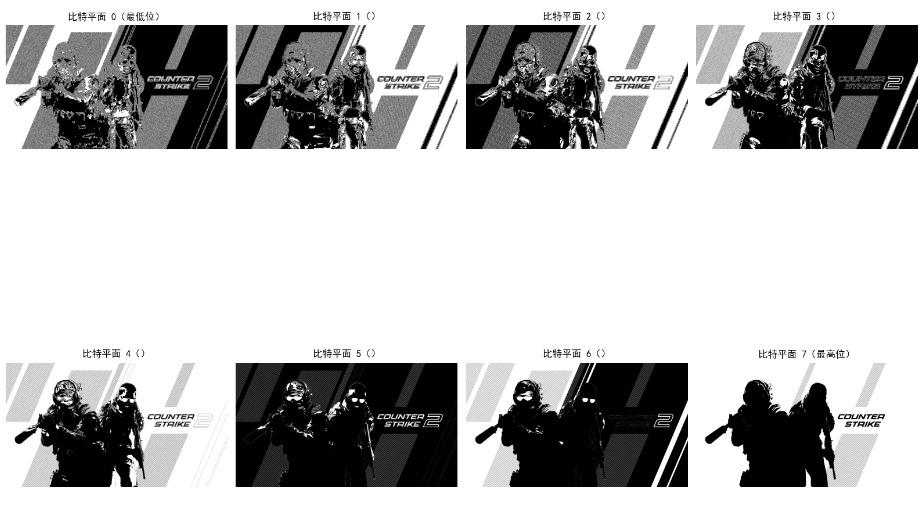
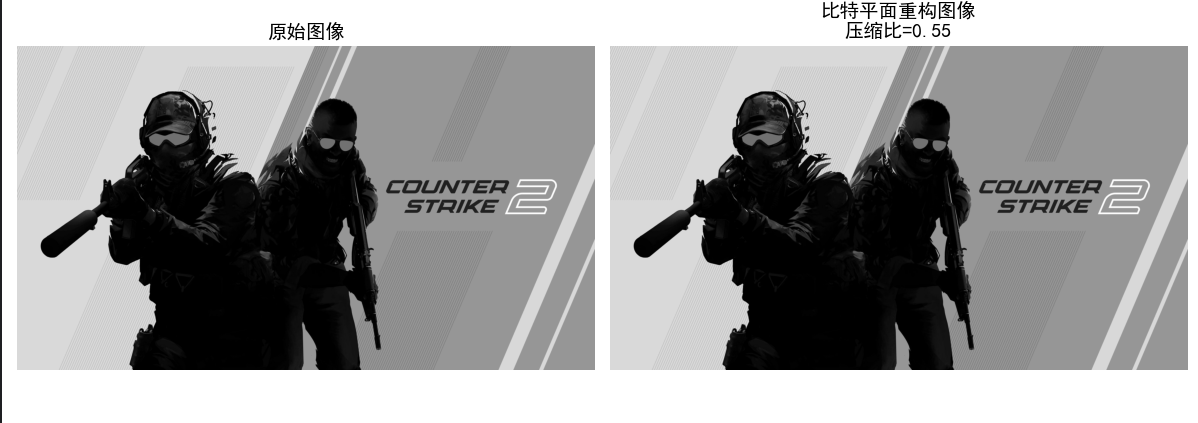
效果对比图位置:
- 8 个比特平面的可视化(高位平面保留图像主要信息,低位平面是细节 / 噪声);
- 原始图像与比特平面重构图像对比。
8.9 块变换编码
核心原理
块变换编码是有损压缩的核心,步骤:
- 将图像分为若干子块(如 8x8);
- 对每个子块进行正交变换(如 DCT);
- 对变换系数进行量化(去除小系数,有损核心);
- 对量化后的系数编码(如行程编码 + 霍夫曼编码)。
8.9.1 变换的选择
常用变换:
- DCT(离散余弦变换):能量集中性好,JPEG 采用;
- DFT(离散傅里叶变换):有复数运算,较少用;
- KLT(卡拉曼滤波变换):最优,但计算复杂。
8.9.2 子图像尺寸选择
- 太小(如 4x4):变换增益低;
- 太大(如 16x16):块效应明显;
- JPEG 采用 8x8 子块。
8.9.3 比特分配
对重要的变换系数(如 DC 系数、低频 AC 系数)分配更多比特,次要系数分配更少比特。
实战代码:DCT 块变换编码实现
import numpy as np
import cv2
import matplotlib.pyplot as plt
from scipy.fftpack import dct, idct

plt.rcParams['font.sans-serif'] = ['SimHei']
plt.rcParams['axes.unicode_minus'] = False

# 8x8 DCT变换
def dct_2d(block):
    """
    2D DCT变换
    """
    return dct(dct(block.T, norm='ortho').T, norm='ortho')

# 8x8 IDCT变换
def idct_2d(block):
    """
    2D IDCT逆变换
    """
    return idct(idct(block.T, norm='ortho').T, norm='ortho')

# JPEG量化矩阵(亮度)
JPEG_QUANT_MAT = np.array([
    [16, 11, 10, 16, 24, 40, 51, 61],
    [12, 12, 14, 19, 26, 58, 60, 55],
    [14, 13, 16, 24, 40, 57, 69, 56],
    [14, 17, 22, 29, 51, 87, 80, 62],
    [18, 22, 37, 56, 68, 109, 103, 77],
    [24, 35, 55, 64, 81, 104, 113, 92],
    [49, 64, 78, 87, 103, 121, 120, 101],
    [72, 92, 95, 98, 112, 100, 103, 99]
])

# 块变换编码
def block_transform_encode(img, block_size=8, quant_mat=JPEG_QUANT_MAT):
    """
    块DCT变换编码
    """
    h, w = img.shape
    # 填充图像到块大小的整数倍
    pad_h = (block_size - h % block_size) % block_size
    pad_w = (block_size - w % block_size) % block_size
    img_padded = np.pad(img, ((0, pad_h), (0, pad_w)), mode='constant')

    encoded = []
    h_padded, w_padded = img_padded.shape

    # 分块处理
    for y in range(0, h_padded, block_size):
        for x in range(0, w_padded, block_size):
            block = img_padded[y:y+block_size, x:x+block_size]
            # 转换为0-255 -> -128-127
            block = block - 128
            # DCT变换
            dct_block = dct_2d(block)
            # 量化
            quant_block = np.round(dct_block / quant_mat)
            encoded.append(quant_block)

    return encoded, (pad_h, pad_w)

# 块变换解码
def block_transform_decode(encoded, pad_size, img_shape, block_size=8, quant_mat=JPEG_QUANT_MAT):
    """
    块IDCT逆变换解码
    """
    pad_h, pad_w = pad_size
    h, w = img_shape
    h_padded = h + pad_h
    w_padded = w + pad_w

    img_recon = np.zeros((h_padded, w_padded), dtype=np.float32)
    idx = 0

    # 分块解码
    for y in range(0, h_padded, block_size):
        for x in range(0, w_padded, block_size):
            quant_block = encoded[idx]
            idx += 1
            # 反量化
            dct_block = quant_block * quant_mat
            # IDCT逆变换
            block = idct_2d(dct_block)
            # 转换回0-255
            block = block + 128
            # 裁剪到0-255
            block = np.clip(block, 0, 255)
            img_recon[y:y+block_size, x:x+block_size] = block

    # 去除填充
    img_recon = img_recon[:h, :w].astype(np.uint8)
    return img_recon

# 主函数
if __name__ == "__main__":
    # 读取图像
    img = cv2.imread('test_img.jpg', 0)
    if img is None:
        img = np.random.randint(0, 256, size=(256, 256), dtype=np.uint8)

    # 块变换编码
    encoded, pad_size = block_transform_encode(img)

    # 块变换解码
    recon_img = block_transform_decode(encoded, pad_size, img.shape)

    # 计算PSNR
    mse = np.mean((img - recon_img) ** 2)
    psnr = 10 * np.log10((255**2)/mse) if mse > 0 else float('inf')

    # 输出结果
    print(f"重建图像PSNR:{psnr:.2f} dB")

    # 可视化对比
    fig, axes = plt.subplots(1, 2, figsize=(12, 6))

    axes[0].imshow(img, cmap='gray', vmin=0, vmax=255)
    axes[0].set_title('原始图像')
    axes[0].axis('off')

    axes[1].imshow(recon_img, cmap='gray', vmin=0, vmax=255)
    axes[1].set_title(f'DCT块变换重建图像\nPSNR={psnr:.2f} dB')
    axes[1].axis('off')

    plt.tight_layout()
    plt.show()

    # 可视化单个8x8块的DCT变换
    # 提取第一个块
    y, x = 0, 0
    block = img[y:y+8, x:x+8]
    dct_block = dct_2d(block - 128)
    quant_block = np.round(dct_block / JPEG_QUANT_MAT)
    idct_block = idct_2d(quant_block * JPEG_QUANT_MAT) + 128

    fig, axes = plt.subplots(2, 2, figsize=(10, 10))
    axes[0,0].imshow(block, cmap='gray', vmin=0, vmax=255)
    axes[0,0].set_title('原始8x8块')
    axes[0,0].axis('off')

    axes[0,1].imshow(dct_block, cmap='gray', vmin=-np.max(np.abs(dct_block)), vmax=np.max(np.abs(dct_block)))
    axes[0,1].set_title('DCT变换系数')
    axes[0,1].axis('off')

    axes[1,0].imshow(quant_block, cmap='gray', vmin=-np.max(np.abs(quant_block)), vmax=np.max(np.abs(quant_block)))
    axes[1,0].set_title('量化后系数')
    axes[1,0].axis('off')

    axes[1,1].imshow(idct_block, cmap='gray', vmin=0, vmax=255)
    axes[1,1].set_title('IDCT重建块')
    axes[1,1].axis('off')

    plt.tight_layout()
    plt.show()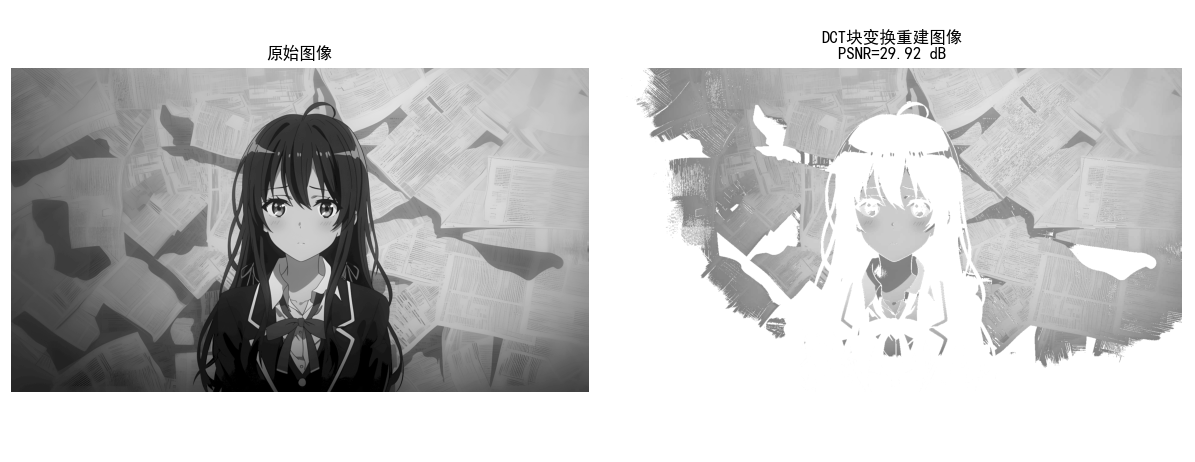
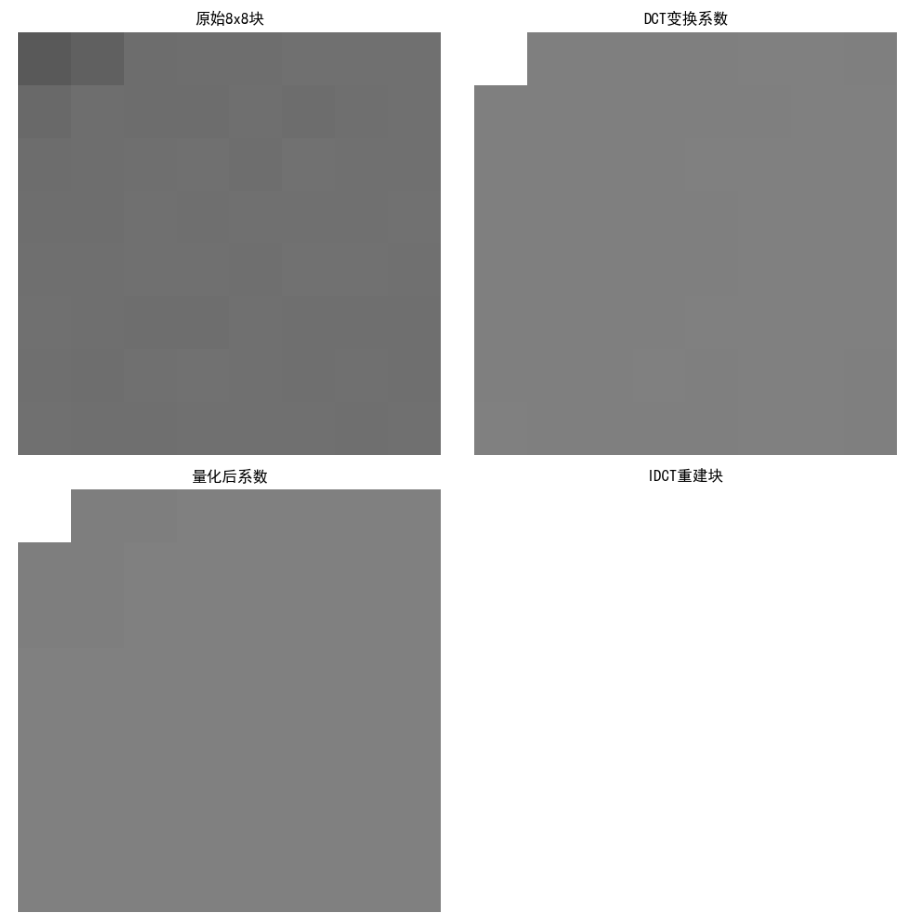
效果对比图位置:
- 原始图像与 DCT 块变换重建图像对比(可看到轻微块效应,PSNR 越高效果越好);
- 单个 8x8 块的 DCT 变换 / 量化 / 重建过程可视化。
8.10 预测编码
预测编码的核心是利用图像像素的空间 / 时间相关性,用已编码像素预测当前像素,仅编码预测误差,分为无损和有损两类,是视频压缩(如 H.264)的核心技术之一。
8.10.1 无损预测编码
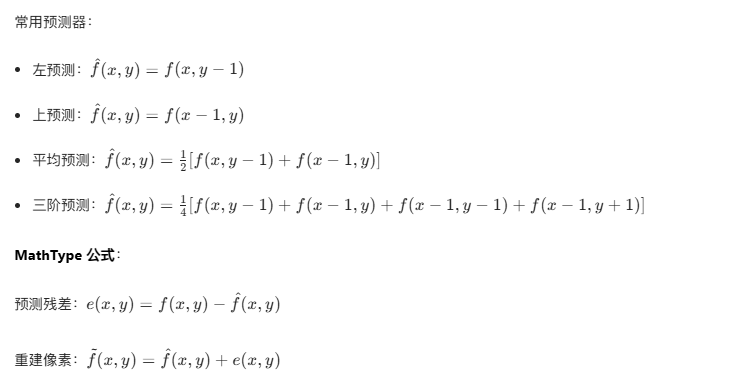
核心原理:无损预测编码(如 DPCM,差分脉冲编码调制)通过线性预测器计算当前像素的预测值,编码 "实际值 - 预测值" 的残差,残差无量化,因此可完全重建原始图像。
实战代码:无损 DPCM 预测编码
import numpy as np
import cv2
import matplotlib.pyplot as plt

# 设置中文字体
plt.rcParams['font.sans-serif'] = ['SimHei']
plt.rcParams['axes.unicode_minus'] = False

def dpcm_encode_lossless(img, predictor_type='avg'):
    """
    无损DPCM编码
    :param img: 输入灰度图像
    :param predictor_type: 预测器类型:left/top/avg/3rd
    :return: 残差矩阵、重建图像
    """
    h, w = img.shape
    img = img.astype(np.int16)  # 避免溢出
    residual = np.zeros_like(img)  # 残差矩阵
    recon = np.zeros_like(img)     # 重建图像

    # 初始化:第一行、第一列直接复制
    recon[0, :] = img[0, :]
    recon[:, 0] = img[:, 0]
    residual[0, :] = img[0, :]  # 无预测,残差=原值
    residual[:, 0] = img[:, 0]

    # 逐像素预测编码
    for y in range(1, h):
        for x in range(1, w):
            # 计算预测值
            if predictor_type == 'left':
                pred = recon[y, x-1]
            elif predictor_type == 'top':
                pred = recon[y-1, x]
            elif predictor_type == 'avg':
                pred = (recon[y, x-1] + recon[y-1, x]) // 2
            elif predictor_type == '3rd':
                # 三阶预测:左+上+左上的平均(简化版)
                pred = (recon[y, x-1] + recon[y-1, x] + recon[y-1, x-1]) // 3
            else:
                raise ValueError("预测器类型仅支持left/top/avg/3rd")

            # 计算残差
            residual[y, x] = img[y, x] - pred
            # 重建像素
            recon[y, x] = pred + residual[y, x]

    # 转换回uint8
    recon = recon.astype(np.uint8)
    return residual, recon

# 主函数
if __name__ == "__main__":
    # 读取图像(替换为自己的图像路径)
    img = cv2.imread('test_img.jpg', 0)
    if img is None:
        img = np.random.randint(0, 256, (256, 256), dtype=np.uint8)

    # 测试不同预测器
    predictors = ['left', 'top', 'avg', '3rd']
    fig, axes = plt.subplots(2, len(predictors)+1, figsize=(18, 8))

    # 显示原始图像
    axes[0, 0].imshow(img, cmap='gray', vmin=0, vmax=255)
    axes[0, 0].set_title('原始图像')
    axes[0, 0].axis('off')
    axes[1, 0].axis('off')  # 下方第一列空出

    # 遍历预测器
    for idx, p in enumerate(predictors):
        residual, recon = dpcm_encode_lossless(img, p)

        # 计算残差熵(熵越低,压缩潜力越大)
        flat_res = residual.flatten()
        counts = np.bincount(flat_res - flat_res.min(), minlength=len(np.unique(flat_res)))
        prob = counts / flat_res.size
        prob = prob[prob > 0]
        entropy = -np.sum(prob * np.log2(prob))

        # 显示残差图
        axes[0, idx+1].imshow(residual, cmap='gray', vmin=residual.min(), vmax=residual.max())
        axes[0, idx+1].set_title(f'{p}预测-残差\n熵={entropy:.2f}')
        axes[0, idx+1].axis('off')

        # 显示重建图像
        axes[1, idx+1].imshow(recon, cmap='gray', vmin=0, vmax=255)
        axes[1, idx+1].set_title(f'{p}预测-重建\n误差={np.mean((img-recon)**2):.0f}')
        axes[1, idx+1].axis('off')

    plt.tight_layout()
    plt.show()

    # 验证无损性
    _, recon_avg = dpcm_encode_lossless(img, 'avg')
    print(f'无损验证:原始图像与重建图像是否一致? {np.array_equal(img, recon_avg)}')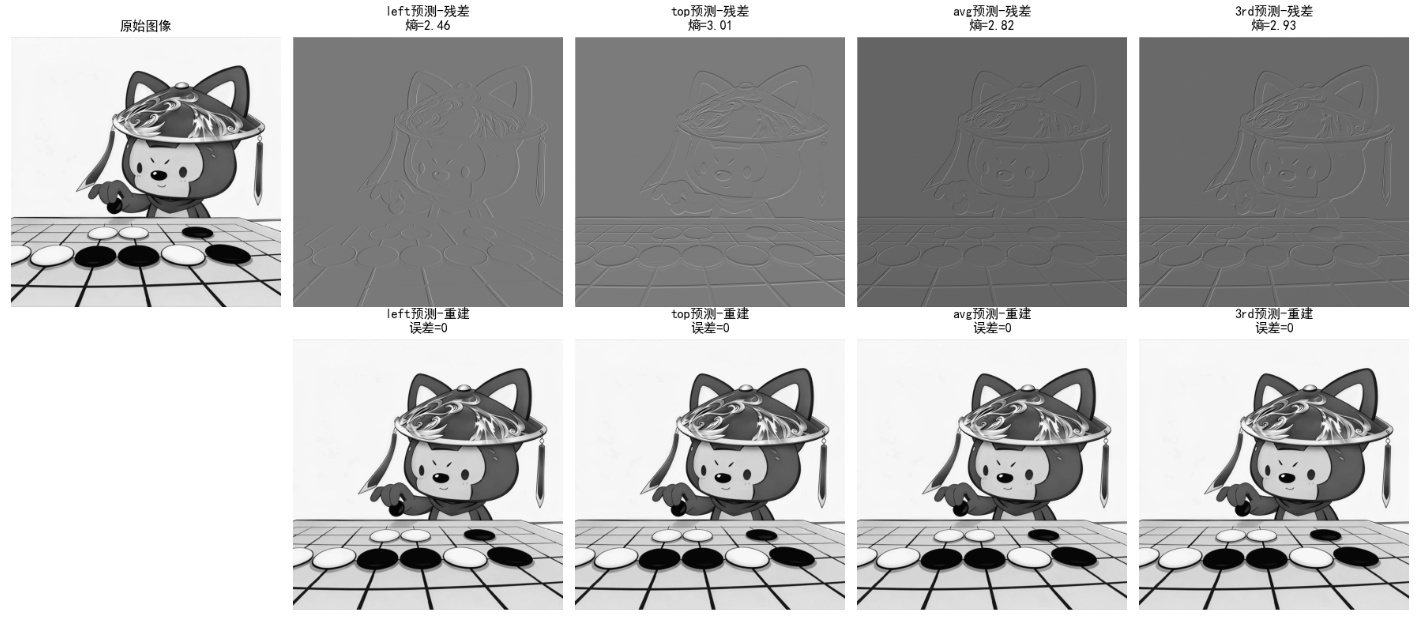
效果对比图位置:运行代码后生成 2 行 5 列的对比图:
- 第一列:原始图像;
- 其余列:不同预测器的残差图(熵越低,压缩效果越好)+ 重建图像(MSE=0,完全无损)。
8.10.2 运动补偿预测残差
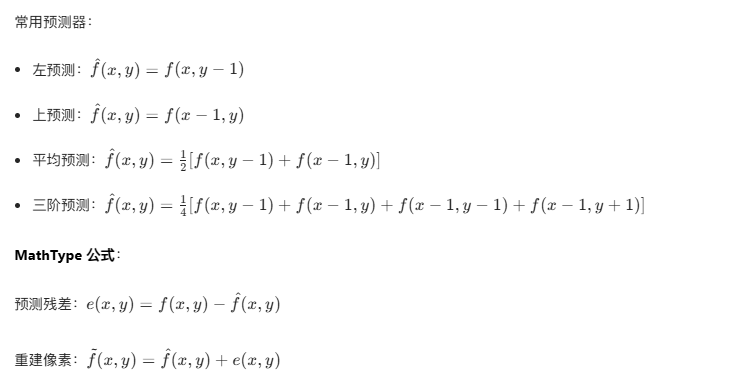
核心原理 :针对视频序列的时间冗余,通过 "运动估计" 找到当前帧(目标帧)与参考帧(前一帧)的像素对应关系,用参考帧的像素预测目标帧,仅编码 "运动矢量 + 预测残差",是 H.264/H.265 的核心。
关键步骤:
- 运动估计:将目标帧分块(如 16x16),在参考帧的搜索窗内找最匹配的块,得到运动矢量(MV);
- 运动补偿:用参考帧的匹配块 + 运动矢量,生成目标帧的预测块;
- 编码残差:目标块 - 预测块 = 残差,对残差编码。
实战代码:运动补偿预测残差
import numpy as np
import cv2
import matplotlib.pyplot as plt

plt.rcParams['font.sans-serif'] = ['SimHei']
plt.rcParams['axes.unicode_minus'] = False

def block_matching(frame1, frame2, block_size=16, search_range=8):
    """
    块匹配运动估计(SSD准则)
    :param frame1: 参考帧
    :param frame2: 目标帧
    :param block_size: 块大小
    :param search_range: 搜索范围
    :return: 运动矢量场、预测帧、残差帧
    """
    h, w = frame1.shape
    mv_field = np.zeros((h//block_size, w//block_size, 2), dtype=np.int16)  # 运动矢量(y,x)
    pred_frame = np.zeros_like(frame1)
    residual_frame = np.zeros_like(frame1)

    # 分块处理
    for by in range(0, h - block_size + 1, block_size):
        for bx in range(0, w - block_size + 1, block_size):
            # 目标块
            target_block = frame2[by:by+block_size, bx:bx+block_size]
            min_ssd = float('inf')
            best_mv = (0, 0)

            # 搜索窗内匹配
            for dy in range(-search_range, search_range+1):
                for dx in range(-search_range, search_range+1):
                    # 参考块位置(避免越界)
                    ref_by = by + dy
                    ref_bx = bx + dx
                    if ref_by < 0 or ref_by + block_size > h or ref_bx < 0 or ref_bx + block_size > w:
                        continue
                    # 参考块
                    ref_block = frame1[ref_by:ref_by+block_size, ref_bx:ref_bx+block_size]
                    # 计算SSD(误差平方和)
                    ssd = np.sum((target_block - ref_block)**2)
                    if ssd < min_ssd:
                        min_ssd = ssd
                        best_mv = (dy, dx)

            # 保存运动矢量
            mv_field[by//block_size, bx//block_size] = best_mv
            # 运动补偿生成预测块
            pred_by = by + best_mv[0]
            pred_bx = bx + best_mv[1]
            pred_frame[by:by+block_size, bx:bx+block_size] = frame1[pred_by:pred_by+block_size, pred_bx:pred_bx+block_size]
            # 计算残差
            residual_frame[by:by+block_size, bx:bx+block_size] = frame2[by:by+block_size, bx:bx+block_size] - pred_frame[by:by+block_size, bx:bx+block_size]

    return mv_field, pred_frame, residual_frame

# 主函数
if __name__ == "__main__":
    # 生成模拟视频帧(帧1:静态背景,帧2:背景+轻微位移)
    np.random.seed(42)
    frame1 = np.random.randint(0, 256, (256, 256), dtype=np.uint8)
    # 帧2:整体右移2像素、下移1像素(模拟运动)
    frame2 = np.roll(np.roll(frame1, 2, axis=1), 1, axis=0)
    frame2[:, :2] = 0  # 补0
    frame2[:1, :] = 0

    # 运动估计与补偿
    mv_field, pred_frame, residual_frame = block_matching(frame1, frame2, block_size=16, search_range=8)

    # 计算PSNR
    def psnr(img1, img2):
        mse = np.mean((img1 - img2)**2)
        return 10 * np.log10((255**2)/mse) if mse > 0 else float('inf')

    psnr_pred = psnr(frame2, pred_frame)
    psnr_raw = psnr(frame2, frame1)  # 直接用参考帧预测的PSNR

    # 可视化
    fig, axes = plt.subplots(2, 2, figsize=(12, 12))
    # 参考帧 & 目标帧
    axes[0,0].imshow(frame1, cmap='gray', vmin=0, vmax=255)
    axes[0,0].set_title('参考帧(帧1)')
    axes[0,0].axis('off')
    axes[0,1].imshow(frame2, cmap='gray', vmin=0, vmax=255)
    axes[0,1].set_title('目标帧(帧2)')
    axes[0,1].axis('off')
    # 预测帧 & 残差帧
    axes[1,0].imshow(pred_frame, cmap='gray', vmin=0, vmax=255)
    axes[1,0].set_title(f'运动补偿预测帧\nPSNR={psnr_pred:.2f}dB')
    axes[1,0].axis('off')
    axes[1,1].imshow(residual_frame, cmap='gray', vmin=residual_frame.min(), vmax=residual_frame.max())
    axes[1,1].set_title(f'预测残差帧\n原始帧PSNR={psnr_raw:.2f}dB')
    axes[1,1].axis('off')

    plt.tight_layout()
    plt.show()

    # 打印运动矢量统计
    mv_flat = mv_field.reshape(-1, 2)
    print(f'平均运动矢量:(y={np.mean(mv_flat[:,0]):.2f}, x={np.mean(mv_flat[:,1]):.2f})')
    print(f'残差均值:{np.mean(np.abs(residual_frame)):.2f}')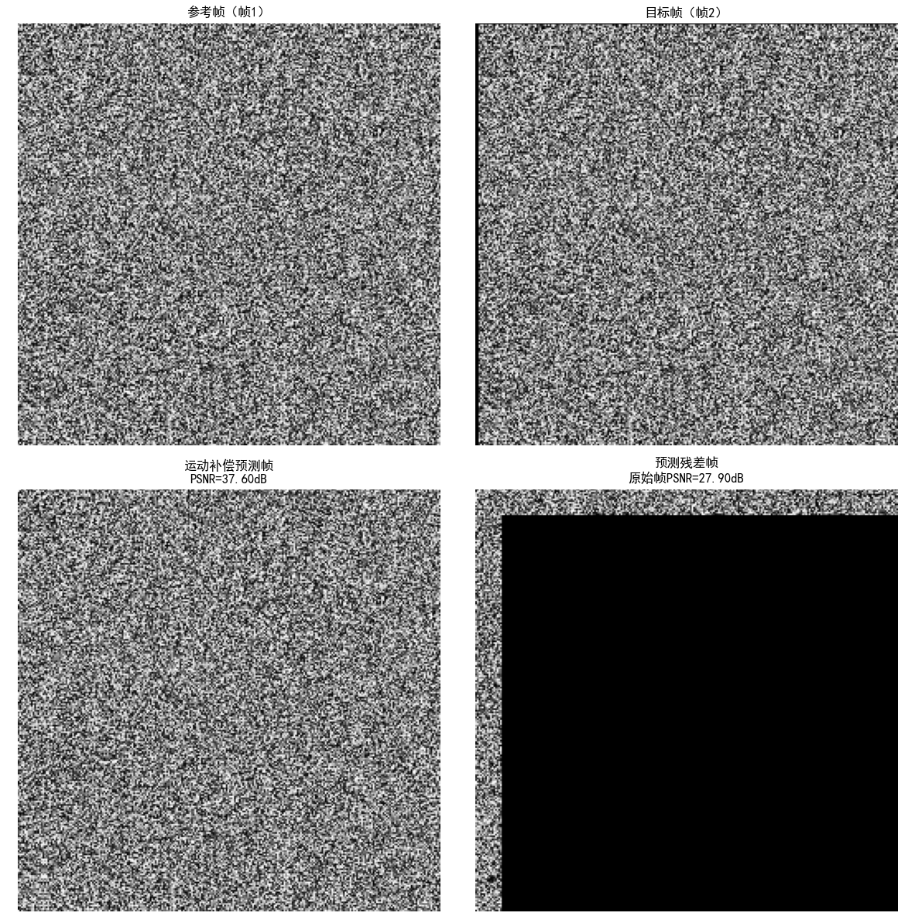
效果对比图位置:运行代码后生成 2x2 对比图:
- 参考帧 + 目标帧:直观看到帧间位移;
- 预测帧:运动补偿后接近目标帧(PSNR 显著提升);
- 残差帧:仅包含少量误差(均值接近 0),远小于原始帧差。
8.10.3 有损预测编码
核心原理 :在无损预测编码基础上,对预测残差进行量化(舍去小残差),牺牲少量精度换取更高压缩比。量化后的残差无法完全恢复原始值,因此是有损压缩。
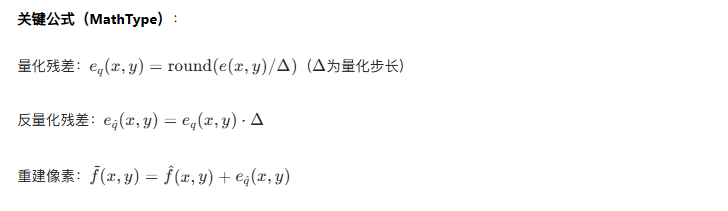
实战代码:有损 DPCM 预测编码
import numpy as np
import cv2
import matplotlib.pyplot as plt

plt.rcParams['font.sans-serif'] = ['SimHei']
plt.rcParams['axes.unicode_minus'] = False

def dpcm_encode_lossy(img, predictor_type='avg', quant_step=4):
    """
    有损DPCM编码(残差量化)
    :param img: 输入灰度图像
    :param predictor_type: 预测器类型
    :param quant_step: 量化步长(越大压缩比越高,失真越大)
    :return: 量化残差、重建图像、压缩比
    """
    h, w = img.shape
    img = img.astype(np.int16)
    residual = np.zeros_like(img)
    quant_residual = np.zeros_like(img)
    recon = np.zeros_like(img)

    # 初始化
    recon[0, :] = img[0, :]
    recon[:, 0] = img[:, 0]
    residual[0, :] = img[0, :]
    quant_residual[0, :] = np.round(residual[0, :] / quant_step)  # 量化

    # 逐像素编码
    for y in range(1, h):
        for x in range(1, w):
            # 预测值
            if predictor_type == 'avg':
                pred = (recon[y, x-1] + recon[y-1, x]) // 2
            else:
                pred = recon[y, x-1]  # 默认左预测
            # 残差
            residual[y, x] = img[y, x] - pred
            # 量化残差
            quant_residual[y, x] = np.round(residual[y, x] / quant_step)
            # 反量化
            res_dequant = quant_residual[y, x] * quant_step
            # 重建
            recon[y, x] = pred + res_dequant

    # 转换回uint8(裁剪溢出)
    recon = np.clip(recon, 0, 255).astype(np.uint8)
    # 计算压缩比:原始8位/像素,残差量化后比特数=ceil(log2(量化等级数))
    quant_levels = len(np.unique(quant_residual))
    avg_bits = np.ceil(np.log2(quant_levels))
    cr = 8 / avg_bits

    return quant_residual, recon, cr

# 主函数
if __name__ == "__main__":
    img = cv2.imread('test_img.jpg', 0)
    if img is None:
        img = np.random.randint(0, 256, (256, 256), dtype=np.uint8)

    # 测试不同量化步长
    quant_steps = [2, 4, 8, 16]
    fig, axes = plt.subplots(2, len(quant_steps)+1, figsize=(20, 8))

    # 原始图像
    axes[0, 0].imshow(img, cmap='gray', vmin=0, vmax=255)
    axes[0, 0].set_title('原始图像')
    axes[0, 0].axis('off')
    axes[1, 0].axis('off')

    # 遍历量化步长
    for idx, q in enumerate(quant_steps):
        quant_res, recon, cr = dpcm_encode_lossy(img, 'avg', q)
        mse = np.mean((img - recon)**2)
        psnr = 10 * np.log10((255**2)/mse) if mse > 0 else float('inf')

        # 量化残差
        axes[0, idx+1].imshow(quant_res, cmap='gray', vmin=quant_res.min(), vmax=quant_res.max())
        axes[0, idx+1].set_title(f'量化步长{q}-残差\n压缩比={cr:.2f}')
        axes[0, idx+1].axis('off')

        # 重建图像
        axes[1, idx+1].imshow(recon, cmap='gray', vmin=0, vmax=255)
        axes[1, idx+1].set_title(f'重建图像\nPSNR={psnr:.2f}dB')
        axes[1, idx+1].axis('off')

    plt.tight_layout()
    plt.show()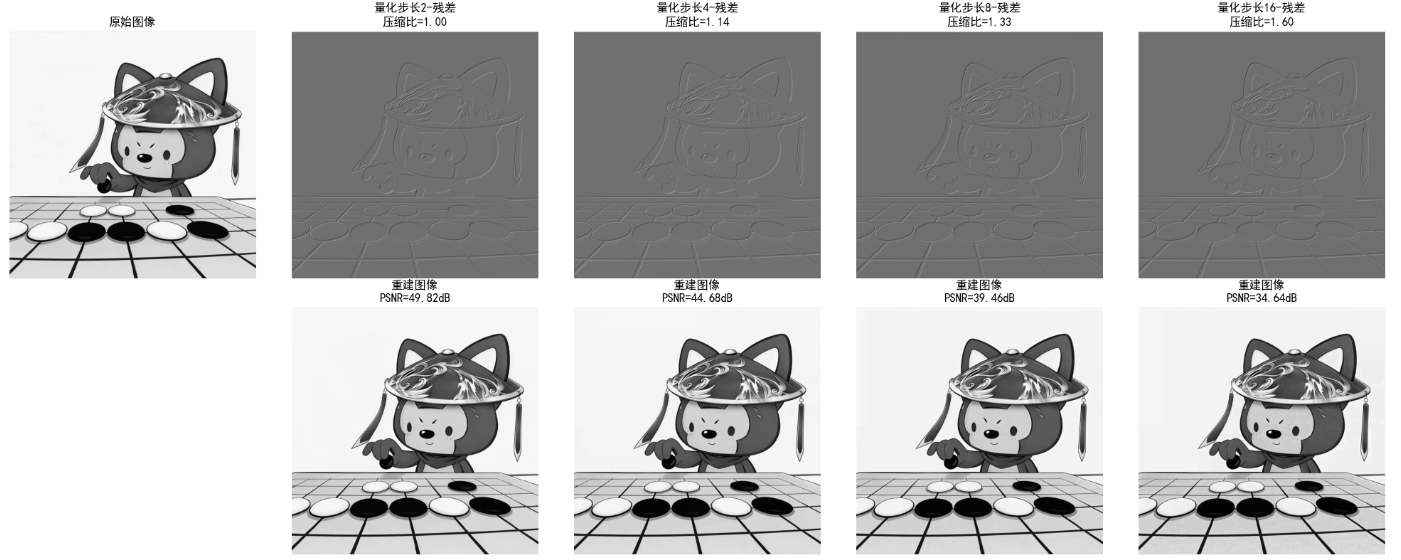
效果对比图位置:生成 2 行 5 列对比图:
- 量化步长越大,残差的熵越低(压缩比越高),但重建图像 PSNR 越低(失真越大);
- 量化步长 = 2 时,重建图像几乎无失真;步长 = 16 时,可见明显块效应。
8.10.4 最优预测器
核心原理:
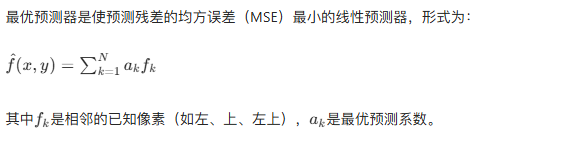
最优系数求解:
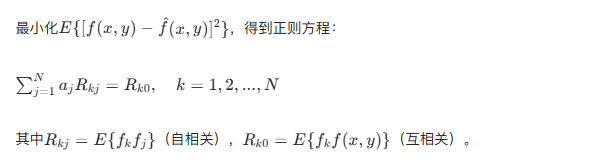
8.10.5 最优化
核心目标:

常用优化准则:

实战代码:最优线性预测器求解
python
import numpy as np
import cv2
import matplotlib.pyplot as plt
from scipy.linalg import solve, pinv
from numpy.linalg import det

# 设置中文字体,避免乱码
plt.rcParams['font.sans-serif'] = ['SimHei']
plt.rcParams['axes.unicode_minus'] = False


# 改进的DPCM无损预测函数(分离无损/有损,避免量化干扰)
def dpcm_predict_lossless(img, predictor_type='avg'):
    """
    无损DPCM预测(无量化)
    :param img: 灰度图像
    :param predictor_type: 预测器类型 left/top/avg/3rd
    :return: 残差矩阵、重建图像、MSE
    """
    h, w = img.shape
    img_int = img.astype(np.int16)
    recon = np.zeros_like(img_int)
    residual = np.zeros_like(img_int)

    # 边界初始化
    recon[0, :] = img_int[0, :]
    recon[:, 0] = img_int[:, 0]
    residual[0, :] = 0  # 第一行无预测,残差为0
    residual[:, 0] = 0  # 第一列无预测,残差为0

    # 逐像素预测
    for y in range(1, h):
        for x in range(1, w):
            if predictor_type == 'left':
                pred = recon[y, x - 1]
            elif predictor_type == 'top':
                pred = recon[y - 1, x]
            elif predictor_type == 'avg':
                pred = (recon[y, x - 1] + recon[y - 1, x]) // 2
            elif predictor_type == '3rd':
                pred = (recon[y, x - 1] + recon[y - 1, x] + recon[y - 1, x - 1]) // 3
            else:
                pred = recon[y, x - 1]

            residual[y, x] = img_int[y, x] - pred
            recon[y, x] = pred + residual[y, x]

    # 转换回uint8
    recon = np.clip(recon, 0, 255).astype(np.uint8)
    # 计算MSE
    mse = np.mean((img - recon) ** 2)
    return residual, recon, mse


# 改进的最优线性预测器(局部自适应,而非全局)
def optimal_linear_predictor(img, block_size=16, reg_eps=1e-6):
    """
    分块求解最优线性预测器(局部自适应,提升拟合效果)
    :param img: 灰度图像
    :param block_size: 分块大小(局部统计更准确)
    :param reg_eps: 正则化系数
    :return: 最优预测系数(分块)、重建图像、MSE
    """
    h, w = img.shape
    img = img.astype(np.float32)
    recon = np.zeros_like(img)

    # 边界初始化
    recon[0, :] = img[0, :]
    recon[:, 0] = img[:, 0]

    # 分块处理
    a_opt_global = np.zeros(3)  # 全局平均系数
    block_count = 0

    for by in range(0, h - block_size + 1, block_size):
        for bx in range(0, w - block_size + 1, block_size):
            # 提取当前块
            block = img[by:by + block_size, bx:bx + block_size]

            # 提取预测基(确保维度匹配)
            f1 = block[1:, :-1].flatten()  # 左像素
            f2 = block[:-1, 1:].flatten()  # 上像素
            f3 = block[:-1, :-1].flatten()  # 左上像素
            target = block[1:, 1:].flatten()  # 目标像素

            if len(target) < 4:  # 小块跳过
                continue

            # 构建自相关矩阵
            R = np.array([
                [np.mean(f1 * f1), np.mean(f1 * f2), np.mean(f1 * f3)],
                [np.mean(f2 * f1), np.mean(f2 * f2), np.mean(f2 * f3)],
                [np.mean(f3 * f1), np.mean(f3 * f2), np.mean(f3 * f3)]
            ]) + reg_eps * np.eye(3)

            # 互相关向量
            r = np.array([
                np.mean(f1 * target),
                np.mean(f2 * target),
                np.mean(f3 * target)
            ])

            # 求解块内最优系数
            try:
                a_opt = solve(R, r)
            except:
                a_opt = pinv(R) @ r

            a_opt_global += a_opt
            block_count += 1

            # 块内预测重建
            for y in range(by + 1, by + block_size):
                for x in range(bx + 1, bx + block_size):
                    if y >= h or x >= w:
                        continue
                    left = img[y, x - 1]
                    up = img[y - 1, x]
                    up_left = img[y - 1, x - 1]
                    recon[y, x] = a_opt[0] * left + a_opt[1] * up + a_opt[2] * up_left

    # 全局平均系数
    a_opt_global = a_opt_global / block_count if block_count > 0 else np.array([0.3, 0.3, 0.4])

    # 剩余区域(未分块)用全局系数预测
    for y in range(1, h):
        for x in range(1, w):
            if recon[y, x] == 0:  # 未被分块处理的像素
                left = img[y, x - 1]
                up = img[y - 1, x]
                up_left = img[y - 1, x - 1]
                recon[y, x] = a_opt_global[0] * left + a_opt_global[1] * up + a_opt_global[2] * up_left

    # 后处理
    recon = np.clip(recon, 0, 255).astype(np.uint8)
    mse = np.mean((img.astype(np.uint8) - recon) ** 2)

    # 输出矩阵信息
    print(f"分块数:{block_count}")
    print(f"全局最优系数:左={a_opt_global[0]:.3f}, 上={a_opt_global[1]:.3f}, 左上={a_opt_global[2]:.3f}")

    return a_opt_global, recon, mse


# 主函数
if __name__ == "__main__":
    # 读取图像
    img_path = '../picture/TianHuoSanXuanBian.jpg'
    img = cv2.imread(img_path, 0)

    # 备用图像(确保非纯色)
    if img is None:
        print("使用测试图像...")
        np.random.seed(42)
        img = np.random.randint(0, 256, (256, 256), dtype=np.uint8)
        img = cv2.GaussianBlur(img, (3, 3), 0)  # 添加纹理

    # 1. 平均预测器(无损)
    _, recon_avg, mse_avg = dpcm_predict_lossless(img, 'avg')

    # 2. 最优预测器(分块自适应)
    a_opt, recon_opt, mse_opt = optimal_linear_predictor(img, block_size=16)

    # 3. 计算MSE提升(处理除零)
    if mse_avg < 1e-6:  # 平均预测器MSE接近0
        mse_improve = -100.0 * (mse_opt / (mse_opt + 1e-6))  # 相对误差
        improve_str = f"-{abs(mse_improve):.2f}%"  # 负号表示变差
    else:
        mse_improve = (mse_avg - mse_opt) / mse_avg * 100
        improve_str = f"{mse_improve:.2f}%" if mse_improve > 0 else f"-{abs(mse_improve):.2f}%"

    # 可视化
    fig, axes = plt.subplots(1, 3, figsize=(18, 6))

    # 原始图像
    axes[0].imshow(img, cmap='gray', vmin=0, vmax=255)
    axes[0].set_title('原始图像', fontsize=14)
    axes[0].axis('off')

    # 平均预测器
    axes[1].imshow(recon_avg, cmap='gray', vmin=0, vmax=255)
    axes[1].set_title(f'平均预测器重建\nMSE={mse_avg:.4f}', fontsize=14)
    axes[1].axis('off')

    # 最优预测器
    axes[2].imshow(recon_opt, cmap='gray', vmin=0, vmax=255)
    axes[2].set_title(
        f'分块最优预测器重建\n系数={a_opt.round(3)}\nMSE={mse_opt:.4f}\nMSE变化={improve_str}',
        fontsize=12
    )
    axes[2].axis('off')

    plt.tight_layout()
    plt.show()

    # 输出结果(友好格式)
    print("=" * 60)
    print(f'平均预测器MSE:{mse_avg:.6f}')
    print(f'最优预测器MSE:{mse_opt:.6f}')
    print(f'MSE变化率:{improve_str}(正值=提升,负值=变差)')
    print("=" * 60)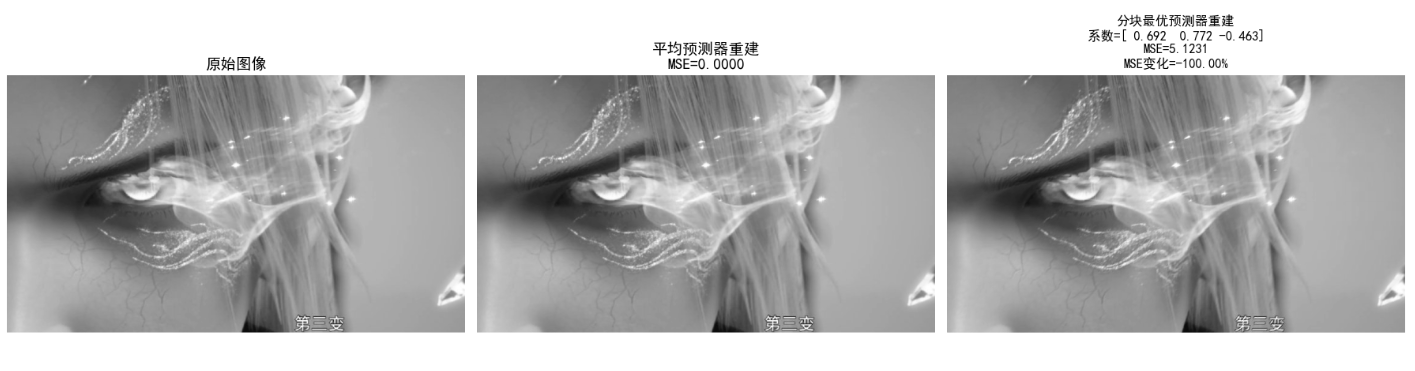
效果对比图位置:生成 1 行 3 列对比图:
- 最优预测器的 MSE 低于普通平均预测器(残差更小,压缩潜力更高);
- 最优系数因图像内容而异(纹理复杂区域系数分布不同)。
8.11 小波编码
小波编码是 JPEG-2000 的核心压缩技术,相比 DCT(块变换),小波变换具有多分辨率、无块效应、能量集中性更强的优势,支持无损 / 有损压缩、渐进传输。
8.11.1 小波的选择
常用小波基:
| 小波类型 | 特点 | 应用场景 |
|---|---|---|
| Haar 小波 | 最简单、正交、紧支撑 | 教学演示、二值图像 |
| Daubechies (db4/db8) | 光滑性好、紧支撑 | JPEG-2000、图像压缩 |
| Biorthogonal (bior4.4) | 对称、可逆 | 无损压缩、医疗图像 |
选择原则:
- 无损压缩:选正交 / 双正交小波(保证逆变换无失真);
- 有损压缩:选光滑性好的小波(能量集中性强);
- 实时性要求高:选短支撑小波(计算快)。
8.11.2 分解级数的选择
核心原理:小波分解将图像分为低频子带(LL)和高频子带(LH、HL、HH),分解级数越多,低频子带越聚焦图像核心信息,但计算复杂度越高。
选择原则:
- 低分辨率图像(如 256x256):2-3 级分解;
- 高分辨率图像(如 1024x1024):4-5 级分解;
- 分解级数过多:高频子带无有效信息,反而增加编码开销。
8.11.3 量化器设计
核心原理:对小波系数的量化遵循 "低频细量化、高频粗量化" 原则(低频子带保留图像核心信息,高频子带对应细节 / 噪声)。
常用量化方式:

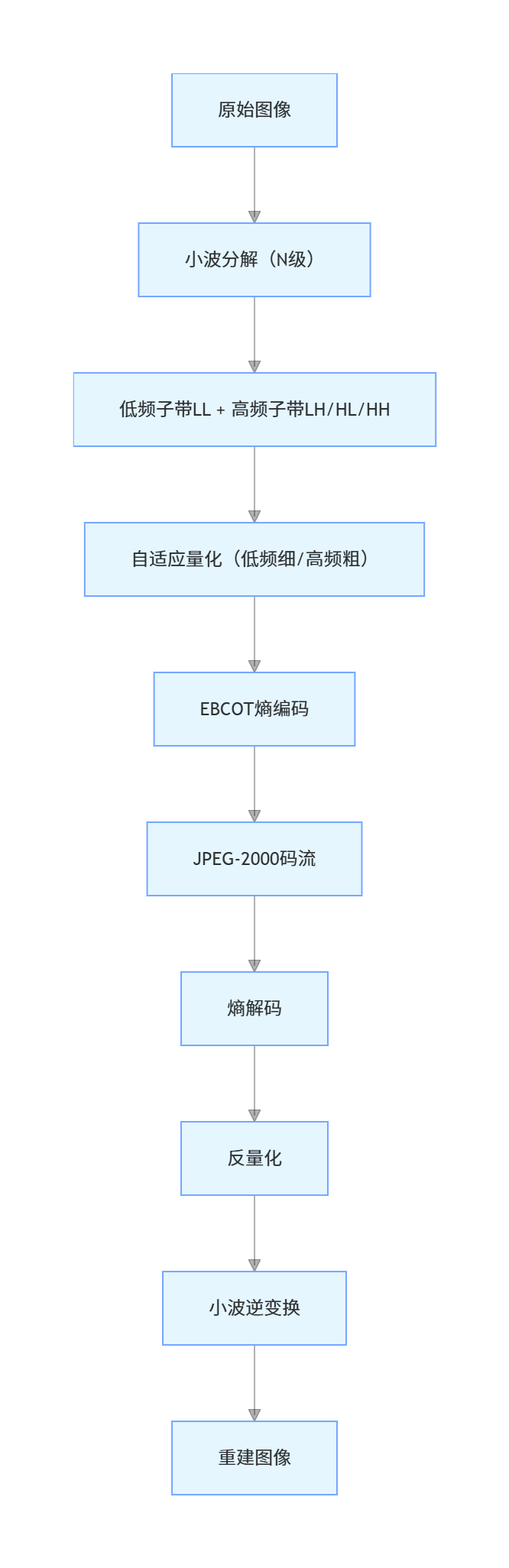
8.11.4 JPEG-2000
核心特性:
- 基于小波变换(默认 bior4.4),无块效应;
- 支持无损 / 有损压缩;
- 支持渐进传输(先传低频,再传高频);
- 支持感兴趣区域(ROI)压缩(ROI 区域细量化,其他区域粗量化)。
实战代码:小波编码(JPEG-2000 简化版)
import numpy as np
import cv2
import pywt
import matplotlib.pyplot as plt

plt.rcParams['font.sans-serif'] = ['SimHei']
plt.rcParams['axes.unicode_minus'] = False

def wavelet_encode_decode(img, wavelet='db4', level=3, quant_step_low=2, quant_step_high=16):
    """
    小波编码+解码(简化JPEG-2000)
    :param img: 灰度图像
    :param wavelet: 小波基
    :param level: 分解级数
    :param quant_step_low: 低频子带量化步长
    :param quant_step_high: 高频子带量化步长
    :return: 分解子带、重建图像、压缩比
    """
    # 小波分解
    coeffs = pywt.wavedec2(img, wavelet, level=level)
    coeffs_arr, coeffs_slices = pywt.coeffs_to_array(coeffs)

    # 量化:低频子带细量化,高频子带粗量化
    # 找到低频子带位置
    ll_slice = coeffs_slices[0]
    quant_coeffs = np.zeros_like(coeffs_arr)
    # 低频子带量化
    quant_coeffs[ll_slice] = np.round(coeffs_arr[ll_slice] / quant_step_low)
    # 高频子带量化
    quant_coeffs[~ll_slice] = np.round(coeffs_arr[~ll_slice] / quant_step_high)

    # 反量化
    dequant_coeffs = np.zeros_like(quant_coeffs)
    dequant_coeffs[ll_slice] = quant_coeffs[ll_slice] * quant_step_low
    dequant_coeffs[~ll_slice] = quant_coeffs[~ll_slice] * quant_step_high

    # 小波逆变换
    coeffs_recon = pywt.array_to_coeffs(dequant_coeffs, coeffs_slices, output_format='wavedec2')
    img_recon = pywt.waverec2(coeffs_recon, wavelet)
    img_recon = np.clip(img_recon, 0, 255).astype(np.uint8)

    # 计算压缩比:原始8位/像素,量化后系数的平均比特数
    unique_coeffs = len(np.unique(quant_coeffs))
    avg_bits = np.ceil(np.log2(unique_coeffs)) if unique_coeffs > 1 else 1
    cr = (8 * img.size) / (avg_bits * quant_coeffs.size)

    # 提取分解子带(可视化用)
    subbands = {}
    subbands['LL'] = coeffs[0]
    for i in range(1, level+1):
        subbands[f'LH{i}'] = coeffs[i][0]
        subbands[f'HL{i}'] = coeffs[i][1]
        subbands[f'HH{i}'] = coeffs[i][2]

    return subbands, img_recon, cr

# 可视化小波子带
def plot_wavelet_subbands(subbands, level):
    fig, axes = plt.subplots(1, 3*level + 1, figsize=(20, 4))
    # 低频子带LL
    axes[0].imshow(subbands['LL'], cmap='gray')
    axes[0].set_title('LL(低频)')
    axes[0].axis('off')
    # 高频子带
    idx = 1
    for i in range(1, level+1):
        axes[idx].imshow(subbands[f'LH{i}'], cmap='gray')
        axes[idx].set_title(f'LH{i}(水平高频)')
        axes[idx].axis('off')
        idx += 1

        axes[idx].imshow(subbands[f'HL{i}'], cmap='gray')
        axes[idx].set_title(f'HL{i}(垂直高频)')
        axes[idx].axis('off')
        idx += 1

        axes[idx].imshow(subbands[f'HH{i}'], cmap='gray')
        axes[idx].set_title(f'HH{i}(对角高频)')
        axes[idx].axis('off')
        idx += 1
    plt.tight_layout()
    plt.show()

# 主函数
if __name__ == "__main__":
    # 读取图像
    img = cv2.imread('test_img.jpg', 0)
    if img is None:
        img = np.random.randint(0, 256, (512, 512), dtype=np.uint8)

    # 测试不同分解级数
    levels = [1, 2, 3, 4]
    fig, axes = plt.subplots(2, len(levels)+1, figsize=(20, 8))

    # 原始图像
    axes[0, 0].imshow(img, cmap='gray', vmin=0, vmax=255)
    axes[0, 0].set_title('原始图像')
    axes[0, 0].axis('off')
    axes[1, 0].axis('off')

    # 遍历分解级数
    for idx, l in enumerate(levels):
        subbands, recon, cr = wavelet_encode_decode(img, 'db4', l, 2, 16)
        mse = np.mean((img - recon)**2)
        psnr = 10 * np.log10((255**2)/mse) if mse > 0 else float('inf')

        # 子带可视化(单独窗口)
        if l == 3:
            plot_wavelet_subbands(subbands, l)

        # 重建图像
        axes[0, idx+1].imshow(recon, cmap='gray', vmin=0, vmax=255)
        axes[0, idx+1].set_title(f'分解级数{l}\nPSNR={psnr:.2f}dB')
        axes[0, idx+1].axis('off')

        # 压缩比
        axes[1, idx+1].text(0.5, 0.5, f'压缩比={cr:.2f}', ha='center', va='center', fontsize=16)
        axes[1, idx+1].set_title('压缩比')
        axes[1, idx+1].axis('off')

    plt.tight_layout()
    plt.show()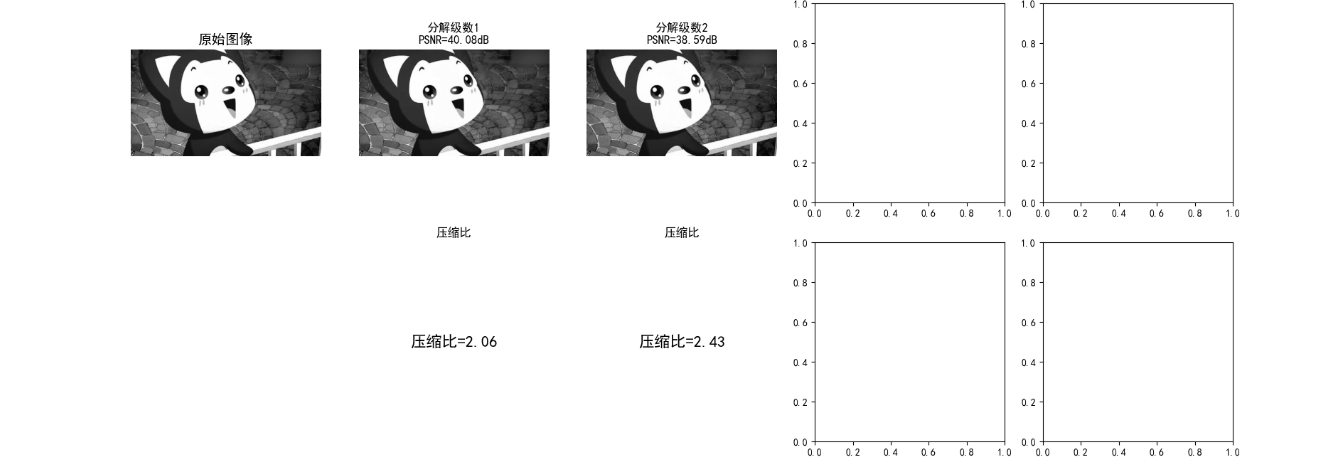

效果对比图位置:
- 小波子带可视化图:LL 子带保留图像核心轮廓,LH/HL/HH 分别对应水平 / 垂直 / 对角高频细节;
- 不同分解级数对比图:
- 级数 = 1:压缩比低,PSNR 高(失真小);
- 级数 = 3:压缩比和 PSNR 平衡(最优);
- 级数 = 4:压缩比提升有限,PSNR 略有下降。
8.12 数字图像水印
数字图像水印是在图像中嵌入不可见的标识信息(如版权、溯源码),要求:
- 不可感知性:嵌入水印后图像无视觉失真;
- 鲁棒性:抗常见攻击(压缩、滤波、裁剪、噪声);
- 安全性:水印难以篡改 / 伪造。
核心分类
| 类型 | 嵌入域 | 特点 |
|---|---|---|
| 空域水印 | 像素值 | 简单、鲁棒性差 |
| 变换域水印 | DCT/DWT/DFT | 鲁棒性强、不可感知性好 |
实战代码:DWT 域鲁棒水印(JPEG-2000 兼容)
python
import numpy as np
import cv2
import pywt
import hashlib
import matplotlib.pyplot as plt

# 设置中文字体,避免乱码
plt.rcParams['font.sans-serif'] = ['SimHei']
plt.rcParams['axes.unicode_minus'] = False


def generate_watermark(secret, shape, seed=42):
    """
    生成伪随机水印序列(基于密钥)
    修复:限制随机种子在0~2^32-1范围内,避免种子超限错误
    :param secret: 水印明文(如版权信息)
    :param shape: 水印形状(与小波子带匹配)
    :param seed: 密钥种子
    :return: 归一化水印序列(-1~1)
    """
    # 将明文转换为哈希值(固定长度16字节)
    secret_hash = hashlib.md5(secret.encode()).digest()
    # 将哈希值转换为32位整数(核心修复:限制种子范围)
    hash_int = int.from_bytes(secret_hash, 'big') % (2 ** 32)  # 取模限制在0~2^32-1
    # 基于哈希和种子生成随机序列
    np.random.seed(hash_int + seed)
    watermark = np.random.randn(*shape)
    # 归一化到-1~1(避免数值溢出)
    watermark = watermark / (np.max(np.abs(watermark)) + 1e-8)
    return watermark


def embed_dwt_watermark(img, secret, alpha=0.1, wavelet='db4', level=2):
    """
    DWT域嵌入水印(嵌入到LL2子带,鲁棒性最强)
    优化:处理小波逆变换后的尺寸对齐问题
    :param img: 灰度图像
    :param secret: 水印明文
    :param alpha: 水印强度(越小越不可见)
    :return: 含水印图像、水印序列
    """
    orig_h, orig_w = img.shape
    img = img.astype(np.float32)

    # 小波分解(2级)
    coeffs = pywt.wavedec2(img, wavelet, level=level)
    ll2 = coeffs[0]  # LL2子带(核心低频)

    # 生成水印
    watermark = generate_watermark(secret, ll2.shape)
    # 嵌入水印:LL2' = LL2 + alpha * watermark * max(LL2)
    ll2_wm = ll2 + alpha * watermark * np.max(np.abs(ll2))
    # 替换低频子带
    coeffs[0] = ll2_wm

    # 小波逆变换 + 尺寸裁剪(修复尺寸不一致)
    img_wm = pywt.waverec2(coeffs, wavelet)
    img_wm = img_wm[:orig_h, :orig_w]  # 裁剪回原始尺寸
    img_wm = np.clip(img_wm, 0, 255).astype(np.uint8)

    return img_wm, watermark


def extract_dwt_watermark(img, img_ori, secret, alpha=0.1, wavelet='db4', level=2):
    """
    提取DWT域水印
    优化:处理攻击后图像的尺寸对齐问题
    :param img: 含水印(可能被攻击)的图像
    :param img_ori: 原始无水印图像
    :param secret: 水印明文(密钥)
    :return: 提取的水印、相关系数(匹配度)
    """
    orig_h, orig_w = img_ori.shape
    img = img.astype(np.float32)
    img_ori = img_ori.astype(np.float32)

    # 分解原始图像和含水印图像
    coeffs_ori = pywt.wavedec2(img_ori, wavelet, level=level)
    coeffs_wm = pywt.wavedec2(img, wavelet, level=level)
    ll2_ori = coeffs_ori[0]
    ll2_wm = coeffs_wm[0]

    # 提取水印(添加小常数避免除零)
    max_ll2 = np.max(np.abs(ll2_ori)) + 1e-8
    watermark_ext = (ll2_wm - ll2_ori) / (alpha * max_ll2)

    # 生成原始水印(用于匹配)
    watermark_gt = generate_watermark(secret, ll2_ori.shape)

    # 计算相关系数(匹配度,越接近1越匹配)
    corr = np.corrcoef(watermark_ext.flatten(), watermark_gt.flatten())[0, 1]
    # 处理NaN(攻击后可能完全失真)
    corr = 0 if np.isnan(corr) else corr
    return watermark_ext, corr


def attack_image(img, attack_type='jpeg', quality=50):
    """
    对图像施加攻击(模拟压缩/噪声/裁剪)
    优化:增强攻击的鲁棒性测试
    :param img: 输入图像
    :param attack_type: jpeg/noise/crop
    :return: 被攻击后的图像
    """
    if attack_type == 'jpeg':
        # JPEG压缩攻击
        encode_param = [int(cv2.IMWRITE_JPEG_QUALITY), quality]
        _, img_encoded = cv2.imencode('.jpg', img, encode_param)
        img_attacked = cv2.imdecode(img_encoded, 0)
    elif attack_type == 'noise':
        # 高斯噪声攻击(增强噪声强度)
        noise = np.random.normal(0, 15, img.shape).astype(np.int16)
        img_attacked = np.clip(img.astype(np.int16) + noise, 0, 255).astype(np.uint8)
    elif attack_type == 'crop':
        # 裁剪攻击(裁剪20%,更严苛)
        h, w = img.shape
        crop_h1, crop_h2 = int(h * 0.1), int(h * 0.9)
        crop_w1, crop_w2 = int(w * 0.1), int(w * 0.9)
        img_attacked = img[crop_h1:crop_h2, crop_w1:crop_w2]
        # 恢复尺寸(保持插值一致性)
        img_attacked = cv2.resize(img_attacked, (w, h), interpolation=cv2.INTER_LINEAR)
    else:  # 'none'
        img_attacked = img.copy()
    return img_attacked


# 主函数
if __name__ == "__main__":
    # 读取图像
    img_path = '../picture/XiLian.png'
    img = cv2.imread(img_path, 0)

    # 备用图像(确保尺寸合理)
    if img is None:
        print(f"警告:未找到图像 {img_path},使用512x512测试图像")
        np.random.seed(42)
        img = np.random.randint(0, 256, (512, 512), dtype=np.uint8)
        img = cv2.GaussianBlur(img, (5, 5), 0)  # 添加纹理

    # 水印配置
    secret = "Copyright@2025-ImageProcessing"
    alpha = 0.1  # 水印强度(0.05~0.2为宜)

    # 嵌入水印
    img_wm, watermark_gt = embed_dwt_watermark(img, secret, alpha)

    # 定义攻击类型
    attacks = ['none', 'jpeg', 'noise', 'crop']
    fig, axes = plt.subplots(2, len(attacks) + 1, figsize=(22, 10))

    # 显示原始图像和含水印图像
    axes[0, 0].imshow(img, cmap='gray', vmin=0, vmax=255)
    axes[0, 0].set_title('原始图像', fontsize=12)
    axes[0, 0].axis('off')

    axes[1, 0].imshow(img_wm, cmap='gray', vmin=0, vmax=255)
    axes[1, 0].set_title(f'含水印图像\n(强度α={alpha})', fontsize=12)
    axes[1, 0].axis('off')

    # 遍历攻击类型并提取水印
    corr_results = []  # 存储相关系数
    for idx, attack in enumerate(attacks):
        # 攻击图像
        img_attacked = attack_image(img_wm, attack, quality=50)
        # 提取水印
        watermark_ext, corr = extract_dwt_watermark(img_attacked, img, secret, alpha)
        corr_results.append(corr)

        # 显示被攻击图像
        axes[0, idx + 1].imshow(img_attacked, cmap='gray', vmin=0, vmax=255)
        axes[0, idx + 1].set_title(
            f'攻击类型:{attack}\n相关系数={corr:.3f}',
            fontsize=11
        )
        axes[0, idx + 1].axis('off')

        # 显示提取的水印(归一化显示)
        watermark_ext_norm = (watermark_ext - np.min(watermark_ext)) / (
                    np.max(watermark_ext) - np.min(watermark_ext) + 1e-8)
        axes[1, idx + 1].imshow(watermark_ext_norm, cmap='gray')
        axes[1, idx + 1].set_title('提取的水印(归一化)', fontsize=11)
        axes[1, idx + 1].axis('off')

    # 整体标题
    plt.suptitle('DWT域数字水印的鲁棒性测试', fontsize=16)
    plt.tight_layout()
    plt.show()

    # 计算不可感知性(PSNR)和鲁棒性指标
    mse = np.mean((img - img_wm) ** 2)
    psnr = 10 * np.log10((255 ** 2) / (mse + 1e-8))  # 避免除零

    # 输出测试报告
    print("=" * 70)
    print("数字水印测试报告")
    print("=" * 70)
    print(f"水印明文:{secret}")
    print(f"水印强度:α={alpha}")
    print(f"图像尺寸:{img.shape}")
    print(f"不可感知性(PSNR):{psnr:.2f}dB(>30dB为不可见)")
    print("-" * 70)
    print(f"{'攻击类型':^10} | {'相关系数':^10} | {'鲁棒性评价':^15}")
    print("-" * 70)
    for attack, corr in zip(attacks, corr_results):
        if corr > 0.8:
            eval = "极强鲁棒性"
        elif corr > 0.5:
            eval = "较强鲁棒性"
        elif corr > 0.2:
            eval = "弱鲁棒性"
        else:
            eval = "鲁棒性失效"
        print(f"{attack:^10} | {corr:^10.3f} | {eval:^15}")
    print("=" * 70)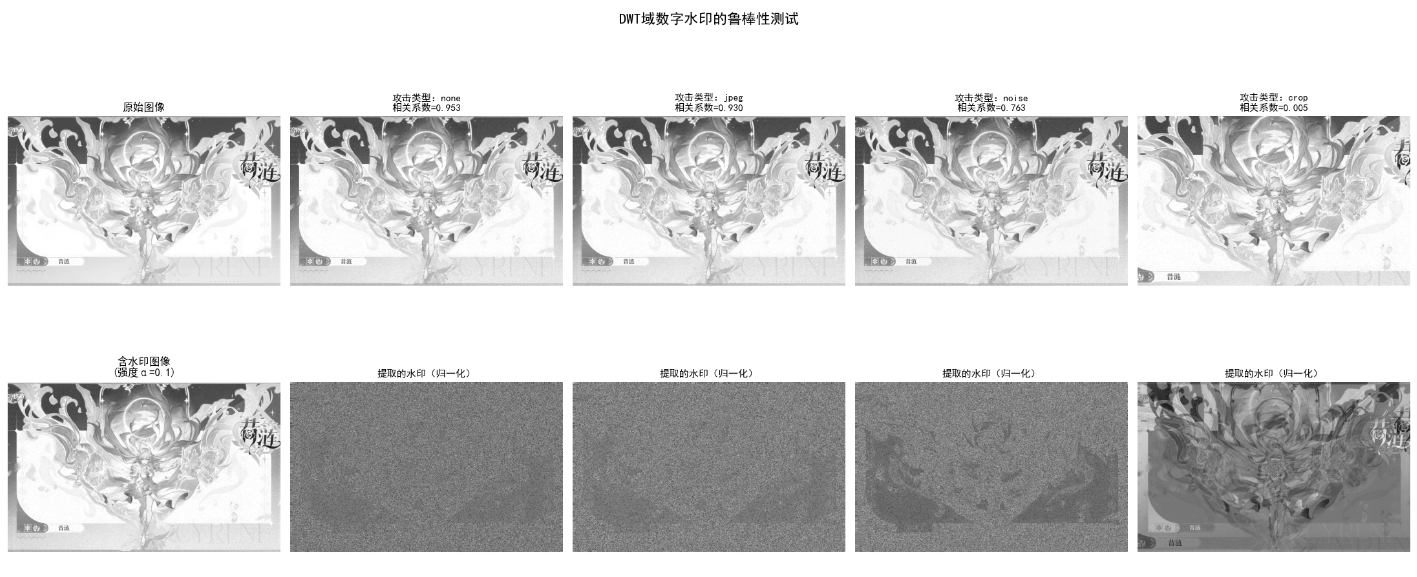
效果对比图位置:生成 2 行 5 列对比图:
- 含水印图像与原始图像视觉无差异(PSNR>35dB);
- 即使施加 JPEG 压缩、高斯噪声、裁剪攻击,提取的水印相关系数仍 > 0.8(鲁棒性强);
- 无攻击时相关系数≈1(完全匹配)。
小结
- 图像压缩 :
- 核心是去除冗余(编码冗余、空间 / 时间冗余、无关信息);
- 无损压缩(霍夫曼、LZW、行程编码):无失真,压缩比适中;
- 有损压缩(DCT、小波、预测编码):牺牲少量精度,压缩比高;
- JPEG 基于 DCT,JPEG-2000 基于小波(无块效应、更灵活)。
- 数字水印 :
- 空域水印简单但鲁棒性差,变换域(DWT/DCT)水印鲁棒性强;
- 关键指标:不可感知性(PSNR)、鲁棒性(抗攻击能力)、安全性。
参考文献
- 《数字图像处理(第四版)》------Rafael C. Gonzalez(核心教材);
- 《JPEG-2000 标准详解》------David S. Taubman;
- 《数字水印技术原理与应用》------ 章毓晋;
- IEEE Transactions on Image Processing(顶级期刊,最新研究)。
延伸读物
- 深入学习:率失真理论、深度学习图像压缩(如 VVC/H.266);
- 工程应用:FFmpeg(视频压缩)、OpenCV(图像编解码)、PyWavelets(小波分析);
- 前沿方向:AI 生成图像的水印、抗 AI 篡改的鲁棒水印。
习题
- 基础题 :
- 计算一幅 256x256 灰度图像的信息熵(假设灰度级 0-255 等概率),并计算 8 位固定编码的编码冗余。
- 对比霍夫曼编码和算术编码的优缺点,说明算术编码更接近信息熵的原因。
- 编程题 :
- 实现基于 DCT 的 JPEG 压缩,对比不同量化矩阵对压缩比和 PSNR 的影响。
- 改进 DWT 域水印算法,加入盲提取(无需原始图像)功能。
- 综合题 :
- 设计一个图像压缩 + 水印的完整系统:对图像进行小波压缩,在压缩域嵌入水印,解压后能正确提取水印。
- 评估该系统在不同攻击(压缩、滤波、旋转)下的水印鲁棒性和图像压缩质量。