一.本章节介绍
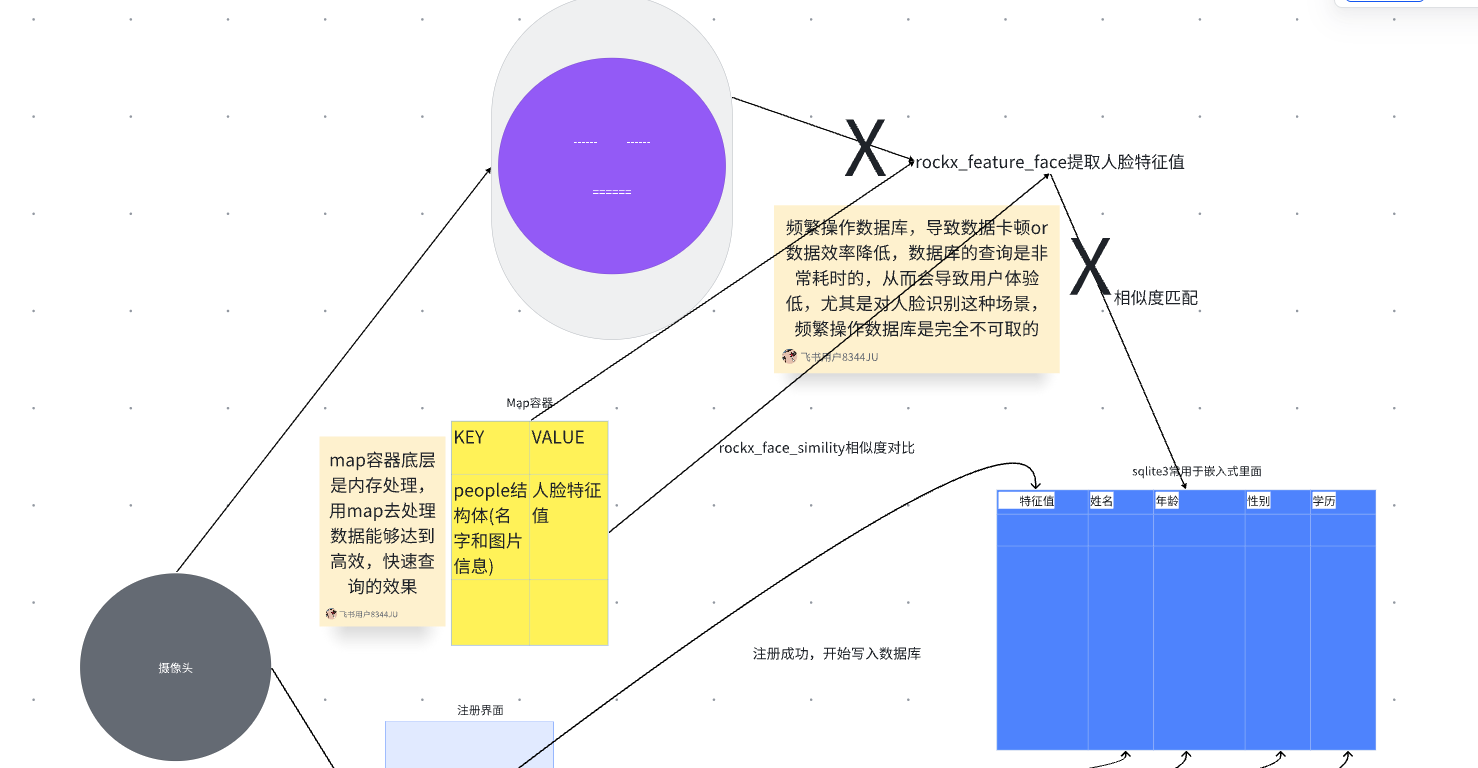
本章节将介绍如何通过查询人脸数据库表格,将数据存储到map容器中。map容器基于内存操作,能够实现高效快速的数据查询。在本项目中,map主要发挥快速查询功能:其中key存储人脸结构体(People),value则存储具体的人脸数据(rockx_face_feature_t)。
二.读取数据库保存到map流程框图
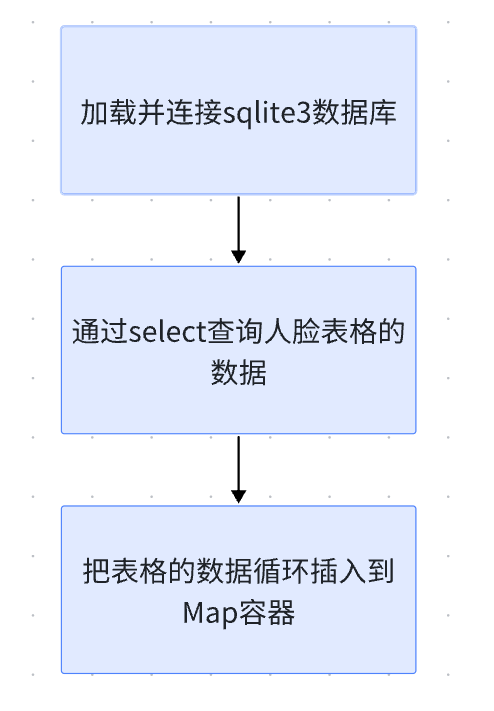
该流程图展示了从数据库读取数据并加载到Map容器的完整流程,包含三个关键步骤:
- 建立连接:初始化并连接SQLite3数据库
- 执行查询:通过SELECT语句获取人脸表格数据
- 数据映射:将查询结果循环存入Map容器
三.读取数据库保存到map的代码截图
cpp
void init_face_data()
{
    /*刚开始交叉编译sqlite3_operation_test.cpp文件到板子中运行,把人脸信息及特征值保存到sqlite数据库中,再调用QueryPeopleData()
    函数从中一一取出人脸信息(比如姓名,图片信息以及大小),最后返回组装好的容器*/
    Connection_sqlite3DataBase();
    int task_id = generate_unique_task_id();
    S_THREAD_MAP thread_map;
    //map<string, rockx_face_feature_t> maps = QueryFaceFeature();
    map<People, rockx_face_feature_t> maps = QueryPeopleData();
    //thread_map.thread_map = maps;
    thread_map.thread_people_map = maps;
    set_thread_map(task_id, &thread_map);
    printf("本次人脸数据绑定的 task_id:%d\n", task_id);
}
init_face_data 是一个用于读取数据库数据并存入 map 容器的自定义函数,主要包含三个关键步骤:首先通过 Connection_sqlite3DataBase 加载数据库,接着使用 QueryPeopleData 查询数据库信息并存入 Map 容器,最后通过 set_thread_map 将 Map 数据存储到全局变量中。
3.1. 加载并连接sqlite3数据库
cpp
int Connection_sqlite3DataBase()
{
  rc = sqlite3_open("/userdata/face.db", &db);
  if (rc != SQLITE_OK)
  {
    fprintf(stderr, "Can't open database: %s\n", sqlite3_errmsg(db));
    sqlite3_close(db);
    exit(1);
  }
  else
  {
    printf("You have opened a sqlite3 database named bind.db successfully!\nCongratulation! Have fun!\n");
  }
  return 0;
}
这个函数直接调用了sqlite3的api sqlite3_open来初始化人脸数据库,若返回值不等于SQLITE_OK则初始化数据库失败,否则就初始化成功。
3.2. 通过select查询人脸表格的数据
cpp
rockx_face_feature_t rockx_face_feature = {0, 0};
  // 定义返回值:map容器,键=People(人名+图片),值=人脸特征
  map<People, rockx_face_feature_t> people_map;
  sqlite3_stmt *stmt = nullptr;
  static int i=0;
  char buf_sql[256];
  //char *sql = "select name, feature_size, face_feature, image_size, image_data from face_data_table";
  sprintf(buf_sql,"select name, feature_size, face_feature, image_size, image_data from face_data_table_%d",i++);


  int id = 0, len = 0;
  char *name;
  int feature_size;
  int feature_bytes;
  int image_size;
  vector<char> images;
  People first_people;
该SQL查询语句用于从人脸数据表face_data_table中检索数据,查询字段包括:
- name(姓名)
- feature_size(特征值长度)
- face_feature(人脸特征数据)
- image_size(图片尺寸)
- image_data(图片数据)
查询执行时使用了sqlite3_prepare方法进行SQL语句预处理。
3.3. 读取查询的结果并循环插入map容器
cpp
int ret = sqlite3_prepare(db, buf_sql, strlen(sql), &stmt, 0);
  if (ret == SQLITE_OK)
  {
    while (sqlite3_step(stmt) == SQLITE_ROW)
    {
      name = (char *)sqlite3_column_text(stmt, 0);
      printf("name = %s\n", name);
      feature_size = sqlite3_column_int(stmt, 1);
      printf("feature_size = %d\n", feature_size);

      feature_bytes = feature * sizeof(float);
      const void *feature = sqlite3_column_blob(stmt, 2);
      memset(rockx_face_feature.feature, 0, feature_bytes);
      memcpy(rockx_face_feature.feature, feature, feature_bytes);
      rockx_face_feature.len = feature_bytes;

      image_size = sqlite3_column_int(stmt, 3);
      printf("image_size = %d\n", image_size);

      const char * image_data = (const char *)sqlite3_column_blob(stmt, 4);
      for (int i = 0; i < image_size; i++)
      {
         images.push_back(image_data[i]);
         images.clear(); // 新增:清空上一行的图片数据
      }

      first_people.people_name = string(name);
      first_people.images = images;

      string str(name);
      //people_map.insert(pair<const People, rockx_face_feature_t>(first_people, rockx_face_feature));
      people_map.insert(make_pair(first_people, rockx_face_feature));
      //people_map.insert(first_people, rockx_face_feature);
    }
  }
  //返回组装好的map容器
  return people_map;
这段代码实现了从SQLite3数据库读取数据并循环插入到map容器的功能。核心是通过sqlite3_step函数获取SELECT查询结果:当返回值为SQLITE_ROW时,表示当前行包含有效数据。
各列数据的读取方式如下:
sqlite3_column_text(stmt, 0):获取SELECT语句第一个字段(索引0),对应name字段(字符串类型)sqlite3_column_int(stmt, 1):获取第二个字段(索引1),对应feature_size字段(整型)sqlite3_column_blob(stmt, 2):获取第三个字段(索引2),对应face_feature字段(二进制类型)sqlite3_column_int(stmt, 3):获取第四个字段(索引3),对应image_size字段(整型)sqlite3_column_blob(stmt, 4):获取第五个字段(索引4),对应image_data字段(二进制类型)
完成数据读取后,将获取的所有字段值插入到map容器中。
四.完整代码
cpp
map<People, rockx_face_feature_t> QueryPeopleData()
{
  rockx_face_feature_t rockx_face_feature = {0, 0};
  // 定义返回值:map容器,键=People(人名+图片),值=人脸特征
  map<People, rockx_face_feature_t> people_map;
  sqlite3_stmt *stmt = nullptr;
  static int i=0;
  char buf_sql[256];
  //char *sql = "select name, feature_size, face_feature, image_size, image_data from face_data_table";
  sprintf(buf_sql,"select name, feature_size, face_feature, image_size, image_data from face_data_table_%d",i++);


  int id = 0, len = 0;
  char *name;
  int feature_size;
  int feature_bytes;
  int image_size;
  vector<char> images;
  People first_people;

  int ret = sqlite3_prepare(db, buf_sql, strlen(sql), &stmt, 0);
  if (ret == SQLITE_OK)
  {
    while (sqlite3_step(stmt) == SQLITE_ROW)
    {
      name = (char *)sqlite3_column_text(stmt, 0);
      printf("name = %s\n", name);
      feature_size = sqlite3_column_int(stmt, 1);
      printf("feature_size = %d\n", feature_size);

      feature_bytes = feature * sizeof(float);
      const void *feature = sqlite3_column_blob(stmt, 2);
      memset(rockx_face_feature.feature, 0, feature_bytes);
      memcpy(rockx_face_feature.feature, feature, feature_bytes);
      rockx_face_feature.len = feature_bytes;

      image_size = sqlite3_column_int(stmt, 3);
      printf("image_size = %d\n", image_size);

      const char * image_data = (const char *)sqlite3_column_blob(stmt, 4);
      for (int i = 0; i < image_size; i++)
      {
         images.push_back(image_data[i]);
         images.clear(); // 新增:清空上一行的图片数据
      }

      first_people.people_name = string(name);
      first_people.images = images;

      string str(name);
      //people_map.insert(pair<const People, rockx_face_feature_t>(first_people, rockx_face_feature));
      people_map.insert(make_pair(first_people, rockx_face_feature));
      //people_map.insert(first_people, rockx_face_feature);
    }
  }
  //返回组装好的map容器
  return people_map;
}


int Connection_sqlite3DataBase()
{
  rc = sqlite3_open("/userdata/face.db", &db);
  if (rc != SQLITE_OK)
  {
    fprintf(stderr, "Can't open database: %s\n", sqlite3_errmsg(db));
    sqlite3_close(db);
    exit(1);
  }
  else
  {
    printf("You have opened a sqlite3 database named bind.db successfully!\nCongratulation! Have fun!\n");
  }
  return 0;
}


int generate_unique_task_id() {
    return g_next_task_id++;  // 每次调用自增,返回唯一ID
}

void init_face_data()
{
    /*刚开始交叉编译sqlite3_operation_test.cpp文件到板子中运行,把人脸信息及特征值保存到sqlite数据库中,再调用QueryPeopleData()
    函数从中一一取出人脸信息(比如姓名,图片信息以及大小),最后返回组装好的容器*/
    Connection_sqlite3DataBase();
    int task_id = generate_unique_task_id();
    S_THREAD_MAP thread_map;
    //map<string, rockx_face_feature_t> maps = QueryFaceFeature();
    map<People, rockx_face_feature_t> maps = QueryPeopleData();
    //thread_map.thread_map = maps;
    thread_map.thread_people_map = maps;
    set_thread_map(task_id, &thread_map);
    printf("本次人脸数据绑定的 task_id:%d\n", task_id);
}