背景问题
使用 Claude Code 时,我们经常需要在不同的 API 提供商之间切换,比如:
- BigModel(智谱 AI)
- MiniMax
- 其他兼容 OpenAI API 的服务
每次切换都需要手动编辑 ~/.claude/settings.json,不仅麻烦,还容易出错。有没有更简单的方式呢?
解决方案
我实现了一个简单的配置切换工具,通过 Claude Code 的 Slash Command 功能,可以快速在多个配置之间切换。
功能特性
- 一键切换 :使用
/cfg switch <名称>快速切换配置 - 配置列表 :使用
/cfg list查看所有可用配置 - 当前状态 :使用
/cfg current显示当前激活的配置 - 自动备份:切换前自动备份当前配置
- 彩色输出:清晰的成功/错误提示
⚠️ 重要提示 :切换配置后,必须重启 Claude Code 才能使新配置生效。Claude Code 在启动时读取配置,运行时不会自动重新加载。
实现方案
系统由两部分组成:
1. Bash 脚本(核心逻辑)
~/.claude/bin/config-manager.sh 负责实际的文件操作:
bash
#!/usr/bin/env bash
CONFIG_DIR="$HOME/.claude-profiles"
SETTINGS_FILE="$HOME/.claude/settings.json"

command_list() {
    # 列出所有 *.settings.json 文件
    # 高亮显示当前激活的配置
}

command_switch() {
    # 验证配置文件存在
    # 备份当前配置
    # 复制新配置到 settings.json
}

command_current() {
    # 显示当前激活的配置名称
}
2. Slash Command(用户界面)
~/.claude/commands/cfg.md 定义用户命令:
markdown
---
description: 管理 Claude Code 配置文件
---

使用配置管理器来管理多个 settings.json 配置文件。
...
目录结构
~/.claude-profiles/              # 配置文件存储目录
  ├── bigmodel.settings.json     # BigModel API 配置
  ├── minimax.settings.json      # MiniMax API 配置
  └── custom.settings.json       # 自定义配置

~/.claude/
  ├── bin/
  │   └── config-manager.sh      # 管理脚本
  └── commands/
      └── cfg.md                 # Slash Command 定义
使用指南
1. 安装步骤
bash
# 1. 创建配置目录
mkdir -p ~/.claude-profiles

# 2. 从当前配置创建第一个配置文件
cp ~/.claude/settings.json ~/.claude-profiles/bigmodel.settings.json

# 3. 创建管理脚本
mkdir -p ~/.claude/bin
# 将 config-manager.sh 放入该目录并赋予执行权限
chmod +x ~/.claude/bin/config-manager.sh

# 4. 创建 Slash Command
mkdir -p ~/.claude/commands
# 将 cfg.md 放入该目录
2. 添加新配置
bash
# 复制现有配置作为模板
cp ~/.claude-profiles/bigmodel.settings.json \
   ~/.claude-profiles/minimax.settings.json

# 编辑新配置
vim ~/.claude-profiles/minimax.settings.json
配置文件格式示例:
json
{
  "env": {
    "ANTHROPIC_AUTH_TOKEN": "your-api-token",
    "ANTHROPIC_BASE_URL": "https://api.provider.com/anthropic",
    "ANTHROPIC_MODEL": "",
    "ANTHROPIC_SMALL_FAST_MODEL": ""
  },
  "statusLine": {
    "type": "command",
    "command": "bunx -y ccstatusline@latest",
    "padding": 0
  },
  "enabledPlugins": {
    "superpowers@superpowers-marketplace": true
  }
}
3. 使用命令
在 Claude Code 对话中:
/cfg list输出:
可用配置:
  * bigmodel (当前)
    minimax
    custom

/cfg switch minimax
输出:
✓ 已切换到配置: minimax
⚠ 请重启 Claude Code 以使新配置生效

/cfg current
输出:
当前激活的配置: minimax重要说明
⚠️ 配置切换需要重启应用
切换配置后,必须重启 Claude Code 才能使新配置生效。
这是因为:
- Claude Code 在启动时读取
~/.claude/settings.json配置文件 - 运行时不会自动监控和重新加载配置文件的变化
- 环境变量(API Token、Base URL 等)在进程启动时就已经设置到进程环境中
正确使用流程:
- 使用
/cfg switch <配置名>切换配置 - 关闭当前的 Claude Code
- 重新启动 Claude Code
- 新配置开始生效
配置文件备份
每次切换配置前,工具会自动创建 settings.json.backup 备份文件。如果切换后出现问题,可以恢复:
bash
# 恢复备份
cp ~/.claude/settings.json.backup ~/.claude/settings.json
技术细节
核心实现要点
- 配置识别:通过文件 diff 判断哪个配置是当前激活的
- 错误处理:配置不存在时显示可用列表
- 用户友好:彩色输出提升可读性
- 安全机制:切换前自动备份
关键代码片段
高亮当前配置:
bash
if diff -q "$file" "$SETTINGS_FILE" > /dev/null 2>&1; then
    echo -e "  ${GREEN}* ${basename}${NC} (当前)"
fi错误处理:
bash
if [[ ! -f "$source" ]]; then
    echo -e "${RED}错误: 配置 '$profile' 不存在${NC}"
    echo ""
    command_list
    return 1
fi
扩展建议
这个工具可以进一步扩展:
1. 配置验证
使用 JSON schema 验证配置文件格式:
bash
jq -f schema.json "$source"2. 配置编辑
bash
command_edit() {
    local profile=$1
    vim "$CONFIG_DIR/${profile}.settings.json"
}
3. 配置导入/导出
bash
command_import() {
    # 从远程仓库下载配置
}

command_export() {
    # 上传配置到远程仓库
}
4. 配置模板
bash
command_template() {
    # 基于模板创建新配置
}
完整代码
config-manager.sh
bash
#!/usr/bin/env bash
# Claude Code Configuration Manager

CONFIG_DIR="$HOME/.claude-profiles"
SETTINGS_FILE="$HOME/.claude/settings.json"

GREEN='\033[0;32m'
RED='\033[0;31m'
YELLOW='\033[1;33m'
NC='\033[0m'

command_list() {
    local configs=("$CONFIG_DIR"/*.settings.json)

    echo -e "${GREEN}可用配置:${NC}"
    for file in "$CONFIG_DIR"/*.settings.json; do
        if [[ -f "$file" ]]; then
            local basename=$(basename "$file" .settings.json)

            if [[ -f "$SETTINGS_FILE" ]]; then
                if diff -q "$file" "$SETTINGS_FILE" > /dev/null 2>&1; then
                    echo -e "  ${GREEN}* ${basename}${NC} (当前)"
                else
                    echo "    ${basename}"
                fi
            fi
        fi
    done
}

command_switch() {
    local profile=$1
    local source="$CONFIG_DIR/${profile}.settings.json"

    if [[ ! -f "$source" ]]; then
        echo -e "${RED}错误: 配置 '$profile' 不存在${NC}"
        command_list
        return 1
    fi

    cp "$SETTINGS_FILE" "${SETTINGS_FILE}.backup"
    cp "$source" "$SETTINGS_FILE"
    echo -e "${GREEN}✓ 已切换到配置: $profile${NC}"
    echo -e "${YELLOW}⚠ 请重启 Claude Code 以使新配置生效${NC}"
}

command_current() {
    for file in "$CONFIG_DIR"/*.settings.json; do
        if diff -q "$file" "$SETTINGS_FILE" > /dev/null 2>&1; then
            local basename=$(basename "$file" .settings.json)
            echo -e "${GREEN}当前激活的配置: $basename${NC}"
            return 0
        fi
    done
}

case "$1" in
    list) command_list ;;
    switch) command_switch "$2" ;;
    current) command_current ;;
    *) echo "用法: $0 {list|switch|current}" ;;
esac
cfg.md
markdown
---
description: 管理 Claude Code 配置文件
---

使用配置管理器来管理多个 settings.json 配置文件。

运行 `bash ~/.claude/bin/config-manager.sh <命令> [参数]`

## 可用命令

- `list`: 列出所有配置
- `switch <name>`: 切换到指定配置
- `current`: 显示当前配置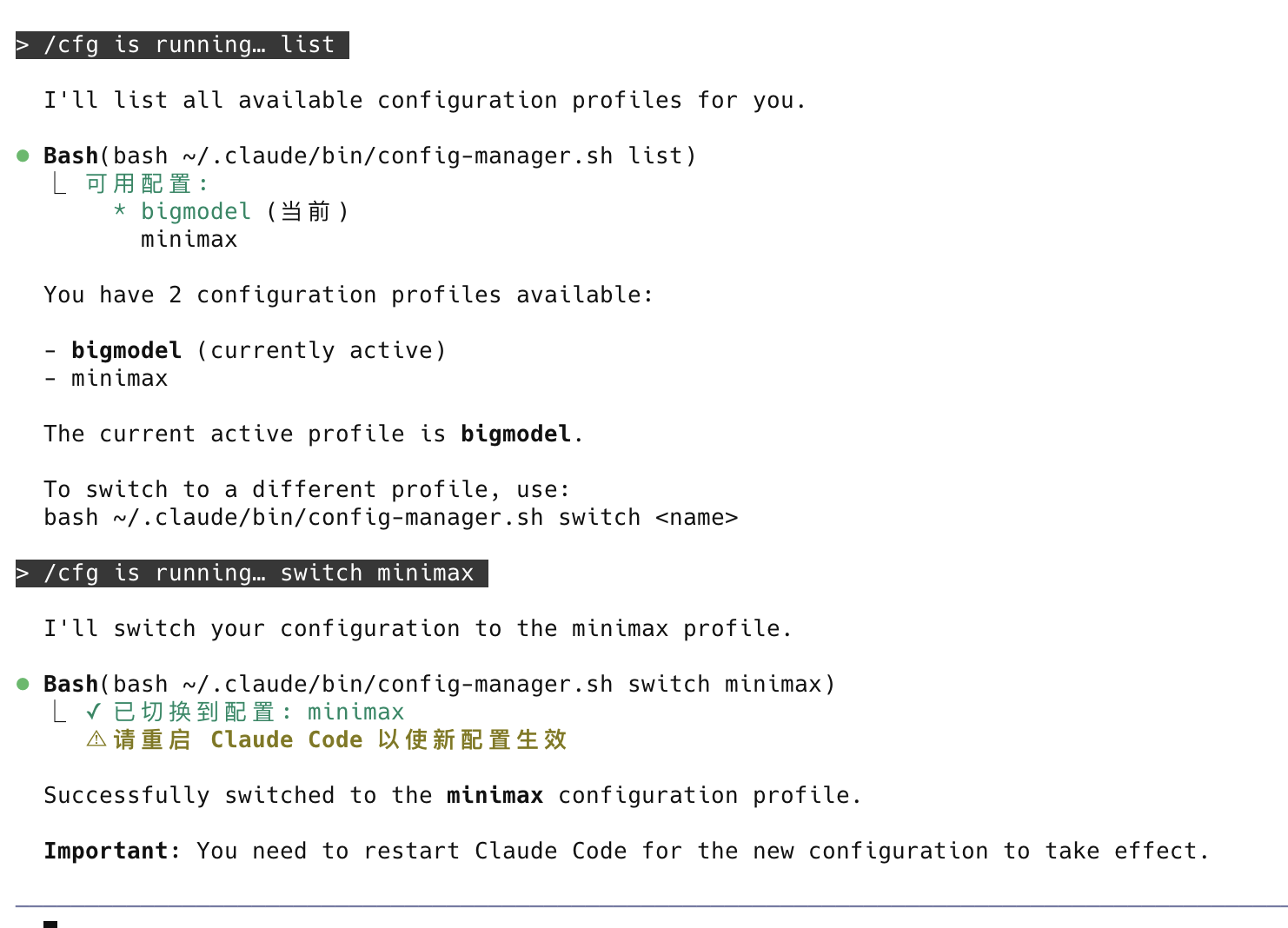
总结
这个配置切换工具通过简单的 Bash 脚本和 Claude Code 的 Slash Command 功能,解决了多配置管理的痛点。实现简单、使用方便,而且易于扩展。
如果你也在使用多个 AI API 提供商,不妨试试这个方案!