一、概论
1.1 基础认识
在AI生成内容(AIGC)爆发的当下,文本生成视频(Text2Video)技术已广泛应用于电商营销、内容创作、教育培训等领域。阿里云百炼平台提供的wan2.5-t2v-preview模型,凭借强大的场景生成能力和灵活的接口设计,成为后端开发者快速集成视频生成能力的优选方案。本文将从技术选型、环境搭建、核心代码实现、接口测试、性能优化等维度,详细讲解如何基于Spring Boot框架构建一套高可用的Text2Video后端服务,帮助开发者快速落地AI视频生成业务。
通义万相文生视频模型基于文本提示词,生成一段流畅的视频。支持的能力包括:
-
基础能力:支持选择视频时长(5/10/15秒)、指定视频分辨率(480P/720P/1080P)、智能改写prompt、添加水印。
-
音频能力 :支持自动配音,或传入自定义音频文件,实现音画同步。(wan2.5、wan2.6支持)
-
多镜头叙事 :支持生成包含多个镜头的视频,在镜头切换的同时保持主体一致。(仅wan2.6支持)
简单来说就是通过用户的文字描述来生成一段 5-15 s的视频给用户。
1.2 阿里云百炼Text2Video接口优势
阿里云百炼平台推出的wan2.5-t2v-preview模型,是针对中文场景优化的视频生成模型,相比其他同类接口,具备以下核心优势:
-
中文Prompt适配性强:精准理解中文语境下的场景描述、情感表达和细节要求,生成视频更符合国内用户预期;
-
灵活的参数配置:支持自定义视频分辨率、时长、随机种子、音频挂载等参数,适配不同业务场景需求;
-
稳定的服务性能:依托阿里云分布式架构,接口响应稳定,支持高并发请求,满足生产环境部署要求;
-
完善的SDK支持:提供Java、Python等多语言SDK,简化后端集成流程,降低开发门槛;
-
多地域部署可选:支持北京、新加坡等地域部署,方便不同区域业务就近调用,降低网络延迟。
1.3 本文核心内容
本文将基于Spring Boot框架,完整实现后端集成阿里云百炼Text2Video接口的全流程,核心内容包括:
-
开发环境搭建与依赖配置;
-
阿里云百炼SDK初始化与配置;
-
请求参数封装、响应体规范与核心服务实现;
-
RESTful接口设计与测试;
-
异步任务优化、参数校验与接口鉴权;
-
常见问题排查与生产环境部署建议。
通过本文学习,你会掌握:① Spring Boot集成第三方AI接口的通用思路;② Text2Video服务的核心实现逻辑;③ 高可用后端服务的优化技巧,能够快速将Text2Video能力集成到实际业务中。
二、技术选型与开发环境准备
2.1 技术栈选型说明
结合后端开发主流实践和阿里云百炼接口特性,本次技术栈选型如下:
| 技术组件 | 版本 | 选型理由 |
|---|---|---|
| Spring Boot | 3.2.0 | 主流后端开发框架,简化配置、快速搭建RESTful接口,生态完善 |
| 阿里云百炼SDK | 2.14.0 | 官方提供的Java SDK,封装了视频生成接口调用逻辑,减少重复开发 |
| Lombok | 1.18.30 | 简化JavaBean代码,通过注解自动生成getter、setter、构造函数等 |
| Jackson | 2.15.3 | Spring Boot默认JSON处理工具,用于请求参数解析和响应结果序列化 |
| Hibernate Validator | 8.0.1.Final | 实现请求参数校验,提升接口健壮性 |
| Redisson | 3.23.3 | 分布式锁和缓存组件,用于异步任务状态管理和接口限流 |
| Springdoc OpenAPI | 2.2.0 | 自动生成接口文档,方便接口测试和前后端对接 |
以上选配是生产环境的推荐,接下来我的实验代码会尽量简单且规范,易于理解。
2.2.1 依赖
java
<?xml version="1.0" encoding="UTF-8"?>
<project xmlns="http://maven.apache.org/POM/4.0.0" xmlns:xsi="http://www.w3.org/2001/XMLSchema-instance"
         xsi:schemaLocation="http://maven.apache.org/POM/4.0.0 https://maven.apache.org/xsd/maven-4.0.0.xsd">
    <modelVersion>4.0.0</modelVersion>
    <parent>
        <groupId>org.springframework.boot</groupId>
        <artifactId>spring-boot-starter-parent</artifactId>
        <version>3.5.9-SNAPSHOT</version>
        <relativePath/> <!-- lookup parent from repository -->
    </parent>
    <groupId>gzj.spring</groupId>
    <artifactId>ai</artifactId>
    <version>0.0.1-SNAPSHOT</version>
    <name>ai</name>
    <description>ai</description>
    <url/>
    <licenses>
        <license/>
    </licenses>
    <developers>
        <developer/>
    </developers>
    <scm>
        <connection/>
        <developerConnection/>
        <tag/>
        <url/>
    </scm>
    <properties>
        <java.version>17</java.version>
        <java.json>2.0.32</java.json>
    </properties>
    <dependencies>
        <dependency>
            <groupId>org.springframework.boot</groupId>
            <artifactId>spring-boot-starter-web</artifactId>
        </dependency>

        <!-- Spring AI Alibaba Agent Framework -->
        <dependency>
            <groupId>com.alibaba.cloud.ai</groupId>
            <artifactId>spring-ai-alibaba-agent-framework</artifactId>
            <version>1.1.0.0-M5</version>
        </dependency>

        <!-- DashScope ChatModel 支持(如果使用其他模型,请参考文档选择对应的 starter) -->
        <dependency>
            <groupId>com.alibaba.cloud.ai</groupId>
            <artifactId>spring-ai-alibaba-starter-dashscope</artifactId>
            <version>1.1.0.0-M5</version>
        </dependency>

        <!-- 新增Redis依赖(Spring Boot整合版) -->
        <dependency>
            <groupId>org.springframework.boot</groupId>
            <artifactId>spring-boot-starter-data-redis</artifactId>
        </dependency>
        <!-- 可选:Redis连接池(提升性能) -->
        <dependency>
            <groupId>org.apache.commons</groupId>
            <artifactId>commons-pool2</artifactId>
        </dependency>

        <dependency>
            <groupId>com.alibaba</groupId>
            <artifactId>dashscope-sdk-java</artifactId>
            <version>2.22.2</version>
        </dependency>

        <dependency>
            <groupId>com.alibaba</groupId>
            <artifactId>fastjson</artifactId>
            <version>${java.json}</version>
        </dependency>

        <dependency>
            <groupId>org.springframework.ai</groupId>
            <artifactId>spring-ai-model</artifactId>
            <version>1.1.0-M4</version>
        </dependency>

        <!-- RxJava(流式调用) -->
        <dependency>
            <groupId>io.reactivex.rxjava3</groupId>
            <artifactId>rxjava</artifactId>
            <version>3.1.8</version>
        </dependency>

        <dependency>
            <groupId>commons-io</groupId>
            <artifactId>commons-io</artifactId>
            <version>2.11.0</version>
        </dependency>

        <dependency>
            <groupId>com.squareup.okhttp3</groupId>
            <artifactId>okhttp</artifactId>
            <version>4.12.0</version>
        </dependency>

        <dependency>
            <groupId>io.springfox</groupId>
            <artifactId>springfox-boot-starter</artifactId>
            <version>3.0.0</version>
        </dependency>


    </dependencies>

    <build>
        <plugins>
            <plugin>
                <groupId>org.springframework.boot</groupId>
                <artifactId>spring-boot-maven-plugin</artifactId>
            </plugin>
        </plugins>
    </build>
    <repositories>
        <repository>
            <id>spring-snapshots</id>
            <name>Spring Snapshots</name>
            <url>https://repo.spring.io/snapshot</url>
            <releases>
                <enabled>false</enabled>
            </releases>
        </repository>
    </repositories>
    <pluginRepositories>
        <pluginRepository>
            <id>spring-snapshots</id>
            <name>Spring Snapshots</name>
            <url>https://repo.spring.io/snapshot</url>
            <releases>
                <enabled>false</enabled>
            </releases>
        </pluginRepository>
    </pluginRepositories>

</project>
2.2.2 阿里云百炼API Key获取
查看文章: Vue3+Springboot3+千问plus流式(前后端分离)_web框架项目案例用vue+springboot前后端分离-CSDN博客
跟着文章的前面的步骤做,可以获得百万 free 的Token
2.2 配置文件编写
2.2.1 application.yml 文件
TypeScript
server:
  port: 8080
spring:
  servlet:
    multipart:
      enabled: true
      max-file-size: 100MB
      max-request-size: 100MB
  application:
    name: ai
  ai:
    dashscope:
      model: qwen-plus
      modelV1: qwen3-vl-plus
      modelV2: gui-plus
      api-key: ${DASHSCOPE_API_KEY}
      agent:
        options:
          app-id: 0bc97a579fdb4c2880acc
  # Redis配置
  data:
    redis:
      port: 6379 # 端口
      password:  # 无密码则留空
      database: 0 # 数据库索引(默认0)
      timeout: 3000ms # 连接超时
      lettuce:
        pool:
          max-active: 8 # 最大连接数
          max-idle: 8 # 最大空闲连接
          min-idle: 0 # 最小空闲连接
          max-wait: -1ms # 连接等待时间
chat:
  context:
    expire-minutes: 30 # 会话过期时间(分钟)
    max-history-rounds: 20 # 单会话最大历史轮数(user+assistant为1轮)
jute:
  weather:
    api-key: 3c6d
2.2.1 META-INF / additional-springconfiguration-metadata.json 文件
javascript
{
  "properties": [
    {
      "name": "jute.weather.api-key",
      "type": "java.lang.String",
      "description": "Description for jute.weather.api-key."
    }
  ]
}
三、核心代码实现
3.1 通用封装:统一响应体
java
package gzj.spring.ai.Response;

import lombok.Data;

/**
 * 全局统一响应体
 */
@Data
public class ApiResponse<T> {
    private int code;
    private String message;
    private T data;

    public static <T> ApiResponse<T> success(T data) {
        ApiResponse<T> response = new ApiResponse<>();
        response.setCode(200);
        response.setMessage("success");
        response.setData(data);
        return response;
    }

    public static <T> ApiResponse<T> error(String message) {
        ApiResponse<T> response = new ApiResponse<>();
        response.setCode(500);
        response.setMessage(message);
        response.setData(null);
        return response;
    }
}
3.2 响应实体 Text2VideoRequest
java
package gzj.spring.ai.Request;


import io.swagger.annotations.ApiModelProperty;
import lombok.Data;

import javax.validation.constraints.NotNull;

/**
 * 文本生成视频的请求参数 DTO
 * @author DELL
 */
@Data
public class Text2VideoRequest {

    /** 核心提示词,描述视频内容 */
    @ApiModelProperty(value = "核心提示词,描述视频内容", required = true)
    @NotNull(message = "核心提示词不能为空")
    private String prompt;

    /** 音频URL(可选),为空则生成无音频视频 */
    @ApiModelProperty(value = "音频URL(可选),为空则生成无音频视频")
    private String audioUrl = "";

    /** 反向提示词,指定不需要的内容 */
    @ApiModelProperty(value = "反向提示词,指定不需要的内容")
    private String negativePrompt = "";

    /** 视频分辨率,如 832*480、1080*720 */
    @ApiModelProperty(value = "视频分辨率,如 832*480、1080*720")
    private String size = "1080*720";

    /** 视频时长(秒),最大支持根据模型限制调整 */
    @ApiModelProperty(value = "视频时长(秒),最大支持根据模型限制调整")
    private Integer duration = 10;

    /** 随机种子,固定种子可生成相同视频 */
    @ApiModelProperty(value = "随机种子,固定种子可生成相同视频")
    private Integer seed = 12345;

    /** 是否开启提示词扩展 */
    @ApiModelProperty(value = "是否开启提示词扩展")
    private Boolean promptExtend = true;

    /** 是否添加水印 */
    @ApiModelProperty(value = "是否添加水印")
    private Boolean watermark = false;
}
3.2 接口Controller
java
package gzj.spring.ai.Controller;

import com.alibaba.dashscope.aigc.videosynthesis.VideoSynthesisResult;
import com.alibaba.dashscope.exception.ApiException;
import gzj.spring.ai.Request.Text2VideoRequest;
import gzj.spring.ai.Response.ApiResponse;
import gzj.spring.ai.Service.Text2VideoService;
import org.springframework.web.bind.annotation.PostMapping;
import org.springframework.web.bind.annotation.RequestBody;
import org.springframework.web.bind.annotation.RequestMapping;
import org.springframework.web.bind.annotation.RestController;

/**
 * @author DELL
 */
@RestController
@RequestMapping("/api/video")
public class Text2VideoController {
    private final Text2VideoService text2VideoService;

    public Text2VideoController(Text2VideoService text2VideoService) {
        this.text2VideoService = text2VideoService;
    }

    /**
     * 文本生成视频接口
     * 请求方式:POST
     * 请求路径:/api/video/generate
     */
    @PostMapping("/generate")
    public ApiResponse<VideoSynthesisResult> generateVideo(@RequestBody Text2VideoRequest request) {
        try {
            VideoSynthesisResult result = text2VideoService.generateVideo(request);
            return ApiResponse.success(result);
        } catch (ApiException e) {
            return ApiResponse.error("视频生成失败:" + e.getMessage());
        }
    }
}
这段代码是基于 Spring Boot 实现的RESTful 接口控制器 ,核心作用是:对外暴露 POST /api/video/generate 接口,接收前端传递的文本生成视频的请求参数,调用服务层 Text2VideoService 的视频生成方法,最终将阿里云百炼接口的返回结果(或异常信息)封装成统一格式的响应体返回给前端。
3.3 Text2VideoService
java
package gzj.spring.ai.Service;

import com.alibaba.dashscope.aigc.videosynthesis.VideoSynthesisResult;
import gzj.spring.ai.Request.Text2VideoRequest;

/**
 * @author DELL
 */
public interface Text2VideoService {

    VideoSynthesisResult generateVideo(Text2VideoRequest request);

}
3.4 Text2VideoServiceImpl
java
package gzj.spring.ai.Service.ServiceImpl;

import com.alibaba.dashscope.aigc.videosynthesis.VideoSynthesis;
import com.alibaba.dashscope.aigc.videosynthesis.VideoSynthesisParam;
import com.alibaba.dashscope.aigc.videosynthesis.VideoSynthesisResult;
import com.alibaba.dashscope.exception.InputRequiredException;
import com.alibaba.dashscope.exception.NoApiKeyException;
import gzj.spring.ai.Request.Text2VideoRequest;
import gzj.spring.ai.Service.Text2VideoService;
import org.springframework.beans.factory.annotation.Value;
import org.springframework.stereotype.Service;

import java.util.HashMap;
import java.util.Map;

/**
 * @author DELL
 */
@Service
public class Text2VideoServiceImpl implements Text2VideoService {

    @Value("${dashscope.api-key}")
    private String apiKey;

    @Override
    public VideoSynthesisResult generateVideo(Text2VideoRequest request) {
        try {
            // 1. 初始化视频合成对象
            VideoSynthesis videoSynthesis = new VideoSynthesis();

            // 2. 构建额外参数(prompt扩展、水印、种子等)
            Map<String, Object> parameters = new HashMap<>();
            parameters.put("prompt_extend", request.getPromptExtend());
            parameters.put("watermark", request.getWatermark());
            parameters.put("seed", request.getSeed());

            // 3. 构建请求参数
            VideoSynthesisParam param = VideoSynthesisParam.builder()
                    .apiKey(apiKey)
                    .model("wan2.5-t2v-preview") // 指定视频生成模型
                    .prompt(request.getPrompt())
                    .audioUrl(request.getAudioUrl())
                    .negativePrompt(request.getNegativePrompt())
                    .size(request.getSize())
                    .duration(request.getDuration())
                    .parameters(parameters)
                    .build();

            // 4. 调用接口并返回结果
            return videoSynthesis.call(param);
        } catch (NoApiKeyException e) {
            throw new RuntimeException(e);
        } catch (InputRequiredException e) {
            throw new RuntimeException(e);
        }
    }
}
四、结果展示
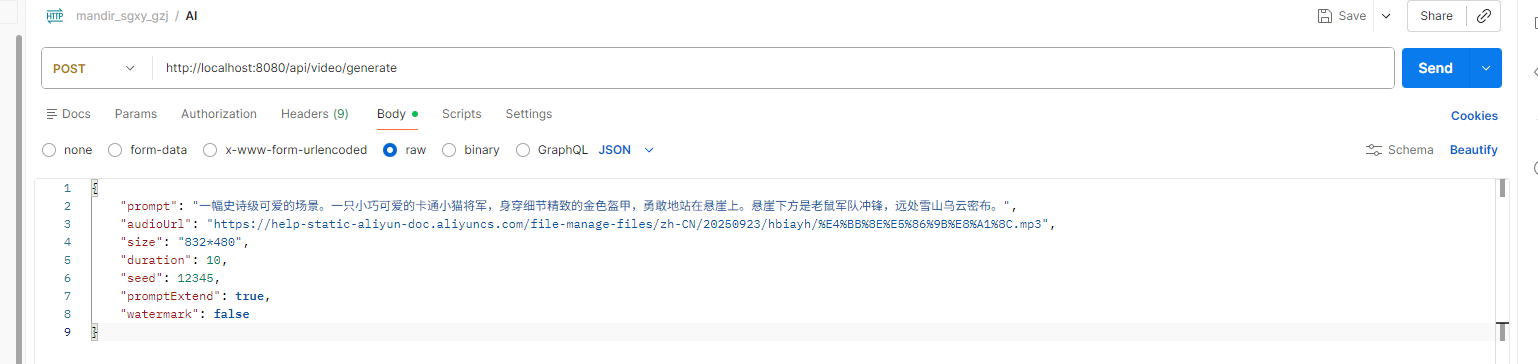
请求:
TypeScript
{
    "prompt": "一幅史诗级可爱的场景。一只小巧可爱的卡通小猫将军,身穿细节精致的金色盔甲,勇敢地站在悬崖上。悬崖下方是老鼠军队冲锋,远处雪山乌云密布。",
    "audioUrl": "https://help-static-aliyun-doc.aliyuncs.com/file-manage-files/zh-CN/20250923/hbiayh/%E4%BB%8E%E5%86%9B%E8%A1%8C.mp3",
    "size": "832*480",
    "duration": 10,
    "seed": 12345,
    "promptExtend": true,
    "watermark": false
}
返回结果:
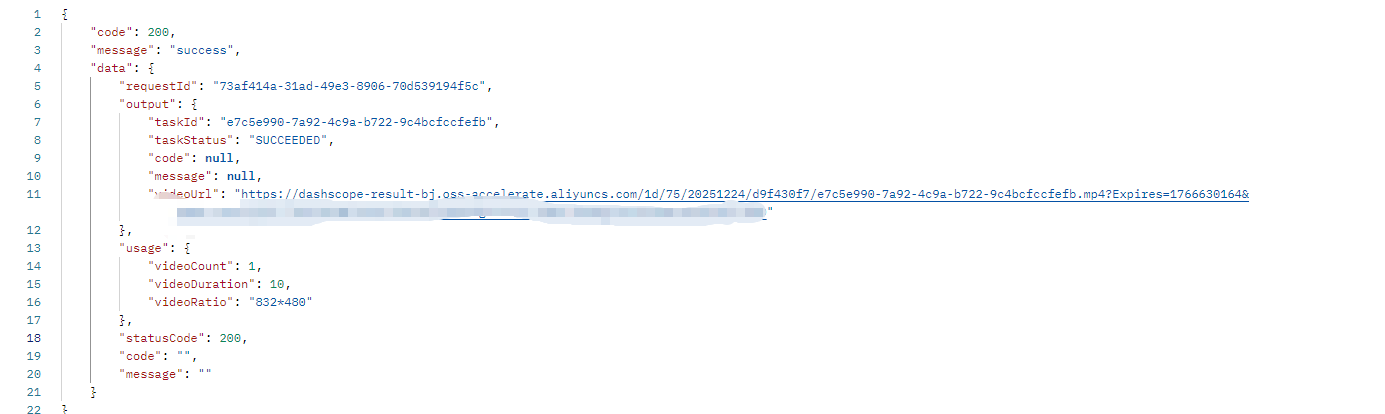

通义万相-文生视频 Text2Video 视频实验
END
如果觉得这份修改实用、总结清晰,别忘了动动小手点个赞👍,再关注一下呀~ 后续还会分享更多 AI 接口封装、代码优化的干货技巧,一起解锁更多好用的功能,少踩坑多提效!🥰 你的支持就是我更新的最大动力,咱们下次分享再见呀~🌟