在 Unity 中进行手柄开发时,按键的对应名称(Button Names)取决于你使用的是 传统的 Input Manager (旧版) 还是 Input System Package (新版)。
目前主流且推荐的做法是使用 Input System Package,因为它能自动处理不同手柄(Xbox, PS4, Switch)之间的差异。
1. 新版 Input System (推荐)
在新版系统中,你不需要记忆复杂的编号,只需使用路径(Path)即可。
| 手柄按键 (通用名称) | 路径名称 (Path) |
|---|---|
| 南面按键 (Xbox: A / PS: ×) | <Gamepad>/buttonSouth |
| 东面按键 (Xbox: B / PS: ○) | <Gamepad>/buttonEast |
| 西面按键 (Xbox: X / PS: □) | <Gamepad>/buttonWest |
| 北面按键 (Xbox: Y / PS: △) | <Gamepad>/buttonNorth |
| 左/右肩键 (LB / RB) | <Gamepad>/leftShoulder, <Gamepad>/rightShoulder |
| 左/右扳机 (LT / RT) | <Gamepad>/leftTrigger, <Gamepad>/rightTrigger |
| 左/右摇杆点击 (LS / RS) | <Gamepad>/leftStickPress, <Gamepad>/rightStickPress |
| 方向键 (D-Pad) | <Gamepad>/dpad/up, down, left, right |
| 功能键 (Start / Back) | <Gamepad>/start, <Gamepad>/select |
2. 旧版 Input Manager (默认项目设置)
如果你在 Project Settings -> Input Manager 中手动设置,通常需要对应 Joystick Button 的编号。以下是以 Xbox Controller (Windows) 为标准的映射:
常用按键映射表 (Xbox)
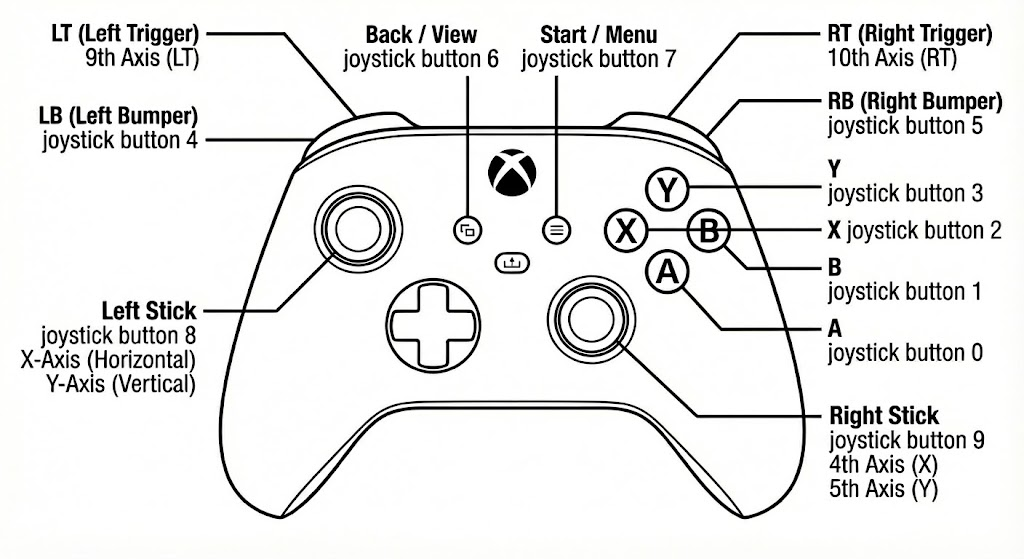
按钮映射表 (Buttons)
| 物理按键 (Physical Button) | Unity 映射 ID (Map to) | 备注 |
|---|---|---|
| A | joystick button 0 |
确认 / 跳跃 |
| B | joystick button 1 |
取消 / 返回 |
| X | joystick button 2 |
(你在图中漏标了这个) |
| Y | joystick button 3 |
|
| LB (左肩键) | joystick button 4 |
Left Bumper |
| RB (右肩键) | joystick button 5 |
Right Bumper |
| View (双框图标) | joystick button 6 |
旧称 Back 键 |
| Menu (三道杠图标) | joystick button 7 |
旧称 Start 键 |
| L3 (按下左摇杆) | joystick button 8 |
Left Stick Click |
| R3 (按下右摇杆) | joystick button 9 |
Right Stick Click |
| Share (中间分享键) | 通常无法识别 | 旧版输入系统很难直接检测到此键 |
| Xbox 标 (西瓜键) | 系统占用 | 呼出 Windows 游戏栏,Unity 无法获取 |
轴线映射 (Axes)
| 物理输入 (Physical Input) | Unity 轴向 (Axis Name/Number) | 值范围 (Value) |
|---|---|---|
| 左摇杆 - 水平 | X Axis |
-1 (左) 到 1 (右) |
| 左摇杆 - 垂直 | Y Axis |
-1 (下) 到 1 (上)* |
| 右摇杆 - 水平 | 4th Axis |
-1 (左) 到 1 (右) |
| 右摇杆 - 垂直 | 5th Axis |
-1 (下) 到 1 (上)* |
| D-Pad (十字键) - 水平 | 6th Axis |
-1 (左) 到 1 (右) |
| D-Pad (十字键) - 垂直 | 7th Axis |
-1 (下) 到 1 (上) |
| LT (左扳机) | 9th Axis |
0 (松开) 到 1 (按下) |
| RT (右扳机) | 10th Axis |
0 (松开) 到 1 (按下) |
3. 注意事项:PS4/PS5 手柄差异
如果你使用的是 PS4 DualShock 手柄且通过旧版 Input Manager 识别,编号会完全不同:
- × (South):
joystick button 1 - ○ (East):
joystick button 2 - □ (West):
joystick button 0 - △ (North):
joystick button 3