文章目录
- MySQL数据库
-
- 数据库原理
- MySQL安装和基本使用
- MySQL的组成和常用工具
-
- MySQL命令类型
- MySQL客户端使用
- MySQLadmin工具
- [mycli 工具](#mycli 工具)
- SQL语言
- 数据库管理
- 数据类型
- [DDL 数据定义语句](#DDL 数据定义语句)
- [DML 数据操纵语言](#DML 数据操纵语言)
- [DQL 数据查询语句](#DQL 数据查询语句)
- MySQL用户账户管理
- MySQL的备份与恢复
MySQL数据库
数据库原理
数据的分类:
- 结构化数据
- 半结构化数据
- 非结构化数据
结构化数据:
结构化数据一般是指可以用二维表来逻辑表达实现的数据。是有固定的格式和有限长度的数据,可以用关系型数据库表示和存储。
其特点是:数据以行为单位,一行数据表示一个实体信息,每一行数据的属性是相同的,存储在数据库中;能够用统一的数据类型和结构加以表示;也能够用二维表结构来逻辑表达实现,包含属性和元组。
对于结构化数据来讲通常是先有结构再有数据。
比如一张二维表
| No | name | age |
|---|---|---|
| 1 | 张三 | 123 |
| 2 | 李四 | 456 |
半结构化数据:
半结构化数据就是介于完全结构化数据和完全无结构的数据之间的数据。
半结构化数据是结构化数据的一种形式,它并不符合关系型数据库或其它数据表的形式关联起来的数据模型结构,但包含相关的标记,用来分隔语义元素及对记录和字段进行分层,数据的结构和内容混在一起,没有明显的区分,因此,这种数据也被称为自描述结构的数据。
例如:HTML文档,JSON,XML和一些NoSQL数据库等就属于半结构化数据。
对于半结构化数据来说则是先有数据再有结构。
比如,json
json
[
    {
        "id":1,
        "name": "张三",
        "age":123
    },
    {
        "id":2,
        "name": "李四",
        "age":456
    }
]
非结构化数据:
顾名思义,就是没有固定结构的数据,这种数据没有固定格式和有限长度,无法用数据库二维逻辑表来表现其结构,对于这类数据,我们一般进行整体存储。
典型的非结构化数据包括:二进制文件,音视频文件,位置信息等
数据管理的三个阶段
- 人工管理阶段
- 文件系统管理阶段
- 数据库系统阶段
文件管理系统的特点
优点
文件形式和格式多样化,数据可以长期保存,且数据具有一定的独立性,由文件系统进行管理。
缺点
应用程序对接不方便,没有统一接口,也不支持对文件的并发访问,无安全控制功能,难以按用户视图表示数据,数据间联系弱,数据冗余不可避免。
数据库管理系统
数据库:Database
数据库是按照一定的数据结构来组织,存储和管理数据的仓库。
是一个长期存储在计算机内的、有组织的、可共享的、统一管理的大量数据的集合。
数据库管理系统:Database Management System(DBMS)
数据库管理系统是一种操纵和管理数据库的大型软件,用于建立,使用和维护数据库,简称DBMS。
它对数据库进行统一的管理和控制,以保证数据库的安全性和完整性。
数据库管理员:Database Administrator(DBA)
DBA是从事管理和维护数据库管理系统(DBMS)的相关工作人员的统称,属于运维工程师的一个分支,主要负责业务数据库从设计、测试到部署交付的全生命周期管理。
DBA的核心目标是保证数据库管理系统的稳定性、安全性、完整性和高可用性能。
应用程序:Application
一个应用程序通常是指能够执行某种功能的软件程序。
数据库管理系统特点
- 数据库管理系统中采用了复杂的数据模型表示数据结构,数据冗余小,易扩充,实现了数据共享。
- 具有较高的数据和程序独立性。数据库的独立性表现在物理独立性和逻辑独立性两个方面。
- 数据库管理系统为用户和应用程序提供了方便和统一的查询接口。
- 数据库管理系统的存在,使得数据可以和应用程序解耦。
- 数据库管理系统还具有并发控制,数据备份和恢复,完整性和安全性保障等功能。
数据库管理系统功能
- 对数据进行定义
- 对数据进行操作,如增删改查
- 数据组织,存储和管理
- 数据库的运行管理
- 数据库的维护
- 数据库的保护
- 数据库与其他软件中间的通信
关系型数据
相关概念
- 数据库: 数据库是一些关联表的集合。
- 数据表: 表是数据的矩阵。在一个数据库中的表看起来像一个简单的电子表格。
- 列(column): 一列(数据元素) 包含了相同类型的数据, 例如邮政编码的数据。
- **行(Row):**一行(元组,或记录)是一组相关的数据,例如一条用户订阅的数据。
- 冗余:存储两倍数据,冗余降低了性能,但提高了数据的安全性。
- 主键(Primary key):主键是唯一的。一个数据表中只能包含一个主键。你可以使用主键来查询数据。
- **外键:**外键用于关联两个表。
- 复合键:复合键(组合键)将多个列作为一个索引键,一般用于复合索引。
- **索引:**使用索引可快速访问数据库表中的特定信息。索引是对数据库表中一列或多列的值进行排序的一种结构。类似于书籍的目录。
- 参照完整性: 参照的完整性要求关系中不允许引用不存在的实体。与实体完整性是关系模型必须满足的完整性约束条件,目的是保证数据的一致性。
常见的关系型数据库系统:
MySQL:MySQL,MariaDB,Percona Server
PostgreSQL:PgSQL,EnterpriseDB
Oracle:Oracle
SQLServer:MS SQLServer
DB2
联系类型
实体间的联系有三种类型:
一对一联系(1:1):例如,一个学号只能分配给一个同学,每个同学都有一个学号,则学号与同学的联系是一对一。
一对多联系(1:n):例如,一个老师可以教授多门课程,每门课程只能有一个老师教授,则老师与课程的联系是一对多。
多对多联系(m:n):例如,一个同学可以报名多门课程,每门课程下有多个同学,则同学与课程的联系是多对多。
MySQL安装和基本使用

Linux:
bash
# 查询自带yum源支持的myslq版本信息
[root@localhost ~]# yum list mysql-server*
CentOS Stream 8 - BaseOS                                                                            5.9 kB/s | 3.9 kB     00:00
CentOS Stream 8 - AppStream                                                                         7.0 kB/s | 4.4 kB     00:00
Available Packages
mysql-server.x86_64
# 查询结果是8.0.26版本的
安装
bash
[root@localhost ~]# yum install -y mysql-server-8.0.26等待安装后,使用systemctl enable mysqld --now启动服务并设置开机自启,并查看对应的端口是否处于监听状态
bash
[root@localhost ~]# systemctl enable mysqld --now
Created symlink /etc/systemd/system/multi-user.target.wants/mysqld.service → /usr/lib/systemd/system/mysqld.service.

[root@localhost ~]# ss -nlp | grep 3306
tcp   LISTEN 0      70                                      *:33060                  *:*     users:(("mysqld",pid=12081,fd=22))
tcp   LISTEN 0      151                                     *:3306                   *:*     users:(("mysqld",pid=12081,fd=25))
登陆及初始化MySQL
bash
[root@localhost ~]# mysql
Welcome to the MySQL monitor.  Commands end with ; or \g.
Your MySQL connection id is 8
Server version: 8.0.26 Source distribution

Copyright (c) 2000, 2021, Oracle and/or its affiliates.

Oracle is a registered trademark of Oracle Corporation and/or its
affiliates. Other names may be trademarks of their respective
owners.

Type 'help;' or '\h' for help. Type '\c' to clear the current input statement.

mysql>
思考:当前登录MySQL的用户名密码分别是什么?
答:当前用户为root,8.0.x在安装完成后,root的默认密码为空,因此不需要输入密码即可登录 MySQL,但是权限很低,必须要进行密码初始化才可以进行下一步操作。
在MySQL5.7版本中,root的密码不为空,是由系统自动为其生成一个密码,具体可以 在/var/log/mysql/mysqld.log中查看到。
初始化MySQL
mysql
# 配置root用户的密码
mysql> alter user root@'localhost' identified by 'Huawei@123';
Query OK, 0 rows affected (0.00 sec)
退出mysql,重新登陆使用root账户登陆
bash
mysql> exit
Bye
[root@localhost ~]# mysql -uroot -p'Huawei@123'
mysql: [Warning] Using a password on the command line interface can be insecure.
#提示命令行使用密码可能不安全
Welcome to the MySQL monitor.  Commands end with ; or \g.
Your MySQL connection id is 9
Server version: 8.0.26 Source distribution

Copyright (c) 2000, 2021, Oracle and/or its affiliates.

Oracle is a registered trademark of Oracle Corporation and/or its
affiliates. Other names may be trademarks of their respective
owners.

Type 'help;' or '\h' for help. Type '\c' to clear the current input statement.

mysql>
查看一下默认有哪些数据库
mysql
mysql> show databases;
+--------------------+
| Database           |
+--------------------+
| information_schema |
| mysql              |
| performance_schema |
| sys                |
+--------------------+
4 rows in set (0.00 sec)
安装完成
MySQL的组成和常用工具
mysql基于C/S模式提供服务,主要有客户端程序和服务端程序组成,另外还有一些管理工具。
服务端主要组成
| 程序 | 功能 |
|---|---|
| mysqld_safe | 安全启动脚本 |
| mysqld | 服务端程序,是mysql服务的核心程序 |
| mysqld_multi | 多实例工具 |
客户端主要组成
| 程序 | 功能 |
|---|---|
| mysql | 基于mysql协议的交互式CLI工具 |
| mysqldump | 备份工具 |
| mysqladmin | 服务端管理工具 |
| mysqlimport | 数据导入工具 |
MyISAM存储引擎的管理工具
| 程序 | 功能 |
|---|---|
| myisamchk | 检测MyISAM库 |
| myisampack | 打包MyISAM表,只读 |
mysql的配置文件放在/etc/my.cnf和/etc/my.cnf.d中
配置文件成效顺序
bash
[root@localhost ~]# mysql --help | grep my.cnf
                      order of preference, my.cnf, $MYSQL_TCP_PORT,
/etc/my.cnf /etc/mysql/my.cnf ~/.my.cnf
MySQL命令类型
MySQL中的命令分为两类,分别是客户端命令和服务端命令。
客户端命令在本地执行。服务端命令发送到服务端执行,再返回执行结果到客户端上。
客户端命令和服务端命令,都是通过MySQL客户端工具进行输入输出。
查看所有客户端命令
mysql
mysql> ?

For information about MySQL products and services, visit:
   http://www.mysql.com/
For developer information, including the MySQL Reference Manual, visit:
   http://dev.mysql.com/
To buy MySQL Enterprise support, training, or other products, visit:
   https://shop.mysql.com/

List of all MySQL commands:
Note that all text commands must be first on line and end with ';'
?         (\?) Synonym for `help'.
clear     (\c) Clear the current input statement.
connect   (\r) Reconnect to the server. Optional arguments are db and host.
delimiter (\d) Set statement delimiter.
edit      (\e) Edit command with $EDITOR.
ego       (\G) Send command to mysql server, display result vertically.
exit      (\q) Exit mysql. Same as quit.
go        (\g) Send command to mysql server.
help      (\h) Display this help.
nopager   (\n) Disable pager, print to stdout.
notee     (\t) Don't write into outfile.
pager     (\P) Set PAGER [to_pager]. Print the query results via PAGER.
print     (\p) Print current command.
prompt    (\R) Change your mysql prompt.
quit      (\q) Quit mysql.
rehash    (\#) Rebuild completion hash.
source    (\.) Execute an SQL script file. Takes a file name as an argument.
status    (\s) Get status information from the server.
system    (\!) Execute a system shell command.
tee       (\T) Set outfile [to_outfile]. Append everything into given outfile.
use       (\u) Use another database. Takes database name as argument.
charset   (\C) Switch to another charset. Might be needed for processing binlog with multi-byte charsets.
warnings  (\W) Show warnings after every statement.
nowarning (\w) Don't show warnings after every statement.
resetconnection(\x) Clean session context.
query_attributes Sets string parameters (name1 value1 name2 value2 ...) for the next query to pick up.

For server side help, type 'help contents'
查看所有服务端命令
mysql
mysql> help contents
You asked for help about help category: "Contents"
For more information, type 'help <item>', where <item> is one of the following
categories:
   Account Management
   Administration
   Components
   Compound Statements
   Contents
   Data Definition
   Data Manipulation
   Data Types
   Functions
   Geographic Features
   Help Metadata
   Language Structure
   Loadable Functions
   Plugins
   Prepared Statements
   Replication Statements
   Storage Engines
   Table Maintenance
   Transactions
   Utility
查看服务端命令具体项
mysql
mysql> help Administration
You asked for help about help category: "Administration"
For more information, type 'help <item>', where <item> is one of the following
topics:
   BINLOG
   CACHE INDEX
   FLUSH
   HELP COMMAND
   KILL
   LOAD INDEX
   RESET
   RESET PERSIST
   RESTART
   SET
   SET CHARACTER SET
   SET CHARSET
   SET NAMES
   SHOW
   SHOW BINARY LOGS
   SHOW BINLOG EVENTS
   SHOW CHARACTER SET
   SHOW COLLATION
   SHOW COLUMNS
   SHOW CREATE DATABASE
   SHOW CREATE EVENT
   SHOW CREATE FUNCTION
   SHOW CREATE PROCEDURE
   SHOW CREATE SCHEMA
   SHOW CREATE TABLE
   SHOW CREATE TRIGGER
   SHOW CREATE USER
   SHOW CREATE VIEW
   SHOW DATABASES
   SHOW ENGINE
   SHOW ENGINES
   SHOW ERRORS
   SHOW EVENTS
   SHOW FIELDS
   SHOW FUNCTION CODE
   SHOW FUNCTION STATUS
   SHOW GRANTS
   SHOW INDEX
   SHOW MASTER LOGS
   SHOW MASTER STATUS
   SHOW OPEN TABLES
   SHOW PLUGINS
   SHOW PRIVILEGES
   SHOW PROCEDURE CODE
   SHOW PROCEDURE STATUS
   SHOW PROCESSLIST
   SHOW PROFILE
   SHOW PROFILES
   SHOW RELAYLOG EVENTS
   SHOW REPLICA STATUS
   SHOW REPLICAS
   SHOW SCHEMAS
   SHOW SLAVE HOSTS
   SHOW SLAVE STATUS
   SHOW STATUS
   SHOW TABLE STATUS
   SHOW TABLES
   SHOW TRIGGERS
   SHOW VARIABLES
   SHOW WARNINGS
   SHUTDOWN
查看详细帮助
mysql
mysql> help BINLOG
Name: 'BINLOG'
Description:
Syntax:
BINLOG 'str'

BINLOG is an internal-use statement. It is generated by the mysqlbinlog
program as the printable representation of certain events in binary log
files. (See https://dev.mysql.com/doc/refman/8.0/en/mysqlbinlog.html.)
The 'str' value is a base 64-encoded string the that server decodes to
determine the data change indicated by the corresponding event.

To execute BINLOG statements when applying mysqlbinlog output, a user
account requires the BINLOG_ADMIN privilege (or the deprecated SUPER
privilege), or the REPLICATION_APPLIER privilege plus the appropriate
privileges to execute each log event.

URL: https://dev.mysql.com/doc/refman/8.0/en/binlog.html
MySQL客户端使用
MySQL服务基于C/S架构,用户主要使用客户端工具来与远程服务端进行连接,从而与MySQL服务进行交互。
bash
# 交互式
# 登陆进mysql进行操作
[root@localhost ~]# mysql -uroot -p
Enter password:
Welcome to the MySQL monitor.  Commands end with ; or \g.
Your MySQL connection id is 15
Server version: 8.0.26 Source distribution

Copyright (c) 2000, 2021, Oracle and/or its affiliates.

Oracle is a registered trademark of Oracle Corporation and/or its
affiliates. Other names may be trademarks of their respective
owners.

Type 'help;' or '\h' for help. Type '\c' to clear the current input statement.

mysql>


# 非交互式
# 先设置一个免密登录
[root@localhost ~]# mysqladmin -uroot -p123456 password ''
[root@localhost ~]# vim /root/test.sql
[root@localhost ~]# cat /root/test.sql
show databases;
[root@localhost ~]# mysql -e "source /root/test.sql"
+--------------------+
| Database           |
+--------------------+
| db1                |
| information_schema |
| mysql              |
| performance_schema |
| sys                |
+--------------------+

# 管道执行
[root@localhost ~]# cat test.sql | mysql
Database
db1
information_schema
mysql
performance_schema
sys

# 标准输入重定向执行
[root@localhost ~]# mysql -uroot < test.sql
Database
db1
information_schema
mysql
performance_schema
sys

# 以table格式输出
[root@localhost ~]# mysql -e "show databases;"
+--------------------+
| Database           |
+--------------------+
| db1                |
| information_schema |
| mysql              |
| performance_schema |
| sys                |
+--------------------+
指定数据库
bash
mysql> show databases;
+--------------------+
| Database           |
+--------------------+
| information_schema |
| mysql              |
| performance_schema |
| sys                |
+--------------------+
4 rows in set (0.00 sec)

# 退出mysql
[root@localhost ~]# mysql information_schema
Reading table information for completion of table and column names
You can turn off this feature to get a quicker startup with -A

Welcome to the MySQL monitor.  Commands end with ; or \g.
Your MySQL connection id is 25
Server version: 8.0.26 Source distribution

Copyright (c) 2000, 2021, Oracle and/or its affiliates.

Oracle is a registered trademark of Oracle Corporation and/or its
affiliates. Other names may be trademarks of their respective
owners.

Type 'help;' or '\h' for help. Type '\c' to clear the current input statement.

mysql> select database();
+--------------------+
| database()         |
+--------------------+
| information_schema |
+--------------------+
1 row in set (0.00 sec)

mysql>
往文件中保存输出结果
bash
mysql> tee db.txt				 #设置写到文件db.txt
Logging to file 'db.txt'
mysql> select version();		#执行SQL语句
+-----------+
| version() |
+-----------+
| 8.0.26    |
+-----------+
1 row in set (0.00 sec)

mysql> \t						#设置不写文件
Outfile disabled.

mysql> show databases;			#执行SQL语句
+--------------------+
| Database           |
+--------------------+
| db1                |
| information_schema |
| mysql              |
| performance_schema |
| sys                |
+--------------------+
5 rows in set (0.00 sec)

mysql> exit
Bye
[root@localhost ~]# cat db.txt		#只记录了\t之前
mysql> select version();
+-----------+
| version() |
+-----------+
| 8.0.26    |
+-----------+
1 row in set (0.00 sec)

mysql> \t
只输出不执行
bash
mysql> select version()\p
--------------
select version()
--------------

    ->
MySQLadmin工具
mysqladmin也是用于管理mysql服务的本地工具
格式
bash
[root@localhost ~]# mysqladmin --help
mysqladmin  Ver 8.0.26 for Linux on x86_64 (Source distribution)
Copyright (c) 2000, 2021, Oracle and/or its affiliates.

Oracle is a registered trademark of Oracle Corporation and/or its
affiliates. Other names may be trademarks of their respective
owners.

Administration program for the mysqld daemon.
Usage: mysqladmin [OPTIONS] command command....
  --bind-address=name IP address to bind to.
  -c, --count=#       Number of iterations to make. This works with -i         #总共执行多少次,配合-i选项使用
                      (--sleep) only.
  -#, --debug[=#]     This is a non-debug version. Catch this and exit.
  --debug-check       This is a non-debug version. Catch this and exit.
  --debug-info        This is a non-debug version. Catch this and exit.
  -f, --force         Don't ask for confirmation on drop database; with
                      multiple commands, continue even if an error occurs.
  -C, --compress      Use compression in server/client protocol.           #启用压缩
  --character-sets-dir=name
                      Directory for character set files.
  --default-character-set=name
                      Set the default character set.
  -?, --help          Display this help and exit.            #显示帮助信息
  -h, --host=name     Connect to host.                       #指定服务器地址
  -b, --no-beep       Turn off beep on error.
  -p, --password[=name]                                      #指定连接服务器的密码
                      Password to use when connecting to server. If password is
                      not given it's asked from the tty.
  -P, --port=#        Port number to use for connection or 0 for default to, in    #指定服务器端口,默认3306
                      order of preference, my.cnf, $MYSQL_TCP_PORT,
                      /etc/services, built-in default (3306).
  --protocol=name     The protocol to use for connection (tcp, socket, pipe,       #指定连接方式(tcp\socket\pipe\memory)
                      memory).
  -r, --relative      Show difference between current and previous values when
                      used with -i. Currently only works with extended-status.
  -s, --silent        Silently exit if one can't connect to server.        #如果无法连接,则静默退出
  -S, --socket=name   The socket file to use for connection.               #指定连接时使用socket文件
  -i, --sleep=#       Execute commands repeatedly with a sleep between.   #持续执行命令,间隔N秒执行一次
  --ssl-mode=name     SSL connection mode.
  --ssl-ca=name       CA file in PEM format.
  --ssl-capath=name   CA directory.
  --ssl-cert=name     X509 cert in PEM format.
  --ssl-cipher=name   SSL cipher to use.
  --ssl-key=name      X509 key in PEM format.
  --ssl-crl=name      Certificate revocation list.
  --ssl-crlpath=name  Certificate revocation list path.
  --tls-version=name  TLS version to use, permitted values are: TLSv1, TLSv1.1,
                      TLSv1.2, TLSv1.3
  --ssl-fips-mode=name
                      SSL FIPS mode (applies only for OpenSSL); permitted
                      values are: OFF, ON, STRICT
  --tls-ciphersuites=name
                      TLS v1.3 cipher to use.
  --server-public-key-path=name
                      File path to the server public RSA key in PEM format.
  --get-server-public-key
                      Get server public key
  -u, --user=name     User for login if not current user.             #指定用户名
  -v, --verbose       Write more information.
  -V, --version       Output version information and exit.             #显示客户端版本
  -E, --vertical      Print output vertically. Is similar to --relative, but
                      prints output vertically.
  -w, --wait[=#]      Wait and retry if connection is down.           #如果连接失败,是否等待重试,如果指定了具体数字,则表示重试几次
  --connect-timeout=#                                          #指定连接超时时长
  --shutdown-timeout=#                                         #指定关机超时时长
  --plugin-dir=name   Directory for client-side plugins.       #客户端插件目录
  --default-auth=name Default authentication client-side plugin to use.
  --enable-cleartext-plugin
                      Enable/disable the clear text authentication plugin.
  --show-warnings     Show warnings after execution
  --compression-algorithms=name
                      Use compression algorithm in server/client protocol.
                      Valid values are any combination of
                      'zstd','zlib','uncompressed'.
  --zstd-compression-level=#
                      Use this compression level in the client/server protocol,
                      in case --compression-algorithms=zstd. Valid range is
                      between 1 and 22, inclusive. Default is 3.

Variables (--variable-name=value)
and boolean options {FALSE|TRUE}  Value (after reading options)
--------------------------------- ----------------------------------------
bind-address                      (No default value)
count                             0
force                             FALSE
compress                          FALSE
character-sets-dir                (No default value)
default-character-set             auto
host                              (No default value)
no-beep                           FALSE
port                              0
relative                          FALSE
socket                            (No default value)
sleep                             0
ssl-ca                            (No default value)
ssl-capath                        (No default value)
ssl-cert                          (No default value)
ssl-cipher                        (No default value)
ssl-key                           (No default value)
ssl-crl                           (No default value)
ssl-crlpath                       (No default value)
tls-version                       (No default value)
tls-ciphersuites                  (No default value)
server-public-key-path            (No default value)
get-server-public-key             FALSE
user                              (No default value)
verbose                           FALSE
vertical                          FALSE
connect-timeout                   43200
shutdown-timeout                  3600
plugin-dir                        (No default value)
default-auth                      (No default value)
enable-cleartext-plugin           FALSE
show-warnings                     FALSE
compression-algorithms            (No default value)
zstd-compression-level            3

Default options are read from the following files in the given order:
/etc/my.cnf /etc/mysql/my.cnf ~/.my.cnf
The following groups are read: mysqladmin client
The following options may be given as the first argument:
--print-defaults        Print the program argument list and exit.            #显示运行参数
--no-defaults           Don't read default options from any option file,
                        except for login file.
--defaults-file=#       Only read default options from the given file #.      #从指定文件中读取选项
--defaults-extra-file=# Read this file after the global files are read.
--defaults-group-suffix=#
                        Also read groups with concat(group, suffix)
--login-path=#          Read this path from the login file.

Where command is a one or more of: (Commands may be shortened)
  create databasename   Create a new database                  #创建新的数据库
  debug                 Instruct server to write debug information to log      #开启调试模式,将调试信息写入log
  drop databasename     Delete a database and all its tables       #删除指定数据库
  extended-status       Gives an extended status message from the server       #显示扩展状态
  flush-hosts           Flush all cached hosts                 #刷新所有缓存的主机
  flush-logs            Flush all logs                         #刷新所有日志
  flush-status          Clear status variables                 #刷新状态变量
  flush-tables          Flush all tables                       #刷新所有表,会强制关闭已打开的表
  flush-threads         Flush the thread cache                 #刷新线程缓存
  flush-privileges      Reload grant tables (same as reload)   #刷新访问权限
  kill id,id,...        Kill mysql threads
  password [new-password] Change old password to new-password in current format    #修改密码
  ping                  Check if mysqld is alive               #心跳检测
  processlist           Show list of active threads in server  #显示活动线程列表
  reload                Reload grant tables                    #刷新授权信息
  refresh               Flush all tables and close and open logfiles   #刷新所有数据库表,重新打开日志文件
  shutdown              Take server down                       #关闭服务
  status                Gives a short status message from the server      #简短显示服务端状态
  start-replica         Start replication
  start-slave           Deprecated: use start-replica instead            #开启主从同步
  stop-replica          Stop replication
  stop-slave            Deprecated: use stop-replica instead             #停止主从同步
  variables             Prints variables available                       #显示服务端所有变量
  version               Get version info from server                     #显示客户端和服务端版本
使用
bash
#显示版本信息
#客户端版本
[root@localhost ~]# mysqladmin -V
mysqladmin  Ver 8.0.26 for Linux on x86_64 (Source distribution)

#客户端和服务端版本信息
[root@localhost ~]# mysqladmin version
mysqladmin  Ver 8.0.26 for Linux on x86_64 (Source distribution)
Copyright (c) 2000, 2021, Oracle and/or its affiliates.

Oracle is a registered trademark of Oracle Corporation and/or its
affiliates. Other names may be trademarks of their respective
owners.

Server version          8.0.26
Protocol version        10
Connection              Localhost via UNIX socket
UNIX socket             /var/lib/mysql/mysql.sock
Uptime:                 1 hour 44 min 34 sec

Threads: 4  Questions: 189  Slow queries: 0  Opens: 287  Flush tables: 3  Open tables: 206  Queries per second avg: 0.030

# 显示状态信息
[root@localhost ~]# mysqladmin status
Uptime: 6352  Threads: 4  Questions: 191  Slow queries: 0  Opens: 287  Flush tables: 3  Open tables: 206  Queries per second avg: 0.030

# 设置连接超时
[root@localhost ~]# mysqladmin -h1.2.3.4 --connect-timeout=2 ping
mysqladmin: connect to server at '1.2.3.4' failed
error: 'Can't connect to MySQL server on '1.2.3.4:3306' (110)'
Check that mysqld is running on 1.2.3.4 and that the port is 3306.
You can check this by doing 'telnet 1.2.3.4 3306'
[root@localhost ~]# echo $?
1

#静默退出,不输出错误信息
[root@localhost ~]# mysqladmin -h1.2.3.4 --connect-timeout=2 -s ping
[root@localhost ~]# echo $?
1


# 持续执行
#每秒执行一次ping命令,一直执行下去
[root@localhost ~]# mysqladmin -i 1 ping
mysqld is alive
mysqld is alive
mysqld is alive
......

#每秒执行一次ping命令,总共执行3次
[root@localhost ~]# mysqladmin -i 1 -c 3 ping
mysqld is alive
mysqld is alive
mysqld is alive


# 关闭服务
#mysqladmin只能关闭服务,不能启动服务
[root@localhost ~]# mysqladmin shutdown

[root@localhost ~]# mysqladmin ping
mysqladmin: connect to server at 'localhost' failed
error: 'Can't connect to local MySQL server through socket '/var/lib/mysql/mysql.sock' (2)'
Check that mysqld is running and that the socket: '/var/lib/mysql/mysql.sock' exists!

[root@localhost ~]# echo $?
1

[root@localhost ~]# systemctl start mysqld


# 创建数据库和删除数据库
#创建
[root@localhost ~]# mysqladmin create mysqladmin-db1
[root@localhost ~]# mysqladmin create mysqladmin-db2
[root@localhost ~]# mysql -e 'show databases'
+--------------------+
| Database           |
+--------------------+
| information_schema |
| mysql              |
| mysqladmin-db1     |
| mysqladmin-db2     |
| performance_schema |
| sys                |
+--------------------+

#删除
[root@localhost ~]# mysqladmin drop mysqladmin-db1
Dropping the database is potentially a very bad thing to do.
Any data stored in the database will be destroyed.

Do you really want to drop the 'mysqladmin-db1' database [y/N] y      #回答y确认
Database "mysqladmin-db1" dropped

[root@localhost ~]# mysqladmin -f drop mysqladmin-db2      #强制删除,不需要确认
Database "mysqladmin-db2" dropped

[root@localhost ~]# mysql -e 'show databases'     #验证mysqladmin-db1和mysqladmin-db2已经删除
+--------------------+
| Database           |
+--------------------+
| information_schema |
| mysql              |
| performance_schema |
| sys                |
+--------------------+
[root@localhost ~]#
mycli 工具
MyCLI是基于Python开发的MySQL的命令行工具,具有自动完成和语法突出显示功能
bash
[root@localhost ~]# yum install -y python39
[root@localhost ~]# pip3.9 config set global.index-url https://pypi.tuna.tsinghua.edu.cn/simple
Writing to /root/.config/pip/pip.conf
[root@localhost ~]# pip-3.9 install mycli

#使用
# 需要密码,我们先给数据库设置一个密码

mysql> alter user root@'localhost' identified by '123456';
Query OK, 0 rows affected (0.00 sec)

[root@localhost ~]# mycli -uroot -p123456
Connecting to socket /var/lib/mysql/mysql.sock, owned by user mysql
MySQL
mycli 1.38.4
Home: http://mycli.net
Bug tracker: https://github.com/dbcli/mycli/issues
Thanks to the contributor - Artem Bezsmertnyi
MySQL root@(none):(none)>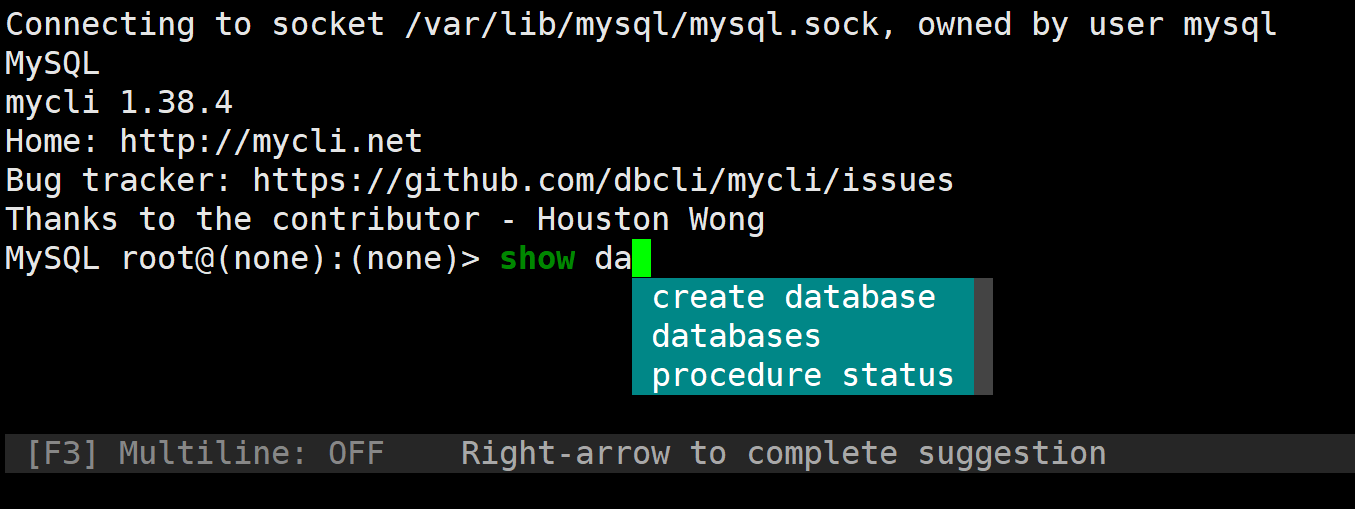
SQL语言
SQL介绍
SQL:(Structured Query Language)结构化查询语言。
SQL语言规范:
- 在数据库系统中,SQL语句不区分大小写,建议用大写。
- SQL语句可单行或多行书写,默认以 **;**结尾。
- 关键词不能跨多行或简写。
- 用空格和TAB缩进来提高语句的可读性。
- 子句通常位于独立行,便于编辑,提高可读性。
数据库对象和命名:
数据库中的组件(对象)
| 组件 | 关键字 | 说明 |
|---|---|---|
| 数据库 | database | 表的集合,一个数据库中可以有多个表,在文件系统中表出就是一个目录 |
| 表 | table | 在数据库中以二维表的形式出现,有行和列,数据库中的数据就是存放于表中的 |
| 索引 | index | 索引通常建立在一个列上,用以加快数据查询速度 |
| 视图 | view | 用SQL语言构建的虚拟表,可以临时把两个或多个表以逻辑关系关联上,对外提供查询 |
| 存储过程 | procedure | 存储过程是一组为了完成特定功能的SQL语句集合,客户端可以直接调用 |
| 存储函数 | function | 存储函数和存储过程一样,都是SQL语句集合,但可以使用参数 |
| 触发器 | tigger | 触发器也是有SQL语句的集合组成,但需要达到触发条件才能调用 |
| 事件调度器 | event scheduler | 数据库中的计划任务 |
| 用户 | user | 连接服务端时的用户名 |
| 权限 | privilege | 每个用户可以对哪些数据库或表进行操作,在什么IP能连接 |
组件命名规则
- 可以包括字母,数字和三个特殊字符(#_$)
- 不能使用MySQL的保留字
SQL语句分类
| SQL语句类型 | 说明 | 具体语句 |
|---|---|---|
| DDL | Data Defination Language数据定义语言 | CREATE,DROP,ALTER |
| DML | Data Mainpulation Language数据操纵语言 | INSERT,DELETE,UPDATE |
| DQL | Data Query Language数据查询语言 | SELECT |
| DCL | Data Control Language数据控制语言 | GRANT,REVOKE |
| TCL | Transaction Control Language事务控制语言 | BEGIN,COMMIT,ROLLBACK,SAVEPOINT |
字符集和排序
早期MySQL版本默认为latin1,从MySQL8.0开始默认字符集已经为utf8mb4
查看当前版本可用的字符集
mysql
mysql> show character set;
+----------+---------------------------------+---------------------+--------+
| Charset  | Description                     | Default collation   | Maxlen |
+----------+---------------------------------+---------------------+--------+
| armscii8 | ARMSCII-8 Armenian              | armscii8_general_ci |      1 |
| ascii    | US ASCII                        | ascii_general_ci    |      1 |
| big5     | Big5 Traditional Chinese        | big5_chinese_ci     |      2 |
| binary   | Binary pseudo charset           | binary              |      1 |
| cp1250   | Windows Central European        | cp1250_general_ci   |      1 |
| cp1251   | Windows Cyrillic                | cp1251_general_ci   |      1 |
| cp1256   | Windows Arabic                  | cp1256_general_ci   |      1 |
| cp1257   | Windows Baltic                  | cp1257_general_ci   |      1 |
| cp850    | DOS West European               | cp850_general_ci    |      1 |
| cp852    | DOS Central European            | cp852_general_ci    |      1 |
| cp866    | DOS Russian                     | cp866_general_ci    |      1 |
| cp932    | SJIS for Windows Japanese       | cp932_japanese_ci   |      2 |
| dec8     | DEC West European               | dec8_swedish_ci     |      1 |
| eucjpms  | UJIS for Windows Japanese       | eucjpms_japanese_ci |      3 |
| euckr    | EUC-KR Korean                   | euckr_korean_ci     |      2 |
| gb18030  | China National Standard GB18030 | gb18030_chinese_ci  |      4 |
| gb2312   | GB2312 Simplified Chinese       | gb2312_chinese_ci   |      2 |
| gbk      | GBK Simplified Chinese          | gbk_chinese_ci      |      2 |
| geostd8  | GEOSTD8 Georgian                | geostd8_general_ci  |      1 |
| greek    | ISO 8859-7 Greek                | greek_general_ci    |      1 |
| hebrew   | ISO 8859-8 Hebrew               | hebrew_general_ci   |      1 |
| hp8      | HP West European                | hp8_english_ci      |      1 |
| keybcs2  | DOS Kamenicky Czech-Slovak      | keybcs2_general_ci  |      1 |
| koi8r    | KOI8-R Relcom Russian           | koi8r_general_ci    |      1 |
| koi8u    | KOI8-U Ukrainian                | koi8u_general_ci    |      1 |
| latin1   | cp1252 West European            | latin1_swedish_ci   |      1 |
| latin2   | ISO 8859-2 Central European     | latin2_general_ci   |      1 |
| latin5   | ISO 8859-9 Turkish              | latin5_turkish_ci   |      1 |
| latin7   | ISO 8859-13 Baltic              | latin7_general_ci   |      1 |
| macce    | Mac Central European            | macce_general_ci    |      1 |
| macroman | Mac West European               | macroman_general_ci |      1 |
| sjis     | Shift-JIS Japanese              | sjis_japanese_ci    |      2 |
| swe7     | 7bit Swedish                    | swe7_swedish_ci     |      1 |
| tis620   | TIS620 Thai                     | tis620_thai_ci      |      1 |
| ucs2     | UCS-2 Unicode                   | ucs2_general_ci     |      2 |
| ujis     | EUC-JP Japanese                 | ujis_japanese_ci    |      3 |
| utf16    | UTF-16 Unicode                  | utf16_general_ci    |      4 |
| utf16le  | UTF-16LE Unicode                | utf16le_general_ci  |      4 |
| utf32    | UTF-32 Unicode                  | utf32_general_ci    |      4 |
| utf8     | UTF-8 Unicode                   | utf8_general_ci     |      3 |
| utf8mb4  | UTF-8 Unicode                   | utf8mb4_0900_ai_ci  |      4 |
+----------+---------------------------------+---------------------+--------+
41 rows in set (0.00 sec)
查看当前默认字符集
mysql
mysql> show variables like 'character%';
+--------------------------+----------------------------+
| Variable_name            | Value                      |
+--------------------------+----------------------------+
| character_set_client     | utf8mb4                    |
| character_set_connection | utf8mb4                    |
| character_set_database   | utf8mb4                    |
| character_set_filesystem | binary                     |
| character_set_results    | utf8mb4                    |
| character_set_server     | utf8mb4                    |
| character_set_system     | utf8mb3                    |
| character_sets_dir       | /usr/share/mysql/charsets/ |
+--------------------------+----------------------------+
8 rows in set (0.01 sec)
修改mariadb-server的默认字符集
bash
[root@localhost ~]# vim /etc/my.cnf.d/mysql-server.cnf
[mysqld]
datadir=/var/lib/mysql
socket=/var/lib/mysql/mysql.sock
log-error=/var/log/mysql/mysqld.log
pid-file=/run/mysqld/mysqld.pid
character-set-server=latin1                #新加一行

[root@localhost ~]# vim /etc/my.cnf.d/client.cnf
[client]
default-character-set=latin1               #新加一样

[root@localhost ~]# systemctl restart mysqld        #重启服务

mysql> show variables like 'character%';
+--------------------------+----------------------------+
| Variable_name            | Value                      |
+--------------------------+----------------------------+
| character_set_client     | latin1                     |
| character_set_connection | latin1                     |
| character_set_database   | latin1                     |
| character_set_filesystem | binary                     |
| character_set_results    | latin1                     |
| character_set_server     | latin1                     |
| character_set_system     | utf8mb3                    |
| character_sets_dir       | /usr/share/mysql/charsets/ |
+--------------------------+----------------------------+
8 rows in set (0.00 sec)

#再改回来,或者还原快照
查看当前版本可用的排序规则
mysql
mysql> show collation;
+----------------------------+----------+-----+---------+----------+---------+---------------+
| Collation                  | Charset  | Id  | Default | Compiled | Sortlen | Pad_attribute |
+----------------------------+----------+-----+---------+----------+---------+---------------+
| armscii8_bin               | armscii8 |  64 |         | Yes      |       1 | PAD SPACE     |
| armscii8_general_ci        | armscii8 |  32 | Yes     | Yes      |       1 | PAD SPACE     |
| ascii_bin                  | ascii    |  65 |         | Yes      |       1 | PAD SPACE     |
| ascii_general_ci           | ascii    |  11 | Yes     | Yes      |       1 | PAD SPACE     |
| big5_bin                   | big5     |  84 |         | Yes      |       1 | PAD SPACE     |
| big5_chinese_ci            | big5     |   1 | Yes     | Yes      |       1 | PAD SPACE     |
... ...
| utf8_unicode_520_ci        | utf8     | 214 |         | Yes      |       8 | PAD SPACE     |
| utf8_unicode_ci            | utf8     | 192 |         | Yes      |       8 | PAD SPACE     |
| utf8_vietnamese_ci         | utf8     | 215 |         | Yes      |       8 | PAD SPACE     |
+----------------------------+----------+-----+---------+----------+---------+---------------+
272 rows in set (0.00 sec)
查看当前使用的排序规则
mysql
mysql> show variables like 'collation%';
+----------------------+--------------------+
| Variable_name        | Value              |
+----------------------+--------------------+
| collation_connection | utf8mb4_0900_ai_ci |
| collation_database   | utf8mb4_0900_ai_ci |
| collation_server     | utf8mb4_0900_ai_ci |
+----------------------+--------------------+
3 rows in set (0.00 sec)
生产环境中,使用uf8mb4编码,使用默认排序规则
数据库管理
查看数据库列表
格式:
mysql
SHOW DATABASES;范例:
bash
#默认这四个系统库,不能删除
mysql> SHOW DATABASES;
+--------------------+
| Database           |
+--------------------+
| information_schema |
| mysql              |
| performance_schema |
| sys                |
+--------------------+
4 rows in set (0.01 sec)
创建数据库
格式
bash
CREATE {DATABASE | SCHEMA} [IF NOT EXISTS] db_name
    [create_option] ...

create_option: [DEFAULT] {
    CHARACTER SET [=] charset_name
  | COLLATE [=] collation_name
  | ENCRYPTION [=] {'Y' | 'N'}
}
范例:
bash
mysql> create database testdb1;
Query OK, 1 row affected (0.00 sec)

#如果已存在,再次创建会报错
mysql> create database testdb1;
ERROR 1007 (HY000): Can't create database 'testdb1'; database exists

#不报错,但也没有创建,if not exists表示如果不存在则创建
mysql> create database if not exists testdb1;
Query OK, 1 row affected, 1 warning (0.00 sec)

#查看数据库列表
mysql> show databases;
+--------------------+
| Database           |
+--------------------+
| information_schema |
| mysql              |
| performance_schema |
| sys                |
| testdb1            |
+--------------------+
5 rows in set (0.01 sec)

#查看创建语句,包含默认字符集
mysql> show create database testdb1;
+----------+-----------------------------------------------------------------------------------------------------------------------------------+
| Database | Create Database                                                                                                                   |
+----------+-----------------------------------------------------------------------------------------------------------------------------------+
| testdb1  | CREATE DATABASE `testdb1` /*!40100 DEFAULT CHARACTER SET utf8mb4 COLLATE utf8mb4_0900_ai_ci */ /*!80016 DEFAULT ENCRYPTION='N' */ |
+----------+-----------------------------------------------------------------------------------------------------------------------------------+
1 row in set (0.00 sec)

#创建时指定字符集
mysql> create database testdb2 DEFAULT CHARACTER SET latin1;
Query OK, 1 row affected (0.01 sec)

#查看创建语句
mysql> show create database testdb2;
+----------+-------------------------------------------------------------------------------------------------------+
| Database | Create Database                                                                                       |
+----------+-------------------------------------------------------------------------------------------------------+
| testdb2  | CREATE DATABASE `testdb2` /*!40100 DEFAULT CHARACTER SET latin1 */ /*!80016 DEFAULT ENCRYPTION='N' */ |
+----------+-------------------------------------------------------------------------------------------------------+
1 row in set (0.00 sec)
创建两个数据库,本质上是在硬盘上创建了两个目录
bash
[root@localhost ~]# ls -d /var/lib/mysql/testdb*
/var/lib/mysql/testdb1  /var/lib/mysql/testdb2
修改数据库
格式
bash
ALTER {DATABASE | SCHEMA} [db_name]
    alter_option ...

alter_option: {
    [DEFAULT] CHARACTER SET [=] charset_name
  | [DEFAULT] COLLATE [=] collation_name
  | [DEFAULT] ENCRYPTION [=] {'Y' | 'N'}
  | READ ONLY [=] {DEFAULT | 0 | 1}
}
范例:修改字符集
mysql
mysql> alter database testdb2 character set utf8mb4 COLLATE utf8mb4_0900_ai_ci;
Query OK, 1 row affected (0.00 sec)

mysql> show create database testdb2\G
*************************** 1. row ***************************
       Database: testdb2
Create Database: CREATE DATABASE `testdb2` /*!40100 DEFAULT CHARACTER SET utf8mb4 COLLATE utf8mb4_0900_ai_ci */ /*!80016 DEFAULT ENCRYPTION='N' */
1 row in set (0.00 sec)
删除数据库
格式
bash
DROP {DATABASE | SCHEMA} [IF EXISTS] db_name范例:
bash
mysql> show databases;
+--------------------+
| Database           |
+--------------------+
| information_schema |
| mysql              |
| performance_schema |
| sys                |
| testdb1            |
| testdb2            |
+--------------------+
6 rows in set (0.00 sec)

#删除数据库
mysql> drop database testdb2;
Query OK, 0 rows affected (0.00 sec)

#删除不存在的库
mysql> drop database testdb2;
ERROR 1008 (HY000): Can't drop database 'testdb2'; database doesn't exist

#加if exists判断
mysql> drop database if exists testdb2;
Query OK, 0 rows affected, 1 warning (0.00 sec)

mysql> show databases;
+--------------------+
| Database           |
+--------------------+
| information_schema |
| mysql              |
| performance_schema |
| sys                |
| testdb1            |
+--------------------+
5 rows in set (0.00 sec)

#testdb2对应的目录已不存在
[root@localhost ~]# ls -d /var/lib/mysql/testdb* -d
/var/lib/mysql/testdb1
mysqladmin 命令也可以创建和删除数据库
bash# 创建数据库 [root@localhost ~]# mysqladmin create db1 # 这一步需要免密登录,或者进入数据后查看 [root@localhost ~]# mysql -e 'show databases' +--------------------+ | Database | +--------------------+ | db1 | | information_schema | | mysql | | performance_schema | | sys | +--------------------+ # 删除数据库 [root@localhost ~]# mysqladmin drop db1 Dropping the database is potentially a very bad thing to do. Any data stored in the database will be destroyed. Do you really want to drop the 'db1' database [y/N] y # 回答`y` Database "db1" dropped [root@localhost ~]# mysql -e 'show databases' +--------------------+ | Database | +--------------------+ | information_schema | | mysql | | performance_schema | | sys | +--------------------+
数据类型
MySQL 中定义数据字段的类型对你数据库的优化是非常重要的。
MySQL 支持多种类型,大致可以分为三类:数值、日期/时间和字符串(字符)类型。
对于任何一个数据表,每一行的每一列对应的元素都是下列数据类型的一种。
| 类型 | 关键字 |
|---|---|
| 整数类型 | TINYINT SMALLINT``MEDIUMINT INT BIGINT |
| 浮点类型 | FLOAT DOUBLE |
| 定点数类型 | DECIMAL |
| 位类型 | BIT |
| 日期时间类型 | YEAR TIME DATE DATETIME TIMESTAMP |
| 文本字符串类型 | CHAR VARCHAR TINYTEXT TEXT MEDIUMTEXT LONGTEXT |
| 枚举类型 | ENUM |
| 集合类型 | SET |
| 二进制字符串类型 | BINARY VARBINARY TINYBLOB BLOB MEDIUMBLOB LONGBLOB |
| JSON 类型 | JSON对象 JSON 数组 |
| 空间数据类型 (单值类型) | GEOMETRY POINT LINESTRING POLYGON |
| 空间数据类型 (集合类型) | MULTIPOINT MULTILINESTRING MULTIPOLYGON GEOMETRYCOLLECTION |
在常见数据表时,除了可以指定列的数据类型,还可以指定列的属性。
| 关键字 | 含义 |
|---|---|
| NULL | 数据列可包含 NULL 值 |
| NOT NULL | 数据列不允许包含 NULL 值 |
| DEFAULT | 默认值 |
| PRIMARY KEY | 主键 |
| AUTO_INCREMENT | 自动递增,适用于整数类型 |
| UNSIGNED | 无符号 |
| CHARACTER SET name | 指定一个字符集 |
DDL 数据定义语句
创建表
格式
bash
CREATE TABLE tbl_name [options]直接创建
mysql
#选择数据库
mysql> use db1;
Database changed

#执行SQL语句
mysql> CREATE TABLE student (
    -> id int UNSIGNED AUTO_INCREMENT PRIMARY KEY,
    -> name VARCHAR(20) NOT NULL,
    -> age tinyint UNSIGNED,
    -> #height DECIMAL(5,2),
    -> gender ENUM('M','F') default 'M'
    -> )ENGINE=InnoDB AUTO_INCREMENT=10 DEFAULT CHARSET=utf8mb4;
Query OK, 0 rows affected (0.02 sec)

#查看
mysql> show tables;
+---------------+
| Tables_in_db1 |
+---------------+
| student       |
+---------------+
1 row in set (0.00 sec)

#查看结构
mysql> desc student;
+--------+------------------+------+-----+---------+----------------+
| Field  | Type             | Null | Key | Default | Extra          |
+--------+------------------+------+-----+---------+----------------+
| id     | int unsigned     | NO   | PRI | NULL    | auto_increment |
| name   | varchar(20)      | NO   |     | NULL    |                |
| age    | tinyint unsigned | YES  |     | NULL    |                |
| gender | enum('M','F')    | YES  |     | M       |                |
+--------+------------------+------+-----+---------+----------------+
4 rows in set (0.00 sec)

#插入一条数据
mysql> insert student (name,age)values('xiaoming',20);
Query OK, 1 row affected (0.01 sec)

#查询表中的所有数据
mysql> select * from student;
+----+----------+------+--------+
| id | name     | age  | gender |
+----+----------+------+--------+
| 10 | xiaoming |   20 | M      |
+----+----------+------+--------+
1 row in set (0.00 sec)

#再次插入一条数据
mysql> insert student(name,age,gender)values('xiaohong',18,'f');
Query OK, 1 row affected (0.00 sec)

mysql> select * from student;
+----+----------+------+--------+
| id | name     | age  | gender |
+----+----------+------+--------+
| 10 | xiaoming |   20 | M      |
| 11 | xiaohong |   18 | F      |
+----+----------+------+--------+
2 rows in set (0.00 sec)
通过查询现存表创建,新表会被直接插入查询而来的数据
bash
mysql> desc student;
+--------+------------------+------+-----+---------+----------------+
| Field  | Type             | Null | Key | Default | Extra          |
+--------+------------------+------+-----+---------+----------------+
| id     | int unsigned     | NO   | PRI | NULL    | auto_increment |
| name   | varchar(20)      | NO   |     | NULL    |                |
| age    | tinyint unsigned | YES  |     | NULL    |                |
| gender | enum('M','F')    | YES  |     | M       |                |
+--------+------------------+------+-----+---------+----------------+
4 rows in set (0.00 sec)

#查询其他表创建
mysql> create table student2 select name,age from student;
Query OK, 2 rows affected (0.01 sec)
Records: 2  Duplicates: 0  Warnings: 0

#查看
mysql> show tables;
+---------------+
| Tables_in_db1 |
+---------------+
| student       |
| student2      |
+---------------+
2 rows in set (0.00 sec)

#查看结构
mysql> desc student2;
+-------+------------------+------+-----+---------+-------+
| Field | Type             | Null | Key | Default | Extra |
+-------+------------------+------+-----+---------+-------+
| name  | varchar(20)      | NO   |     | NULL    |       |
| age   | tinyint unsigned | YES  |     | NULL    |       |
+-------+------------------+------+-----+---------+-------+
2 rows in set (0.00 sec)

#数据也复制过来了
mysql> select * from student2;
+----------+------+
| name     | age  |
+----------+------+
| xiaoming |   20 |
| xiaohong |   18 |
+----------+------+
2 rows in set (0.00 sec)
通过复制现存的表的表结构创建,但不复制数据
mysql
mysql> desc student;
+--------+------------------+------+-----+---------+----------------+
| Field  | Type             | Null | Key | Default | Extra          |
+--------+------------------+------+-----+---------+----------------+
| id     | int unsigned     | NO   | PRI | NULL    | auto_increment |
| name   | varchar(20)      | NO   |     | NULL    |                |
| age    | tinyint unsigned | YES  |     | NULL    |                |
| gender | enum('M','F')    | YES  |     | M       |                |
+--------+------------------+------+-----+---------+----------------+
4 rows in set (0.00 sec)

mysql> create table student3 like student;
Query OK, 0 rows affected (0.01 sec)

mysql> show tables;
+---------------+
| Tables_in_db1 |
+---------------+
| student       |
| student2      |
| student3      |
+---------------+
3 rows in set (0.00 sec)

mysql> desc student3;
+--------+------------------+------+-----+---------+----------------+
| Field  | Type             | Null | Key | Default | Extra          |
+--------+------------------+------+-----+---------+----------------+
| id     | int unsigned     | NO   | PRI | NULL    | auto_increment |
| name   | varchar(20)      | NO   |     | NULL    |                |
| age    | tinyint unsigned | YES  |     | NULL    |                |
| gender | enum('M','F')    | YES  |     | M       |                |
+--------+------------------+------+-----+---------+----------------+
4 rows in set (0.00 sec)

mysql> select * from student3;
Empty set (0.00 sec)
查看表
列出数据库中的表
格式
bash
SHOW TABLES [FROM db_name]
bash
#查看当前库中所有表
mysql> show tables;
+---------------+
| Tables_in_db1 |
+---------------+
| student       |
| student2      |
| student3      |
+---------------+
3 rows in set (0.00 sec)

#查看指定库中的表
mysql> show tables from db1;
+---------------+
| Tables_in_db1 |
+---------------+
| student       |
| student2      |
| student3      |
+---------------+
3 rows in set (0.00 sec)
查看建表语句
格式
bash
SHOW CREATE TABLE [db_name.]tbl_name
bash
mysql> show create table student;
+---------+--------------------------------------------+
| Table   | Create Table                                                                                                                                                                                                                                                                                |
+---------+--------------------------------------------+
| student | CREATE TABLE `student` (
  `id` int unsigned NOT NULL AUTO_INCREMENT,
  `name` varchar(20) NOT NULL,
  `age` tinyint unsigned DEFAULT NULL,
  `gender` enum('M','F') DEFAULT 'M',
  PRIMARY KEY (`id`)
) ENGINE=InnoDB AUTO_INCREMENT=12 DEFAULT CHARSET=utf8mb4 COLLATE=utf8mb4_0900_ai_ci |
+---------+--------------------------------------------+
1 row in set (0.00 sec)


#查看指定数据库的数据表
mysql> show create table db1.student\G			# \G垂直显示结果
*************************** 1. row ***************************
       Table: student
Create Table: CREATE TABLE `student` (
  `id` int unsigned NOT NULL AUTO_INCREMENT,
  `name` varchar(20) NOT NULL,
  `age` tinyint unsigned DEFAULT NULL,
  `gender` enum('M','F') DEFAULT 'M',
  PRIMARY KEY (`id`)
) ENGINE=InnoDB AUTO_INCREMENT=12 DEFAULT CHARSET=utf8mb4 COLLATE=utf8mb4_0900_ai_ci
1 row in set (0.00 sec)
查看表结构
格式
bash
DESC [db_name.]tbl_name
SHOW COLUMNS FROM [db_name.]tbl_name
bash
mysql> desc student;
+--------+------------------+------+-----+---------+----------------+
| Field  | Type             | Null | Key | Default | Extra          |
+--------+------------------+------+-----+---------+----------------+
| id     | int unsigned     | NO   | PRI | NULL    | auto_increment |
| name   | varchar(20)      | NO   |     | NULL    |                |
| age    | tinyint unsigned | YES  |     | NULL    |                |
| gender | enum('M','F')    | YES  |     | M       |                |
+--------+------------------+------+-----+---------+----------------+
4 rows in set (0.00 sec)

mysql> show columns from student;
+--------+------------------+------+-----+---------+----------------+
| Field  | Type             | Null | Key | Default | Extra          |
+--------+------------------+------+-----+---------+----------------+
| id     | int unsigned     | NO   | PRI | NULL    | auto_increment |
| name   | varchar(20)      | NO   |     | NULL    |                |
| age    | tinyint unsigned | YES  |     | NULL    |                |
| gender | enum('M','F')    | YES  |     | M       |                |
+--------+------------------+------+-----+---------+----------------+
4 rows in set (0.00 sec)
查看表状态
格式
bash
SHOW TABLE STATUS LIKE 'tbl_name'
bash
mysql> SHOW TABLE STATUS LIKE 'student';
+---------+--------+---------+------------+------+----------------+-------------+-----------------+--------------+-----------+----------------+---------------------+---------------------+------------+--------------------+----------+----------------+---------+
| Name    | Engine | Version | Row_format | Rows | Avg_row_length | Data_length | Max_data_length | Index_length | Data_free | Auto_increment | Create_time         | Update_time         | Check_time | Collation          | Checksum | Create_options | Comment |
+---------+--------+---------+------------+------+----------------+-------------+-----------------+--------------+-----------+----------------+---------------------+---------------------+------------+--------------------+----------+----------------+---------+
| student | InnoDB |      10 | Dynamic    |    2 |           8192 |       16384 |               0 |            0 |         0 |             12 | 2025-09-18 22:10:21 | 2025-09-18 22:24:45 | NULL       | utf8mb4_0900_ai_ci |     NULL |                |         |
+---------+--------+---------+------------+------+----------------+-------------+-----------------+--------------+-----------+----------------+---------------------+---------------------+------------+--------------------+----------+----------------+---------+
1 row in set (0.00 sec)

mysql> SHOW TABLE STATUS LIKE 'student'\G
*************************** 1. row ***************************
           Name: student
         Engine: InnoDB
        Version: 10
     Row_format: Dynamic
           Rows: 2
 Avg_row_length: 8192
    Data_length: 16384
Max_data_length: 0
   Index_length: 0
      Data_free: 0
 Auto_increment: 12
    Create_time: 2025-09-18 22:10:21
    Update_time: 2025-09-18 22:24:45
     Check_time: NULL
      Collation: utf8mb4_0900_ai_ci
       Checksum: NULL
 Create_options:
        Comment:
1 row in set (0.01 sec)

#不能有库名
mysql> SHOW TABLE STATUS LIKE 'db1.student'\G
Empty set (0.00 sec)
查看库中所有表状态
格式
mysql
SHOW TABLE STATUS FROM db_name
bash
mysql> SHOW TABLE STATUS FROM db1\G
*************************** 1. row ***************************
           Name: student
         Engine: InnoDB
        Version: 10
     Row_format: Dynamic
           Rows: 2
 Avg_row_length: 8192
    Data_length: 16384
Max_data_length: 0
   Index_length: 0
      Data_free: 0
 Auto_increment: 12
    Create_time: 2025-09-18 22:10:21
    Update_time: 2025-09-18 22:24:45
     Check_time: NULL
      Collation: utf8mb4_0900_ai_ci
       Checksum: NULL
 Create_options:
        Comment:
*************************** 2. row ***************************
           Name: student2
         Engine: InnoDB
        Version: 10
     Row_format: Dynamic
           Rows: 2
 Avg_row_length: 8192
    Data_length: 16384
Max_data_length: 0
   Index_length: 0
      Data_free: 0
 Auto_increment: NULL
    Create_time: 2025-09-18 22:35:06
    Update_time: 2025-09-18 22:35:06
     Check_time: NULL
      Collation: utf8mb4_0900_ai_ci
       Checksum: NULL
 Create_options:
        Comment:
*************************** 3. row ***************************
           Name: student3
         Engine: InnoDB
        Version: 10
     Row_format: Dynamic
           Rows: 0
 Avg_row_length: 0
    Data_length: 16384
Max_data_length: 0
   Index_length: 0
      Data_free: 0
 Auto_increment: 1
    Create_time: 2025-09-18 22:49:14
    Update_time: NULL
     Check_time: NULL
      Collation: utf8mb4_0900_ai_ci
       Checksum: NULL
 Create_options:
        Comment:
3 rows in set (0.01 sec)
查看当前MySQL服务支持的引擎
格式
mysql
SHOW ENGINES
mysql
mysql> SHOW ENGINES\G
*************************** 1. row ***************************
      Engine: FEDERATED
     Support: NO
     Comment: Federated MySQL storage engine
Transactions: NULL
          XA: NULL
  Savepoints: NULL
*************************** 2. row ***************************
      Engine: MEMORY
     Support: YES
     Comment: Hash based, stored in memory, useful for temporary tables
Transactions: NO
          XA: NO
  Savepoints: NO
*************************** 3. row ***************************
      Engine: InnoDB
     Support: DEFAULT
     Comment: Supports transactions, row-level locking, and foreign keys
Transactions: YES
          XA: YES
  Savepoints: YES
*************************** 4. row ***************************
      Engine: PERFORMANCE_SCHEMA
     Support: YES
     Comment: Performance Schema
Transactions: NO
          XA: NO
  Savepoints: NO
*************************** 5. row ***************************
      Engine: MyISAM
     Support: YES
     Comment: MyISAM storage engine
Transactions: NO
          XA: NO
  Savepoints: NO
*************************** 6. row ***************************
      Engine: MRG_MYISAM
     Support: YES
     Comment: Collection of identical MyISAM tables
Transactions: NO
          XA: NO
  Savepoints: NO
*************************** 7. row ***************************
      Engine: BLACKHOLE
     Support: YES
     Comment: /dev/null storage engine (anything you write to it disappears)
Transactions: NO
          XA: NO
  Savepoints: NO
*************************** 8. row ***************************
      Engine: CSV
     Support: YES
     Comment: CSV storage engine
Transactions: NO
          XA: NO
  Savepoints: NO
*************************** 9. row ***************************
      Engine: ARCHIVE
     Support: YES
     Comment: Archive storage engine
Transactions: NO
          XA: NO
  Savepoints: NO
9 rows in set (0.00 sec)
修改和删除表
mysql
ALTER TABLE tbl_name
    [alter_option [, alter_option] ...]
    [partition_options]
mysql
{ ADD COLUMN <列名> <类型>
| CHANGE COLUMN <旧列名> <新列名> <新列类型>
| ALTER COLUMN <列名> { SET DEFAULT <默认值>丨DROP DEFAULT }
| MODIFY COLUMN <列名> <类型>
| DROP COLUMN <列名>
| RENAME TO <新表名> }
bash
#修改表名
mysql> alter table student rename stu;
Query OK, 0 rows affected (0.01 sec)

mysql> show tables;
+---------------+
| Tables_in_db1 |
+---------------+
| stu           |
| student2      |
| student3      |
+---------------+
3 rows in set (0.00 sec)

mysql> desc stu;
+--------+------------------+------+-----+---------+----------------+
| Field  | Type             | Null | Key | Default | Extra          |
+--------+------------------+------+-----+---------+----------------+
| id     | int unsigned     | NO   | PRI | NULL    | auto_increment |
| name   | varchar(20)      | NO   |     | NULL    |                |
| age    | tinyint unsigned | YES  |     | NULL    |                |
| gender | enum('M','F')    | YES  |     | M       |                |
+--------+------------------+------+-----+---------+----------------+
4 rows in set (0.00 sec)

#添加表字段
mysql> alter table stu add phone varchar(11) after name;
Query OK, 0 rows affected (0.01 sec)
Records: 0  Duplicates: 0  Warnings: 0

mysql> desc stu;
+--------+------------------+------+-----+---------+----------------+
| Field  | Type             | Null | Key | Default | Extra          |
+--------+------------------+------+-----+---------+----------------+
| id     | int unsigned     | NO   | PRI | NULL    | auto_increment |
| name   | varchar(20)      | NO   |     | NULL    |                |
| phone  | varchar(11)      | YES  |     | NULL    |                |
| age    | tinyint unsigned | YES  |     | NULL    |                |
| gender | enum('M','F')    | YES  |     | M       |                |
+--------+------------------+------+-----+---------+----------------+
5 rows in set (0.00 sec)

#修改字段类型
mysql> alter table stu modify phone int;
Query OK, 2 rows affected (0.01 sec)
Records: 2  Duplicates: 0  Warnings: 0

mysql> desc stu;
+--------+------------------+------+-----+---------+----------------+
| Field  | Type             | Null | Key | Default | Extra          |
+--------+------------------+------+-----+---------+----------------+
| id     | int unsigned     | NO   | PRI | NULL    | auto_increment |
| name   | varchar(20)      | NO   |     | NULL    |                |
| phone  | int              | YES  |     | NULL    |                |
| age    | tinyint unsigned | YES  |     | NULL    |                |
| gender | enum('M','F')    | YES  |     | M       |                |
+--------+------------------+------+-----+---------+----------------+
5 rows in set (0.00 sec)

#修改字段名称和类型
mysql> ALTER TABLE stu CHANGE COLUMN phone mobile char(11);
Query OK, 2 rows affected (0.02 sec)
Records: 2  Duplicates: 0  Warnings: 0

mysql> desc stu;
+--------+------------------+------+-----+---------+----------------+
| Field  | Type             | Null | Key | Default | Extra          |
+--------+------------------+------+-----+---------+----------------+
| id     | int unsigned     | NO   | PRI | NULL    | auto_increment |
| name   | varchar(20)      | NO   |     | NULL    |                |
| mobile | char(11)         | YES  |     | NULL    |                |
| age    | tinyint unsigned | YES  |     | NULL    |                |
| gender | enum('M','F')    | YES  |     | M       |                |
+--------+------------------+------+-----+---------+----------------+
5 rows in set (0.00 sec)

#删除字段
mysql> ALTER TABLE stu DROP COLUMN mobile;
Query OK, 0 rows affected (0.02 sec)
Records: 0  Duplicates: 0  Warnings: 0

mysql> desc stu;
+--------+------------------+------+-----+---------+----------------+
| Field  | Type             | Null | Key | Default | Extra          |
+--------+------------------+------+-----+---------+----------------+
| id     | int unsigned     | NO   | PRI | NULL    | auto_increment |
| name   | varchar(20)      | NO   |     | NULL    |                |
| age    | tinyint unsigned | YES  |     | NULL    |                |
| gender | enum('M','F')    | YES  |     | M       |                |
+--------+------------------+------+-----+---------+----------------+
4 rows in set (0.00 sec)

#修改表字符集
mysql> ALTER TABLE stu character SET utf8;
Query OK, 0 rows affected, 1 warning (0.00 sec)
Records: 0  Duplicates: 0  Warnings: 1

#同时修改数据类型和字符集,只修改字符集,类型也不能少
mysql> ALTER TABLE stu CHANGE name name char(30) character set utf8;
Query OK, 2 rows affected, 1 warning (0.02 sec)
Records: 2  Duplicates: 0  Warnings: 1

#设置字段默认值
mysql> alter table stu alter column gender set default 'M';
Query OK, 0 rows affected (0.01 sec)
Records: 0  Duplicates: 0  Warnings: 0

#添加字段和修改字段
mysql> ALTER TABLE stu ADD is_del bool DEFAULT false;
Query OK, 0 rows affected (0.00 sec)
Records: 0  Duplicates: 0  Warnings: 0

mysql> ALTER TABLE stu modify is_del bool DEFAULT true;
Query OK, 0 rows affected (0.00 sec)
Records: 0  Duplicates: 0  Warnings: 0
删除表
格式
bash
DROP [TEMPORARY] TABLE [IF EXISTS]
    tbl_name [, tbl_name] ...
    [RESTRICT | CASCADE]
bash
mysql> show tables;
+---------------+
| Tables_in_db1 |
+---------------+
| stu           |
| stu2          |
| student2      |
| student3      |
+---------------+
4 rows in set (0.00 sec)

mysql> drop table student2;drop table db1.student3;
Query OK, 0 rows affected (0.01 sec)
Query OK, 0 rows affected (0.01 sec)

mysql> show tables;
+---------------+
| Tables_in_db1 |
+---------------+
| stu           |
| stu2          |
+---------------+
2 rows in set (0.00 sec)
DML 数据操纵语言
插入数据
格式
bash
INSERT INTO tbl_name [(col1,...)] VALUES (val1,...),(val21,...)
bash
mysql> select * from stu;
+----+----------+------+--------+--------+
| id | name     | age  | gender | is_del |
+----+----------+------+--------+--------+
| 10 | xiaoming |   20 | M      |      0 |
| 11 | xiaohong |   18 | F      |      0 |
+----+----------+------+--------+--------+
2 rows in set (0.00 sec)

# 不标明字段,全部插入
mysql> INSERT INTO stu VALUES(12,'xiaoli',19,'F',0);
Query OK, 1 row affected (0.01 sec)

# 标出部分字段
mysql> INSERT INTO stu(name,age)VALUES('xiaozhou',20);
Query OK, 1 row affected (0.02 sec)

# 一次插入多条
mysql> INSERT INTO stu (name,age)VALUES('test1',20),('test2',21),('test3',22);
Query OK, 3 rows affected (0.01 sec)
Records: 3  Duplicates: 0  Warnings: 0

# 有默认值用默认值,没有则使用NULL
mysql> INSERT stu (age,is_del)VALUES(23,0);
Query OK, 1 row affected (0.00 sec)

mysql> select * from stu;
+----+----------+------+--------+--------+
| id | name     | age  | gender | is_del |
+----+----------+------+--------+--------+
| 10 | xiaoming |   20 | M      |      0 |
| 11 | xiaohong |   18 | F      |      0 |
| 12 | xiaoli   |   19 | F      |      0 |
| 13 | xiaozhou |   20 | M      |      1 |
| 14 | test1    |   20 | M      |      1 |
| 15 | test2    |   21 | M      |      1 |
| 16 | test3    |   22 | M      |      1 |
| 17 | NULL     |   23 | M      |      0 |
+----+----------+------+--------+--------+
8 rows in set (0.00 sec)

#将查询结果当值插入
mysql> insert into stu (name,age,gender) select name,age,gender from stu where id=11;
Query OK, 1 row affected (0.01 sec)
Records: 1  Duplicates: 0  Warnings: 0

mysql> select * from stu;
+----+----------+------+--------+--------+
| id | name     | age  | gender | is_del |
+----+----------+------+--------+--------+
| 10 | xiaoming |   20 | M      |      0 |
| 11 | xiaohong |   18 | F      |      0 |
| 12 | zhangsan |   19 | F      |      0 |
| 13 | xiaozhou |   20 | M      |      1 |
| 14 | test1    |   20 | M      |      1 |
| 15 | test2    |   21 | M      |      1 |
| 16 | test3    |   22 | M      |      1 |
| 17 | NULL     |   23 | M      |      0 |
| 18 | xiaohong |   18 | F      |      1 |
+----+----------+------+--------+--------+
9 rows in set (0.00 sec)
更新数据
更新数据一定要加条件限制,没有条件则会更新表中所有记录
bash
#不加条件表示更新所有
mysql> UPDATE stu set age=30,gender='F';
Query OK, 11 rows affected (0.00 sec)
Rows matched: 11  Changed: 11  Warnings: 0

mysql> select * from stu;
+----+----------+------+--------+--------+
| id | name     | age  | gender | is_del |
+----+----------+------+--------+--------+
| 10 | xiaoming |   30 | F      |      0 |
| 11 | xiaohong |   30 | F      |      0 |
| 12 | zhangsan |   30 | F      |      0 |
| 13 | xiaozhou |   30 | F      |      1 |
| 14 | test1    |   30 | F      |      1 |
| 15 | test2    |   30 | F      |      1 |
| 16 | test3    |   30 | F      |      1 |
| 17 | NULL     |   30 | F      |      0 |
| 18 | xiaohong |   30 | F      |      1 |
| 19 | xiaohong |   30 | F      |      1 |
| 20 | zhangsan |   30 | F      |      1 |
+----+----------+------+--------+--------+
11 rows in set (0.00 sec)

#根据条件更新
mysql> update stu set age=31 WHERE id>15;
Query OK, 5 rows affected (0.01 sec)
Rows matched: 5  Changed: 5  Warnings: 0

mysql> select * from stu;
+----+----------+------+--------+--------+
| id | name     | age  | gender | is_del |
+----+----------+------+--------+--------+
| 10 | xiaoming |   30 | F      |      0 |
| 11 | xiaohong |   30 | F      |      0 |
| 12 | zhangsan |   30 | F      |      0 |
| 13 | xiaozhou |   30 | F      |      1 |
| 14 | test1    |   30 | F      |      1 |
| 15 | test2    |   30 | F      |      1 |
| 16 | test3    |   31 | F      |      1 |
| 17 | NULL     |   31 | F      |      0 |
| 18 | xiaohong |   31 | F      |      1 |
| 19 | xiaohong |   31 | F      |      1 |
| 20 | zhangsan |   31 | F      |      1 |
+----+----------+------+--------+--------+
11 rows in set (0.00 sec)

#多个条件,满足任何一个条件都更新 OR 可以写成 ||
mysql> update stu set age=21,gender='M' where (id=15 OR name is null);
Query OK, 2 rows affected (0.01 sec)
Rows matched: 2  Changed: 2  Warnings: 0

#多个条件满足,AND 可以写成 &&
mysql> update stu set age=22,gender='M' WHERE (id=17 AND name is null);
Query OK, 1 row affected (0.02 sec)
Rows matched: 1  Changed: 1  Warnings: 0

#NULL要写 IS NULL
mysql> update stu set gender='F' where name IS NULL;
Query OK, 0 rows affected (0.00 sec)
Rows matched: 0  Changed: 0  Warnings: 0
删除数据
格式
bash
DELETE [LOW_PRIORITY] [QUICK] [IGNORE]
    tbl_name[.*] [, tbl_name[.*]] ...
    FROM table_references
    [WHERE where_condition]

DELETE [LOW_PRIORITY] [QUICK] [IGNORE]
    FROM tbl_name[.*] [, tbl_name[.*]] ...
    USING table_references
    [WHERE where_condition]
bash
#根据条件删除
mysql> delete from stu where id=10;
Query OK, 1 row affected (0.00 sec)
在直实生产环境中,一般不会对数据做物理删除,而是用字段来标记为逻辑删除,将对应字段值设为某个特定项(is_del ),(is_del=1)认为是己删除
bash
mysql> UPDATE stu SET is_del=1 WHERE id=11;
Query OK, 0 rows affected (0.00 sec)
Rows matched: 1  Changed: 0  Warnings: 0

mysql> select * from stu;
+----+----------+------+--------+--------+
| id | name     | age  | gender | is_del |
+----+----------+------+--------+--------+
| 11 | xiaohong |   30 | F      |      1 |
| 12 | zhangsan |   30 | F      |      0 |
| 13 | xiaozhou |   30 | F      |      1 |
| 14 | test1    |   30 | F      |      1 |
| 15 | test2    |   21 | M      |      1 |
| 16 | test3    |   31 | F      |      1 |
| 17 | NULL     |   23 | F      |      0 |
| 18 | xiaohong |   31 | F      |      1 |
| 19 | xiaohong |   31 | F      |      1 |
| 20 | zhangsan |   31 | F      |      1 |
+----+----------+------+--------+--------+
10 rows in set (0.00 sec)
清空表
bash
TRUNCATE TABLE tbl_name;   #DDL语句,不支持事务,效率更高
DELETE FROM tbl_name;      #DML语句
DQL 数据查询语句
主要对数据进行查询,常用关键字有 SELECT,FROM,WHERE等
格式
bash
SELECT 列名 FROM 表名 WHERE 条件过滤条件:
-
布尔型表达式
-
算术操作符:+,-,*,/,%
-
比较操作符:=,<=>(相等或都为空),<>,!=(非标准SQL,>,>=,<,<=)
-
范围查询:BETWEEN min_num AND max_num
-
不连续的查询:IN(element1,element2,...)
-
空查询:IS NULL,,IS NOT NULL
-
DISTINCT去除重复行,范例:SELECT DISTINCT gender FROM students;
-
模糊查询:LIKE使用%表示任意长度的任意字符_表示任意单个字符
-
逻辑操作符:NOT,AND,OR,XOR
-
GROUPBY:根据指定的条件把查询结果进行"分组"以用于做"聚合"运算
- 常见的聚合函数:count),sum(),max(),min(),avg(),注意:聚合函数不对null统计
-
HAVING:对分组聚合运算后的结果指定过滤条件
一旦分组group by,select语句后只跟分组的字段,聚合函数
-
ORDERBY:根据指定的字段对查询结果进行排序
- 升序:ASC
- 降序:DESC
MySQL用户账户管理
MySQL服务的账户是独立存在的,只用于MySQL服务的登录验证。
虚拟用户:给服务和应用使用的用户账号。
系统用户:Linux系统使用的用户账号
在MySQL服务中,用户组成包括用户名,主机,密码等。
Host可以写成主机名,IP地址,网段。可以用%,_来表示通配符,%表示任意长度的任意字符,_表示一个字符。
示例:
bash
#主机名
host@'mysql.laogao.cloud'
host@'localhost'

#IP地址
host@'10.0.0.110'
host@'172.16.10.110'

#网段
host@′10.0.0.0/255.255.0.0'
host@′172.16.10.0/255.255.255.0'

#通配符
host@′10.0.%.%
host@'172.16._.%'
mysql8 中默认没有可以远程登陆的用户
mysql
mysql> use mysql;
Reading table information for completion of table and column names
You can turn off this feature to get a quicker startup with -A

Database changed
mysql> select Host,User from user;
+-----------+------------------+
| Host      | User             |
+-----------+------------------+
| localhost | mysql.infoschema |
| localhost | mysql.session    |
| localhost | mysql.sys        |
| localhost | root             |
+-----------+------------------+
4 rows in set (0.00 sec)
# 前三个是MySQL服务自身使用
# 现在使用的是第四个

mysql> select user();
+----------------+
| user()         |
+----------------+
| root@localhost |
+----------------+
1 row in set (0.00 sec)

# 也可以使用status命令查看
mysql> status
--------------
mysql  Ver 8.0.26 for Linux on x86_64 (Source distribution)

Connection id:		10
Current database:	mysql
Current user:		root@localhost
SSL:			Not in use
Current pager:		stdout
Using outfile:		''
Using delimiter:	;
Server version:		8.0.26 Source distribution
Protocol version:	10
Connection:		Localhost via UNIX socket
Server characterset:	utf8mb4
Db     characterset:	utf8mb4
Client characterset:	utf8mb4
Conn.  characterset:	utf8mb4
UNIX socket:		/var/lib/mysql/mysql.sock
Binary data as:		Hexadecimal
Uptime:			17 min 53 sec

Threads: 2  Questions: 54  Slow queries: 0  Opens: 207  Flush tables: 3  Open tables: 123  Queries per second avg: 0.050
--------------
无法在远程主机上连接当前主机的mysql服务
在宿主机(笔记本/台式机)上连接一下试试
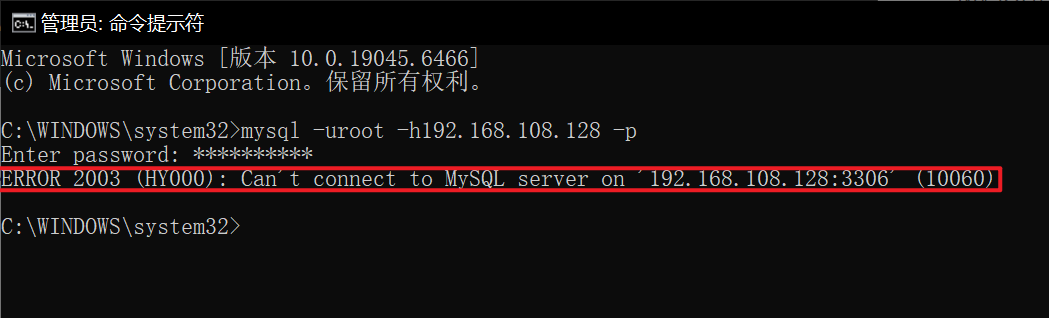
可以看见是不可以的
创建用户:CREATE USER
bash
#格式
CREATE USER 'USERNAME'@'HOST' [IDENTIFIED BY 'password'];

#范例
create user test@'192.168.108.0/255.255.255.0' identified by '123456';
create user test2@'192.168.108.%' identified by '123456';
mysql
mysql> use mysql
Reading table information for completion of table and column names
You can turn off this feature to get a quicker startup with -A

Database changed
mysql> create user root@'192.168.108.1' identified by '123456';
Query OK, 0 rows affected (0.01 sec)

mysql> select host,user from user;
+---------------+------------------+
| host          | user             |
+---------------+------------------+
| 192.168.108.1 | root             |
| localhost     | mysql.infoschema |
| localhost     | mysql.session    |
| localhost     | mysql.sys        |
| localhost     | root             |
+---------------+------------------+
5 rows in set (0.00 sec)
在宿主机(192.168.108.1)上操作
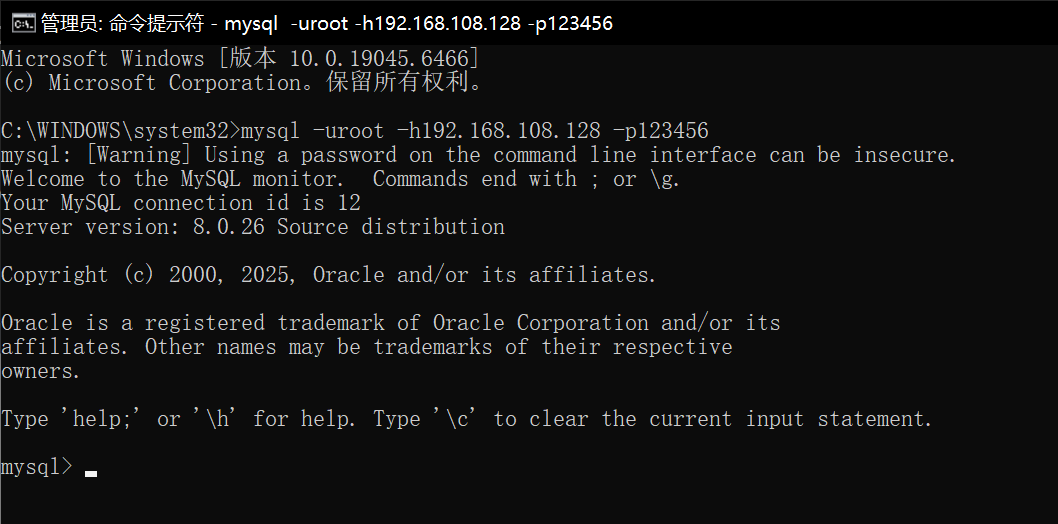
若宿主机连接不上,检查是否是虚拟机的防火墙没有关
bash
# 查看当前客户端连接时适用的用户名和主机
mysql> select user();
+--------------------+
| user()             |
+--------------------+
| root@192.168.108.1 |
+--------------------+
1 row in set (0.00 sec)

#查看线程
mysql> show processlist;
+----+------+---------------------+-------+---------+------+-------+------------------+
| Id | User | Host                | db    | Command | Time | State | Info             |
+----+------+---------------------+-------+---------+------+-------+------------------+
| 11 | root | localhost           | mysql | Sleep   |   66 |       | NULL             |
| 13 | root | 192.168.108.1:61940 | NULL  | Query   |    0 | init  | show processlist |
+----+------+---------------------+-------+---------+------+-------+------------------+
2 rows in set (0.00 sec)

#查看数据库
mysql> show databases;
+--------------------+
| Database           |
+--------------------+
| information_schema |
+--------------------+
1 row in set (0.00 sec)

#没有权限
mysql> use mysql;
ERROR 1044 (42000): Access denied for user 'root'@'192.168.108.1' to database 'mysql'
mysql> create database db1;
ERROR 1044 (42000): Access denied for user 'root'@'192.168.108.1' to database 'db1'
重命名用户:RENAME USER
bash
RENAME USER 'USERNAME'@'HOST' TO 'USERNAME'@'HOST';删除用户:DROP USER
bash
DROP USER 'USERNAME'@'HOST'

#范例,删除gqd
DROP user test@'192.168.108.0/255.255.255.0'
DROP USER test2@'192.168.108.0.%';
修改密码
新版mysql中用户密码可以保存在mysql.user表的 authentication_string字段中,己经取消了password字段。
mariadb中某些版本 authentication_string,password字段共存,旧版以password字段为准,新版以authentication_string为准。
bash
# 查看mysql.user表
mysql> use mysql
Database changed
mysql> select Host,User,authentication_string from mysql.user;
+-----------+------------------+------------------------------------------------------------------------+
| Host      | User             | authentication_string                                                  |
+-----------+------------------+------------------------------------------------------------------------+
| localhost | mysql.infoschema | $A$005$THISISACOMBINATIONOFINVALIDSALTANDPASSWORDTHATMUSTNEVERBRBEUSED |
| localhost | mysql.session    | $A$005$THISISACOMBINATIONOFINVALIDSALTANDPASSWORDTHATMUSTNEVERBRBEUSED |
| localhost | mysql.sys        | $A$005$THISISACOMBINATIONOFINVALIDSALTANDPASSWORDTHATMUSTNEVERBRBEUSED |
| localhost | root             | *094C0901889F4D899028A83C061EF44272590E22                              |
+-----------+------------------+------------------------------------------------------------------------+
4 rows in set (0.00 sec)

# 更新密码
# 方式一
mysql> set password for root@'localhost' = '123456';
Query OK, 0 rows affected (0.00 sec)

mysql> select Host,User,authentication_string from mysql.user;
+-----------+------------------+------------------------------------------------------------------------+
| Host      | User             | authentication_string                                                  |
+-----------+------------------+------------------------------------------------------------------------+
| localhost | mysql.infoschema | $A$005$THISISACOMBINATIONOFINVALIDSALTANDPASSWORDTHATMUSTNEVERBRBEUSED |
| localhost | mysql.session    | $A$005$THISISACOMBINATIONOFINVALIDSALTANDPASSWORDTHATMUSTNEVERBRBEUSED |
| localhost | mysql.sys        | $A$005$THISISACOMBINATIONOFINVALIDSALTANDPASSWORDTHATMUSTNEVERBRBEUSED |
| localhost | root             | *6BB4837EB74329105EE4568DDA7DC67ED2CA2AD9                              |
+-----------+------------------+------------------------------------------------------------------------+
4 rows in set (0.00 sec)

# 方式二(此方法通用)
mysql> alter user root@'localhost' identified by '123456';
Query OK, 0 rows affected (0.00 sec)

# 测试
[root@localhost ~]# mysql -uroot -p123456
mysql: [Warning] Using a password on the command line interface can be insecure.
Welcome to the MySQL monitor.  Commands end with ; or \g.
Your MySQL connection id is 13
Server version: 8.0.26 Source distribution

Copyright (c) 2000, 2021, Oracle and/or its affiliates.

Oracle is a registered trademark of Oracle Corporation and/or its
affiliates. Other names may be trademarks of their respective
owners.

Type 'help;' or '\h' for help. Type '\c' to clear the current input statement.

mysql>

# 方法三(非交互修改密码)
[root@localhost ~]# mysqladmin -uroot -p123456 password abcde
mysqladmin: [Warning] Using a password on the command line interface can be insecure.
Warning: Since password will be sent to server in plain text, use ssl connection to ensure password safety.
[root@localhost ~]# mysql -uroot -pabcde
mysql: [Warning] Using a password on the command line interface can be insecure.
Welcome to the MySQL monitor.  Commands end with ; or \g.
Your MySQL connection id is 15
Server version: 8.0.26 Source distribution

Copyright (c) 2000, 2021, Oracle and/or its affiliates.

Oracle is a registered trademark of Oracle Corporation and/or its
affiliates. Other names may be trademarks of their respective
owners.

Type 'help;' or '\h' for help. Type '\c' to clear the current input statement.

mysql>
忘记密码
方式一:保留原数据
bash
# 方式一,保留原数据

#1 启动时添加指定项
--skip-grant-tables
--skip-networking
[root@localhost ~]# vim /etc/my.cnf.d/mysql-server.cnf
[mysqld]
skip-grant-tables
skip-networking          #MYSQL8.0不需要

[root@localhost ~]# systemctl restart mysqld.service
[root@localhost ~]# mysql
Welcome to the MySQL monitor.  Commands end with ; or \g.
Your MySQL connection id is 7
Server version: 8.0.26 Source distribution

Copyright (c) 2000, 2021, Oracle and/or its affiliates.

Oracle is a registered trademark of Oracle Corporation and/or its
affiliates. Other names may be trademarks of their respective
owners.

Type 'help;' or '\h' for help. Type '\c' to clear the current input statement.

mysql>

#2 使用UPDATE命令修改管理员密码
mysql> update mysql.user set
    -> authentication_string='' where user='root' and host='localhost';
Query OK, 1 row affected (0.00 sec)
Rows matched: 1  Changed: 1  Warnings: 0

mysql> flush privileges;
Query OK, 0 rows affected (0.01 sec)

mysql> alter user root@'localhost' identified by '123456';
Query OK, 0 rows affected (0.00 sec)

#3 移除配置项重启
[root@localhost ~]# vim /etc/my.cnf.d/mysql-server.cnf
[mysqld]
#skip-grant-tables
#skip-networking
[root@localhost ~]# systemctl restart mysqld.service
[root@localhost ~]# mysql -uroot -p123456
mysql: [Warning] Using a password on the command line interface can be insecure.
Welcome to the MySQL monitor.  Commands end with ; or \g.
Your MySQL connection id is 8
Server version: 8.0.26 Source distribution

Copyright (c) 2000, 2021, Oracle and/or its affiliates.

Oracle is a registered trademark of Oracle Corporation and/or its
affiliates. Other names may be trademarks of their respective
owners.

Type 'help;' or '\h' for help. Type '\c' to clear the current input statement.

mysql>
方式二:清空root密码(学完就忘,跑的要快!!!)
bash
# 停止服务
[root@localhost ~]# systemctl stop mysqld.service

# 删除数据目录下的所有内容
[root@localhost ~]# rm -rf /var/lib/mysql/*

# 重启服务,恢复空密码登陆
[root@localhost ~]# systemctl start mysqld.service
[root@localhost ~]# mysql
Welcome to the MySQL monitor.  Commands end with ; or \g.
Your MySQL connection id is 8
Server version: 8.0.26 Source distribution

Copyright (c) 2000, 2021, Oracle and/or its affiliates.

Oracle is a registered trademark of Oracle Corporation and/or its
affiliates. Other names may be trademarks of their respective
owners.

Type 'help;' or '\h' for help. Type '\c' to clear the current input statement.

mysql>
权限管理
在上面创建用户我们可以看见,简单的创建用户是没有操作权限的,只能连接以及简单的查看,需要配置相应的权限才能使用
权限类别
管理类
CREATE USER,FILE,SUPER,SHOW DATABASES,RELOAD,SHUTDOWN,REPLICATION SLAVE,REPLICATION CLIENT,LOCK TABLES,PROCESS,CREATE TEMPORARY TABLES
程序类针对FUNCTION、PROCEDURE、TRIGGER
CREATE,ALTER,DROP,EXCUTE
库和表级别针对DATABASE、TABLE
ALTER,CREATE,CREATE VIEW,DROP INDEX,SHOW VIEW,WITH GRANT OPTION(将自己获得的权限转赠给其他用户)
数据操作
SELECT,INSERT,DELETE,UPDATE
字段级别
SELECT(col1,coI2.,...),UPDATE(col1,col2,...),INSERT(col1,col2,...)
所有权限
ALL PRIVILEGES或ALL
授权
grant on to
bash
mysql> help grant
Name: 'GRANT'
Description:
Syntax:
GRANT
    priv_type [(column_list)]
      [, priv_type [(column_list)]] ...
    ON [object_type] priv_level
    TO user_or_role [, user_or_role] ...
    [WITH GRANT OPTION]
    [AS user
        [WITH ROLE
            DEFAULT
          | NONE
          | ALL
          | ALL EXCEPT role [, role ] ...
          | role [, role ] ...
        ]
    ]
}
... ...
#priv_type       要授予的权限ALL [PRIVILEGES]
#object_type     对象的类型TABLE|FUNCTION|PROCEDURE
#priv_level      范围  *|*.*|db_name.*|db_name.tbl_name|tbl_name|db_name.routine_name(指定库的函数,存储过程,触发器)
#with_option   选项
				#GRANT OPTION   可以将自己的权限授权给其它账号
				#MAX_QUERIES_PER_HOUR N    每小时最大查询次数
				#MAX_UPDATES_PER_HOUR N    每小时最大更新次数
				#MAX_CONNECTIONS_PER_HOUR N    每小时最大连接次数
				#MAX_USER_CONNECTIONS N    最大用户连接数
#MAX_USER_CONNECTIONS    指的是瞬间的并发连接数,而MAX_CONNECTIONS_PER_HOUR指的是每小时累计的最大连接次数
#资源限制是对某一账号进行累计的,而不是对账号的一次连接进行累计的,当资源限制到达后,账号的任何一次相关操作都会被拒
示例
bash
#只能查询,插入指定字段
GRANT SELECT(col1),INSERT(col1,col2) ON mydb.mytbl TO 'someuser'@'somehost';

#有指定库的所有权限
GRANT ALL ON wordpress.* TO wordpress@'10.0.0.%';

#授予所有权限
GRANT ALL PRIVILEGES ON *.* TO 'root'@'10.0.0.%' WITH GRANT OPTION;

#创建用户和授权同时执行的方式在MySQL8.0取消了
GRANT ALL ON wordpress.* TO wordpress@'192.168.108.%' IDENTIFIED BY 'huawei';
GRANT ALL PRIVILEGES ON *.* TO 'root'@'192.168.108.%' IDENTIFIED BY 'huawei' WITH GRANT OPTION;
撤销权限
revoke on from
格式
bash
REVOKE
    priv_type [(column_list)]
      [, priv_type [(column_list)]] ...
    ON [object_type] priv_level
    FROM user_or_role [, user_or_role] ...
范例
bash
REVOKE DELETE ON *.* FROM 'testuser'@'172.16.0.%';
REVOKE ALL ON *.* FROM'testuser'@'172.16.0.%';
查看用户权限
格式
mysql
#查看指定用户权限
SHOW GRANTS FOR 'user'@'host';

#查看当前使用中的用户的权限
SHOW GRANTS FOR CURRENT_USER[()];
范例
mysql
mysql> select user,host from mysql.user
+------------------+---------------+
| user             | host          |
+------------------+---------------+
| root             | 192.168.108.1 |
| mysql.infoschema | localhost     |
| mysql.session    | localhost     |
| mysql.sys        | localhost     |
| root             | localhost     |
+------------------+---------------+
5 rows in set (0.00 sec)

mysql> show grants for 'root'@'192.168.108.1';
+----------------------------------------------+
| Grants for root@192.168.108.1                |
+----------------------------------------------+
| GRANT USAGE ON *.* TO `root`@`192.168.108.1` |
+----------------------------------------------+
1 row in set (0.00 sec)
能看见上面新创建的用户只有 USAGE 权限,只能连接
bash
# 本次操作,给192.168.108.1 授予select权限
mysql> create database db1;
Query OK, 1 row affected (0.00 sec)

mysql> use db1;
Database changed

mysql> create table student (
    -> id int UNSIGNED AUTO_INCREMENT PRIMARY KEY,
    -> name VARCHAR(20) NOT NULL,
    -> age tinyint UNSIGNED,
    -> gender ENUM('M','F') default 'M'
    -> )ENGINE=InnoDB AUTO_INCREMENT=10 DEFAULT CHARSET=utf8mb4;
Query OK, 0 rows affected (0.00 sec)

mysql> insert student (name,age)values('xiaoming',20);
Query OK, 1 row affected (0.01 sec)

mysql> grant select on db1.student to root@'192.168.108.1';
Query OK, 0 rows affected (0.00 sec)

mysql> show grants for root@192.168.108.1;
+-----------------------------------------------------------+
| Grants for root@192.168.108.1                             |
+-----------------------------------------------------------+
| GRANT USAGE ON *.* TO `root`@`192.168.108.1`              |
| GRANT SELECT ON `db1`.`student` TO `root`@`192.168.108.1` |
+-----------------------------------------------------------+
2 rows in set (0.00 sec)
使用远程用户再次刷新,远程操作
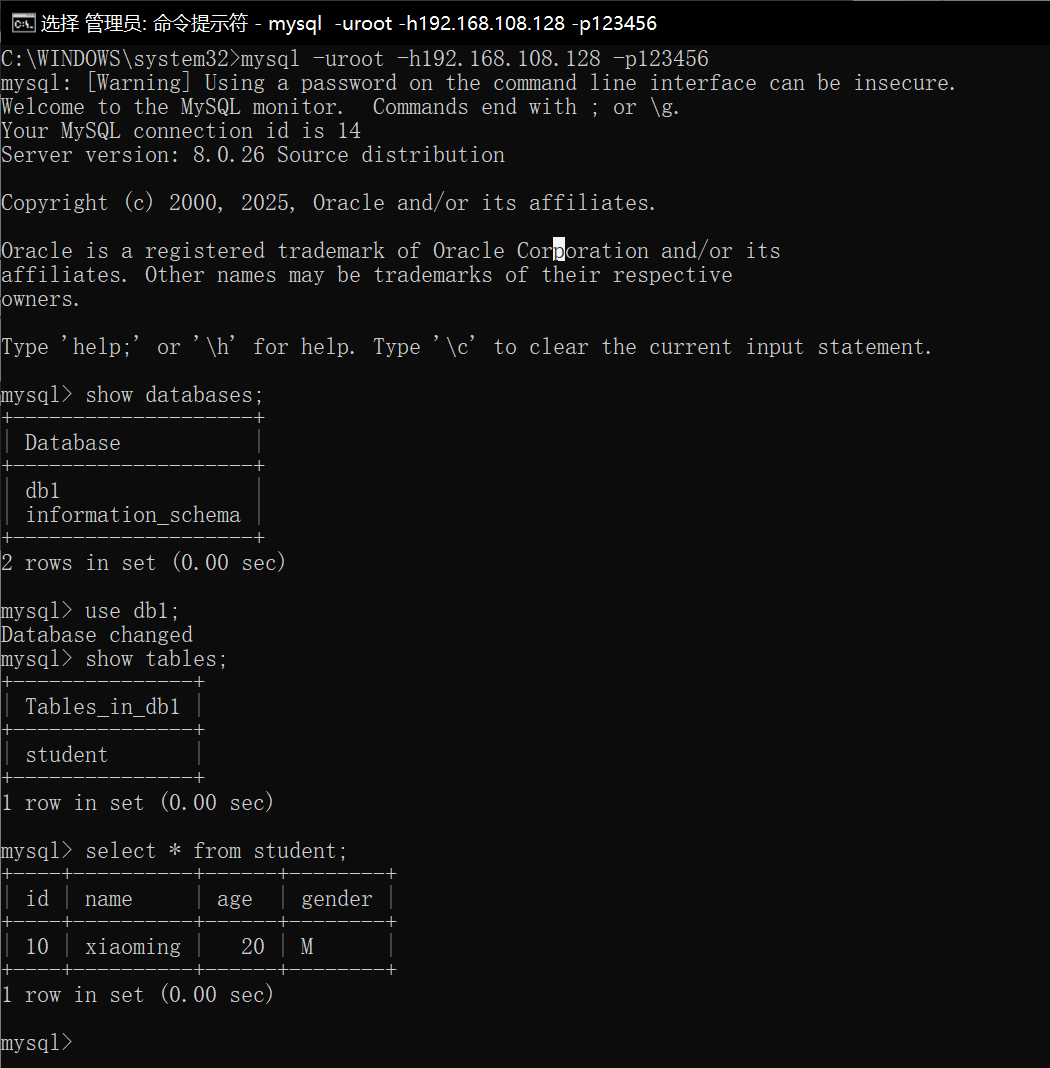
可以看见有权限是可以操作的
现在我们试试撤销权限
mysql
mysql> revoke select on db1.student from root@192.168.108.1;
Query OK, 0 rows affected (0.00 sec)

mysql> show grants for root@192.168.108.1;
+----------------------------------------------+
| Grants for root@192.168.108.1                |
+----------------------------------------------+
| GRANT USAGE ON *.* TO `root`@`192.168.108.1` |
+----------------------------------------------+
1 row in set (0.00 sec)
现在,远程用户没有权限取访问db1了
MySQL的备份与恢复
本次备份实验的环境是使用的CentOS-7操作系统以及MySQL 5版本
数据备份的重要性
-
在生产环境中,数据的安全性至关重要
-
任何数据的丢失都可能产生严重的后果
-
造成数据丢失的原因
-
程序错误
-
人为操作错误
-
运算错误
-
磁盘故障
-
灾难(如火灾、地震)和盗窃
-
数据库备份的分类
从物理与逻辑的角度,备份可分为
- 物理备份:对数据库操作系统的物理文件(如数据文件、日志文件等)的备份
- 物理备份方法
- 冷备份(脱机备份):是在关闭数据库的时候进行的
- 热备份(联机备份):数据库处于运行状态,依赖于数据库的日志文件
- 温备份:数据库锁定表格(不可写入但可读)的状态下进行备份操作
- 物理备份方法
- 逻辑备份:对数据库逻辑组件(如:表等数据库对象)的备份
检查mysql实际使用的数据目录:
bash
mysql -uroot -p -e "SHOW VARIABLES LIKE 'datadir';"查出来的是数据目录,为下面模拟故障以及增量备份做准备
使用mysql 8的也不用担心,这条命令帮助同步下面数据目录的问题,只是数据目录不同
冷备份
bash
# 备份(推荐写法)
systemctl stop mysqld			# 先停止服务
cd /usr/local/mysql/data		# 进入mysql的数据目录
mkdir /mysql_bak
tar czf /mysql_bak/mysql-backup-$(date +%F).tar.gz *
systemctl start mysqld			# 备份完成后启动服务
测试服务正常

# 删除数据
systemctl stop mysqld			# 先停止服务
rm -rf /usr/local/mysql/data/*  	# 清空数据目录(谨慎操作!)
# 再次开启测试,发现数据库坏了
systemctl start mysqld

# 停止数据库,恢复数据库
systemctl stop mysqld
tar xzf /mysql_bak/mysql-backup-2025-10-15.tar.gz -C /usr/local/mysql/data/
chown -R mysql:mysql /usr/local/mysql/data       # 恢复权限
systemctl start mysqld          # 启动服务
逻辑备份
mysqldump 命令
bash
#备份数据库
[root@localhost ~]# systemctl start mysqld
[root@localhost ~]# mysqldump -u root -p school > /mysql_bak/school.sql
Enter password:
[root@localhost ~]# ls /mysql_bak/school.sql
mysql_bak/school.sql
[root@localhost ~]# cat /mysql_bak/school.sql


#备份多个数据库
[root@localhost ~]# mysqldump -u root -p --databases school mysql > /mysql_bak/school-mysql.sql
Enter password:
[root@localhost ~]# cat /mysql_bak/school-mysql.sql


#备份所有数据库
[root@localhost ~]# mysqldump -u root -p --opt --all-databases > /mysql_bak/all.sql
Enter password:
[root@localhost ~]# cat /mysql_bak/all.sql


#备份整个表
[root@localhost ~]# mysqldump -u root -p school info  > /mysql_bak/info.sql
Enter password:
[root@localhost ~]# cat /mysql_bak/info.sql
恢复数据
bash
# 先删除对应的数据模拟故障
mysql> source /mysql_bak/info.sql

mysql> show tables;
+------------------+
| Tables_in_school |
+------------------+
| info             |
+------------------+
1 row in set (0.00 sec)
增量备份
bash
[root@localhost ~]# vim /etc/my.cnf
# mysql8 编辑/etc/my.cnf.d/mysql-server.cnf
------------------------
[mysqld]
log-bin=mysql-bin #这段下面最后加一行

[root@localhost ~]# systemctl restart mysqld.service

[root@localhost ~]# ls /usr/local/mysql/data/
auto.cnf    client-cert.pem  ibdata1      ibtmp1            mysql-bin.index     public_key.pem   server-key.pem
ca-key.pem  client-key.pem   ib_logfile0  mysql             performance_schema  school           sys
ca.pem      ib_buffer_pool   ib_logfile1  mysql-bin.000001  private_key.pem     server-cert.pem

# 先进行完整性备份
[root@localhost ~]# mysqldump -uroot -p school > /opt/school.sql
Enter password:

#日志刷新生效
[root@localhost ~]# mysqladmin -uroot -p flush-logs
Enter password:
#新产生的mysql-bin.000002只记录本次刷新后insert操作

[root@localhost ~]# ls /usr/local/mysql/data/
auto.cnf    client-cert.pem  ibdata1      ibtmp1            mysql-bin.000002    private_key.pem  server-cert.pem
ca-key.pem  client-key.pem   ib_logfile0  mysql             mysql-bin.index     public_key.pem   server-key.pem
ca.pem      ib_buffer_pool   ib_logfile1  mysql-bin.000001  performance_schema  school           sys

[root@localhost ~]# mysql -uroot -p
Enter password:
----------------------------------------
mysql> use school;
Database changed

mysql> select * from info;
+----+--------+-------+---------+-------+
| id | name   | score | address | hobby |
+----+--------+-------+---------+-------+
|  1 | 唐三   | 90.00 | 广州    |     1 |
|  2 | 叶凡   | 91.00 | 伦敦    |     2 |
|  4 | 曹操   | 66.50 | 合肥    |     4 |
+----+--------+-------+---------+-------+
3 rows in set (0.00 sec)

#再次插入数据生产增量备份
mysql> insert into info (name,score,address,hobby) values ('美猴王',75,'武汉',1);
Query OK, 1 row affected (0.00 sec)

mysql> exit
Bye

[root@localhost ~]# mysqladmin -uroot -p flush-log
Enter password:
#新产生mysql-bin.000003日志记录insert操作
[root@localhost ~]# ls /usr/local/mysql/data/
auto.cnf    client-cert.pem  ibdata1      ibtmp1            mysql-bin.000002  performance_schema  school           sys
ca-key.pem  client-key.pem   ib_logfile0  mysql             mysql-bin.000003  private_key.pem     server-cert.pem
ca.pem      ib_buffer_pool   ib_logfile1  mysql-bin.000001  mysql-bin.index   public_key.pem      server-key.pem

[root@localhost ~]# mysql -uroot -p
Enter password:
---------------------------------------------------------------
mysql> use school;
Database changed

mysql> insert into info (name,score,address,hobby) values ('超人',83,'上海',2);
Query OK, 1 row affected (0.00 sec)

mysql> select * from info;
+----+-----------+-------+---------+-------+
| id | name      | score | address | hobby |
+----+-----------+-------+---------+-------+
|  1 | 唐三      | 90.00 | 广州    |     1 |
|  2 | 叶凡      | 91.00 | 伦敦    |     2 |
|  4 | 曹操      | 66.50 | 合肥    |     4 |
|  5 | 美猴王    | 75.00 | 武汉    |     1 |
|  6 | 超人      | 83.00 | 上海    |     2 |
+----+-----------+-------+---------+-------+
5 rows in set (0.00 sec)

mysql> exit
Bye

#刷新日志生效
[root@localhost ~]# mysqladmin -uroot -p flush-log
Enter password:

[root@localhost ~]# mysql -uroot -p
Enter password:
--------------------------------------------------------------
mysql> use school;
Database changed

#删除内容
mysql> delete from info where id=6;
Query OK, 1 row affected (0.00 sec)

mysql> delete from info where id=5;
Query OK, 1 row affected (0.01 sec)

mysql> select * from info;
+----+--------+-------+---------+-------+
| id | name   | score | address | hobby |
+----+--------+-------+---------+-------+
|  1 | 唐三   | 90.00 | 广州    |     1 |
|  2 | 叶凡   | 91.00 | 伦敦    |     2 |
|  4 | 曹操   | 66.50 | 合肥    |     4 |
+----+--------+-------+---------+-------+
3 rows in set (0.00 sec)

mysql> exit
Bye

[root@localhost ~]# ls /usr/local/mysql/data/
auto.cnf    client-cert.pem  ibdata1      ibtmp1            mysql-bin.000002  mysql-bin.index     public_key.pem   server-key.pem
ca-key.pem  client-key.pem   ib_logfile0  mysql             mysql-bin.000003  performance_schema  school           sys
ca.pem      ib_buffer_pool   ib_logfile1  mysql-bin.000001  mysql-bin.000004  private_key.pem     server-cert.pem

# 查看日志文件,vim看日志是乱码
[root@localhost ~]# mysqlbinlog --no-defaults --base64-output=decode-rows -v /usr/local/mysql/data/mysql-bin.000003

#恢复操作,恢复时如果被拒绝,是有其他mysql进程占用了
[root@localhost ~]# mysqlbinlog --no-defaults /usr/local/mysql/data/mysql-bin.000003 | mysql -uroot -p
Enter password:

# 验证
[root@localhost ~]# mysql -uroot -p
Enter password:
---------------------------------------------------------------
mysql> select * from info;
+----+--------+-------+---------+-------+
| id | name   | score | address | hobby |
+----+--------+-------+---------+-------+
|  1 | 唐三   | 90.00 | 广州    |     1 |
|  2 | 叶凡   | 91.00 | 伦敦    |     2 |
|  4 | 曹操   | 66.50 | 合肥    |     4 |
|  6 | 超人   | 83.00 | 上海    |     2 |
+----+--------+-------+---------+-------+
4 rows in set (0.00 sec)