安装说明
shell
因为官网弃用了promtail明年3月彻底弃用。使用alloy 功能更强大
helm repo add grafana https://grafana.github.io/helm-charts
helm pull grafana/loki
helm pull  grafana/alloy
分布式日志服务安装
shell
helm -n loki install loki loki-6.49.0.tgz -f values.yaml最后安装
shell
helm -n loki install my-alloy grafana/alloy --set "configMap.content=loki.write \"loki\" {\n endpoint {\n url = \"http://loki-write:3100/loki/api/v1/push\"\n }\n}"在安装granfna
shell
kubectl apply -f grafana.yaml安装完后需要alloy的添加参数如下configmap修改:
yaml
#在配置项最后添加
discovery.kubernetes "pod" {
  role = "pod"
  selectors {
    role = "pod"
    field = "spec.nodeName=" + coalesce(sys.env("HOSTNAME"), constants.hostname)
  }
}


discovery.relabel "pod_logs" {
  targets = discovery.kubernetes.pod.targets

  rule {
    source_labels = ["__meta_kubernetes_namespace"]
    action = "replace"
    target_label = "namespace"
  }

  rule {
    source_labels = ["__meta_kubernetes_pod_name"]
    action = "replace"
    target_label = "pod"
  }

  rule {
    source_labels = ["__meta_kubernetes_pod_container_name"]
    action = "replace"
    target_label = "container"
  }

  rule {
    source_labels = ["__meta_kubernetes_pod_label_app_kubernetes_io_name"]
    action = "replace"
    target_label = "app"
  }

  rule {
    source_labels = ["__meta_kubernetes_namespace", "__meta_kubernetes_pod_container_name"]
    action = "replace"
    target_label = "job"
    separator = "/"
    replacement = "$1"
  }


  rule {
    source_labels = ["__meta_kubernetes_pod_uid", "__meta_kubernetes_pod_container_name"]
    action = "replace"
    target_label = "__path__"
    separator = "/"
    replacement = "/var/log/pods/*$1/*.log"
  }

  rule {
    source_labels = ["__meta_kubernetes_pod_container_id"]
    action = "replace"
    target_label = "container_runtime"
    regex = "^(\\S+):\\/\\/.+$"
    replacement = "$1"
  }
}

loki.source.kubernetes "pod_logs" {
  targets    = discovery.relabel.pod_logs.output
  forward_to = [loki.process.pod_logs.receiver]
}

#集群事件收集
loki.source.kubernetes_events "cluster_events" {
  job_name   = "integrations/kubernetes/eventhandler"
  log_format = "logfmt"
  forward_to = [
    loki.process.cluster_events.receiver,
  ]
}

loki.process "cluster_events" {
  forward_to = [loki.write.loki.receiver]

  stage.static_labels {
    values = {
      cluster = "my-events",
    }
  }

  stage.labels {
    values = {
      kubernetes_cluster_events = "job",
    }
  }
}


loki.process "pod_logs" {
  stage.static_labels {
      values = {
        cluster = "my-alloy2",
      }
  }

  forward_to = [loki.write.loki.receiver]
}


loki.write "loki" {
    endpoint {
    name = "loki-write"
    url = "http://loki-write:3100/loki/api/v1/push"
    headers = {
      "X-Scope-OrgID" = "fake",
   }
  }
  external_labels = {

      cluster = "my-alloy",
      source  = "alloy",
    }
  }
grafana
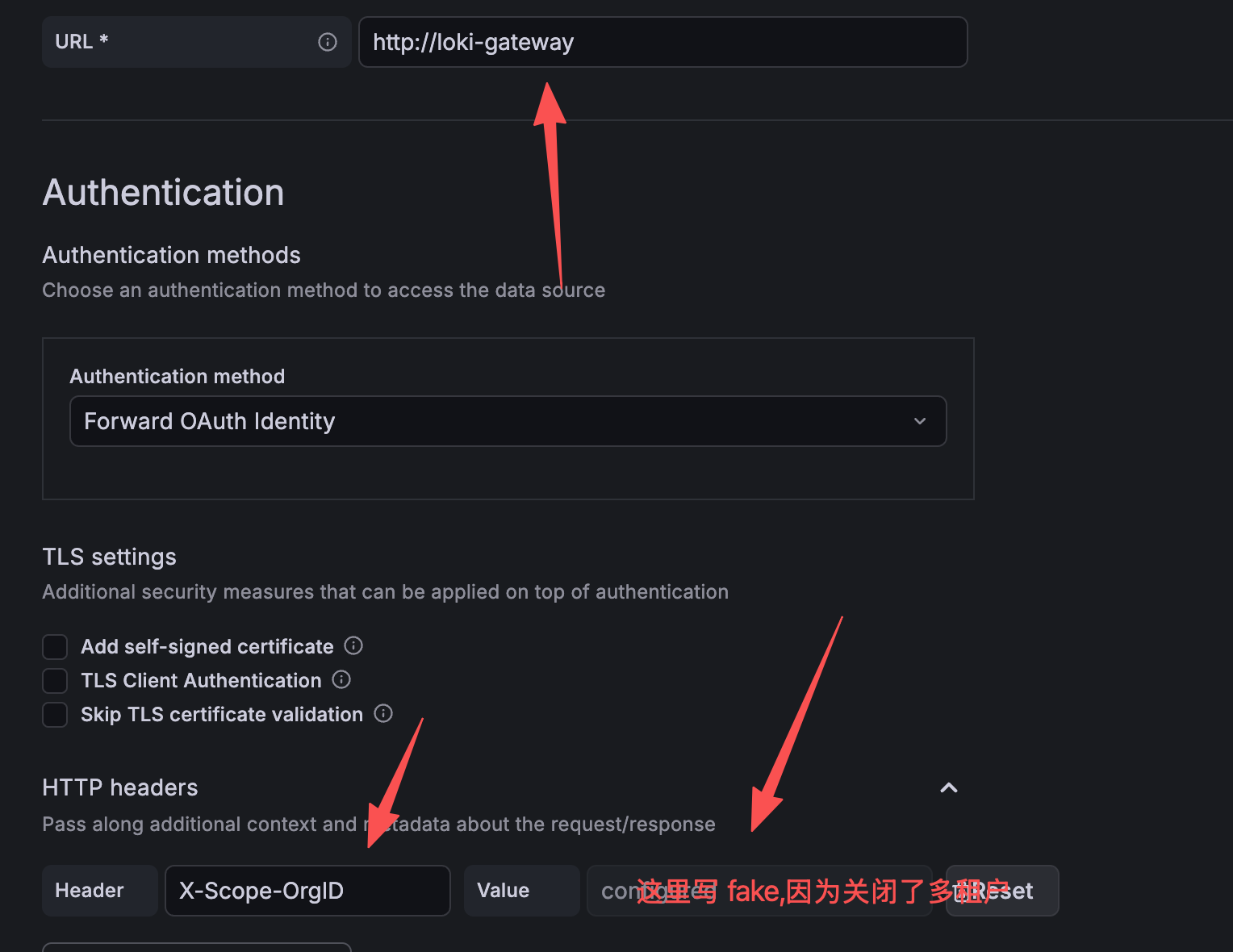
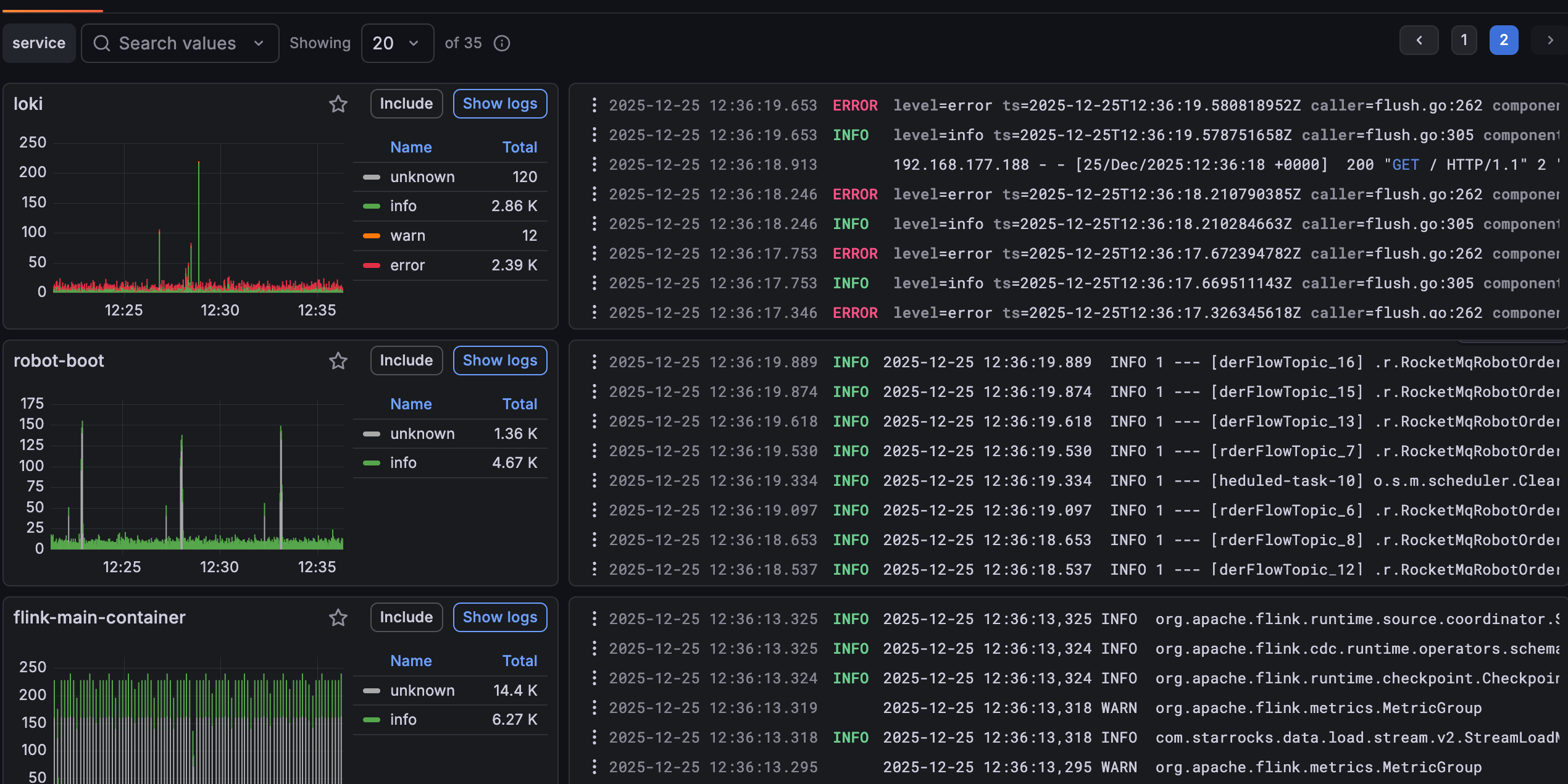
或者用的yaml
yaml
apiVersion: v1
kind: ConfigMap
metadata:
  name: grafana-datasources
data:
  loki-datasource.yaml: |
    apiVersion: 1
    datasources:
      - name: Loki
        type: loki
        access: proxy
        url: http://loki-gateway:80  #如果是 SingleBinary 模式下直接用 loki:3100
        version: 1
        editable: true
        jsonData:
          httpHeaderName1: "X-Scope-OrgID"
        secureJsonData:
          httpHeaderValue1: "fake"  # 如果是多租户模式,替换为实际 tenant ID

---
apiVersion: apps/v1
kind: Deployment
metadata:
  labels:
    app: grafana
  name: grafana
spec:
  selector:
    matchLabels:
      app: grafana
  template:
    metadata:
      labels:
        app: grafana
    spec:
      securityContext:
        fsGroup: 472
        supplementalGroups:
          - 0
      containers:
        - name: grafana
          image: grafana/grafana:latest
          imagePullPolicy: IfNotPresent
          ports:
            - containerPort: 3000
              name: http-grafana
              protocol: TCP
          readinessProbe:
            failureThreshold: 3
            httpGet:
              path: /robots.txt
              port: 3000
              scheme: HTTP
            initialDelaySeconds: 10
            periodSeconds: 30
            successThreshold: 1
            timeoutSeconds: 2
          livenessProbe:
            failureThreshold: 3
            initialDelaySeconds: 30
            periodSeconds: 10
            successThreshold: 1
            tcpSocket:
              port: 3000
            timeoutSeconds: 1
          resources:
            requests:
              cpu: 250m
              memory: 750Mi
          volumeMounts:
            - mountPath: /var/lib/grafana
              name: grafana-pv
            # 新增:挂载数据源 provisioning 配置
            - mountPath: /etc/grafana/provisioning/datasources/loki-datasource.yaml
              name: grafana-datasources
              subPath: loki-datasource.yaml
      # 新增 volumes
      volumes:
        - name: grafana-pv
          persistentVolumeClaim:
            claimName: grafana-pvc
        - name: grafana-datasources
          configMap:
            name: grafana-datasources

---
apiVersion: v1
kind: Service
metadata:
  name: grafana
spec:
  ports:
    - port: 3000
      protocol: TCP
      targetPort: http-grafana
  selector:
    app: grafana
  sessionAffinity: None
  type: NodePort
---
apiVersion: v1
kind: PersistentVolumeClaim
metadata:
  name: grafana-pvc
spec:
  storageClassName: "local-path"
  accessModes:
    - ReadWriteOnce
  resources:
    requests:
      storage: 1Gi