在 Unity 开发中,我们经常会遇到这样的场景:
场景中存在大量外观相同、行为相似,但位置、朝向各不相同的对象,例如森林里的树、草地上的草、子弹、NPC 装饰物等。
如果我们为每一个对象都完整地创建一套数据和资源,不仅会造成 内存浪费 ,还会增加 实例化与管理成本 。
而享元模式(Flyweight Pattern)正是为了解决这类问题而存在的。
享元模式的核心思想是:
将"可以共享的内部状态"抽离出来复用,把"不可共享的外部状态"交给使用者维护。
下面我将结合 Unity 的实际开发场景,用一个「森林生成系统」的例子,完整演示享元模式的设计与使用方式。
1.创建享元对象------承载外部状态
Tree 类并不是树的"类型",而是树的一个实例描述。
cs
using System.Collections;
using System.Collections.Generic;
using UnityEngine;

public class Tree
{
    private TreeType treeType;  // 共享的内部状态(享元对象)
    private Vector3 position;   // 外部状态:位置
    private Quaternion rotation; // 外部状态:旋转
    private float scale;        // 外部状态:缩放
    private GameObject treeObject; // 实际的游戏对象

    public GameObject TreeObject => treeObject;

    public Tree(TreeType type, Vector3 pos, Quaternion rot, float scale)
    {
        this.treeType = type;
        this.position = pos;
        this.rotation = rot;
        this.scale = scale;
    }

    // 实例化树到场景中
    public GameObject Instantiate(Transform parent = null)
    {
        if (treeType == null) return null;

        treeObject = treeType.InstantiateTree(position, rotation, scale, parent);
        return treeObject;
    }

    // 移除树
    public void Destroy()
    {
        if (treeObject != null)
        {
            GameObject.Destroy(treeObject);
        }
    }
}
2.创建树的类型------真正的享元对象
TreeType 才是享元模式中的核心共享对象。
它保存的是:树的名称,颜色,纹理信息,预制体引用
cs
using System.Collections;
using System.Collections.Generic;
using UnityEngine;

public class TreeType
{
    public string Name { get; }      // 树种名称
    public Color Color { get; }      // 树的主要颜色
    public string Texture { get; }   // 纹理名称
    public GameObject Prefab { get; } // 树的预制体

    // 构造函数
    public TreeType(string name, Color color, string texture, GameObject prefab)
    {
        Name = name;
        Color = color;
        Texture = texture;
        Prefab = prefab;

        Debug.Log($"创建树种: {name} (颜色: {color}, 纹理: {texture})");
    }

    // 实例化树的方法
    public GameObject InstantiateTree(Vector3 position, Quaternion rotation, float scale, Transform parent)
    {
        GameObject tree = GameObject.Instantiate(Prefab, position, rotation, parent);
        tree.transform.localScale = Vector3.one * scale;

        // 可以根据颜色和纹理修改材质
        MeshRenderer renderer = tree.GetComponent<MeshRenderer>();
        if (renderer != null)
        {
            // 这里可以设置材质颜色或纹理
            Material newMaterial = new Material(renderer.sharedMaterial);
            newMaterial.color = Color;
            renderer.material = newMaterial;
        }

        return tree;
    }
}
3.创建享元工厂------统一管理共享对象
TreeFactory 的职责是:
-
管理所有已经创建的
TreeType -
保证同一类型只会被创建一次
-
对外提供统一获取接口
cs
using System.Collections.Generic;
using UnityEngine;
public class TreeFactory
{
    private static Dictionary<string, TreeType> treeTypes = new Dictionary<string, TreeType>();

    // 获取或创建树种 - 新增prefab参数
    public static TreeType GetTreeType(string name, Color color, string texture, GameObject prefab = null)
    {
        string key = $"{name}_{color}_{texture}";

        if (!treeTypes.ContainsKey(key))
        {
            // 如果不存在,创建新的享元对象
            if (prefab == null)
            {
                Debug.LogError($"首次创建树种 '{name}' 时必须提供预制体!");
                return null;
            }

            treeTypes[key] = new TreeType(name, color, texture, prefab);
            Debug.Log($"✓ 创建新的树种类型: {name}");
        }
        else
        {
            Debug.Log($"✓ 重用现有的树种类型: {name}");
        }

        return treeTypes[key];
    }

    // 获取已创建的树种数量
    public static int GetTreeTypeCount()
    {
        return treeTypes.Count;
    }

    // 获取特定类型的树种
    public static TreeType GetExistingTreeType(string name, Color color, string texture)
    {
        string key = $"{name}_{color}_{texture}";
        if (treeTypes.ContainsKey(key))
        {
            return treeTypes[key];
        }
        return null;
    }
    public static void Clear()
    {
        treeTypes.Clear();
        Debug.Log("已清除所有树种类型");
    }
}
4.创建一片森林
-
创建 1000 棵树
-
实际只创建 2 个 TreeType
-
每棵树位置、旋转、缩放都不同
cs
using System.Collections.Generic;
using UnityEngine;

public class Forest : MonoBehaviour
{
    public GameObject treePrefab; // 树的预制体
    public int treeCount = 1000;  // 要创建的树数量
    public Vector2 areaSize = new Vector2(200, 200); // 森林区域大小
    public Transform forestParent; // 所有树的父对象(可选)

    private List<Tree> trees = new List<Tree>();

    void Start()
    {
        CreateForest();
    }

    void CreateForest()
    {
        Debug.Log("=== 开始创建森林 ===");

        // 确保有预制体
        if (treePrefab == null)
        {
            Debug.LogError("请先指定树的预制体!");
            return;
        }

        // 创建两种树型配置
        TreeType pineTreeType = null;
        TreeType oakTreeType = null;

        // 创建1000棵树,但只有2种树种
        for (int i = 0; i < treeCount; i++)
        {
            TreeType treeType;

            // 随机选择树种(只有2种类型)
            if (UnityEngine.Random.value > 0.5f)
            {
                // 松树 - 共享的享元对象
                if (pineTreeType == null)
                {
                    pineTreeType = TreeFactory.GetTreeType(
                        "松树",
                        Color.green,
                        "pine_texture",
                        treePrefab // 传入预制体
                    );
                }
                treeType = pineTreeType;
            }
            else
            {
                // 橡树 - 共享的享元对象
                if (oakTreeType == null)
                {
                    oakTreeType = TreeFactory.GetTreeType(
                        "橡树",
                        new Color(0.2f, 0.8f, 0.3f),
                        "oak_texture",
                        treePrefab // 传入预制体
                    );
                }
                treeType = oakTreeType;
            }

            // 每棵树有不同的位置、旋转和缩放(外部状态)
            Vector3 randomPosition = new Vector3(
                UnityEngine.Random.Range(-areaSize.x / 2, areaSize.x / 2),
                0,
                UnityEngine.Random.Range(-areaSize.y / 2, areaSize.y / 2)
            );

            Quaternion randomRotation = Quaternion.Euler(
                0,
                UnityEngine.Random.Range(0, 360),
                0
            );

            float randomScale = UnityEngine.Random.Range(0.8f, 1.5f);

            // 创建树对象(此时还没有实例化游戏对象)
            Tree tree = new Tree(treeType, randomPosition, randomRotation, randomScale);
            trees.Add(tree);
        }

        Debug.Log($"=== 创建完成 ===");
        Debug.Log($"总共创建了 {trees.Count} 棵树");
        Debug.Log($"但只创建了 {TreeFactory.GetTreeTypeCount()} 种树种类型");
        Debug.Log($"节省了 {trees.Count - TreeFactory.GetTreeTypeCount()} 个重复对象的创建!");

        // 实际实例化所有树到场景中
        InstantiateAllTrees();
    }

    void InstantiateAllTrees()
    {
        Debug.Log("开始实例化树到场景中...");

        // 创建森林父对象(如果指定)
        Transform parent = forestParent;
        if (parent == null)
        {
            GameObject forestContainer = new GameObject("ForestContainer");
            parent = forestContainer.transform;
        }

        foreach (Tree tree in trees)
        {
            tree.Instantiate(parent);
        }

        Debug.Log($"已实例化 {trees.Count} 棵树到场景中");
    }

    // 清空森林
    void ClearForest()
    {
        foreach (Tree tree in trees)
        {
            tree.Destroy();
        }
        trees.Clear();
        TreeFactory.Clear(); // 如果需要添加清除方法
    }

    void OnDrawGizmos()
    {
        // 绘制森林区域
        Gizmos.color = new Color(0, 1, 0, 0.1f);
        Gizmos.DrawCube(transform.position + Vector3.up * 0.1f,
                       new Vector3(areaSize.x, 0.1f, areaSize.y));
    }
}
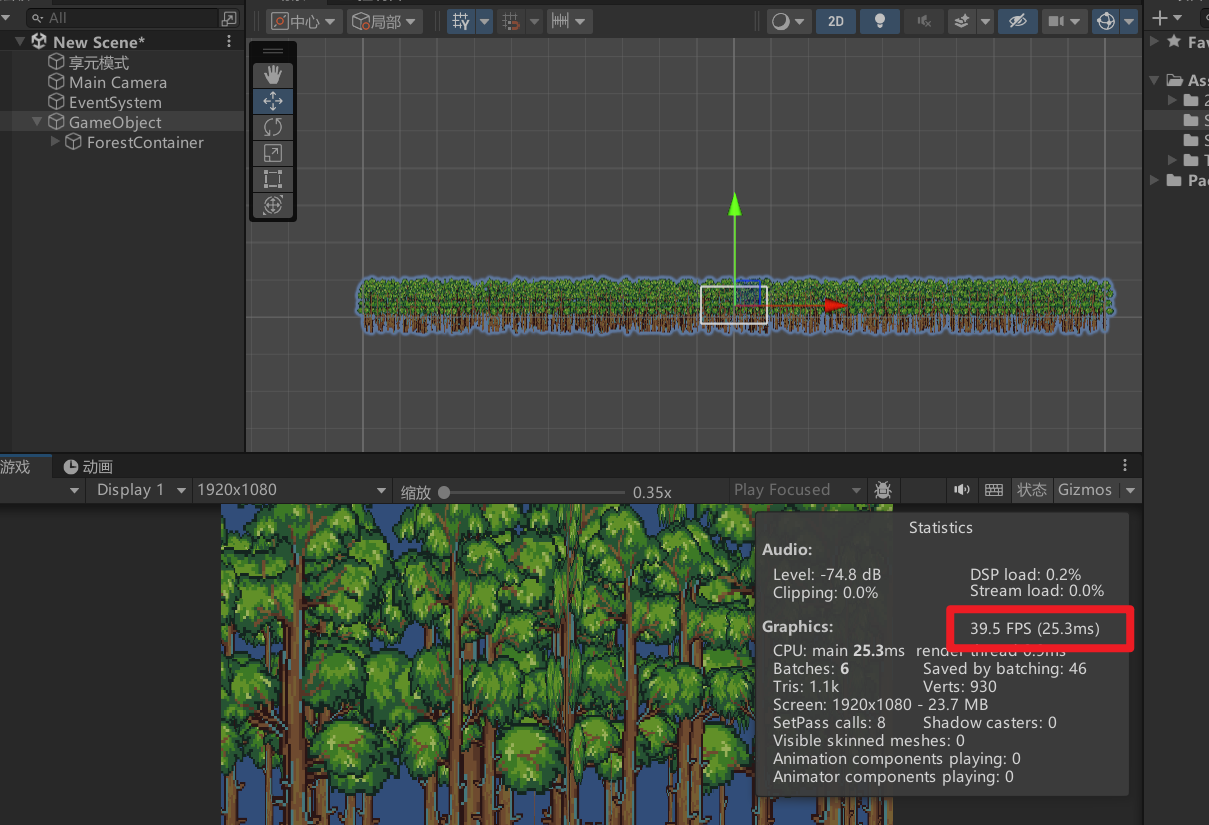
5.运行效果对比
使用享元
可以看到帧率最高能达到120帧。

不使用享元
可以看到帧率直接下降了一半多,提升还是很显著的。
总结
在 Unity 中,享元模式非常适合应用在:
-
大规模场景物体(树、草、岩石)
-
特效实例(同类型粒子)
-
子弹、道具、装饰物
-
UI 中的重复元素
一句话总结就是:
当你发现"很多对象看起来一样,只是位置或状态不同"时,享元模式几乎一定值得考虑。