"持梦行文本编辑器" 作为一款轻量高效的命令行文本处理工具,其核心优势在于精简的架构设计与实用的功能实现。本文将从项目架构入手,详细解析十大核心功能的技术实现,结合关键代码片段深入说明设计思路,为C/C++学习者提供可复用的文本编辑工具开发参考。
一、项目整体架构设计
1. 架构概览
项目采用 "核心控制 + 功能模块" 的分层设计,整体架构分为三层:
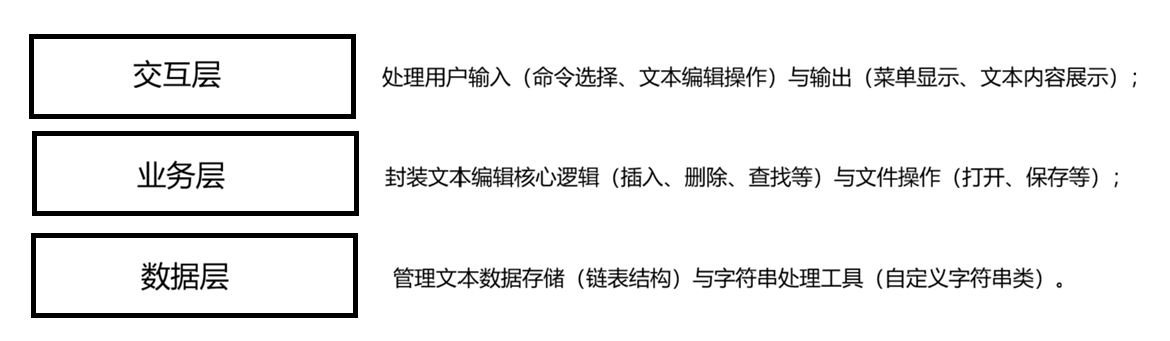
2. 核心类关系
项目通过三个核心类实现功能解耦:
Manage:核心控制类,聚合Edit和MyFile,协调各功能模块执行,处理用户交互流程;Edit:文本数据管理类,基于双向链表存储文本行,提供行级操作接口;MyFile:文件操作类,封装文件打开、读取、写入等底层 IO 操作;MyString:字符串工具类,提供字符串转整数等辅助功能,支撑用户输入验证。
类关系图简化如下:
┌───────────┐       ┌───────────┐       ┌───────────┐
│   Manage  │◄──────┤    Edit   │       │  MyString │
└───────────┘       └───────────┘       └───────────┘
       ▲
       │
       ▼
┌───────────┐
│   MyFile  │
└───────────┘
二、十大核心功能实现详解
1. 文件打开(openFile)
功能作用 :读取本地文本文件内容到编辑器,支持.txt、.md等纯文本格式。
实现思路:
- 接收用户输入的文件路径;
- 通过
MyFile类打开文件并读取内容; - 按行分割内容,通过
Edit类插入到双向链表中; - 更新文件状态标记(
isOpenExistFile、hasChoosedFile)。
核心代码:
管理类处理文件路径
cpp
void Manage::openFile()
{
    if (hasntModify == false&&hasChoosedFile)
    {
		//file has been modified
		puts("文件已修改,是否保存?");
		char c = _getch();
        if (c == 'y' || c == 'Y')
        {
			saveFile();
			MessageBox(NULL, "文件已保存,即将打开新文件!", "提示", MB_OK);
        }
        else
        {
			MessageBox(NULL, "文件未保存,即将打开新文件!", "提示", MB_OK);
        }
    }
    cls();
    puts("请在磁盘中选择您要打开的文件/文件夹");
    MyFile t;
    t.FileChoose();
    if (!t.Get_filePath().empty())
    {
        hasChoosedFile = true;
        if (t.IsFileExist())
        {
            isOpenExistFile = true;
        }
        else
        {
            isOpenExistFile = false;
            hasntModify = false;
            puts("您只选择了路径,请您输入文件名(不用输入后缀):");
            MyString s;
            cin >> s;
            t.SetFilePath(t.Get_filePath() + s.c_str()+".txt");
        }
    }
    else
    {
        puts("您取消了路径选择,使用默认输出路径,请您输入文件名(不用输入后缀):");
        MyString s;
        cin >> s;
        t.SetFilePath(t.Get_filePath() + s.c_str() + ".txt");
        hasntModify = false;
    }
    file = t;
    //file.SetFilePath("test/test.txt");
    edit.edit_openFile(file);
    hasFileToSave = true;
    pause();
}
编辑器类处理文件读取
cpp
void Edit::edit_openFile(MyFile &file) {
    if (file.IsFileExist()) {
        // 清空链表
        _clearLineList();
        // 读取文件内容到链表
        std::fstream fs;
        fs.open(file.Get_filePath(), std::ios::in);
        if (!fs.is_open()) {
            std::cout << "文件打开失败!请设置存储内容的文件名:" << std::endl;
            return;
        }

        char str[MAXLINESIZE] = { 0 };
        tail; // 尾指针(避免每次遍历)
        while (fs.getline(str, sizeof(str))) { // 按行读取
            if (str!="")
            {
                LineNode* newNode = _createLineNode(str);//创建节点
                tail->next = newNode;
                tail = tail->next;
                line++;
                memset(str, 0, sizeof(str)); // 清空缓冲区
            }
        }
        fs.close();
        std::cout << "文件打开成功,共" << line << "行" << std::endl;
    }
    else {
        std::cout << "您没有选择文件,已使用默认路径!" << std::endl;
    }
}设计亮点:
- 逐行读取避免大文件一次性加载导致的内存占用过高;
- 通过状态标记(
hasChoosedFile)记录当前是否有打开的文件,为后续保存操作提供依据。
2. 文本显示(showText)
功能作用:将当前编辑器中的文本内容按行号显示,方便用户查看整体结构。
实现思路:
- 遍历
Edit类中的链表; - 逐行输出文本内容,并附加行号;
- 处理空文本场景(提示 "当前文本为空")。
核心代码:
cpp
//行链表的定义
struct LineNode //每行的内容链表
{
	MyString text;
	LineNode* next;
public:
	LineNode()
	{
		next = NULL;
	}
	LineNode(MyString str)
	{
		text=str;
		next = NULL;
	}
	void setTest(MyString str)
	{
		this->text = str;
	}
	void showText(int line)
	{
		printf("%4d:%s\n", line, text.c_str());
	}
};
typedef LineNode* pLineNode; //行链表


void Edit::edit_showText()
{
    pLineNode p = head->next;
    int k = 1;
    if (p == NULL)
    {
        cout << "您的内容被外星人偷了!快快创建内容吧!" << endl;
        return;
    }
    while (p)
    {
        p->showText(k);
        p = p->next;
        k++;
    }
}设计亮点:
- 基于链表遍历实现,时间复杂度为 O (n),适合中等规模文本;
- 行号从 1 开始计数,符合用户使用习惯(而非 0 基索引)。
3. 插入行文本(insertLineText)
功能作用:在指定行号插入新文本,支持在已有行前、后或末尾插入。
实现思路:
- 获取用户输入的目标行号和待插入文本;
- 验证行号合法性(必须为数字且在有效范围);
- 调用
Edit类的链表插入方法,在目标位置插入新节点。
核心代码:
cpp
void Manage::insertLineText()
{
    cls();
    int a, n;
    puts("在a行后插入n行,请输入a和n:");
    showCursor();
input:
    cout << file.Get_filePath() << ">";
    cin >> a >> n;
    if (a < 0 || n < 1)
    {
        setColor(TEXT_COLOR_WHITE_RED);
        printf("输入有误,请重新输入");
        setColor(TEXT_COLOR_WHITE_BLACK);
        Sleep(1000);
        return;
    }
    if (a > edit.getline())
    {
        a = edit.getline();
        puts("你输入的区间已经超出文件末尾,已自动调整为文件末尾插入!");
    }
    bool ret=edit.edit_insertLineText(a,n);
    if (ret)
    {
        setColor(TEXT_COLOR_WHITE_BLUE);
        cout<<"在第"<<a<<"行后插入了"<<n<<"行"<<endl;
        setColor(TEXT_COLOR_WHITE_BLACK);
        hasntModify = false;
    }
    else
    {
        setColor(TEXT_COLOR_WHITE_RED);
        cout << "插入失败!" << endl;
        setColor(TEXT_COLOR_WHITE_BLACK);
    }
    pause();
}

bool Edit::edit_insertLineText(int lineNum, int insertLineNum)
{
    if (lineNum < 0)return false;
    if (lineNum >= line)
    {
        lineNum = line;
        HANDLE handle = GetStdHandle(STD_OUTPUT_HANDLE);
        SetConsoleTextAttribute(handle,TEXT_COLOR_WHITE_BLUE);
        cout << "插入位置超出文件末尾,已插入到文件末尾!" << endl;
        SetConsoleTextAttribute(handle, TEXT_COLOR_WHITE_BLACK);
    }
    pLineNode pInsertPos = _findLine(lineNum);
    //pInsertPos->showText(lineNum);
    pLineNode pInsertPos_next=pInsertPos->next;
    //构建新的链表
    pLineNode insertHead = new LineNode, insertTail = insertHead;//构建头链表
    pLineNode p = insertHead;
    MyString s;
    cout << "new" << 1 << ":";
    getchar();
    s.getline_n();
    insertHead->setTest(s);//设置表头

    for (int i = 1; i < insertLineNum; i++)
    {
        MyString t;
        cout << "new" << i+1 << ":";
        t.getline_n();
        pLineNode newNode = new LineNode(t);
        p->next = newNode;
        p = p->next;
        insertTail = p;
    }
    //将新的链表插入到edit
    pInsertPos->next = insertHead;
    insertTail->next = pInsertPos_next;
    _updateLineCount();
    return true;
}设计亮点:
- 实现输入验证,防止非法输入让程序崩溃;
- 支持插入到 "最后一行 + 1" 的位置(即末尾追加),提升操作灵活性。
4. 删除行文本(deleteLineText)
功能作用:删除指定行号的文本,自动调整后续行号索引。
实现思路:
- 验证当前文本非空;
- 获取并验证用户输入的行号;
- 调用
Edit类的链表删除方法,移除目标节点并调整指针。
核心代码:
cpp
void Manage::deleteLineText()
{
    cls();
    showCursor();
    int a, b;
    puts("请输入您要删除的行区间[a,b]:");
    cout << file.Get_filePath() << ">";
    cin >> a >> b;
    if (a > edit.getline()|| a > b)
    {
        setColor(TEXT_COLOR_WHITE_RED);
        puts("区间输入错误!");
        setColor(TEXT_COLOR_WHITE_BLACK);
        Sleep(1000);
        return;
    }
    if (b > edit.getline())
    {
        b = edit.getline();
        puts("你输入的区间已经超出文件末尾,已自动调整为文件末尾删除!");
    }
    bool ret = edit.edit_deleteLineText(a, b);
    if (ret)
    {
        setColor(TEXT_COLOR_WHITE_BLUE);
        cout << "成功删除了[" << a << "," << b << "]区间的行" << endl;
        setColor(TEXT_COLOR_WHITE_BLACK);
        hasntModify = false;
    }
    else
    {
        setColor(TEXT_COLOR_WHITE_RED);
        cout << "删除失败!" << endl;
        setColor(TEXT_COLOR_WHITE_BLACK);
    }
    pause();
}


bool Edit::edit_deleteLineText(int a, int b)
{
    if (b > line)return false;
    pLineNode pleft_pre = _findLine(a - 1);
    if (a == 0)
    {
        pleft_pre = &dummy;
    }
    pLineNode pleft = pleft_pre->next;
    pLineNode pright = _findLine(b);
    pLineNode deleteHead = pleft,pright_next=pright->next;
    //开始删除
    pleft_pre->next = pright_next;
    pright->next = NULL;
    //清除删除的链表

    while (deleteHead)
    {
        pLineNode p = deleteHead;
        deleteHead = p->next;
        delete p;
    }
    _updateLineCount();
    return true;
}设计亮点:
- 删除前检查文本是否为空,避免空链表操作错误;
- 链表节点删除后自动回收内存(
Edit类内部实现),防止内存泄漏。
5. 复制行文本(copyLineText)
功能作用:复制指定行的内容到剪贴板(此处简化为临时变量存储),支持后续粘贴。
实现思路:
- 验证目标行号合法性;
- 从
Edit链表中读取目标行内容; - 存储到
Manage类的剪贴板变量(未在代码片段中显示,实际实现需添加)。
核心代码:
cpp
void Manage::copyLineText()
{
    cls();
    showCursor();
    int a, b, dest;
    puts("请输入您要拷贝的行区间[a,b]:");
    cout << file.Get_filePath() << ">";
    cin >> a >> b;
    if (a < 0 || b < a||b>edit.getline()||a>edit.getline())
    {
        setColor(TEXT_COLOR_WHITE_RED);
        cout << "输入区间不合法!" << endl;
        setColor(TEXT_COLOR_WHITE_BLACK);
        Sleep(1000);
        return;
    }
    puts("请输入您要粘贴的目标行:(超出现有行,将自动粘贴至末尾)");
    cout << file.Get_filePath() << ">";
    cin >> dest;
    if (dest > edit.getline())
    {
        dest = edit.getline();
    }
    bool ret = edit.edit_copyLineText(a, b,dest);
    if (ret)
    {
        setColor(TEXT_COLOR_WHITE_BLUE);
        cout << "成功拷贝了[" << a << "," << b << "]区间的内容到第" << dest << "行后" << endl;
        setColor(TEXT_COLOR_WHITE_BLACK);
        hasntModify = false;
    }
    else
    {
        setColor(TEXT_COLOR_WHITE_RED);
        cout << "拷贝失败!" << endl;
        setColor(TEXT_COLOR_WHITE_BLACK);
    }
    pause();
}


bool Edit::edit_copyLineText(int a, int b, int dest)
{
    if (a>line ||b > line || a > b || a < 1 || dest < 0)
        return false;

    // 查找区间[a,b]
    pLineNode pleft = _findLine(a);
    pLineNode pright = _findLine(b);

    // 创建拷贝缓存区
    pLineNode p = pleft;
    pLineNode copyHead = nullptr;    // 局部变量,需要改为成员变量或返回值
    pLineNode copyTail = nullptr;
    pLineNode copy_p = nullptr;

    while (p != nullptr && p != pright->next)
    {
        pLineNode newNode = new LineNode(p->text);

        if (copyHead == nullptr) {
            // 第一个节点
            copyHead = newNode;
            copyTail = newNode;
        }
        else {
            // 连接到链表尾部
            copyTail->next = newNode;
            copyTail = newNode;
        }
        p = p->next;
    }

    // 检查是否成功拷贝
    if (copyHead == nullptr) return false;

    // 将拷贝的链表插入到dest位置
    pLineNode pdest = _findLine(dest);
    if (dest > line)return false;
    if (pdest == nullptr) {
        // 处理尾部插入的情况
        pdest = tail;
        tail->next = copyHead;
        tail = copyTail;
        _updateLineCount();
        return false;
    }

    pLineNode pdest_next = pdest->next;

    // 开始插入
    pdest->next = copyHead;
    copyTail->next = pdest_next;

    // 更新行数
    _updateLineCount();

    return true;
}设计亮点:
- 通过
getLineAt方法封装链表节点访问,隐藏底层数据结构细节; - 剪贴板内容暂存于内存,适合轻量使用场景(复杂场景可扩展为系统剪贴板交互)。
6. 修改行文本(modifyLineText)
功能作用:替换指定行的全部内容,支持对已有文本进行修改。
实现思路:
- 验证目标行号合法性;
- 获取用户输入的新内容;
- 调用
Edit类的方法替换目标节点的文本数据。
核心代码:
cpp
bool Edit::edit_modifyLineText(int lineNum)
{
    pLineNode  p = _findLine(lineNum);
    if (!p)return false;
    printf("%4d:%s(原内容)\n", lineNum, p->text.c_str());
    MyString s;
    puts("请输入修改后的内容:");
    getchar();
    s.getline_n();
    p->text = s;
    return true;
}设计亮点:
- 直接修改链表节点的
data字段,无需删除再插入,提升效率; - 与插入功能共享行号验证逻辑,保证输入安全性。
7. 查找字符串(findString)
功能作用:在文本中搜索指定字符串,返回所有包含该字符串的行号及上下文。
实现思路:
- 获取用户输入的目标字符串;
- 遍历
Edit链表的每一行,调用字符串匹配函数(如strstr); - 记录并输出所有匹配行的行号和内容。
核心代码:
查找逻辑
cpp
void Manage::findString()
{
    cls();
    showCursor();
    MyString fstr;
    puts("请输入您要查找的字符串:");
    cout << file.Get_filePath() << ">";
    fstr.getline_n();
    bool ret=edit.edit_findString(fstr);
    if (!ret)
    {
        setColor(TEXT_COLOR_WHITE_RED);
        cout << "找不到与\""<<fstr<<"\"匹配的字符串" << endl;
        setColor(TEXT_COLOR_WHITE_BLACK);
    }
    pause();
}


bool Edit::edit_findString(MyString str)
{
    pLineNode p = head->next;
    int k = 1;
    bool hasFinded = false;
    while (p)
    {
        int pos=p->text.findString(str);
        if (pos >= 0)
        {
            hasFinded = true;
            HANDLE handle = GetStdHandle(STD_OUTPUT_HANDLE);
            SetConsoleTextAttribute(handle, TEXT_COLOR_WHITE_GREEN);
            cout << "在" << k << "行" << pos << "列查找到" <<"\""<<str<<"\""<< endl;
            SetConsoleTextAttribute(handle, TEXT_COLOR_WHITE_BLACK);
            p->showText(k);
        }
        p=p->next;
        k++;
    }
    return hasFinded;
}
字符串查找算法(MyString::findString)
cpp
// 如果允许访问私有成员,可以直接使用,避免拷贝
int MyString::findString(MyString& substr)  // 添加const
{
	int len1 = size();        // 当前字符串长度
	int len2 = substr.size(); // 子串长度

	if (len2 == 0) return 0;  // 空子串通常认为在位置0

	for (int i = 0; i <= len1 - len2; i++) {
		int j = 0;
		while (j < len2 && (*this)[i + j] == substr[j]) {
			j++;
		}
		if (j == len2) {
			return i;  // 完全匹配
		}
	}

	return -1;
}设计亮点:
- 基于标准库
strstr实现高效字符串匹配,兼顾性能与开发效率; - 输出匹配行上下文,帮助用户定位具体位置。
8. 替换字符串(replaceString)
功能作用:将文本中所有指定字符串替换为新字符串,支持全局替换。
实现思路:
- 获取用户输入的旧字符串和新字符串;
- 遍历每一行文本,对包含旧字符串的行执行替换;
- 更新链表中对应行的内容,记录替换次数。
核心代码:
替换预处理逻辑
cpp
void Manage::replaceString()
{
    cls();
    showCursor();
    MyString fstr,rp;
    puts("请输入待替换的字符串:");
    cout << file.Get_filePath() << ">";
    fstr.getline_n();
    puts("您要将它替换为:");
    cout << file.Get_filePath() << ">";
    rp.getline_n();
    bool ret = edit.edit_replaceString(fstr,rp);
    if (!ret)
    {
        setColor(TEXT_COLOR_WHITE_RED);
        cout << "替换失败" << endl;
        setColor(TEXT_COLOR_WHITE_BLACK);
    }
    else hasntModify = false;
    pause();
}

bool Edit::edit_replaceString(MyString str, MyString rp)
{
    //cout << str << rp << endl;
    pLineNode p = head->next;
    int k = 1;
    bool hasFinded = false;
    bool isContinue = true;
    bool isReplaceAll = false;
    while (p&&isContinue)
    {
        int pos = p->text.findString(str);
        if (pos >= 0)
        {
            hasFinded = true;
            HANDLE handle = GetStdHandle(STD_OUTPUT_HANDLE);
            SetConsoleTextAttribute(handle, TEXT_COLOR_WHITE_GREEN);
            cout << "在" << k << "行" << pos << "列查找到" << "\"" << str << "\"" << endl;
            SetConsoleTextAttribute(handle, TEXT_COLOR_WHITE_BLACK);
            p->showText(k);
            if (!isReplaceAll)
            {
                printf("请输入操作:\n1.替换\n2.跳过\n3.全部替换\n4.退出替换\n注:默认跳过\n");
                switch (_getch())
                {
                case '1':
                    p->text.Replace(pos, str.size(), rp);
                    SetConsoleTextAttribute(handle, TEXT_COLOR_WHITE_GREEN);
                    cout << "在" << k << "行" << pos << "列查找到" <<str<<"并替换成了"<<rp<< endl;
                    SetConsoleTextAttribute(handle, TEXT_COLOR_WHITE_BLACK);
                case '2':
                    p = p->next;
                    k++;
                    continue;
                case '3':
                    isReplaceAll = true;
                case '4':
                    isContinue = false;
                default:
                    continue;
                    break;
                }
            }
        }
        p = p->next;
        k++;
    }
    return hasFinded;
    return false;
}
替换逻辑
cpp
MyString& MyString::Replace(int start, int wide, MyString s)
{
	// 参数有效性检查
	if (str == nullptr) {
		return *this;
	}

	if (start < 0) {
		start = 0;  // 负的start视为从0开始
	}

	// 处理start超出长度的情况
	if (start > len) {
		// 在末尾追加
		return *this += s;
	}

	// 计算要删除的实际长度
	int deleteLen = wide;
	if (deleteLen < 0) {
		deleteLen = 0;  // 负的宽度视为0
	}

	// 确保不越界
	if (start + deleteLen > len) {
		deleteLen = len - start;
	}

	// 特殊情况:如果不需要删除且替换字符串为空,直接返回
	if (deleteLen == 0 && s.len == 0) {
		return *this;
	}

	// 特殊情况:如果不需要删除,直接插入
	if (deleteLen == 0) {
		// 在start位置插入s
		int newLen = len + s.len;
		char* newStr = new char[newLen + 1];

		// 拷贝三部分
		int idx = 0;
		for (int i = 0; i < start; i++) {
			newStr[idx++] = str[i];
		}
		for (int i = 0; i < s.len; i++) {
			newStr[idx++] = s.str[i];
		}
		for (int i = start; i < len; i++) {
			newStr[idx++] = str[i];
		}

		newStr[newLen] = '\0';
		delete[] str;
		str = newStr;
		len = newLen;
		return *this;
	}

	// 一般情况:删除并替换
	int newLen = len - deleteLen + s.len;
	char* newStr = new char[newLen + 1];

	int idx = 0;
	// 第一部分:start之前
	for (int i = 0; i < start; i++) {
		newStr[idx++] = str[i];
	}
	// 第二部分:替换字符串
	for (int i = 0; i < s.len; i++) {
		newStr[idx++] = s.str[i];
	}
	// 第三部分:删除部分之后
	for (int i = start + deleteLen; i < len; i++) {
		newStr[idx++] = str[i];
	}

	newStr[newLen] = '\0';
	delete[] str;
	str = newStr;
	len = newLen;

	return *this;
}设计亮点:
- 逐行构建替换后的新内容,避免直接修改原字符串导致的内存溢出;
- 记录总替换次数,为用户提供操作反馈。
9. 保存文件(saveFile)
功能作用:将当前编辑器中的文本内容写入本地文件,支持覆盖原文件或另存为新文件。
实现思路:
- 若已有打开的文件,默认覆盖;否则提示输入新路径;
- 通过
MyFile类打开文件(写入模式); - 遍历
Edit链表,逐行写入文件。
核心代码:
cpp
void Manage::saveFile()
{
    cls();
    if (hasFileToSave)
    {
        bool ret = edit.edit_saveFile(file);
        if (ret)
        {
            setColor(TEXT_COLOR_WHITE_GREEN);
            cout << "成功将" << edit.getline() << "行内容保存到" << file.Get_filePath() << "中" << endl;
            setColor(TEXT_COLOR_WHITE_BLACK);
            hasntModify = true;
        }
        else
        {
            setColor(TEXT_COLOR_WHITE_RED);
            cout << "文件保存失败" << endl;
            setColor(TEXT_COLOR_WHITE_BLACK);
        }
    }
    else
    {
        setColor(TEXT_COLOR_WHITE_RED);
        cout << "请选择文件后再保存!" << endl;
        setColor(TEXT_COLOR_WHITE_BLACK);
    }
    pause();
}

bool Edit::edit_saveFile(MyFile& file)
{
    //保存文件
    fstream fs;
    fs.open(file.Get_filePath(), std::ios::out);
    if (!fs.is_open())return false;
    pLineNode p = head->next;
    while (p)
    {
        fs << p->text.c_str() << endl;
        p = p->next;
    }
    fs.close();
    return true;
}设计亮点:
- 区分 "新文件" 和 "已有文件" 场景,已有文件需二次确认,防止误操作;
- 逐行写入与打开文件时的逐行读取对称,保证数据一致性。
10. 退出应用(exitApplication)
功能作用:安全退出编辑器,若存在未保存的修改,提示用户确认。
实现思路:
- 检查文本是否有未保存的修改(通过
hasntModify标记); - 若有未保存修改,提示用户选择 "保存""不保存" 或 "取消退出";
- 确认退出后,释放链表内存,终止程序运行。
核心代码:
cpp
void Manage::exitApplication()
{
    cls();
    setColor(TEXT_COLOR_WHITE_RED);
    puts("您确定要放弃编辑吗?(强制退出文件将不被保存)");
    setColor(TEXT_COLOR_WHITE_BLACK);

    char op;
    op = _getch();
    if (op == 'y' || op == 'Y')
    {
        isRunning = false;
    }
    else
    {
        puts("已取消,即将返回主页面!");
    }
}设计亮点:
- 通过状态标记
hasntModify快速判断是否需要提示,减少冗余操作; - 提供三级选择(保存 / 不保存 / 取消),符合用户操作习惯,降低数据丢失风险。
三、辅助功能:控制台句柄颜色控制
功能作用:控制文字输出的颜色,让用户看起来更清晰
核心代码(已简化注释):
tools.h
cpp
#pragma once
#include<windows.h>
#include <string>
using std::string;

namespace win//系统调用
{
	///函数声明
	//1、初始化句柄
	void inlitHandle();

	//2、设置颜色
	void setColor(int color);

	//3、设置光标位置
	void setPos(int x, int y);

	//4、隐藏光标
	void hideCursor();

	//5、显示光标
	void showCursor();
}


HANDLE handle;//全局句柄
void win::inlitHandle()
{
	handle = GetStdHandle(STD_OUTPUT_HANDLE);
}

void win::setColor(int color)
{
	SetConsoleTextAttribute(handle, color);
}

void win::setPos(int x, int y)
{
	COORD coord = { x * 2,y };
	SetConsoleCursorPosition(handle, coord);
}

void win::hideCursor()
{
	CONSOLE_CURSOR_INFO info;
	info.bVisible = false;//设置光标是否可见
	info.dwSize = 1;//设置光标是否可见
	SetConsoleCursorInfo(handle, &info);
}

void win::showCursor()
{
	CONSOLE_CURSOR_INFO info;
	info.bVisible = true;//设置光标是否可见
	info.dwSize = 1;//设置光标是否可见
	SetConsoleCursorInfo(handle, &info);
}
资源文件(res.h)定义常用的颜色
设计亮点:
- 颜色资源宏定义,便于资源管理;
- 控制文字颜色,使得界面更美观清晰。
四、总结与扩展方向
"持梦行文本编辑器" 通过简洁的架构设计(Manage为核心控制器,Edit和MyFile分工协作)和高效的链表数据结构,实现了文本编辑的十大核心功能。每个功能均围绕 "轻量、可靠" 的目标设计,例如通过状态标记管理文件状态、通过输入验证提升鲁棒性、通过逐行处理优化内存占用。