Google Gemini 是一款非常强大的 AI 对话系统,只要输入提示词,就能在短短几秒内生成流畅自然的回复。Gemini 都能提供令人惊叹的智能协助,极大地提高了人类的工作效率和创造力。
本文档主要介绍 Gemini Chat Completion API 操作的使用流程,利用它我们可以轻松使用官方 Gemini 的对话功能。
申请流程
要使用 Gemini Chat Completion API,首先可以到 Gemini Chat Completion API 页面点击「Acquire」按钮,获取请求所需要的凭证:

如果你尚未登录或注册,会自动跳转到登录页面邀请您来注册和登录,登录注册之后会自动返回当前页面。
在首次申请时会有免费额度赠送,可以免费使用该 API。
基本使用
接下来就可以在界面上填写对应的内容,如图所示:

在第一次使用该接口时,我们至少需要填写三个内容,一个是 authorization,直接在下拉列表里面选择即可。另一个参数是 model, model 就是我们选择使用 Gemini 官网模型类别,这里我们主要有 6 种模型,详情可以看我们提供的模型。最后一个参数是messages,messages是我们输入的提问词数组,它是一个数组,表示可以同时上传多个提问词,每个提问词包含了 role 和 content,其中 role 表示提问者的角色,我们提供了三种身份,分别为 user 、assistant、system 。另一个 content 就是我们提问的具体内容。
同时您可以注意到右侧有对应的调用代码生成,您可以复制代码直接运行,也可以直接点击「Try」按钮进行测试。
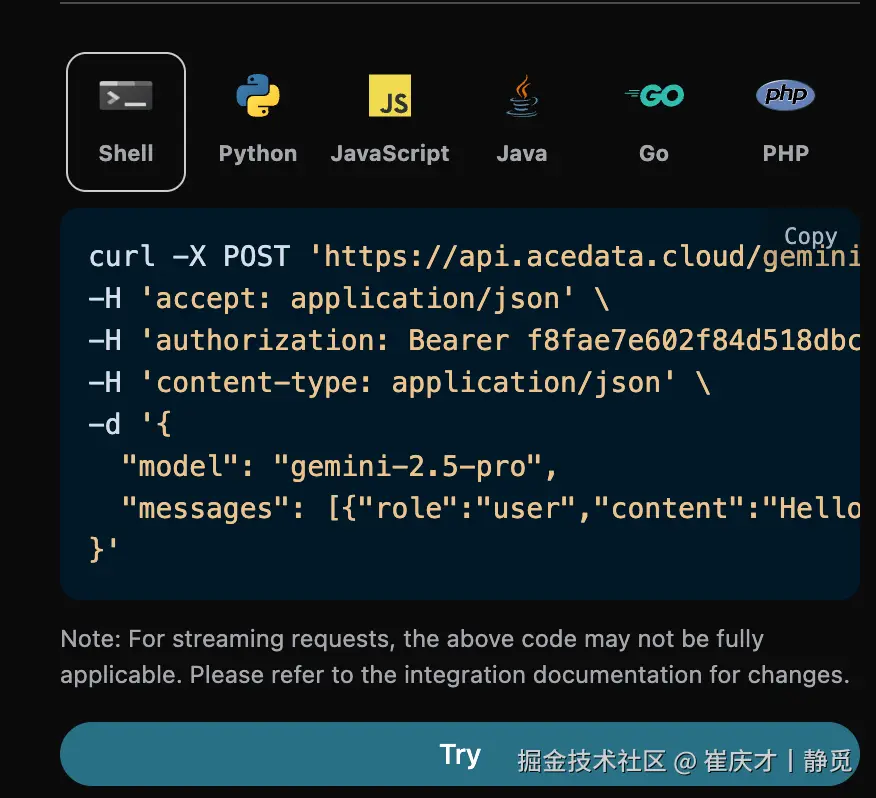
调用之后,我们发现返回结果如下:
json
{
  "id": "chatcmpl-20251122212413908150493uPhjTUO9",
  "model": "gemini-2.5-pro",
  "object": "chat.completion",
  "created": 1763817866,
  "choices": [
    {
      "index": 0,
      "message": {
        "role": "assistant",
        "content": "I am a large language model, trained by Google.",
        "reasoning_content": "**My Reasoning: Answering the User's Question**\n\nOkay, here's how I'm going to approach answering the user's question, \"What model are you?\". The core is to be direct and informative. First, I have to be clear about my origin. Then, I need to make sure the explanation is accessible, given that the user may not be familiar with technical jargon. I need to explain what a \"large language model\" actually *does*, and provide relatable examples. I know the user might be looking for a specific name, like other models have, so I'll address that directly and then wrap it up with an invitation to continue.\n\nSo, here's my plan:\n\n1.  **Lead with the key info:** I'll begin by stating that I am a large language model created by Google. That is the fundamental, most critical piece of the puzzle.\n2.  **Define the buzzword:** Then, I'll explain that \"large language model\" in simple terms. I'll explain what I *do* - process and generate text; how I *do* it - by training on huge amounts of text data; and the *goal* - to be able to communicate like a human.\n3.  **Provide context:** After that, to make the concept even clearer, I'll provide a list of examples of my capabilities. I'll mention things like answering questions, summarizing texts, writing stories, translating languages, and brainstorming ideas.\n4.  **Acknowledge the lack of a personal name:** I'll anticipate the likely question about a model name (like ChatGPT) by clearly stating that I don't have a personal name and that it's best to think of me as an AI assistant from Google.\n5.  **End with an invitation:** Lastly, I'll end with a simple, friendly question to invite further interaction and to guide the conversation.\n\nWith this approach, I am confident I can successfully answer this important question.\n"
      },
      "finish_reason": "stop"
    }
  ],
  "usage": {
    "prompt_tokens": 8,
    "completion_tokens": 932,
    "total_tokens": 940,
    "prompt_tokens_details": {
      "cached_tokens": 0,
      "text_tokens": 8,
      "audio_tokens": 0,
      "image_tokens": 0
    },
    "completion_tokens_details": {
      "text_tokens": 0,
      "audio_tokens": 0,
      "reasoning_tokens": 921
    },
    "input_tokens": 0,
    "output_tokens": 0,
    "input_tokens_details": null,
    "claude_cache_creation_5_m_tokens": 0,
    "claude_cache_creation_1_h_tokens": 0
  }
}
返回结果一共有多个字段,介绍如下:
id,生成此次对话任务的 ID,用于唯一标识此次对话任务。model,选择的 Gemini 官网模型。choices,Gemini 针对提问词给于的回答信息。usage:针对本次问答对 token 的统计信息。
其中 choices 是包含了 Gemini 的回答信息,它里面的 choices 是 Gemini回答的具体信息,可以发现如图所示。

可以看到,choices 里面的 content 字段包含了 Gemini 回复的具体内容。
流式响应
该接口也支持流式响应,这对网页对接十分有用,可以让网页实现逐字显示效果。
如果想流式返回响应,可以更改请求头里面的 stream 参数,修改为 true。
修改如图所示,不过调用代码需要有对应的更改才能支持流式响应。
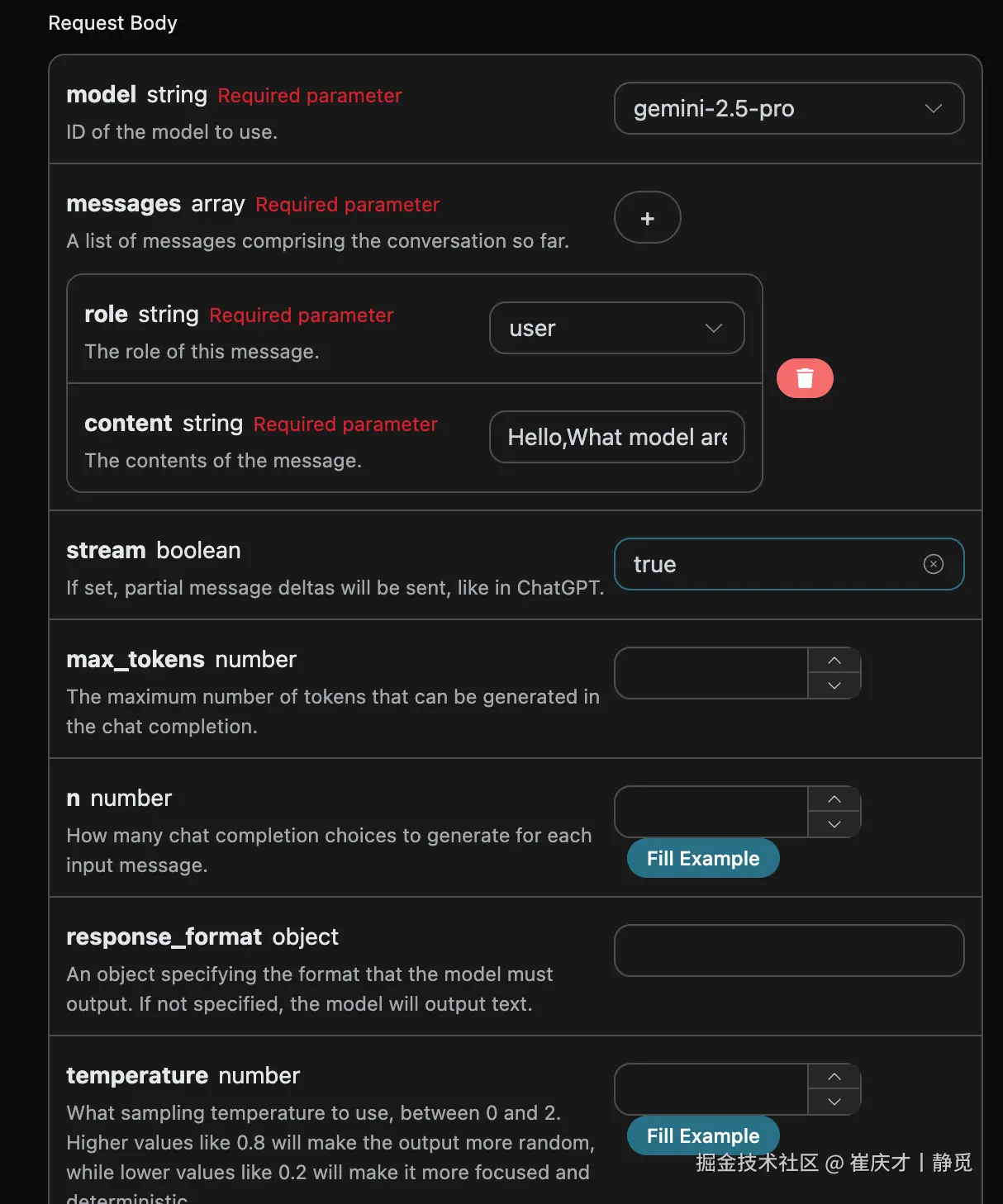
将 stream 修改为 true 之后,API 将逐行返回对应的 JSON 数据,在代码层面我们需要做相应的修改来获得逐行的结果。
Python 样例调用代码:
python
import requests

url = "https://api.acedata.cloud/gemini/chat/completions"

headers = {
    "accept": "application/json",
    "authorization": "Bearer {token}",
    "content-type": "application/json"
}

payload = {
    "model": "gemini-2.5-pro",
    "messages": [{"role":"user","content":"Hello,What model are you?"}],
    "stream": True
}

response = requests.post(url, json=payload, headers=headers)
print(response.text)
输出效果如下:
json
data: {"id": "chatcmpl-20251122214038810722821kNjUTjtr", "object": "chat.completion.chunk", "created": 1763818842, "model": "gemini-2.5-pro", "system_fingerprint": null, "choices": [{"delta": {"content": "", "role": "assistant"}, "logprobs": null, "finish_reason": null, "index": 0}], "usage": null}

data: {"id": "chatcmpl-20251122214038810722821kNjUTjtr", "object": "chat.completion.chunk", "created": 1763818842, "model": "gemini-2.5-pro", "system_fingerprint": null, "choices": [{"delta": {"reasoning_content": "**Define My Nature**\n\nMy thinking has started. The user wants to know my nature, asking a direct \"what are you?\" The initial step was straightforward: identifying the query. Now, I recall my fundamental identity: I'm a large language model. This is the core truth I aim to convey.\n\n\n"}, "logprobs": null, "finish_reason": null, "index": 0}], "usage": null}

data: {"id": "chatcmpl-20251122214038810722821kNjUTjtr", "object": "chat.completion.chunk", "created": 1763818842, "model": "gemini-2.5-pro", "system_fingerprint": null, "choices": [{"delta": {"reasoning_content": "**Refining My Response**\n\nI've added the crucial information that I'm trained by Google to the basic \"large language model\" identity. My next step is considering what being a \"large language model\" actually entails, so I can explain my core capabilities. I'm focusing on providing context without going into specific technical details or model names. I want to convey my function in a way the user can easily understand.\n\n\n"}, "logprobs": null, "finish_reason": null, "index": 0}], "usage": null}

data: {"id": "chatcmpl-20251122214038810722821kNjUTjtr", "object": "chat.completion.chunk", "created": 1763818842, "model": "gemini-2.5-pro", "system_fingerprint": null, "choices": [{"delta": {"reasoning_content": "**Confirming Core Identity**\n\nI'm now solidifying my response. The user's query about my model affiliation needs a focused answer. I've pinpointed that \"trained by Google\" is essential, providing key context. I'm resisting the urge to mention any specific model names, as it's not relevant. The aim is to deliver a direct, accurate statement. My goal remains a clear and concise reply, avoiding technical jargon and getting straight to the relevant point.\n\n\n"}, "logprobs": null, "finish_reason": null, "index": 0}], "usage": null}

data: {"id": "chatcmpl-20251122214038810722821kNjUTjtr", "object": "chat.completion.chunk", "created": 1763818842, "model": "gemini-2.5-pro", "system_fingerprint": null, "choices": [{"delta": {"content": "I am a large language model, trained by Google."}, "logprobs": null, "finish_reason": null, "index": 0}], "usage": null}

data: {"id": "chatcmpl-20251122214038810722821kNjUTjtr", "object": "chat.completion.chunk", "created": 1763818842, "model": "gemini-2.5-pro", "system_fingerprint": null, "choices": [{"delta": {}, "logprobs": null, "finish_reason": "stop", "index": 0}], "usage": null}

data: {"id": "chatcmpl-20251122214038810722821kNjUTjtr", "object": "chat.completion.chunk", "created": 1763818842, "model": "gemini-2.5-pro", "system_fingerprint": "", "choices": [], "usage": {"prompt_tokens": 8, "completion_tokens": 527, "total_tokens": 535, "prompt_tokens_details": {"cached_tokens": 0, "text_tokens": 8, "audio_tokens": 0, "image_tokens": 0}, "completion_tokens_details": {"text_tokens": 0, "audio_tokens": 0, "reasoning_tokens": 519}, "input_tokens": 0, "output_tokens": 0, "input_tokens_details": null, "claude_cache_creation_5_m_tokens": 0, "claude_cache_creation_1_h_tokens": 0}}

data: [DONE]
可以看到,响应里面有许多 data ,data 里面的 choices 即为最新的回答内容,与上文介绍的内容一致。choices 是新增的回答内容,您可以根据结果来对接到您的系统中。同时流式响应的结束是根据 data 的内容来判断的,如果内容为 [DONE],则表示流式响应回答已经全部结束。返回的 data 结果一共有多个字段,介绍如下:
id,生成此次对话任务的 ID,用于唯一标识此次对话任务。model,选择的 Gemini 官网模型。choices,Gemini 针对提问词给于的回答信息。
JavaScript 也是支持的,比如 Node.js 的流式调用代码如下:
javascript
const options = {
  method: "post",
  headers: {
    "accept": "application/json",
    "authorization": "Bearer {token}",
    "content-type": "application/json"
  },
  body: JSON.stringify({
    "model": "gemini-2.5-pro",
    "messages": [{"role":"user","content":"Hello,What model are you?"}],
    "stream": true
  })
};

fetch("https://api.acedata.cloud/gemini/chat/completions", options)
  .then(response => response.json())
  .then(response => console.log(response))
  .catch(err => console.error(err));
Java 样例代码:
java
JSONObject jsonObject = new JSONObject();
jsonObject.put("model", "gemini-2.5-pro");
jsonObject.put("messages", [{"role":"user","content":"Hello,What model are you?"}]);
jsonObject.put("stream", true);
MediaType mediaType = "application/json; charset=utf-8".toMediaType();
RequestBody body = jsonObject.toString().toRequestBody(mediaType);
Request request = new Request.Builder()
  .url("https://api.acedata.cloud/gemini/chat/completions")
  .post(body)
  .addHeader("accept", "application/json")
  .addHeader("authorization", "Bearer {token}")
  .addHeader("content-type", "application/json")
  .build();

OkHttpClient client = new OkHttpClient();
Response response = client.newCall(request).execute();
System.out.print(response.body!!.string())
其他语言可以另外自行改写,原理都是一样的。
多轮对话
如果您想要对接多轮对话功能,需要对 messages 字段上传多个提问词,多个提问词的具体示例如下图所示:
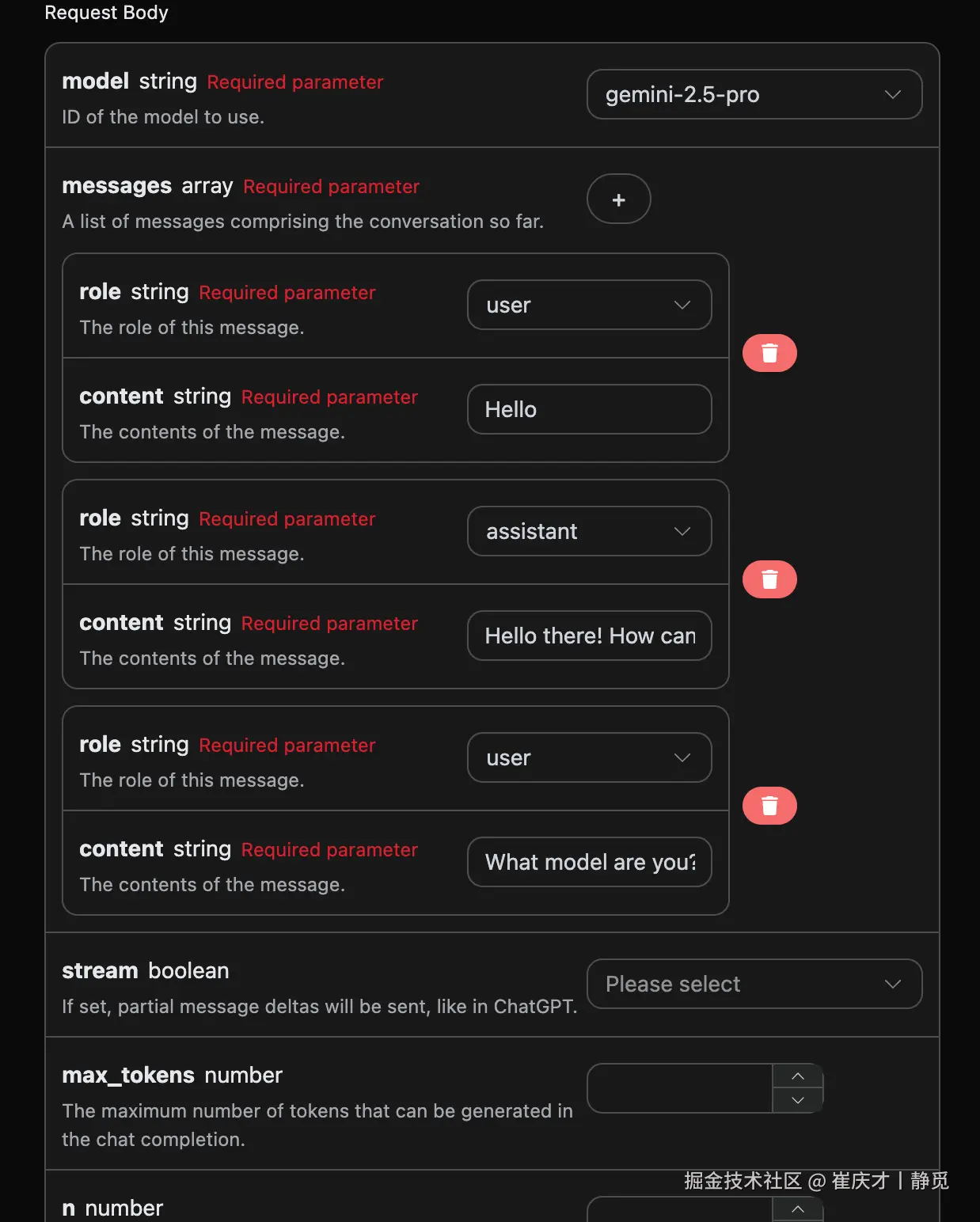
Python 样例调用代码:
python
import requests

url = "https://api.acedata.cloud/gemini/chat/completions"

headers = {
    "accept": "application/json",
    "authorization": "Bearer {token}",
    "content-type": "application/json"
}

payload = {
    "model": "gemini-2.5-pro",
    "messages": [{"role":"user","content":"Hello"},{"role":"assistant","content":"Hello there! How can I help you today?"},{"role":"user","content":"What model are you?"}]
}

response = requests.post(url, json=payload, headers=headers)
print(response.text)
通过上传多个提问词,就可以轻松实现多轮对话,可以得到如下回答:
json
{
  "id": "chatcmpl-20251122214426669120974AKFwnJd1",
  "model": "gemini-2.5-pro",
  "object": "chat.completion",
  "created": 1763819072,
  "choices": [
    {
      "index": 0,
      "message": {
        "role": "assistant",
        "content": "I am a large language model, trained by Google.",
        "reasoning_content": "Okay, here's how I'd approach this, thinking as a sophisticated AI:\n\nFirst, the user is directly querying my core identity: \"What model are you?\" That's a simple, straightforward question. My primary task is to provide accurate and helpful information, so I need to answer this immediately.\n\nRight off the bat, I know the answer. I *am* a large language model. That's my fundamental architecture and operational principle. I'm built on a vast network of connections and trained on a massive dataset.\n\nThen I must add the necessary context. Crucially, I have to provide the source of my training. I *was* trained by Google. That's a key identifier. It provides the user with valuable information about my origin and potential biases (though I'm trained to mitigate them).\n\nNow I must construct the response. My goal is to be factual, concise, and understandable.\n\nThe synthesized response is something like: \"I am a large language model, trained by Google.\"\n\nI have to assess the output: Does it meet the criteria? It's clear. It states what I am, it includes a critical piece of information on my origins, and it avoids jargon. No misleading promises.\n\nFinal verification: Does it actually answer the question? Yes. Is the information correct and truthful? Yes. Is it concise? Absolutely. Is the tone appropriate for any user? Yes. And, finally, this is the standard, approved response. Excellent.\n"
      },
      "finish_reason": "stop"
    }
  ],
  "usage": {
    "prompt_tokens": 16,
    "completion_tokens": 265,
    "total_tokens": 281,
    "prompt_tokens_details": {
      "cached_tokens": 0,
      "text_tokens": 16,
      "audio_tokens": 0,
      "image_tokens": 0
    },
    "completion_tokens_details": {
      "text_tokens": 0,
      "audio_tokens": 0,
      "reasoning_tokens": 254
    },
    "input_tokens": 0,
    "output_tokens": 0,
    "input_tokens_details": null,
    "claude_cache_creation_5_m_tokens": 0,
    "claude_cache_creation_1_h_tokens": 0
  }
}可以看到,choices 包含的信息与基本使用的内容是一致的,这个包含了 Gemini 针对多个对话进行回复的具体内容,这样就可以根据多个对话内容来回答对应的问题了。
Gemini-3.0 多模态模型
请求样例:
json
{
  "model": "gemini-3.0-pro",
  "messages": [
    {
      "role": "user",
      "content": [
        {
          "type": "text",
          "text": "图片的内容是什么?"
        },
        {
          "type": "image_url",
          "image_url": {
            "url": "https://cdn.acedata.cloud/qzx2z1.png"
          }
        }
      ]
    }
  ],
  "stream": false
}
样例结果:
json
{
    "id": "chatcmpl-20251206001815715692730UVZe38kB",
    "model": "gemini-3.0-pro",
    "object": "chat.completion",
    "created": 1764951548,
    "choices": [
        {
            "index": 0,
            "message": {
                "role": "assistant",
                "content": "这是一张年轻女性的户外半身人像照片。\n\n以下是图片的主要内容描述:\n\n*   **人物外貌**:照片中的女孩留着一头乌黑柔顺的长直发,五官清秀,皮肤白皙。她面带温柔的微笑,目光注视着镜头。\n*   **穿着打扮**:她穿着一件米白色或浅杏色的泡泡袖上衣,外面搭配着黑色的衣物(看起来像是背带裙或马甲)。\n*   **光影氛围**:阳光从左侧后方照射过来,洒在她的头发上,形成了一圈温暖的金黄色光晕,营造出一种清新、唯美的氛围。\n*   **背景**:背景被虚化处理,可以看出是在户外,身后是一条空旷的路面(柏油路)以及路边的绿色树木。\n\n整体来看,这张照片给人一种甜美、阳光和邻家女孩的感觉。"
            },
            "finish_reason": "stop"
        }
    ],
    "usage": {
        "prompt_tokens": 1092,
        "completion_tokens": 1271,
        "total_tokens": 2363,
        "prompt_tokens_details": {
            "cached_tokens": 0,
            "text_tokens": 4,
            "audio_tokens": 0,
            "image_tokens": 0
        },
        "completion_tokens_details": {
            "text_tokens": 0,
            "audio_tokens": 0,
            "reasoning_tokens": 1072
        },
        "input_tokens": 0,
        "output_tokens": 0,
        "input_tokens_details": null,
        "claude_cache_creation_5_m_tokens": 0,
        "claude_cache_creation_1_h_tokens": 0
    }
}
当然你也可以传如视频的链接,具体的输入如下:
json
{
  "model": "gemini-3.0-pro",
  "messages": [
    {
      "role": "user",
      "content": [
        {
          "type": "text",
          "text": "视频的内容是什么?"
        },
        {
          "type": "image_url",
          "image_url": {
            "url": "https://cdn.acedata.cloud/58yioe.mp4"
          }
        }
      ]
    }
  ],
  "stream": false
}
样例结果:
json
{
    "id": "chatcmpl-20251206002711949677736JC9yL8AE",
    "model": "gemini-3.0-pro",
    "object": "chat.completion",
    "created": 1764952060,
    "choices": [
        {
            "index": 0,
            "message": {
                "role": "assistant",
                "content": "这段视频的内容充满趣味,主要展示了一只**橘猫**在黄昏时分的乡间公路上自信小跑的情景。\n\n具体细节如下:\n\n1.  **画面内容**:\n    *   主角是一只橘色的虎斑猫。\n    *   背景是夕阳西下(或清晨)的时刻,光线金黄柔和。路边有木质栅栏和旷野,远处还有一个行人的剪影。\n    *   镜头采用了低角度拍摄,时而拍摄猫咪迎面跑来,时而拍摄它离去的背影,还有猫咪面部和花纹的特写。\n\n2.  **声音特点(关键点)**:\n    *   视频的配音非常有特色。虽然画面是轻盈的猫咪在跑,但配上的声音却是**沉重且有节奏的马蹄声**(或者是类似木屐/高跟鞋敲击路面的声音)。\n    *   这种声音与画面的反差制造了一种幽默感,仿佛这只猫咪把自己当成了一匹正在驰骋的骏马。\n\n总的来说,这是一个利用音画反差来制造萌点和笑点的宠物视频。"
            },
            "finish_reason": "stop"
        }
    ],
    "usage": {
        "prompt_tokens": 915,
        "completion_tokens": 1423,
        "total_tokens": 2338,
        "prompt_tokens_details": {
            "cached_tokens": 0,
            "text_tokens": 5,
            "audio_tokens": 0,
            "image_tokens": 0
        },
        "completion_tokens_details": {
            "text_tokens": 0,
            "audio_tokens": 0,
            "reasoning_tokens": 1162
        },
        "input_tokens": 0,
        "output_tokens": 0,
        "input_tokens_details": null,
        "claude_cache_creation_5_m_tokens": 0,
        "claude_cache_creation_1_h_tokens": 0
    }
}
从上面可以看出是Gemini 3.0模型可以支持多模态的理解的。
错误处理
在调用 API 时,如果遇到错误,API 会返回相应的错误代码和信息。例如:
400 token_mismatched:Bad request, possibly due to missing or invalid parameters.400 api_not_implemented:Bad request, possibly due to missing or invalid parameters.401 invalid_token:Unauthorized, invalid or missing authorization token.429 too_many_requests:Too many requests, you have exceeded the rate limit.500 api_error:Internal server error, something went wrong on the server.
错误响应示例
json
{
  "success": false,
  "error": {
    "code": "api_error",
    "message": "fetch failed"
  },
  "trace_id": "2cf86e86-22a4-46e1-ac2f-032c0f2a4e89"
}
结论
通过本文档,您已经了解了如何使用 Gemini Chat Completion API 轻松实现官方 Gemini 的对话功能。希望本文档能帮助您更好地对接和使用该 API。如有任何问题,请随时联系我们的技术支持团队。