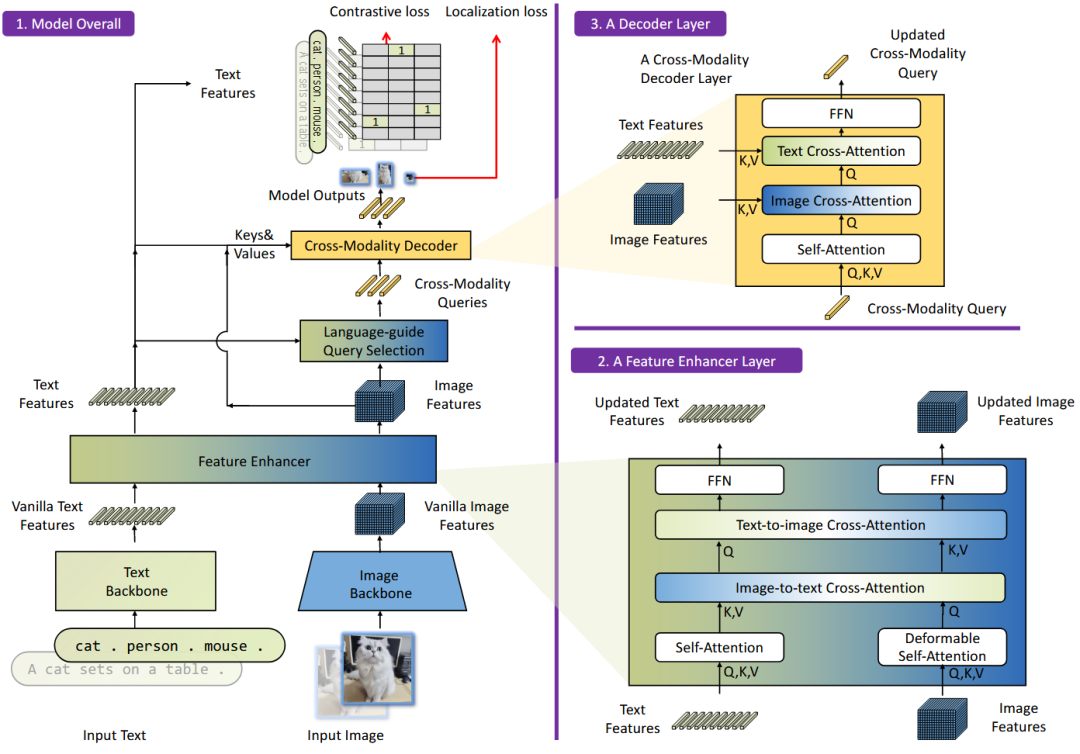
前言:关于论文的介绍:请参考下列文章
论文推荐:Grounding DINO: Marrying DINO with Grounded Pre-Training
一、准备工作
1.1 代码准备
由于Grounding DINO官方并没有开源训练代码,所以这里使用第三方代码Open Grounding DINO,代码链接如下:
https://github.com/longzw1997/Open-GroundingDino这里省去环境配置,此外,还需要准备一些权重文件和配置文件
第一,以下两种Grounding DINO官方提供的预训练模型权重
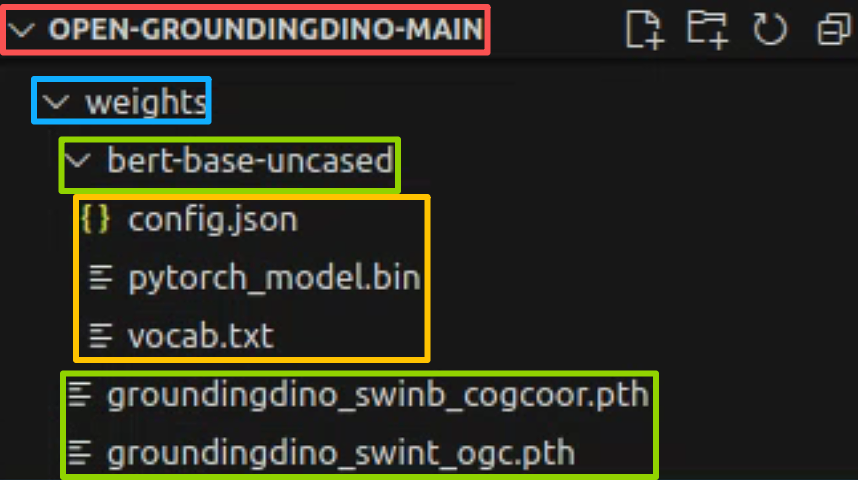
weight1: groundingdino_swinb_cogcoor.pthweight1 link: https://huggingface.co/ShilongLiu/GroundingDINO/blob/main/groundingdino_swinb_cogcoor.pthweight2: groundingdino_swint_ogc.pthweight2 link: https://huggingface.co/ShilongLiu/GroundingDINO/blob/main/groundingdino_swint_ogc.pth第二,bert权重,配置文件和词汇表(补充:Grounding DINO能跳出词汇提示进一步使用字句也是因为使用了bert)
config.json:https://huggingface.co/google-bert/bert-base-uncased/blob/main/config.jsonpytorch_model.bin:https://huggingface.co/google-bert/bert-base-uncased/blob/main/pytorch_model.binvocab.txt:https://huggingface.co/google-bert/bert-base-uncased/blob/main/vocab.txt上面文件,不方便下载的请使用下列链接,都放在一起:
通过网盘分享的文件:DINO Checkpoint.zip链接: https://pan.baidu.com/s/11RF4sF-Ckuv-I5JZcqhrjw?pwd=58fc 提取码: 58fc --来自百度网盘超级会员v8的分享通过网盘分享的文件:bert-base-uncased.zip链接: https://pan.baidu.com/s/1PtmKlmS2pQZ2KAaoTJRy-w?pwd=wp5u 提取码: wp5u --来自百度网盘超级会员v9的分享第三,按照下面的步骤将第一步和第二步下载的数据放到open grounding dino库中;
1.2 数据准备
为了方便进行复现,这里使用COCO的小批量数据进行验证,推荐一个数据链接如下:
tiny_coco_dataset:https://github.com/lizhogn/tiny_coco_dataset值得注意的是,COCO数据集的类别id是从1开始的,而open grounding dino的类别id是从0开始的,因此,我们要在做数据集的时候要注意,下面一步步介绍
第一步,tiny_coco_dataset介绍,下载的数据结构如下
tiny_coco_dataset-master/└──tiny_coco/│ ├──annotations/│ │ ├──instances_train2017.json │ │ ├──instances_val2017.json │ │ └──...json #coco格式的val.json│ ├──train2017/│ │ └──...jpg #训练集图片│ └── val2017/│ └──...jpg #验证集图片│ └──LICENSE│ └──README.md│ └──split_coco_dataset.py第二步,我们只需要用到tiny_coco_dataset中的图像和实例json
instances_train2017.jsoninstances_val2017.json train2017val2017然后我们需要进行如下步骤数据准备
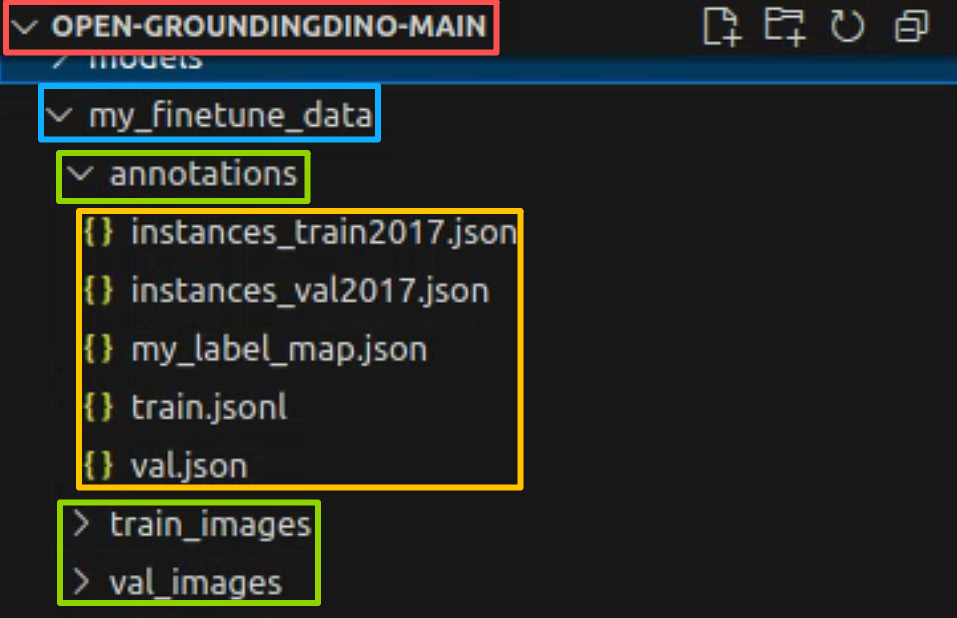
1.在open grounding dino库中新建my_finetune_data文件夹,并把
train2017val2017这两个图片的文件夹改为
train_imagesval_images将两个json文件夹放到annotation文件中
instances_train2017.jsoninstances_val2017.json 新建三个文件
my_label_map.jsontrain.jsonlval.json其中my_label_map.json文件如下,可以看到文件夹的id索引是从0开始的,注意,这和coco默认的索引从1开始并不相同。(还注意到coco的原来的数据类别并不连续,虽然有80类,但序号从1不连续排序到了90,而open grounding dino训练的类别是从0开始的,且需要连续排序,因此这里序号从0到了79)
python
{
    "0": "person",
    "1": "bicycle",
    "2": "car",
    "3": "motorcycle",
    "4": "airplane",
    "5": "bus",
    "6": "train",
    "7": "truck",
    "8": "boat",
    "9": "traffic light",
    "10": "fire hydrant",
    "11": "stop sign",
    "12": "parking meter",
    "13": "bench",
    "14": "bird",
    "15": "cat",
    "16": "dog",
    "17": "horse",
    "18": "sheep",
    "19": "cow",
    "20": "elephant",
    "21": "bear",
    "22": "zebra",
    "23": "giraffe",
    "24": "backpack",
    "25": "umbrella",
    "26": "handbag",
    "27": "tie",
    "28": "suitcase",
    "29": "frisbee",
    "30": "skis",
    "31": "snowboard",
    "32": "sports ball",
    "33": "kite",
    "34": "baseball bat",
    "35": "baseball glove",
    "36": "skateboard",
    "37": "surfboard",
    "38": "tennis racket",
    "39": "bottle",
    "40": "wine glass",
    "41": "cup",
    "42": "fork",
    "43": "knife",
    "44": "spoon",
    "45": "bowl",
    "46": "banana",
    "47": "apple",
    "48": "sandwich",
    "49": "orange",
    "50": "broccoli",
    "51": "carrot",
    "52": "hot dog",
    "53": "pizza",
    "54": "donut",
    "55": "cake",
    "56": "chair",
    "57": "couch",
    "58": "potted plant",
    "59": "bed",
    "60": "dining table",
    "61": "toilet",
    "62": "tv",
    "63": "laptop",
    "64": "mouse",
    "65": "remote",
    "66": "keyboard",
    "67": "cell phone",
    "68": "microwave",
    "69": "oven",
    "70": "toaster",
    "71": "sink",
    "72": "refrigerator",
    "73": "book",
    "74": "clock",
    "75": "vase",
    "76": "scissors",
    "77": "teddy bear",
    "78": "hair drier",
    "79": "toothbrush"
}
于是my_finetune_data文件夹整体结构如下
第三步,将coco文件转换为open grounding dino训练需要的数据格式;
第三步,将coco文件转换为open grounding dino训练需要的数据格式;
使用tools文件夹中的coco2odvg.py将数据转换为odvg格式,由于个人不太喜欢在终端启动代码,这里个人将coco2odvg.py进行了一点小修改,把代码中的路径改成了硬编码,改后的coco2odvg.py如下(还注意到coco的原来的数据类别并不连续,虽然有80类,但序号从1不连续排序到了90,而open grounding dino训练的类别是从0开始的,且需要连续排序,因此在coco2odvg.py中,将coco的类别映射到了0到79类,具体见函数def dump_label_map)
python
import argparse
import jsonlines
from tqdm import tqdm
import json

# this id_map is only for coco dataset which has 80 classes used for training but 90 categories in total.
# which change the start label -> 0
# {"0": "person", "1": "bicycle", "2": "car", "3": "motorcycle", "4": "airplane", "5": "bus", "6": "train", "7": "truck", "8": "boat", "9": "traffic light", "10": "fire hydrant", "11": "stop sign", "12": "parking meter", "13": "bench", "14": "bird", "15": "cat", "16": "dog", "17": "horse", "18": "sheep", "19": "cow", "20": "elephant", "21": "bear", "22": "zebra", "23": "giraffe", "24": "backpack", "25": "umbrella", "26": "handbag", "27": "tie", "28": "suitcase", "29": "frisbee", "30": "skis", "31": "snowboard", "32": "sports ball", "33": "kite", "34": "baseball bat", "35": "baseball glove", "36": "skateboard", "37": "surfboard", "38": "tennis racket", "39": "bottle", "40": "wine glass", "41": "cup", "42": "fork", "43": "knife", "44": "spoon", "45": "bowl", "46": "banana", "47": "apple", "48": "sandwich", "49": "orange", "50": "broccoli", "51": "carrot", "52": "hot dog", "53": "pizza", "54": "donut", "55": "cake", "56": "chair", "57": "couch", "58": "potted plant", "59": "bed", "60": "dining table", "61": "toilet", "62": "tv", "63": "laptop", "64": "mouse", "65": "remote", "66": "keyboard", "67": "cell phone", "68": "microwave", "69": "oven", "70": "toaster", "71": "sink", "72": "refrigerator", "73": "book", "74": "clock", "75": "vase", "76": "scissors", "77": "teddy bear", "78": "hair drier", "79": "toothbrush"}

coco_id_map = {0: 1, 1: 2, 2: 3, 3: 4, 4: 5, 5: 6, 6: 7, 7: 8, 8: 9, 9: 10, 10: 11, 11: 13, 12: 14, 13: 15, 14: 16, 15: 17, 16: 18, 17: 19, 18: 20, 19: 21, 20: 22, 21: 23, 22: 24, 23: 25, 24: 27, 25: 28, 26: 31, 27: 32, 28: 33, 29: 34, 30: 35, 31: 36, 32: 37, 33: 38, 34: 39, 35: 40, 36: 41, 37: 42, 38: 43, 39: 44, 40: 46, 41: 47, 42: 48, 43: 49, 44: 50, 45: 51, 46: 52, 47: 53, 48: 54, 49: 55, 50: 56, 51: 57, 52: 58, 53: 59, 54: 60, 55: 61, 56: 62, 57: 63, 58: 64, 59: 65, 60: 67, 61: 70, 62: 72, 63: 73, 64: 74, 65: 75, 66: 76, 67: 77, 68: 78, 69: 79, 70: 80, 71: 81, 72: 82, 73: 84, 74: 85, 75: 86, 76: 87, 77: 88, 78: 89, 79: 90}
coco_key_list=list(coco_id_map.keys())
coco_val_list=list(coco_id_map.values())

def dump_label_map(output="./out.json"):
    ori_map = {"1": "person", "2": "bicycle", "3": "car", "4": "motorcycle", "5": "airplane", "6": "bus", "7": "train", "8": "truck", "9": "boat", "10": "traffic light", "11": "fire hydrant", "13": "stop sign", "14": "parking meter", "15": "bench", "16": "bird", "17": "cat", "18": "dog", "19": "horse", "20": "sheep", "21": "cow", "22": "elephant", "23": "bear", "24": "zebra", "25": "giraffe", "27": "backpack", "28": "umbrella", "31": "handbag", "32": "tie", "33": "suitcase", "34": "frisbee", "35": "skis", "36": "snowboard", "37": "sports ball", "38": "kite", "39": "baseball bat", "40": "baseball glove", "41": "skateboard", "42": "surfboard", "43": "tennis racket", "44": "bottle", "46": "wine glass", "47": "cup", "48": "fork", "49": "knife", "50": "spoon", "51": "bowl", "52": "banana", "53": "apple", "54": "sandwich", "55": "orange", "56": "broccoli", "57": "carrot", "58": "hot dog", "59": "pizza", "60": "donut", "61": "cake", "62": "chair", "63": "couch", "64": "potted plant", "65": "bed", "67": "dining table", "70": "toilet", "72": "tv", "73": "laptop", "74": "mouse", "75": "remote", "76": "keyboard", "77": "cell phone", "78": "microwave", "79": "oven", "80": "toaster", "81": "sink", "82": "refrigerator", "84": "book", "85": "clock", "86": "vase", "87": "scissors", "88": "teddy bear", "89": "hair drier", "90": "toothbrush"}
    new_map = {}
    for key, value in ori_map.items():
        label = int(key)
        ind=coco_val_list.index(label)
        label_trans = coco_key_list[ind]
        new_map[label_trans] = value
    with open(output,"w") as f:
        json.dump(new_map, f)

def coco_to_xyxy(bbox):
    x, y, width, height = bbox
    x1 = round(x, 2)
    y1 = round(y, 2)
    x2 = round(x + width, 2)
    y2 = round(y + height, 2)
    return [x1, y1, x2, y2]


def coco2odvg():
    from pycocotools.coco import COCO

    # 直接在代码中指定路径
    input_path = "my_finetune_data/annotations/instances_train2017.json"  # 输入路径
    output_path = "my_finetune_data/annotations/train.jsonl"  # 输出路径
    use_coco_idmap = True  # 或者 False,根据你的需求

    coco = COCO(input_path)
    cats = coco.loadCats(coco.getCatIds())
    nms = {cat['id']:cat['name'] for cat in cats}
    metas = []

    for img_id, img_info in tqdm(coco.imgs.items()):
        ann_ids = coco.getAnnIds(imgIds=img_id)
        instance_list = []
        for ann_id in ann_ids:
            ann = coco.anns[ann_id]
            bbox = ann['bbox']
            bbox_xyxy = coco_to_xyxy(bbox)
            label = ann['category_id']
            category = nms[label]
            if use_coco_idmap:
                ind=coco_val_list.index(label)
                label_trans = coco_key_list[ind]
            else:
                label_trans = label
            instance_list.append({
                "bbox": bbox_xyxy,
                "label": label_trans,
                "category": category
                }
            )
        metas.append(
            {
                "filename": img_info["file_name"],
                "height": img_info["height"],
                "width": img_info["width"],
                "detection": {
                    "instances": instance_list
                }
            }
        )
    print("  == dump meta ...")
    with jsonlines.open(output_path, mode="w") as writer:
        writer.write_all(metas)
    print("  == done.")

if __name__ == "__main__":
    coco2odvg()  # 直接调用函数
直接启动代码后,前面创建的train.jsonl空文件会生成如下所示的odvg格式训练数据集标注文件
python
{"filename": "000000391895.jpg", "height": 360, "width": 640, "detection": {"instances": [{"bbox": [359.17, 146.17, 471.62, 359.74], "label": 3, "category": "motorcycle"}, {"bbox": [339.88, 22.16, 493.76, 322.89], "label": 0, "category": "person"}, {"bbox": [471.64, 172.82, 507.56, 220.92], "label": 0, "category": "person"}, {"bbox": [486.01, 183.31, 516.64, 218.29], "label": 1, "category": "bicycle"}]}}
{"filename": "000000522418.jpg", "height": 480, "width": 640, "detection": {"instances": [{"bbox": [382.48, 0.0, 639.28, 474.31], "label": 0, "category": "person"}, {"bbox": [234.06, 406.61, 454.0, 449.28], "label": 43, "category": "knife"}, {"bbox": [0.0, 316.04, 406.65, 473.53], "label": 55, "category": "cake"}, {"bbox": [305.45, 172.05, 362.81, 249.35], "label": 71, "category": "sink"}]}}
{"filename": "000000184613.jpg", "height": 336, "width": 500, "detection": {"instances": [{"bbox": [239.9, 111.16, 368.52, 210.87], "label": 19, "category": "cow"}, {"bbox": [285.08, 85.99, 455.31, 150.47], "label": 19, "category": "cow"}, {"bbox": [452.49, 85.93, 500.0, 108.75], "label": 19, "category": "cow"}, {"bbox": [296.96, 68.01, 319.35, 89.07], "label": 19, "category": "cow"}, {"bbox": [461.07, 75.92, 495.53, 90.11], "label": 19, "category": "cow"}, {"bbox": [103.44, 31.01, 258.23, 166.16], "label": 25, "category": "umbrella"}, {"bbox": [65.33, 59.84, 85.97, 72.15], "label": 19, "category": "cow"}, {"bbox": [146.48, 65.69, 307.31, 312.59], "label": 0, "category": "person"}, {"bbox": [8.29, 57.26, 83.62, 204.16], "label": 0, "category": "person"}, {"bbox": [45.24, 48.41, 91.21, 173.96], "label": 0, "category": "person"}, {"bbox": [20.71, 44.87, 64.99, 95.23], "label": 0, "category": "person"}, {"bbox": [0.75, 76.59, 36.91, 182.06], "label": 0, "category": "person"}, {"bbox": [343.28, 63.97, 362.24, 92.7], "label": 0, "category": "person"}, {"bbox": [362.05, 66.51, 379.49, 91.29], "label": 0, "category": "person"}, {"bbox": [382.76, 60.79, 395.58, 93.33], "label": 0, "category": "person"}, {"bbox": [413.61, 61.01, 425.53, 88.21], "label": 0, "category": "person"}, {"bbox": [314.34, 57.09, 328.03, 88.82], "label": 0, "category": "person"}, {"bbox": [288.04, 57.1, 297.8, 86.81], "label": 0, "category": "person"}, {"bbox": [272.72, 56.58, 279.09, 87.12], "label": 0, "category": "person"}, {"bbox": [8.93, 48.6, 18.1, 59.29], "label": 0, "category": "person"}, {"bbox": [271.13, 87.59, 349.22, 110.6], "label": 19, "category": "cow"}, {"bbox": [257.75, 80.2, 287.42, 110.87], "label": 19, "category": "cow"}, {"bbox": [255.71, 132.65, 493.09, 317.67], "label": 19, "category": "cow"}, {"bbox": [0, 35, 481, 185], "label": 0, "category": "person"}]}}
{"filename": "000000318219.jpg", "height": 640, "width": 556, "detection": {"instances": [{"bbox": [40.65, 38.8, 459.03, 640.0], "label": 0, "category": "person"}, {"bbox": [0.0, 0.0, 198.92, 631.35], "label": 0, "category": "person"}, {"bbox": [455.98, 436.73, 514.55, 473.09], "label": 64, "category": "mouse"}, {"bbox": [405.44, 594.41, 482.03, 634.64], "label": 64, "category": "mouse"}, {"bbox": [314.26, 479.43, 470.67, 569.83], "label": 66, "category": "keyboard"}, {"bbox": [276.83, 241.89, 436.2, 406.9], "label": 66, "category": "keyboard"}, {"bbox": [329.2, 192.18, 397.09, 240.2], "label": 64, "category": "mouse"}, {"bbox": [505.24, 0.0, 553.1, 309.25], "label": 62, "category": "tv"}, {"bbox": [470.68, 0.0, 516.61, 191.86], "label": 62, "category": "tv"}, {"bbox": [442.51, 0.0, 485.9, 119.87], "label": 62, "category": "tv"}, {"bbox": [289.7, 319.6, 382.2, 340.67], "label": 64, "category": "mouse"}]}}
......注意,前面新建的val.json先不改,open grounding dino推理用的coco格式,先空着,后面再说。
1.3 配置文件设置
在Open-GroundingDino/config路径下找到cfg_odvg.py和 datasets_mixed_odvg.json 进行修改:
第一、cfg_odvg.py中的参数修改
如果采用权重文件groundingdino_swint_ogc.pth,则修改如下代码
python
首先
text_encoder_type = "bert-base-uncased"
修改为
text_encoder_type = "weights/groundingdino_swint_ogc.pth"
其次
use_coco_eval = True
修改为
use_coco_eval = False
最后,在最后一行加入训练时候的标签,这里用的coco,我就用的coco标签
label_list=['person', 'bicycle', 'car', 'motorcycle', 'airplane', 'bus', 'train', 'truck', 'boat', 'traffic light', 'fire hydrant', 'stop sign', 'parking meter', 'bench', 'bird', 'cat', 'dog', 'horse', 'sheep', 'cow', 'elephant', 'bear', 'zebra', 'giraffe', 'backpack', 'umbrella', 'handbag', 'tie', 'suitcase', 'frisbee', 'skis', 'snowboard', 'sports ball', 'kite', 'baseball bat', 'baseball glove', 'skateboard', 'surfboard', 'tennis racket', 'bottle', 'wine glass', 'cup', 'fork', 'knife', 'spoon', 'bowl', 'banana', 'apple', 'sandwich', 'orange', 'broccoli', 'carrot', 'hot dog', 'pizza', 'donut', 'cake', 'chair', 'couch', 'potted plant', 'bed', 'dining table', 'toilet', 'tv', 'laptop', 'mouse', 'remote', 'keyboard', 'cell phone', 'microwave', 'oven', 'toaster', 'sink', 'refrigerator', 'book', 'clock', 'vase', 'scissors', 'teddy bear', 'hair drier', 'toothbrush']如果采用权重文件groundingdino_swinb_cogcoor.pth,则修改代码在上述的修改基础上再加一处
python
backbone = "swin_T_224_1k"
修改为
backbone = "swin_B_384_22k"
第二、datasets_mixed_odvg.json 中的参数修改如下,注意,路径是自己的路径
python
{
  "train": [
    {
      "root": "my_finetune_data/train_images/",
      "anno": "my_finetune_data/annotations/train.jsonl",
      "label_map": "my_finetune_data/annotations/my_label_map.json",
      "dataset_mode": "odvg"
    }
  ],
  "val": [
    {
      "root": "my_finetune_data/val_images/",
      "anno": "my_finetune_data/annotations/val.json",
      "label_map": null,
      "dataset_mode": "coco"
    }
  ]
}
这里注意,前文我们新建了一个val.json,没错,就是把我们之前复制到文件夹annotations中的instances_val2017.json,因为open grounding dino的val文件格式就是coco,不需要改为odvg格式。
但是为啥我们还要新建一个val.json呢,是因为open grounding dino的id索引要从0开始,而coco的id索引是从1开始的;
因此,我们需要把instances_val2017.json中的id全部减1,这里提供一个脚本把instances_val2017.json转换为val.json,要将 annotations 列表中的每个 category_id 减1,同时将 categories 列表中的每个字典的 id 减1。
python
import json
from tqdm import tqdm

def convert_coco_category_ids(input_file, output_file):
    """
    将 COCO 数据的类别 ID 从 1 开始改为从 0 开始

    Args:
        input_file: 输入的 COCO JSON 文件路径
        output_file: 输出的 COCO JSON 文件路径
    """
    try:
        # 读取原始文件
        print(f"正在读取文件: {input_file}")
        with open(input_file, 'r') as f:
            coco_data = json.load(f)

        # 1. 修改 categories 中的 id
        print("正在修改类别 ID...")
        for category in tqdm(coco_data['categories'], desc="处理类别"):
            original_id = category['id']
            category['id'] -= 1
            print(f"  类别 '{category['name']}': {original_id} -> {category['id']}")

        # 2. 修改 annotations 中的 category_id
        print("正在修改标注中的类别 ID...")
        for annotation in tqdm(coco_data['annotations'], desc="处理标注"):
            original_cat_id = annotation['category_id']
            annotation['category_id'] -= 1
            # 可选:打印前几个标注的转换情况用于验证
            if len(coco_data['annotations']) < 100 or annotation['id'] % 1000 == 0:
                print(f"  标注 {annotation['id']}: {original_cat_id} -> {annotation['category_id']}")

        # 3. 保存修改后的数据
        print(f"正在保存到: {output_file}")
        with open(output_file, 'w') as f:
            json.dump(coco_data, f, indent=2)

        # 统计信息
        print("\n转换完成!")
        print(f"原始文件: {input_file}")
        print(f"新文件: {output_file}")
        print(f"类别数量: {len(coco_data['categories'])}")
        print(f"标注数量: {len(coco_data['annotations'])}")
        print(f"图像数量: {len(coco_data['images'])}")

        # 显示类别 ID 范围
        cat_ids = [cat['id'] for cat in coco_data['categories']]
        print(f"类别 ID 范围: {min(cat_ids)} - {max(cat_ids)}")

        # 验证转换结果
        print("\n验证转换结果:")
        min_cat_id = min(cat_ids)
        max_cat_id = max(cat_ids)
        if min_cat_id == 0:
            print("✓ 类别 ID 现在从 0 开始")
        else:
            print(f"✗ 类别 ID 仍然从 {min_cat_id} 开始")

        # 检查 annotations 中的 category_id 范围
        ann_cat_ids = set(ann['category_id'] for ann in coco_data['annotations'])
        min_ann_cat_id = min(ann_cat_ids)
        max_ann_cat_id = max(ann_cat_ids)
        print(f"标注中的类别 ID 范围: {min_ann_cat_id} - {max_ann_cat_id}")

        if min_ann_cat_id == 0 and max_ann_cat_id == max_cat_id:
            print("✓ 标注中的类别 ID 范围正确")
        else:
            print("✗ 标注中的类别 ID 范围不正确")

    except FileNotFoundError:
        print(f"错误: 找不到文件 {input_file}")
    except json.JSONDecodeError:
        print(f"错误: {input_file} 不是有效的 JSON 文件")
    except KeyError as e:
        print(f"错误: COCO 文件缺少必要的字段: {e}")
    except Exception as e:
        print(f"发生未知错误: {e}")

if __name__ == "__main__":
    # 使用示例
    input_file = "my_finetune_data/annotations/instances_val2017.json"  # 输入文件路径
    output_file = "my_finetune_data/annotations/val.json"  # 输出文件路径

    convert_coco_category_ids(input_file, output_file)
到这里,准备工作就结束了。
二、开始训练
2.1 虚拟环境配置表
这里我使用的CUDA版本是11.5,各种函数库版本如下
python
addict==2.4.0
aiofiles==23.2.1
aiohttp==3.8.6
aiosignal==1.3.1
altair==5.0.1
annotated-types==0.5.0
anyio==3.7.1
async-timeout==4.0.3
asynctest==0.13.0
attrs==24.2.0
backcall==0.2.0
certifi @ file:///croot/certifi_1671487769961/work/certifi
charset-normalizer==3.4.4
click==8.1.8
colorlog==6.10.1
cycler==0.11.0
decorator==5.1.1
docopt==0.6.2
exceptiongroup==1.3.0
fastapi==0.103.2
ffmpy==0.3.2
fiftyone-db==1.1.5
filelock==3.12.2
fonttools==4.38.0
frozenlist==1.3.3
fsspec==2023.1.0
glob2==0.7
gradio==3.34.0
gradio_client==0.2.6
h11==0.14.0
httpcore==0.17.3
httpx==0.24.1
huggingface-hub==0.16.4
idna==3.10
importlib-metadata==6.7.0
importlib-resources==5.12.0
ipdb==0.13.13
ipython==7.34.0
jedi==0.19.2
Jinja2==3.1.6
jsonlines==3.1.0
jsonschema==4.17.3
kiwisolver==1.4.5
linkify-it-py==2.0.3
markdown-it-py==2.2.0
MarkupSafe==2.1.5
matplotlib==3.5.3
matplotlib-inline==0.1.6
mdit-py-plugins==0.3.3
mdurl==0.1.2
multidict==6.0.5
MultiScaleDeformableAttention==1.0
numpy==1.21.6
nvidia-cublas-cu11==11.10.3.66
nvidia-cuda-nvrtc-cu11==11.7.99
nvidia-cuda-runtime-cu11==11.7.99
nvidia-cudnn-cu11==8.5.0.96
opencv-python==4.12.0.88
orjson==3.9.7
packaging==24.0
pandas==1.3.5
parso==0.8.5
pexpect==4.9.0
pickleshare==0.7.5
Pillow==9.5.0
pipreqs==0.4.13
pkgutil_resolve_name==1.3.10
platformdirs==4.0.0
prompt_toolkit==3.0.48
ptyprocess==0.7.0
pycocotools==2.0.7
pydantic==2.5.3
pydantic_core==2.14.6
pydub==0.25.1
Pygments==2.17.2
pyparsing==3.1.4
pyrsistent==0.19.3
python-dateutil==2.9.0.post0
python-multipart==0.0.8
pytz==2025.2
PyYAML==6.0.1
pyzstd==0.16.2
regex==2024.4.16
requests==2.31.0
rich==13.8.1
scipy==1.7.3
semantic-version==2.10.0
shellingham==1.5.4
six==1.17.0
sniffio==1.3.1
starlette==0.27.0
supervision==0.11.1
termcolor==2.3.0
timm==0.4.12
tokenizers==0.12.1
tomli==2.0.1
toolz==0.12.1
torch==1.13.0
torchaudio==0.13.0
torchvision==0.14.0
tqdm==4.67.1
traitlets==5.9.0
transformers==4.21.0
typer==0.19.1
typing_extensions==4.7.1
uc-micro-py==1.0.3
urllib3==2.0.7
uvicorn==0.22.0
wcwidth==0.2.14
websockets==11.0.3
yapf==0.40.1
yarg==0.1.10
yarl==1.9.4
zipp==3.15.0
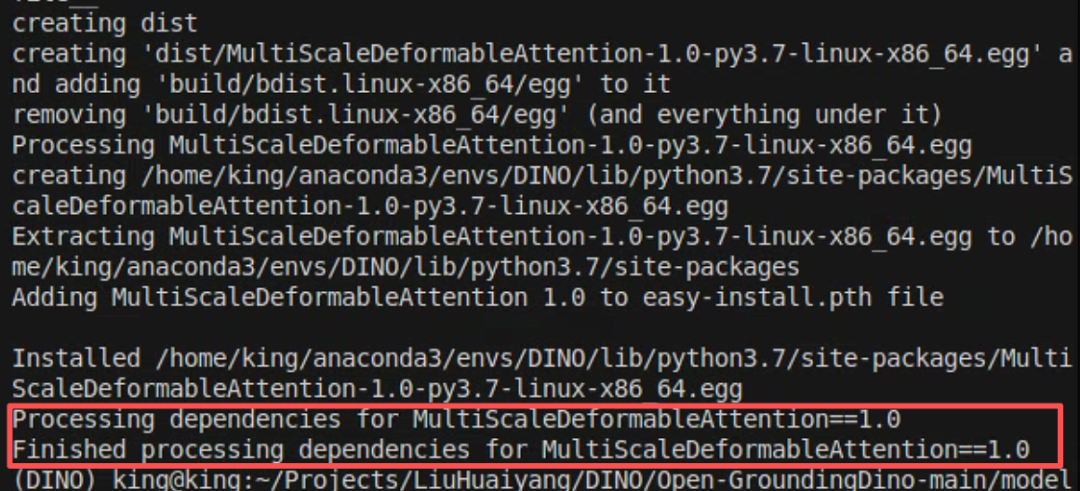
尤其需要注意的是,会碰上一个报错,无法找到下面的模块
MultiScaleDeformableAttention这里直接cd进入到文件夹
cd models/GroundingDINO/ops然后
python setup.py build install
这样我们就编译好了MultiScaleDeformableAttention
还需要注意的是timm库如果安装不上,直接指定版本
pip install timm==0.4.12 -i https://pypi.tuna.tsinghua.edu.cn/simple2.2 训练参数设置
第一,修改 train_dist.sh参数,将这两处分别改为下载好的预训练模型groundingdino_swint_ogc.pth和bert权重pytorch_model.bin的路径
python
PRETRAIN_MODEL_PATH=${PRETRAIN_MODEL_PATH:-"/path/to/groundingdino_swint_ogc.pth"}
TEXT_ENCODER_TYPE=${TEXT_ENCODER_TYPE:-"/path/to/bert-base-uncased"}
修改为
PRETRAIN_MODEL_PATH=${PRETRAIN_MODEL_PATH:-"weights/groundingdino_swint_ogc.pth"}
TEXT_ENCODER_TYPE=${TEXT_ENCODER_TYPE:-"weights/bert-base-uncased/pytorch_model.bin"}
2.2 开始训练
训练参数如下
bash train_dist.sh ${GPU_NUM} ${CFG} ${DATASETS} ${OUTPUT_DIR}我这使用两块v100显卡训练,训练命令如下
我这使用两块v100显卡训练,训练命令如下
sh train_dist.sh 2 ./config/cfg_odvg.py ./config/datasets_mixed_odvg.json ./training_output如果在训练的时候遇到了了下列的报错
RuntimeError: CUDA error: CUBLAS_STATUS_NOT_SUPPORTED when calling `cublasSgemmStridedBatched( handle, opa, opb, m, n, k, &alpha, a, lda, stridea, b, ldb, strideb, &beta, c, ldc, stridec, num_batches)`而你在尝试各种更换CUDA和Torch版本等手段无效后,请尝试下面的方法,在终端的命令行输入下调命令
unset LD_LIBRARY_PATH然后再输入训练指令
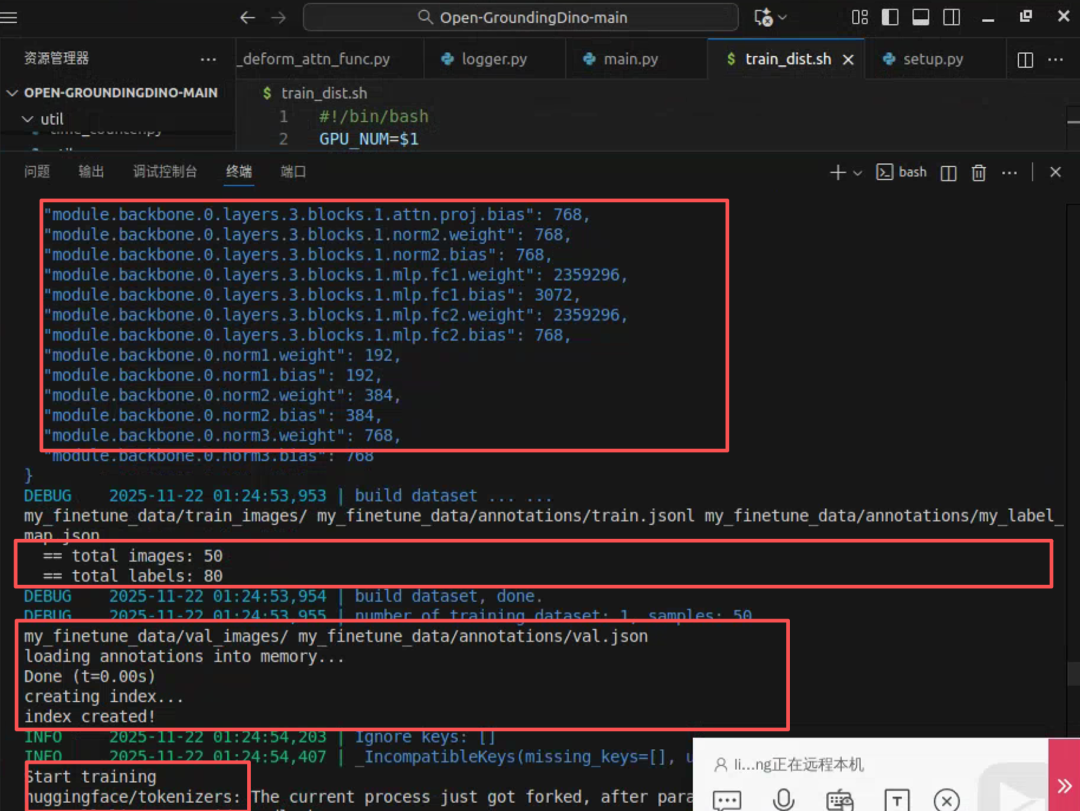
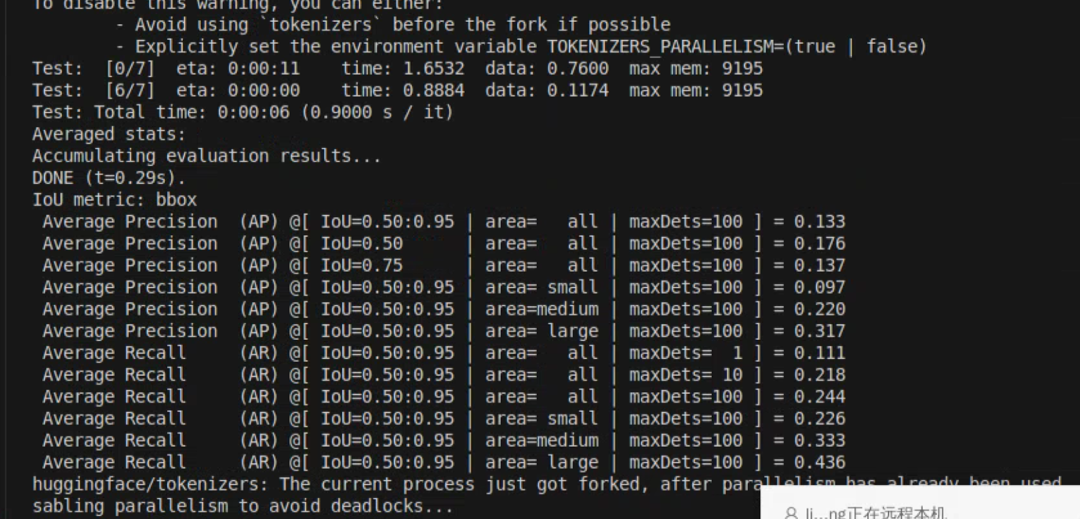
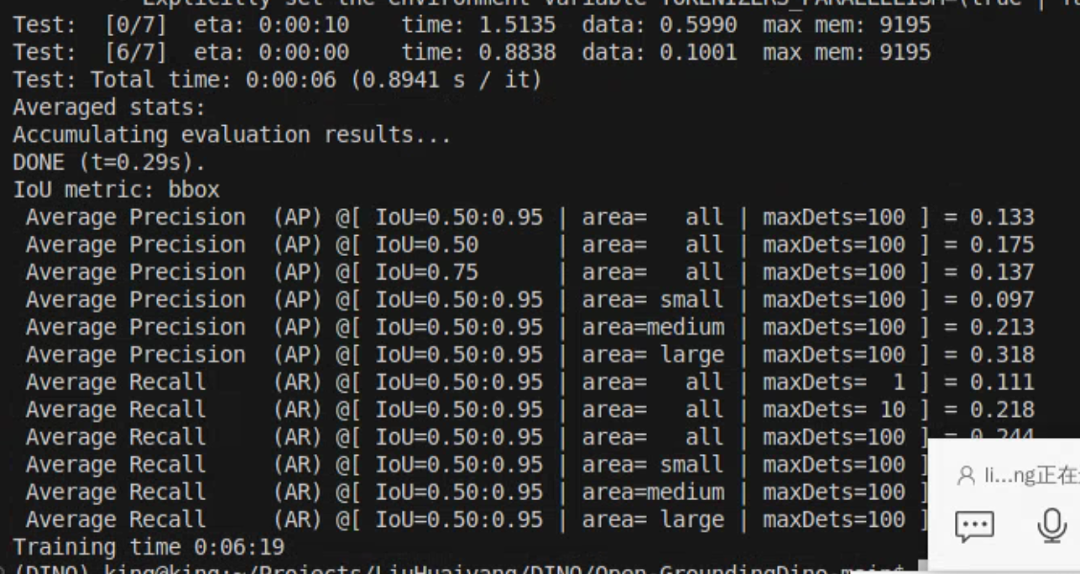
sh train_dist.sh 2 ./config/cfg_odvg.py ./config/datasets_mixed_odvg.json ./training_output训练这就能跑通了,监测分布式训练已经开始
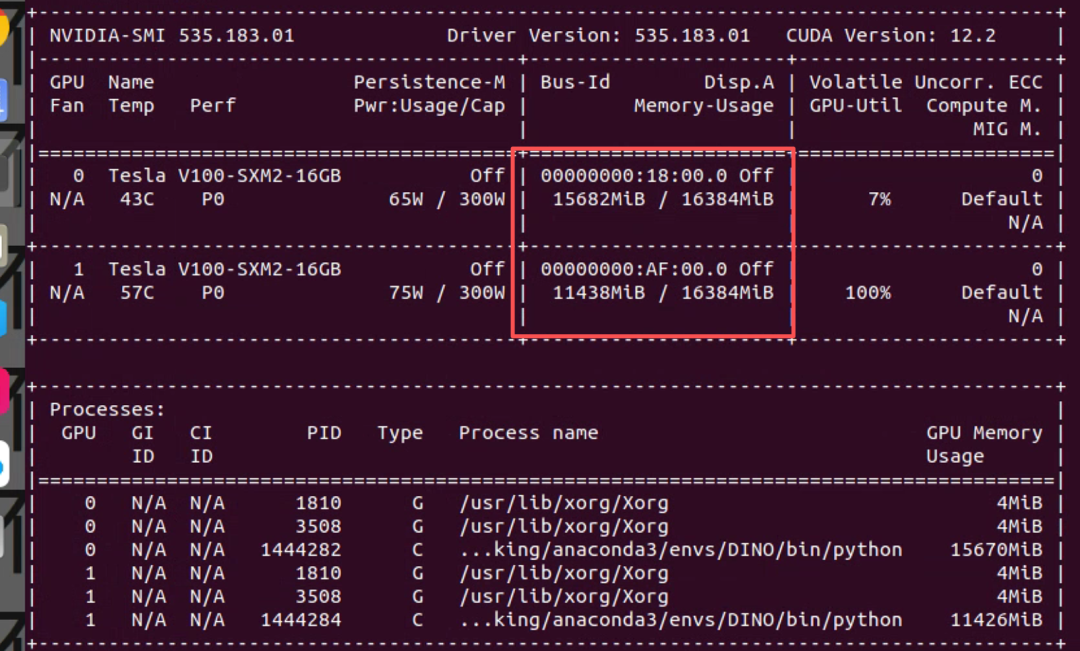
使用tiny_coco_dataset训练,两张显卡,训练完成需要6分钟
三、推理
Open-GroundingDINO中推理实际上是Grounding DINO官方的推理代码,需要安装GroundingDINO库,推理代码见
Open-GroundingDINO/tools/inference_on_a_image.py但是,推理代码需要安装groundingdino库,本次训练所用平台为cuda11.5,python版本为3.7,安装不上,只能再创建一个虚拟环境用于推理(内心OS,配环境太让人崩溃了,解决了的,请把完整的环境放到评论区)
推理所用的环境如下
python
addict                   2.4.0
certifi                  2025.11.12
charset-normalizer       3.4.4
contourpy                1.3.2
cycler                   0.12.1
defusedxml               0.7.1
filelock                 3.20.1
fonttools                4.61.1
fsspec                   2025.12.0
groundingdino            0.1.0
hf-xet                   1.2.0
huggingface-hub          0.36.0
idna                     3.11
Jinja2                   3.1.6
kiwisolver               1.4.9
MarkupSafe               3.0.3
matplotlib               3.10.8
mpmath                   1.3.0
networkx                 3.4.2
numpy                    2.2.6
nvidia-cublas-cu12       12.8.4.1
nvidia-cuda-cupti-cu12   12.8.90
nvidia-cuda-nvrtc-cu12   12.8.93
nvidia-cuda-runtime-cu12 12.8.90
nvidia-cudnn-cu12        9.10.2.21
nvidia-cufft-cu12        11.3.3.83
nvidia-cufile-cu12       1.13.1.3
nvidia-curand-cu12       10.3.9.90
nvidia-cusolver-cu12     11.7.3.90
nvidia-cusparse-cu12     12.5.8.93
nvidia-cusparselt-cu12   0.7.1
nvidia-nccl-cu12         2.27.5
nvidia-nvjitlink-cu12    12.8.93
nvidia-nvshmem-cu12      3.3.20
nvidia-nvtx-cu12         12.8.90
opencv-python            4.12.0.88
packaging                25.0
pillow                   12.0.0
pip                      25.3
platformdirs             4.5.1
pycocotools              2.0.11
pyparsing                3.3.1
python-dateutil          2.9.0.post0
PyYAML                   6.0.3
regex                    2025.11.3
requests                 2.32.5
safetensors              0.7.0
scipy                    1.15.3
setuptools               80.9.0
six                      1.17.0
supervision              0.27.0
sympy                    1.14.0
timm                     1.0.22
tokenizers               0.22.1
tomli                    2.3.0
torch                    2.9.1
torchvision              0.24.1
tqdm                     4.67.1
transformers             4.57.3
triton                   3.5.1
typing_extensions        4.15.0
urllib3                  2.6.2
wheel                    0.45.1
yapf                     0.43.0
groundingdino采用whl文件本地安装,wheel文件下载地址如下
https://huggingface.co/MonsterMMORPG/SECourses_Premium_Flash_Attention/blob/main/groundingdino-0.1.0-cp310-cp310-linux_x86_64.whl还有个人并不喜欢通过终端输入参数的方式来运行代码,所以我把
inference_on_a_image.py改成了如下方式
python
import os
import numpy as np
import torch
from PIL import Image, ImageDraw, ImageFont
# 设置环境变量以避免网络问题
os.environ['HF_ENDPOINT'] = 'https://hf-mirror.com'  # 使用国内镜像
# os.environ['TRANSFORMERS_OFFLINE'] = '1'  # 使用离线模式
# 如果github上的GroundingDINO没有正确安装,请确保安装正确
import groundingdino.datasets.transforms as T
from groundingdino.models import build_model
from groundingdino.util.slconfig import SLConfig
from groundingdino.util.utils import clean_state_dict, get_phrases_from_posmap
from groundingdino.util.vl_utils import create_positive_map_from_span
def plot_boxes_to_image(image_pil, tgt):
    H, W = tgt["size"]
    boxes = tgt["boxes"]
    labels = tgt["labels"]
    assert len(boxes) == len(labels), "boxes and labels must have same length"
    draw = ImageDraw.Draw(image_pil)
    mask = Image.new("L", image_pil.size, 0)
    mask_draw = ImageDraw.Draw(mask)
    # draw boxes and masks
    for box, label in zip(boxes, labels):
        # from 0..1 to 0..W, 0..H
        box = box * torch.Tensor([W, H, W, H])
        # from xywh to xyxy
        box[:2] -= box[2:] / 2
        box[2:] += box[:2]
        # random color
        color = tuple(np.random.randint(0, 255, size=3).tolist())
        # draw
        x0, y0, x1, y1 = box
        x0, y0, x1, y1 = int(x0), int(y0), int(x1), int(y1)
        draw.rectangle([x0, y0, x1, y1], outline=color, width=6)
        font = ImageFont.load_default()
        if hasattr(font, "getbbox"):
            bbox = draw.textbbox((x0, y0), str(label), font)
        else:
            w, h = draw.textsize(str(label), font)
            bbox = (x0, y0, w + x0, y0 + h)
        draw.rectangle(bbox, fill=color)
        draw.text((x0, y0), str(label), fill="white")
        mask_draw.rectangle([x0, y0, x1, y1], fill=255, width=6)
    return image_pil, mask
def load_image(image_path):
    # load image
    image_pil = Image.open(image_path).convert("RGB")  # load image
    transform = T.Compose(
        [
            T.RandomResize([800], max_size=1333),
            T.ToTensor(),
            T.Normalize([0.485, 0.456, 0.406], [0.229, 0.224, 0.225]),
        ]
    )
    image, _ = transform(image_pil, None)  # 3, h, w
    return image_pil, image
def load_model(model_config_path, model_checkpoint_path, cpu_only=False):
    args = SLConfig.fromfile(model_config_path)
    args.device = "cuda" if not cpu_only and torch.cuda.is_available() else "cpu"
    model = build_model(args)
    checkpoint = torch.load(model_checkpoint_path, map_location="cpu")
    load_res = model.load_state_dict(clean_state_dict(checkpoint["model"]), strict=False)
    print(f"模型加载状态: {load_res}")
    _ = model.eval()
    return model
def get_grounding_output(model, image, caption, box_threshold, text_threshold=None, with_logits=True, cpu_only=False, token_spans=None):
    assert text_threshold is not None or token_spans is not None, "text_threshold and token_spans should not be None at the same time!"
    caption = caption.lower()
    caption = caption.strip()
    if not caption.endswith("."):
        caption = caption + "."
    device = "cuda" if not cpu_only and torch.cuda.is_available() else "cpu"
    model = model.to(device)
    image = image.to(device)
    with torch.no_grad():
        outputs = model(image[None], captions=[caption])
    logits = outputs["pred_logits"].sigmoid()[0]  # (nq, 256)
    boxes = outputs["pred_boxes"][0]  # (nq, 4)
    # filter output
    if token_spans is None:
        logits_filt = logits.cpu().clone()
        boxes_filt = boxes.cpu().clone()
        filt_mask = logits_filt.max(dim=1)[0] > box_threshold
        logits_filt = logits_filt[filt_mask]  # num_filt, 256
        boxes_filt = boxes_filt[filt_mask]  # num_filt, 4
        # get phrase
        tokenlizer = model.tokenizer
        tokenized = tokenlizer(caption)
        # build pred
        pred_phrases = []
        for logit, box in zip(logits_filt, boxes_filt):
            pred_phrase = get_phrases_from_posmap(logit > text_threshold, tokenized, tokenlizer)
            if with_logits:
                pred_phrases.append(pred_phrase + f"({str(logit.max().item())[:4]})")
            else:
                pred_phrases.append(pred_phrase)
    else:
        # given-phrase mode
        positive_maps = create_positive_map_from_span(
            model.tokenizer(caption),  # 修正:使用 caption 而不是 text_prompt
            token_span=token_spans
        ).to(image.device)  # n_phrase, 256
        logits_for_phrases = positive_maps @ logits.T  # n_phrase, nq
        all_logits = []
        all_phrases = []
        all_boxes = []
        for (token_span, logit_phr) in zip(token_spans, logits_for_phrases):
            # get phrase
            phrase = ' '.join([caption[_s:_e] for (_s, _e) in token_span])
            # get mask
            filt_mask = logit_phr > box_threshold
            # filt box
            all_boxes.append(boxes[filt_mask])
            # filt logits
            all_logits.append(logit_phr[filt_mask])
            if with_logits:
                logit_phr_num = logit_phr[filt_mask]
                all_phrases.extend([phrase + f"({str(logit.item())[:4]})" for logit in logit_phr_num])
            else:
                all_phrases.extend([phrase for _ in range(len(filt_mask))])
        boxes_filt = torch.cat(all_boxes, dim=0).cpu()
        pred_phrases = all_phrases
    return boxes_filt, pred_phrases
def main():
    # ============ 在这里设置你的参数 ============

    # 配置文件路径
    config_file = "tools/GroundingDINO_SwinT_OGC.py"

    # 模型权重路径 (预训练模型or自己训练的)
    checkpoint_path = "weights/groundingdino_swint_ogc.pth"

    # 输入图片路径
    image_path = "coco128/images/train2017/000000000650.jpg"

    # 文本提示词 (多个类别用 . 分隔)
    text_prompt = "cat . dog . tree"

    # 输出目录
    output_dir = "inference_output"

    # 检测阈值 (可选,默认0.3)
    box_threshold = 0.3

    # 文本阈值 (可选,默认0.25)
    text_threshold = 0.25

    # 是否只使用CPU (可选,默认False)
    cpu_only = False

    # token spans (可选,默认None)
    token_spans = None
    # 如果需要使用token_spans,可以这样设置:
    # token_spans = [[[2, 5]], ]  # 检测"cat",如果文本是"a cat and a dog"

    # ============ 参数设置结束 ============

    print("开始运行 Grounding DINO 检测...")
    print(f"配置文件: {config_file}")
    print(f"模型权重: {checkpoint_path}")
    print(f"输入图片: {image_path}")
    print(f"文本提示: {text_prompt}")
    print(f"输出目录: {output_dir}")

    # 检查文件是否存在
    if not os.path.exists(config_file):
        print(f"错误: 配置文件不存在: {config_file}")
        print("请先下载 GroundingDINO_SwinT_OGC.py 文件")
        return

    if not os.path.exists(checkpoint_path):
        print(f"错误: 模型权重文件不存在: {checkpoint_path}")
        print("请先下载 groundingdino_swint_ogc.pth 文件")
        return

    if not os.path.exists(image_path):
        print(f"错误: 图片文件不存在: {image_path}")
        return

    # 创建输出目录
    os.makedirs(output_dir, exist_ok=True)

    # 加载图片
    print("加载图片...")
    image_pil, image = load_image(image_path)

    # 加载模型
    print("加载模型...")
    model = load_model(config_file, checkpoint_path, cpu_only=cpu_only)

    # 保存原始图片
    raw_image_path = os.path.join(output_dir, "raw_image.jpg")
    image_pil.save(raw_image_path)
    print(f"原始图片已保存到: {raw_image_path}")

    # 如果设置了token_spans,则将text_threshold设为None
    if token_spans is not None:
        text_threshold_for_run = None
        print("使用 token_spans 模式,text_threshold 设为 None")
    else:
        text_threshold_for_run = text_threshold

    # 运行模型
    print("运行检测...")
    boxes_filt, pred_phrases = get_grounding_output(
        model, image, text_prompt, box_threshold, text_threshold_for_run,
        cpu_only=cpu_only, token_spans=token_spans
    )

    # 可视化预测结果
    size = image_pil.size
    pred_dict = {
        "boxes": boxes_filt,
        "size": [size[1], size[0]],  # H,W
        "labels": pred_phrases,
    }

    # 绘制检测框
    print("绘制检测结果...")
    image_with_box = plot_boxes_to_image(image_pil.copy(), pred_dict)[0]

    # 保存结果
    save_path = os.path.join(output_dir, "pred.jpg")
    image_with_box.save(save_path)

    # 打印检测到的对象
    print("\n检测到的对象:")
    if len(boxes_filt) == 0:
        print("未检测到任何对象")
    else:
        for i, (box, label) in enumerate(zip(boxes_filt, pred_phrases)):
            print(f"{i+1}. {label}: 位置 {box.tolist()}")

    print(f"\n======================\n结果图片已保存到: {save_path}")
    print("程序运行成功!")
if __name__ == "__main__":
    main()
但是又遇到如下报错
python
/home/king/anaconda3/envs/DinoInfer/lib/python3.10/site-packages/timm/models/layers/__init__.py:48: FutureWarning: Importing from timm.models.layers is deprecated, please import via timm.layers
  warnings.warn(f"Importing from {__name__} is deprecated, please import via timm.layers", FutureWarning)
/home/king/anaconda3/envs/DinoInfer/lib/python3.10/site-packages/groundingdino/models/GroundingDINO/ms_deform_attn.py:31: UserWarning: Failed to load custom C++ ops. Running on CPU mode Only!
  warnings.warn("Failed to load custom C++ ops. Running on CPU mode Only!")
开始运行 Grounding DINO 检测...
配置文件: tools/GroundingDINO_SwinT_OGC.py
模型权重: weights/groundingdino_swint_ogc.pth
输入图片: coco128/images/train2017/000000000650.jpg
文本提示: cat . dog . tree
输出目录: inference_output
加载图片...
加载模型...
final text_encoder_type: bert-base-uncased
模型加载状态: _IncompatibleKeys(missing_keys=[], unexpected_keys=['label_enc.weight', 'bert.embeddings.position_ids'])
原始图片已保存到: inference_output/raw_image.jpg
运行检测...
/home/king/anaconda3/envs/DinoInfer/lib/python3.10/site-packages/torch/utils/checkpoint.py:85: UserWarning: None of the inputs have requires_grad=True. Gradients will be None
  warnings.warn(
Traceback (most recent call last):
  File "/home/king/Projects/LiuHuaiyang/DINO/Open-GroundingDino-main/tools/inference_on_a_image.py", line 262, in <module>
    main()
  File "/home/king/Projects/LiuHuaiyang/DINO/Open-GroundingDino-main/tools/inference_on_a_image.py", line 228, in main
    boxes_filt, pred_phrases = get_grounding_output(
  File "/home/king/Projects/LiuHuaiyang/DINO/Open-GroundingDino-main/tools/inference_on_a_image.py", line 93, in get_grounding_output
    outputs = model(image[None], captions=[caption])
  File "/home/king/anaconda3/envs/DinoInfer/lib/python3.10/site-packages/torch/nn/modules/module.py", line 1775, in _wrapped_call_impl
    return self._call_impl(*args, **kwargs)
  File "/home/king/anaconda3/envs/DinoInfer/lib/python3.10/site-packages/torch/nn/modules/module.py", line 1786, in _call_impl
    return forward_call(*args, **kwargs)
  File "/home/king/anaconda3/envs/DinoInfer/lib/python3.10/site-packages/groundingdino/models/GroundingDINO/groundingdino.py", line 327, in forward
    hs, reference, hs_enc, ref_enc, init_box_proposal = self.transformer(
  File "/home/king/anaconda3/envs/DinoInfer/lib/python3.10/site-packages/torch/nn/modules/module.py", line 1775, in _wrapped_call_impl
    return self._call_impl(*args, **kwargs)
  File "/home/king/anaconda3/envs/DinoInfer/lib/python3.10/site-packages/torch/nn/modules/module.py", line 1786, in _call_impl
    return forward_call(*args, **kwargs)
  File "/home/king/anaconda3/envs/DinoInfer/lib/python3.10/site-packages/groundingdino/models/GroundingDINO/transformer.py", line 258, in forward
    memory, memory_text = self.encoder(
  File "/home/king/anaconda3/envs/DinoInfer/lib/python3.10/site-packages/torch/nn/modules/module.py", line 1775, in _wrapped_call_impl
    return self._call_impl(*args, **kwargs)
  File "/home/king/anaconda3/envs/DinoInfer/lib/python3.10/site-packages/torch/nn/modules/module.py", line 1786, in _call_impl
    return forward_call(*args, **kwargs)
  File "/home/king/anaconda3/envs/DinoInfer/lib/python3.10/site-packages/groundingdino/models/GroundingDINO/transformer.py", line 578, in forward
    output = checkpoint.checkpoint(
  File "/home/king/anaconda3/envs/DinoInfer/lib/python3.10/site-packages/torch/_compile.py", line 53, in inner
    return disable_fn(*args, **kwargs)
  File "/home/king/anaconda3/envs/DinoInfer/lib/python3.10/site-packages/torch/_dynamo/eval_frame.py", line 1044, in _fn
    return fn(*args, **kwargs)
  File "/home/king/anaconda3/envs/DinoInfer/lib/python3.10/site-packages/torch/utils/checkpoint.py", line 496, in checkpoint
    return CheckpointFunction.apply(function, preserve, *args)
  File "/home/king/anaconda3/envs/DinoInfer/lib/python3.10/site-packages/torch/autograd/function.py", line 581, in apply
    return super().apply(*args, **kwargs)  # type: ignore[misc]
  File "/home/king/anaconda3/envs/DinoInfer/lib/python3.10/site-packages/torch/utils/checkpoint.py", line 262, in forward
    outputs = run_function(*args)
  File "/home/king/anaconda3/envs/DinoInfer/lib/python3.10/site-packages/torch/nn/modules/module.py", line 1775, in _wrapped_call_impl
    return self._call_impl(*args, **kwargs)
  File "/home/king/anaconda3/envs/DinoInfer/lib/python3.10/site-packages/torch/nn/modules/module.py", line 1786, in _call_impl
    return forward_call(*args, **kwargs)
  File "/home/king/anaconda3/envs/DinoInfer/lib/python3.10/site-packages/groundingdino/models/GroundingDINO/transformer.py", line 788, in forward
    src2 = self.self_attn(
  File "/home/king/anaconda3/envs/DinoInfer/lib/python3.10/site-packages/torch/nn/modules/module.py", line 1775, in _wrapped_call_impl
    return self._call_impl(*args, **kwargs)
  File "/home/king/anaconda3/envs/DinoInfer/lib/python3.10/site-packages/torch/nn/modules/module.py", line 1786, in _call_impl
    return forward_call(*args, **kwargs)
  File "/home/king/anaconda3/envs/DinoInfer/lib/python3.10/site-packages/groundingdino/models/GroundingDINO/ms_deform_attn.py", line 338, in forward
    output = MultiScaleDeformableAttnFunction.apply(
  File "/home/king/anaconda3/envs/DinoInfer/lib/python3.10/site-packages/torch/autograd/function.py", line 581, in apply
    return super().apply(*args, **kwargs)  # type: ignore[misc]
  File "/home/king/anaconda3/envs/DinoInfer/lib/python3.10/site-packages/groundingdino/models/GroundingDINO/ms_deform_attn.py", line 53, in forward
    output = _C.ms_deform_attn_forward(
NameError: name '_C' is not defined
重点报错
python
 File "/home/king/anaconda3/envs/DinoInfer/lib/python3.10/site-packages/groundingdino/models/GroundingDINO/ms_deform_attn.py", line 53, in forward
    output = _C.ms_deform_attn_forward(
NameError: name '_C' is not defined
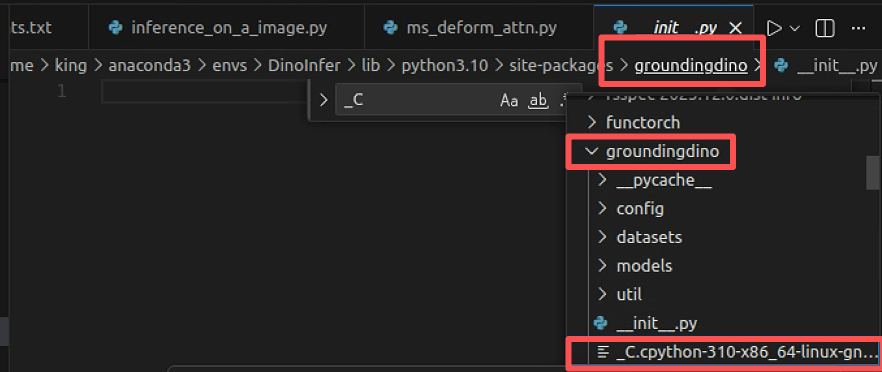
按图索骥到
/home/king/anaconda3/envs/DinoInfer/lib/python3.10/site-packages/groundingdino/models/GroundingDINO/ms_deform_attn.py这里面有部分代码是这样的
python
try:
    from groundingdino import _C
except:
    warnings.warn("Failed to load custom C++ ops. Running on CPU mode Only!")
显然是groundingdino没有编译清楚,在找到groundingdino的文件夹重新编译即可,或者按照官方的环境一步步配置