大家好,我是Edison。
最近我一直在跟着圣杰的《.NET+AI智能体开发进阶》课程学习MAF的开发技巧,我强烈推荐你也上车跟我一起出发!
上一篇,我们学习了MAF中如何进行循环(loop)路由。本篇,我们来了解下在MAF中如何并行执行(fan-out/fan-in)的工作流。
1 并行执行模式
在实际业务场景中,往往需要在工作流中让多个Agent同时运行再通过聚合结果做做一些数据分析或决策呈现,这时就需要并行执行机制。
在MAF中,我们可以使用 Fan-Out/Fan-In 模式来实现这个目的,如下代码片段所示:
var workflow = new WorkflowBuilder(startExecutor)
    .AddFanOutEdge(startExecutor, [amazonExecutor, ebayExecutor, shopeeExecutor])
    .AddFanInEdge([amazonExecutor, ebayExecutor, shopeeExecutor], strategyExecutor)
    .WithOutputFrom(strategyExecutor)
    .Build();
可以看到,我们通过MAF的 AddFanOutEdge 和 AddFanInEdge 来实现了并行执行的目的,最后通过一个自定义的执行器来做聚合。
核心概念补充:
- Fan-Out Edge => 并发执行边
- Fan-In Edge => 汇聚边
2 并行工作流实验案例
假设我们是一个跨境电商团队,想要实时监控同一个商品在多个电商平台(如亚马逊、eBay、Shopee等)的定价策略,在检测到竞争对手降价时快速做出响应决策。
因此,我们的目标是:配置一个 Fan-Out + Fan-In 工作流,实现一次查询、并行抓取、智能决策的企业级模式。
2.1 关键依赖包引入
在今天的这个案例中,我们仍然创建了一个.NET控制台应用程序,安装了以下NuGet包:
- Microsoft.Agents.AI.OpenAI
- Microsoft.Agents.AI.Workflows
- Microsoft.Extensions.AI.OpenAI
2.2 定义数据传输模型
首先,我们定义一下在这个工作流中需要生成传递的数据模型:
PriceQueryDto :价格查询模型DTO
internal class PriceQueryDto
{
    public string ProductId { get; private set; }
    public string ProductName { get; private set; }
    public string TargetRegion { get; private set; }
    public PriceQueryDto(string productId, string productName, string targetRegion)
    {
        ProductId = productId;
        ProductName = productName;
        TargetRegion = targetRegion;
    }
}
2.3 定义Agents&Executors
**(1)价格查询:**封装各大电商平台的价格查询逻辑,模拟其API响应,仅仅做演示用无实际逻辑:
internal sealed class PlatformPriceExecutor : Executor<ChatMessage>
{
    private readonly string _instructions;
    private readonly IChatClient _chatClient;

    public PlatformPriceExecutor(string id, IChatClient chatClient, string platformInstructions)
        : base(id)
    {
        _chatClient = chatClient;
        _instructions = platformInstructions;
    }

    public override async ValueTask HandleAsync(ChatMessage message, IWorkflowContext context, CancellationToken cancellationToken = default)
    {
        var messages = new List<ChatMessage>
        {
            new(ChatRole.System, _instructions),
            message
        };

        var response = await _chatClient.GetResponseAsync(messages, cancellationToken: cancellationToken);
        var replyMessage = new ChatMessage(ChatRole.Assistant, response.Text ?? string.Empty)
        {
            AuthorName = this.Id
        };

        await context.SendMessageAsync(replyMessage, cancellationToken: cancellationToken);
        Console.WriteLine($"✅ {this.Id} 完成查询");
    }
}
(2)广播查询请求执行器: 负责广播价格查询请求到各大电商平台并发放TurnToken。
NOTE:只有发放了TurnToken才能真正开启执行后续LLM节点!
internal sealed class PriceQueryStartExecutor() : Executor<PriceQueryDto>(nameof(PriceQueryStartExecutor))
{
    public override async ValueTask HandleAsync(PriceQueryDto query, IWorkflowContext context, CancellationToken cancellationToken = default)
    {
        var userPrompt = $@"商品ID: {query.ProductId}
商品名称: {query.ProductName}
目标区域: {query.TargetRegion}

请查询该商品在你的平台上的当前价格、库存状态和配送信息。";
        await context.SendMessageAsync(new ChatMessage(ChatRole.User, userPrompt), cancellationToken: cancellationToken);
        await context.SendMessageAsync(new TurnToken(emitEvents: true), cancellationToken: cancellationToken);

        Console.WriteLine("📡 Fan-out 价格查询广播已发送");
    }
}
(3)定价聚合: 模拟收集到所有平台的定价之后执行的数据聚合操作。
internal sealed class PricingStrategyExecutor : Executor<ChatMessage>
{
    private readonly List<ChatMessage> _messages = [];
    private readonly int _targetCount;

    public PricingStrategyExecutor(int targetCount) : base(nameof(PricingStrategyExecutor))
    {
        _targetCount = targetCount;
    }

    public override async ValueTask HandleAsync(ChatMessage message, IWorkflowContext context, CancellationToken cancellationToken = default)
    {
        this._messages.Add(message);
        Console.WriteLine($"📊 已收集 {_messages.Count}/{_targetCount} 个平台数据 - 来自 {message.AuthorName}");

        if (this._messages.Count == this._targetCount)
        {
            var platformData = string.Join("\n", this._messages.Select(m => $"• {m.AuthorName}: {m.Text}"));
            var strategyReport = $@"━━━━━━━━━━━━━━━━━━━━━━━━━━━━━━━━
📊 多平台价格汇总(共 {this._messages.Count} 个平台)
━━━━━━━━━━━━━━━━━━━━━━━━━━━━━━━━

{platformData}

━━━━━━━━━━━━━━━━━━━━━━━━━━━━━━━━
💡 智能定价建议
━━━━━━━━━━━━━━━━━━━━━━━━━━━━━━━━
基于以上数据,建议分析竞争对手价格区间,制定差异化定价策略。
考虑因素:库存压力、配送成本、平台佣金率、目标利润率。";

            await context.YieldOutputAsync(strategyReport, cancellationToken);

            Console.WriteLine("✨ Fan-in 定价策略生成完成");
        }
    }
}
2.4 构建工作流
现在万事俱备,只欠一个Workflow,现在Let's do it!
Step1: 获取ChatClient
var chatClient = new OpenAIClient(
        new ApiKeyCredential(openAIProvider.ApiKey),
        new OpenAIClientOptions { Endpoint = new Uri(openAIProvider.Endpoint) })
    .GetChatClient(openAIProvider.ModelId)
    .AsIChatClient();
Step2: 实例化自定义Agent & Executors
var amazonExecutor = new PlatformPriceExecutor(
    "AmazonPriceAgent",
    chatClient,
    "你是Amazon平台价格查询Agent。返回格式:价格=$XXX,库存状态=充足/紧张,配送说明=Prime会员免运费/标准配送。"
);
var ebayExecutor = new PlatformPriceExecutor(
    "eBayPriceAgent",
    chatClient,
    "你是eBay平台价格查询Agent。返回格式:价格=$XXX,商品状态=全新/二手XX新,运费说明=包邮/买家承担。"
);
var shopeeExecutor = new PlatformPriceExecutor(
    "ShopeePriceAgent",
    chatClient,
    "你是Shopee平台价格查询Agent。返回格式:价格=$XXX(含税),区域=东南亚/台湾,促销信息=满减活动/无。"
);
var startExecutor = new PriceQueryStartExecutor();
var strategyExecutor = new PricingStrategyExecutor(3);
Step3: 创建并行执行工作流
var workflow = new WorkflowBuilder(startExecutor)
        .AddFanOutEdge(startExecutor, [amazonExecutor, ebayExecutor, shopeeExecutor])
        .AddFanInEdge([amazonExecutor, ebayExecutor, shopeeExecutor], strategyExecutor)
        .WithOutputFrom(strategyExecutor)
        .Build();
Console.OutputEncoding = Encoding.UTF8;
Console.WriteLine("✅ Loop Workflow 构建完成");
2.5 测试工作流
定义查询的商品是IPhone15:
var priceQuery = new PriceQueryDto(
    productId: "IPHONE15-PRO-256",
    productName: "iPhone 15 Pro 256GB",
    targetRegion: "US"
);
通过Streaming流式执行:
await using (var run = await InProcessExecution.StreamAsync(workflow, priceQuery))
{
    await foreach (var evt in run.WatchStreamAsync())
    {
        switch (evt)
        {
            case ExecutorInvokedEvent started:
                Console.WriteLine($"🚀 {started.ExecutorId} 开始运行");
                break;
            case ExecutorCompletedEvent completed:
                Console.WriteLine($"✅ {completed.ExecutorId} 结束运行");
                break;
            case WorkflowOutputEvent outputEvent:
                Console.WriteLine("🎉 Fan-in 汇总输出:");
                Console.WriteLine($"{outputEvent.Data}");
                break;
            case WorkflowErrorEvent errorEvent:
                Console.WriteLine("✨ 收到 Workflow Error Event:");
                Console.WriteLine($"{errorEvent.Data}");
                break;
        }
    }
}
测试结果如下图所示:
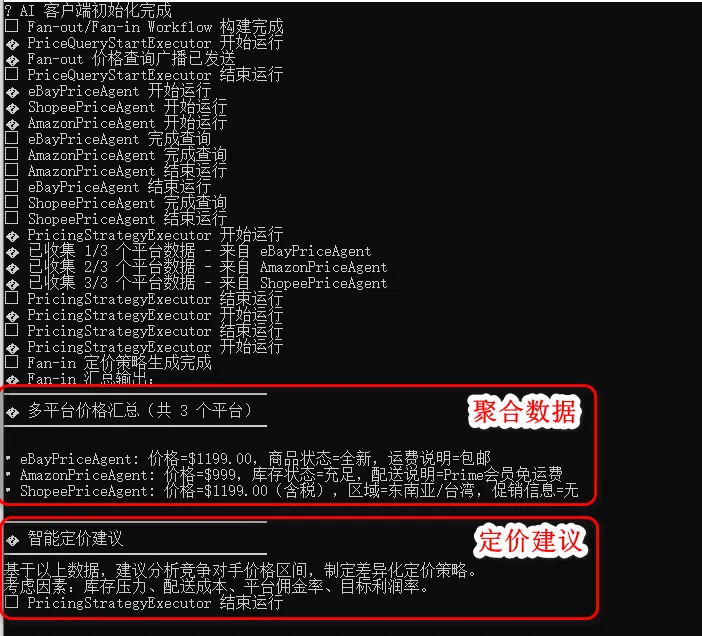
可以看见,经过并行执行价格查询后,由聚合执行器进行了价格汇总并发送给LLM进行了最终的定价建议。
3 小结
本文介绍了MAF中并行工作流以及如何实现"Fan-Out/Fan-In"的工作模式,最后通过一个跨境电商价格查询智能定价的案例介绍了这种模式的代码实现。
下一篇,我们将继续学习MAF中工作流的多选路由工作流。
示例源码
GitHub: https://github.com/EdisonTalk/MAFD
参考资料
圣杰,《.NET + AI 智能体开发进阶》(推荐指数:★★★★★)
Microsoft Learn,《Agent Framework Tutorials》

作者:爱迪生
出处:https://edisontalk.cnblogs.com
本文版权归作者和博客园共有,欢迎转载,但未经作者同意必须保留此段声明,且在文章页面明显位置给出原文链接。